





Ask Bruce why your food cost moved
Ask about your live data in plain English. Bruce answers with charts, tables and links to the records, and exports to PDF or Excel.
On every page
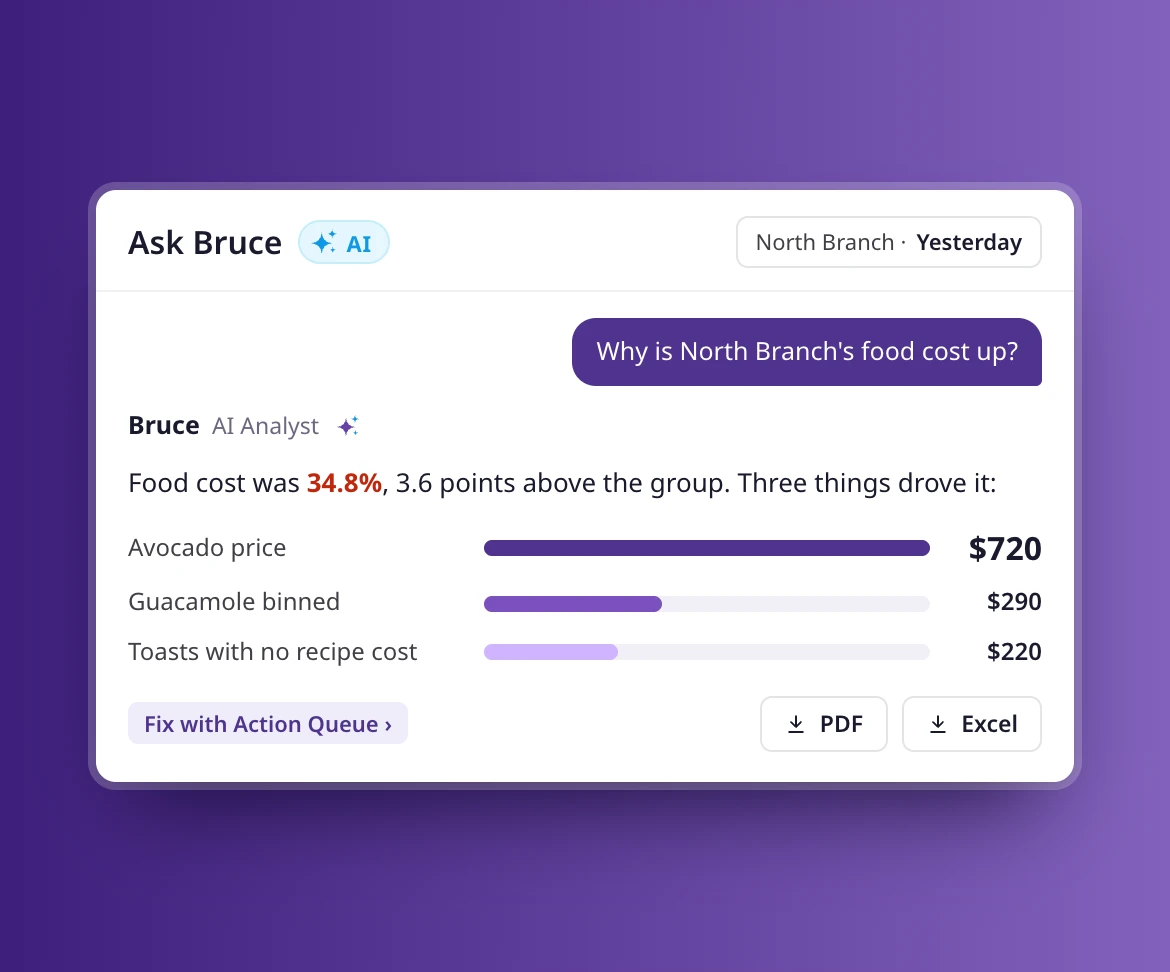
The Ask Bruce button sits at the top of every page and knows what you’re looking at.
Answers with charts
Explanations, charts, tables and summary figures, built from your own data.
Keep and share
Save threads, export answers to PDF or Excel, and pick up where you left off.
Ask anything
Four kinds of question, one box
Bruce suggests questions to start with, grouped as Analyse, What if, Trend and Look up. Or type your own: why food cost moved, what a price change would do, how a supplier’s prices have trended, or which branch wasted the most.
- Analyse: what is driving my variance?
- What if: a 10% price rise on my best seller
- Trend: chicken thigh cost over 12 weeks
- Look up: which branch wasted the most?
Context
Bruce knows the page you’re on
Open Bruce from a variance report and it starts with that report. Open it from a branch in the Portfolio view or an alert in the Action Queue and it starts there. Clear the context to ask about anything else.
- Opens beside any page, docked or full screen
- Starts with the report, branch or alert in front of you
- Suggested questions for that page
Variance, explained
Answers you can check, down to the cause
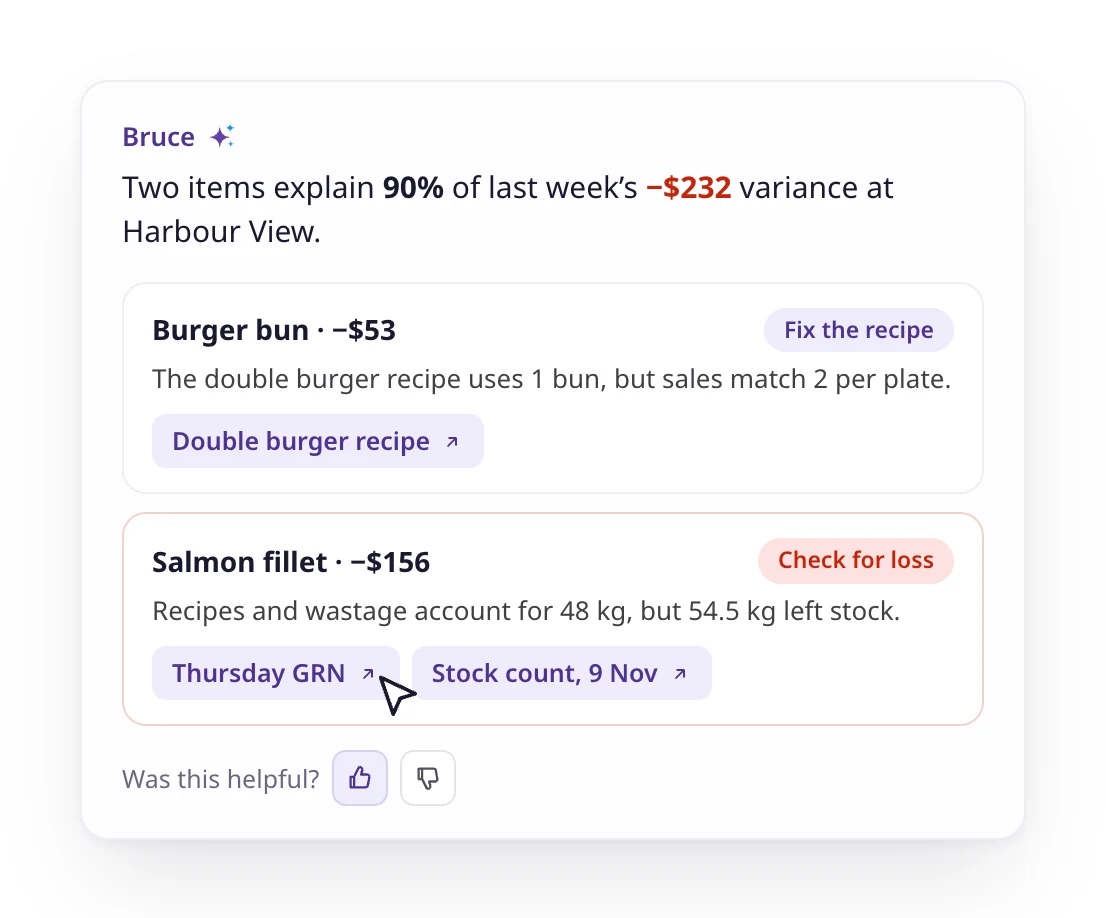
Ask what is driving your variance and Bruce separates the two kinds of gap. A data issue, such as a recipe that needs fixing, gets the fix. A real loss, such as stock going missing, gets a place to look. Every answer links to the records behind it.
- Recipe errors told apart from real losses
- Links to the recipe, GRN or count behind each figure
- Suggested follow-up questions
- Thumbs up or down on every answer
Save and share
Save it, export it, take it to the meeting
Star the threads you’ll come back to and rename them. Export any answer as a PDF or an Excel file, leaving out the parts you don’t need.
- Saved and recent threads
- PDF and Excel export
- Share a link with a colleague who has access
Ask anything
Four kinds of question, one box
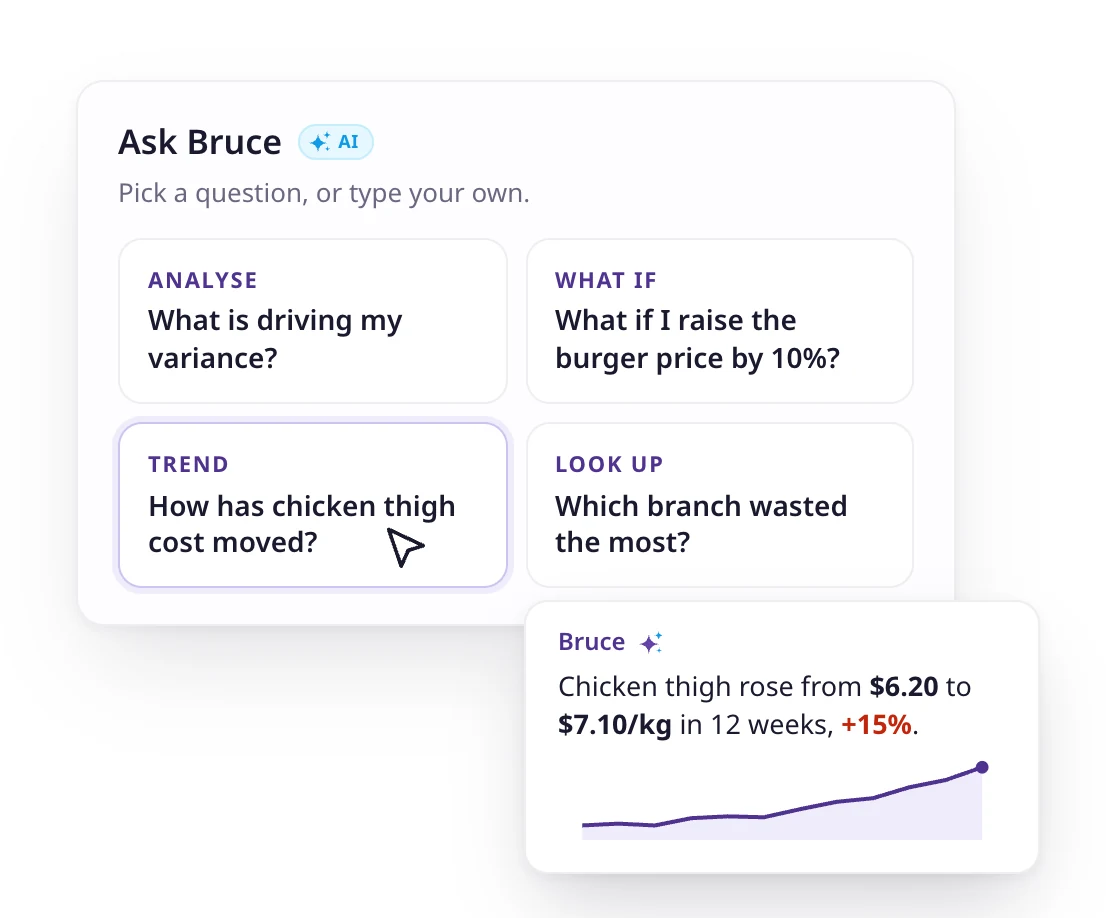
Bruce suggests questions to start with, grouped as Analyse, What if, Trend and Look up. Or type your own: why food cost moved, what a price change would do, how a supplier’s prices have trended, or which branch wasted the most.
- Analyse: what is driving my variance?
- What if: a 10% price rise on my best seller
- Trend: chicken thigh cost over 12 weeks
- Look up: which branch wasted the most?
Context
Bruce knows the page you’re on
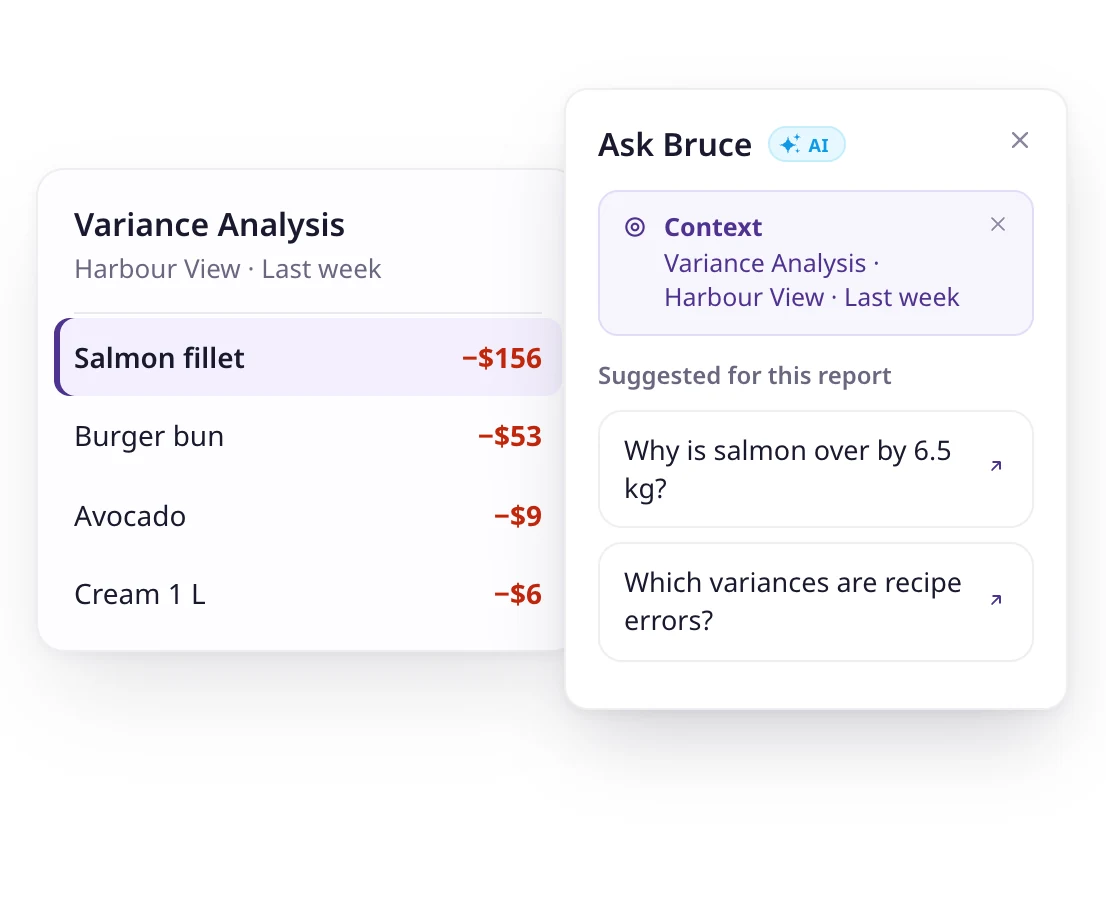
Open Bruce from a variance report and it starts with that report. Open it from a branch in the Portfolio view or an alert in the Action Queue and it starts there. Clear the context to ask about anything else.
- Opens beside any page, docked or full screen
- Starts with the report, branch or alert in front of you
- Suggested questions for that page
Variance, explained
Answers you can check, down to the cause
Ask what is driving your variance and Bruce separates the two kinds of gap. A data issue, such as a recipe that needs fixing, gets the fix. A real loss, such as stock going missing, gets a place to look. Every answer links to the records behind it.
- Recipe errors told apart from real losses
- Links to the recipe, GRN or count behind each figure
- Suggested follow-up questions
- Thumbs up or down on every answer
Save and share
Save it, export it, take it to the meeting
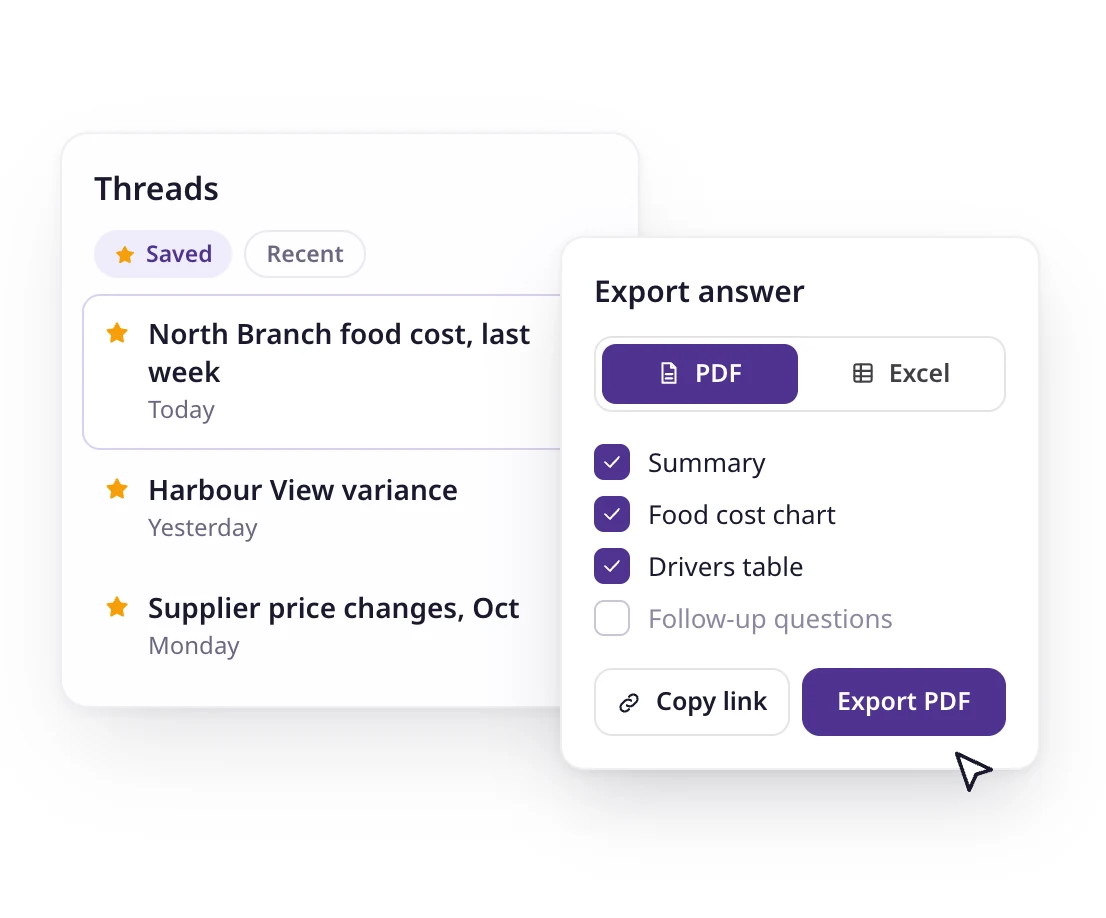
Star the threads you’ll come back to and rename them. Export any answer as a PDF or an Excel file, leaving out the parts you don’t need.
- Saved and recent threads
- PDF and Excel export
- Share a link with a colleague who has access

75+ integrations and counting
Connect Supy with all your favourite tools

Why our customers love us














Why our customers love us














Our operational insights

Our operational insights


Ready to transform your operations?
Join 5,000+ restaurant operators cutting costs, streamlining operations and making smarter decisions with Supy.
Your questions answered
Everything you need to know about Supy — from setup to integrations, pricing, and daily use. If it’s not covered here, just ask.
Anything about your Supy data: sales, food cost, variance, wastage, purchases, supplier prices, stock and recipes. Ask why a number moved, what a change would do, how something has trended, or look up a single figure.
From your live Supy data, for the branches you are allowed to see. Bruce shows its working with charts and tables and links to the records behind each figure.
No. Bruce reads your data and answers questions. It never creates or changes a record.
If you use Supy, it’s already in the web app: click Ask Bruce at the top of any page. Every user can ask, and Bruce answers for the branches they can see. New to Supy? Book a demo to see it on sample data.
Bruce lives inside Supy. The Supy MCP lets you ask the same kind of question from Claude, ChatGPT or another AI tool you already use, next to your own files.
Intelligence is just the start
Supy also runs procurement, inventory and Supy Ops for multi-branch restaurant groups, on the same login.
Supy Ops is checklist software for restaurant groups. Build each checklist once and it runs on schedule at every branch: staff complete it on their phones, a failed step triggers a fix, and nothing is finished until a manager signs off.
Supy connects to the tools you already use, and opens your data to whatever you build next.
Make every stock count quicker, every variance easier to explain with AI, and every site more accountable. All your inventory tools in one place.
AI-enabled requisitions, purchase orders and approval workflows, on mobile or portal. Built for complex operations and large estates.