.jpeg)

Intégration fournisseurs pour groupes multi-sites : connecter les commandes à votre ERP sans ressaisie
Ce que signifie vraiment l’intégration fournisseurs pour un groupe multi-sites
Lorsqu’un groupe de restauration gère quatre sites, les tableurs et les bons de commande envoyés par e-mail semblent gérables. À quarante sites, ils cessent d’être une gêne et deviennent le fonctionnement lui-même. Les commandes partent par e-mail et SMS sans historique commun, les quantités sont saisies avec des erreurs à la réception, et en fin de période, une équipe finance ressaisit manuellement des jours de données depuis Excel vers le logiciel comptable. Le plus surprenant : même les très grands groupes gèrent encore leurs achats amont sur des tableurs — non pas par choix, mais parce que leurs outils ne permettent pas de faire circuler les données de façon fiable entre le système de commande, les fournisseurs et la comptabilité.
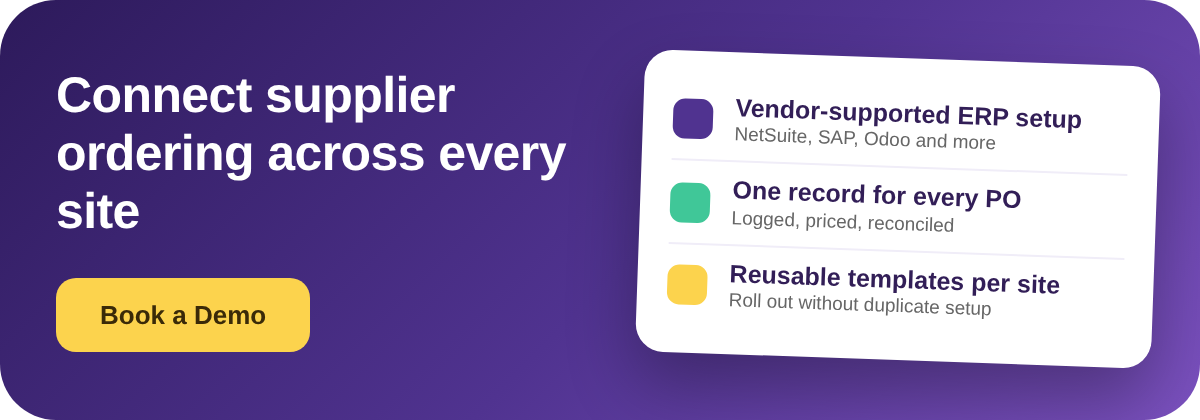
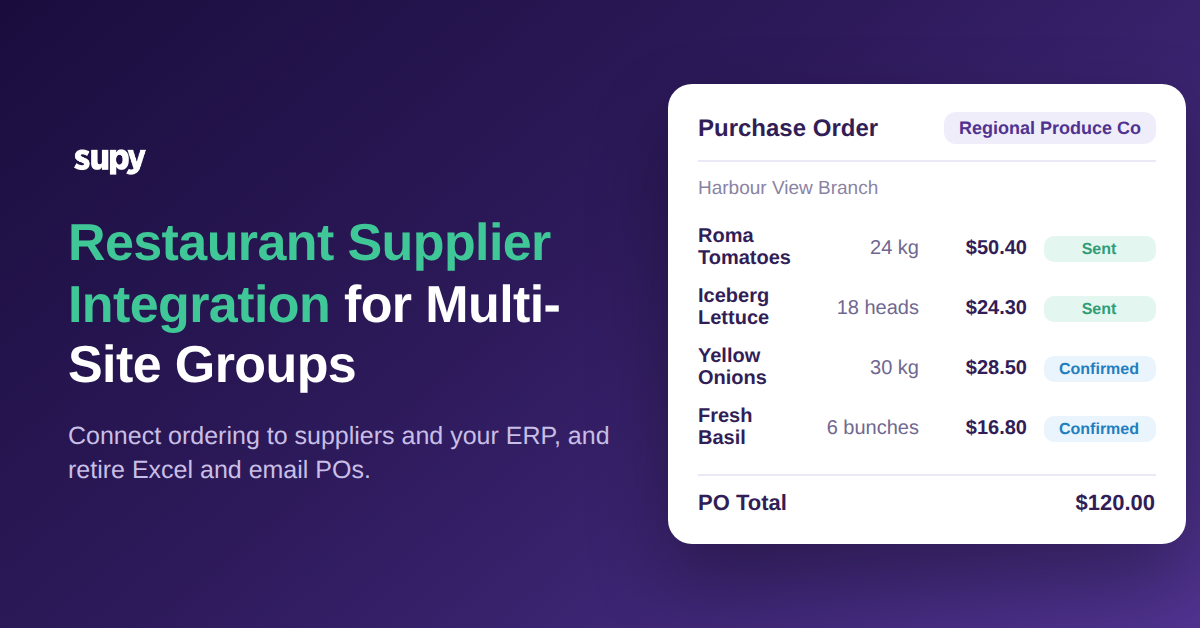
L’intégration fournisseurs pour les groupes multi-sites désigne l’ensemble des connexions qui comblent cet écart. Mais le terme est utilisé loosement, et la plupart des guides le traitent comme un simple connecteur à activer. La capacité réelle est plus large : les commandes et les données qui les sous-tendent transitent de votre système de commande vers vos fournisseurs et dans votre ERP sans que personne ne les ressaisisse en chemin, et c’est quelqu’un d’autre que votre équipe qui est chargé de construire et maintenir ces connexions. Bien exécuté, un responsable crée une demande d’achat, elle devient un bon de commande, ce bon atteint le fournisseur via un canal supporté, et les données de coût et de réception qui en résultent arrivent d’elles-mêmes dans votre système financier. Personne n’exporte un fichier, personne ne ressaisit un chiffre.
Pour un restaurant unique, la plupart de cela peut être compensé par l’e-mail et un tableur. Pour un groupe multi-sites, c’est impossible, car le volume se multiplie. Un groupe de 40 sites passant environ 620 bons de commande par semaine auprès de 45 fournisseurs actifs génère bien plus de lignes de commande qu’une équipe finance ne peut en rapprocher manuellement. L’intégration est le mécanisme qui maintient ce flux sans ajouter des effectifs à chaque étape.
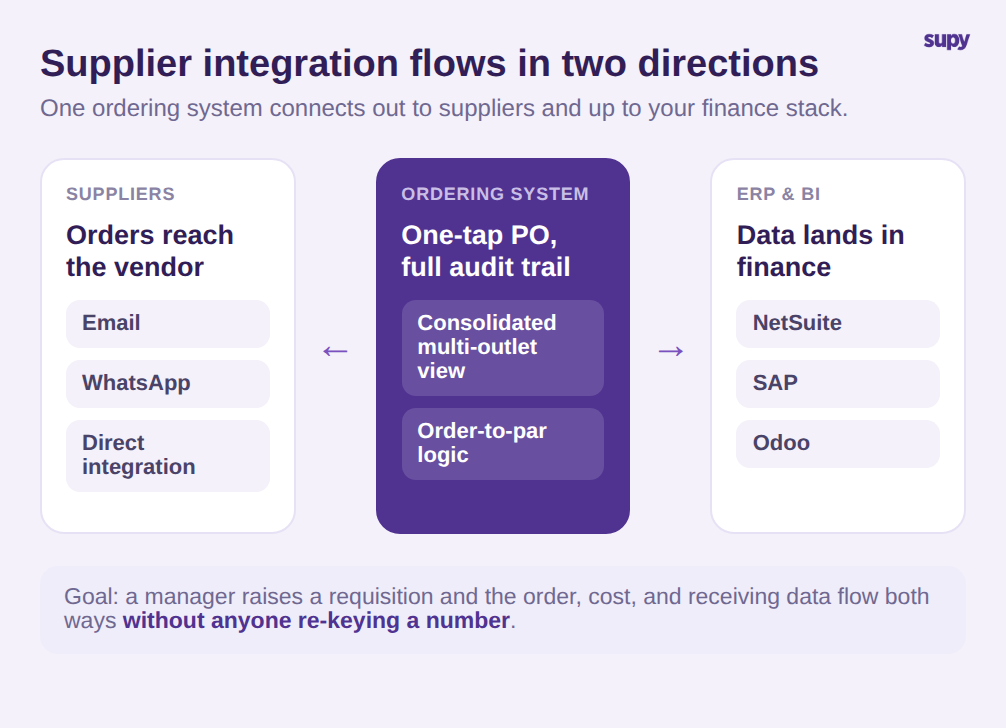
Il est utile de distinguer les deux directions que couvre le mot « intégration », car les acheteurs les confondent systématiquement. Le volet fournisseur concerne la manière dont un bon de commande parvient effectivement au fournisseur. Dans Supy, une commande créée depuis la vue consolidée multi-sites devient un bon de commande en un tap et est envoyée au fournisseur par e-mail, WhatsApp ou une intégration directe, avec une logique de niveau de stock cible et un historique complet derrière chaque envoi. Le volet système concerne la destination suivante des données de commande et de coût, c’est la partie qui défaille en premier à grande échelle, et celle sur laquelle nous allons nous attarder le plus.
Il existe une troisième dimension qui n’apparaît que lorsqu’un groupe est vraiment multi-sites : la réplicabilité. Une connexion qui fonctionne parfaitement sur un site mais doit être reconstruite manuellement sur le suivant n’est pas une intégration, c’est une démonstration. Les groupes qui évoluent proprement sont ceux qui peuvent enregistrer un fournisseur, ses prix et ses règles de commande une seule fois et réutiliser cette configuration à l’ouverture de chaque nouveau site. Supy prend en charge cela grâce à une configuration fournisseur par site et des modèles de commandes et de demandes d’achat réutilisables qui pré-remplissent une commande pour un site et un fournisseur donnés, avec des commandes récurrentes pour les lignes qui ne changent pratiquement jamais.
Où les commandes par e-mail et Excel défaillent à grande échelle
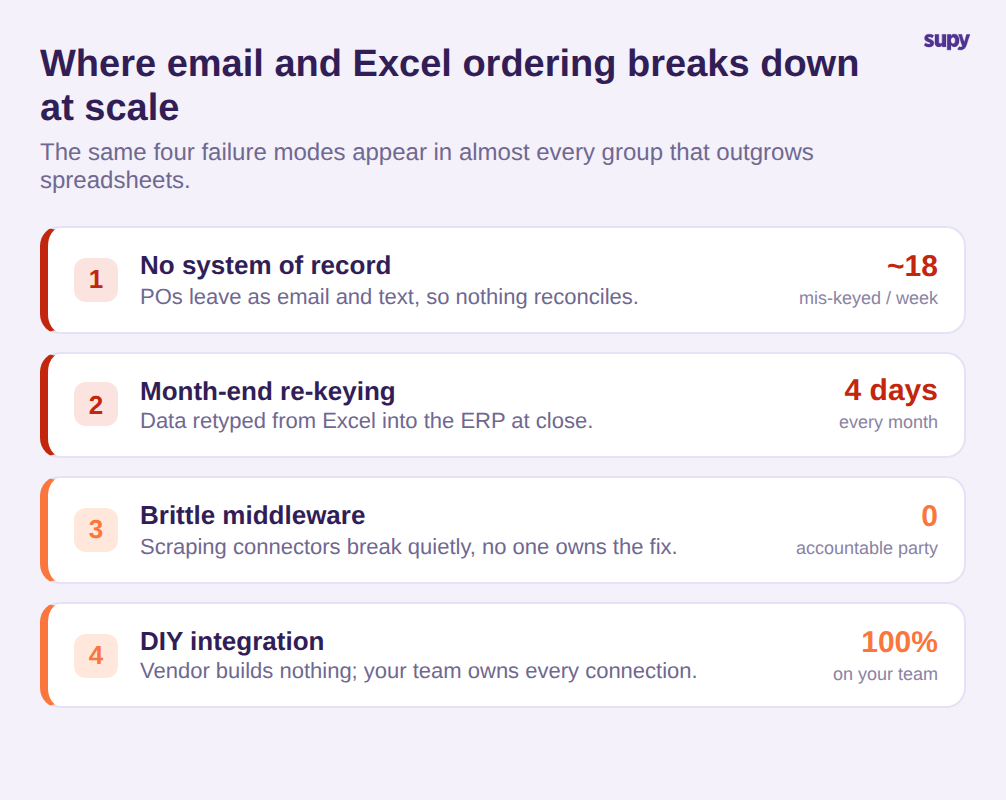
Les points de défaillance sont prévisibles et identiques dans presque tous les groupes qui ont dépassé les tableurs. Les nommer précisément est la première étape pour évaluer honnêlement toute solution.
Le premier : les bons de commande envoyés par e-mail ou SMS n’ont pas de système de référence. Il n’existe aucun endroit unique indiquant ce qui a été commandé, à quel prix, auprès de qui et si cela a été confirmé. Les quantités sont saisies avec des erreurs à la réception, et rien ne se rapproche proprement ensuite. Sur 620 commandes par semaine, même un taux d’erreur de 3 % représente environ 18 commandes erronées chaque semaine que quelqu’un doit gérer.
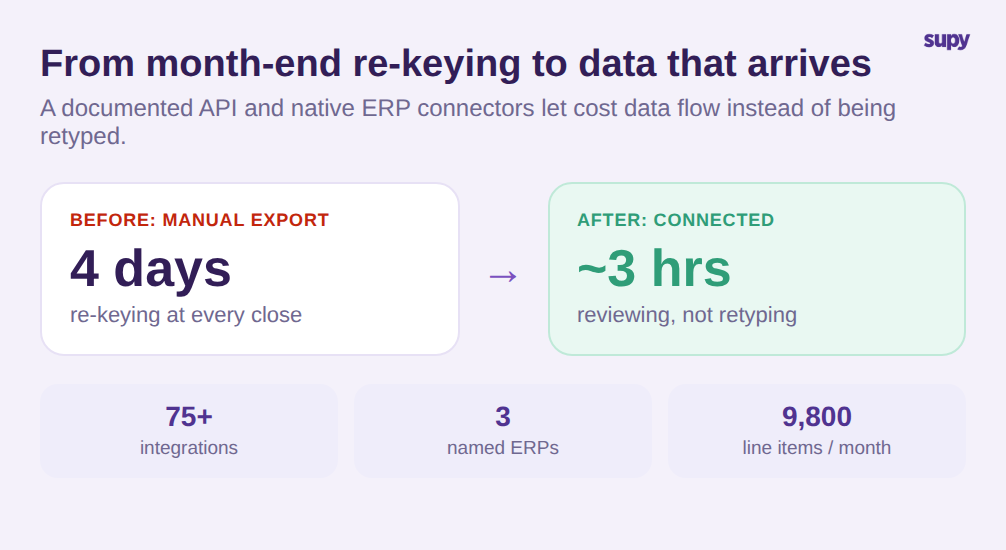
Le deuxième : le marathon de fin de période. Les données de ventes et de consommation sont transférées manuellement d’Excel vers l’ERP à la clôture, un processus que le responsable financier d’un groupe multi-sites a décrit comme prenant plusieurs jours et étant sujet à erreurs de bout en bout. Quand une équipe finance passe quatre jours par mois à ressaisir des chiffres sur 9 800 lignes, ce n’est pas une tâche de saisie, c’est une taxe structurelle sur chaque clôture.
Le troisième : les middlewares fragiles. Certains groupes comblent l’écart avec des connecteurs basés sur le scraping qui s’insèrent entre les systèmes et tombent en panne silencieusement. Quand ils échouent, les éditeurs concernés se renvoient la balle et personne n’assume la correction. Un responsable opérateur de dark kitchen a décrit exactement ce schéma : une intégration qui fonctionne jusqu’à ce qu’elle ne fonctionne plus, sans partie responsable unique.
Le quatrième : qui assume le développement. Un groupe évaluant des plateformes a constaté qu’un produit concurrent n’offrait aucun support d’intégration ERP et laissait chaque connexion à l’équipe du client à construire et maintenir. Pour un groupe avec un environnement financier complexe, c’est un coût caché qui surgit des mois après la signature.
Connecter les données de commande à votre ERP sans ressaisie de fin de période
La principale raison pour laquelle un groupe multi-sites intègre les commandes fournisseurs, ce n’est pas la commande elle-même — c’est tout ce qui suit. Si les données de commande, de réception et de coût peuvent circuler d’elles-mêmes dans vos systèmes financiers et d’analyses, la ressaisie de fin de période disparaît et les chiffres cessent de diverger entre systèmes.
C’est là que l’évaluation doit devenir concrète. Supy expose une API documentée couvrant les approvisionnements, les stocks, la production, les recettes, les pertes, le chiffre d’affaires et le coût des marchandises vendues, conçue pour alimenter les data lakes et les outils de Business Intelligence en temps réel ou de façon planifiée. En parallèle, la plateforme maintient plus de 75 intégrations dans des catégories incluant les caisses POS, la comptabilité et l’ERP, avec des connexions ERP nommées vers NetSuite, SAP et Odoo. Pour une équipe finance, le résultat concret : les quatre jours de ressaisie à la clôture peuvent se réduire à quelques heures de contrôle, car les données arrivent au lieu d’être retapées.
La réception est l’autre moitié de données de coût fiables. Plutôt que de faire confiance à ce qu’une facture reçue par e-mail correspond à ce qui a été livré, Supy transforme un bon de commande en bon de réception en un clic, pré-remplit les lignes depuis la facture et signale les écarts de prix et de quantité pour contrôle avant toute mise à jour des stocks ou de la comptabilité. Une vue des articles reçus regroupe chaque ligne de toutes les livraisons et affiche par défaut le filtre écarts de prix, afin qu’un contrôleur traite les exceptions plutôt que de vérifier chaque ligne. C’est la différence entre des données simplement connectées et des données en lesquelles vous pouvez réellement avoir confiance dans votre ERP.
La production centrale ajoute un autre chemin à examiner. Les groupes qui gèrent une cuisine centrale ont des sites qui commandent auprès de cette cuisine ainsi qu’auprès de fournisseurs extérieurs, et ces commandes internes nécessitent le même traitement que les externes. Supy gère les commandes des sites vers la cuisine comme une demande consolidée inter-sites par article, afin que la cuisine centrale voie ce que chaque site nécessite en une seule vue plutôt que dans une pile de messages séparés. Si votre groupe gère ou prévoit de gérer une production centrale, assurez-vous que le récit d’intégration couvre l’approvisionnement interne, pas seulement les fournisseurs tiers, car c’est souvent là que les tableurs persistent discrètement.
La leçon tirée des middlewares fragiles s’applique à tout cela. Un chemin documenté et supporté vers votre système financier vaut plus qu’une longue liste de connecteurs, car un connecteur que personne ne maintient est une future panne. Lors de votre évaluation, pesez la profondeur et le support des quelques intégrations sur lesquelles vous vous appuierez vraiment plutôt que le nombre brut, nommez votre ERP spécifique et demandez à voir la connexion fonctionner, et demandez ce qu’il se passe le jour où quelque chose tombe en panne.
Comment évaluer l’intégration fournisseurs avant de vous engager
Parce que « intégration » peut signifier tant de choses différentes, la démarche la plus utile en démonstration est d’appliquer un ensemble de critères courts et homogènes et d’évaluer chacun sur des preuves plutôt que sur une case à cocher. Quatre questions séparent une vraie capacité d’une promesse marketing.
Premièrement, qui effectue le travail d’intégration ? Demandez au fournisseur de détailler, étape par étape, qui construit et maintient la connexion avec votre ERP. Un support de configuration assumé par le éditeur est un produit différent d’un lien vers une documentation et des vœux de bonne chance. Si la réponse est que votre équipe en est seule responsable, chiffrez ce temps d’ingénierie dans l’offre.
Deuxièmement, quel est le chemin vers votre ERP ? Recherchez une API documentée et un connecteur natif pour votre système financier spécifique, pas un export manuel. Nommez votre ERP et demandez à voir la connexion, pas une diapositive. Un vrai chemin signifie que les données de commande et de coût arrivent en finance sans tableur intermédiaire.
Troisièmement, comment est-ce déployé sur les sites ? Un groupe ajoute des sites, donc la configuration doit être réutilisable. Demandez si la configuration des fournisseurs et des articles peut être saisie une fois et appliquée aux nouveaux sites via des modèles, ou si chaque site implique de ressaisir manuellement les mêmes fournisseurs, prix et règles de commande. Multipliez le temps de configuration par site par votre plan d’expansion avant de décider que cela n’a pas d’importance.
Quatrièmement, existe-t-il un véritable système de référence pour les bons de commande ? Chaque commande doit être enregistrée, tariée et raçonçable, avec un historique, afin que rien ne vive uniquement dans le dossier « envoiés » de quelqu’un. Si les bons de commande partent encore comme des e-mails non tracés, vous avez automatisé l’envoi et conservé le problème d’origine.
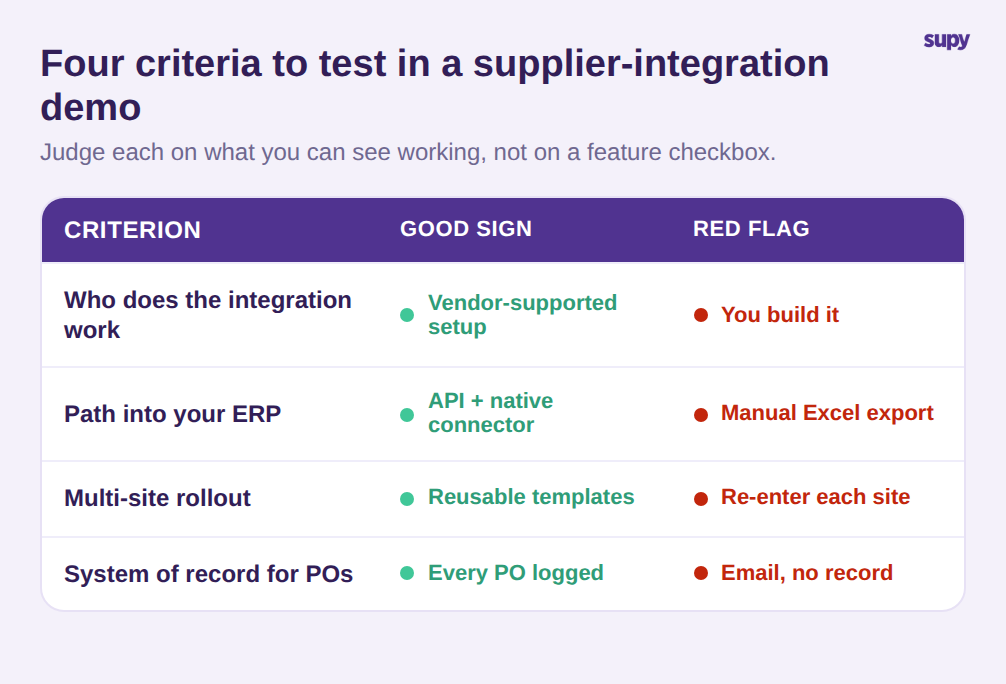
Évaluez chaque critère sur ce que vous pouvez voir, pas sur ce qu’on vous dit. Une plateforme qui répond à tous les quatre par une démonstration en direct offre une intégration fournisseurs pour restauration au sens qui compte vraiment pour un groupe multi-sites. Celle qui répond avec des logos et des promesses offre une liste de connecteurs.
L’intégration fournisseurs n’est pas un bouton que l’on active — c’est la tuyauterie qui détermine si votre groupe scale par les effectifs ou par les systèmes. Apportez ces quatre questions à chaque démonstration, insistez pour voir chaque réponse fonctionner plutôt que d’être décrite, et vous acquérrez la capacité qui élimine les tableurs plutôt que celle qui les déplace.