.jpeg)

Comparaison des prix multi-fournisseurs par ingrédient : Connaître le coût réel par fournisseur avant de commander
Voir ce que chaque fournisseur facture pour le même ingrédient
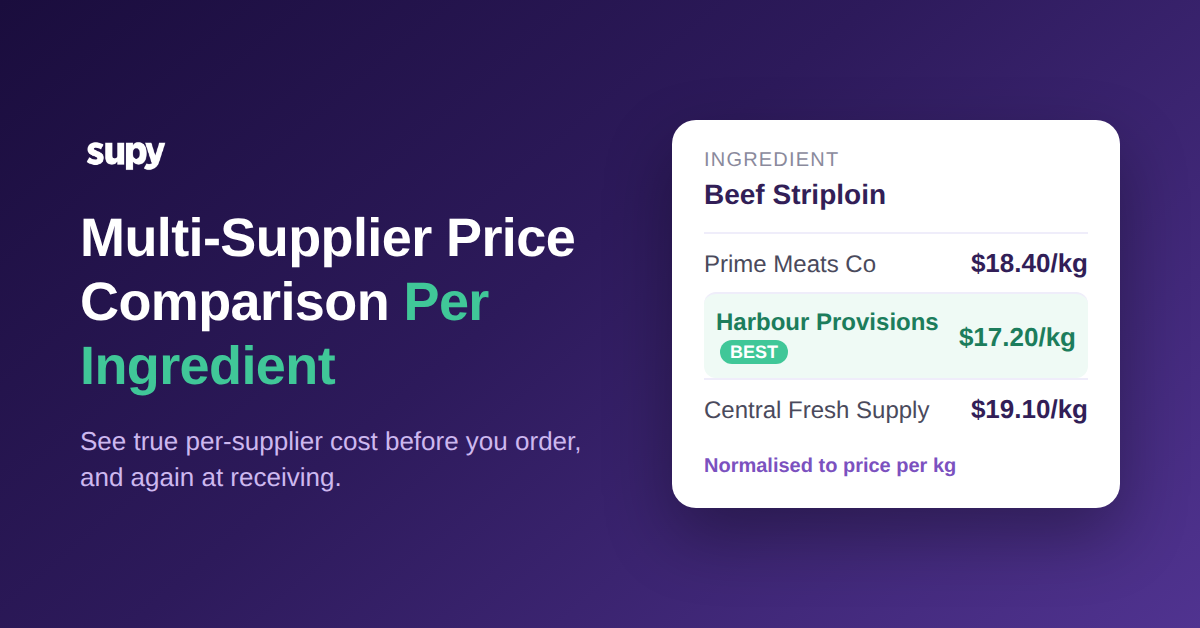
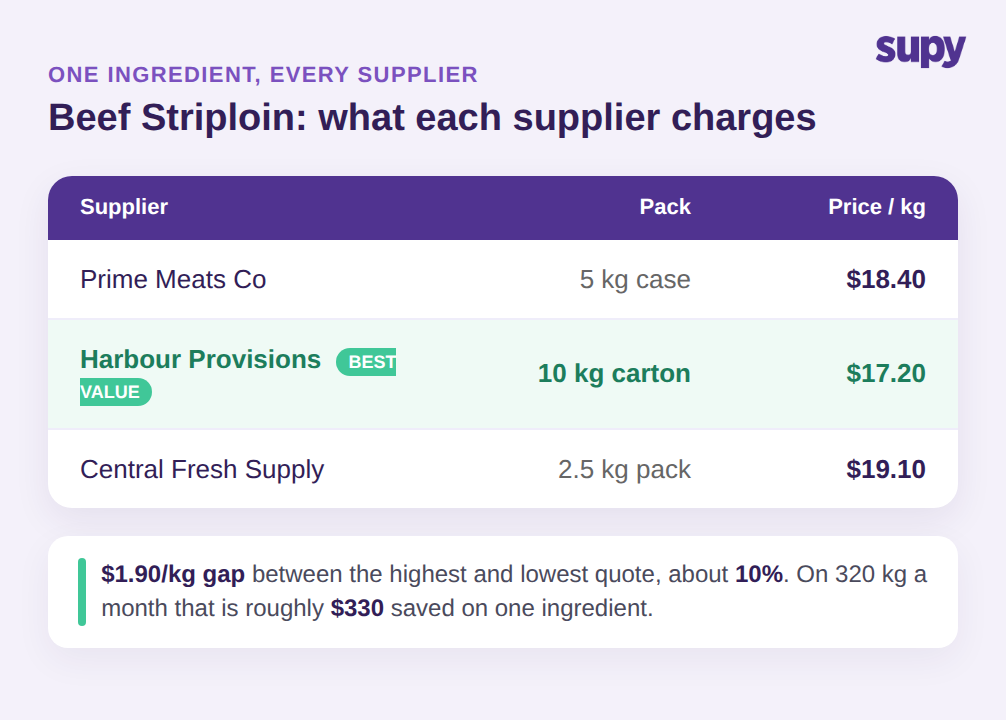
Un groupe multi-sites peut demander des devis à trois fournisseurs pour un aloyau de bœuf et obtient trois prix qui ne peuvent pas être alignés directement : 18,40 € par kg du premier, 17,20 € du second, 19,10 € du troisième. Cet écart de 1,90 € par kg entre le moins cher et le plus cher représente de l'argent réel, et pour un groupe qui achète 320 kg par mois, c'est environ 330 € par mois sur un seul ingrédient. L'acheteur qui peut voir les trois devis côte à côte, au même prix unitaire, route la commande vers le fournisseur à 17,20 € et passe à autre chose. Celui qui ne peut pas les voir ensemble paie ce que le fournisseur par défaut du mois dernier facture.
La comparaison des prix multi-fournisseurs par ingrédient, c'est la capacité de voir, pour un seul ingrédient, exactement ce que chacun de vos fournisseurs approuvés facture, avant de passer la commande. Dans Supy, chaque ingrédient est un unique Base Item, et chaque SKU fournisseur, conditionnement et prix unitaire pour cet ingrédient y est associé. Quand vous ouvrez l'article, vous voyez le prix actuel de chaque fournisseur pour le même produit, normalisé à une unité commune, de sorte que la comparaison est honnête plutôt qu'une estimation sur trois catalogues. Vous choisissez le fournisseur selon le prix, la disponibilité ou le contrat, et la commande part au tarif réellement convenu.
C'est le résultat que la plupart des opérateurs veulent et que peu d'outils délivrent proprement : une vue par ingrédient du marché dans lequel vous achetez, mise à jour au fil des mouvements de prix, à un écran de la commande elle-même. Cela fonctionne parce que l'ingrédient, et non le catalogue fournisseur, est ce que vous gérez. Si vous construisez le tableau d'approvisionnement plus large, cela s'intègre au reste de votre configuration de gestion des fournisseurs de restaurant plutôt que de la remplacer.
Le changement pratique est minime mais transforme chaque commande. Au lieu qu'un acheteur ouvre la liste de prix d'un fournisseur et commande ce que ce fournisseur vend, l'acheteur ouvre l'ingrédient et laisse l'ingrédient lui montrer les fournisseurs. La question ne porte plus sur ce que ce fournisseur facture mais sur qui facture le moins pour ce dont j'ai besoin cette semaine. Pour un ingrédient volatil, cette réponse peut changer de mois en mois, et un acheteur qui le vérifie à chaque fois capte la différence qu'un acheteur travaillant avec un fournisseur par défaut fixe ne voit jamais. Multipliez l'exemple de l'aloyau sur quelques dizaines d'ingrédients à fort volume, et la vue par ingrédient protège discrètement une part significative de la marge de coût matière à chaque cycle de commande.
Les prix ne se comparent que lorsque chaque SKU est associé à un Base Item
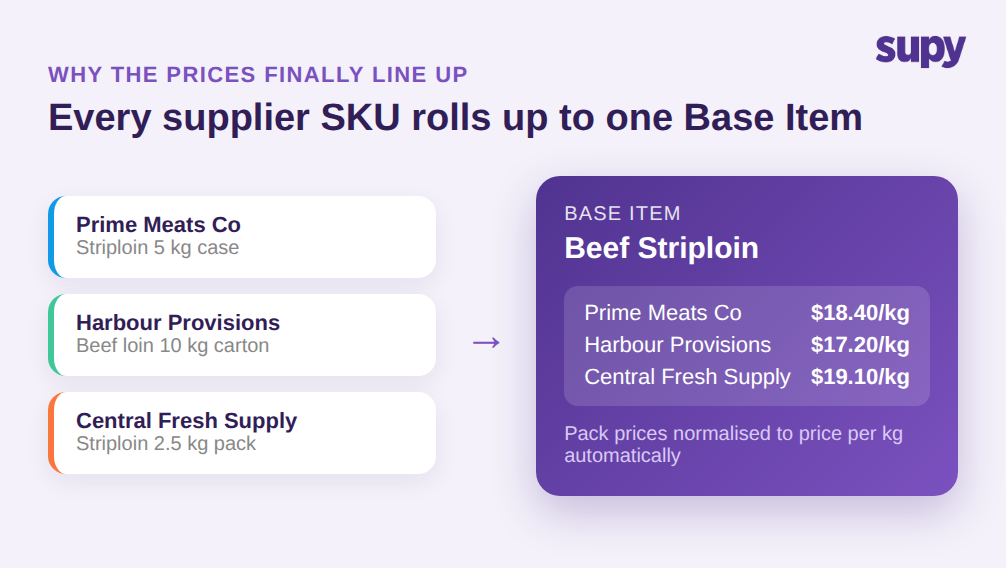
Voici où la plupart des logiciels de comparaison des prix fournisseurs de restaurants se trompent : ils comparent des lignes à l'écran de commande sans les rendre d'abord comparables. Le même aloyau de bœuf arrive dans une caisse de 5 kg d'un fournisseur, un carton de 10 kg d'un autre et un pack de 2,5 kg d'un troisième. Chaque fournisseur le nomme différemment, le conditionne différemment et facture le conditionnement, non le kilogramme. Mettre ces trois lignes côte à côte, les chiffres ne signifient pas la même chose, donc le conditionnement le moins cher n'est pas toujours l'ingrédient le moins cher.
La comparaison n'est valide que lorsque chacun de ces SKUs fournisseurs est associé à un seul Base Item pour l'ingrédient. La gestion des ingrédients et allergènes de Supy détient un Base Item par ingrédient avec tous les SKUs fournisseurs et conditionnements associés, de sorte qu'un prix par conditionnement devient automatiquement un prix par kg et les trois devis s'alignent enfin. Vous n'avez plus à maintenir un catalogue d'articles distinct par fournisseur et à estimer à vue d'œil lequel est moins cher. Le système normalise, et vous lisez un coût par fournisseur réel.
Ce modèle à article unique empêche également que la comparaison se dégrade avec le temps. Parce que les étiquettes d'allergènes et les conditionnements sont au niveau de l'ingrédient et se synchronisent en temps réel sur tous les points de vente, l'ajout d'un quatrième fournisseur pour le même ingrédient est un SKU de plus sur le même Base Item, pas un nouveau catalogue à réconcilier. Les concurrents qui présentent la comparaison comme une commodité au moment de la commande sautent cette étape, c'est pourquoi leur comparaison semble soignée à l'écran de commande et s'effondre dès que les tailles de conditionnement diffèrent.
Cela supprime également le travail manuel caché qui fait que la plupart des opérateurs arrêtent de comparer après quelques semaines. Quand chaque fournisseur vit dans son propre catalogue, quelqu'un doit convertir manuellement les prix par conditionnement, maintenir les conversions à jour au fil des changements de conditionnement, et se rappeler quelle ligne dans quelle liste correspond à quel ingrédient réel. Ce travail est suffisamment fastidieux pour être sauté, et une fois qu'il est sauté, la comparaison n'est que décoration. Associer chaque SKU à un Base Item transfère cet effort dans le système une seule fois, de sorte que la vue par fournisseur reste fiable sans qu'une personne maintienne un tableur derrière.
Donnez à chaque site le bon fournisseur et gardez des coûts de recettes exacts
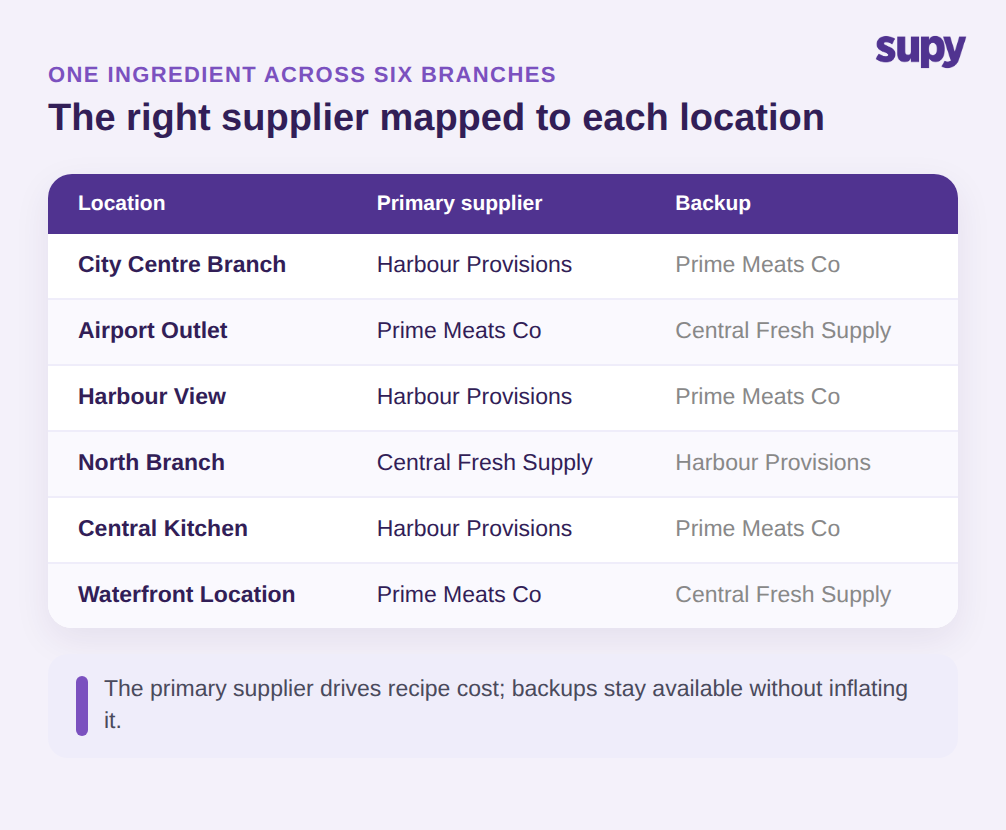
Un groupe ne souhaite rarement acheter un ingrédient d'un seul fournisseur partout. Une succursale en centre-ville et un établissement en aéroport peuvent être sur des routes de livraison différentes, donc le bon fournisseur pour l'aloyau de bœuf n'est pas le même aux deux endroits. Les opérateurs multi-sites doivent associer un ingrédient à différents fournisseurs par site et faire en sorte que le système impose le bon à chaque emplacement, plutôt que de faire confiance à chaque responsable de site pour se souvenir de la règle. Sur six succursales, ce sont six bonnes réponses pour un ingrédient, et se tromper signifie payer une prime de livraison ou rater un tarif contracté.
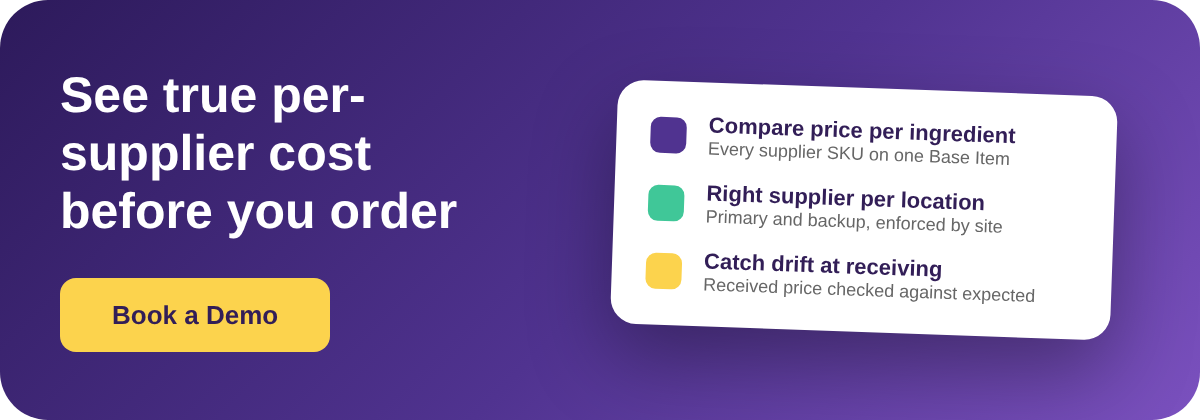
La comparaison par ingrédient doit alimenter des coûts de recettes précis, pas seulement un écran de commande plus soigné. Lorsque les fournisseurs de secours sont dans le produit maître et que chaque fournisseur est traité de la même façon, les coûts de recettes se brouillent : un plat est calculé par rapport à un mélange qui inclut un fournisseur auquel vous achetez rarement. La solution est de traiter un fournisseur comme le fournisseur principal contre lequel vous calculez et de garder les autres comme sauvegardes, de sorte que la recette reflète ce que vous payez réellement. Supy associe le prix de chaque fournisseur au même Base Item et prend en charge un fournisseur préféré par article, de sorte que le prix derrière votre comparaison est celui auquel vous achetez le plus souvent.
La gouvernance est au-dessus de tout cela. Avec plus de 200 autorisations personnalisables et des approbations séquentielles de jusqu'à 5 approbateurs par succursale et valeur de commande, vous contrôlez qui peut changer le fournisseur d'un site ou passer outre un prix, de sorte qu'une règle par site n'est pas annulée par la première personne pressée. La comparaison reste fiable parce que les règles derrière elle sont appliquées, non consultatives.
Détectez à nouveau les dérives de prix à la réception, pas seulement à la commande
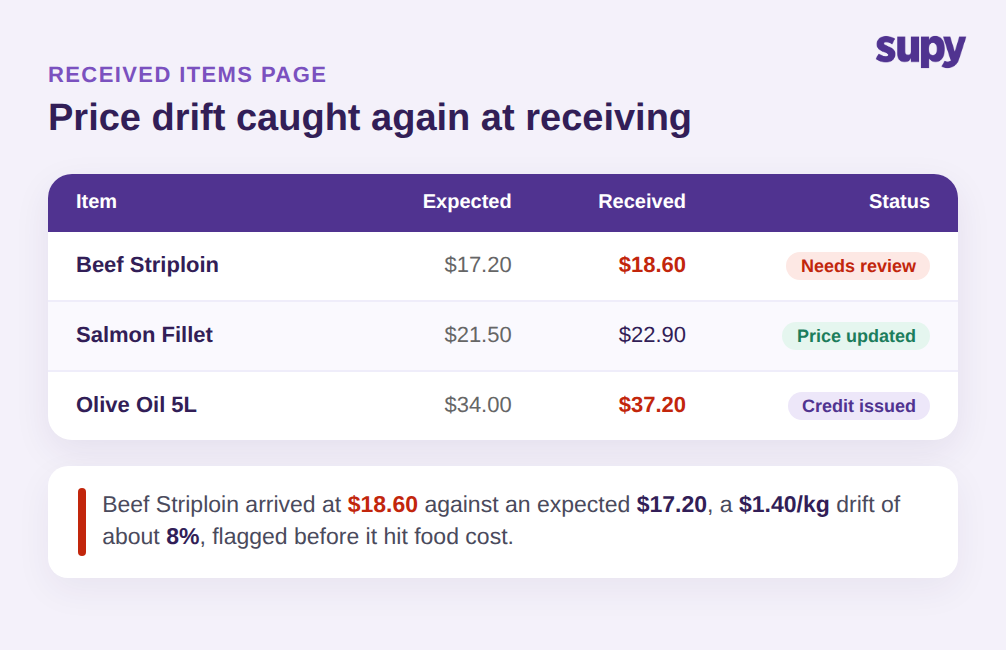
Choisir le fournisseur le moins cher à la commande ne signifie rien si le prix change silencieusement au moment où les marchandises arrivent. C'est là où la comparaison uniquement au moment de la commande fuit : vous avez convenu 17,20 € par kg, la livraison arrive facturée à 18,60 €, et à moins que quelqu'un ne détecte l'écart de 8% à la porte, il va directement dans votre coût matière. Les ingrédients volatils dérivent le plus, et ils dérivent sans alerte à moins que le système ne surveille le prix reçu par rapport au prix attendu.
Supy étend la comparaison au moment de la réception. La page des articles reçus liste chaque article reçu sur les bons de réception comme une ligne et filtre par défaut sur les écarts de prix, de sorte que les lignes où le prix reçu diffère du prix attendu apparaissent en premier. Depuis cet écran, l'acheteur peut mettre à jour le prix attendu, générer un e-mail de contact fournisseur, ou ouvrir le bon de réception pour émettre un avoir fournisseur, et chaque action est enregistrée dans l'historique des prix de sorte que le prochain calcul de coût utilise la valeur corrigée. La comparaison effectuée à la commande est appliquée à nouveau à la porte, ce qui est exactement là où la plupart des outils s'arrêtent. Si des erreurs de facturation non détectées drainent votre marge, les mécanismes de cette fuite méritent une compréhension plus approfondie dans notre article sur les surfacturations fournisseurs dans les restaurants.
Maintenir l'historique des prix propre est ce qui fait que toute la boucle se cumule. Chaque prix corrigé alimente la prochaine comparaison, de sorte qu'après quelques mois, les prix attendus que vous comparez sont les vrais que vous avez payés, pas ceux qu'un fournisseur a cités il y a un an. Avec plus de 75 intégrations tirant les données fournisseurs et comptables au même endroit, le tableau reste actuel sans que quelqu'un n'ait à les ressaisir.
Lus ensemble, commander et recevoir deviennent deux vérifications sur le même chiffre plutôt que deux tâches déconnectées. À la commande, vous choisissez le fournisseur dont le prix gagne ; à la réception, vous confirmez que le prix choisi est bien celui qui est arrivé. Un écart à l'un ou l'autre point est visible, attribuable à un fournisseur et un ingrédient, et corrigeable depuis le même écran où vous l'avez remarqué. C'est la différence entre connaître votre coût matière après la fin du mois et le piloter pendant le mois, et c'est uniquement possible parce que chaque prix, aux deux moments, est lié au même Base Item pour l'ingrédient.
Par où commencer
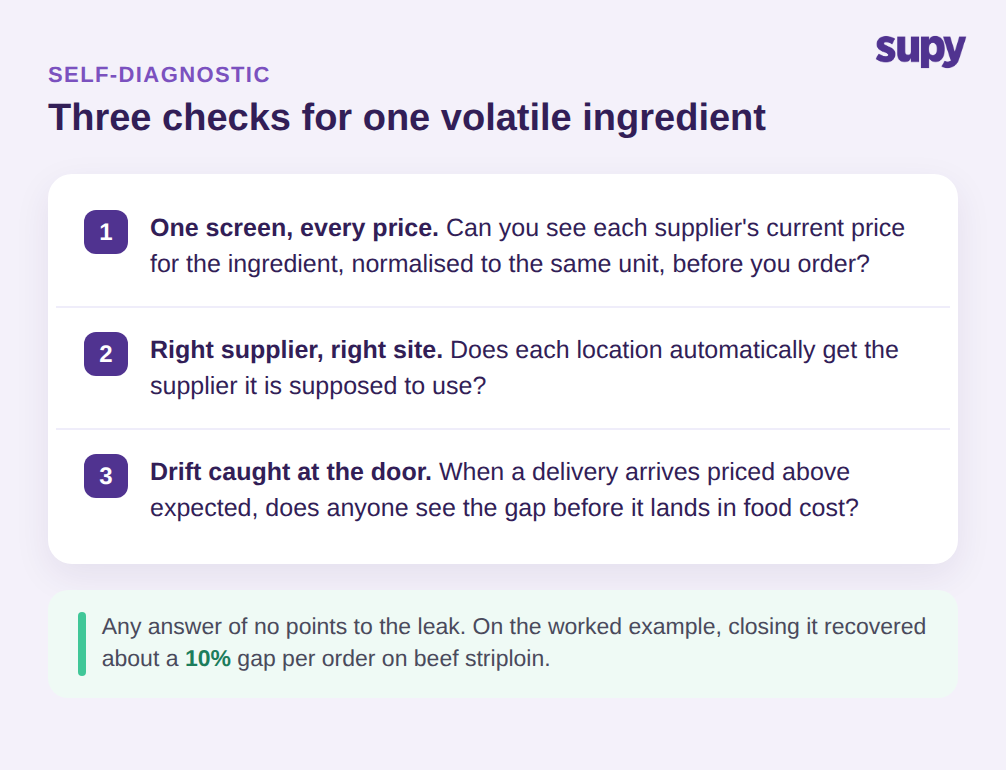
Vous n'avez pas besoin de reconstruire les achats pour que cela fonctionne. Faites d'abord un contrôle rapide sur votre propre exploitation. Choisissez un ingrédient volatil que vous achetez auprès de plus d'un fournisseur et posez trois questions. Pouvez-vous voir le prix actuel de chaque fournisseur pour cet ingrédient, normalisé à la même unité, sur un seul écran ? Chaque site reçoit-il automatiquement le fournisseur qu'il est censé utiliser ? Et quand une livraison arrive à un prix supérieur à ce que vous attendiez, quelqu'un voit-il l'écart avant qu'il n'atterrisse dans le coût matière ? Si la réponse à l'une de ces questions est non, c'est cet ingrédient qui est la source de la fuite, et un seul Base Item reliant chaque SKU fournisseur est le correctif qui ferme les trois écarts à la fois, à la commande et à nouveau à la réception. Commencez avec l'ingrédient qui échoue le plus de vérifications, modélisez-le correctement, et utilisez-le comme modèle pour les dix suivants. Les opérateurs qui tirent le plus de la comparaison par ingrédient ne sont pas ceux qui activent tout le premier jour ; ce sont ceux qui prouvent la boucle sur un seul ingrédient volatil, voient l'écart de prix se fermer à la prochaine commande, et le déploient à partir de là.