.jpeg)


مقارنة أسعار موردين متعددين لكل مكوّن: احصل على التكلفة الحقيقية لكل مورّد قبل الطلب
اكتشف ما يتقاضاه كل مورّد عن نفس المكوّن
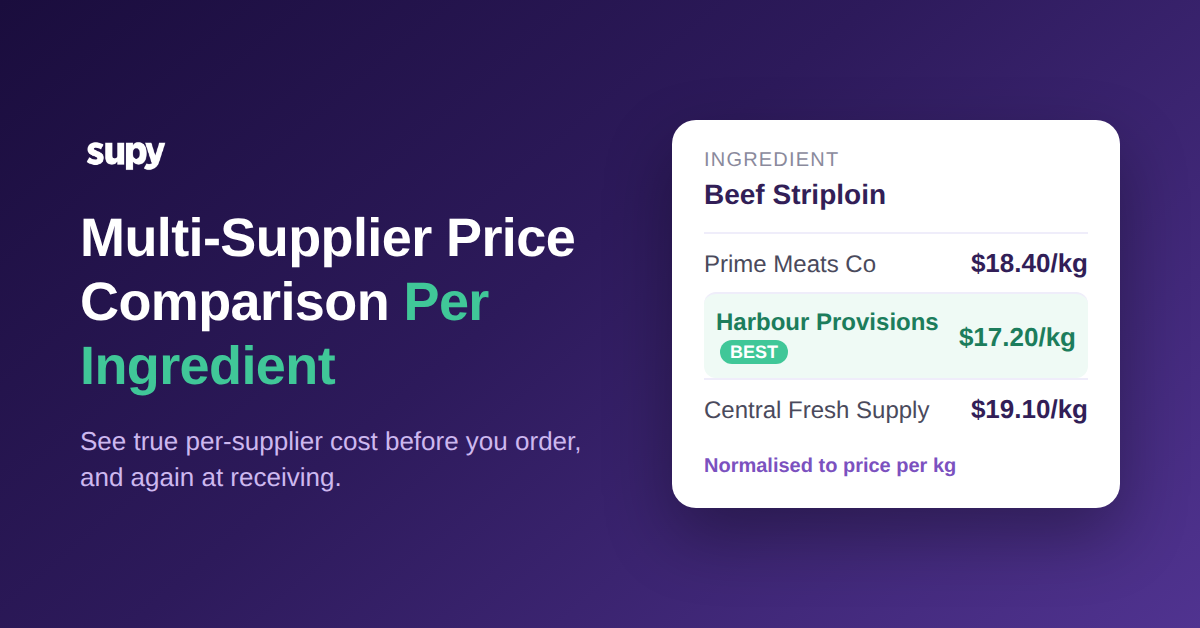
اطلب من ثلاثة موردين تسعير شريحة لحم بقري وستحصل على ثلاثة أسعار لا يمكنك مقارنتها بسهولة: 18.40 دولاراً للكيلوغرام من أحدهم، و17.20 دولاراً من الثاني، و19.10 دولاراً من الثالث. الفجوة البالغة 1.90 دولار للكيلوغرام بين الأرخص والأغلى مال حقيقي، وعلى مجموعة تشتري 320 كيلوغراماً شهرياً فهي ما يقارب 330 دولاراً شهرياً على مكوّن واحد فحسب. المشتري الذي يرى الأسعار الثلاثة جنباً إلى جنب، مسعّرةً بالوحدة ذاتها، يحوّل الطلب إلى مورّد الـ17.20 دولاراً ويمضي. أما المشتري الذي لا يستطيع مقارنتها معاً فيدفع ما يحدده المورّد الافتراضي الذي اعتاد التعامل معه.
مقارنة أسعار موردين متعددين لكل مكوّن هي القدرة على رؤية ما يتقاضاه كل مورّد معتمد بالضبط عن مكوّن واحد، قبل رفع طلب الشراء. في Supy، كل مكوّن هو صنف أساسي واحد، وكل SKU لمورّد وحجم تعبئة وسعر وحدة يرتبط به. حين تفتح الصنف، ترى سعر كل مورّد الحالي للشيء ذاته، مُعيَّراً إلى وحدة مشتركة، فتكون المقارنة حقيقية لا تخمينية عبر ثلاثة كتالوجات. تختار المورّد بناءً على السعر أو التوافر أو العقد، ويصدر الطلب بالسعر المتفق عليه فعلاً.
هذه هي النتيجة التي يريدها معظم المشغّلين وتفشل كثير من الأدوات في تحقيقها بوضوح: نظرة لكل مكوّن على السوق الذي تشتري منه، تتحدث مع تحرك الأسعار، وتبعد شاشة واحدة عن الطلب نفسه. وهي ممكنة لأن المكوّن —لا كتالوج المورّد— هو ما تديره. إن كنت تبني صورة شراء أشمل، فهذا يجلس جنباً إلى جنب مع بقية إعداد إدارة المُوردين في المطعم لا بديلاً عنه.
التحوّل العملي صغير لكنه يغيّر كل طلب. بدلاً من أن يفتح المشتري قائمة أسعار مورّد ويطلب ما يبيعه ذلك المورّد، يفتح المشتري المكوّن ويترك المكوّن يُريه الموردين. لا يعود السؤال "ماذا يتقاضى هذا المورّد" بل يصبح "من يتقاضى الأقل عن ما أحتاجه هذا الأسبوع". في المكوّنات المتقلبة، قد يتغير هذا الجواب شهراً بشهر، والمشتري الذي يتحقق منه في كل نوبة يلتقط الفارق الذي لا يراه المشتري العامل بافتراض ثابت. اضرب مثال شريحة اللحم البقري عبر عشرات المكوّنات عالية الحجم وستجد أن النظرة لكل مكوّن تحمي بصمت شريحة مهمة من هامش تكلفة الغذاء في كل دورة طلب.
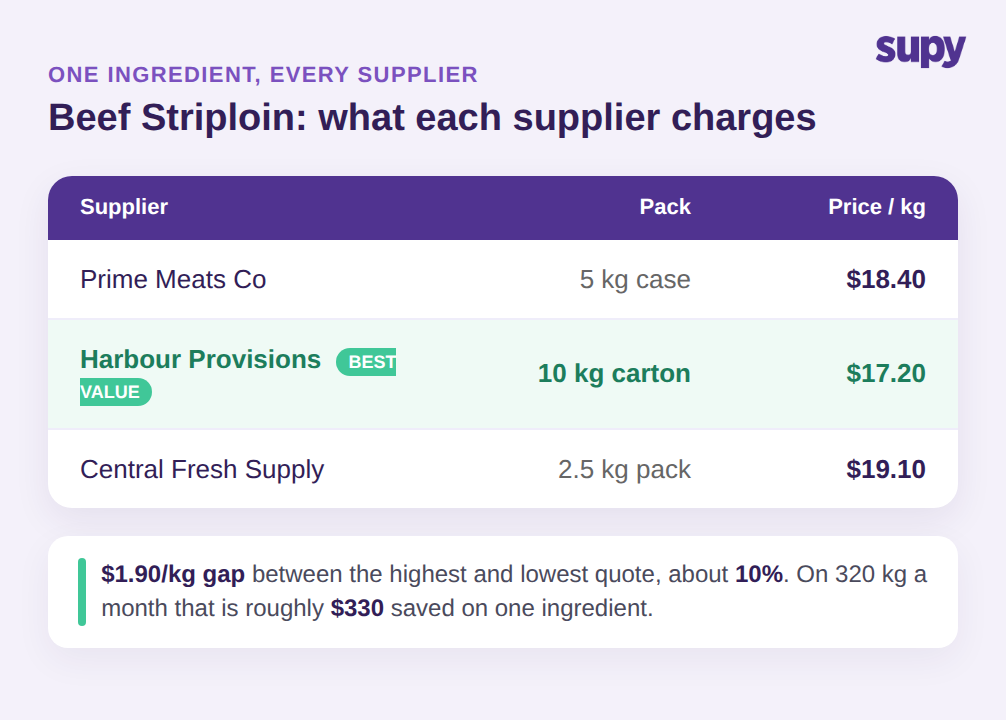
الأسعار لا تُقارَن إلا حين يندرج كل SKU تحت صنف أساسي واحد
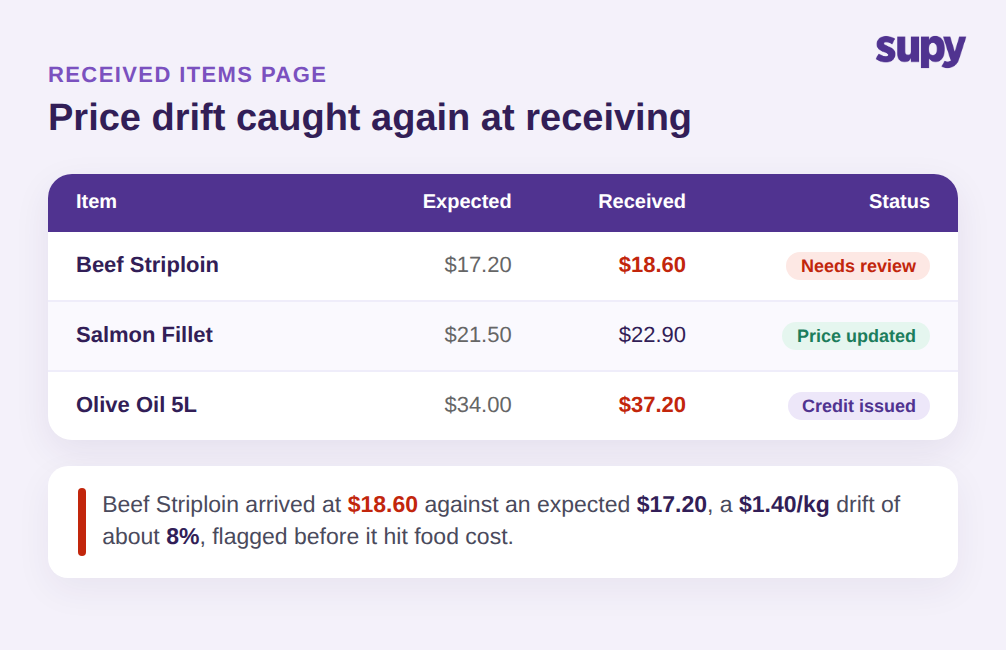
هنا يكمن الخطأ الذي يقع فيه معظم برامج مقارنة أسعار الموردين للمطاعم: يقارن الأسعار على شاشة الطلب دون أن يجعلها قابلة للمقارنة أولاً. تصل شريحة اللحم البقري ذاتها في صندوق 5 كيلوغرامات من أحد الموردين، وكرتونة 10 كيلوغرامات من آخر، وعبوة 2.5 كيلوغرام من ثالث. كل مورّد يُسمّيها باسم مختلف، ويعبّئها بشكل مختلف، ويسعّر العبوة لا الكيلوغرام. ضع تلك الأسطر الثلاثة جنباً إلى جنب والأرقام لا تعني الشيء ذاته، فأرخص عبوة لا تعني دائماً أرخص مكوّن.
المقارنة لا تصح إلا حين يندرج كل واحد من تلك SKUs لمورّد تحت صنف أساسي واحد للمكوّن. تحتفظ المكونات وإدارة مُسبّبات الحساسية في Supy بصنف أساسي واحد لكل مكوّن مع ربط جميع SKUs الموردين وأحجام التعبئة به، فيتحوّل سعر العبوة تلقائياً إلى سعر لكل كيلوغرام وتصطف الأسعار الثلاثة أخيراً. لم تعد تحتفظ بكتالوج أصناف منفصل لكل مورّد وتحاول تخمين أيها أرخص. يتولى النظام التوحيد القياسي، وتقرأ تكلفة حقيقية لكل مورّد.
نموذج الصنف الواحد هذا هو أيضاً ما يمنع المقارنة من التدهور مع الوقت. لأن علامات مُسبّبات الحساسية والتعبئة توجد على مستوى المكوّن وتتزامن فورياً عبر المنافذ، فإن إضافة مورّد رابع للمكوّن ذاته هو SKU إضافي واحد على الصنف الأساسي ذاته، لا كتالوج جديد لمطابقته. المنافسون الذين يُصوّرون المقارنة بوصفها راحةً عند الطلب يتخطون هذه الخطوة، ولهذا تبدو مقارنتهم مرتبة على شاشة الطلب وتنهار فور اختلاف أحجام العبوات.
كما يُزيل العمل اليدوي الخفي الذي يجعل معظم المشغّلين يتوقفون عن المقارنة بعد أسابيع. حين يعيش كل مورّد في كتالوج خاص به، يحتاج أحدهم إلى تحويل أسعار العبوات يدوياً، والحفاظ على التحويلات محدّثةً مع تغير أحجام العبوات، وتذكّر أي سطر في أي قائمة يُعيّن المكوّن الحقيقي. هذا العمل مُمل لدرجة تجاهله، وحين يُتجاهَل تصبح المقارنة مجرد ديكور. إدراج كل SKU تحت صنف أساسي واحد ينقل ذلك الجهد إلى النظام مرةً واحدة، فتبقى النظرة لكل مورّد موثوقة دون أن يحتاج أحد إلى صون جدول بيانات خلفها. المقارنة التي يمكن الاعتماد عليها بعد ستة أشهر هي التي لا يحتاج أحد لرعايتها.
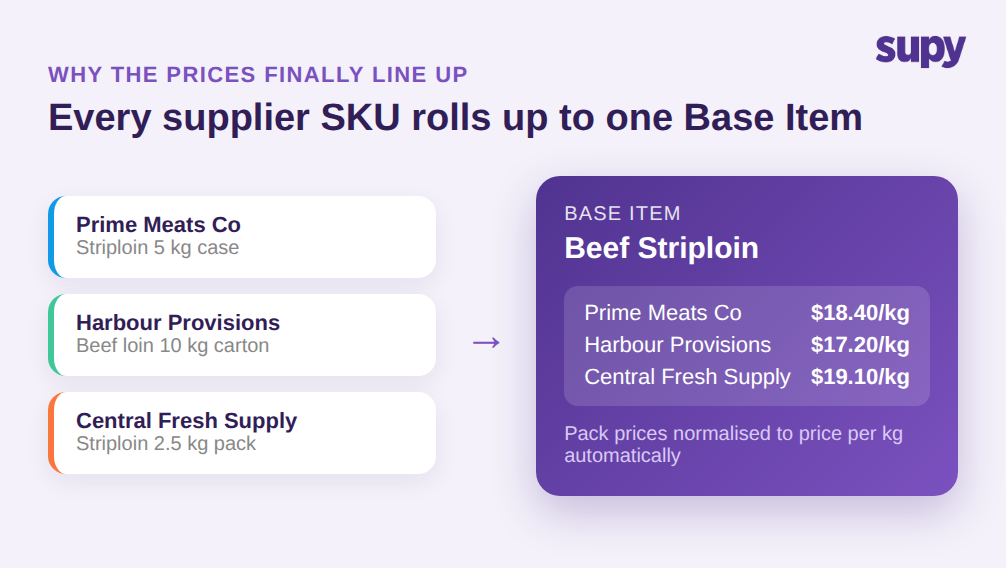
امنح كل موقع المورّد المناسب، وحافظ على دقة تكاليف الوصفات
نادراً ما تشتري مجموعة واحدة مكوّناً من مورّد واحد في كل مكان. قد يقع فرع وسط المدينة ومنفذ المطار على طرق توصيل مختلفة، فالمورّد الصحيح لشريحة اللحم البقري ليس نفسه في الموقعين. يحتاج المشغّلون متعددو المواقع إلى تعيين مكوّن واحد لموردين مختلفين لكل موقع وإلزام النظام بالمورّد الصحيح في كل فرع، بدلاً من الاعتماد على تذكّر كل مدير فرع للقاعدة. عبر ستة فروع، هذا يعني ستة إجابات صحيحة لمكوّن واحد، والخطأ يعني دفع رسوم توصيل إضافية أو تفويت سعر متعاقد عليه.
يجب أن تُغذّي مقارنة الأسعار لكل مكوّن تكاليف وصفات دقيقة، لا مجرد شاشة طلب أكثر ترتيباً. حين تكون الموردون الاحتياطيون في قائمة المنتجات الرئيسية ويُعامَل كل مورّد بالتساوي، تتشوّش تكاليف الوصفات: يُكلَّف الطبق بناءً على مزيج يضم مورّداً نادراً ما تشتري منه. الحل في تحديد مورّد رئيسي واحد للتكلفة وإبقاء الآخرين احتياطيين، حتى تعكس الوصفة ما تدفعه فعلاً لا مزيجاً نادر الشراء. يربط Supy سعر كل مورّد بالصنف الأساسي الواحد ويدعم مورّداً مفضّلاً لكل صنف، فالسعر خلف مقارنتك هو الذي تشتري به في أغلب الأحيان، ولا يُشوّه مورّد تلجأ إليه أحياناً تكلفتك بصمت.
تجلس الحوكمة فوق هذا كله. مع أكثر من 200 إذن قابل للتخصيص وأنظمة الموافقات المتسلسلة تصل إلى 5 معتمدين بحسب الفرع وقيمة الطلب، تتحكم بمن يستطيع تغيير مورّد موقع أو تجاوز سعر، فلا تُلغى قاعدة لكل موقع بمجرد تسرّع شخص ما. تبقى المقارنة موثوقة لأن القواعد خلفها مُفعَّلة لا استشارية.
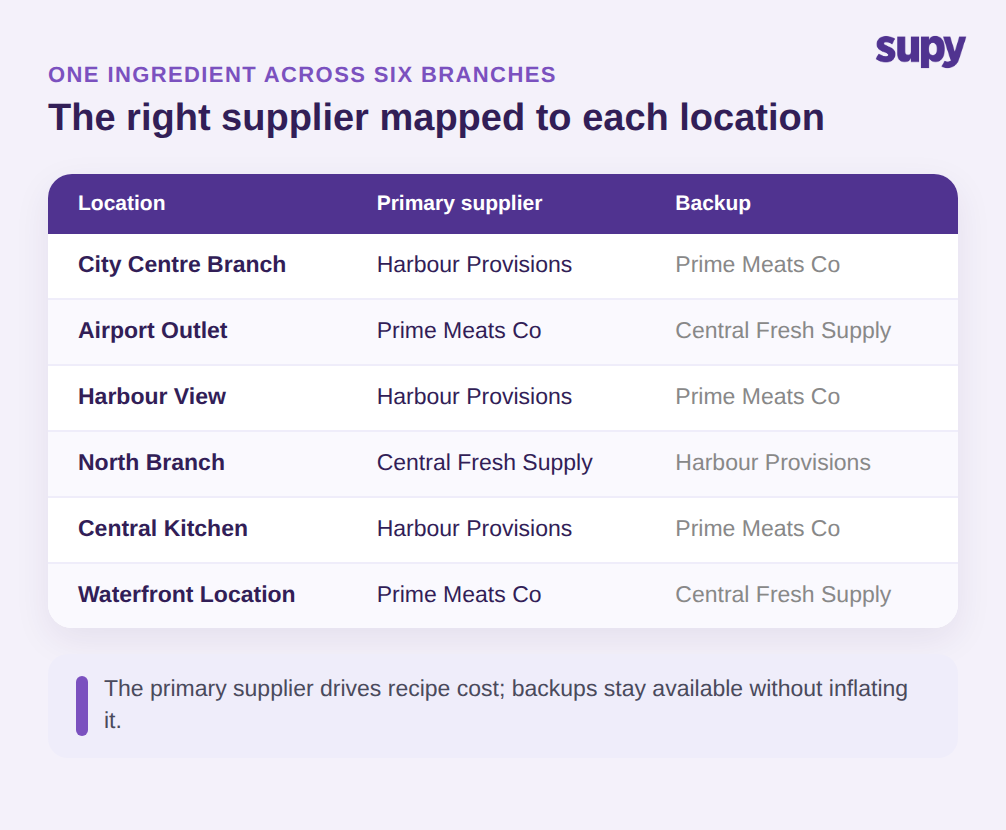
اكتشف انجراف الأسعار أيضاً عند الاستلام، لا عند الطلب فحسب
اختيار أرخص مورّد عند الطلب لا معنى له إن تغيّر السعر بهدوء حين تصل البضائع. هنا تتسرب المقارنة المقتصرة على وقت الطلب: اتفقت على 17.20 دولاراً للكيلوغرام، وصلت الشحنة بفاتورة بـ18.60 دولاراً، وما لم يلتقط أحد هذا الانجراف بنسبة 8% عند الباب، ينتقل مباشرةً إلى تكلفة الغذاء. المكوّنات المتقلبة تنجرف أكثر، وتنجرف دون تنبيه ما لم ينتبه النظام إلى السعر المستلَم مقارنةً بالمتوقع.
يُمدّد Supy المقارنة إلى وقت الاستلام. تسرد صفحة الأصناف المستلَمة كل صنف مستلَم عبر مذكرات GRN في صف واحد وتبدأ بفلتر تباين الأسعار افتراضياً، فتظهر الأسطر التي يختلف فيها السعر المستلَم عن المتوقع أولاً. من تلك الشاشة يستطيع المشتري تحديث السعر المتوقع، أو إنشاء بريد إلكتروني للتواصل مع المورّد، أو فتح مذكرة GRN لإصدار إشعار ائتمان، وكل إجراء يُسجَّل في سجل الأسعار حتى تستخدم حسابات التكلفة التالية الرقم المصحَّح. المقارنة التي أجريتها عند الطلب تُفرَض مجدداً عند الباب، وهذا بالضبط هو الحد الذي تقف عنده معظم الأدوات. إن كانت أخطاء الفواتير غير المكتشَفة تستنزف هامشك، فتفاصيل هذا التسرب تستحق فهماً أعمق في مقالتنا عن المطالبة المفرطة من الموردين في المطاعم.
الحفاظ على نظافة سجل الأسعار هو ما يجعل الدورة كاملة تتراكم نفعاً. كل سعر مصحَّح يُغذّي المقارنة التالية، وعبر بضعة أشهر تصبح الأسعار المتوقعة التي تقارن بها هي ما كنت تدفعه فعلاً، لا ما اقترحه مورّد منذ عام. مع أكثر من 75 من التكاملات التي تسحب بيانات الموردين والمحاسبة إلى المكان ذاته، تبقى الصورة محدّثةً دون أن يعيد أحد إدخالها.
حين تقرأهما معاً، يصبح الطلب والاستلام فحصين على الرقم ذاته لا مهمتين منفصلتين. عند الطلب تختار المورّد الأفضل سعراً؛ عند الاستلام تؤكد أن السعر الذي اخترته هو ما وصل فعلاً. أي فجوة في أي من النقطتين مرئية، ومنسوبة إلى مورّد ومكوّن، وقابلة للمعالجة من الشاشة ذاتها التي لاحظتها فيها. هذا هو الفارق بين معرفة تكلفة الغذاء بعد نهاية الشهر وتوجيهها أثناء الشهر، وهو ممكن فقط لأن كل سعر، في كلا اللحظتين، مرتبط بالصنف الأساسي الواحد للمكوّن.
من أين تبدأ
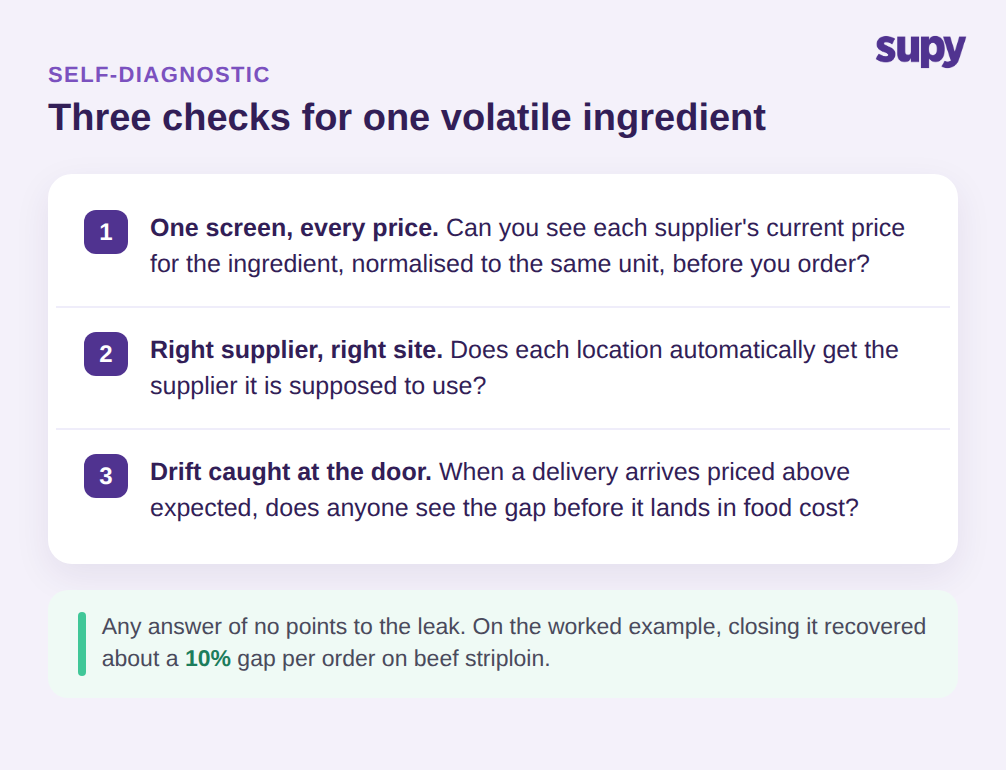
لا تحتاج إلى إعادة بناء المشتريات لتشغيل هذا. ابدأ بفحص سريع على عمليتك الخاصة. اختر مكوّناً متقلباً تشتريه من أكثر من مورّد واطرح ثلاثة أسئلة: هل يمكنك رؤية السعر الحالي لكل مورّد عنه، مُعيَّراً إلى الوحدة ذاتها، في شاشة واحدة؟ هل يحصل كل موقع تلقائياً على المورّد المفترض أن يستخدمه؟ وحين تصل شحنة بسعر أعلى مما توقعته، هل يرى أحد الفجوة قبل أن تصل إلى تكلفة الغذاء؟ إن كانت الإجابة لا على أي من هذه، فذلك المكوّن هو مكان التسرب، وصنف أساسي واحد يربط كل SKU لكل مورّد هو الحل الذي يغلق الثغرات الثلاث في آنٍ، عند الطلب ومجدداً عند الاستلام. ابدأ بالمكوّن الذي يخفق في أكثر الفحوصات، أنشئه نموذجاً صحيحاً، واستخدمه قالباً للعشرة التالية. المشغّلون الذين يستفيدون أكثر من مقارنة الأسعار لكل مكوّن ليسوا من يفعّلون كل شيء في اليوم الأول؛ بل هم من يُثبتون أن الدورة تعمل على مكوّن واحد متقلب، يرون الفجوة في السعر تنغلق على الطلب التالي، ثم يوسّعون ذلك من هناك.