.jpeg)


Multi-Lieferanten-Preisvergleich pro Zutat: Echten Lieferantenpreis vor der Bestellung kennen
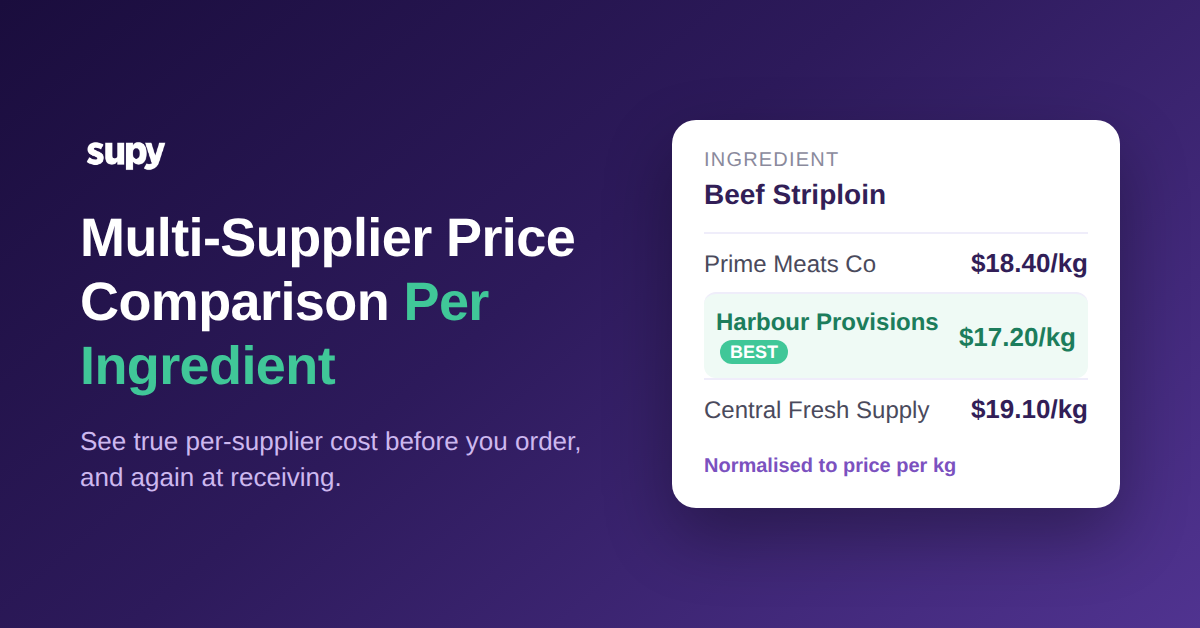
Sehen Sie, was jeder Lieferant für dieselbe Zutat berechnet
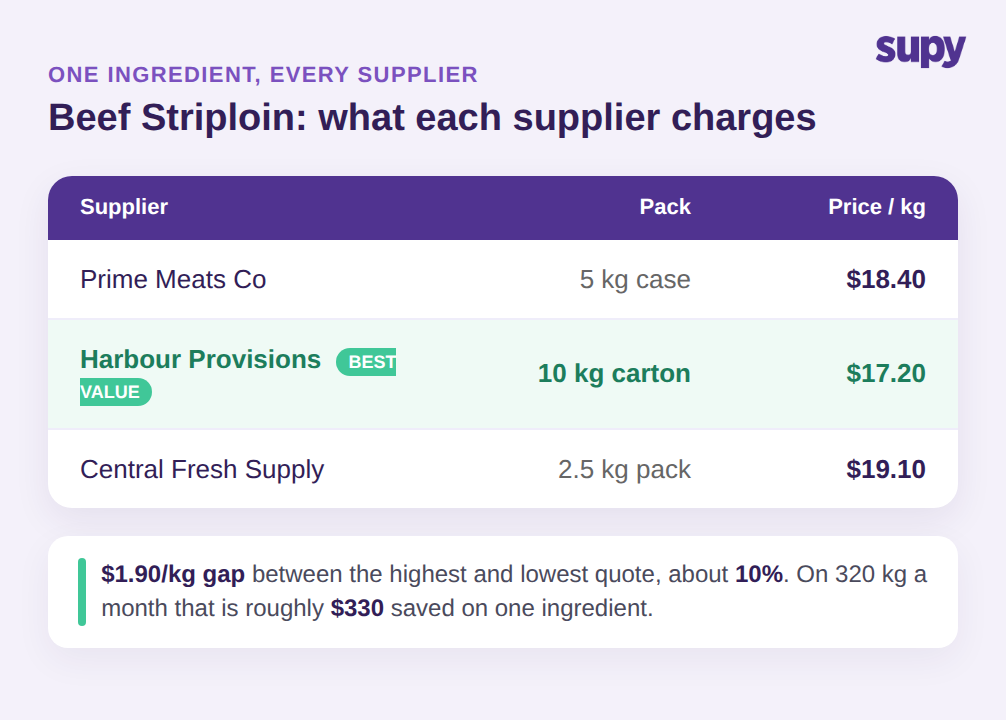
Eine Mehrstandortgruppe kann bei drei Lieferanten einen Rinderstriploin anfragen und erhält drei Preise, die sich nicht direkt vergleichen lassen: 18,40 € pro kg von einem, 17,20 € von einem anderen, 19,10 € von einem dritten. Diese Differenz von 1,90 € pro kg zwischen dem günstigsten und dem teuersten ist echtes Geld, und bei einer Gruppe, die 320 kg pro Monat kauft, sind das rund 330 € im Monat für eine einzige Zutat. Der Einkäufer, der alle drei Angebote nebeneinander sehen kann, normiert auf dieselbe Einheit, leitet die Bestellung an den 17,20-€-Lieferanten und macht weiter. Der Einkäufer, der sie nicht zusammen sehen kann, zahlt, was der Standardlieferant des letzten Monats berechnet.
Multi-Lieferanten-Preisvergleich pro Zutat ist die Fähigkeit, für eine einzige Zutat genau zu sehen, was jeder Ihrer zugelassenen Lieferanten berechnet, bevor Sie die Bestellung aufgeben. In Supy ist jede Zutat ein einziges Base Item, und jede Lieferanten-SKU, Verpackungsgröße und Stückpreis für diese Zutat ist damit verknüpft. Wenn Sie den Artikel öffnen, sehen Sie den aktuellen Preis jedes Lieferanten für dasselbe Produkt, normiert auf eine gemeinsame Einheit, sodass der Vergleich ehrlich ist und nicht eine Schätzung über drei Kataloge. Sie wählen den Lieferanten nach Preis, Verfügbarkeit oder Vertrag, und die Bestellung geht zum tatsächlich vereinbarten Preis heraus.
Dies ist das Ergebnis, das die meisten Betreiber wollen und das nur wenige Tools sauber liefern: eine Pro-Zutat-Ansicht des Marktes, in dem Sie einkaufen, aktualisiert wenn sich Preise ändern, einen Bildschirm von der Bestellung entfernt. Es funktioniert, weil die Zutat, nicht der Lieferantenkatalog, das Objekt ist, das Sie verwalten. Wenn Sie das breitere Beschaffungsbild aufbauen, ergänzt dies den Rest Ihrer Lieferantenverwaltung für Restaurants, anstatt sie zu ersetzen.
Die praktische Umstellung ist klein, ändert aber jede Bestellung. Anstatt dass ein Einkäufer die Preisliste eines Lieferanten öffnet und bestellt, was dieser Lieferant verkauft, öffnet der Einkäufer die Zutat und lässt sich die Lieferanten anzeigen. Die Frage lautet nicht mehr „Was berechnet dieser Lieferant", sondern „Wer berechnet am wenigsten für das, was ich diese Woche brauche". Bei volatilen Zutaten kann sich diese Antwort von Monat zu Monat ändern, und ein Einkäufer, der jedes Mal nachschaut, nimmt die Differenz mit, die ein Einkäufer, der mit einem festen Standard-Lieferanten arbeitet, nie sieht. Multiplizieren Sie das Rinderstriploin-Beispiel über einige Dutzend umsatzstarke Zutaten, und die Pro-Zutat-Ansicht schützt bei jedem Bestellzyklus stillschweigend einen bedeutenden Teil der Wareneinsatzmarge.
Preise lassen sich nur vergleichen, wenn jede SKU einem Base Item zugeordnet wird
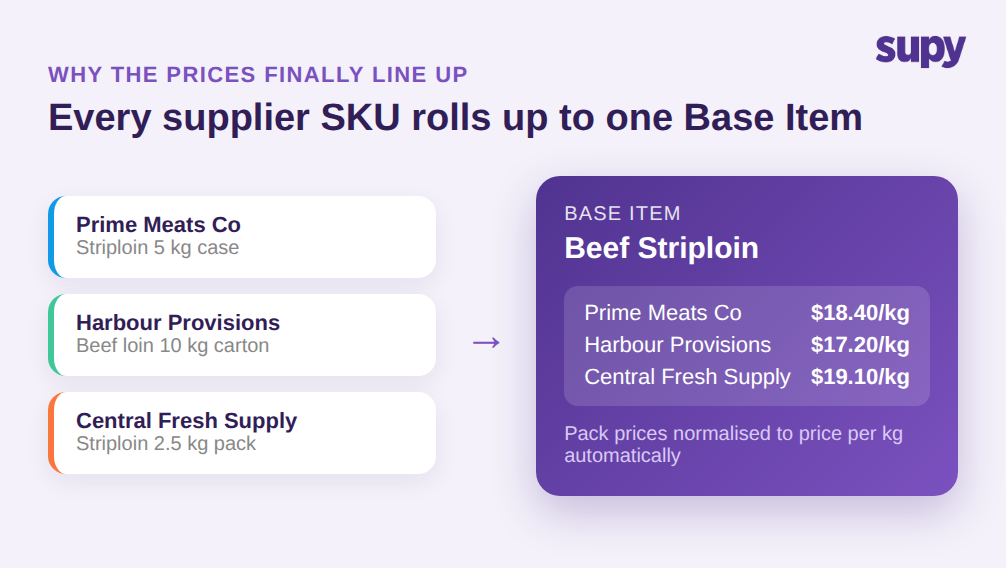
Hier liegt das Problem, das die meisten Restaurant-Lieferantenpreisvergleich-Softwarelösungen falsch machen: Sie vergleichen Positionen auf dem Bestellbildschirm, ohne sie zuerst vergleichbar zu machen. Dasselbe Rinderstriploin kommt von einem Lieferanten in einer 5-kg-Kiste, von einem anderen in einem 10-kg-Karton und von einem dritten in einem 2,5-kg-Pack. Jeder Lieferant benennt es anders, verpackt es anders und bepreist die Verpackung, nicht das Kilogramm. Stellt man diese drei Positionen nebeneinander, bedeuten die Zahlen nicht dasselbe, daher ist das günstigste Paket nicht immer die günstigste Zutat.
Vergleiche sind nur dann gültig, wenn jede dieser Lieferanten-SKUs einem einzigen Base Item für die Zutat zugeordnet wird. Supys Zutaten- & Allergenverwaltung hält ein Base Item pro Zutat mit allen daran verknüpften Lieferanten-SKUs und Verpackungen, sodass ein Preis pro Paket automatisch zu einem Preis pro kg wird und die drei Angebote sich endlich angleichen. Sie pflegen nicht mehr einen separaten Artikelkatalog pro Lieferant und schätzen per Augenschein, welcher günstiger ist. Das System normiert, und Sie lesen einen echten Preis pro Lieferant.
Dieses Single-Item-Modell verhindert auch, dass der Vergleich über die Zeit verfällt. Da Allergenmarkierungen und Verpackungen auf Zutatenebene liegen und live über alle Standorte hinweg synchronisiert werden, ist das Hinzufügen eines vierten Lieferanten für dieselbe Zutat eine weitere SKU auf demselben Base Item, kein neuer Katalog zum Abgleichen. Wettbewerber, die den Vergleich als Bestellzeit-Bequemlichkeit darstellen, überspringen diesen Schritt, weshalb ihr Vergleich auf dem Bestellbildschirm ordentlich aussieht und zusammenbricht, sobald Packungsgrößen abweichen.
Es beseitigt auch die versteckte Handarbeit, die dazu führt, dass die meisten Betreiber nach ein paar Wochen aufhören zu vergleichen. Wenn jeder Lieferant in seinem eigenen Katalog lebt, muss jemand Packungspreise manuell umrechnen, die Umrechnungen aktuell halten, wenn sich Packungsgrößen ändern, und sich merken, welche Position in welcher Liste welcher echten Zutat entspricht. Diese Arbeit ist mühsam genug, dass sie übersprungen wird, und sobald sie übersprungen wird, ist der Vergleich Dekoration. Die Zuordnung jeder SKU zu einem Base Item verlagert diesen Aufwand einmalig ins System, sodass die Pro-Lieferant-Ansicht zuverlässig bleibt, ohne dass eine Person eine Tabelle dahinter pflegt. Der Vergleich, auf den man in sechs Monaten noch vertrauen kann, ist der, den niemand betreuen muss.
Geben Sie jedem Standort den richtigen Lieferanten und halten Sie Rezeptkosten ehrlich
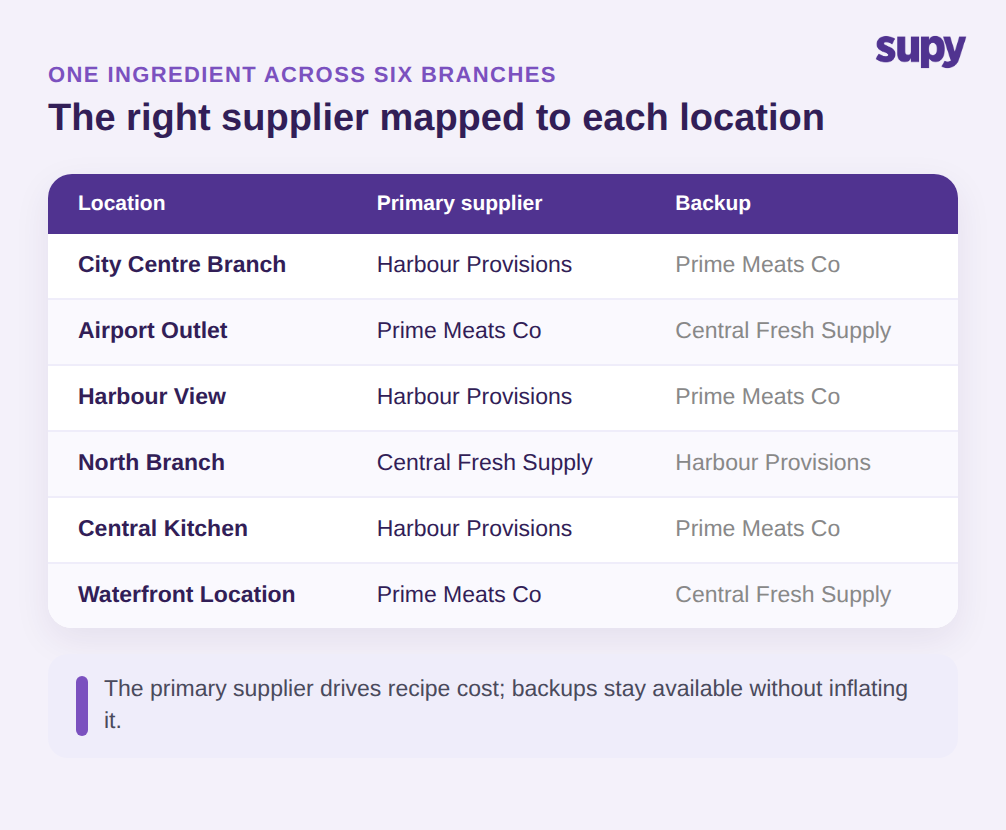
Eine Gruppe kauft selten eine Zutat von einem Lieferanten überall. Eine Filiale im Stadtzentrum und ein Flughafenlokal können auf unterschiedlichen Lieferwegen liegen, daher ist der richtige Lieferant für Rinderstriploin nicht an beiden Stellen derselbe. Mehrstandortbetreiber müssen eine Zutat verschiedenen Lieferanten pro Standort zuordnen und das System den richtigen Lieferanten an jedem Standort durchsetzen lassen, anstatt jedem Filialleiter zu vertrauen, sich an die Regel zu erinnern. Bei sechs Filialen sind das sechs richtige Antworten für eine Zutat, und ein Fehler bedeutet, eine Lieferpauschale zu zahlen oder einen Vertragspreis zu verpassen.
Der Pro-Zutat-Vergleich muss genaue Rezeptkosten liefern, nicht nur einen aufgeräumteren Bestellbildschirm. Wenn Backup-Lieferanten im Produkt-Master sitzen und jeder Lieferant gleich behandelt wird, verschwimmen die Rezeptkosten: Ein Gericht wird gegen eine Mischung kalkuliert, die einen Lieferanten einschließt, bei dem Sie selten kaufen. Die Lösung besteht darin, einen Lieferanten als den primären zu behandeln, gegen den Sie kalkulieren, und die anderen als Backups zu behalten, sodass das Rezept widerspiegelt, was Sie tatsächlich zahlen und nicht eine Mischung, die Sie selten kaufen. Supy verknüpft jeden Lieferantenpreis mit dem einen Base Item und unterstützt einen bevorzugten Lieferanten pro Artikel, sodass der Preis hinter Ihrem Vergleich der ist, bei dem Sie am häufigsten kaufen, und ein Backup, das Sie gelegentlich nutzen, ihn nicht stillschweigend verzerrt.
Governance liegt darüber. Mit mehr als 200 anpassbaren Berechtigungen und sequentiellen Genehmigungen von bis zu 5 Genehmigern nach Filiale und Bestellwert kontrollieren Sie, wer den Lieferanten eines Standorts wechseln oder einen Preis überschreiben kann, sodass eine Pro-Standort-Regel nicht von der ersten Person in Eile rückgängig gemacht wird. Der Vergleich bleibt zuverlässig, weil die Regeln dahinter durchgesetzt und nicht nur empfohlen werden.
Erkennen Sie Preisabweichungen erneut beim Wareneingang, nicht nur beim Bestellen
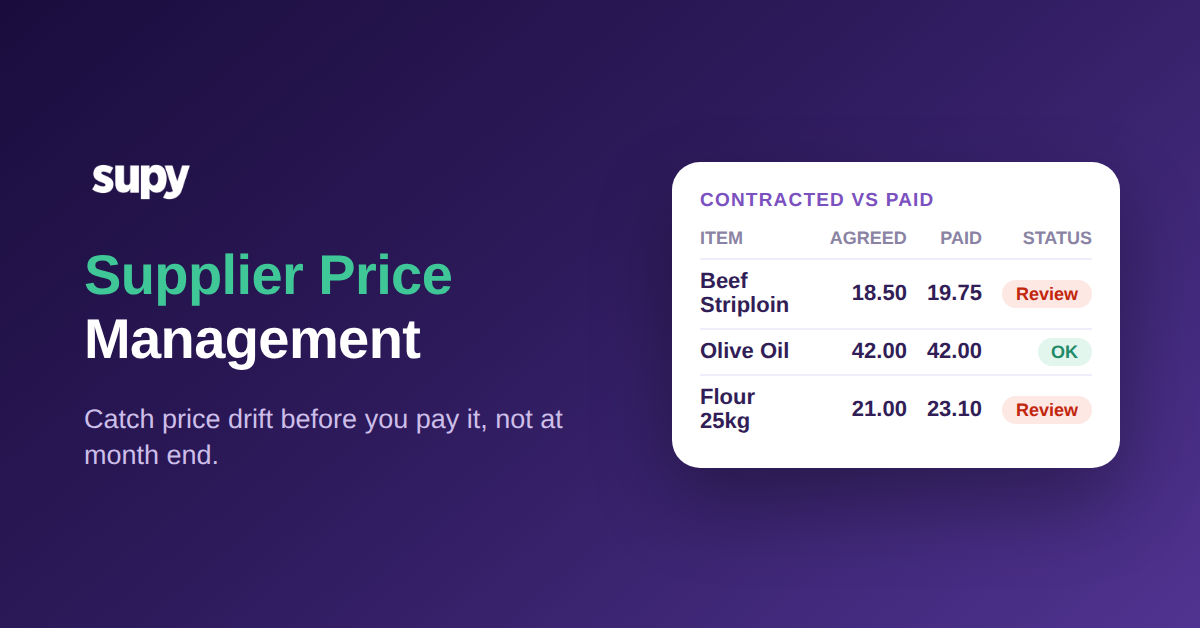
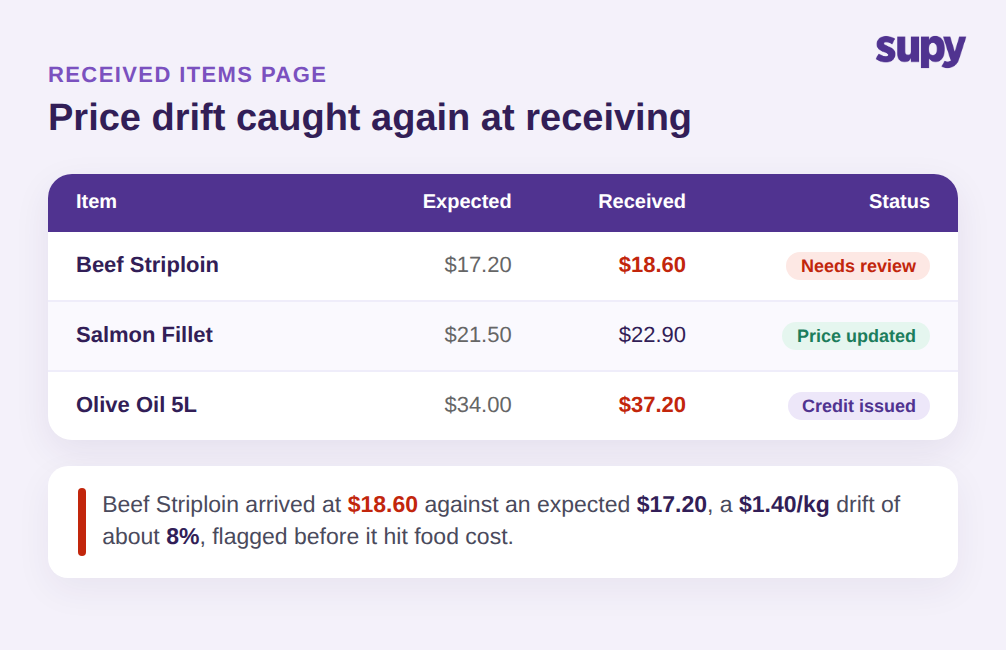
Den günstigsten Lieferanten beim Bestellen zu wählen, bedeutet nichts, wenn sich der Preis bis zur Ankunft der Waren stillschweigend ändert. Hier verliert ein reines Orderzeit-Vergleichssystem: Sie haben 17,20 € pro kg vereinbart, die Lieferung kommt mit 18,60 € in Rechnung gestellt an, und wenn nicht jemand die 8%ige Abweichung an der Tür bemerkt, fließt sie direkt in den Wareneinsatz. Volatile Zutaten weichen am stärksten ab, und sie weichen ohne eine Warnung ab, wenn das System den empfangenen Preis nicht gegen den erwarteten überwacht.
Supy erweitert den Vergleich auf den Wareneingang. Die Seite „Empfangene Artikel" listet jeden eingegangenen Artikel über Wareneingangsbuchungen als Zeile auf und filtert standardmäßig nach Preisabweichungen, sodass die Zeilen, bei denen der empfangene Preis vom erwarteten abweicht, zuerst erscheinen. Von diesem Bildschirm aus kann der Einkäufer den erwarteten Preis aktualisieren, eine Lieferanten-Kontakt-E-Mail generieren oder die Wareneingangsbuchung öffnen, um eine Gutschrift bei Lieferanten anzufordern, und jede Aktion wird in der Preishistorie aufgezeichnet, damit die nächste Kostenkalkulation die korrigierte Zahl verwendet. Der Vergleich, den Sie beim Bestellen durchgeführt haben, wird erneut an der Tür durchgesetzt, was genau der Punkt ist, an dem die meisten Tools aufhören. Wenn unerkannte Rechnungsfehler Ihre Marge belasten, lohnt es sich, die Mechanik dieses Lecks in unserem Artikel über Lieferanten-Überpreisungen in Restaurants tiefer zu verstehen.
Die Preishistorie sauber zu halten, ist das, was die gesamte Schleife zusammensetzt. Jeder korrigierte Preis fließt in den nächsten Vergleich ein, sodass die erwarteten Preise, die Sie nach einigen Monaten vergleichen, die echten sind, die Sie tatsächlich gezahlt haben, und nicht die, die ein Lieferant vor einem Jahr angeboten hat. Mit mehr als 75 Integrationen, die Lieferanten- und Buchhaltungsdaten an denselben Ort ziehen, bleibt das Bild aktuell, ohne dass jemand es neu eintippen muss.
Zusammengelesen werden Bestellen und Wareneingang zu zwei Überprüfungen derselben Zahl, anstatt zwei getrennter Aufgaben. Beim Bestellen wählen Sie den Lieferanten, dessen Preis gewinnt; beim Wareneingang bestätigen Sie, dass der gewählte Preis auch tatsächlich ankam. Eine Lücke an einem der beiden Punkte ist sichtbar, einem Lieferanten und einer Zutat zugeordnet und von demselben Bildschirm aus behebbar, auf dem Sie sie bemerkt haben. Das ist der Unterschied zwischen dem Kennen Ihres Wareneinsatzes nach Monatsende und dem Steuern während des Monats, und er ist nur möglich, weil jeder Preis, zu beiden Zeitpunkten, auf das eine Base Item für die Zutat zurückgeführt wird.
Wo beginnen
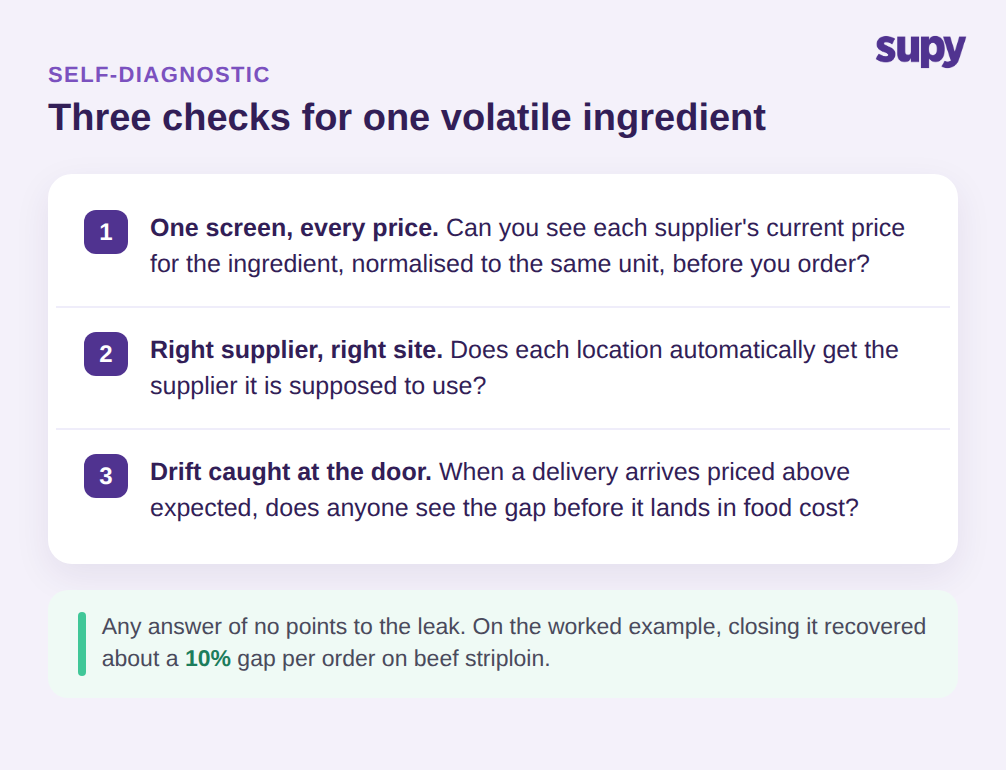
Sie müssen die Beschaffung nicht neu aufbauen, um dies zum Laufen zu bringen. Führen Sie zuerst eine schnelle Prüfung Ihres eigenen Betriebs durch. Wählen Sie eine volatile Zutat, die Sie von mehr als einem Lieferanten kaufen, und stellen Sie drei Fragen. Können Sie den aktuellen Preis jedes Lieferanten dafür, normiert auf dieselbe Einheit, auf einem Bildschirm sehen? Bekommt jeder Standort automatisch den Lieferanten, den er verwenden soll? Und wenn eine Lieferung zu einem höheren Preis als erwartet ankommt, sieht jemand die Lücke, bevor sie in den Wareneinsatz fließt? Wenn die Antwort auf eine dieser Fragen nein ist, ist diese Zutat die Stelle, an der die Lücke ist, und ein einziges Base Item, das jede Lieferanten-SKU verknüpft, ist die Lösung, die alle drei Lücken auf einmal schließt, beim Bestellen und erneut beim Wareneingang. Beginnen Sie mit der einen Zutat, die die meisten Überprüfungen nicht besteht, modellieren Sie sie korrekt und verwenden Sie sie als Vorlage für die nächsten zehn. Die Betreiber, die den meisten Nutzen aus dem Pro-Zutat-Vergleich ziehen, sind nicht diejenigen, die alles an Tag eins einschalten; sie sind diejenigen, die die Schleife an einer einzigen volatilen Zutat beweisen, sehen, wie sich die Preislücke bei der nächsten Bestellung schließt, und ihn von dort aus einrollen.