.jpeg)

Calcul du coût des recettes : tableur ou logiciel ?
Pourquoi le coût des recettes sur tableur devient obsolète
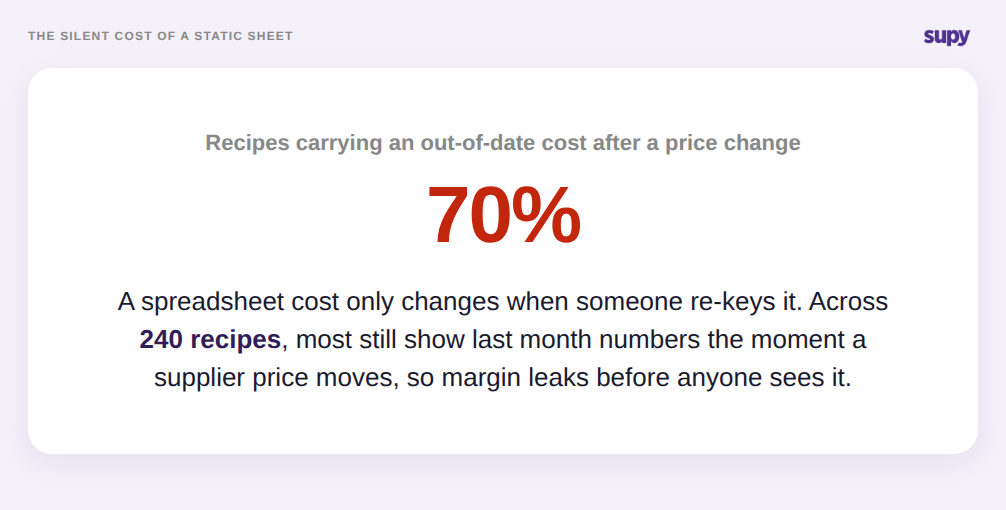
Le calcul du coût des recettes sur tableur consiste à saisir le coût de chaque ingrédient dans une feuille et à en lire le total ; un logiciel calcule ce même total à partir des prix fournisseurs en temps réel et le maintient à jour automatiquement. La différence ne se fait sentir qu'au moment d'un changement de prix. Le tableur conserve l'ancienne valeur jusqu'à ce que quelqu'un la ressaisisse manuellement ; le coût de la recette devient faux dès qu'un prix fournisseur change, sans que personne ne s'en aperçoive avant la clôture de période.
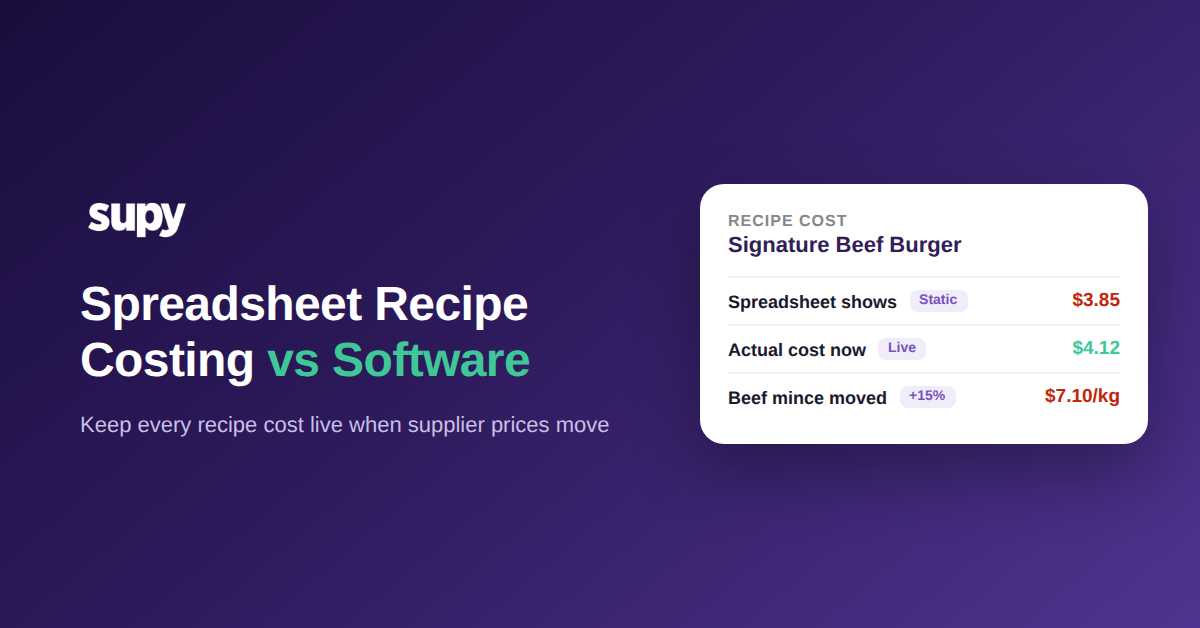
Prenons un exemple concret. Un Burger Bœuf Signature préparé avec de la viande hachée à $6.20 le kg affiche un coût de recette de $3.85 dans le tableur. Le fournisseur augmente le prix de la viande à $7.10 le kg, soit une hausse de 15 %, et le coût réel de ce burger passe à $4.12. Le prix sur la carte n'a pas changé, le tableur non plus, et l'écart de 7 % entre le coût inscrit et le coût réel représente de la marge qui s'évapore silencieusement.
Une seule recette est facile à corriger. Le problème, c'est qu'un groupe exploite des centaines de recettes à partir du même référentiel fournisseur, et qu'un seul changement de prix touche toutes les recettes utilisant cet ingrédient. À moins de recalculer manuellement chaque recette concernée le jour même, la majeure partie de la carte affiche un coût obsolète.
Ce qu'un coût de recette figé ne prend pas en compte : pertes, rendement et prix par site
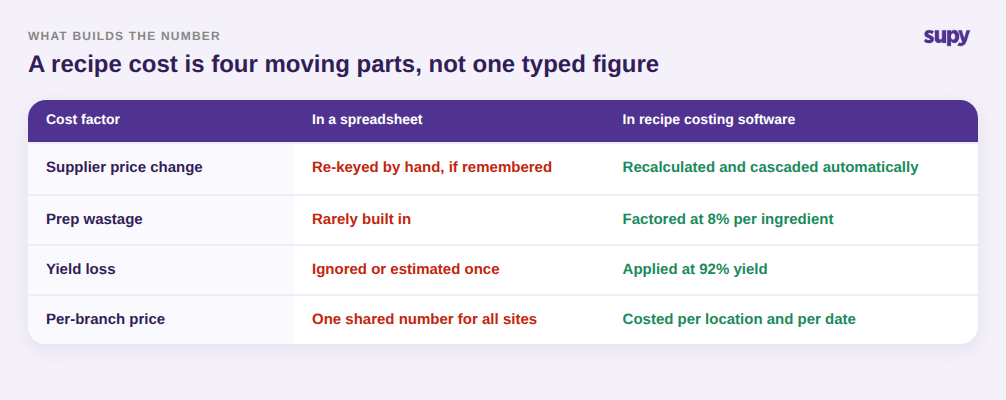
Un coût saisi dans un tableur est une valeur figée, mais le coût réel d'une recette résulte de plusieurs variables. Le traiter comme un chiffre unique est la deuxième façon dont le calcul sur tableur s'éloigne de la réalité, même sans aucun changement de prix.
Trois facteurs sont ignorés. Les pertes de préparation obligent la cuisine à acheter plus d'un ingrédient que ce qui se retrouve dans l'assiette, ce qui hausse le coût réel par portion au-delà du prix brut. Le rendement joue dans le sens inverse : la taille, la cuisson et le portionnement font qu'un kilo acheté donne rarement un kilo complet de produit fini. Enfin, un groupe qui achète le même article à des conditions fournisseurs différentes selon les sites n'a pas un prix d'ingrédient unique. Un tableur qui ignore 8 % de pertes de préparation et un rendement de 92 % sous-estime le coût à l'assiette, et plus l'opérateur cherche à être rigoureux, plus le tableur exige de mises à jour manuelles. Un logiciel de calcul des coûts de recettes intègre automatiquement les pertes et le rendement dans chaque recette, en utilisant le coût moyen ou le dernier prix d'achat par site, de sorte que le chiffre reflète le vrai coût de production du plat. La même rigueur est à la base de tout calcul honnête du ratio coût matière.
Pourquoi un tableur partagé ne peut pas calculer le coût de chaque site
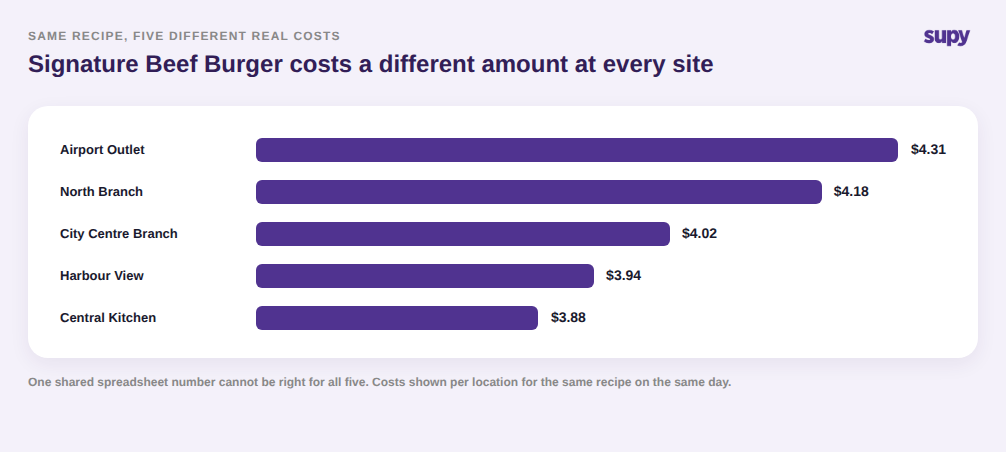
Le problème le plus difficile à résoudre dans un tableur est qu'un groupe multi-sites n'a pas un coût de recette unique. Il en a un par site. Le même burger ne coûte pas $4.12 partout, car chaque établissement achète à ses propres prix fournisseurs, selon ses conditions de livraison et sa disponibilité locale.
Un tableur maître ne peut stocker qu'une valeur par recette, ce qui l'oblige à choisir une moyenne ou un prix de siège et à l'appliquer à tous les établissements. Cela masque les sites qui surpayent silencieusement et flatte ceux qui ne le font pas. Quand le même Burger Bœuf Signature coûte $4.31 dans un établissement et $3.88 dans un autre, un coût groupe agrégé n'apprend rien à l'opérateur sur la source réelle du problème. Un logiciel calcule le coût de chaque recette par site et par date, ce qui permet au groupe d'observer les écarts et d'agir sur l'établissement réellement hors norme, plutôt que sur un chiffre consolidé qui ne décrit aucun d'eux fidèlement. C'est la même raison pour laquelle le food cost théorique et le food cost réel divergent par site et doivent être lus établissement par établissement.
Tableur ou logiciel : ce qui change quand les coûts se mettent à jour automatiquement
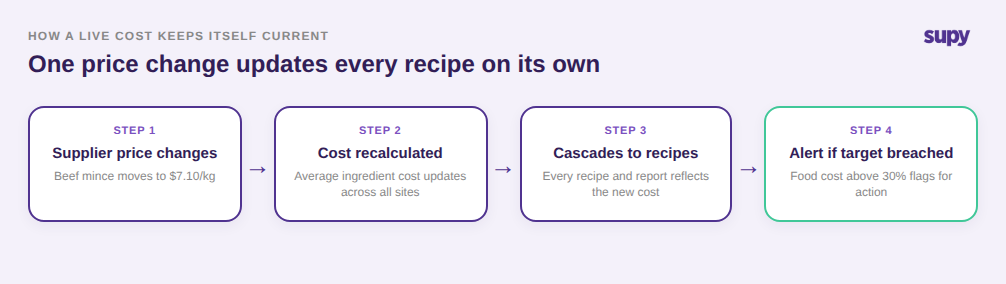
Si un logiciel comble ces trois lacunes à la fois, c'est qu'il ne dépend pas d'une intervention humaine pour maintenir les données à jour. Quand un prix fournisseur change, la plateforme recalcule le coût moyen de l'ingrédient sur tous les sites et le propage dans chaque recette et rapport qui l'utilisent, puis signale toute recette dont le ratio coût matière dépasse sa cible. Le calcul des coûts cesse d'être un nettoyage mensuel pour devenir un garde-fou en temps réel. Supy gère cela au sein de sa plateforme de gestion des stocks et de calcul des coûts de recettes pour restaurants, en maintenant les prix fournisseurs, les recettes et les objectifs de coût matière sur un modèle connecté.
C'est aussi la grille d'analyse honnête pour et contre chaque approche. Optez pour un tableur si vous gérez un seul site avec une carte courte et stable et une liste fournisseurs qui bouge peu, là où ressaisir quelques coûts de temps en temps est vraiment rapide. Optez pour un logiciel de calcul des coûts de recettes si vous gérez plusieurs sites, une carte étendue ou des prix qui évoluent souvent, car à cette échelle, les mises à jour manuelles qu'exige un tableur sont précisément les tâches qui ne sont jamais faites, et le coût de cette négligence se traduit par un taux de food cost que vous ne découvrez qu'à la clôture de période.
Le test est simple. Si vous ne pouvez pas dire ce que coûte une recette précise dans un établissement précis aujourd'hui, et être certain que la réponse reflète les prix fournisseurs de cette semaine, vos coûts de recettes sont déjà obsolètes — la seule question est : de combien ? Choisissez un plat à fort volume, comparez son coût calculé à une facture récente dans deux établissements, et l'ampleur de l'écart vous dira si votre tableur vous sert encore ou vous coûte silencieusement de la marge.