.jpeg)

Planifier les modifications de recettes entre établissements : comment déployer de nouvelles versions à une date future sans corrompre les rapports de coût de période
Comment la planification à date future d'une modification de recette garantit des rapports de coût propres
Pour planifier une modification de recette sur l'ensemble de vos établissements, vous définissez une date d'entrée en vigueur pour la nouvelle version plutôt que de modifier manuellement la recette en production. La version mise à jour reste en attente jusqu'à cette date, puis prend automatiquement le relais : chaque établissement bascule le même jour, et aucune période de reporting ne se retrouve partagée entre deux versions différentes.
Modifier une recette le jour même de sa mise en production paraît rapide, mais cela altère silencieusement vos chiffres. Dès que vous écrasez la version en production, chaque rapport de coût pour cette période mélange des coûts avant et après modification sans frontière nette, et le contrôleur de coûts doit réconcilier le coût matière réel avec un coût théorique qui a changé sous ses pieds. Sur un groupe de 9 établissements, cette réconciliation peut engloutir 6 heures par établissement et par période de reporting, soit environ 54 heures à l'échelle du groupe – du temps passé à justifier des chiffres plutôt qu'à agir.
Fixer une date future supprime les incertitudes. Vous préparez la nouvelle version à l'avance, indiquez au système la date à partir de laquelle elle doit s'appliquer, et laissez-le gérer le basculement. Ce guide présente les trois façons dont Supy applique une modification de recette, dans quelles situations chacune est appropriée, et comment la date d'entrée en vigueur maintient les stocks, les pertes et les rapports de coût sur la bonne version pour chaque période. Si vous devez également retracer l'évolution d'un coût dans le temps, consultez notre guide sur le suivi des modifications de coût des recettes au fil du temps.

Immédiat, planifié ou rétroactif : choisir le bon mode de modification
Supy applique une modification de recette selon l'un des trois modes suivants, et choisir le bon est l'essentiel de la décision. Une modification immédiate entre en vigueur à partir d'aujourd'hui. Une modification planifiée est préparée maintenant et prend effet à une date future que vous définissez. Une modification rétroactive s'applique à partir d'une date passée. Le mode choisi détermine quelles périodes de reporting voient les anciens coûts et lesquelles voient les nouveaux.
Optez pour une modification immédiate quand la nouvelle recette s'applique réellement à partir d'aujourd'hui dans chaque établissement, par exemple un changement de fournisseur déjà en place dans toutes les cuisines. Optez pour une modification planifiée quand le basculement correspond à une date future connue, comme le lancement d'un menu saisonnier ou un changement de prix effectif à partir du premier du mois ; c'est ce mode qui vous permet de préparer 18 recettes reformulées avant un lancement sans toucher aux versions encore en vente. Optez pour une modification rétroactive quand une recette a déjà été changée en cuisine avant d'être saisie dans le système, pour que les coûts révisés s'imputent à la date réelle de la modification plutôt qu'au jour de la saisie. Les outils de recettes et de préparation de Supy conservent l'historique complet des versions pour chacune de ces trois options, de sorte que vous pouvez toujours savoir quelle version était active pour une période donnée.

Préparer une version de recette à date future avant le lancement d'un menu
La préparation d'une version planifiée suit une séquence courte et reproductible. Première étape : ouvrez la recette et modifiez la nouvelle version – les ingrédients, les quantités et le rendement pour le plat reformulé. Deuxième étape : choisissez Planifiée et définissez la date d'entrée en vigueur correspondant à votre date de lancement. Troisième étape : confirmez que le contrôle du plan unique actif est satisfait. Quatrième étape : laissez la version en production intacte ; elle continue de servir et de calculer le coût de chaque vente jusqu'à la date. Cinquième étape : à la date d'entrée en vigueur, la nouvelle version s'active automatiquement, dans chaque établissement, sans que personne n'ait à mettre à jour les recettes le matin du lancement.
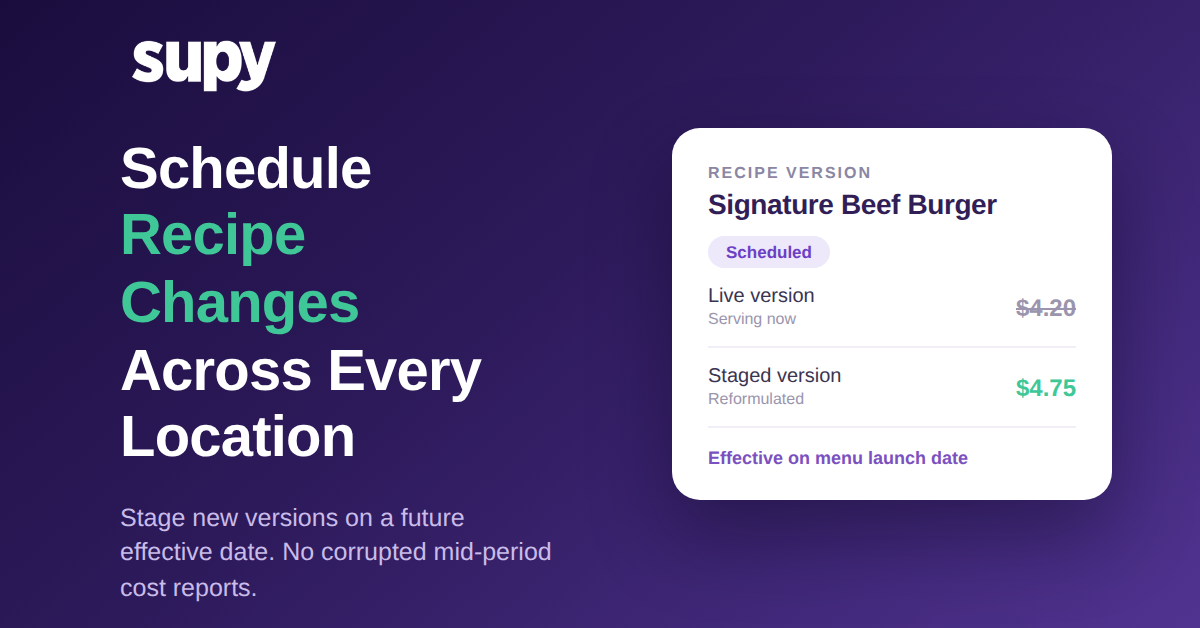
Prenons la reformulation du Signature Beef Burger qui fait passer le coût de l'assiette de 4,20 $ à 4,75 $. Planifiée comme modification programmée pour la date de lancement, la version à 4,20 $ continue de calculer le coût de chaque burger vendu jusqu'à cette date, et la version à 4,75 $ prend le relais sans accroc au moment où le nouveau menu est mis en production. Personne n'a à penser à effectuer le changement à minuit, et aucun établissement n'est en décalage d'un jour par rapport aux autres.

La barrière du plan unique actif : pourquoi les versions conflictuelles ne peuvent pas se cumuler
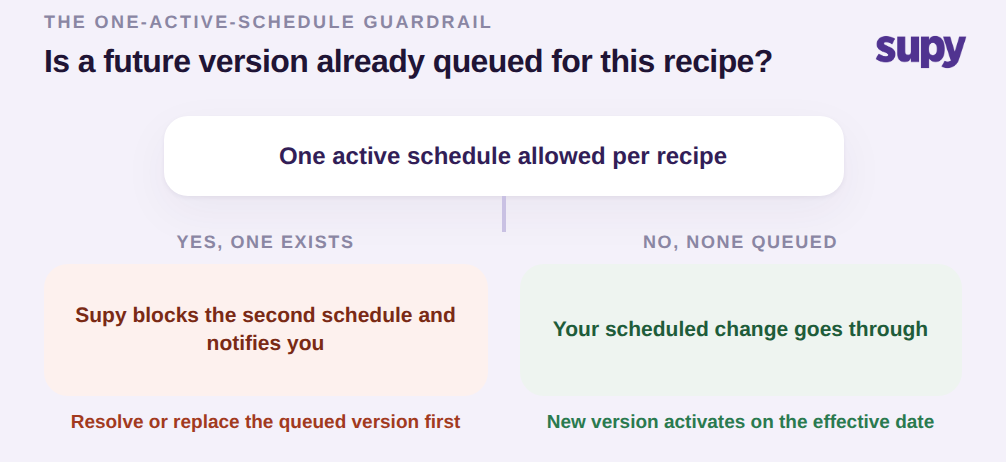
Supy impose un seul plan actif par recette. Si une version future est déjà en attente pour une recette et que quelqu'un tente d'en planifier une seconde, le système bloque la deuxième mise à jour et notifie l'utilisateur plutôt que de mettre silencieusement deux versions conflictuelles en file d'attente pour le même article. Il s'agit d'une barrière de protection, non d'une limitation, et elle existe parce que les versions futures empilées sont précisément ce qui fait échouer un déploiement : deux personnes planifient des modifications différentes pour le même plat, chacune pense que la sienne sera appliquée, et la période de reporting hérite de celle qui a gagné par hasard.
La décision à ce stade est donc simple. Si aucune version future n'est en attente, votre modification planifiée passe. Si une version existe déjà, le système vous arrête et vous montre ce qui est prévu, afin que vous puissiez résoudre ou remplacer le plan existant avant d'en ajouter un autre. Dans tous les cas, vous n'aboutissez jamais à deux avenirs se disputant la même recette. Cette même discipline sous-tend l'approche plus globale de gestion des recettes de Supy, où le contrôle de version est traité comme partie intégrante de la précision des coûts et non comme une réflexion secondaire.
Maintenir l'écart théorique/réel propre sur chaque établissement
Le bénéfice d'une modification planifiée se reflète dans vos rapports d'écart. Lorsqu'une modification est activée, elle porte une date d'entrée en vigueur, et Supy utilise cette date pour déterminer quelle version de recette chaque transaction de stock, déduction de pertes et rapport de coût doit lire pour chaque période. Cela signifie que le coût théorique et le coût réel sont toujours comparés sur la même frontière de version, de sorte que l'écart que vous observez est un écart opérationnel réel, et non du bruit créé par une recette qui a changé en milieu de période.
Sans cette frontière nette, un contrôleur de coûts multi-établissements finit par réconcilier manuellement le réel et le théorique, parce que les versions de recettes et leur calendrier ne coïncident jamais avec la période de reporting. Avec elle, la réconciliation manuelle qui prenait jadis 3 à 7 heures par établissement et par période tombe à zéro, et les rapports de marge sur le menu reflètent les modifications de coût et de prix de manière cohérente sur chaque établissement, au lieu d'être appliquées au cas par cas, site par site.

La prochaine étape dépend de votre situation actuelle. Si une mise à jour de menu ou une modification de coût est prévue à une date connue, préparez-la maintenant comme modification planifiée afin que tous vos établissements basculent ensemble et que votre période actuelle reste propre. Si une modification est déjà entrée en vigueur en cuisine avant d'atteindre le système, utilisez une modification rétroactive pour que les coûts révisés s'imputent à la date réelle. Et si vous modifiez encore des recettes en production le jour même de leur changement, c'est cette habitude qui altère vos rapports de période ; transférer ce seul Workflow vers des dates d'entrée en vigueur planifiées est la modification à la plus haute valeur ajoutée que vous puissiez apporter à la précision de vos coûts.