.jpeg)


Rezeptänderungen standortübergreifend planen: So führen Sie neue Versionen zu einem zukünftigen Datum ein, ohne Periodenberichte zu korrumpieren
Wie die Zukunftsdatierung einer Rezeptänderung saubere Periodenberichte gewährleistet
Um eine Rezeptänderung standortübergreifend zu planen, legen Sie für die neue Version ein Gültigkeitsdatum fest, anstatt das live geschaltete Rezept manuell zu bearbeiten. Die aktualisierte Version bleibt bis zu diesem Datum bereitgestellt und übernimmt dann automatisch, sodass jeder Standort am gleichen Tag wechselt und kein Berichtszeitraum zwischen zwei Versionen der Realität aufgeteilt wird.
Ein Rezept am Tag seines Live-Gangs zu bearbeiten erscheint schnell, korrumpiert aber still und leise Ihre Zahlen. In dem Moment, in dem Sie die Live-Version überschreiben, vermischt jeder Kostenbericht für diesen Zeitraum Vor- und Nachänderungskosten ohne saubere Trennlinie, und ein Kostenverantwortlicher muss den tatsächlichen Wareneinsatz gegen einen theoretischen Wareneinsatz abstimmen, der sich unter seinen Händen verändert hat. In einer Gruppe mit 9 Standorten kann diese Abstimmung 6 Stunden pro Standort und Berichtszeitraum verschlingen, also rund 54 Stunden in der gesamten Gruppe – Zeit, die mit dem Belegen von Zahlen statt mit dem Handeln verbracht wird.
Zukunftsdatierung beseitigt das Rätselraten. Sie bereiten die neue Version im Voraus vor, teilen dem System das Datum mit, ab dem sie gelten soll, und überlassen ihm die Umschaltung. Dieser Leitfaden erläutert die drei Arten, wie Supy eine Rezeptänderung anwendet, wann jede davon richtig ist und wie das Gültigkeitsdatum sicherstellt, dass Bestände, Schwund und Kostenberichte für jeden Zeitraum auf der richtigen Version basieren. Wenn Sie auch rückblickend nachverfolgen müssen, wie sich ein Kostenwert im Laufe der Zeit verändert hat, lesen Sie dazu unseren Leitfaden zum Verfolgen von Rezeptkostenänderungen im Zeitverlauf.

Sofort, Geplant oder Rückdatiert: Die richtige Änderungsart wählen
Supy wendet eine Rezeptänderung auf eine von drei Arten an, und die Wahl der richtigen ist die gesamte Entscheidung. Eine sofortige Änderung gilt ab heute. Eine geplante Änderung wird jetzt bereitgestellt und tritt an einem von Ihnen festgelegten zukünftigen Datum in Kraft. Eine rückdatierte Änderung gilt ab einem Datum in der Vergangenheit. Der gewählte Modus bestimmt, welche Berichtszeiträume die alten Kosten und welche die neuen sehen.
Verwenden Sie eine sofortige Änderung, wenn das neue Rezept tatsächlich ab heute an jedem Standort gilt, zum Beispiel bei einem Lieferantenwechsel, der bereits in jeder Küche vollzogen ist. Verwenden Sie eine geplante Änderung, wenn der Wechsel zu einem bekannten zukünftigen Datum gehört, etwa einem saisonalen Menülaunch oder einer Preisänderung, die am Monatsersten beginnt; dies ist der Modus, mit dem Sie 18 überarbeitete Rezepte vor einem Launch bereitstellen können, ohne die noch verkauften Versionen anzufassen. Verwenden Sie eine rückdatierte Änderung, wenn ein Rezept in der Küche früher geändert wurde, als es im System erfasst wurde, damit die korrigierten Kosten auf das tatsächliche Änderungsdatum fallen und nicht auf den Tag der Dateneingabe. Supys Rezept- und Vorbereitungstools bewahren die vollständige Versionshistorie hinter allen drei Optionen, sodass Sie stets nachvollziehen können, welche Version für einen bestimmten Zeitraum aktiv war.

Eine zukunftsdatierte Rezeptversion vor einem Menülaunch bereitstellen
Das Bereitstellen einer geplanten Version ist eine kurze, wiederholbare Abfolge. Erstens: Öffnen Sie das Rezept und bearbeiten Sie die neue Version – die Zutaten, Mengen und den Ertrag für das überarbeitete Gericht. Zweitens: Wählen Sie Geplant und legen Sie als Gültigkeitsdatum Ihr Startdatum fest. Drittens: Bestätigen Sie, dass die Prüfung auf einen einzigen aktiven Plan bestanden wird. Viertens: Lassen Sie die Live-Version unangetastet; sie bedient und berechnet jeden Verkauf bis zu diesem Datum. Fünftens: Am Gültigkeitsdatum aktiviert sich die neue Version automatisch, an jedem Standort, ohne dass jemand am Morgen des Launches Rezepte aktualisieren muss.
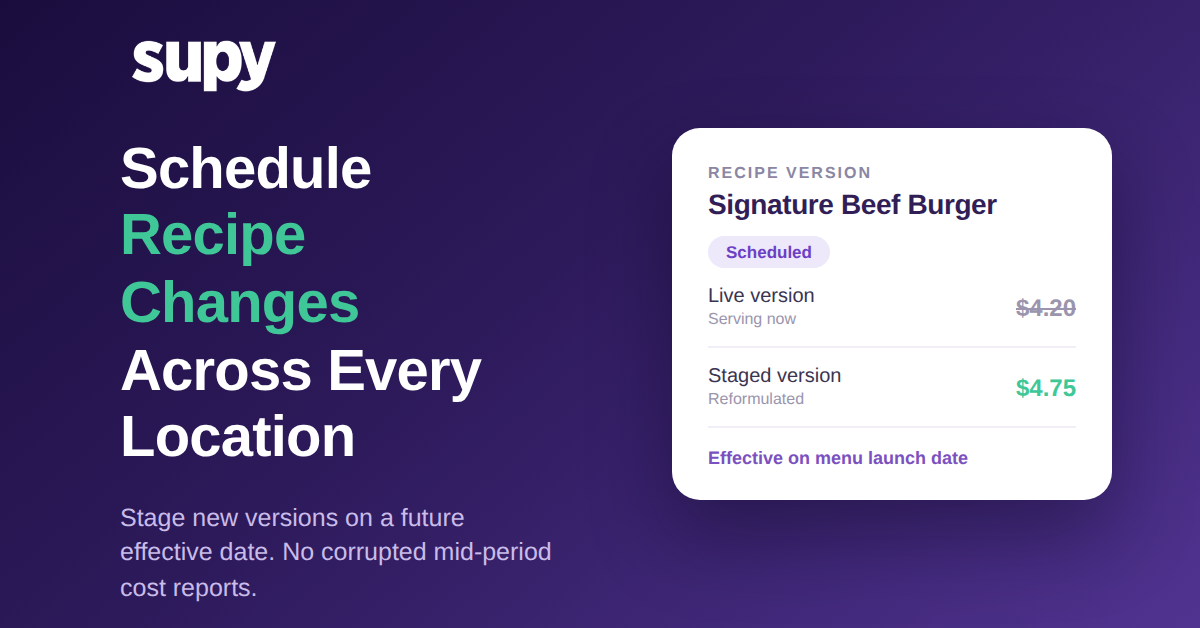
Betrachten Sie eine Überarbeitung des Signature Beef Burgers, die den Einstandspreis von 4,20 $ auf 4,75 $ hebt. Als geplante Änderung für das Startdatum bereitgestellt, berechnet die 4,20 $-Version bis dahin jeden verkauften Burger, und die 4,75 $-Version übernimmt nahtlos in dem Moment, in dem die neue Speisekarte live geht. Niemand muss daran denken, um Mitternacht die Änderung vorzunehmen, und kein Standort ist auch nur einen Tag außer Schritt mit den anderen.

Die Einzelplan-Schutzschranke: Warum widersprüchliche Versionen nicht gestapelt werden können
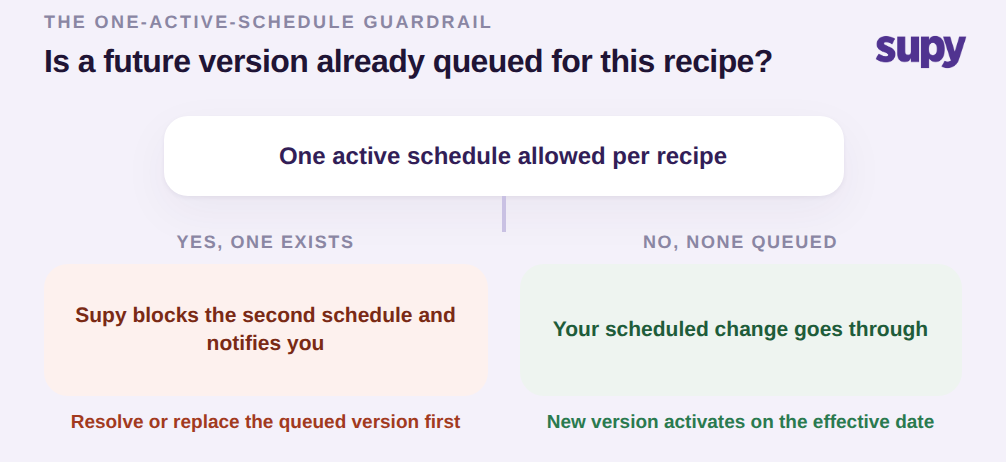
Supy erzwingt einen einzigen aktiven Plan pro Rezept. Wenn für ein Rezept bereits eine zukünftige Version in der Warteschlange ist und jemand versucht, eine zweite zu planen, blockiert das System die zweite Aktualisierung und benachrichtigt den Nutzer, anstatt still und leise zwei widersprüchliche Versionen für dasselbe Element einzureihen. Das ist eine Schutzschranke, keine Einschränkung, und sie existiert, weil gestapelte zukünftige Versionen genau das sind, was einen Rollout scheitern lässt: Zwei Personen planen unterschiedliche Änderungen für dasselbe Gericht, beide denken, dass ihre die anzuwendende sein wird, und der Berichtszeitraum erbt diejenige, die zufällig gewonnen hat.
Die Entscheidung an diesem Punkt ist also einfach. Wenn keine zukünftige Version in der Warteschlange ist, wird Ihre geplante Änderung durchgeführt. Wenn bereits eine existiert, stoppt das System Sie und zeigt Ihnen, was bereits geplant ist, damit Sie den bestehenden Plan lösen oder ersetzen, bevor Sie einen weiteren hinzufügen. So enden Sie in keinem Fall mit zwei Zukünften, die um dasselbe Rezept kämpfen. Dieselbe Disziplin liegt Supys umfassenderem Rezeptmanagement-Ansatz zugrunde, wo Versionskontrolle als Teil der Kostengenauigkeit und nicht als nachträglicher Gedanke behandelt wird.
Theoretische und tatsächliche Abweichung an jedem Standort sauber halten
Der Nutzen einer geplanten Änderung zeigt sich in Ihren Abweichungsberichten. Wenn eine Änderung aktiviert wird, trägt sie ein Gültigkeitsdatum, und Supy nutzt dieses Datum, um zu bestimmen, welche Rezeptversion jede Bestandstransaktion, jeder Schwundabzug und jeder Kostenbericht für jeden Zeitraum lesen soll. Das bedeutet, dass theoretische und tatsächliche Kosten immer an derselben Versionsgrenze verglichen werden, sodass die Abweichung, die Sie sehen, eine echte betriebliche Abweichung ist und kein Rauschen, das durch ein Rezept entstand, das sich mitten in der Periode veränderte.
Ohne diese saubere Grenze muss ein Multi-Standort-Kostenverantwortlicher tatsächliche gegen theoretische Werte manuell abstimmen, weil die Rezeptversionen und ihr Timing nie mit dem Berichtszeitraum übereinstimmen. Mit ihr sinkt die manuelle Abstimmung, die früher 3 bis 7 Stunden pro Filiale und Periode betrug, gegen null, und die Menü-Marge-Berichterstattung spiegelt Kosten- und Preisänderungen konsistent an jedem Standort wider, anstatt sie sporadisch, Standort für Standort, zu berücksichtigen.

Der nächste Schritt hängt von Ihrer aktuellen Situation ab. Wenn eine Menü-Aktualisierung oder eine Kostenänderung zu einem bekannten Datum bevorsteht, stellen Sie sie jetzt als geplante Änderung bereit, damit alle Ihre Standorte gemeinsam wechseln und Ihre aktuelle Periode sauber bleibt. Wenn eine Änderung bereits in der Küche live ging, bevor sie das System erreichte, verwenden Sie eine rückdatierte Änderung, damit die korrigierten Kosten auf das tatsächliche Datum fallen. Und wenn Sie Rezepte noch am Tag ihrer Änderung live bearbeiten, ist das die Gewohnheit, die Ihre Periodenberichte korrumpiert; diesen einen Workflow auf geplante Gültigkeitsdaten umzustellen, ist die einzige Maßnahme mit dem höchsten Mehrwert für Ihre Kostengenauigkeit.