.jpeg)

Comment corriger la qualité des données du référentiel article quand l'incohérence fausse le coût des recettes, le reporting MB et les prises d'inventaire
Pourquoi le référentiel article relève de la gouvernance des données, pas de la gestion administrative
La gestion de la qualité des données du référentiel article est la discipline qui consiste à maintenir votre référentiel produits propre : un enregistrement par produit réel, chacun avec un nom cohérent, l'unité de mesure correcte, un coût à jour et chaque fournisseur lié à cet enregistrement unique. Le coût des recettes, les rapports de marge brute (MB) et les prises d'inventaire lisent tous depuis le référentiel article, donc sa qualité fixe un plafond sur la précision de chacun d'eux.
La plupart des problèmes de coûts dans une cuisine multi-sites sont attribués au vol, au gaspillage ou à un fournisseur qui relève discrètement ses prix. Souvent, le vrai coupable se trouve un niveau en dessous de tout cela. Lorsque le même produit existe trois fois sous trois noms, lorsqu'un coût unitaire a été saisi une fois lors de la configuration et n'a plus jamais été modifié, ou lorsqu'un prix au carton est enregistré comme si c'était le prix d'un seul paquet, chaque chiffre construit par-dessus perd tout sens, sans qu'aucune erreur évidente n'apparaisse. Tout cela corrompt silencieusement chaque rapport.
C'est pourquoi le référentiel article mérite la même gouvernance que vous accorderiez à n'importe quel ensemble de données financières partagées : une responsabilité claire, une norme de dénomination et un audit régulier. Le traiter comme une simple gestion administrative est là où les groupes se font du tort, car chaque coût de recette, chaque écart théorique versus réel et chaque rapport de MB consolidé est un calcul effectué par-dessus. Ce guide parcourt les trois défauts qui causent le plus de dommages, puis vous fournit un audit à mener ce trimestre. Il complète notre guide approfondi sur les logiciels de coût des recettes, qui couvre ce qui se passe une fois votre référentiel nettoyé.

Quand des articles sont manquants ou dupliqués, les prises d'inventaire ne se réconcilent jamais
La façon la plus rapide de ressentir un référentiel article défaillant est lors de la prise d'inventaire. Les compteurs parcourent les rayons, trouvent un produit qui n'a jamais été ajouté au référentiel et n'ont nulle part où l'enregistrer. L'inventaire ne peut pas être complété, la dépréciation se bloque et le rapport d'écart qui s'ensuit est construit sur un tableau partiel. Les opérateurs multi-sites signalent ce phénomène à répétition : les lacunes du référentiel article bloquent la finalisation des inventaires et empêchent la dépréciation des stocks.
Les doublons posent le problème en miroir. Quand un produit existe sous deux ou trois enregistrements, l'inventaire se répartit entre eux : une partie est comptée sur l'enregistrement A, une autre sur l'enregistrement B, et aucun ne se réconcile avec ce que les recettes ont réellement consommé. Vous finissez par chercher un écart qui est un artefact des données, pas une vraie perte sur le terrain. La solution est structurelle, pas administrative : un enregistrement par produit réel, chaque fournisseur et chaque format lié à cet enregistrement unique, et un modèle d'inventaire qui liste l'intégralité du rayon pour que rien ne puisse être sauté. Les modèles de prises d'inventaire réutilisables et classés par rayons sont ce qui rend un inventaire à la fois complet et rapide, et c'est en procédant ainsi que les opérateurs signalent avoir réduit le temps de comptage de plus de moitié.

Quand le même produit a cinq noms, les rapports de groupe mentent
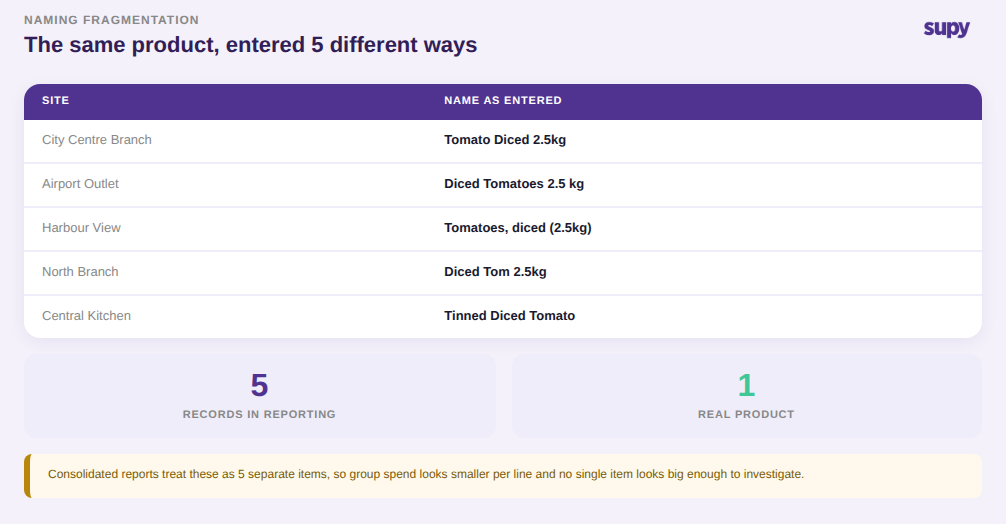
Donnez à cinq sites la liberté de nommer les produits eux-mêmes et un seul carton de tomates concassées devient cinq lignes différentes : l'un l'écrit en toutes lettres, l'un abrège, l'un ajoute la taille du paquet entre parenthèses, l'un réorganise les mots, l'un supprime un espace. Pour un humain, c'est évidemment la même chose. Pour le moteur de reporting, ce sont cinq produits distincts, chacun avec son propre coût, sa propre utilisation et sa propre part des dépenses.
Cette fragmentation empoisonne silencieusement chaque rapport consolidé. Les achats au niveau du groupe paraissent plus faibles par article qu'ils ne le sont, vous perdez ainsi l'effet de volume que vous avez réellement avec un fournisseur. Les dépenses par catégorie sont diluées sur des noms quasi-identiques, de sorte qu'aucune ligne ne semble assez importante pour être investiguée. Et une tendance de coût sur « l'article tomate » est sans signification car il n'y a pas un seul article tomate. Un responsable des données d'un groupe multi-sites a décrit exactement cela : le même produit nommé différemment selon les sites et les utilisateurs a fragmenté le référentiel et rendu les rapports consolidés inexacts. Le remède est une convention de dénomination que chaque site suit, appliquée au moment de la création des articles plutôt que corrigée après coup.
Quand les unités et les coûts sont mal configurés, le coût des recettes et l'écart se dérèglent tous les deux
Deux erreurs de configuration causent des dommages disproportionnés car elles se cachent dans des chiffres qui semblent plausibles.
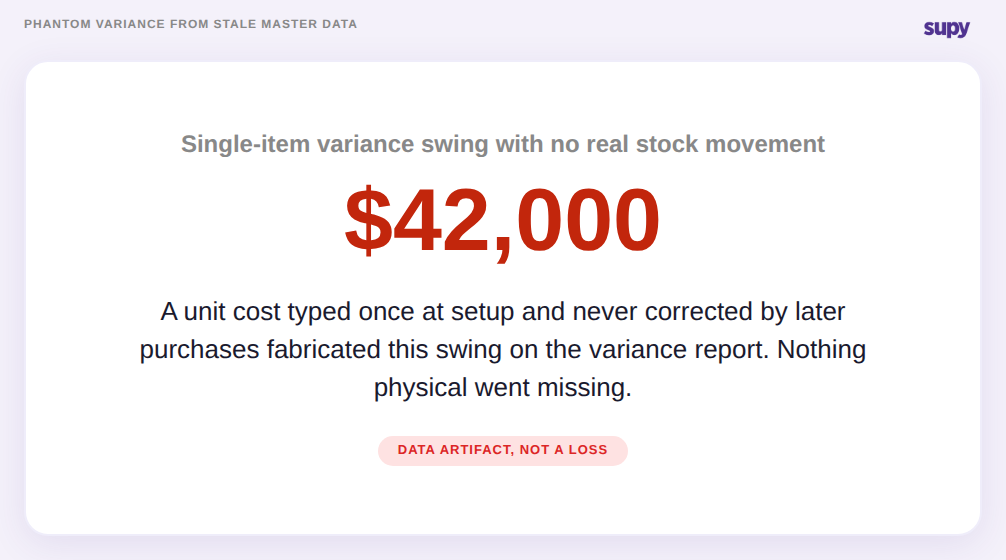
La première est un coût unitaire qui a été défini une fois et jamais corrigé. Si un article à forte rotation est tarifié lors de la configuration et que les achats ultérieurs ne mettent jamais à jour ce coût, le rapport d'écart commence à inventer des mouvements qui n'ont jamais eu lieu. Un groupe de restauration a retracé un écart d'un seul article d'environ $42,000 sur son rapport non pas à du vol ou du gaspillage, mais à un coût unitaire figé lors de la configuration tandis que les prix réels évoluaient en dessous. Il n'y avait aucun stock manquant. Le chiffre était un pur artefact de données, et il a envoyé l'équipe chercher une perte qui n'existait pas.
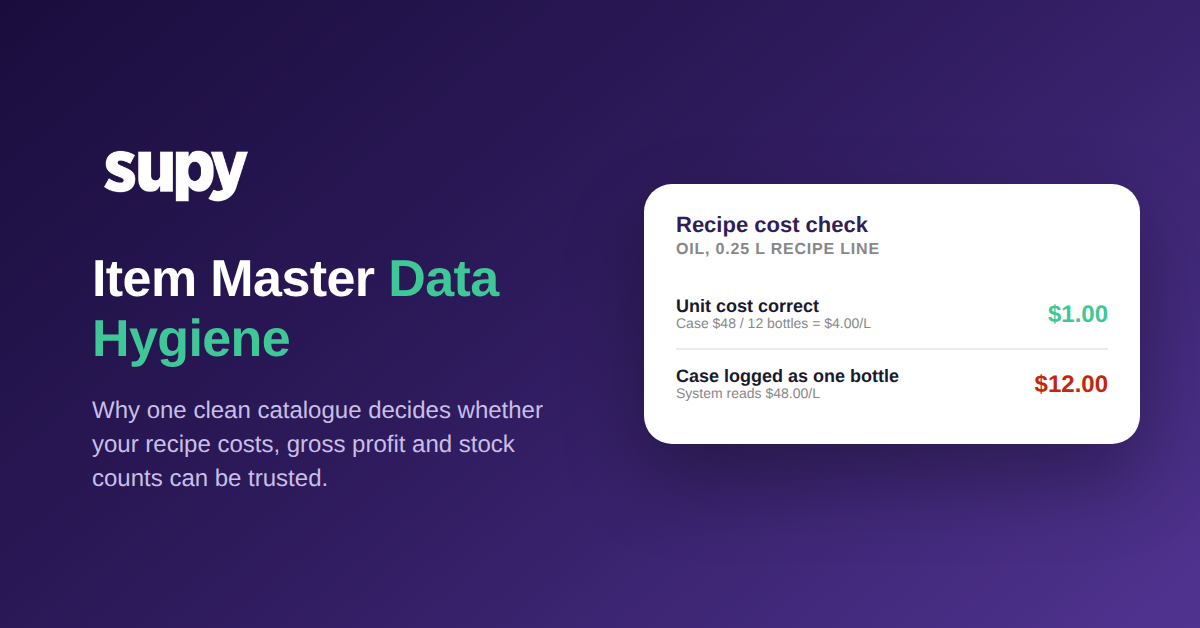
La seconde est une erreur d'unité de mesure à la réception. Achetez de l'huile en carton de 12 bouteilles d'un litre pour $48, et le coût correct par litre est $4.00. Enregistrez ce $48 comme le prix d'une seule bouteille, et le système croit maintenant que chaque litre coûte $48.00. Une recette qui utilise un quart de litre passe de $1.00 à $12.00 sur cette ligne seule, et chaque plat construit sur elle hérite de l'erreur. Le même type d'erreur apparaît quand un article semi-fini préparé est configuré comme matière première au lieu d'une sous-recette stockable : son coût et son stock cessent tous les deux de se comporter correctement. Un groupe multi-marques gérant plusieurs concepts depuis des cuisines partagées a trouvé des coûts de recettes fortement gonflés par exactement ces deux erreurs, et les a corrigées avec un audit structuré et un préfixe de convention de dénomination. Bien configurer les unités et les types d'articles au niveau des ingrédients est ce qui maintient le coût des recettes et l'écart fiables.
Un audit en quatre étapes du référentiel article que vous pouvez mener ce trimestre
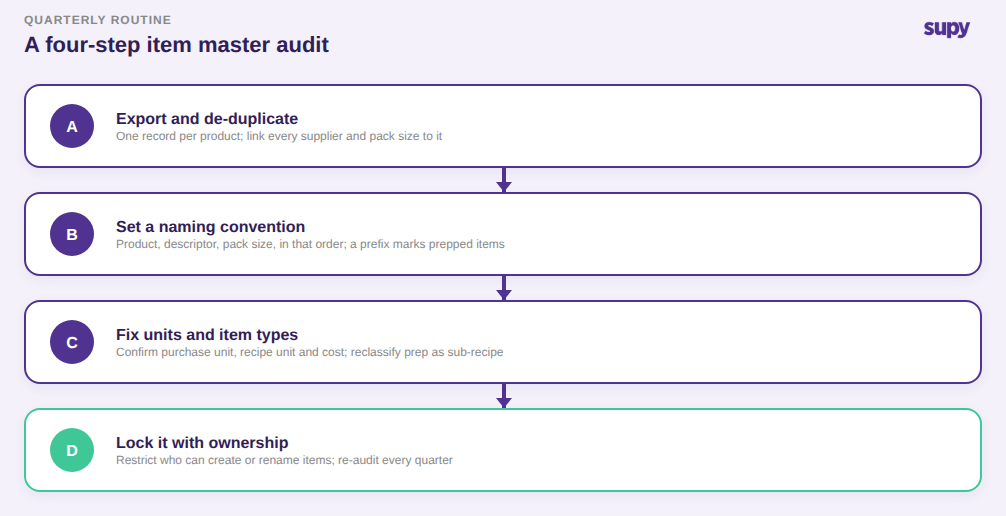
Vous n'avez pas besoin d'une équipe de données pour nettoyer cela. Vous avez besoin d'une séquence et d'un responsable.
- Exporter et dédupliquer. Extrayez la liste complète des articles et triez par nom et par fournisseur. Partout où le même produit réel apparaît plus d'une fois, fusionnez les doublons en un seul enregistrement et liez chaque fournisseur et chaque format à cet enregistrement. Un produit, un enregistrement, plusieurs fournisseurs.
- Définir une convention de dénomination et l'appliquer partout. Décidez du format une fois (produit, puis descripteur, puis taille du paquet, dans cet ordre) et renommez chaque article en conséquence. Un court préfixe pour les articles préparés et les sous-recettes les rend faciles à distinguer des matières premières d'un coup d'œil.
- Corriger les unités de mesure et les types d'articles. Pour chaque article à forte rotation, confirmez l'unité d'achat, l'unité de recette et la conversion entre elles, et vérifiez le coût actuel par rapport à une facture récente. Reclassifiez tout article préparé qui se fait passer pour une matière première en sous-recette stockable.
- Verrouiller avec responsabilité et permissions. Décidez qui est autorisé à créer ou renommer des articles, restreignez ce droit et mettez un ré-audit trimestriel au calendrier. La gouvernance est ce qui empêche le référentiel de dériver à nouveau dans le même désordre.
Une plateforme aide ici car elle supprime les étapes manuelles : un article de base unique par ingrédient avec chaque fournisseur et chaque format lié à lui rend les doublons difficiles à créer dès le départ, le comptage en direct classé par rayons fait apparaître les lacunes du référentiel au moment de l'inventaire, et les tableaux de bord consolidés lisent depuis un enregistrement propre au lieu de cinq fragmentés.
Vous voulez savoir si cela se passe dans votre exploitation en ce moment ? Effectuez trois vérifications rapides. Recherchez dans votre liste d'articles vos cinq produits aux dépenses les plus élevées et comptez le nombre d'enregistrements que chacun possède réellement. Ouvrez votre dernier rapport d'écart et demandez-vous si un grand écart a une cause physique réelle derrière lui, ou si le coût unitaire semble simplement obsolète. Et demandez à votre dernier compteur s'il a trouvé un article en rayon qu'il ne pouvait pas enregistrer. Si l'un de ces trois points soulève un signal d'alerte, vos rapports sont façonnés par votre référentiel article, pas par ce qui se passe dans vos cuisines, et l'audit en quatre étapes ci-dessus est le point de départ.



