.jpeg)

Modèle d'inventaire alimentaire gratuit pour restaurants – Téléchargement gratuit
Ce qu'un modèle d'inventaire alimentaire doit contenir
La plupart des modèles d'inventaire alimentaire commencent leur vie sous la forme d'une feuille de calcul bien rangée et cessent silencieusement de fonctionner dès l'ouverture d'un deuxième point de vente. Un seul gérant peut gérer les stocks d'un site dans sa tête et dans une colonne de chiffres ; sur trois ou quatre établissements, la même feuille devient une tâche quotidienne de copier-coller qui engloutit des heures tout en laissant quelqu'un deviner quoi recommander. Les groupes multi-sites font régulièrement état de gérants qui consacrent cinq à dix heures par semaine aux comptages manuels, et le processus reste sujet aux erreurs même à ce coût.
Le problème n'est pas le format du modèle. C'est qu'une simple feuille de comptage enregistre ce qui se trouvait sur l'étagère et rien de plus. Un modèle d'inventaire alimentaire qui mérite vraiment sa place vous indique non pas seulement ce que vous avez en stock, mais aussi ce qu'il faut en faire : quels articles recommander, en quelle quantité et pour quel site. Ce guide couvre les champs qui font cette différence, comment les paramétrer par point de vente, comment organiser le comptage pour que n'importe qui puisse le réaliser et à quelle fréquence chaque article mérite d'être compté.
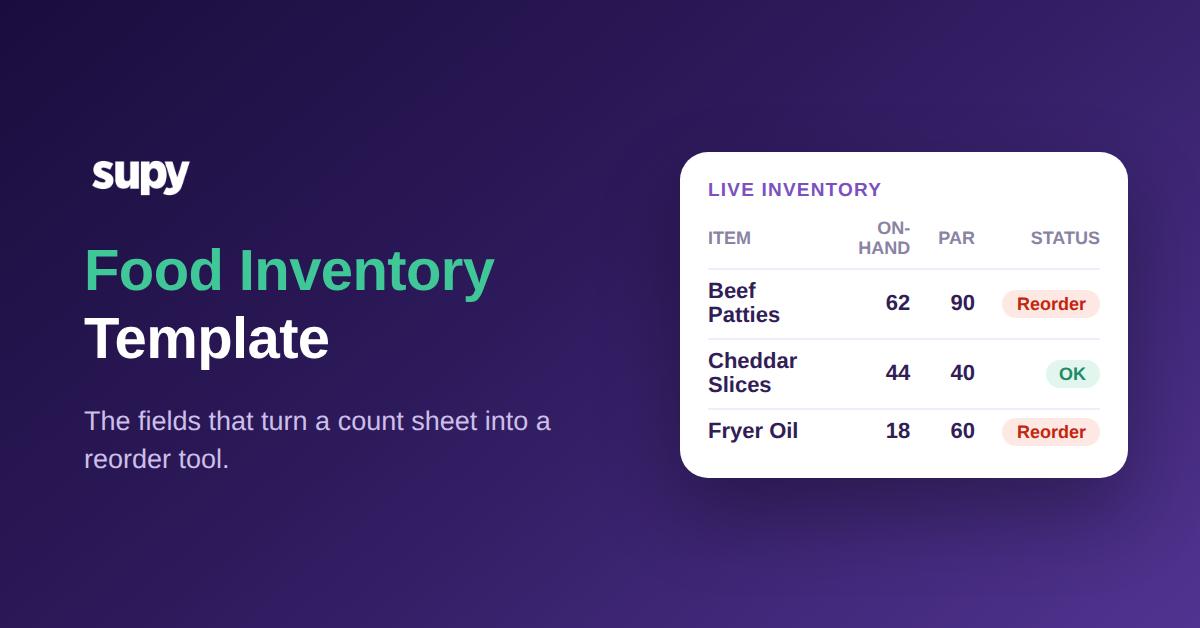
Un modèle d'inventaire alimentaire utile va au-delà d'un nom d'article et d'une colonne de quantité. Six champs font le vrai travail : l'article, sa catégorie, l'unité de comptage, le stock minimum (par), la quantité en stock actuelle et un statut qui compare les deux derniers. Tout le reste est facultatif ; ces six champs permettent à la feuille de prendre une décision au lieu de simplement stocker un chiffre.
Si vous ne souhaitez pas calculer le stock minimum à la main, le calculateur de stock minimum gratuit le fait pour chaque article à partir de votre propre consommation, de vos jours de livraison et des délais fournisseur.
L'unité compte plus qu'il n'y paraît. Compter des steaks hachés en kilogrammes tout en les commandant en cartons, c'est la façon dont un comptage qui paraît complet produit quand même une mauvaise commande. Fixez l'unité de comptage par article, notez-la dans le modèle, et chaque compteur enregistre de la même façon. La catégorie est le champ qui rend une longue liste gérable : regrouper les articles en protéines, produits laitiers, fruits et légumes, boulangerie et épicerie permet à un compteur de traiter une zone après l'autre et de lire le coût matière par catégorie sans devoir tout retrier.
Dans la pratique, une seule ligne se lit clairement : steaks hachés, protéines, kilogrammes, stock minimum 90, en stock 62, statut à recommander. N'importe qui peut parcourir cette ligne et connaître à la fois l'état actuel et l'action requise, sans ouvrir une deuxième feuille ni demander à un gérant. Une douzaine de lignes de ce type, regroupées par catégorie, constitue un comptage fonctionnel qu'un nouveau venu peut compléter dès son premier jour.
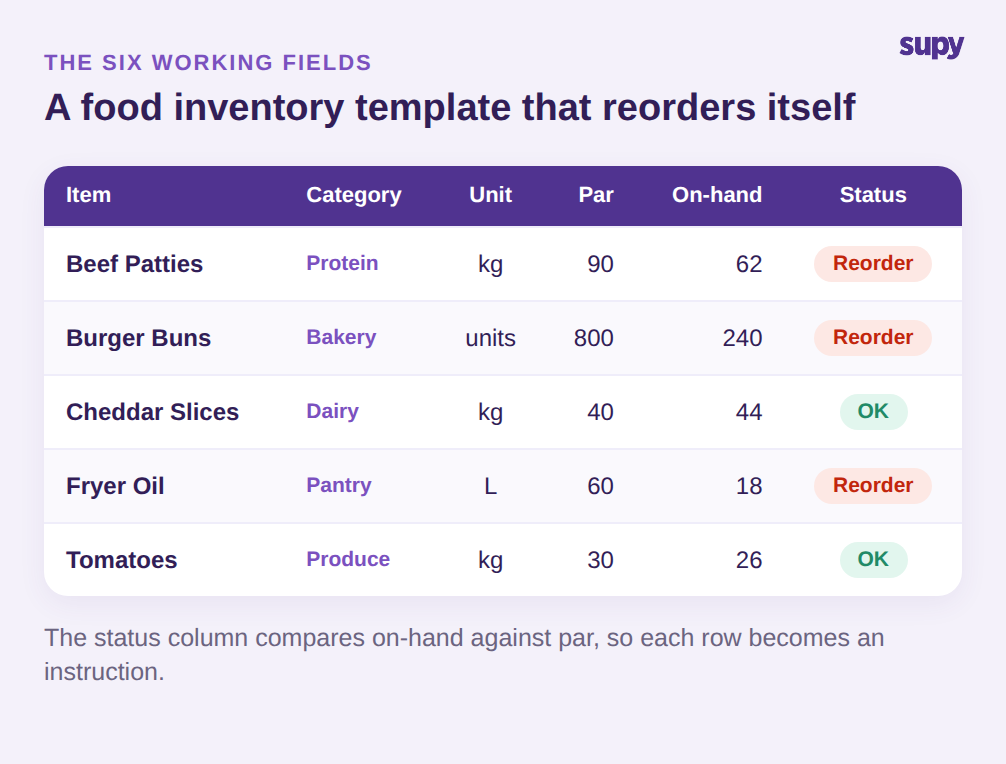
La colonne de statut est le champ que la plupart des feuilles de calcul omettent. Dès que vous disposez du stock minimum et du stock en cours côte à côte, une règle simple (en stock inférieur au minimum signifie recommander) transforme la ligne en instruction. Un compteur qui lit la feuille n'a plus besoin de connaître la logique de recommande ; le modèle la porte. Cette seule colonne fait la différence entre un enregistrement et un outil de recommande. Construisez les six champs dans cet ordre en haut, verrouillez la ligne d'en-tête et résistez à l'envie d'ajouter des colonnes supplémentaires que personne ne remplira : un modèle que les gens complètent réellement vaut mieux qu'un modèle exhaustif qu'ils ignorent.
Définir les stocks minimums par point de vente, pas par groupe
La façon la plus rapide de rendre un modèle d'inventaire alimentaire inutilisable pour un groupe est de fixer un stock minimum identique pour chaque site. Un point de vente situé près d'un quartier d'affaires épuise ses stocks du déjeuner à 1 h de l'après-midi ; un site de banlieue plus calme n'atteint jamais le même volume. Donner le même stock minimum aux deux garantit que l'un manque de produits tandis que l'autre sur-commande et jette la différence.
Le stock minimum appartient au niveau article-et-point-de-vente. Les mêmes steaks hachés peuvent avoir un stock minimum de 90 kilogrammes dans une enseigne du centre-ville, 140 dans un outlet d'aéroport à fort trafic, et 70 dans une petite enseigne nord. Calculez chaque valeur à partir de la consommation propre du site sur une semaine normale, pas à partir d'une moyenne de groupe, et ajoutez une marge pour les délais de livraison.
Le point de recommande est simplement le stock minimum moins ce que vous prévoyez de vendre avant la prochaine livraison ; un site approvisionné deux fois par semaine peut donc maintenir un point de recommande plus bas qu'un site approvisionné chaque semaine. Un exemple concret : si l'outlet de l'aéroport utilise 20 kilogrammes de steaks hachés par jour et que la prochaine livraison est dans deux jours, il faut au moins 40 kilogrammes en stock pour couvrir l'écart, donc un point de recommande supérieur ne laisse aucune marge pour un week-end chargé. Inscrivez le point de recommande dans le modèle à côté du stock minimum, et la colonne de statut peut signaler non seulement ce qui est bas, mais aussi ce qui risque vraiment de manquer avant le réapprovisionnement. Obtenez ces chiffres correctement une fois par site et le modèle effectue le raisonnement à chaque comptage suivant, signalant exactement les articles qui sont passés sous le seuil propre à leur site.
| Article (stock min.) | Centre-ville | Outlet aéroport | Enseigne nord |
|---|---|---|---|
| Steaks hachés kg | 90 | 140 | 70 |
| Pains à hamburger unités | 800 | 1 200 | 600 |
Standardiser l'ordre de comptage dans votre modèle d'inventaire alimentaire
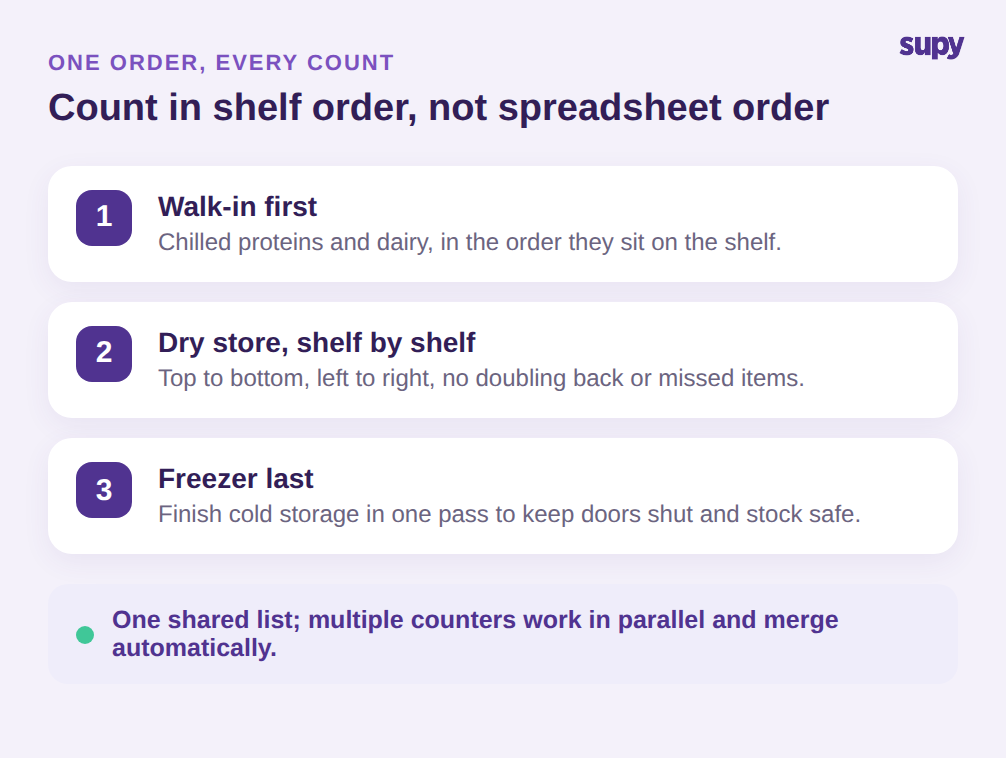
Un comptage n'est aussi rapide et précis qu'il est reproductible. Si le modèle liste les articles dans l'ordre où ils ont été ajoutés à la feuille, chaque compteur suit un parcours différent dans la réserve, fait demi-tour, oublie une étagère et produit des chiffres auxquels personne ne fait vraiment confiance. Ordonnez plutôt le modèle selon l'agencement physique : chambre froide en premier, puis la réserve sèche étagère par étagère, puis le congélateur. Un compteur suit la feuille de haut en bas sans jamais avoir à réfléchir à l'endroit suivant.
La réutilisabilité représente l'autre moitié. Reconstruire la liste de mémoire pour chaque comptage, c'est là que des articles disparaissent silencieusement et que des écarts s'installent. Conservez un modèle d'inventaire alimentaire enregistré par site que n'importe qui peut charger et utiliser, qu'il s'agisse d'un comptage spot quotidien ou d'une prise d'inventaire mensuelle complète. Lors de l'ouverture d'un nouveau site, clonez le modèle existant le plus proche plutôt que de repartir d'une feuille vierge : la structure, les unités et l'ordre de comptage sont repris, et vous n'avez qu'à ajuster les stocks minimums au nouveau site.
Pour un comptage plus important, plusieurs personnes peuvent traiter la même liste simultanément, chacune prenant en charge une section, de sorte qu'une tâche qui demandait une soirée à un gérant est accomplie par une petite équipe en une demi-heure. Cela ne fonctionne que si tout le monde compte à partir de la liste identique dans le même ordre, ce que garantit précisément un modèle partagé et standardisé. Effectuer le comptage sur un téléphone ou une tablette directement au rayon, plutôt que sur papier retranscrit ensuite, supprime l'étape de retranscription où les chiffres sont transposés ou perdus. Le modèle reste la seule source de ce qu'il faut compter et dans quel ordre ; seul le nombre de mains change.
Adapter la fréquence de comptage à la valeur, pas à la routine
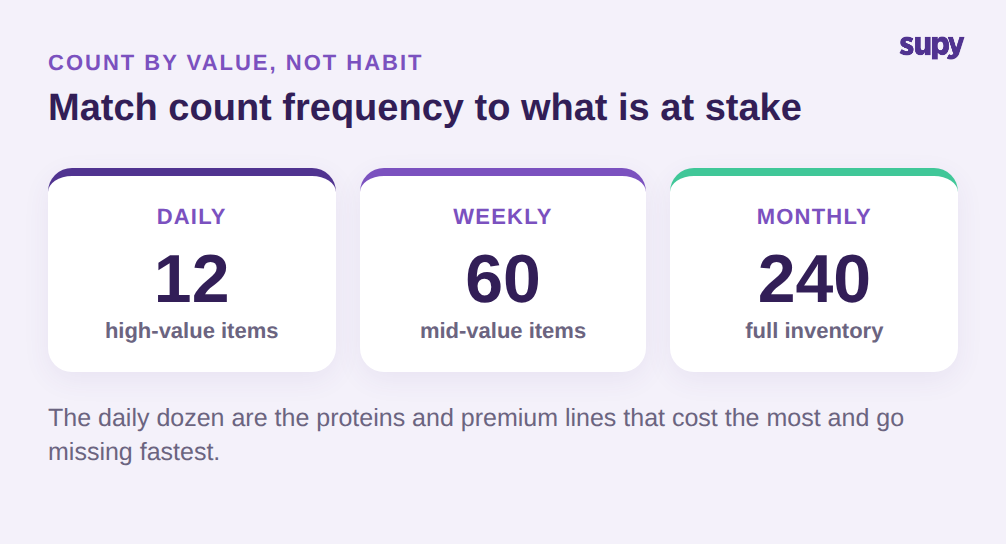
Tout compter chaque mois et rien entre-temps est une habitude, pas une stratégie. Les articles qui génèrent le coût matière et disparaissent le plus vite méritent d'être comptés bien plus souvent que les produits d'épicerie stables qui bougent à peine. Un rythme praticable compte une courte liste d'une douzaine d'articles à haute valeur ou à risque de démarque chaque jour, une liste plus large d'environ soixante chaque semaine, et l'inventaire complet de quelques centaines de lignes une fois par mois.
Choisir la douzaine quotidienne n'est pas une question de hasard. Ce sont les protéines, les spiritueux et les ingrédients premium qui portent le coût le plus élevé par unité et la plus grande tentation de sortir par la porte de derrière, plus tout ce qui vous a récemment surpris avec un mauvais écart. Ce sont les lignes où une journée de dérive est coûteuse et où un comptage uniquement hebdomadaire lui permettrait de se cacher. Tout le reste peut attendre son niveau, ce qui maintient le comptage quotidien suffisamment court pour qu'un responsable de quart le fasse vraiment.
Niveauter le comptage de cette façon maintient l'effort quotidien faible tout en détectant les problèmes tôt sur les articles qui comptent. Une douzaine de lignes quotidiennes prennent quelques minutes à l'ouverture ou à la fermeture ; le niveau hebdomadaire capte les articles de valeur moyenne qui dérivent ; la prise d'inventaire mensuelle complète remet tout à niveau, y compris les produits d'épicerie à rotation lente qui surprennent rarement. Marquez le niveau de chaque article dans le modèle afin que les listes quotidiennes et hebdomadaires soient de simples vues filtrées de la même feuille maîtresse, pas des documents séparés qui se désynchronisent.
La hiérarchisation vous donne également quelque chose qu'un comptage mensuel unique ne peut pas offrir : un moyen de comparer ce que vos recettes et vos ventes indiquent que vous auriez dû utiliser avec ce que le comptage révèle que vous avez réellement utilisé. Cet écart théorique-réel, vérifié sur vos articles de haute valeur chaque semaine plutôt qu'une fois par mois, est l'endroit où vous repérez les surcuissons, les pertes ou la démarque inconnue pendant qu'il est encore temps d'agir, au lieu de les découvrir enfouis dans un rapprochement de fin de mois sur lequel vous ne pouvez plus rien faire.
Votre premier comptage de la semaine
Il n'est pas nécessaire d'avoir un système parfait pour commencer. Construisez le modèle d'inventaire alimentaire avec les six champs, ordonnez les lignes selon votre réserve et définissez un stock minimum ainsi qu'un point de recommande par site pour vos vingt articles les plus importants par dépense. Ces vingt lignes couvrent presque toujours l'essentiel de votre coût matière, ce qui permet d'obtenir d'abord l'essentiel des bénéfices avant d'étendre le modèle à la liste complète. Comptez ces lignes quotidiennement pendant une semaine, le niveau suivant hebdomadairement et l'inventaire complet en fin de mois. En deux semaines, vous disposerez d'un modèle qui indique à chaque site quoi recommander sans qu'un gérant ait à le calculer à la main, et d'un chiffre d'écart sur vos articles de plus haute valeur auquel vous pouvez vraiment faire confiance. À partir de là, l'extension au reste du catalogue se résume à ajouter des lignes, pas à repenser l'approche.

Une feuille de calcul vous permet de démarrer, mais elle cesse de passer à l'échelle précisément au moment où un groupe en pleine croissance en a le plus besoin. Supy transforme le même modèle en système vivant : modèles de comptage réutilisables par site que chacun peut exécuter sur mobile, seuils minimums et de stock cible par site qui signalent automatiquement ce qu'il faut recommander, et comptages en parallèle que plusieurs collaborateurs enregistrent simultanément et que le système fusionne avec un historique complet des attributions. Les opérateurs qui abandonnent les feuilles de calcul font état d'une réduction du temps de prise d'inventaire allant jusqu'à 85 %, et les chiffres derrière chaque commande restent à jour plutôt qu'une semaine en retard.