.jpeg)


Kostenlose Lebensmittelinventur-Vorlage für Restaurants – Kostenloser Download
Was eine Lebensmittelinventur-Vorlage enthalten muss
Die meisten Lebensmittelinventur-Vorlagen beginnen ihr Leben als übersichtliche Tabelle und funktionieren in der Woche, in der ein zweiter Standort eröffnet, still und leise nicht mehr. Ein einzelner Manager kann den Warenbestand eines Standorts im Kopf und in einer Spalte mit Zahlen behalten; über drei oder vier Filialen hinweg wird dieselbe Tabelle zur täglichen Kopier-Einfüge-Aufgabe, die Stunden kostet und trotzdem Rätselraten hinterlässt, was nachbestellt werden soll. Betreiber von Multi-Standort-Gruppen berichten regelmäßig, dass Manager fünf bis zehn Stunden pro Woche mit manuellen Zählungen verbringen, wobei der Prozess selbst bei diesem Aufwand fehleranfällig bleibt.
Das Problem liegt selten im Layout der Vorlage. Es liegt daran, dass ein einfaches Zählblatt nur erfasst, was im Regal lag – und nichts sonst. Eine Lebensmittelinventur-Vorlage, die ihren Platz wirklich verdient, zeigt nicht nur, was vorhanden ist, sondern auch, was als Nächstes zu tun ist: welche Artikel nachbestellt werden sollen, wie viel davon und wo. Dieser Leitfaden behandelt die Felder, die diesen Unterschied machen, wie sie je Standort eingestellt werden, wie die Zählung durchgeführt wird, damit jeder im Team sie erledigen kann, und wie häufig jeder Artikel gezählt werden sollte.
Eine nützliche Lebensmittelinventur-Vorlage enthält mehr als einen Artikelnamen und eine Mengenspalte. Sechs Felder leisten die eigentliche Arbeit: der Artikel, seine Kategorie, die Zähleinheit, der Mindestbestand (Par), der aktuelle Bestand und ein Status, der die letzten beiden vergleicht. Alles andere ist optional; diese sechs Felder ermöglichen es der Tabelle, eine Entscheidung zu treffen, anstatt nur eine Zahl zu speichern.
Wer den Mindestbestand nicht von Hand ermitteln möchte, kann den kostenlosen Mindestbestand-Rechner nutzen – er berechnet ihn je Artikel aus dem eigenen Verbrauch, den Liefertagen und den Lieferanten-Vorlaufzeiten.
Die Einheit ist wichtiger, als sie aussieht. Fleischpastetchen in Kilogramm zu zählen, während sie in Kartons bestellt werden, ist der Grund, warum eine vollständig aussehende Zählung trotzdem die falsche Bestellung ergibt. Die Zähleinheit je Artikel festlegen, in der Vorlage vermerken, und jeder Zähler erfasst auf dieselbe Weise. Die Kategorie ist das Feld, das eine lange Liste handhabbar hält: Artikel in Protein, Milchprodukte, Obst & Gemüse, Backwaren und Vorratswaren zu gruppieren, ermöglicht es einem Zähler, einen Bereich nach dem anderen abzuarbeiten, und erlaubt es, den Wareneinsatz später nach Kategorie abzulesen, ohne etwas neu sortieren zu müssen.
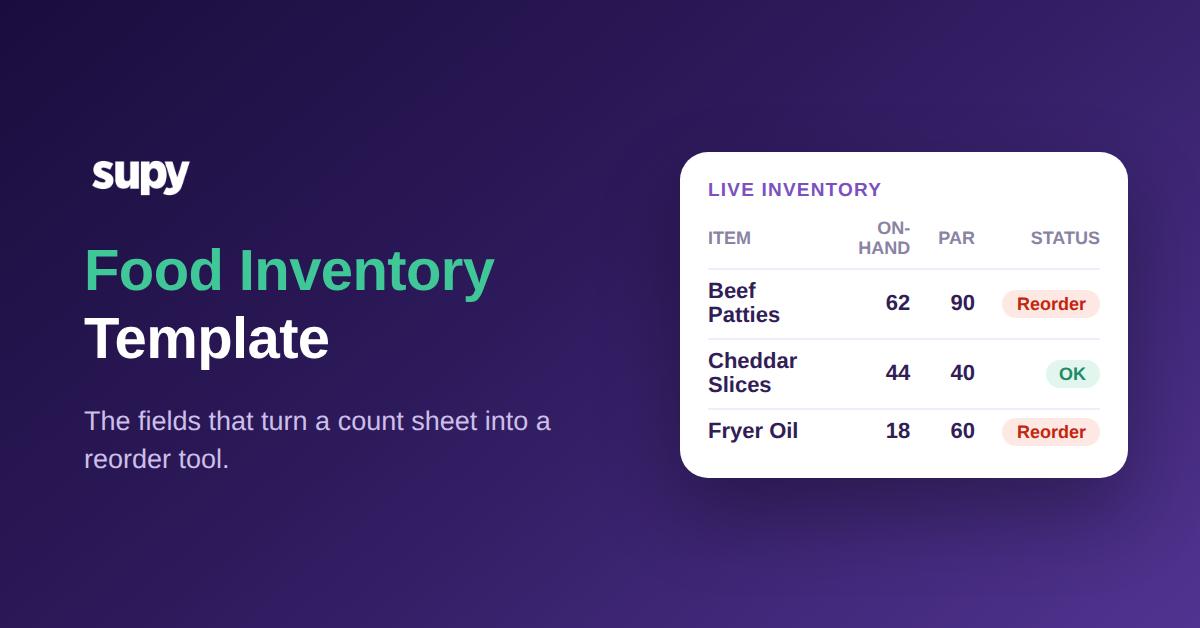
In der Praxis liest sich eine einzelne Zeile klar: Fleischpastetchen, Protein, Kilogramm, Mindestbestand 90, Bestand 62, Status nachbestellen. Jeder kann diese Zeile überfliegen und sowohl den aktuellen Stand als auch die erforderliche Aktion erkennen, ohne eine zweite Tabelle zu öffnen oder einen Manager zu fragen. Ein Dutzend solcher Zeilen, nach Kategorien gruppiert, ist eine funktionierende Zählung in einer Form, die ein neuer Mitarbeiter ab seiner ersten Schicht ausfüllen kann.
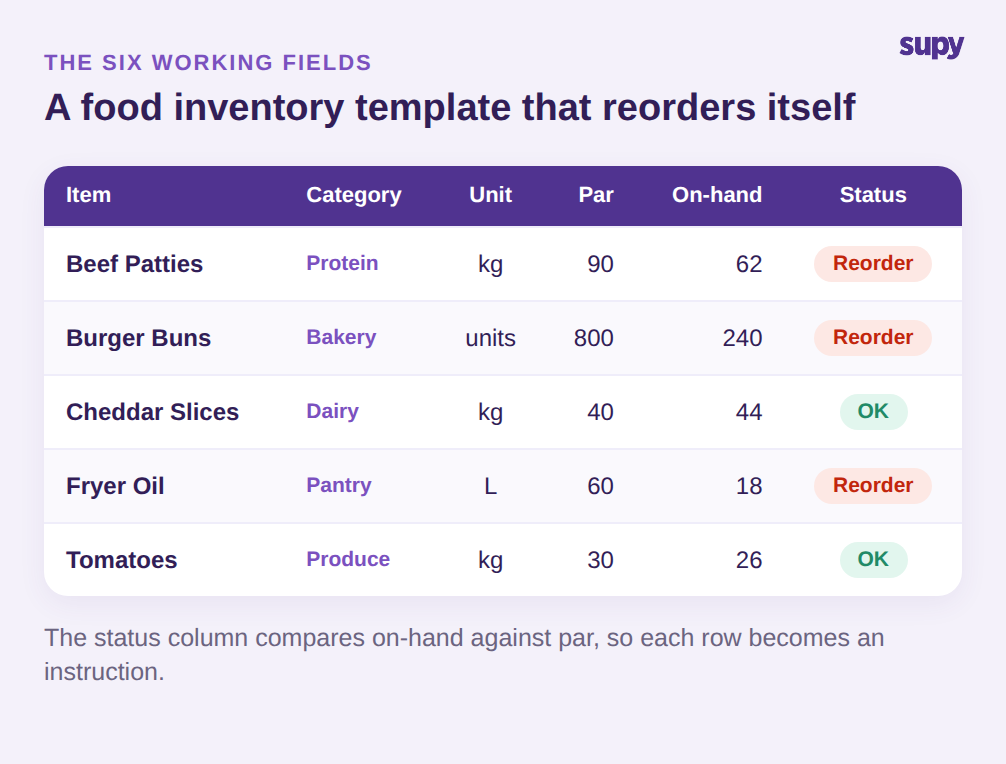
Die Statusspalte ist das Feld, das die meisten Tabellen auslassen. Sobald Mindestbestand und aktueller Bestand nebeneinander stehen, verwandelt eine einfache Regel (Bestand unter Mindestbestand bedeutet nachbestellen) die Zeile in eine Anweisung. Ein Zähler, der die Tabelle liest, muss die Nachbestelllogik nicht mehr kennen; die Vorlage trägt sie. Genau diese eine Spalte ist der Unterschied zwischen einem Protokoll und einem Nachbestellwerkzeug. Die sechs Felder in dieser Reihenfolge oben anlegen, die Kopfzeile sperren und dem Drang widerstehen, zusätzliche Spalten hinzuzufügen, die niemand ausfüllt: Eine Vorlage, die die Leute tatsächlich ausfüllen, ist besser als eine gründliche, die übersprungen wird.
Mindestbestände und Nachbestellpunkte je Standort festlegen, nicht je Gruppe
Der schnellste Weg, eine Lebensmittelinventur-Vorlage für eine Gruppe unbrauchbar zu machen, ist die Festlegung eines einzigen Mindestbestands für jeden Standort. Ein Standort in der Nähe eines Geschäftsviertels leert seinen Mittagswarenbestand bis 1 Uhr nachmittags; ein ruhigerer Vorortstandort verbraucht nie dasselbe Volumen. Beide mit demselben Mindestbestand auszustatten, garantiert, dass einer ausläuft, während der andere überbestellt und die Differenz wegwirft.
Der Mindestbestand gehört auf die Artikel-und-Standort-Ebene. Dieselben Fleischpastetchen können bei einer Innenstadtfiliale einen Mindestbestand von 90 Kilogramm haben, bei einem stark frequentierten Flughafenoutlet 140 und bei einer kleineren Nordfiliale 70. Jeden Wert aus dem eigenen Verbrauch des Standorts über eine normale Woche ermitteln, nicht aus einem Gruppendurchschnitt, und etwas Spielraum für die Liefervorlaufzeit einplanen.
Der Nachbestellpunkt ist schlicht der Mindestbestand abzüglich des erwarteten Verbrauchs bis zur nächsten Lieferung; ein Standort mit zweimal wöchentlichen Lieferungen kann also einen niedrigeren Nachbestellpunkt halten als einer mit wöchentlicher Versorgung. Ein konkretes Beispiel: Wenn das Flughafenoutlet täglich 20 Kilogramm Pastetchen verbraucht und die nächste Lieferung in zwei Tagen eintrifft, müssen mindestens 40 Kilogramm vorrätig sein, um die Lücke zu überbrücken; ein Nachbestellpunkt darüber lässt keinen Spielraum für ein belebtes Wochenende. Den Nachbestellpunkt neben dem Mindestbestand in der Vorlage einzutragen ermöglicht es der Statusspalte, nicht nur anzuzeigen, was niedrig ist, sondern was ernsthaft Gefahr läuft, vor der Nachlieferung auszugehen. Diese Zahlen einmal je Standort richtig ermitteln, und die Vorlage übernimmt bei jeder anschließenden Zählung das Denken und markiert genau die Artikel, die unter den Mindestbestand ihres Standorts gefallen sind.
| Artikel (Mindestbestand) | Innenstadt | Flughafenoutlet | Nordfiliale |
|---|---|---|---|
| Fleischpastetchen kg | 90 | 140 | 70 |
| Burgerbrötchen Stück | 800 | 1.200 | 600 |
Die Zählreihenfolge in der Lebensmittelinventur-Vorlage standardisieren
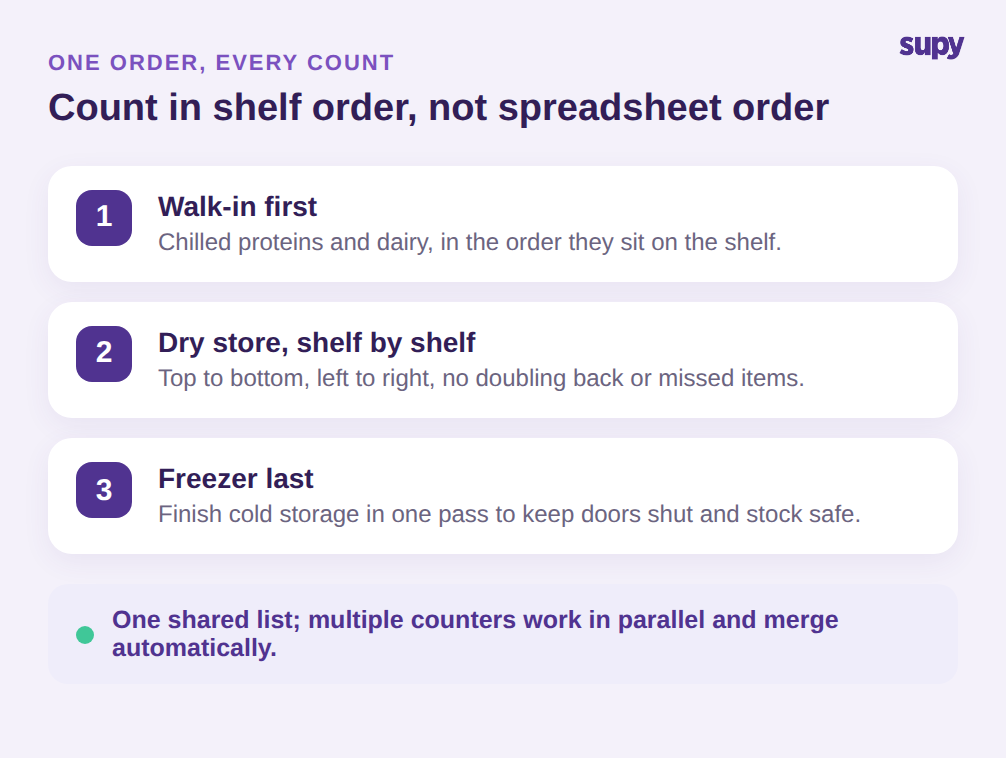
Eine Zählung ist nur so schnell und genau wie sie wiederholbar ist. Wenn die Vorlage Artikel in der Reihenfolge auflistet, in der sie zur Tabelle hinzugefügt wurden, geht jeder Zähler einen anderen Weg durch das Lager, kehrt um, übersieht ein Regal und liefert Zahlen, denen niemand vollständig vertraut. Die Vorlage stattdessen an das physische Layout anpassen: zuerst die Kühlkammer, dann das Trockenlager Regal für Regal, dann das Tiefkühllager. Ein Zähler folgt der Tabelle von oben nach unten und muss nie überlegen, wohin er als Nächstes gehen soll.
Wiederverwendbarkeit ist die andere Hälfte. Die Liste für jede Zählung aus dem Gedächtnis neu aufzubauen, ist der Ort, an dem Artikel still und leise wegfallen und sich Abweichungen einschleichen. Eine gespeicherte Lebensmittelinventur-Vorlage je Standort aufbewahren, die jeder laden und verwenden kann, egal ob es sich um eine schnelle tägliche Stichprobenzählung oder eine vollständige monatliche Inventur handelt. Wenn ein neuer Standort eröffnet wird, die nächstgelegene vorhandene Vorlage klonen statt mit einem leeren Blatt zu beginnen: Struktur, Einheiten und Zählreihenfolge werden übernommen, und nur die Mindestbestände müssen an den neuen Standort angepasst werden.
Bei einer größeren Zählung können mehrere Personen gleichzeitig dieselbe Liste abarbeiten, jede einen Abschnitt übernehmend, sodass eine Aufgabe, die einen Manager einen Abend kostete, ein kleines Team in einer halben Stunde erledigt. Das funktioniert nur, wenn alle von derselben Liste in derselben Reihenfolge zählen – was genau eine gemeinsame, standardisierte Vorlage garantiert. Die Zählung auf einem Telefon oder Tablet direkt am Regal durchzuführen statt auf Papier, das später abgeschrieben wird, beseitigt den Schritt, bei dem Zahlen transponiert oder verloren gehen. Die Vorlage bleibt die einzige Quelle dafür, was zu zählen ist und in welcher Reihenfolge; nur die Anzahl der Hände ändert sich.
Zählhäufigkeit an den Warenwert anpassen, nicht an Gewohnheiten
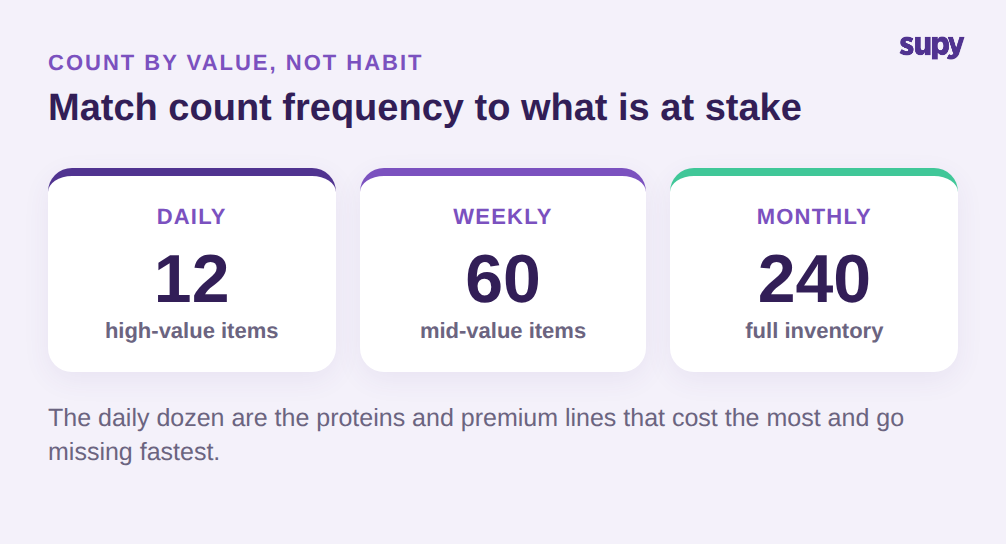
Alles monatlich und dazwischen nichts zu zählen ist eine Gewohnheit, keine Strategie. Die Artikel, die den Wareneinsatz antreiben und am schnellsten verloren gehen, verdienen es, viel häufiger gezählt zu werden als lagerfähige Vorräte, die sich kaum bewegen. Ein praktischer Rhythmus zählt eine kurze Liste von etwa einem Dutzend hochwertiger oder diebstahlgefährdeter Artikel täglich, eine breitere Liste von rund sechzig wöchentlich und den vollständigen Warenbestand mit einigen hundert Positionen einmal im Monat.
Das tägliche Dutzend zu wählen ist kein Rätselraten. Es sind die Proteine, Spirituosen und Premiumzutaten, die die höchsten Kosten pro Einheit und die größte Versuchung tragen, durch die Hintertür zu verschwinden, plus alles, was zuletzt mit einer schlechten Abweichung überrascht hat. Das sind die Positionen, bei denen ein Tag Drift teuer ist und eine nur wöchentliche Zählung ihn verstecken lassen würde. Alles andere kann auf seine Stufe warten, was die tägliche Zählung kurz genug hält, damit ein Schichtleiter sie tatsächlich durchführt.
Die Zählung auf diese Weise zu stufen hält den täglichen Aufwand klein und erkennt Probleme früh bei den wichtigen Artikeln. Ein Dutzend tägliche Positionen dauern ein paar Minuten beim Öffnen oder Schließen; die wöchentliche Stufe erfasst die mittelwertigen Artikel, die abdriften; die monatliche Vollzählung gleicht alles aus, einschließlich der langsam drehenden Vorräte, die selten jemanden überraschen. Die Stufe jedes Artikels in der Vorlage markieren, damit die täglichen und wöchentlichen Listen nur gefilterte Ansichten derselben Haupttabelle sind, keine separaten Dokumente, die sich desynchronisieren.
Die Stufung gibt einem auch etwas, das eine einzelne monatliche Zählung nicht kann: eine Möglichkeit, zu vergleichen, was Rezepte und Umsatz sagen, dass verbraucht worden sein sollte, mit dem, was die Zählung tatsächlich ergibt. Diese Soll-Ist-Abweichung, bei hochwertigen Artikeln wöchentlich statt einmal im Monat geprüft, zeigt Überportionierung, Verschwendung oder Schwund, solange noch Zeit bleibt zu handeln, statt sie in einer Monatsendabrechnung zu finden, bei der nichts mehr getan werden kann.
Die erste Zählung dieser Woche
Es ist kein perfektes System nötig, um anzufangen. Die Lebensmittelinventur-Vorlage mit den sechs Feldern aufbauen, die Zeilen an das Lager anpassen und einen Mindestbestand sowie einen Nachbestellpunkt je Standort für die zwanzig Artikel mit dem höchsten Ausgabenanteil festlegen. Diese zwanzig Positionen decken fast immer den Großteil des Wareneinsatzes ab, sodass es zunächst richtig gemacht werden und der Hauptnutzen erzielt wird, bevor die Vorlage auf die vollständige Liste erweitert wird. Diese täglich eine Woche lang zählen, die nächste Stufe wöchentlich und das vollständige Inventar am Monatsende. Innerhalb von zwei Wochen liegt eine Vorlage vor, die jedem Standort mitteilt, was nachzubestellen ist, ohne dass ein Manager es von Hand ausrechnen muss, und eine Abweichungszahl bei den höchstwertigen Artikeln, der wirklich vertraut werden kann. Von dort aus ist die Erweiterung auf den Rest des Sortiments eine Frage des Hinzufügens von Zeilen, nicht des Neudenkens des Ansatzes.

Eine Tabelle ermöglicht den Einstieg, hört aber genau in dem Moment auf zu skalieren, in dem eine wachsende Gruppe sie am dringendsten benötigt. Supy verwandelt dieselbe Vorlage in ein Live-System: wiederverwendbare Zählvorlagen per Standort, die jeder auf dem Mobilgerät durchführen kann, standortspezifische Mindest- und Sollbestands-Schwellenwerte, die automatisch anzeigen, was nachzubestellen ist, und parallele Zählungen, die mehrere Mitarbeiter gleichzeitig erfassen und das System mit einem vollständigen Zuordnungsprotokoll zusammenführt. Betreiber, die auf Tabellen verzichten, berichten von einer Verkürzung der Inventur-Zeit um bis zu 85%, und die Zahlen hinter jeder Bestellung bleiben aktuell statt eine Woche alt zu sein.