Inventory

Stock Count Controls for Multi-Site Restaurants: Who Can Submit, Lock, and Correct Counts Before They Reach Your Variance Reports
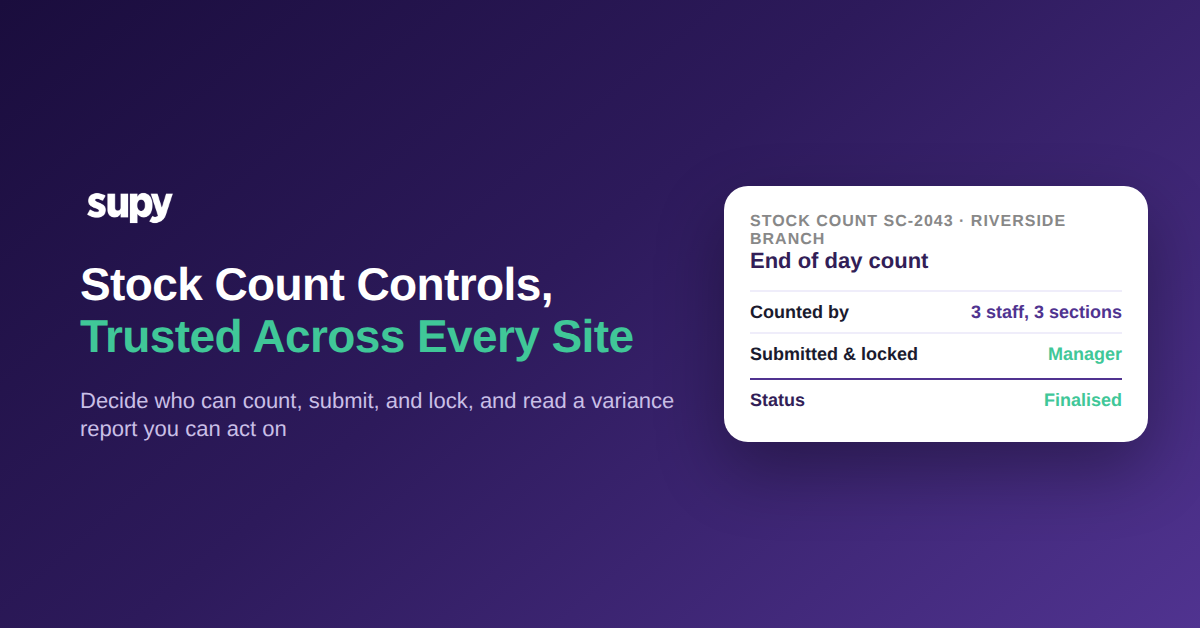
Stock count controls trusted across every site - Supy

What Makes a Stock Count You Can Actually Trust

Stock count controls are the permissions and workflow rules that decide who can count, who can submit and lock a count, and what can still be changed after it is submitted. For a multi-site group they are what turn a set of separate branch counts into one variance report the whole group can act on, because every number on it was captured under the same rules.

Get those controls right and the payoff is big. A count finishes faster because several people can work at once, the number is defensible because you know who entered it, and the variance report reflects genuine stock movement rather than someone quietly fixing their own mistake after the fact. Supy's stock counting is built around these controls, and operators using them report cutting counting time by more than 50% once the structure is in place.
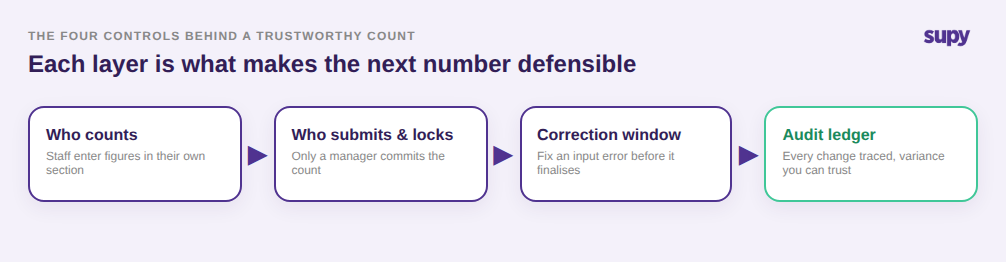
The four controls behind a trustworthy stock count: who counts, who submits and locks, the correction window, and the audit ledger

Deciding Who Can Count, Submit, and Unlock a Count

Before your next count, decide what a floor staff member is allowed to do and what stays with a branch manager. Supy's role-based lock and unlock permissions let you separate the two on both web and mobile: staff can enter counts, while submitting, locking, and reopening a committed count sits with the manager. That single decision closes the most common control gap operators describe, where anyone could change a committed number and no one could tell.

One multi-site group described having no real control over stock across its sites, with inconsistent counts, items that went missing, and no way to see losses from theft or staff giveaways. Uncontrolled, that site was running variance at around 3.2% of a 21,000 USD inventory. The fix is rarely more counting. It is deciding who owns the count and enforcing it in the software so the rule holds at every branch, not just the ones head office happens to watch.

Permission matrix showing floor staff can enter counts while only a branch manager can submit, lock, reopen, and unlock a stock count

Counting Together Without Overwriting Each Other

A single count can be split into named sections so several people count different areas of one location at the same time. Each counter works in their own locked section that no one else can edit mid-count, and Supy merges the sections into one consolidated count automatically when everyone is done, with attribution preserved so management can see exactly who counted what.

For a 12-site group that changes the economics of counting. Three people can count three sections of a location in parallel instead of one person walking the whole floor, which is a large part of the more than 50% time reduction operators report. And because each section is attributed, a strange number becomes a question you can answer, because you know which counter to ask, rather than a mystery that quietly widens your variance.
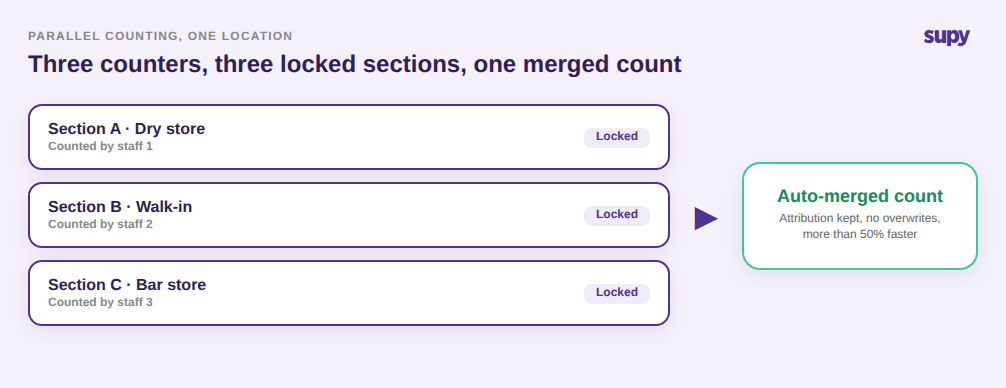
Parallel counting with three staff counting three locked sections that auto-merge into one attributed count

From a Locked Count to a Variance Report You Can Act On

Genuine mistakes happen, so after a count is submitted there is a short window to reopen it and fix an input error before it is finalised, after which it locks. Every count, like every goods receipt, transfer, and wastage log, is written to an auditable stock-movement ledger, so a correction is a traceable event rather than a silent overwrite. When the count closes, Supy captures the latest recipe cost for each item, so the variance report shows not just the quantity gap but its food-cost impact per site.

That is where controls pay for themselves. A single miskeyed count can distort a recipe's cost by around 180 USD and send a manager chasing a variance that was never real. With controlled counts, that same site's variance fell from 3.2% to about 0.9% of inventory, and its monthly shrink from theft, giveaways, and error dropped from roughly 1,680 USD to 470 USD, not because the staff changed but because the count they were measured against could finally be trusted.
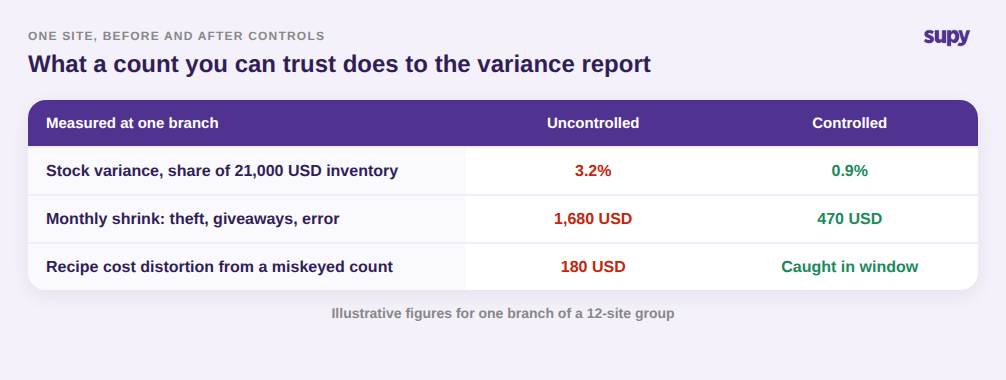
Before and after table showing controlled counts cut variance from 3.2 percent to 0.9 percent and monthly shrink from 1,680 USD to 470 USD at one branch

If you are setting this up, start with one decision before you touch a count template: who in each branch may submit and unlock a count, and who may only enter one. Set that permission first, run your next count in parallel sections so it is faster and attributed, then read the variance report knowing every number on it was captured under the same rule. That is the difference between a count you simply file and a count you can act on, and it is the same discipline that separates a reliable stock count software rollout from a spreadsheet everyone edits. To see it on your own item list and sites, book a Supy demo.


Book a Demo with Supy for stock count controls across multi-site restaurants

Ready to optimize your restaurant operations?

Blog

Our operational insights

No items found.

Your questions 
answered

Everything you need to know about Supy — from setup to integrations, pricing, and daily use. If it’s not covered here, just ask.

What are stock count controls in a restaurant inventory system?
+

Stock count controls are the permissions and workflow rules that govern a physical count: who is allowed to enter counts, who can submit and lock a completed count, and what can be changed after submission. In a multi-site group they matter more than in a single site, because counts happen in parallel across branches and roll up into one variance report. Without controls, any user can alter a committed number and the group cannot tell which counts to trust. With them, every count is captured under the same rule, so the resulting figures are comparable and defensible across every location.

Who should be allowed to submit and lock a stock count?
+

Whoever is accountable for the count at that site, usually a branch or kitchen manager, should hold the rights to submit, lock, and reopen a count, while floor staff are limited to entering figures. Separating those two roles is the single most effective control, because it stops a committed count from being quietly changed by the same person who was measured against it. Supy applies these role-based permissions on both web and mobile, so the rule holds whether a count is finalised at a terminal or on a phone during the count itself, and it stays consistent as you add sites.

How does parallel stock counting work without people overwriting each other?
+

Parallel counting splits one location's count into named sections so several people can count different areas at the same time. Each counter works in their own locked section that no one else can edit while it is open, which prevents two people from overwriting the same items. When every section is complete, the software merges them into one consolidated count automatically and preserves attribution, so management can see who counted each section. For a group this cuts counting time sharply, because three people counting three sections finish far faster than one person walking an entire floor alone.

Can a stock count be corrected after it is submitted?
+

Yes, but under control rather than freely. After a count is submitted there is a short window to reopen it and fix a genuine input error before the count is finalised, after which it locks. The correction is written to an auditable stock-movement ledger alongside goods receipts, transfers, and wastage, so it is a traceable event rather than a silent overwrite. This matters because an uncontrolled edit made days later, with no record, is exactly what makes a variance report impossible to trust. A controlled correction window fixes real mistakes without opening the door to tampering.

Why do stock count controls matter for multi-site restaurant groups?
+

Multi-site groups compare performance across branches, so their counts have to be captured the same way everywhere or the comparison is meaningless. Controls make that possible: the same permissions decide who can submit and lock a count at every site, and the same audit ledger records every change. Operators often describe having no real control over stock across sites, with inconsistent counts and losses they cannot see. Standardising who counts and how counts are committed is what closes that gap, turning a set of separate branch numbers into one group-wide variance report leadership can actually act on.

How do stock count controls improve variance report accuracy?
+

A variance report is only as accurate as the count behind it. If counts can be edited after the fact by anyone, the report measures the edits, not the shelf. Controls fix this by locking who can commit a count and recording every correction, so the numbers reflect real stock movement. In Supy, when a count closes the latest recipe cost is captured per item, so the report shows both the quantity gap and its food-cost impact per site. That lets managers act on a specific, trustworthy figure instead of chasing a variance that a stray edit created.

Does controlling stock counts reduce shrinkage from theft or staff giveaways?
+

Indirectly but meaningfully. Controls do not stop theft on their own, but they make shrinkage visible and attributable, which is the first step to reducing it. When counts are locked, attributed, and recorded, an unexplained drop shows up cleanly in the variance report instead of hiding behind inconsistent counting. Managers can then see which site and which items are losing stock and investigate. Operators who tighten count controls typically watch unexplained losses shrink over the following months, not because staff changed, but because the count finally exposes the loss instead of absorbing it.

Ready to transform your operations?

Join 3500+ restaurant operators cutting costs, streamlining operations and making smarter decisions with Supy.