.jpg)


Restaurant Inventory Management: The Complete Guide for Multi-Unit Operators

Restaurant inventory management is the process of tracking, ordering, and controlling the ingredients, supplies, and goods your restaurant uses to operate. Done well, it connects purchasing decisions to actual usage, gives you accurate food cost data in real time, and reduces the waste and shrinkage that silently erode your margins. This guide covers every component of restaurant inventory management - from setting par levels and running stocktakes to managing variance analysis and coordinating stock across multiple locations. Whether you are currently working from spreadsheets or evaluating dedicated software, you will find practical frameworks here to tighten operational control and improve profitability. For operators ready to evaluate software options, see our best restaurant inventory management software guide for 2026.
Want the numbers for your own kitchen? The free par level calculator works out a par for every item on your sheet from your usage, delivery days and supplier lead times.
What is Restaurant Inventory Management?
Restaurant inventory management covers everything that happens to your stock from the moment a purchase order is raised to the moment an ingredient is consumed in a dish. It includes counting what you have on hand, tracking what comes in through supplier deliveries, recording what gets used in production, and reconciling the difference between what should have been used (based on sales) and what actually was.
The output of a well-run inventory system is accurate cost of goods sold (COGS) data and visibility into where waste, theft, or portioning errors are occurring. Without it, you are essentially running your restaurant on instinct - guessing at what to order, discovering cost overruns only when the end-of-month figures come in, and reacting to problems rather than preventing them.
For single-site operators, inventory management is already a discipline that requires consistent effort. For multi-unit operators running five, ten, or fifty locations, the complexity compounds significantly - stock transfers, centralised purchasing, per-location par levels, and consolidated reporting all add layers that simple spreadsheets cannot reliably handle.
Why Inventory Management Directly Affects Profitability
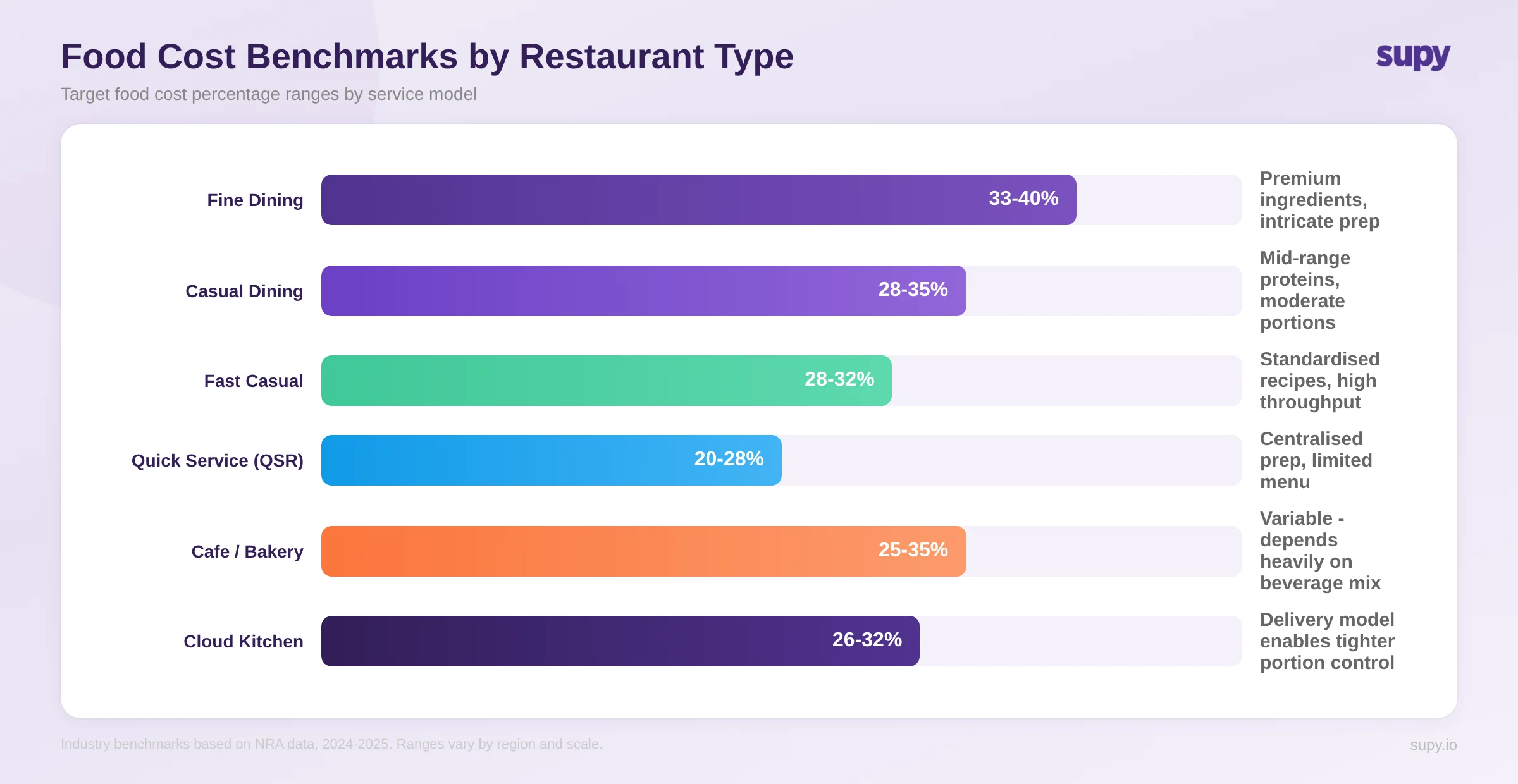
The connection between inventory management and profitability is direct and measurable. Food cost percentage - the ratio of ingredient spend to revenue - is one of the most important financial metrics in the restaurant business. Targets vary significantly by service model: quick-service restaurants typically aim for 20-28%, fast casual operations run 28-32%, casual dining sits around 28-35%, and fine dining often lands between 33-40% due to premium ingredient sourcing and more intricate preparation. These ranges have also shifted upward in recent years as ingredient costs have risen across the board.
Hitting and maintaining that target requires accurate inventory data. If you do not know precisely what you are using, you cannot identify where costs are leaking. Operators often discover, once they implement proper tracking, that their actual food cost has been running significantly higher than their theoretical cost - the expected cost based on recipes and sales. That gap represents money that has already been spent without value being delivered: over-ordered stock that expired, portions that exceeded recipe specifications, ingredients that were transferred without proper documentation, or simply goods that went missing.
This concern is widely shared across the industry. Operations leaders frequently cite the struggle to keep theoretical margins accurate as one of their core operational challenges - knowing what should have been used and comparing it against what was used is the foundation of cost control. The goal of getting food cost down toward a 30% target, when it is currently running at 40%, is one that better inventory discipline directly addresses.
Read our post on how to calculate restaurant food cost percentage for the formula and worked examples.
The Key Components of Restaurant Inventory Management
Effective inventory management is built on four interconnected practices: par level management, stocktaking, variance analysis, and procurement integration. Each one builds on the last.
1. Par Level Management
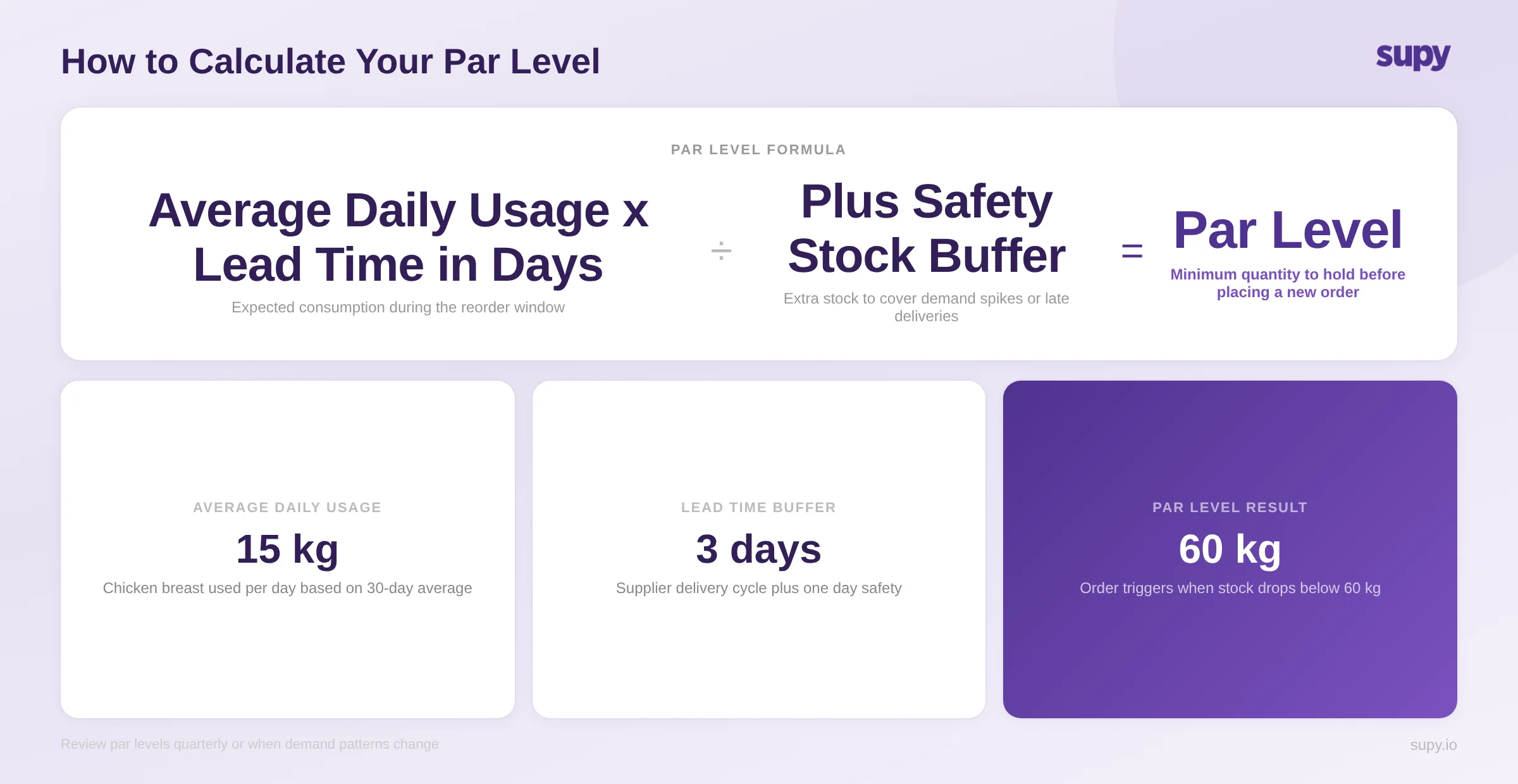
A par level is the minimum quantity of a given ingredient or product that should be on hand at any time to meet demand without overstocking. Setting accurate par levels allows your ordering process to become largely mechanical - when stock drops below par, an order is triggered for the shortfall.
The standard calculation for a par level is:
Par Level = (Average Daily Usage x Lead Time in Days) + Safety Stock
For example, if your kitchen uses 15 kg of chicken breast per day and your supplier delivers every three days with a one-day safety buffer, your par level would be:
(15 kg x 3 days) + 15 kg = 60 kg
When stock on hand drops below 60 kg, a purchase order for the shortfall is raised. For a deeper walkthrough of the calculation method, see our guide on what is par level and how to calculate par level.
Par levels are not set once and forgotten. They should be reviewed at least quarterly, or whenever there are significant changes to sales volume, seasonal patterns, or supplier lead times. Outdated par levels are one of the most common causes of over-ordering.
One practical consideration often overlooked: available storage space. Your par level calculation may produce a theoretically optimal figure, but if your walk-in or dry store cannot physically accommodate that quantity, the number needs adjusting. Factor in shelf capacity, cold storage limits, and any shared storage areas when setting pars - particularly for bulky items like oil, flour, or beverages where the ideal par level may exceed what your kitchen can realistically store.
2. Stocktaking
A stocktake (also called a stock count or physical inventory count) is the process of physically counting every item in your kitchen, dry store, walk-in, and any other storage area, then recording the quantities. This becomes the actual inventory figure against which all transactions - purchases, transfers, and sales-driven consumption - are reconciled.
Stocktake frequency varies by item type and operational need:
- High-value and high-use items (proteins, seafood, top-shelf spirits): weekly or even daily counts
- Mid-value items (dairy, produce, dry goods): weekly or bi-weekly
- Low-use and stable items (condiments, packaging): monthly
For operations running lean, a practical approach is a weekly partial stocktake covering your highest-cost categories, with a full count monthly. The key is consistency - the same counting methodology, the same timing, and the same team members responsible for counts. Inconsistent stocktake processes produce data you cannot trust.
For operators still using spreadsheets to run stocktakes, our free restaurant inventory management template provides a structured starting point.
3. Variance Analysis
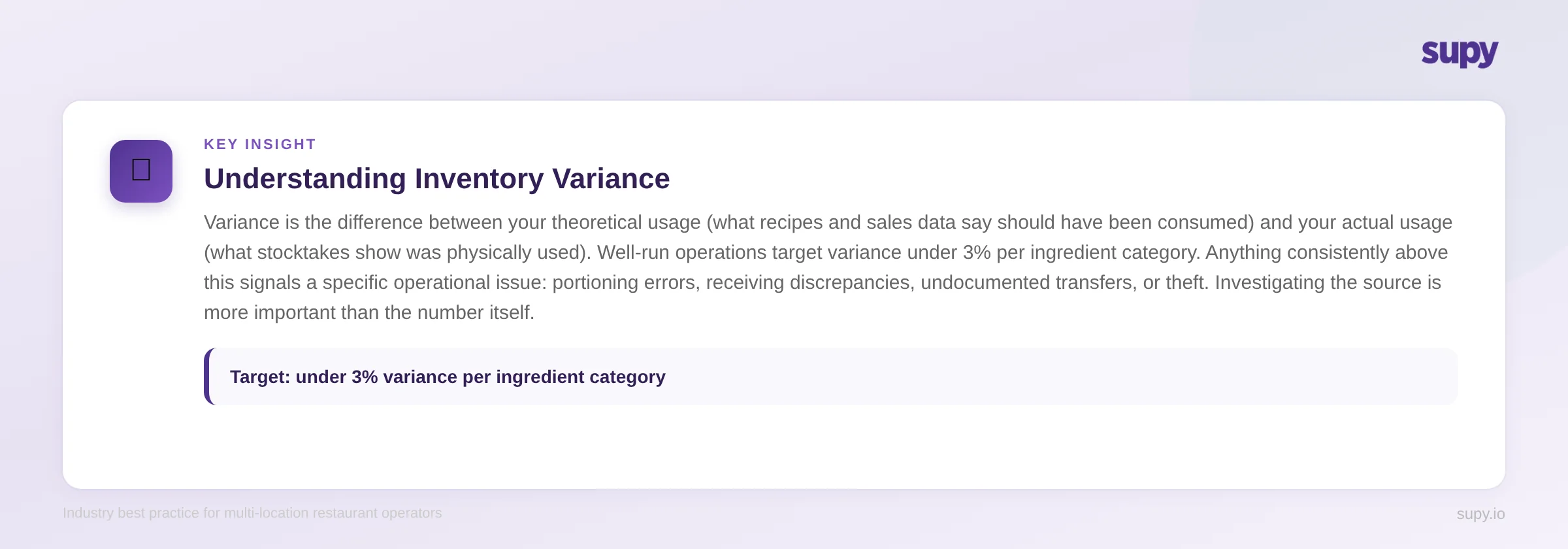
Variance analysis is where inventory management becomes a genuine profitability tool. Variance is the difference between your theoretical usage (what the system expects was consumed based on sales data and recipes) and your actual usage (what your stocktake and delivery data show was physically used).
A variance of zero means every ingredient used in production is accounted for by sales. In practice, no operation achieves a perfect zero - some level of variance is expected from trim and prep waste, slight portioning variation, and measurement rounding. Well-run operations target variance under 3% per ingredient category - anything above this signals a specific problem worth investigating. For high-value items like proteins and spirits, even tighter thresholds are common.
Variance can be broken down by cause:
- Spoilage and waste: ingredients that expired before use or were discarded during prep
- Portioning errors: dishes made with more or less of an ingredient than the recipe specifies
- Theft: stock that left the building without being sold
- Transfer errors: stock moved between locations without proper documentation
- Receiving discrepancies: deliveries that were recorded as received but were short or damaged
Understanding which type of variance you are dealing with determines the operational response. High spoilage variance suggests ordering frequency or par level issues. High portioning variance points to training or supervision gaps. Consistent unexplained variance in high-value items warrants a closer look at access controls.
4. Procurement Integration
Inventory management and procurement are not separate disciplines - they are two halves of the same system. Your purchase orders should be driven by inventory data (par levels, current stock, usage rates), and your inventory records should be automatically updated when deliveries are received and invoices are reconciled.
When these two processes are disconnected - where procurement happens in one system and inventory tracking in another, or worse, where both happen on paper - you create reconciliation work and a time lag between events and data. Receiving a delivery on Tuesday that only gets logged in your inventory system on Friday means your food cost data is five days behind reality.
Invoice accuracy is also part of this integration. Manually checking every invoice line against the purchase order to verify quantities and prices is a significant time cost for many operators. Automated matching - where the system flags any line where the invoiced price or quantity differs from the PO - reduces this to exception management rather than exhaustive line checking.
Manual vs Software: Choosing the Right Approach
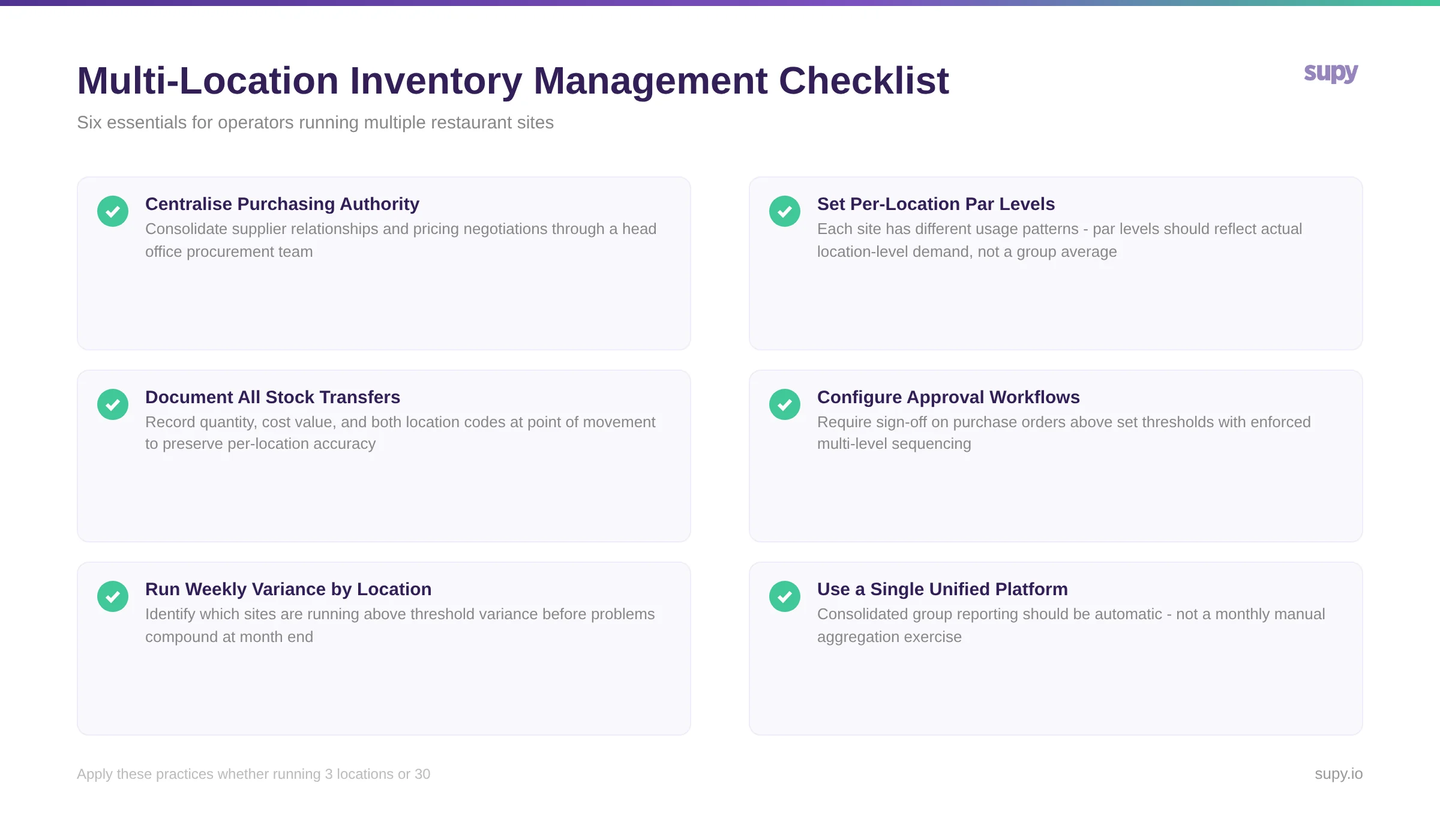
Many restaurant operators begin their inventory management journey with spreadsheets. For a single-site operation with a limited menu, a well-constructed Excel template can provide adequate visibility. The practical limits become apparent as the operation grows.
What manual inventory management looks like in practice
The typical manual approach involves a combination of spreadsheet-based stock count sheets (one per storage area), a separate sheet for tracking deliveries, and a master cost sheet where ingredient prices are maintained. Variance is calculated manually by comparing closing stock plus deliveries minus opening stock against theoretical usage estimated from POS sales.
This works up to a point, but the maintenance burden is significant. Menu changes require updating every recipe-linked cost formula. Supplier price changes need to be reflected in multiple places. Stock count sheets get lost, filled out inconsistently, or updated hours after the actual count was done. For operations tracking inventory "on paper" or across "many documents manually entered into Excel", this represents a meaningful hidden labour cost and a persistent accuracy problem.
When software becomes necessary
Software becomes the more practical choice when any of these conditions are true:
- You operate more than one location and need consolidated visibility
- Your menu has more than 60-70 items with separate recipe components
- You are spending more than two hours per week on inventory administration
- You have identified variance but cannot diagnose the source
- You need real-time food cost data rather than end-of-month reports
- Your procurement and inventory data live in separate, unconnected systems
The productivity case is straightforward: software that connects procurement, receiving, stocktaking, and recipe costing into a unified system removes the manual reconciliation work and delivers the visibility that manual systems structurally cannot.
Modern stock counting tools illustrate this well. Purpose-built platforms let you create count templates that match your actual storage layout - so staff count items in shelf order rather than scrolling through an alphabetical master list. Counting happens on a mobile app, even in low-connectivity areas like walk-in fridges, with items logged in their arrival packaging (cases, packs, bottles, kilos) rather than forcing staff to convert everything to base units in their heads. This eliminates the mental maths that slows counts down and introduces errors. Multiple team members can count different storage areas simultaneously, with results merging into a single final count automatically. The result is stock counts that take half the time they used to, with significantly fewer errors - and variance reports generated the moment the count is submitted rather than days later.
Multi-Location Inventory Management
For operators running multiple restaurants, the inventory management challenge changes in nature, not just in scale. Several specific issues emerge at multiple locations that do not exist in single-site operations.
Centralised vs decentralised purchasing
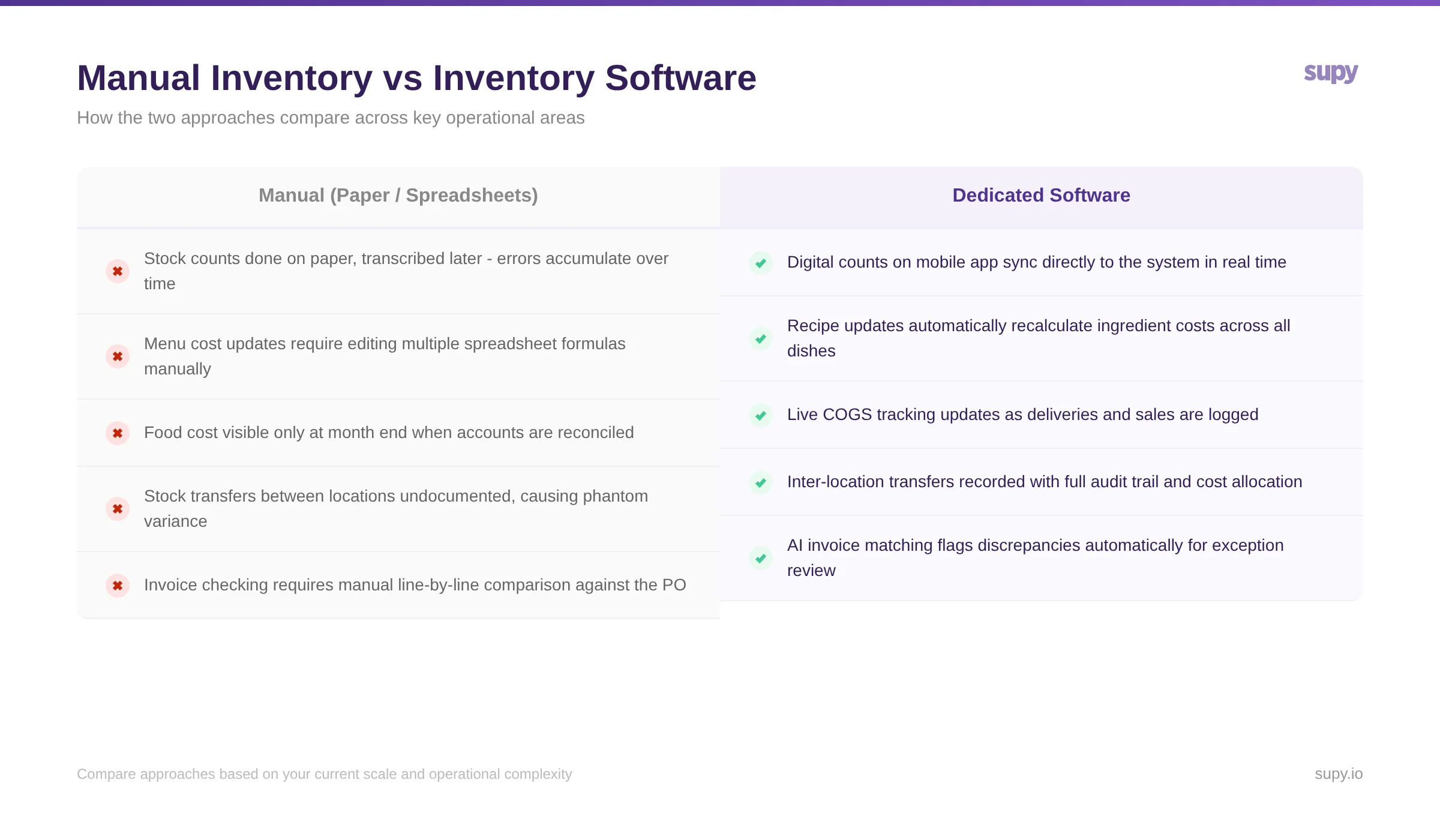
Multi-unit operators typically choose one of two procurement models. In a centralised model, a head office procurement team manages all supplier relationships, negotiates pricing, and issues purchase orders on behalf of all locations. Individual locations receive deliveries and log receipts, but purchasing decisions and supplier management happen centrally.
In a decentralised model, each location manager maintains their own supplier relationships and raises orders independently. This gives locations more flexibility but creates inconsistency in pricing, supplier terms, and purchasing behaviour.
Most growing groups move toward centralisation as they scale, because centralised purchasing provides negotiating power with suppliers and consistent cost control. The practical challenge is building a system where central procurement can see live stock levels across all locations to plan orders accurately, and where location managers can request stock (via requisitions) without needing direct supplier access.
Stock transfers between locations
Stock transfers are a common operational need for multi-unit groups - a busy branch runs short on a key ingredient, a quieter location has surplus, and a transfer makes more sense than placing an emergency order. The risk is that undocumented transfers create a phantom variance problem: the sending location shows stock leaving without a corresponding decrease in its usage, while the receiving location shows stock arriving without a purchase.
Properly documented stock transfers - where the quantity, cost value, and both location codes are recorded at the time of movement - are essential for accurate per-location financial reporting. Without this discipline, your location-level COGS figures become unreliable, and it becomes impossible to identify which location is actually performing well and which is not.
Approval workflows and permission controls
As procurement authority becomes centralised, most operators want to implement approval controls - ensuring that purchase orders above certain values are reviewed before being placed, and that location-level staff can request stock without having unrestricted ordering authority. The ability to restrict and control purchasing permissions, with different levels of access per user and per location, is one of the features operations leaders find most valuable when evaluating back-of-house platforms.
Multi-level approval sequencing - where a requisition must pass through a department manager before reaching the procurement team - is becoming a standard requirement for enterprise operators, particularly those with formal governance obligations.
Consolidated reporting
The final multi-location challenge is reporting. Location managers need per-location data to run their operations; finance leadership needs consolidated group-level figures to understand overall performance. Generating this dual view from manual systems requires either duplicating data entry or running a laborious consolidation process at month end.
A unified platform that maintains per-location ledgers while automatically rolling up to a group view removes this entirely, and makes it possible to compare location performance against each other - something that is impossible to do reliably from disconnected spreadsheets.
Best Practices for Restaurant Inventory Management
Whether you are running a manual system or a software platform, the following practices determine the accuracy and reliability of your inventory data.
Assign clear ownership. One person at each location should be responsible for stocktakes - either a head chef, operations manager, or a dedicated inventory clerk. Rotating responsibility without process documentation leads to inconsistent counts.
Count at consistent times. Always count at the same point in the week - typically at close of trading on Sunday or at opening on Monday, before the week's deliveries begin. Counting mid-shift or at different points introduces timing errors.
Use a top-down counting method. Count from the top of each shelf or storage area to the bottom, left to right, working through each zone in a fixed sequence. This prevents double-counting and ensures nothing is missed.
Record deliveries at point of receipt. Delivery quantities and prices should be logged when the delivery arrives, not later. If an invoice shows ten cases of cooking oil but you only received nine, the discrepancy needs to be noted on the same day for it to be useful.
Set recipe-level standards. Each dish on your menu should have a standardised recipe with specified gram weights for every ingredient. Without this, you cannot calculate theoretical usage, and variance analysis becomes meaningless.
Review and update par levels regularly. Par levels set when your restaurant first opened are almost certainly wrong today. Review them whenever demand patterns change significantly.
How Supy Addresses Inventory Management Challenges
Supy is purpose-built for multi-location restaurant operators who need real-time visibility across procurement, inventory, and financial performance. The platform connects inventory movement, purchasing, and actual usage data into a unified operational view.
For inventory specifically, Supy enables:
- Live COGS tracking: rather than waiting until month end to see your food cost, Supy calculates cost of goods sold in real time as deliveries are logged and sales data flows in from your POS.
- Automated variance analysis: the platform compares theoretical usage (based on your recipes and POS sales) against actual usage (from stocktakes and delivery records), flagging variances by location, category, and ingredient.
- Par level management with auto-replenishment suggestions: set par levels per location, and Supy generates purchase order suggestions when stock drops below the threshold.
- Stock transfers with full audit trail: transfers between locations are documented automatically, preserving the accuracy of per-location inventory and cost records.
- Multi-level approval workflows: configure requisition and purchasing approval sequences by user role, location, or order value, with enforced sequencing that cannot be skipped.
- AI-powered invoice processing: invoices received by email are automatically matched against purchase orders, with flagged discrepancies surfaced for review rather than requiring manual line-by-line checking.
For operators exploring what to look for in an inventory management platform, our guide to restaurant inventory management software covers the key capabilities in detail.
About Supy
Supy provides back-of-house operations software designed specifically for multi-location restaurant groups. The platform covers procurement, inventory management, recipe costing, and business intelligence, connecting operational data across locations into a single system. By bringing purchasing, receiving, stocktaking, and cost tracking into one place, Supy gives operations and finance leaders the real-time visibility they need to control food costs, reduce waste, and make confident procurement decisions.
Conclusion
Restaurant inventory management is not an administrative function - it is the operational backbone of food cost control. Without accurate, consistent inventory tracking, you are working from incomplete information on your most significant controllable cost. For single-site operators, the fundamentals of par levels, regular stocktakes, and variance tracking provide the control needed to hit food cost targets. For multi-location operators, the additional complexity of stock transfers, centralised procurement, and consolidated reporting typically makes dedicated software the more practical choice.
The starting point is always the same: establish consistent counting practices, connect inventory data to your procurement process, and use variance analysis to identify and address specific sources of cost leakage. From there, the systems and tools you use can scale with your operation.