.jpg)


Restaurant Standard Operating Procedures: The 5-Routine Checklist
Why Standard Operating Procedures Slip Across Sites
A restaurant standard operating procedures checklist is the short, ordered list of routines every location runs the same way, so a group of sites behaves like one operation instead of many. The value is not the document. It is whether the routine actually happens the same way at every site, on every shift, without someone having to remember to enforce it.
That is where most standard operating procedures fail. Operations leaders describe the same pattern as a group grows: procedures written once quietly drift, until each branch has its own version of the standard and the numbers stop lining up. The gap is rarely that a site never received the procedure. It is that the procedure lives in a document and nothing checks whether it was followed.
So this checklist is built around the five routines that most often drift across sites and, for each one, the system check that makes it enforceable rather than optional. Standardise the routine first, then put a control behind it, and standard starts to mean the same thing in every kitchen.
| Routine | Standardise across every site | The check that holds it |
|---|---|---|
| Stock counts | Same template, sections and cadence | Locked sections, variance on submit |
| Goods receiving | One way to check and book a delivery | Items validated to the site before posting |
| Prep and production | Log and cost every batch | Auto-costing from the recipe |
| Wastage | One category structure, no catch-alls | Loss tagged to a real reason |
| Inter-site transfers | One raise-and-receive flow | Destination confirms before stock moves |
Counts, Receiving and Transfers: Keep Stock Data Honest
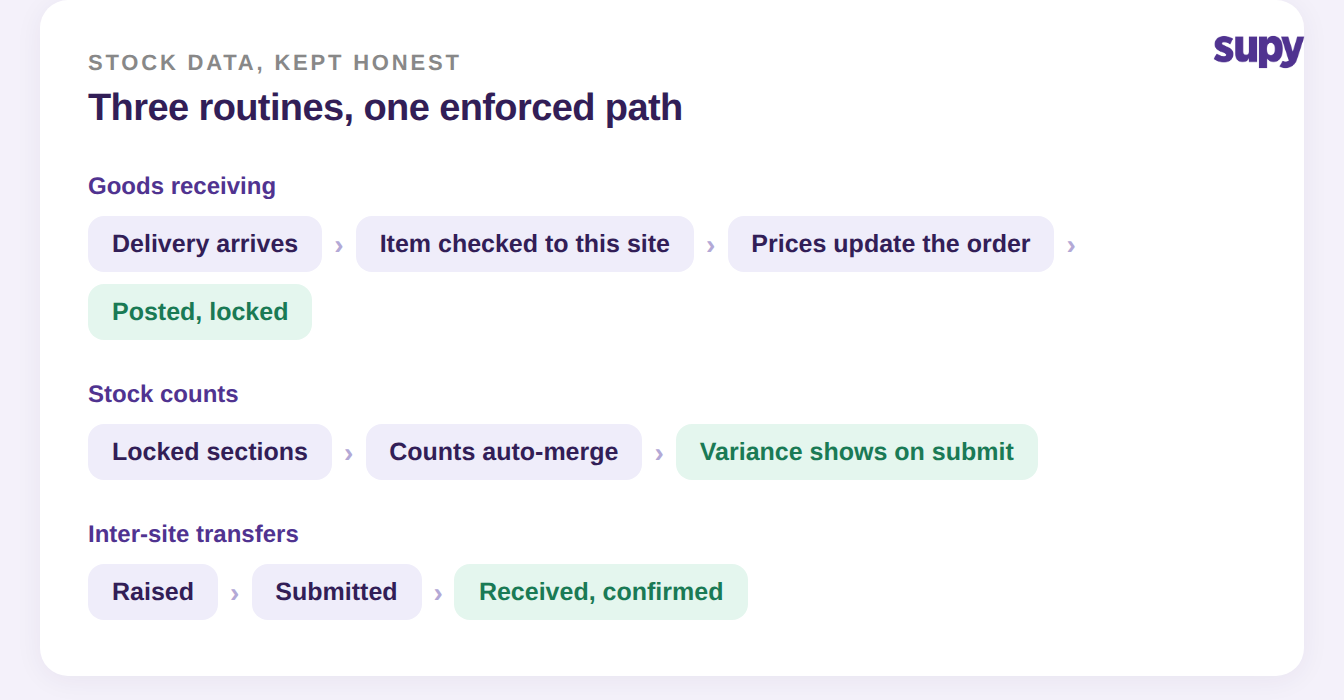
Three of the five routines exist to protect the same thing: whether the stock number on the screen matches what is on the shelf. If they drift, every downstream report, from food cost to purchasing, inherits the error.
1. Stock counts. Standardise the count template, the sections, and how often each site counts. A shared template built once in shelf order and cloned to every location means a counter at any branch works through the same list in the same order, which is what makes two sites comparable at all. To keep the count itself honest, a single count can be split into locked sub-sections so several people count different areas at once and the results merge automatically, with the variance against the system showing the moment the count is submitted. See how parallel stock counting works, and our guide to building a multi-site count template.
2. Goods receiving. Standardise how a delivery is checked and booked before anyone signs for it. The control that stops misrouted stock is a check that every item on a goods received note actually belongs to the receiving location before the note can be posted. Received quantities and prices then update the linked order automatically, and once a note is posted it cannot be quietly deleted, so the receiving record and the ledger stay in step. For the full routine, see our restaurant food receiving procedure.
3. Inter-site transfers. When stock moves between locations, the routine has to close a loop, not just push product out the door. Standardise a single flow where a transfer is raised, submitted, and then received, with the destination confirming receipt before stock updates at either site. That confirmation step is the difference between two sites that agree on what moved and two sites that argue about it at month end. There is more on this in tracking central kitchen transfers.
Prep, Production and Wastage: Keep Cost Data Honest
The other two routines protect cost accuracy. They are the ones most often skipped, because their failures hide inside a food cost percentage that still looks roughly right.
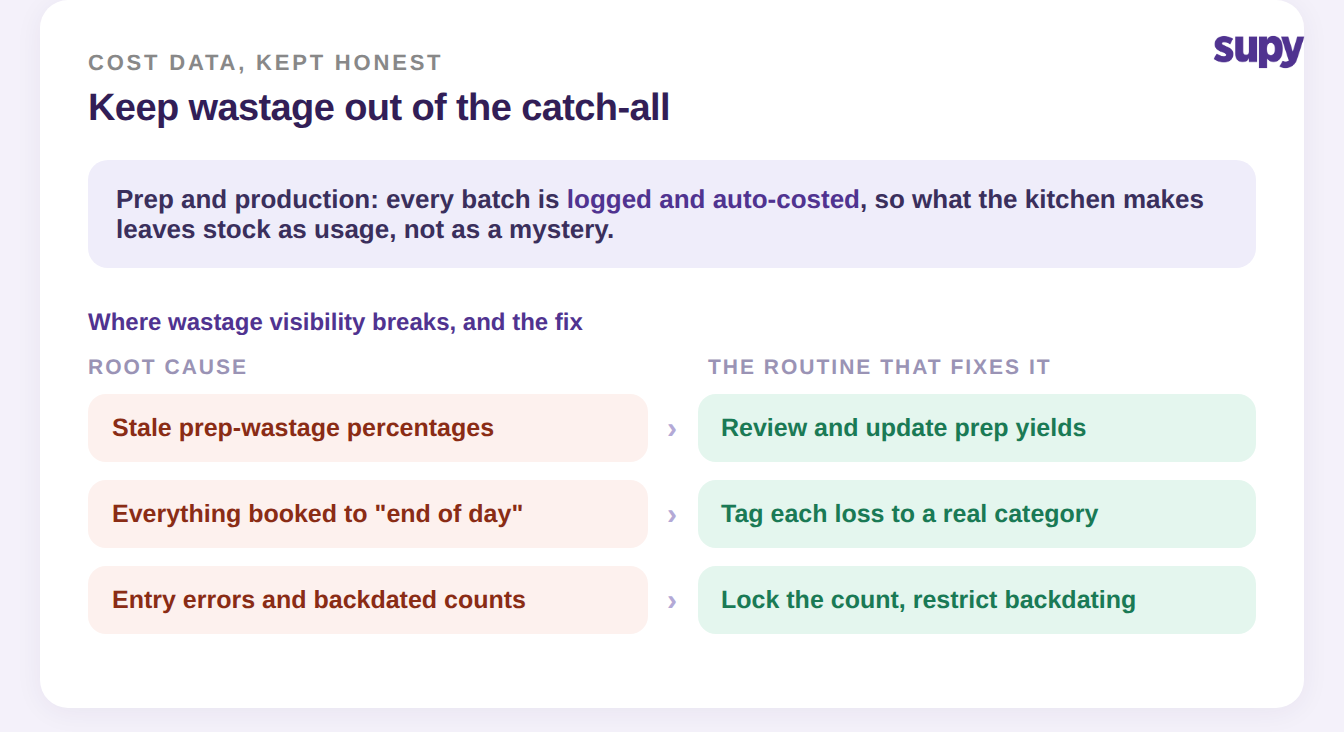
4. Prep and production. Standardise how made-in-house items are logged. When a kitchen records a batch of prep or a breakdown recipe, such as portioning a whole fish into fillets and trim, the ingredients leave stock as usage and the cost follows the recipe automatically, including a yield percentage for each output. Without that routine, prep either never leaves stock, which inflates what you appear to hold, or gets written off as loss, which inflates wastage. Logged and costed, it is neither.
5. Wastage. Standardise one category structure and ban the catch-all. The single biggest reason wastage is invisible is that everything ends up booked to a generic bucket like end of day, so no one can see what is actually being lost or why. Give every loss a real reason, keep prep-wastage percentages current rather than stale, and lock counts so figures cannot be quietly backdated. Once losses carry real categories, the wastage line becomes something you can act on instead of a number you distrust. To pressure-test what a point of wastage is costing you, our food cost calculator is a quick place to start.
Roll These Out as Procedures, Not PDFs
A checklist only changes behaviour if the rollout is itself a procedure. The operators who make this stick treat written routines as a prerequisite for opening or onboarding a site, not a nice-to-have to circulate afterwards. One consistent lesson: skipping the documentation does not save time, it moves the cost to a flood of support questions later, usually at the worst possible moment.
Two practical habits are worth copying. Write procedures per role, not per topic, so a receiver gets the receiving routine and a manager gets the count-submission routine, each covering their daily, weekly and monthly tasks. And share them as a live link rather than a file attachment, so the version people open is always current and no one is left unable to open a document right before a period-end count.
| Routine | Sign it is drifting | First move this week |
|---|---|---|
| Stock counts | Sites count on different days or templates | Clone one template to every location |
| Goods receiving | Deliveries booked without a line check | Require item validation before posting |
| Prep and production | Made items missing from usage | Log every batch against a recipe |
| Wastage | Most loss booked to one catch-all | Replace it with real categories |
| Transfers | Sites disagree on what moved | Require destination confirmation |
Pick the one routine drifting hardest right now, standardise it across every site this week, and put its control in place before moving to the next. Five routines, enforced the same way everywhere, is what turns a binder of procedures into an operation that actually runs the same in every kitchen.