.jpg)


Central Kitchen to Outlet Stock Transfer Tracking: Where Text-and-Spreadsheet Transfers Break for Multi-Site Groups
How central kitchen to outlet transfers actually run in most multi-site groups
Start with the workflow as it exists today, because that is where the searcher lives. A central kitchen produces for three or more outlets. Each morning someone builds a prep and delivery list, often in a note or a spreadsheet, then messages each venue what is coming. The van goes out. At the other end, an outlet manager eyeballs the delivery, maybe ticks a printed sheet, and gets on with service. Nothing is entered anywhere as a system of record.
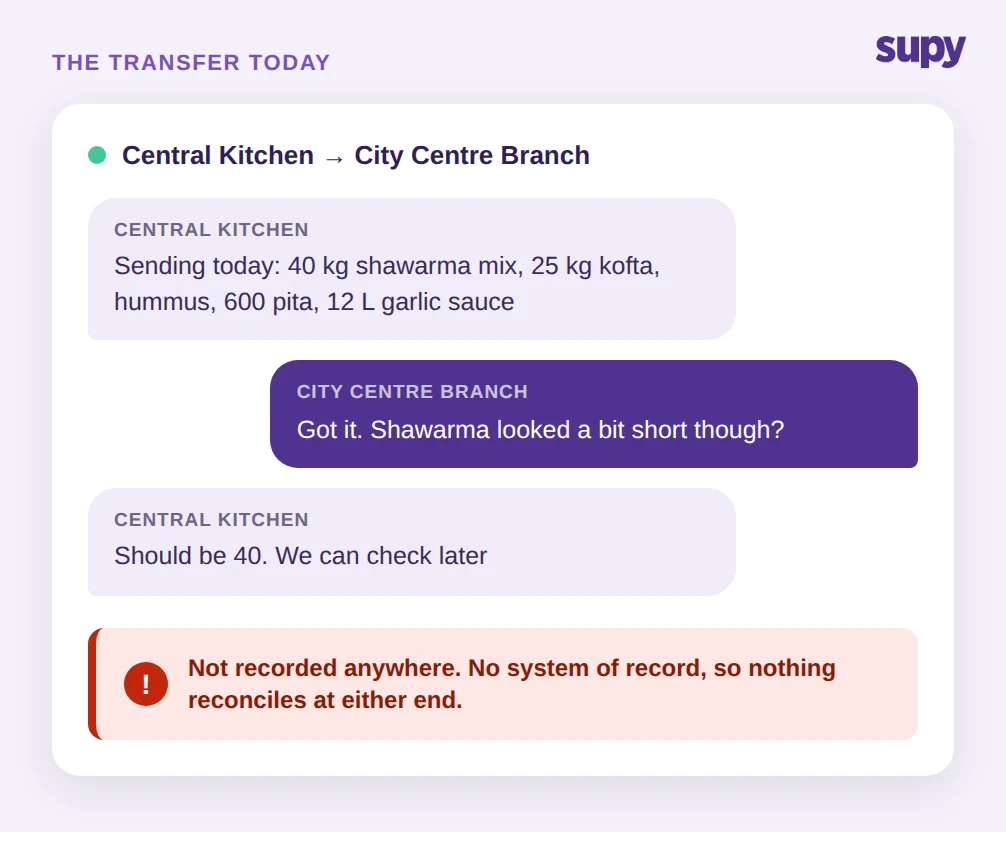
This is not a strawman. At one three-outlet group, the head of ops ran its entire central kitchen ordering over text messages, with prep and delivery lists typed by hand, which meant every transfer between the kitchen and its venues was keyed twice and reconciled never. At another, a two-outlet group's F&B director ran all of it, inventory, inter-branch transfers, wastage and recipe costing, inside spreadsheets and messaging apps, and ended up with fragmented, unreliable records at both ends.
The failure mode is structural, not careless. When the transfer lives in a message, there is no shared object that both sides update. The kitchen believes it sent 40 kg of shawarma mix. The outlet believes it got "about" that. Quantities are mis-keyed, a line gets forgotten, a substitution never gets written down, and by the time anyone notices, the thread has scrolled past it. The title promise of this article is exactly this point: text-and-spreadsheet transfers break because there is no single accepted record of the movement, only two separate approximations of it. The question to ask first is blunt: if you needed the exact detail of last Tuesday's transfer to one outlet, could you produce it without scrolling a chat thread?
The visibility you lose: quantity, cost and wastage per outlet
The messaging workflow does not just create errors. It hides three specific numbers you need to run a group.
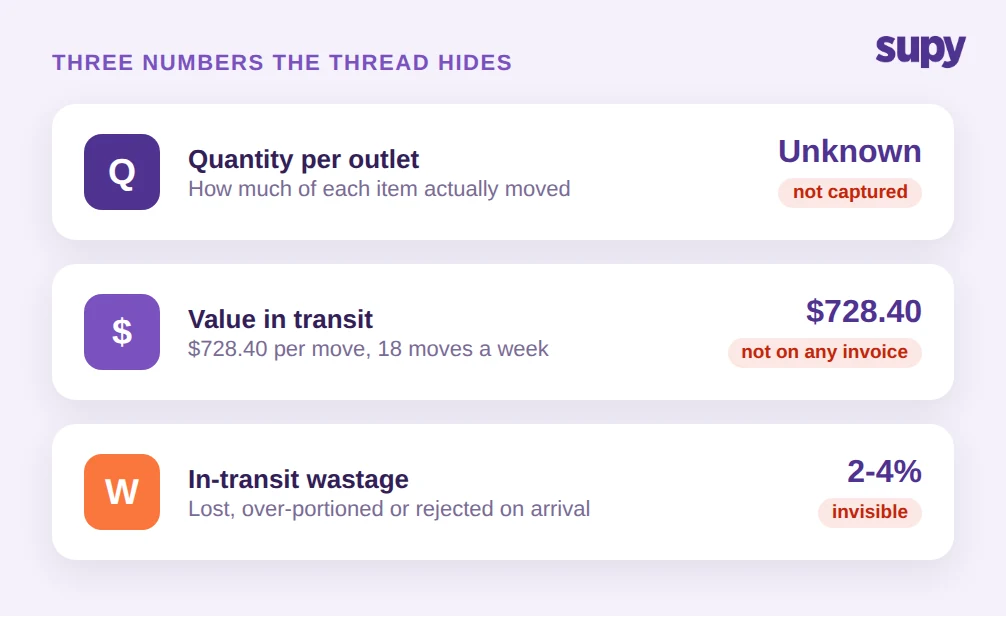
The first is quantity. Without a confirmed transfer record, you cannot answer "how much of item X moved from the kitchen to each outlet this week" without adding up chat messages. One F&B director described the central kitchen as a shared production hub for two branches with no real-time visibility into the quantities transferred at all.
The second is cost. A transfer is an internal movement of value, not a purchase, so it never shows up in your supplier invoices. If you cannot attach a cost to each line that leaves the kitchen, you cannot say what each outlet is actually consuming in kitchen-produced goods, and your outlet-level food cost is guesswork. Take a single delivery: 40 kg of shawarma mix at $7.00/kg, 25 kg of beef kofta at $9.20/kg, prepped hummus, pita and sauces. That one transfer is worth $728.40 leaving the kitchen. Multiply that by 18 transfers a week and the untracked internal value is not a rounding error.
The third is wastage. Product is lost in transit, over-portioned, or rejected on arrival, and in a manual flow that loss is invisible. The same F&B director had no view of the wastage along the way, so shrinkage between the kitchen and the outlet simply disappeared from the books. Two to four percent lost per transfer sounds small until it is running every day across every outlet with nobody counting it. So ask which of the three you could actually put a number to today, quantity, cost or wastage per outlet, because if the honest answer is none, the message thread is running your kitchen.
Why manual counts and month-end reconciliation break across cost centres
The workaround most groups reach for is counting. If the system does not know what is on hand, staff count it by hand. One multi-location group's owner had no inventory software at all, so central kitchen staff counted stock by hand, item by item, before every single order. At roughly 45 minutes a count, that is a recurring labour cost that exists only because there is no live record feeding the transfers.
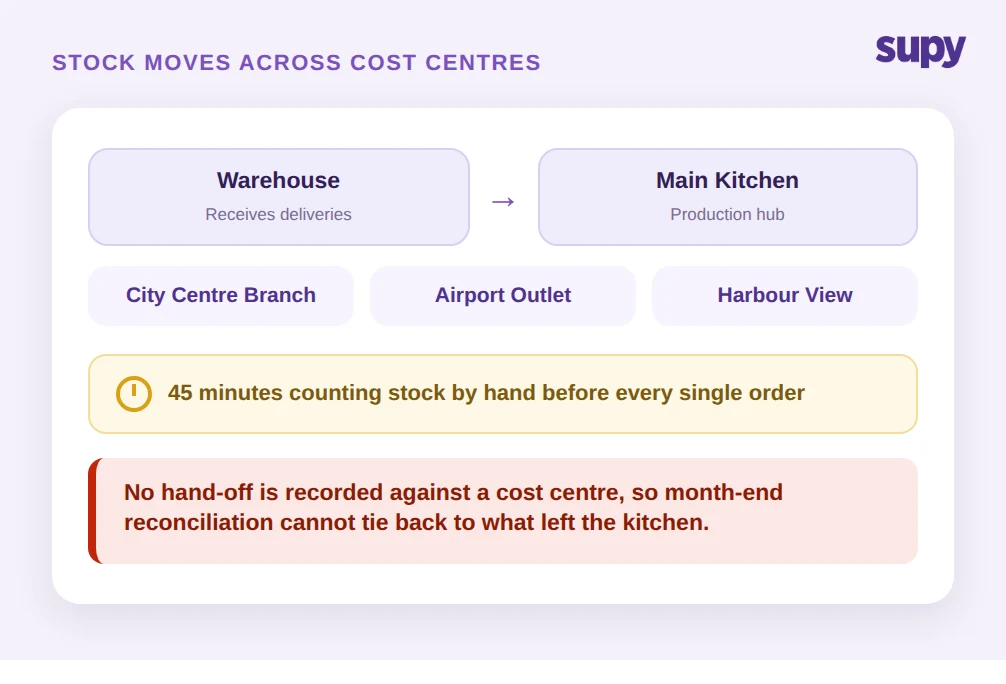
It gets harder as the operation grows a real supply chain inside itself. A central kitchen's procurement manager described needing to manage stock movement across several cost centres at once: a warehouse that receives supplier deliveries, a main kitchen that produces, and satellite cafes that sell. Stock flows warehouse to main kitchen to outlet, and each hand-off is a transfer. When none of those hand-offs is recorded against a cost centre, month-end reconciliation is impossible by construction. The received value at an outlet can never be matched to what left the kitchen, because the two were never captured as the same event.
This is the difference between transfer pricing, which is an accounting question about how you value internal moves, and transfer tracking, which is the operational question of what physically moved and whether both ends agree. Most competitor content answers the pricing question and leaves the operator who searched for tracking with nothing. You need the operational record first. The valuation is only as good as the movement data underneath it. Before you add another outlet, decide where each hand-off gets recorded, because a reconciliation you cannot do across three sites does not get easier across six.
What structured stock transfer tracking changes
Structured central kitchen to outlet stock transfer tracking replaces the message thread with a single shared transfer object that both sides act on. In Supy, an outlet or the kitchen raises an inter-branch transfer request, and the key control is this: the receiving location must accept the transfer before stock updates at either end. Nothing moves in the numbers on a promise. It moves when the receiver confirms.
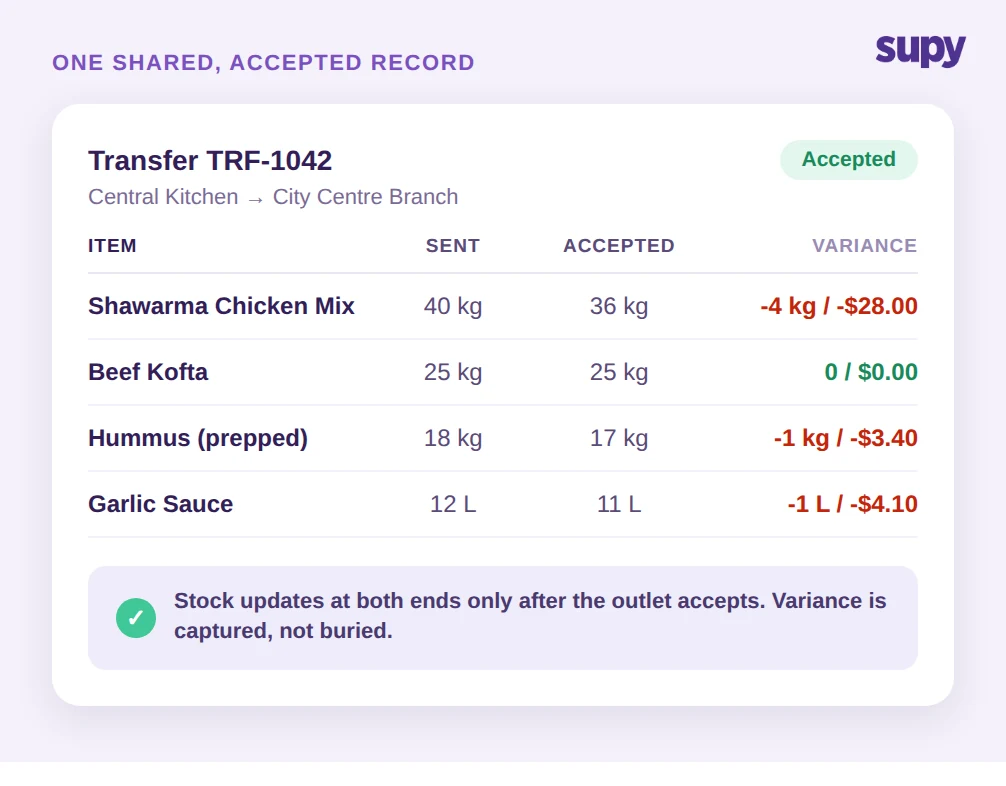
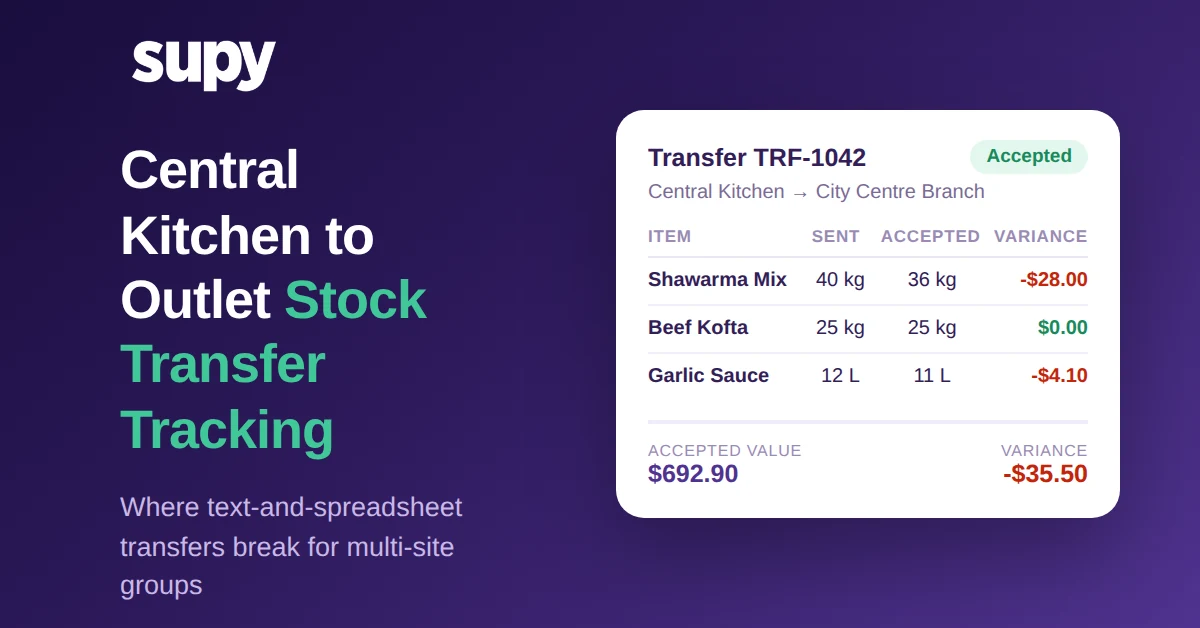
That one control removes phantom stock, the single biggest cause of counts that never reconcile. If the kitchen sent 40 kg of shawarma mix but the outlet only accepts 36 kg, the outlet accepts the line for 36 and the 4 kg discrepancy is captured, not buried. Supy supports partial accept and reject on a line-by-line basis, so a short or rejected line is recorded as exactly that rather than forcing an all-or-nothing choice. Once the transfer is accepted, stock adjusts automatically at both the sending and receiving location, so the kitchen's on-hand drops and the outlet's rises in one confirmed step, with no double entry.
Because the movement is now a real record, it flows into the rest of the numbers. Accepted transfers appear in variance, usage and live stock reporting, so an outlet's kitchen-produced consumption sits alongside its purchased stock, and theoretical-versus-actual usage finally includes what came from the central kitchen. Live stock visibility updates from these confirmed movements automatically, which is what lets you retire the 45-minute manual count before every order. And every transfer keeps a full audit trail, so the question "who sent what, when, and what did the other end accept" has an answer that is not a chat scroll-back.
Consider the same $728.40 delivery again. Under the messaging workflow it left the kitchen and vanished from the record until someone tried to reconcile weeks later. Under a confirmed-transfer record, the outlet accepts $692.90 of it, the $35.50 shortfall is captured on the spot against the specific lines that ran short, and both locations' on-hand figures reflect reality the moment the receiver taps accept. The kitchen sees its stock drop, the outlet sees its stock rise, and the variance is already sitting in the report. There is no second data-entry step and no month-end archaeology.
None of this is a pricing feature bolted on. It is the operational system of record that the messaging workflow never had, sitting inside the same platform that runs your central kitchen management, live stock and wastage. That single-platform point matters: because purchases, production, transfers and wastage share one set of item and cost data, a transfer does not need re-keying to become a cost, and an outlet's food cost picks up its kitchen-produced goods without a separate spreadsheet stitched on at the end of the month. The test for your own setup is simple: do both ends ever sign off on the same transfer record? If they do not today, that is the thing to change.
A quick self-check for your central kitchen
You do not need a project to find out whether this is costing you. Run three checks against your own operation.
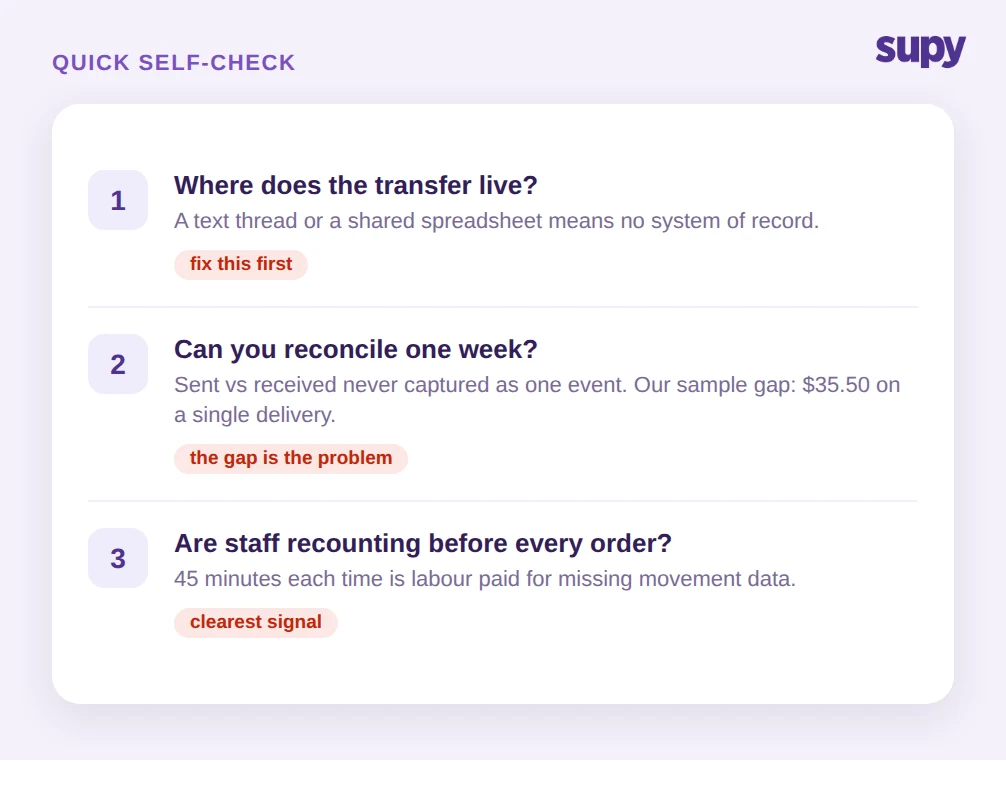
First, ask where the transfer lives. If the answer is a text thread, a WhatsApp group or a shared spreadsheet, you have no system of record, and every number below it is an estimate. That is the first thing to fix.
Second, try to reconcile one week. Pull what the kitchen believes it sent to one outlet against what that outlet believes it received. If those two figures were never captured as the same accepted event, they will not match, and the gap you find, in our sample transfer it was $35.50 on a single delivery, is the size of the problem multiplied across every move you make.
Third, count the counts. If staff are recounting central kitchen stock before every order, you are paying in labour for information a confirmed-transfer record would give you for free. That recurring 45 minutes is the clearest signal that the movement data is missing.
If any of the three lands, the move is the same: get the transfer out of the message thread and into a shared record that the receiving outlet has to accept before stock updates. Once both ends agree on what moved, per-outlet cost attribution, real wastage figures and a clean month-end reconciliation stop being manual reconstructions and start being reports you can read.
Supy runs central kitchen to outlet stock transfer tracking as part of one platform for multi-site inventory, transfers, wastage and recipe costing, so the movement, its cost and its variance all live in the same place. If your transfers still run over text, that is the gap worth closing first.