.jpeg)


تتبع نقل المخزون من المطبخ المركزي إلى الفروع: أين تنهار أسلوب الرسائل والجداول في المجموعات متعددة المواقع
كيف تسير عمليات النقل من المطبخ المركزي إلى الفروع فعلياً في معظم المجموعات متعددة المواقع
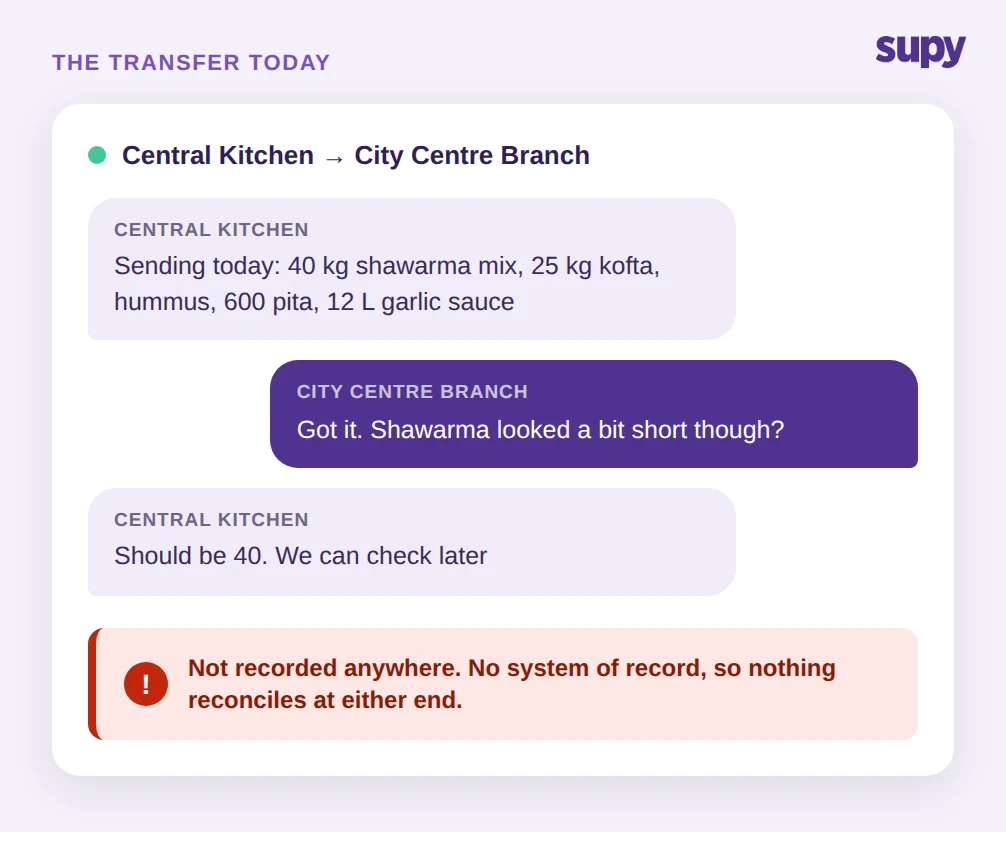
لنبدأ بالواقع الراهن، لأن هذا هو المكان الذي يعيش فيه أصحاب المطابخ المركزية. يُنتج مطبخ مركزي لثلاثة فروع أو أكثر. كل صباح، يضع أحدهم قائمة بالتجهيز والتوصيل — في أغلب الأحيان في ملاحظة أو جدول بيانات — ثم يُرسل رسالة إلى كل موقع بما هو قادم. تخرج السيارة. في الطرف الآخر، يُلقي مدير الفرع نظرة على التسليم، وربما يضع علامة على ورقة مطبوعة، ثم ينشغل بالخدمة. لا شيء يُدخل في أي مكان كسجل نظام.
هذا ليس سيناريو افتراضي. في إحدى المجموعات ذات ثلاثة فروع، أدار رئيس العمليات طلبات المطبخ المركزي بالكامل عبر الرسائل النصية، مع قوائم التجهيز والتوصيل المكتوبة يدوياً — مما يعني أن كل نقل بين المطبخ وفروعه كان يُدخل مرتين ولا يُوفَّق أبداً. وفي مجموعة أخرى بفرعين، أدار مدير الأغذية والمشروبات كل شيء — المخزون، والنقل بين الفروع، والهدر، وتكاليف الوصفة — داخل جداول البيانات وتطبيقات المراسلة، وانتهى بسجلات متشتتة وغير موثوقة في كلا الطرفين.
نمط الفشل هيكلي لا إهمال. عندما يعيش النقل في رسالة، لا يوجد كائن مشترك يُحدّثه الطرفان. يعتقد المطبخ أنه أرسل 40 كجم من مزيج الشاورما. يعتقد الفرع أنه استلم "نحو" ذلك. تُخطأ الكميات، وتُنسى بنود، ولا تُسجّل بدائل، وبحلول وقت يلاحظ أحدهم، يكون الخيط قد تجاوز ذلك. هذا هو جوهر المشكلة التي يعالجها هذا المقال: عمليات النقل عبر الرسائل والجداول تنهار لأنه لا يوجد سجل مقبول واحد للحركة، بل تقديران منفصلان لها فحسب. السؤال الذي يجب طرحه أولاً صريح: لو احتجت التفاصيل الدقيقة لنقل الثلاثاء الماضي إلى أحد الفروع، هل يمكنك الحصول عليها دون التمرير في خيط الدردشة؟
الرؤية التي تفقدها: الكمية والتكلفة والهدر لكل فرع
لا يقتصر سير عمل المراسلة على إنشاء الأخطاء؛ بل يُخفي ثلاثة أرقام محددة تحتاجها لإدارة المجموعة.
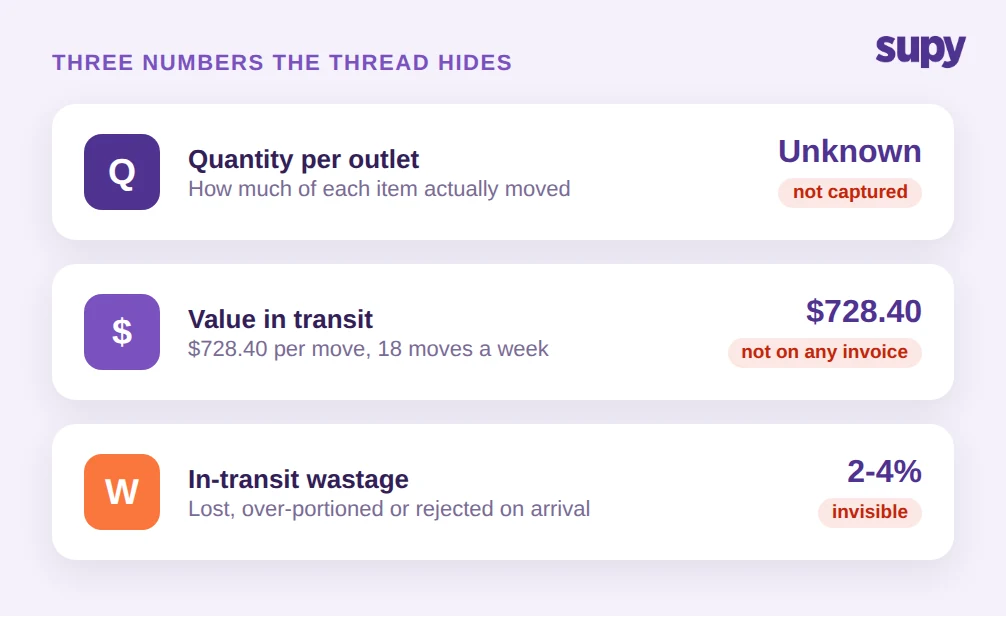
الأول هو الكمية. بدون سجل نقل مؤكد، لا يمكنك الإجابة على "كم قطعة من الصنف X انتقلت من المطبخ إلى كل فرع هذا الأسبوع" دون جمع رسائل الدردشة. وصف أحد مديري الأغذية والمشروبات المطبخ المركزي بأنه مركز إنتاج مشترك لفرعين دون أي رؤية في الوقت الفعلي للكميات المنقولة.
الثاني هو التكلفة. النقل هو حركة قيمة داخلية، لا عملية شراء، لذا لا يظهر أبداً في فواتير الموردين. إذا لم تتمكن من إلصاق تكلفة بكل بند يغادر المطبخ، لا يمكنك معرفة ما تستهلكه كل فرع فعلاً من البضائع المُنتجة في المطبخ، وتكلفة الغذاء على مستوى الفرع مجرد تخمين. خذ تسليماً واحداً: 40 كجم من مزيج الشاورما بـ $7.00/كجم، و25 كجم من كفتة اللحم بـ $9.20/كجم، وحمص وخبز وصلصات جاهزة. هذا النقل الواحد يساوي $728.40 تغادر المطبخ. اضرب ذلك في 18 عملية نقل أسبوعياً، وستجد أن القيمة الداخلية غير المتتبعة ليست خطأ تقريب.
الثالث هو الهدر. يُفقد المنتج أثناء النقل، أو يُجزأ بشكل مفرط، أو يُرفض عند الوصول، وفي سير العمل اليدوي يصبح هذا الفقد غير مرئي. لم يكن لدى مدير الأغذية والمشروبات نفسه أي رؤية للهدر على طول الطريق، فكان الانكماش بين المطبخ والفرع يختفي ببساطة من الدفاتر. يبدو فقدان من اثنين إلى أربعة في المئة لكل عملية نقل صغيراً حتى يتكرر كل يوم عبر كل فرع دون أن يعدّه أحد. اسأل نفسك أيّاً من الثلاثة يمكنك تحديده برقم اليوم — الكمية أو التكلفة أو الهدر لكل فرع — لأن الإجابة الصادقة "لا شيء" تعني أن خيط الرسائل هو من يُدير مطبخك.
لماذا تنهار العدادات اليدوية والتسوية الشهرية عبر مراكز التكلفة
الحل البديل الذي تلجأ إليه معظم المجموعات هو العد. إذا كان النظام لا يعرف ما هو متاح، يعدّ الموظفون يدوياً. في إحدى المجموعات متعددة المواقع، لم يكن لدى صاحبها أي برنامج مخزون، فكان موظفو المطبخ المركزي يعدّون المخزون يدوياً، صنفاً بصنف، قبل كل طلب. بمعدل 45 دقيقة للعدادة، هذه تكلفة عمالة متكررة لا وجود لها إلا لأن لا سجل لحظي يغذي عمليات النقل.
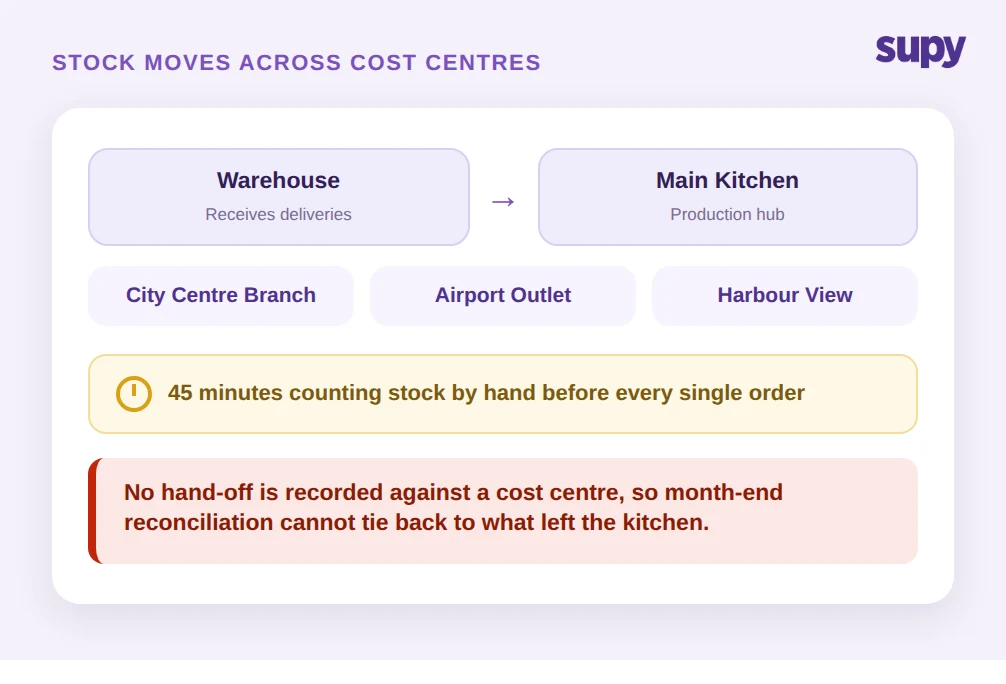
تزداد الصعوبة مع نمو العملية لتتضمن سلسلة توريد داخلية حقيقية. وصف مدير المشتريات في مطبخ مركزي ضرورة إدارة حركة المخزون عبر عدة مراكز تكلفة في آنٍ واحد: مستودع يستقبل توريدات من كل مورّد خارجي، ومطبخ رئيسي يُنتج، ومقاهٍ ساتلة تبيع. يتدفق المخزون من المستودع إلى المطبخ الرئيسي إلى الفرع، وكل تسليم هو عملية نقل. حين لا تُسجَّل أيٌّ من هذه التسليمات مقابل مركز تكلفة، تصبح التسوية في نهاية الشهر مستحيلة هيكلياً. لا يمكن مطابقة القيمة المستلمة في الفرع بما غادر المطبخ، لأن الطرفين لم يُسجَّلا قط كحدث واحد.
هذا هو الفرق بين تسعير التحويل — وهو سؤال محاسبي عن كيفية تقييم الحركات الداخلية — وتتبع النقل، وهو السؤال التشغيلي عمّا انتقل فعلياً وما إذا كان الطرفان يتفقان. معظم محتوى المنافسين يجيب على سؤال التسعير ويترك المشغّل الذي بحث عن التتبع دون إجابة. تحتاج أولاً إلى السجل التشغيلي؛ التقييم لا يكون أفضل من بيانات الحركة التي يقوم عليها. قبل افتتاح فرع جديد، قرر أين يُسجَّل كل تسليم، لأن التسوية التي لا تستطيع إنجازها عبر ثلاثة مواقع لن تسهل عبر ستة.
ما الذي يُغيّره تتبع نقل المخزون المنظّم
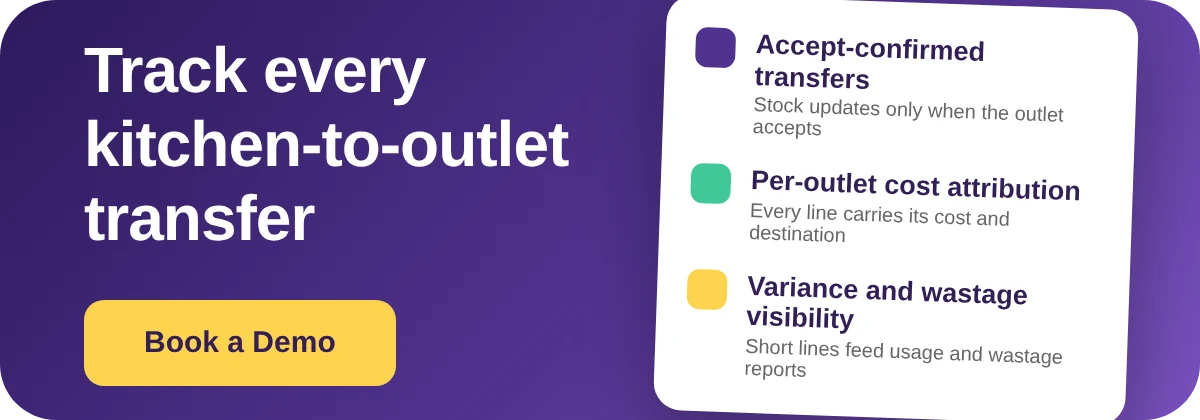
يستبدل تتبع نقل المخزون من المطبخ المركزي إلى الفرع بصورة منظّمة خيطَ الرسائل بكائن نقل مشترك واحد يتصرف الطرفان بناءً عليه. في Supy، يرفع الفرع أو المطبخ طلب نقل بين الفروع، والضابط الأساسي هو: يجب على الموقع المستلم قبول النقل قبل تحديث المخزون في أي طرف. لا شيء يتحرك في الأرقام بمجرد الوعد؛ بل يتحرك حين يؤكد المستلم.
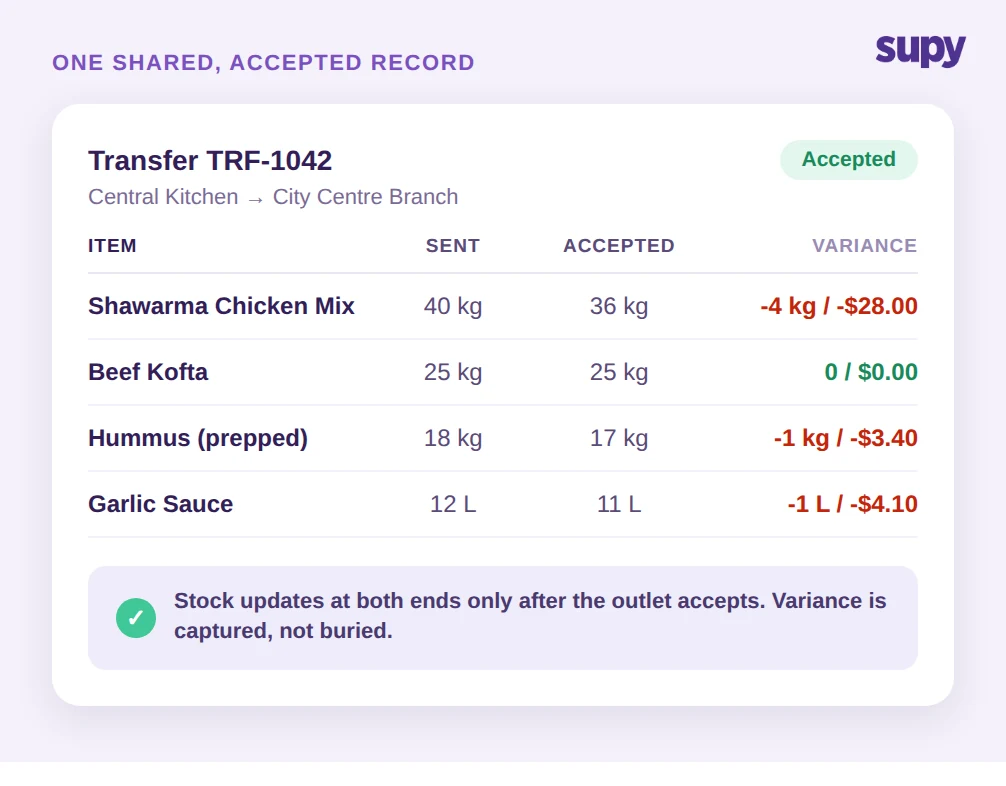
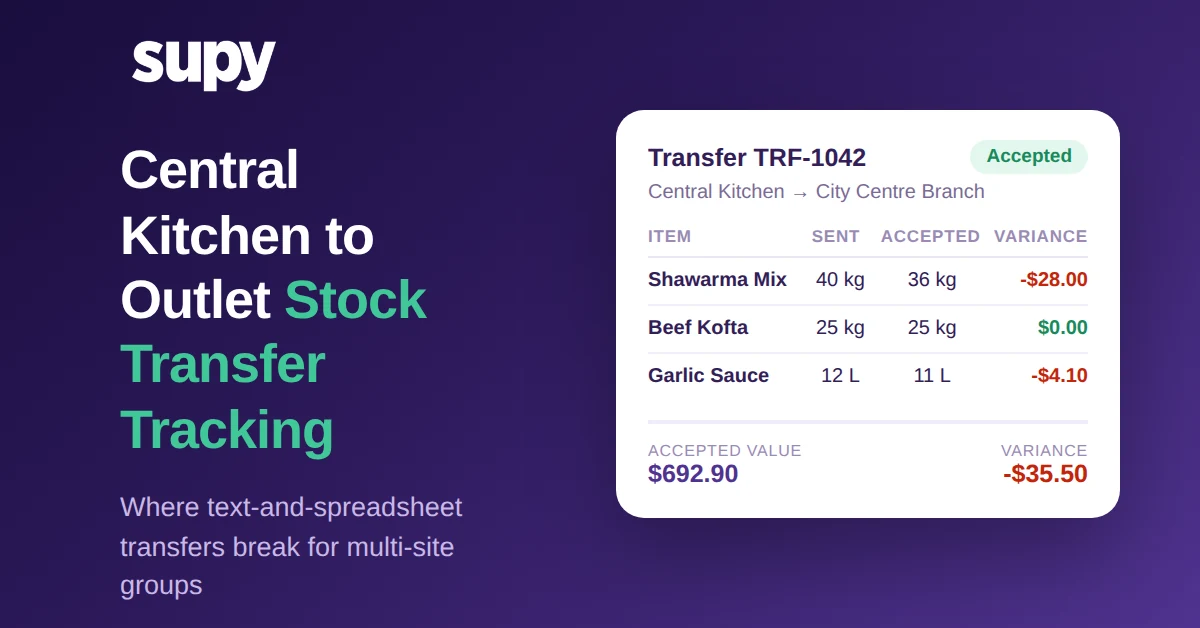
هذا الضابط الواحد يُزيل المخزون الوهمي، وهو السبب الأكبر في عدم توازن العدادات. إذا أرسل المطبخ 40 كجم من مزيج الشاورما لكن الفرع قبل 36 كجم فحسب، يقبل الفرع البند بـ 36 كجم ويُسجَّل فرق الـ 4 كجم، لا يُطمر. تدعم Supy القبول والرفض الجزئيين بند ببند، لذا يُسجَّل البند الناقص أو المرفوض بدقة دون إجبار على اختيار كل شيء أو لا شيء. بمجرد قبول النقل، يتعدّل المخزون تلقائياً في موقع الإرسال وموقع الاستلام، فيرتفع المخزون في الفرع وينخفض في المطبخ في خطوة مؤكدة واحدة، دون إدخال مضاعف.
بما أن الحركة أصبحت سجلاً حقيقياً، تتدفق إلى بقية الأرقام. تظهر عمليات النقل المقبولة في التقارير الخاصة بالتباين والاستهلاك والمخزون اللحظي، لتجلس استهلاك الفرع من المنتجات المطبخية جنباً إلى جنب مع مخزونه المشترى، ويشمل الاستخدام النظري مقابل الفعلي أخيراً ما جاء من المطبخ المركزي. تتحدث متابعة المخزون الفعلي تلقائياً من هذه الحركات المؤكدة، مما يُتيح التخلي عن العدادة اليدوية التي تستغرق 45 دقيقة قبل كل طلب. ويحتفظ كل نقل بسجل مراجعة كامل، لتكون الإجابة على "من أرسل ماذا، ومتى، وما الذي قبله الطرف الآخر" متاحة دون العودة إلى سجل الدردشة.
تأمل نفس تسليم $728.40. في سير عمل المراسلة، غادر المطبخ واختفى من السجل حتى حاول أحدهم التسوية بعد أسابيع. في سجل النقل المؤكد، قبل الفرع $692.90 منه، وسُجّل نقص $35.50 فوراً مقابل البنود المحددة التي نقصت، وتعكس أرقام المخزون اللحظي في كلا الموقعين الواقع في اللحظة التي يضغط فيها المستلم على قبول. يرى المطبخ انخفاض مخزونه، ويرى الفرع ارتفاع مخزونه، وتجلس التباين فعلاً في التقارير. لا توجد خطوة إدخال بيانات ثانية، ولا استقصاء في نهاية الشهر.
لا شيء من هذا ميزة تسعير مضافة. إنه السجل التشغيلي الذي لم يمتلكه سير عمل المراسلة قط، كامناً داخل المنصة ذاتها التي تُدير إدارة مطبخك المركزي والمخزون اللحظي والهدر. هذه النقطة المتعلقة بالمنصة الواحدة مهمة: لأن المشتريات والإنتاج والنقل والهدر تشترك في مجموعة واحدة من بيانات الأصناف والتكاليف، لا يحتاج النقل إلى إعادة إدخال ليصبح تكلفة، ولا تحتاج تكلفة الغذاء على مستوى الفرع إلى جدول بيانات منفصل يُضاف في نهاية الشهر. الاختبار لإعدادك الخاص بسيط: هل يوقّع كلا الطرفين على نفس سجل النقل؟ إذا لم يكن الأمر كذلك اليوم، فهذا ما يجب تغييره.
فحص ذاتي سريع لمطبخك المركزي
لست بحاجة إلى مشروع لمعرفة ما إذا كان هذا يُكلّفك. أجرِ ثلاثة فحوصات على عملياتك الخاصة.
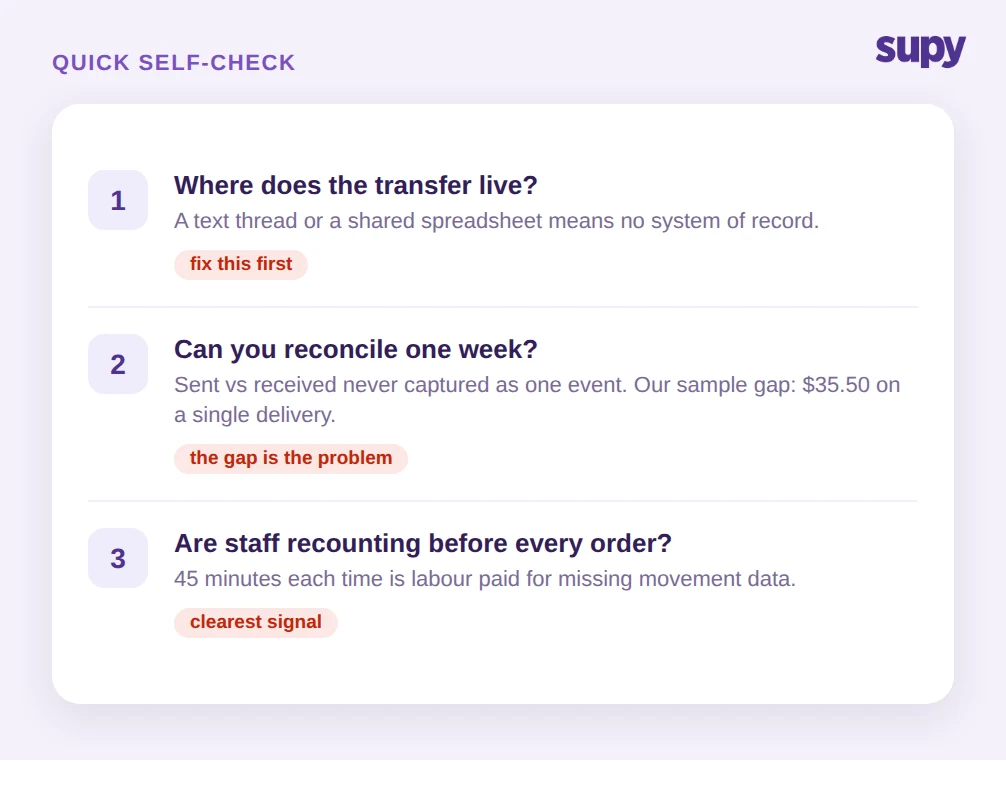
أولاً، اسأل أين يعيش النقل. إذا كانت الإجابة خيط نصي أو مجموعة WhatsApp أو جدول بيانات مشترك، فليس لديك سجل نظام، وكل رقم تحته مجرد تقدير. هذا أول شيء يجب إصلاحه.
ثانياً، حاول توفيق أسبوع واحد. قارن ما يعتقد المطبخ أنه أرسله إلى فرع واحد بما يعتقد ذلك الفرع أنه استلمه. إذا لم يُسجَّل هذان الرقمان قط كحدث مقبول واحد، فلن يتطابقا، والفجوة التي ستجدها — في مثال نقلنا كانت $35.50 في تسليم واحد — هي حجم المشكلة مضروباً في كل حركة تقوم بها.
ثالثاً، عُد العدادات. إذا كان الموظفون يُعيدون عدّ مخزون المطبخ المركزي قبل كل طلب، فأنت تدفع بالعمالة مقابل معلومات كان يمنحك إياها سجل النقل المؤكد مجاناً. تلك الـ 45 دقيقة المتكررة هي الإشارة الأوضح على غياب بيانات الحركة.
إذا انطبق أي من الثلاثة، فالخطوة هي نفسها: أخرج النقل من خيط الرسائل وضعه في سجل مشترك يجب على الفرع المستلم قبوله قبل تحديث المخزون. حين يتفق الطرفان على ما انتقل، تتوقف إسناد التكلفة لكل فرع وأرقام الهدر الحقيقية والتسوية النظيفة في نهاية الشهر عن كونها إعادة بناء يدوية وتصبح تقارير يمكنك قراءتها.
تُدير Supy تتبع نقل المخزون من المطبخ المركزي إلى الفروع كجزء من منصة واحدة للمخزون متعدد المواقع والنقل والهدر وتكاليف الوصفة، فتجلس الحركة وتكلفتها وفروقاتها في مكان واحد. إذا كانت عمليات نقلك لا تزال تجري عبر الرسائل، فهذه هي الفجوة التي يستحق سدها الأولوية.