.jpg)


Restaurant Management System: What Multi-Location Operators Actually Need
What Most "Restaurant Management Systems" Actually Cover
The category name is broad enough to include almost anything. Software marketed as a restaurant management system may focus almost entirely on front-of-house: reservations, table management, POS, staff scheduling. Back-of-house capability - if it exists at all - is often a bolted-on module with limited depth.
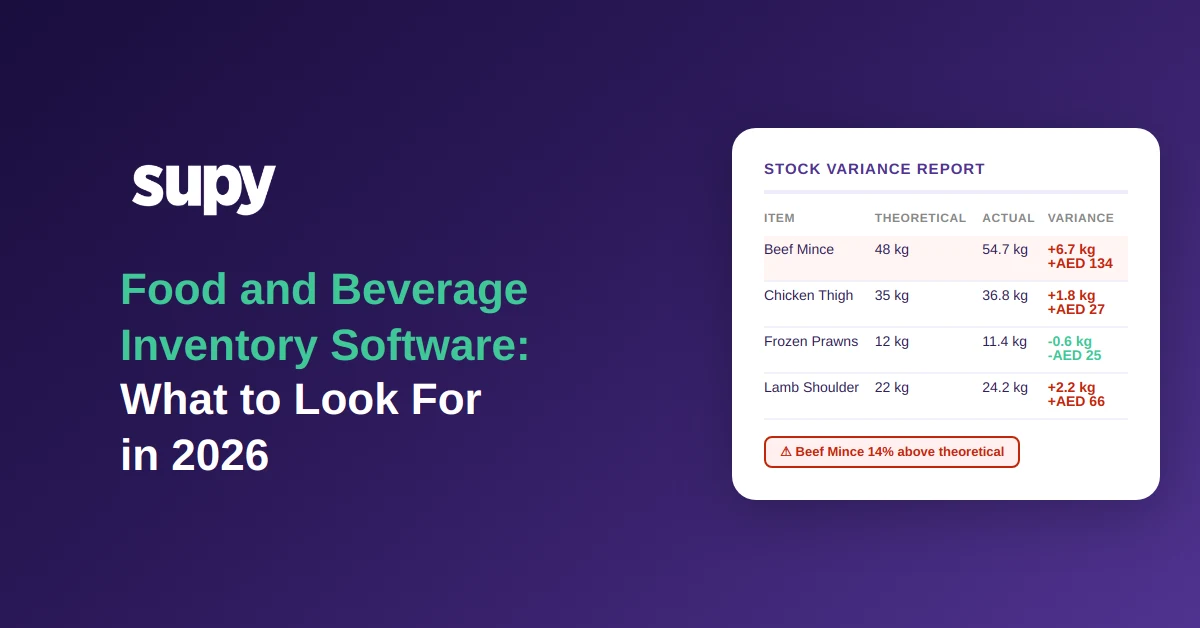
Multi-location operators running five or more outlets quickly discover the gap. A reservation tool does not tell you that your City Centre Branch is sitting on 24 kg of chicken breast while your Airport Outlet has ordered another 20 kg from the same supplier for tomorrow. A POS records a sale but does not automatically reduce theoretical stock, compare it against a physical count, or flag the variance against a recipe-costed threshold.
The decision frame for growing F&B groups is not "should we buy a restaurant management system?" but "does the system we are evaluating cover what happens after the order is placed and before the dish reaches the table?" Ask specifically: does the system track live inventory across all sites, link recipes to actual ingredient consumption, and connect purchasing decisions to current stock levels in real time?
Live Inventory Visibility Across Every Location
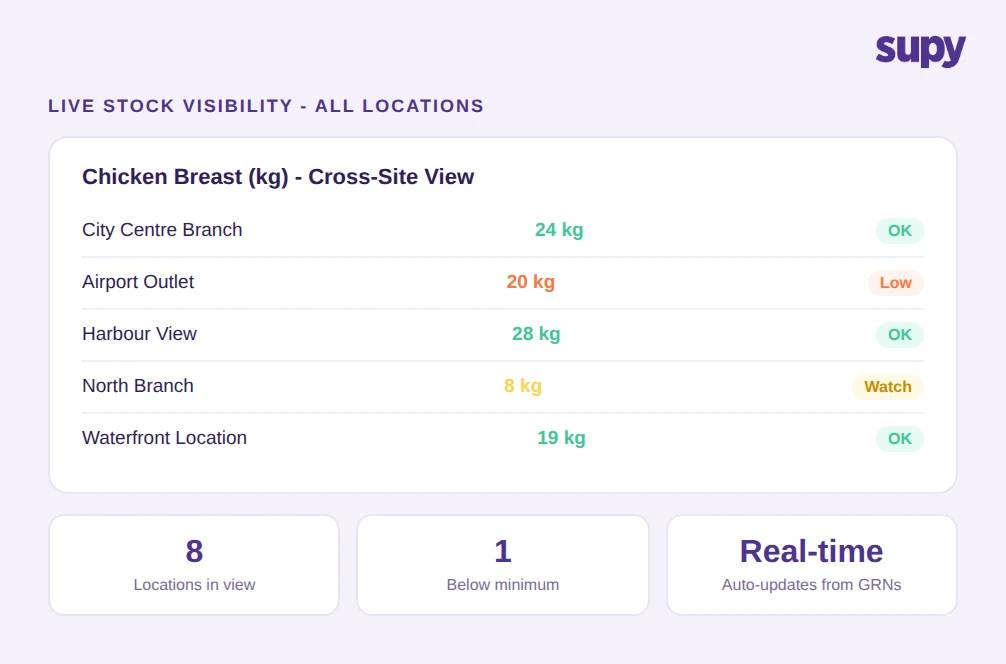
Without centralised stock visibility, branch managers make ordering decisions based on memory and rough estimates. A multi-site group operating without this infrastructure faces a predictable problem: over-purchasing at some locations, stock-outs at others, and no audit trail that explains which.
Live inventory visibility means the system updates stock-on-hand automatically when a goods receipt note (GRN) is confirmed - not when a manager enters a manual count. It means each site's par and minimum thresholds trigger alerts the moment stock drops below them, not at the next morning's briefing. And it means a head-office operations manager can see all locations from a single view rather than chasing branch managers for updates.
Inter-branch transfers are where this breaks down most visibly. When a central kitchen ships product to an outlet, both stock records must update the moment the receiving manager confirms the delivery - not before, and not through a manual memo. Receiver-accept workflows prevent phantom variances that make it impossible to tell whether a discrepancy reflects a real loss or simply an unrecorded transfer.
For a multi-location group, the question to ask is: does the system update stock across all branches in real time, including transfers, without requiring manual entry at either end? For more on this, see our guide to restaurant inventory software.
Recipe-Linked Costing: Where Theoretical Meets Actual
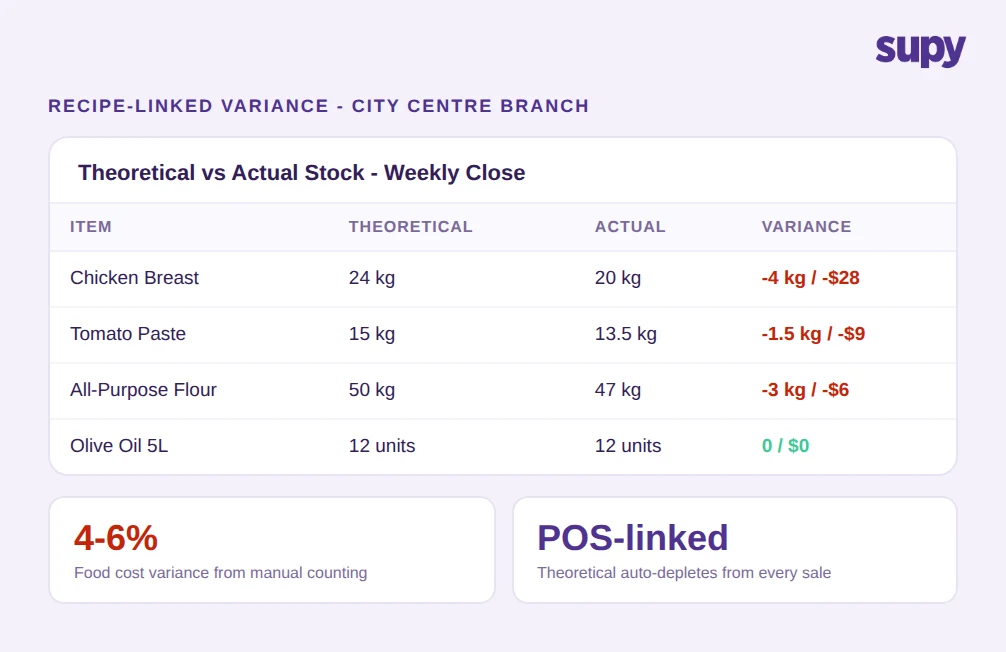
A multi-location QSR chain found that manual stock counting across branches produced 4-6% food cost variance monthly. Their managers spent hours reconciling spreadsheets but could not isolate whether losses were coming from portioning inconsistency, waste, or something else. Without recipe-linked tracking, every food cost number is a net figure with no way to unpack it.
Recipe-linked costing means every sale recorded by the POS reduces theoretical ingredient stock according to the recipe on file. Plated dishes, semi-finished prep recipes, and menu modifiers are all mapped to their base ingredients, with yields and shrinkage built in. When you count physical stock at the end of a period and compare it to the theoretical figure, the system shows you exactly where the gap is - by item, by branch, and by category.
This also changes how you manage menu pricing. Target food cost percentages are set at the recipe level, and over-threshold alerts fire when actual costs drift - before the month-end report, not after. For groups running more than five outlets, this is the difference between a food cost problem you can trace and one you are simply absorbing.
Ask any system vendor: can the recipe module handle prep recipes and modifiers, and does a POS sale automatically update theoretical stock without manual intervention? For further reading, see our guide to food cost management software.
Procurement That Runs on Current Stock Data, Not Habit
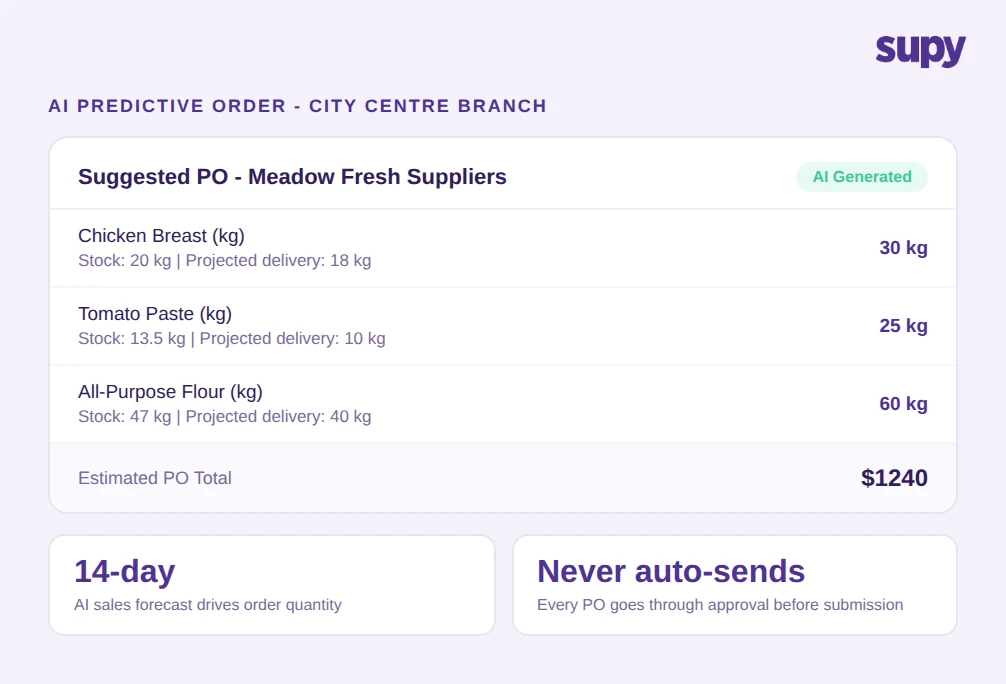
Operators evaluating purchasing tools typically focus on whether the system can send a PO by email or WhatsApp. That is a low bar. The more consequential question is whether the system generates purchase recommendations from actual stock levels, sales forecasts, and par settings - rather than from a weekly routine or a branch manager's judgment.
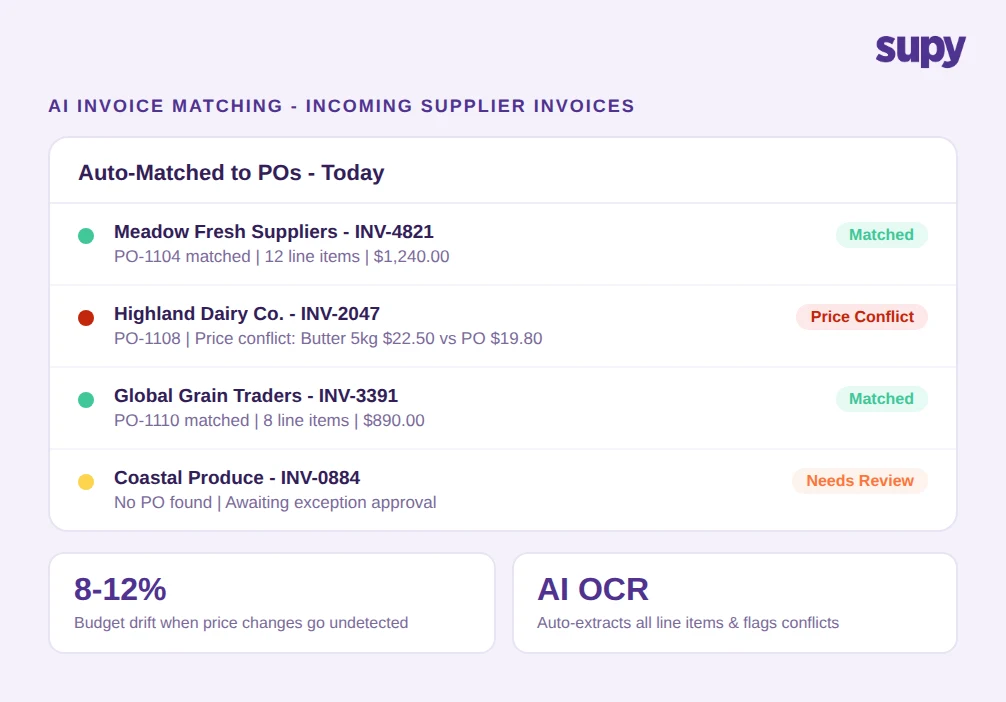
A multi-site F&B group operating in Saudi Arabia described supplier price increases slipping through their paper-based GRN process for weeks. Without automated PO-to-invoice matching, actual food cost versus budget drifted 8-12% before finance flagged it at month-end. The problem was not the prices themselves - suppliers adjust prices. The problem was a receiving process that could not catch the discrepancy in real time.
AI-driven procurement closes this loop. A 14-day AI sales forecast, run through the recipe database and checked against current stock, produces a ready-to-submit purchase order that shows projected stock on delivery alongside the recommendation. AI invoice scanning - where suppliers email invoices to a per-restaurant inbox and the system auto-matches them to POs, extracting line items and flagging price conflicts - catches drift at the point of receiving rather than at month-end.
The approval layer matters equally. Sequential approvals up to five approvers, triggered by branch and order value, with separate requisition and PO flows, prevent the approval threshold problem: branch staff structuring orders to stay below the limit. Ask whether the approval workflow operates per-branch and per-value threshold, or only as a blanket setting. Our guide to restaurant procurement software covers this in more depth. You can also explore Supy AI Predictive Ordering directly.
Waste Tracking With Cost Impact, Not Just Volume
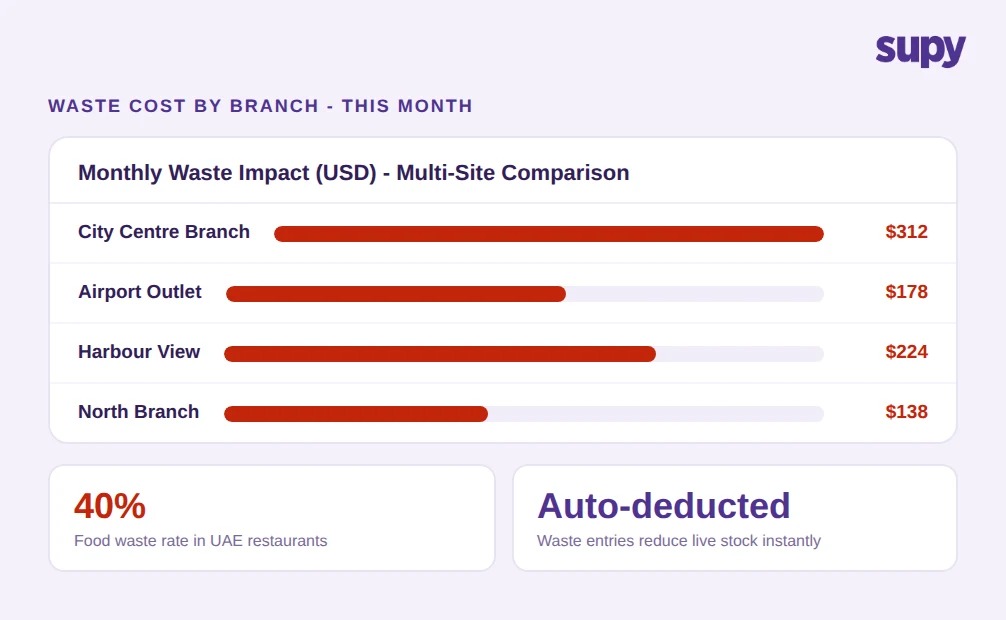
In the UAE, food waste in restaurants runs at approximately 40%. In Saudi Arabia, annual losses reach nearly 40 billion SAR. Operators face both margin pressure and increasing regulatory scrutiny on waste performance - but most inventory systems capture only volume, not the cost dimension that makes waste data actionable.
Cost-impact waste tracking means every waste entry - logged in seconds on mobile by the person handling the product - carries a monetary value based on the ingredient cost on file. Reports show waste by category, by branch, and by period, and the cost is automatically deducted from stock. A multi-site group can compare branches directly: which location is generating $312 in waste per month against a comparable site at $178, and what is driving the gap?
This is distinct from shrinkage recorded through a physical count. Logged waste and count-based shrinkage should both appear in the variance analysis so operators can distinguish between what was deliberately discarded and what cannot be accounted for at all.
Ask: does the system separate logged waste from count-based shrinkage in the variance report, and can you see waste cost by category and branch in a single view? See also our guide to food inventory software for related coverage.
Cross-Site Visibility and the Central Kitchen Layer
For groups with a central kitchen supplying multiple outlets, the management system needs to handle an additional operational layer. Branches send purchase orders to the central kitchen, which consolidates demand across sites, fulfils and ships, and generates delivery notes and pro forma invoices. The central kitchen may also serve external B2B clients with their own price lists.
The back-office infrastructure for this is more demanding than branch-level operations. Billing must distinguish internal transfers from external sales. Stock adjustments at both the central kitchen and the receiving branch must fire automatically from the delivery confirmation. And the head-office operations view must be able to see central kitchen stock alongside branch stock without requiring a separate login or report.
Cross-site visibility also covers reporting: live COGS at group level, theoretical-versus-actual variance by site, and slow-mover identification across the portfolio. A 75+ integration ecosystem - connecting the management system to existing POS, accounting (QuickBooks, Xero, Zoho Books), and ERP platforms - determines how much of this data flows automatically versus how much requires manual export.
Ask any vendor: is the central kitchen billing module the same product, or a separate add-on with limited integration into the core inventory and procurement stack? Our guide to central kitchen management software covers the full operational scope.
What to Look for in a Restaurant Management System Architecture
The challenge for most growing F&B groups is not any single module. It is that a POS-first platform built for front-of-house operations and a standalone inventory tool built for a single site do not share a data model. Stock counts in one system do not feed recipe-linked COGS calculations in another. Waste logged on a mobile app does not reduce theoretical stock in the purchasing tool.
A back-of-house management system built for multi-location operators treats procurement, inventory, recipe costing, and waste as connected data, not separate applications. A delivery confirmation updates stock, triggers a variance calculation against the recipe-based theoretical, and informs the next purchase order recommendation - all without manual intervention at any step.
Before committing to any platform, ask whether the system was built as a unified back-of-house data model or assembled from acquired modules. The difference shows up in variance reports, approval workflows, and the quality of the AI ordering recommendations. For a full picture of what this back-of-house layer covers, see our guide to back-of-house restaurant operations.