.jpg)


Cloud Power: Enhancing Inventory Management Across Locations
Inventory management is a crucial function for any business, with improper practices potentially leading to significant financial losses. Even minor human errors such as delayed stock counts, inaccurate readings, or misplacing items can severely impact profits. Implementing Cloud-Based Inventory Management can help mitigate these risks by automating processes and ensuring more accurate and timely data.
Until recently, desktop software was the latest solution to handle all inventory-related tasks. However, successfully setting up such a system is time-consuming and expensive, requiring lots of data and equipment to be properly installed. This is where cloud-based inventory management solutions come in.
Offering extra flexibility and real-time problem-solving, cloud-based solutions have taken the world of inventory management by storm. Now, businesses can manage inventory levels from any device anywhere in the world.
In this article, we will discuss the core features and implementations of cloud solutions for inventory management in detail. In addition, we will highlight the success stories of satisfied business owners to help you better understand the practical benefits of adopting cloud-based restaurant inventory systems.
Table Of Content:
- Core Features Of Cloud-Based Systems
- Implementing Cloud Technology
- Success Stories
- Navigating Challenges
- Conclusion
- About Supy
1. Core Features of Cloud-Based Inventory Management
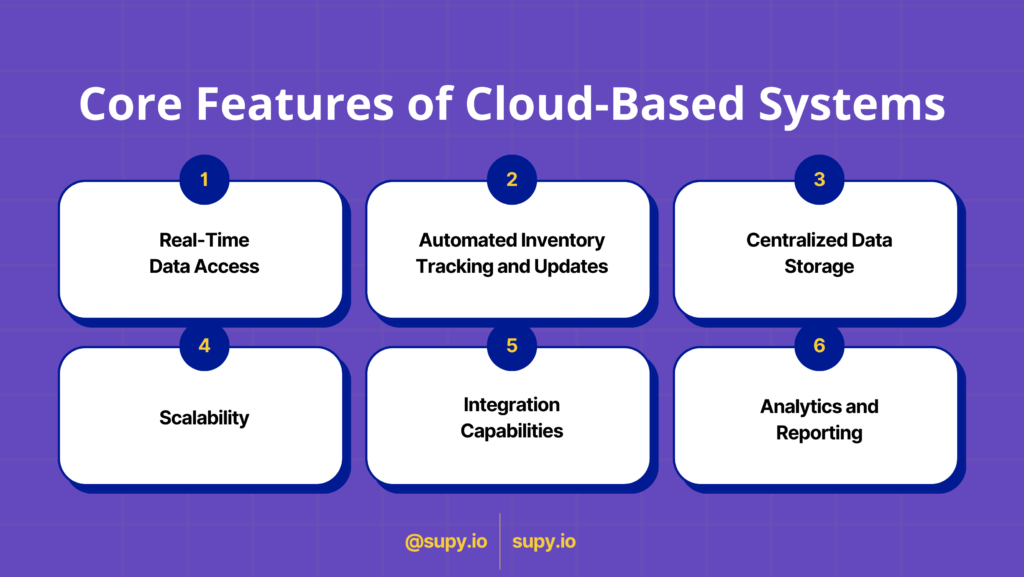
Leveraging cloud computing methods, cloud-based systems offer a variety of cutting-edge features designed to enhance any business’ inventory management experience. Below are some central features found in cloud-based systems.
Real-Time Data Access
With cloud-based systems, you can access all inventory-related data from anywhere in the world. This includes stock levels, inventory movements, order status, product information, and more. Since your data is now on the cloud instead of a local desktop, you can get notified about all real-time updates from any device with an internet connection. This can help you make quick decisions when needed and stay up to date on all matters at all times, like when you need to make quick business decisions such as ordering stock, redirecting a shipment, etc.
Automated Inventory Tracking and Updates
Gone are the days of meticulously counting stock and manually entering inventory levels. With cloud-based solutions, you can automate the system to keep track of inventory levels for all items even when you’re not logged in. Every time an order is placed, the number of items sold will automatically be deducted from the inventory count, minimizing the risk of human errors and inaccurate numbers. Other activities like receiving, picking, packing, and shipping minimize errors and make it easier to manage can also be automated to make sure the system is always updated.
Centralized Data Storage
One major edge cloud solution for inventory over traditional inventory management software is centralized data storage. Instead of having multiple servers installed at every business location, all your data is stored remotely on the cloud. It's like having all your important information in a safe that you can open from anywhere, whether you're at home, at the office, or even on vacation!
Scalability
One of the primary concerns for any up-and-coming business is using strategies and services that will grow with them. As your company reaches new milestones, whether that be opening new locations, increased customer base, or more vendor contracts, your management methods must be able to accommodate. Cloud solutions, with resources like computing power and storage provided on demand, can quickly scale up or down according to the needs of the business without compromising on customer satisfaction
Integration Capabilities
Cloud inventory management systems can connect with other essential software such as programs for handling finances, selling products online, or organizing company resources. For instance, when a customer in a restaurant places an order at the POS terminal, the inventory system automatically updates the stock levels for the items sold. Similarly, if a reservation is made through the restaurant's online platform, the inventory system adjusts ingredient quantities for expected demand. This allows for streamlined supply chain management by keeping all information in sync.
Analytics and Reporting
Cloud-based inventory management systems offer robust analytics and reporting capabilities, empowering businesses to optimize inventory operations. For example, you can analyze sales trends to identify which items are the top-selling and then predict future demands accordingly. Additionally, advanced reporting features allow you to track KPIs (key performance indicators) like inventory turnover rates and order fulfillment times, that too in real-time. All this data is displayed in customizable dashboards which are easy to read and understand, allowing businesses to make informed decisions that in turn drive efficiency and profitability.
2. Implementing Cloud-Based Inventory Management Technology
Successful implementation of cloud technology can do wonders for your business management. The following are some steps you can follow to seamlessly integrate real-time inventory management solutions in your company.
- Assess Current Inventory Process: The first step in implementing any new procedure in your business is to take a good internal look at the current conditions. What problems do you face while managing inventory on a day-to-day basis? What are the limitations of your current cloud inventory software? In what situations does your team struggle the most? By asking yourself these questions, you will be able to get a clear idea of what kind of solution you are looking for.
- Research and Select The Right Cloud Solution: Although there are several leading cloud inventory management software on the market, not all of them will be suitable for your business. Look for solutions that specifically target F&B operators, with features tailored to the restaurant industry. Consider features like real-time tracking, recipe management, mobile accessibility, and integration capabilities.
- Migrate Data: Once you have selected your preferred cloud solution, it is time to migrate data and set up the software. This includes configuring product categories, units of measure, and reorder thresholds. Most software automates this process, but it is best to consult with their customer service for guidance.
- Train Employees: Learning how to use your newly installed real-time inventory management system is the next step. Not all your employees may be tech-savvy enough to understand how to use the software from the get-go. Schedule training sessions and tutorials to get your staff comfortable with the software and avoid usage mistakes.
- Test and Optimize: Make sure to test out any important integrations to ensure the system is performing perfectly. This includes POS (Point-Of-Sale) systems, barcode scanning, batch tracking, etc.
- Maintain and Support: Conduct regular maintenance checks on the system’s overall performance. Take feedback from your staff and stakeholders to understand any concerns and ensure customer satisfaction.
By following these practical steps, you can successfully implement cloud technology for inventory management in your F&B business, improving efficiency, accuracy, and overall operations.
3. Success Stories
Cloud-based solutions have transformed inventory management for many leading companies, bringing both financial and organizational benefits. Among these businesses are establishments that have adopted Supy’s cutting-edge inventory management software and have seen significant success in at least one metric. The following are some inspiring success stories of companies in the F&B industry that use Supy for their inventory control.
Grit Hospitality
One of the top restaurant companies in the UAE, Grit Hospitality is behind famous Emirati food brands like Tahini, Moonshine, and Smashed. Although business was booming, the company was struggling with issues like manual procurement, delivery delays, and mismanaged ordering.
Supy solved these issues by digitizing the entire procurement process with its 6-in-1 restaurant management software. Now, the staff was able to view inventory data of all restaurant locations in one place with built-in performance dashboards. This allowed for easier insight into discrepancies, high-performing products, and more. As a result, the company was able to report an increase of 11% in their bottom line, a clear indicator of positive performance!
La Carnita
La Carnita is a traditional Mexican restaurant with two locations currently operating in Dubai. When launching its second branch, the business began facing issues in managing its inventory data, specifically recipe information. The brand needed to replicate the same taste and standard that they had reached success with, without compromising on profits and sales in the process.
By subscribing to Supy’s cloud-based software, the restaurant was able to track inventory data in a centralized manner for all its branches. Other changes were ingredient price tracking, menu engineering, and recipe transcription. The result was an amazing 15% increase in profits.
4. Navigating Challenges
Implementing any new solutions to a functioning company is bound to come with its fair share of obstacles. One of the first challenges that may arise is resistance to change. Your employees might have a hard time adjusting to the new system, especially if it's their first time using cloud inventory management software.
Technical challenges must also be accounted for. Unlike desktop inventory management software, cloud systems require an internet connection for access, a factor that can be a major concern for businesses operating in locations with poor internet infrastructure. Possible solutions are to invest in reliable internet service providers and keep mobile hotspots as backups for emergencies. Integration issues are another possible concern, as any error in the connection of POS or accounting systems can have disastrous effects.
Much of the data that is uploaded to these cloud inventory management software is highly sensitive. To ensure protection against data breaches or unauthorized access, businesses should implement access controls and take measures like data encryption, regular security checkups, and multi-factor authentication.
5. Conclusion
Cloud-based solutions are the future of inventory management, providing access to benefits that were never possible before. By implementing pioneering features like real-time inventory tracking, mobile accessibility, third-party integration, and advanced analytics and reporting, these systems have the power to transform the world of inventory management as we know it.
Making cloud-based systems the standard software for all inventory-related activities will not only streamline operations but also improve efficiency and drive smarter decision-making. Businesses can expect to save time, reduce errors, and enhance productivity by implementing cloud technology for inventory management.
6. About Supy
Supy is an all-encompassing inventory management software specifically targeted to restaurants and food and business operators. The platform aims to reduce variance, cost, and food waste, allowing businesses to take back control of their restaurant inventory. It is a highly scalable solution that can be utilized by both small pubs and large restaurant chains.
The three core functions of Supy’s inventory management software are to reduce variance in stock count, monitor stock metrics in real-time for quick discrepancy addressing, and save time otherwise spent counting inventory. With Supy, you can streamline operations and maximize resources while minimizing costs.