




How a Real Time Inventory Tracking System Works in Restaurants
A real time inventory tracking system deducts stock as each sale, delivery and transfer is recorded, so the number on screen matches the shelf. Many POS integrations still send sales over in a nightly batch, while a live sync shows each sale in the inventory in under five minutes. That gap decides whether a manager orders mid-service from real numbers or from yesterday's. This article shows how real time inventory tracking works, where nightly systems fall short and what to test in a demo.
- What is Real-Time Inventory?
- Can a POS System Track Inventory in Real Time?
- Variance That Stays Hidden Until Month-End
- How Real Time Tracking Works Across Multiple Sites
- Benefits of Real-Time Inventory Tracking in the F&B Sector
- Strategies to Implement Real-Time Inventory Tracking
- What to Test in a Demo
- Conclusion
- About Supy
What is Real-Time Inventory?
Real-time inventory tracking is a dynamic approach to inventory management that updates stock levels immediately as sales and restocks occur. This system provides up-to-the-minute data, allowing businesses to view their inventory levels in real time.
Integrating technology such as barcode scanners, RFID tags, and cloud-based software ensures that data on hand is always current and accurate. This immediacy helps businesses respond more quickly to the demands of the market, reduces the risk of overstocking or understocking, and enhances decision-making capabilities. For any food and beverage operation looking to optimize efficiency and reduce waste, real-time inventory is an essential tool.
Can a POS System Track Inventory in Real Time?
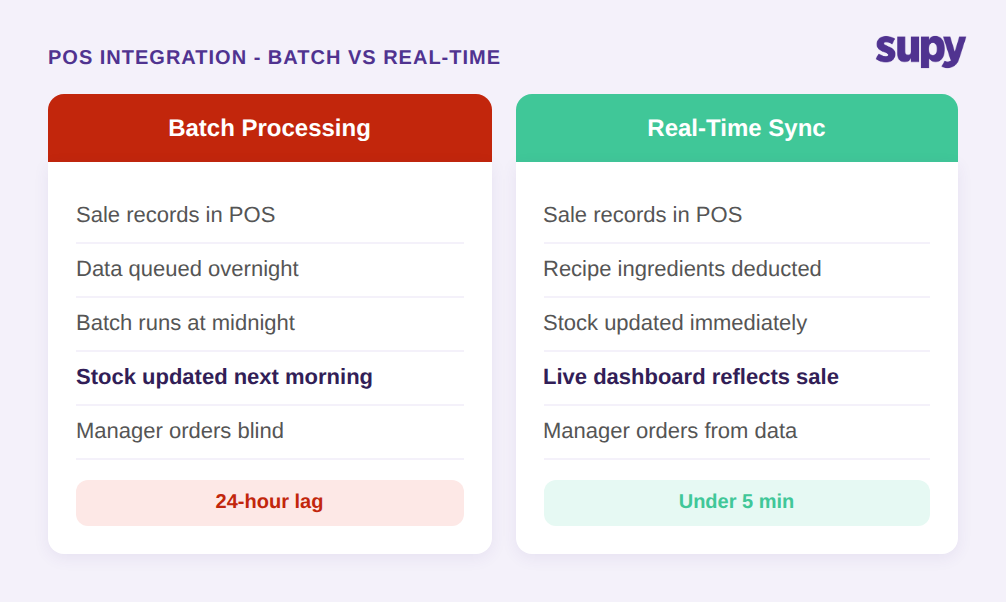
A POS system can feed real time inventory tracking, but only if it sends each sale to the inventory as it happens. Many integrations batch POS data overnight, so each morning yesterday's sales have not yet come off the stock count.
With a live sync, a dish that sells deducts the ingredients in its recipe straight away. Sites that run breakfast, lunch and dinner back to back can then order mid-service from what they have actually used. Two things decide whether the numbers hold up:
- Sync speed. A live sync shows a sale in the inventory within minutes. A nightly or end-of-day sync is a batch system, whatever the vendor calls it.
- Recipe and modifier mapping. Every POS menu item, size and modifier needs to map to the right ingredient quantities. A large portion should deduct more than a small one, or theoretical stock drifts away from the shelf even when the sync is fast.
The one question to ask a vendor is how often its POS integration updates stock on hand. Then ask to see a sale rung through a live POS appear on the inventory dashboard within minutes.
Variance That Stays Hidden Until Month-End
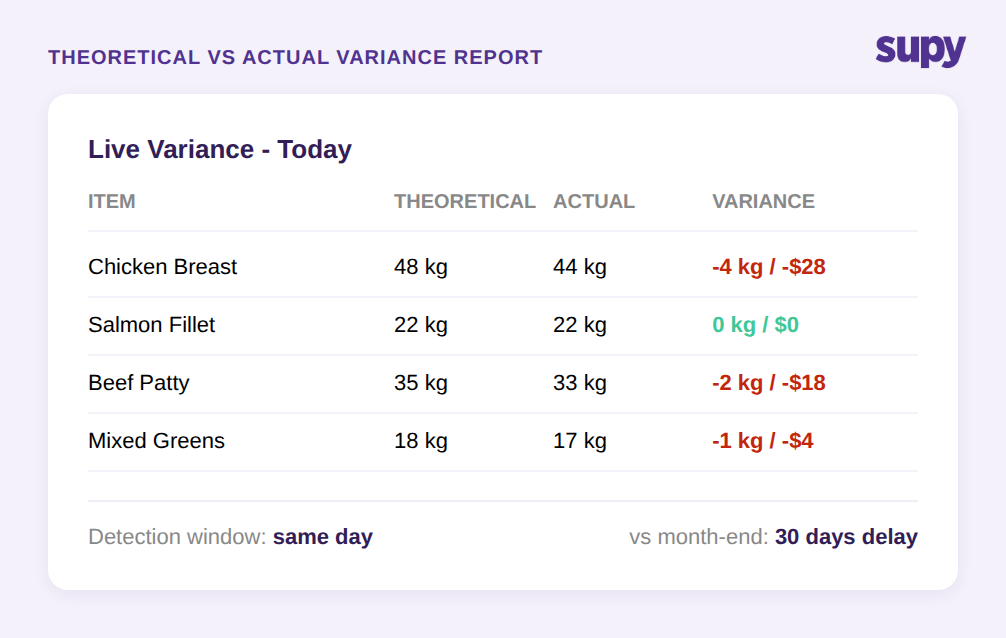
Without real time tracking, most groups check variance once a month. A count is compared with theoretical stock from POS sales and recorded waste, and by then the gap holds up to 30 days of waste, shrinkage and recording errors that nobody can trace to a shift, an item or a site.
Real time tracking compares theoretical and actual usage continuously, so a variance that shows up on Monday morning gets checked on Monday. High-value proteins, spirits and short-life produce can be flagged the same day instead of disappearing into one blended number at month-end.
How Real Time Tracking Works Across Multiple Sites
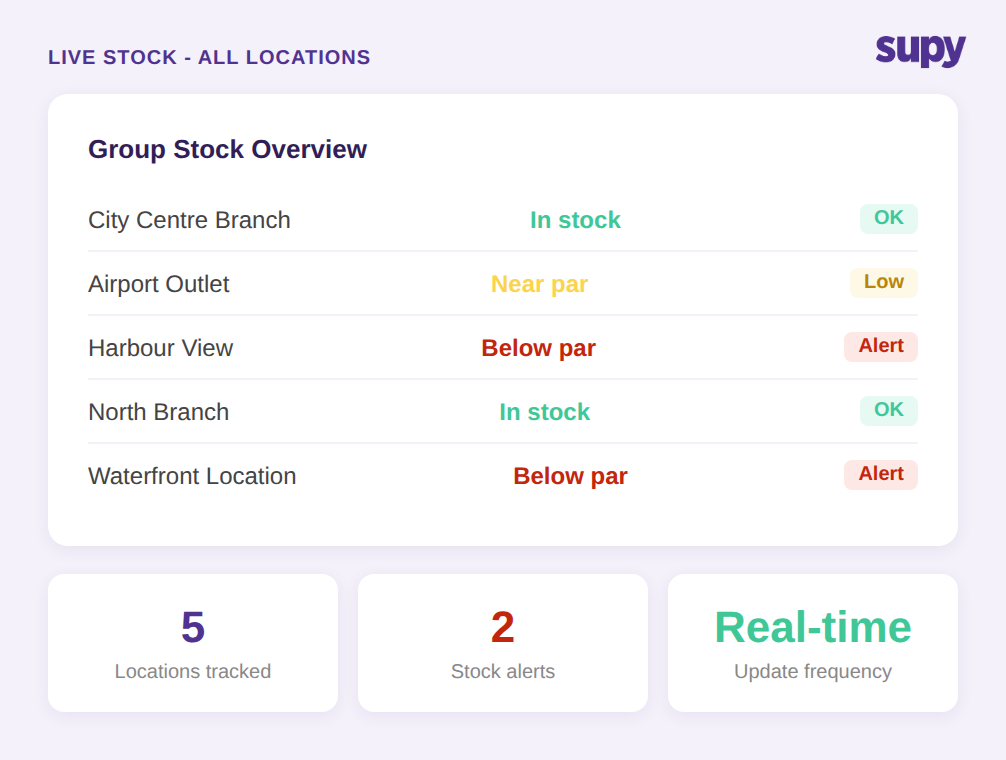
For a group, real time tracking has to cover every location in one view. Stock should update as each goods received note is confirmed, each sale comes through the POS and each transfer is accepted, with no manual sync. Head office then sees stock on hand by branch, category and storage area without calling each site.
Transfers need one extra rule. When stock moves from the central kitchen to a branch, or between two branches, the receiving site's stock changes only when that site accepts the transfer. That stops stock that is still on the van from showing up twice in the group total.
Low-stock alerts then turn ordering from a reaction into a routine:
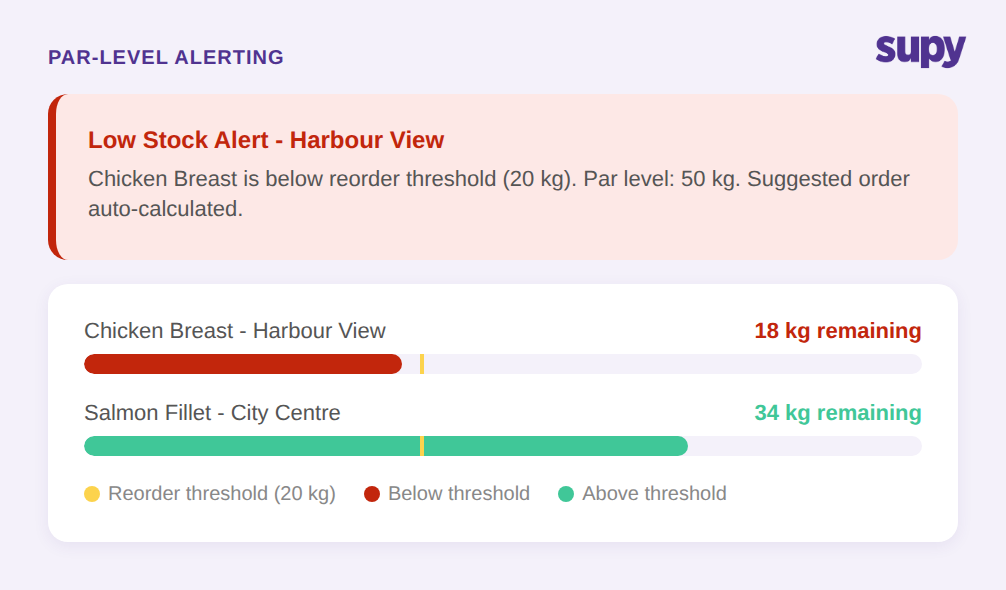
- Par and minimum levels per site. Each item gets its own par level and minimum at each location, so a high-volume protein with a 50 kg par might alert at 20 kg while a slow specialty item is tracked more loosely.
- An alert before the stockout. When stock drops below the minimum, the team that orders gets an alert early enough to order on the normal delivery day, instead of paying for an emergency order mid-service.
- Order to par. The system works out the quantity needed to get back to par and fills in a suggested order, which the manager checks and approves.
If you would rather not work par out by hand, the free par level calculator does it for every item from your usage, delivery days and supplier lead times.
Benefits of Real-Time Inventory Tracking in the F&B Sector

Implementing real-time inventory tracking in the food and beverage industry brings several advantages that can streamline operations and boost overall efficiency. Here's how it can transform your business:
Minimized Stockouts and Overstocking
Real-time inventory tracking can save you from these headaches by giving you precise, up-to-the-minute information. This helps you make smarter purchasing decisions, ensuring that your best-sellers are always available and you’re not wasting money on over-purchasing perishable goods.
For example, Pinza, a popular pizza chain, took Supy's real-time inventory tracking system and saw an 85% reduction in inventory variance. This impressive result was achieved through easy, regular updates of stock counts, wastage, and invoices via Supy’s mobile app.
Increased Operational Efficiency
Real-time data can transform your business operations. Instead of managers spending countless hours tracking inventory manually, they can focus on more critical activities that drive growth. Automating inventory tracking not only speeds up processes but also cuts down on human errors, which can be both costly and time-consuming to fix.
Better Financial Insights and Forecasting
Real-time inventory systems offer a treasure trove of data that can enhance your financial forecasting and budgeting. With this visibility, you can deeply analyze which products are performing well and which aren’t, leading to more informed financial decisions.
Enhanced Customer Satisfaction
Accurate real-time inventory management can significantly boost your customer satisfaction. When you know exactly what's in stock, you can avoid disappointing customers with unavailable menu items, which in turn prevents negative reviews and fosters loyalty.
Compliance and Safety
In the food and beverage sector, staying compliant with health regulations and standards is crucial. Real-time inventory tracking plays a vital role in ensuring all items are fresh and nothing expired remains on shelves or in storage. This proactive management is key to maintaining food safety, reducing the risk of foodborne illnesses, and complying with local health codes.
Strategies to Implement Real-Time Inventory Tracking
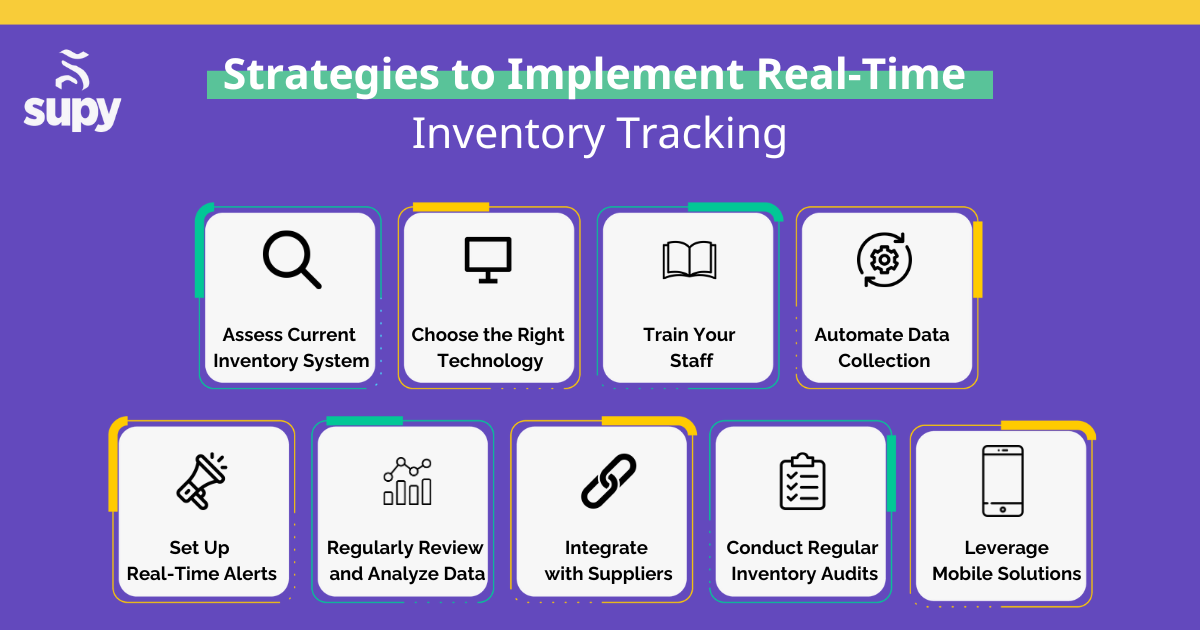
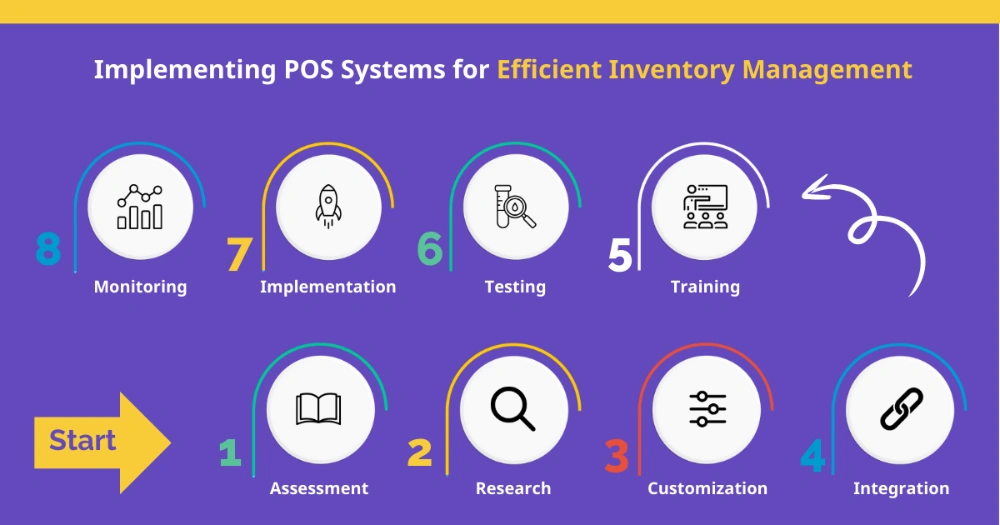
Implementing real-time inventory tracking in your restaurant or bar requires careful planning and execution. Here are some expert strategies to ensure a successful transition:
1. Assess Your Current Inventory System
Before making any changes, take a comprehensive look at your current inventory management processes. Start by conducting a thorough audit of your current processes, from how inventory is tracked to how orders are placed.
Identify the strengths and weaknesses of your current system. Are there frequent discrepancies between physical counts and recorded data? Are certain items consistently overstocked or understocked? Understanding these pain points will help you see where real-time tracking can provide the most benefit.
To achieve this, involve your staff in the assessment process. Gather feedback from those who handle inventory daily, as they can offer valuable insights into practical issues and inefficiencies. Use inventory management software to generate reports that highlight trends and problem areas.
For instance, look at historical data to see if there are patterns in stockouts or overages. This data-driven approach will help you tailor the new real-time system to address specific challenges, ensuring it meets the unique needs of your restaurant or bar. By understanding your inventory status, you can optimize logistics operations and improve sales channels to better meet customer demand while reducing manual data entry errors.
2. Choose the Right Technology
Selecting the right inventory management system is crucial, especially for multi-chain restaurants and bars. The software should handle the complexities of multiple locations while being scalable for growth. Look for features like cloud-based data management, which allows access to real-time inventory data from any location. This centralized view helps you monitor and track inventory across all your establishments, facilitating better coordination and decision-making.
Ensure that the software integrates seamlessly with your existing systems, such as point-of-sale (POS) systems and accounting software. This integration helps streamline operations and maintain data consistency across multiple channels.
Choose a user-friendly solution to minimize the learning curve for your staff, and look for providers that offer comprehensive training and support. With real time visibility and effective inventory planning, you can better manage stock levels and improve overall efficiency.
If you're on the lookout for such software, book a demo with Supy.
3. Train Your Staff
Proper training is essential for the successful implementation of a real-time inventory system. Begin by ensuring that all staff members understand the importance of the new technology and how it will benefit daily operations and the overall supply chain.
To reinforce this training, create easy-to-follow guides or video tutorials that staff can reference as needed. These resources should be clear and concise, helping employees quickly resolve any issues they encounter with the inventory tracking process.
Regular refresher courses can also be beneficial to keep everyone up-to-date with any system updates or new features. By reviewing past sales data, inventory levels, and strategies for managing dead stock and safety stock, you can better train your team to meet customer expectations effectively. Consistent inventory monitoring ensures that your business can adapt to changes and maintain optimal performance.
4. Automate Data Collection
Automating data collection can significantly improve the efficiency of your inventory management. By using automated tools, you can streamline collecting data quickly and accurately, minimizing the chances of human error. This ensures that your inventory data is always up-to-date, providing a reliable basis for making informed decisions and enhancing inventory accuracy.
Automated systems simplify the data processing and periodically updating inventory, allowing for faster stock counts and more efficient tracking of inventory movements. With precise, real-time data at your fingertips, you can optimize stock levels, reduce waste, and avoid excess inventory, ultimately enhancing your operational efficiency.
5. Set Up Real-Time Alerts
Configuring your inventory system to send real-time alerts is crucial for proactive management. Real time inventory solutions enable you to set up alerts for low stock levels, expired items, and any discrepancies in your inventory. These notifications provide accurate and timely information, ensuring you can address issues immediately, preventing potential disruptions to your operations.
Real-time alerts allow you to take swift action, whether it's reordering stock before it runs out or removing expired items to maintain food safety. By knowing how much inventory you have at all times, you can better control inventory costs and ensure smoother operations and a more efficient business. Staying ahead of potential problems with real-time alerts keeps your inventory management effective and reliable.
6. Regularly Review and Analyze Data
Consistently monitoring and analyzing the inventory data collected by your real-time tracking system is essential for effective inventory management. Regularly reviewing this data helps you identify trends and patterns that can inform your purchasing decisions and inventory practices, enhancing your overall inventory visibility.
Visualizing the data through charts and graphs can make it easier to spot significant trends. For instance, you might notice that certain items sell faster during specific times of the year, allowing you to adjust your orders accordingly to meet consumer demand. Regular data analysis helps you optimize stock levels, reduce waste, and ensure that you always have the right amount of inventory on hand.
7. Integrate with Suppliers
Integrating your real-time inventory system with your suppliers’ systems is a key strategy for streamlining procurement and maintaining a seamless supply chain. This integration facilitates automatic reordering, ensuring that your stock levels are replenished without manual intervention.
Maintaining close communication with your suppliers through integrated systems ensures timely deliveries and helps you avoid stockouts. It also allows for better coordination and transparency in the procurement process, making it easier to manage lead times and anticipate potential delays. This reduces the administrative burden on your team, allowing them to focus on other critical aspects of your business.
8. Conduct Regular Inventory Audits
Even with a real-time tracking system in place, conducting regular physical inventory audits is crucial. These audits verify the accuracy of your digital records and help identify any discrepancies or areas for improvement. Regularly comparing your physical inventory to your digital records ensures that your system remains reliable and effective.
Physical audits can uncover issues such as inventory shrinkage, miscounts, or data entry errors that might not be immediately apparent through digital tracking alone. Scheduling these audits periodically, such as monthly or quarterly, helps maintain the integrity of your inventory data. By addressing any discrepancies promptly, you can refine your processes, enhance accuracy, and ensure that your real-time inventory system delivers the best possible results.
9. Leverage Mobile Solutions
Implementing mobile solutions can significantly enhance your inventory management. Mobile apps allow staff to update inventory counts and receive alerts on the go, providing unmatched flexibility. This ensures that inventory management tasks can be performed anywhere, anytime, keeping your data current and accurate.
For example, using a mobile app, your team can quickly scan items during deliveries, update stock levels instantly, and even receive notifications about low inventory or discrepancies in real time. This mobility reduces the need for fixed workstations and allows your staff to manage inventory seamlessly, whether they are in the stockroom, on the restaurant floor, or at a remote location.
What to Test in a Demo
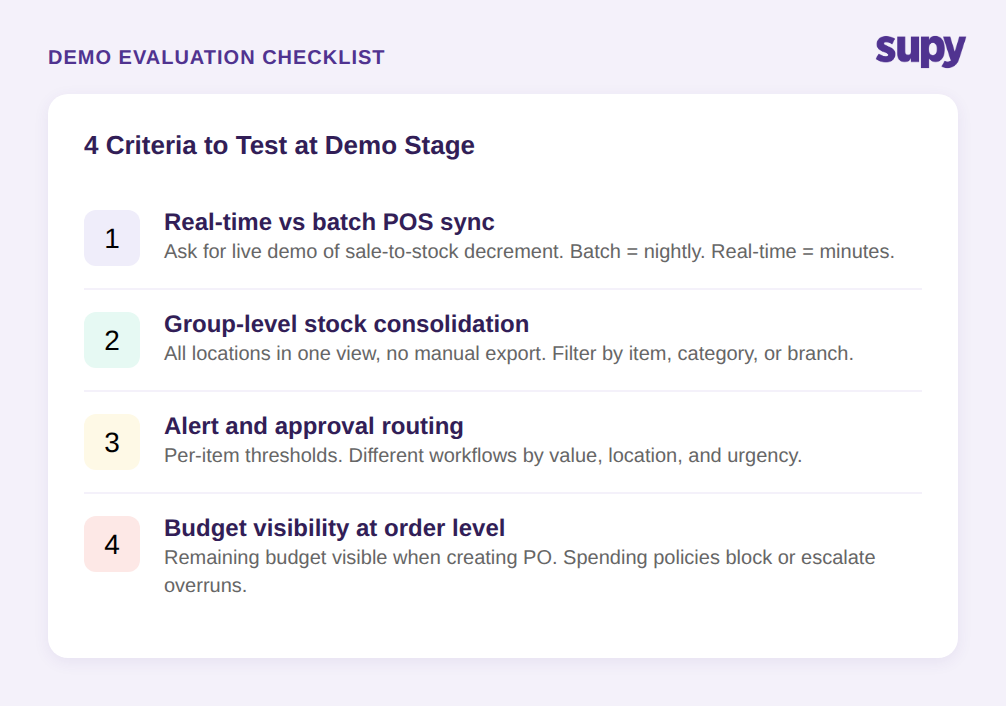
Most buyer guides list the same features. Four tests in a live demo separate a real time system from a stock ledger with reports on top:
- Real time versus batch POS sync. Ask the vendor to ring a sale through a live POS and show how long it takes to come off stock. If the answer involves end-of-day processing, it is a batch system.
- Group stock in one view. Ask to see stock for every location in one dashboard, filtered by category, storage area or a single item, with the group stock value and no export or manual merge.
- Alert and approval routing. Ask whether different items can have different thresholds, and whether orders above set values follow different approval paths.
- Budget visibility at the order. Ask whether a manager can see the budget left for the period while creating a purchase order, and whether spending policies escalate orders over a limit.
Supy covers the first three as live features. It shows live stock by location and for the whole group, sends par alerts with order to par and compares theoretical and actual usage on its dashboards. Spending policies and approval workflows with up to 5 approvers control orders, across 75+ POS, accounting and ERP integrations.
Conclusion
Implementing real-time inventory tracking in the food and beverage sector can truly transform your business. By minimizing stockouts and overstocking, enhancing customer satisfaction, and ensuring compliance with health standards, you can streamline operations and cut costs.
Real-time inventory solutions provide the accurate and timely information you need to make smart, data-driven decisions. Invest in the right technology, train your team effectively, and keep an eye on your data to stay ahead in the competitive F&B industry.

About Supy
At Supy, we understand the challenges that come with managing inventory in the food and beverage industry. Our real-time inventory tracking solutions are designed to help you minimize stockouts, reduce waste, and improve overall efficiency. By providing accurate and timely insights, Supy enables you to make informed decisions that drive profitability and enhance customer satisfaction.
Ready to transform your inventory management? Book a demo with Supy today!