.jpg)


Why Your Restaurant Stock Count Shows Negative Stock: The "Set Uncounted to Zero" Trap
The Problem: Why Your Restaurant Stock Count Goes Negative and Wrecks Your Reports
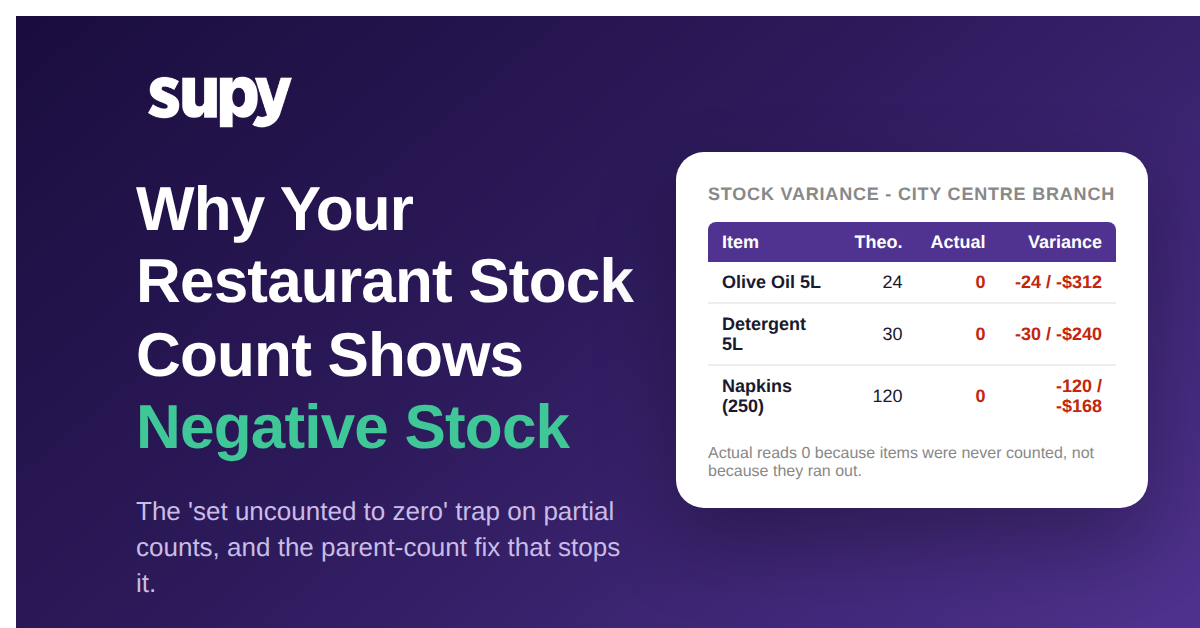
A restaurant stock count goes negative when "set uncounted items to zero" is applied to a count that is not finished. The setting writes every item you have not reached yet down to zero, and ongoing sales then push those balances below zero. On fragmented, per-category counts most of the catalogue is always uncounted, so the damage is large and it corrupts every variance and cost report that reads on-hand stock.
The toggle itself is useful. On a finished, whole-location count it is how you clear items that genuinely reached zero without typing a zero against each line. The problem is scope: the system cannot tell "counted and found empty" apart from "never counted at all". Once the toggle fires on a partial count, both become zero, so full cases sitting in the store room are written down to zero on hand before a single sale happens. Recipe usage then keeps deducting from that zero, and the balance runs straight into negative stock.
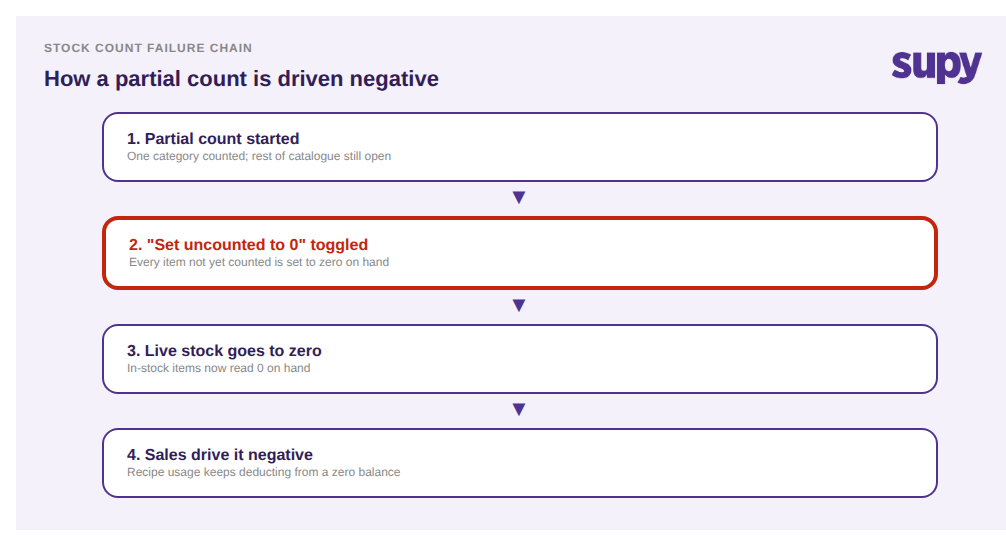
The reason this keeps happening is structural, not careless. Operators split the work for speed: one person counts disposables, another cleaning supplies, another dry goods, each as its own separate stock count. During any single one of those counts, most of the catalogue is technically uncounted. A 6-site catering group ran into exactly this - each partial count only ever touched a slice of the roughly 475 items in the catalogue, so toggling "set uncounted items to zero" on any one section zeroed the other 87 to 94 percent along with it. One line item alone landed at minus $1,700. In separate counts, "uncounted" can only ever mean "zero this", never "another count still has it".
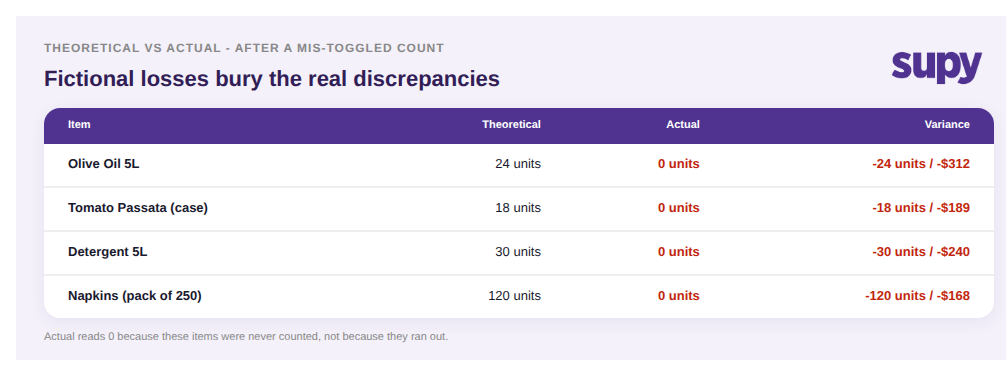
That is why the damage scales, and why it lands squarely on your reports. A wrong zero does not stay one wrong number: once an in-stock item reads zero, every sale drags it further negative, and the next count has to unwind both the original zero and all the phantom usage on top. One multi-branch group reviewing two consecutive monthly counts found a 54,000-unit net variance between them - about 71,000 units negative against 17,000 positive - most of it introduced by count structure, not real shrinkage. Theoretical-versus-actual variance is hit hardest: when actual stock reads zero on items that are physically in the store room, the variance column fills with huge fictional losses and buries the real discrepancies you needed to find. One 14-venue hospitality group traced roughly $28,000 of unexplained cost, a 14 percent variance swing at one site, to a stack of small count gaps exactly like this. The deeper cost is trust: once a variance report has cried wolf, managers stop believing it, and a genuine loss then hides in plain sight.
The Fix: One Parent Stock Count With Sub-Counts (and What You Get Back)
The fix is to stop running separate per-category counts and run one parent stock count for the location, split into sub-counts. In Supy a single count can be divided into sub-counts that several people work at once, and they auto-merge into one parent count when done. Now "uncounted" means "another sub-count still has it", so the "set uncounted to zero" step only ever applies to a genuinely complete count, never to live stock mid-count.
For the legacy and discontinued items that made operators reach for the zero toggle in the first place, create a dedicated "do not use" sub-count and zero those items there on purpose. The clean-up is scoped to the lines you actually chose, so live stock everywhere else is untouched. That single change removes the trap at its source: you never apply a destructive zero to partial data again.
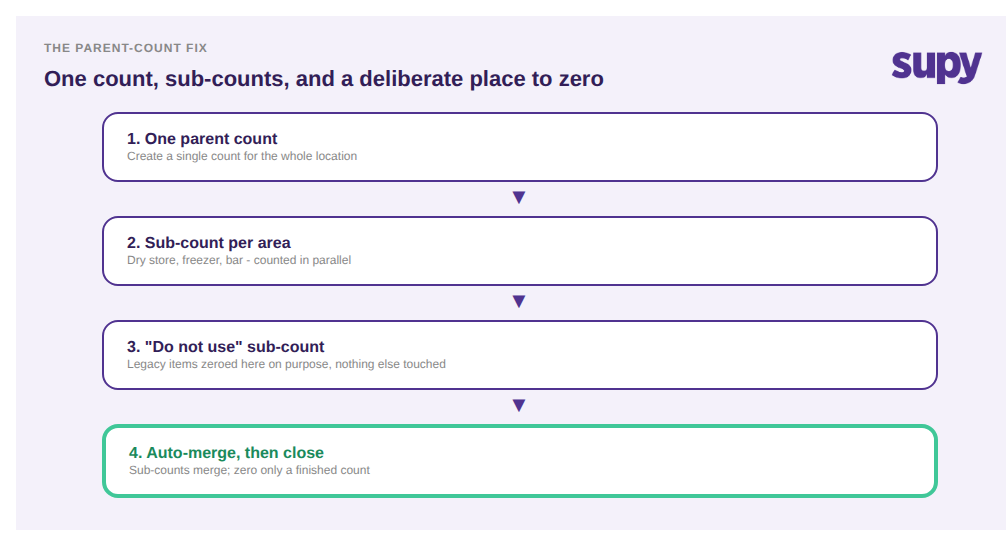
The payoff shows up immediately in the numbers you report on. Because the whole location stays inside one count, live stock-on-hand by location stays accurate throughout, and instant theoretical-versus-actual variance the moment the count closes tells you if something looks wrong straight away, not a week later. Variance and cost reports go back to showing real discrepancies instead of fictional negative losses, so they become trustworthy enough to act on again. And because the sub-counts run in parallel, you get all of that without the count taking any longer. See how stock counting and live stock visibility work together to make this the default.
Before your next count, run a quick self-check. Are you creating one count per location, or several separate counts per category? Does "set uncounted to zero" ever get toggled while any section is still open? Is there a deliberate home for legacy items, or are people using the blanket zero to clear them? If you are running fragmented counts and toggling zero on partial data, restructuring to one parent stock count with sub-counts is the single change that stops the negative-stock spiral at its source. For the other traps that distort a multi-site count, our guide to stocktake failure modes across multi-site groups covers the rest.