Inventory

How Supy Stops Increases Inventory Accuracy By Reducing Phantom Inventory Variance

How Supy stops phantom inventory variance by backdating recipe changes

Phantom inventory variance is a gap between your stock count and your system that no physical loss can explain. It appears whenever a recipe quantity, a production event, or a recipe's start date is entered without backdating it to the date it actually took effect. The system then re-runs months of past sales against the wrong figure, fabricating a variance that never happened on the shelf.

The same mechanism shows up in four everyday ways, and each one manufactures variance the same way:

  • A recipe quantity changes but the edit is dated today instead of when it actually changed, so months of past sales keep depleting the old, smaller quantity.
  • A production event is entered into the count by hand instead of run as production, so stock and value stay wrong until that event is backdated to when it really happened.
  • A recipe is created after its sales were already imported, so those earlier sales link to nothing and deplete no stock at all.
  • An ingredient swap is dated today rather than its true effective date, so it quietly rewrites prior months' cost history and margins.

The through-line is timing, not counting. Theoretical stock is not a number typed in once and left alone; it is derived continuously from every goods receipt and every recipe consumption event, so the instant a recipe or production record changes, the system re-runs it against all the sales it can see. Backdating tells it which window that change belongs to. Skip the backdate and you have not just changed things going forward, you have silently rewritten the past, which is why no amount of recounting will close the gap.
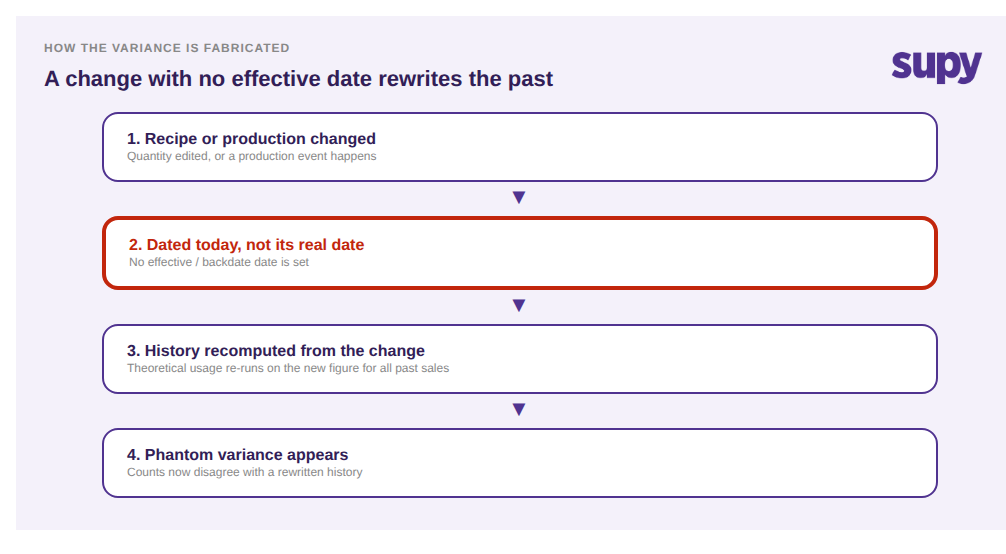
Flow showing how a recipe change with no effective date recomputes history and fabricates phantom variance

The scale this reaches is easy to underestimate. One multi-branch restaurant group's review turned up a roughly 54,000-unit net variance between two counts a month apart, about 71,000 units negative against 17,000 positive, yet item by item almost none of it was real loss. The count was accurate and the recipe was correct going forward. The single fault was a recipe quantity that had been changed with no effective date, so months of historical sales had only ever depleted the old, much smaller quantity. Nobody had lost 54,000 units of anything; the discrepancy lived in the timing of the change, not on the shelf.
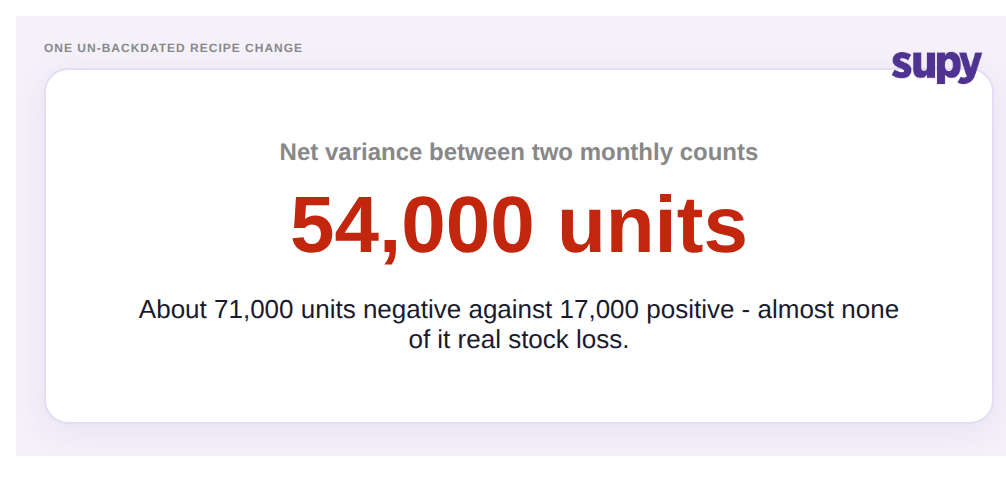
Stat callout showing a 54,000-unit net variance traced to one un-backdated recipe change

The Fix: Backdate Every Change to Its Real Date, and Get Variance You Can Trust

The fix is not to recount or hand-adjust a number. It is to backdate each change to the date it actually took effect, so the system re-runs historical sales at the corrected figure instead of the stale one, then to lock the reconciled count so no later edit drifts it again. Correct the timing and the variance corrects itself.

In Supy that is a deliberate, repeatable workflow rather than a spreadsheet rescue. Find the date a change really took effect: when the quantity changed, when the production ran, when the ingredient swap started. Use Action > Backdate Recipe to set that true effective date, and Supy re-depletes historical sales at the corrected amount instead of the stale one. Because theoretical stock is kept continuously up to date from every goods receipt and recipe consumption event, that correction propagates cleanly through the whole history the change touches, which is exactly why backdating fixes it and a manual number tweak cannot. Once the figures reconcile, lock the stock count so no edit drifts it while finance signs off.

Fix flow: find the real date, backdate the change, history re-depletes, lock the corrected count

The impact is that variance starts meaning something again. Instead of teams burning days recounting shelves to chase a loss that never happened, the number on the report reflects what physically moved. Margins and closing stock value stop swinging on data-entry timing, investigations get shorter, and a locked, reconciled count is something finance can actually sign off. That is the difference between an inventory system that merely records numbers and one whose theoretical stock is trustworthy enough to run the business on.

Before you write off your next big variance as loss, run three quick checks: did any recipe change in the period without an effective date; were any production events keyed in by hand instead of run as production; was any recipe created after its sales were already imported? If the answer to any of them is yes, the variance is almost certainly fabricated by timing, and backdating, not recounting, is the fix. See how Supy's recipe management and inventory management keep theoretical stock honest, and our guide to stocktake failure modes across multi-site groups covers the other timing traps that distort a count.


Book a Demo with Supy - make inventory variance reflect reality with backdating

Ready to optimize your restaurant operations?

Blog

Our operational insights

No items found.

Your questions 
answered

Everything you need to know about Supy — from setup to integrations, pricing, and daily use. If it’s not covered here, just ask.

What does backdating a recipe change actually do?
+

What backdating does is tell the system the real date a recipe change took effect, so it re-runs that recipe against sales from the correct point in time rather than from today. Because theoretical stock usage is derived continuously from your recipes, any change is applied to the history it touches. If you backdate to the true effective date, past sales re-deplete at the quantity that was really in use then. If you do not, the new quantity is applied backwards across all prior sales, rewriting stock movements that already happened and creating variance that has no physical cause on the shelf.

Why does an un-backdated recipe change create inventory variance?
+

Why it creates variance is that the change is silently applied to the past as well as the future. When a recipe quantity changes with no effective date, the system recalculates how much stock every historical sale of that dish should have consumed, using the new figure. The physical count has not changed and is still correct, but the system's expected usage has been rewritten, so the two no longer agree. The gap surfaces at the next count as variance. It looks like loss, but nothing was lost. The mismatch is purely between a correct shelf and a recomputed history that skipped its effective date.

How can a recipe change fabricate tens of thousands of units of variance?
+

How the number gets so large is repetition over time. A single recipe can sell across many branches every day for months. If its quantity changes without backdating, every one of those historical sales is suddenly re-depleted at the wrong amount, and the errors accumulate across the whole period and every location. One multi-branch group saw a roughly 54,000-unit net variance between two monthly counts, about 71,000 negative against 17,000 positive, traced largely to one recipe changed without an effective date. No stock was actually missing. The size came from one timing error multiplied across months of correct sales.

What is a missed production event and why does it need backdating?
+

A missed production event is prep work that physically happened, such as making a batch of aioli, but was never recorded as a production run in the system. When that happens, the raw ingredients are never shown as consumed and the finished prep item appears only as hand-entered value, so both raw and prep stock read wrong. One group watched inventory value jump from about $6,000 to about $44,000 with no purchases behind it for exactly this reason. The fix is to backdate each missed production event to the week it actually ran, so raw depletion and prep creation both land on the correct dates and the value reconciles.

Why do some sales not deplete any stock at all?
+

Why some sales deplete nothing is usually that the recipe was created after those sales were imported. A sale can only link to a recipe that already exists on the sale's date, so any sale recorded before the recipe's creation date has nothing to attach to and moves no stock. The revenue is still captured, which is what makes it easy to miss, but the stock behind those sales never moves on paper, producing a steady one-directional variance that mimics theft or spoilage. Backdating the recipe so its effective date precedes the earliest sale, and assigning it to every location where it sold, reconnects those sales to real depletion.

How do you backdate a recipe change correctly?
+

How to backdate correctly is a three-step discipline. First, establish the date the change truly took effect, not the date you entered it: when the quantity really changed, when the production really ran, or when an ingredient swap really started. Second, backdate the change to that real effective date so the system re-depletes historical sales at the corrected amount instead of the stale one. Third, once the figures reconcile, lock the corrected stock count so no later edit drifts it again while finance reviews and signs off. Applied consistently, this keeps theoretical stock aligned with what physically happened, so variance reflects reality rather than data-entry timing.

Should you recount stock or backdate when variance looks wrong?
+

Whether to recount or backdate depends on where the error lives, and for this class of problem it is not on the shelf. If a big variance traces to a recipe changed without an effective date, a missed production event, or a recipe created after its sales, recounting will keep producing the same number because the physical count is already correct. The discrepancy sits in the timing of a change, so the fix is to backdate that change, not to count again. Recount only after you have ruled out these timing causes; otherwise you spend effort confirming a number that was never the problem.

Ready to transform your operations?

Join 3500+ restaurant operators cutting costs, streamlining operations and making smarter decisions with Supy.