.jpeg)


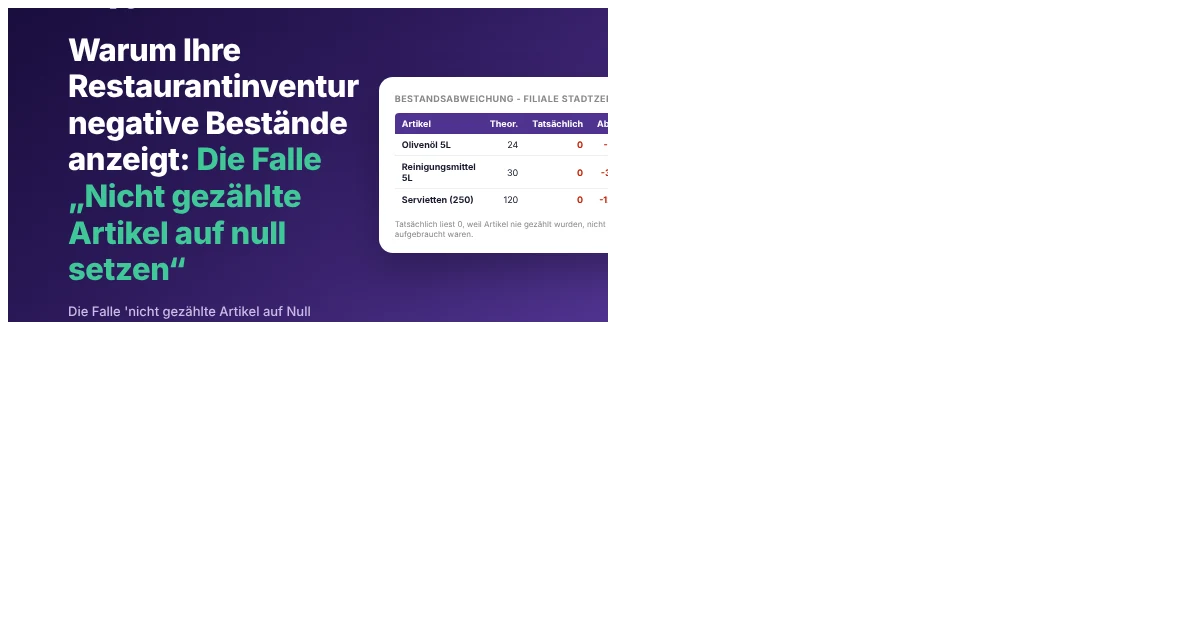
Warum Ihre Restaurantinventur negative Bestände anzeigt: Die Falle „Nicht gezählte Artikel auf null setzen“
Das Problem: Warum Ihre Restaurantinventur negative Werte anzeigt und Ihre Berichte ruiniert
Eine Restaurantinventur weist negative Werte auf, wenn „Nicht gezählte Artikel auf null setzen“ auf eine unvollständige Inventur angewendet wird. Die Einstellung schreibt jeden Artikel, den Sie noch nicht erfasst haben, auf null, und laufende Verkäufe drücken diese Bestände dann unter null. Bei fragmentierten, kategoriebezogenen Inventuren ist der größte Teil des Katalogs stets nicht gezählt, sodass der Schaden erheblich ist und jeden Abweichungs- und Kostenbericht korrumpiert, der den aktuellen Lagerbestand ausliest.
Die Funktion selbst ist nützlich. Bei einer abgeschlossenen, standortweiten Inventur löscht sie Artikel, die tatsächlich auf null gesunken sind, ohne dass Sie manuell eine null eintragen müssen. Das Problem liegt im Umfang: Das System kann „gezählt und leer befunden“ nicht von „noch gar nicht gezählt“ unterscheiden. Sobald die Funktion bei einer unvollständigen Inventur ausgelöst wird, werden beide auf null gesetzt, sodass volle Kartons im Lagerraum als null im Bestand gebucht werden, noch bevor ein einziger Verkauf stattgefunden hat. Die Rezept-Nutzung zieht danach weiter von dieser null ab, und der Bestand rutscht direkt in negativen Lagerbestand.
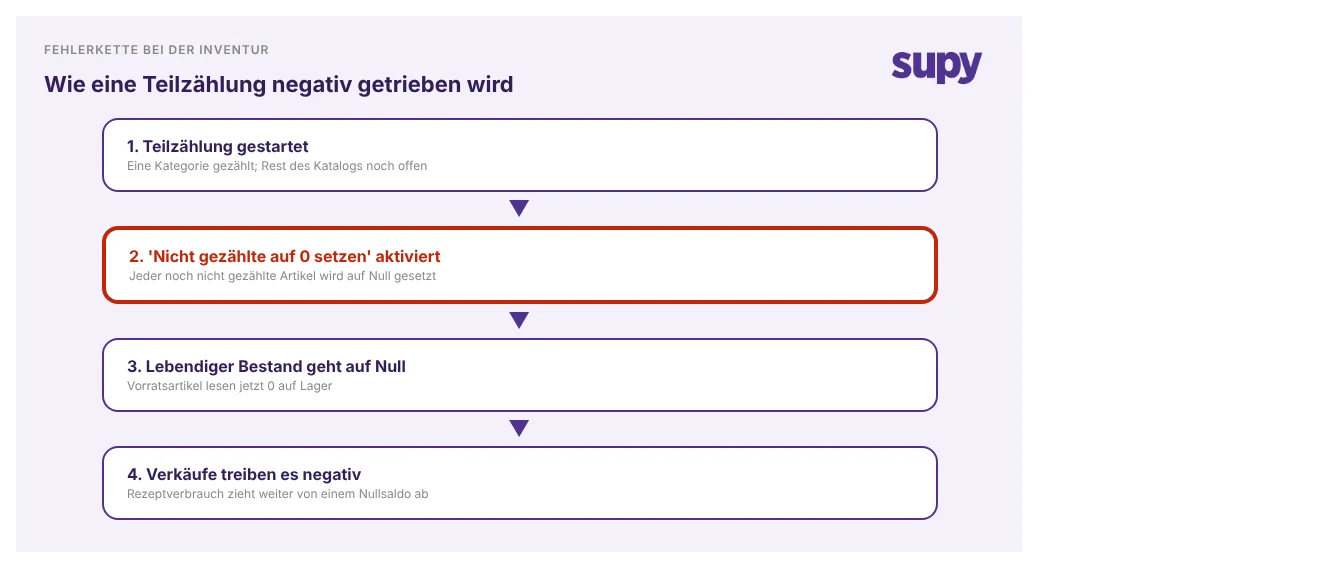
Der Grund, warum dies immer wieder passiert, ist struktureller Natur, kein Versehen. Betreiber teilen die Arbeit der Geschwindigkeit halber auf: Eine Person zählt Verbrauchsmaterial, eine andere Reinigungsmittel, eine weitere Trockenwaren – jede als eigene separate Inventur. Während einer einzelnen dieser Inventuren ist der größte Teil des Katalogs technisch gesehen nicht gezählt. Eine Cateringgruppe mit 6 Standorten stieß genau auf dieses Problem: Jede Teilinventur erfasste stets nur einen Bruchteil der rund 475 Artikel im Katalog, sodass das Aktivieren von „Nicht gezählte Artikel auf null setzen“ in einem Abschnitt die übrigen 87 bis 94 Prozent ebenfalls auf null setzte. Allein ein einziger Artikel landete bei minus $1,700. Bei separaten Inventuren kann „nicht gezählt“ nur „auf null setzen“ bedeuten, niemals „eine andere Inventur hat ihn noch“.
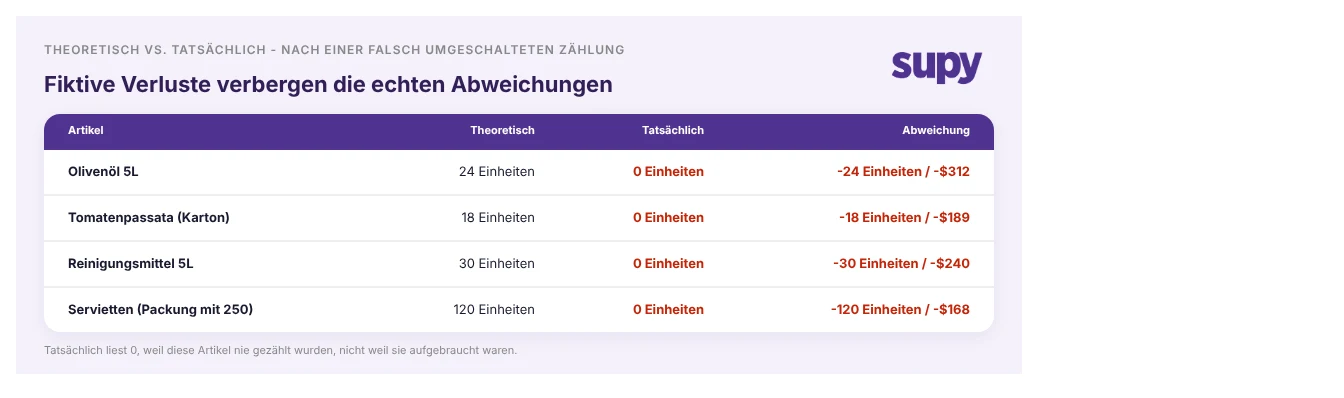
Deshalb eskaliert der Schaden und trifft direkt Ihre Berichte. Eine falsche null bleibt nicht eine einzelne falsche Zahl: Sobald ein vorrätiger Artikel als null ausgelesen wird, zieht jeder Verkauf ihn weiter in negatives Territorium, und die nächste Inventur muss sowohl die ursprüngliche null als auch alle darüber angehäuften Phantomverbräuche korrigieren. Eine Gruppe mit mehreren Filialen, die zwei aufeinanderfolgende monatliche Inventuren auswertete, stellte eine Netto-Abweichung von 54,000 Einheiten fest – etwa 71,000 Einheiten negativ gegen 17,000 positiv –, der größte Teil davon durch die Inventurstruktur verursacht, nicht durch tatsächlichen Schwund. Die Soll-Ist-Abweichung ist am stärksten betroffen: Wenn der tatsächliche Bestand für Artikel, die physisch im Lagerraum vorhanden sind, null anzeigt, füllt sich die Abweichungsspalte mit riesigen fiktiven Verlusten und begräbt die echten Diskrepanzen, die Sie eigentlich finden wollten. Eine Gastronomiegruppe mit 14 Standorten konnte rund $28,000 unerklärter Kosten – einen Abweichungsschwung von 14 Prozent an einem Standort – auf eine Reihe kleiner Inventurlücken genau dieser Art zurückführen. Der tiefere Schaden ist der Vertrauensverlust: Sobald ein Abweichungsbericht Fehlalarm geschlagen hat, glauben Führungskräfte ihm nicht mehr, und ein echter Verlust versteckt sich dann im offenen Sichtfeld.
Die Lösung: Eine übergeordnete Inventur mit Teilinventuren (und was Sie dadurch zurückgewinnen)
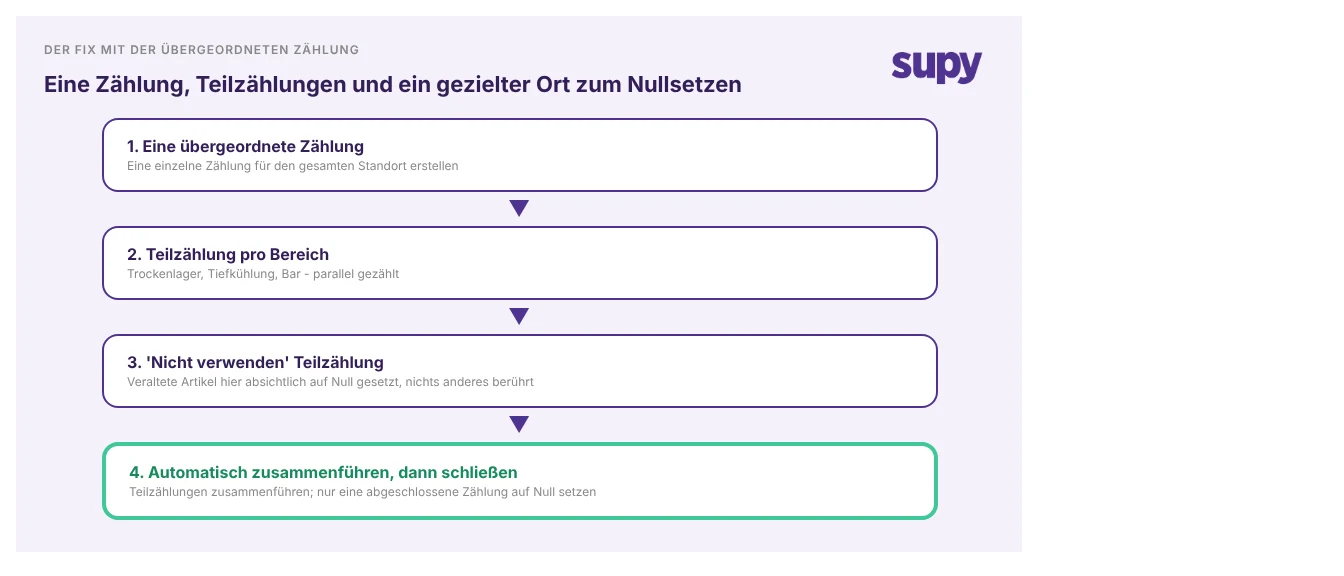
Die Lösung besteht darin, keine separaten kategoriebezogenen Inventuren mehr durchzuführen, sondern eine übergeordnete Inventur für den Standort mit Teilinventuren durchzuführen. In Supy kann eine einzelne Inventur in Teilinventuren aufgeteilt werden, an denen mehrere Personen gleichzeitig arbeiten, und diese werden bei Abschluss automatisch in eine übergeordnete Inventur zusammengeführt. Jetzt bedeutet „nicht gezählt“ „eine andere Teilinventur hat ihn noch“, sodass der Schritt „Nicht gezählte Artikel auf null setzen“ nur noch auf eine tatsächlich vollständige Inventur angewendet wird, niemals auf laufende Bestände während der Inventur.
Erstellen Sie für die veralteten und aussortierten Artikel, die Betreiber ursprünglich zur Null-Funktion greifen ließen, eine dedizierte „Nicht verwenden“-Teilinventur und setzen Sie diese Artikel dort absichtlich auf null. Die Bereinigung beschränkt sich auf die Positionen, die Sie tatsächlich ausgewählt haben, sodass der laufende Bestand überall sonst unberührt bleibt. Diese eine Änderung beseitigt die Falle an ihrer Quelle: Sie wenden nie wieder eine destruktive null auf unvollständige Daten an.
Der Gewinn zeigt sich sofort in den Zahlen, über die Sie berichten. Da der gesamte Standort in einer einzigen Inventur verbleibt, bleibt der aktuelle Lagerbestand nach Standort durchgehend genau, und die sofortige Soll-Ist-Abweichung beim Abschluss der Inventur zeigt Ihnen unmittelbar, wenn etwas nicht stimmt – nicht eine Woche später. Abweichungs- und Kostenberichte zeigen wieder echte Diskrepanzen statt fiktiver negativer Verluste und werden dadurch wieder vertrauenswürdig genug, um darauf zu handeln. Und da die Teilinventuren parallel laufen, erhalten Sie all das, ohne dass die Inventur länger dauert. Sehen Sie, wie Inventur und Echtzeit-Warenübersicht zusammenwirken, um dies zum Standard zu machen.
Führen Sie vor Ihrer nächsten Inventur einen kurzen Selbstcheck durch. Erstellen Sie eine Inventur pro Standort oder mehrere separate Inventuren pro Kategorie? Wird „Nicht gezählte Artikel auf null setzen“ jemals aktiviert, während noch ein Abschnitt offen ist? Gibt es einen bewussten Platz für veraltete Artikel, oder verwenden die Mitarbeiter die pauschale null, um sie zu löschen? Wenn Sie fragmentierte Inventuren durchführen und null auf unvollständigen Daten aktivieren, ist die Umstrukturierung auf eine übergeordnete Inventur mit Teilinventuren die einzige Änderung, die die Negativbestandsspirale an ihrer Quelle stoppt. Für die anderen Fallen, die eine Mehrstellen-Inventur verzerren, deckt unser Leitfaden zu Inventurproblemen in Mehrstellen-Gruppen den Rest ab.