.jpg)


Restaurant Staff Scheduling Software: What Multi-Site Groups Should Know
What Restaurant Staff Scheduling Software Actually Has to Get Right
Restaurant staff scheduling software builds and manages employee rotas across one or more sites: it assigns shifts to the right people with the right skills, tracks availability and time-off, publishes the schedule to staff, and records hours for payroll. At a multi-site group its real job is narrower and harder, hold labour cost on target at every location while still covering every shift.
That framing matters because labour is usually the second-largest line on a restaurant P&L, commonly 25 to 35 percent of revenue, and together with food cost it forms prime cost, the number most operators manage to a 55 to 65 percent target. A scheduling tool that only helps you fill shifts, without connecting those shifts to expected sales, leaves the expensive half of that equation to instinct. The feature that wins the demo, shift-swaps, mobile clock-in, a tidy calendar, is table stakes. The feature that changes your P&L is the one nobody clicks in a demo: how the rota gets built in the first place.

The Difference Between Scheduling to a Forecast and Scheduling to Last Week
Most scheduling tools let a manager copy last week's rota and adjust it. That is fast, and it is exactly how labour-to-sales drifts out of target. Last week is not next week: a public holiday, a heatwave, a nearby event, or a slow Tuesday all move covers, and a copied rota books the same hours against different sales. Scheduling to a forecast means starting from expected demand by day and daypart, translating that into how many people you need on each station, and only then building the rota.
The catch is that a scheduling tool is only as good as the demand number it is fed, and most standalone schedulers do not produce one. This is where a broader operations platform helps even when it does not build the rota itself. Supy does not schedule staff, but its AI Sales Forecasting predicts sales at the day and individual menu-item level and lets a manager override any figure in the dashboard, so the demand signal your scheduling decision depends on is a real 14-day forecast rather than a copy of history. If you want to understand the forecasting side in depth, our guide to restaurant sales forecasting covers how demand prediction actually works. The practical test for any scheduling tool: can it ingest a forward demand forecast, or does it only offer you last week to copy.

Why Labour-to-Sales Is the Number to Judge a Tool On
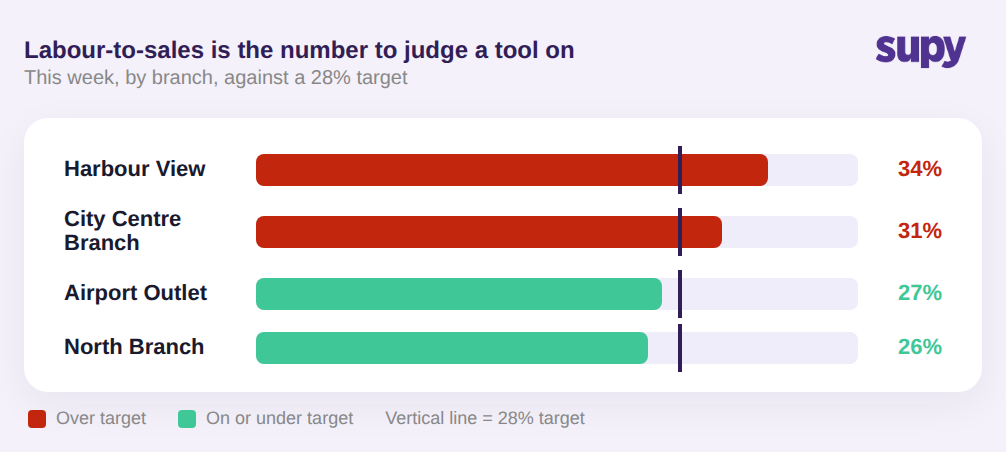
Judge scheduling software on whether it shows labour cost against sales, by site and by daypart, not on how many shift-swap features it lists. Labour-to-sales ratio is the single number that tells a multi-unit operator whether a schedule is working, and operators consistently ask for it as a view they can see at a glance rather than reconstruct in a spreadsheet after the fact.
At a group level the value is comparison. When every site reports labour-to-sales against the same target, an area manager can see in one screen that one branch is running hot and another has room, and move the conversation from anecdote to number. A tool that shows each site its own rota but gives head office no consistent cross-site view recreates the exact spreadsheet problem the software was bought to solve. Before you sign, ask to see the multi-site labour-to-sales report, not the scheduling calendar, because that report is what you will actually live in.
Where a Scheduling Tool Stops, and What It Leaves You to Reconcile
Even a good scheduling tool covers only the labour half of prime cost, and only the parts of labour that show up as scheduled hours. Staff meal costs, for example, sit outside the rota entirely, and multi-site groups routinely need to record and attribute them separately from customer sales, something no scheduling app does for you. The other half of prime cost, food, lives in your inventory and costing system, which is why prime cost is only ever visible when scheduling and costing data meet. Our restaurant prime cost formula guide walks through how the two halves combine.
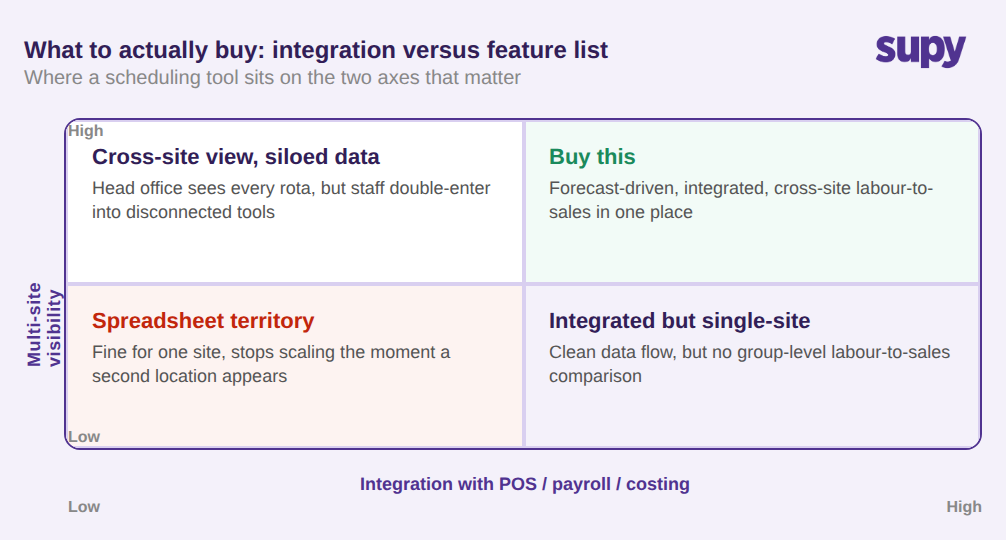
The bigger risk is integration. Operators who add a system that does not talk to their POS, payroll, and costing tools sometimes find admin labour goes up, not down, because staff end up entering the same data twice. That is the decision that actually matters at scale: weight a scheduling tool on how cleanly it integrates with the systems you already run, not on how long its feature list is. A standalone app with a beautiful rota and no integration can quietly create a second data-entry job across every site. This is also where Supy fits without replacing your scheduler: it integrates with many of the scheduling and workforce-management tools multi-site groups already run, alongside your POS and accounting systems, so its demand forecast and live cost data flow into the scheduling software you have chosen rather than forcing a parallel one.
How to Choose: A Simple Rule
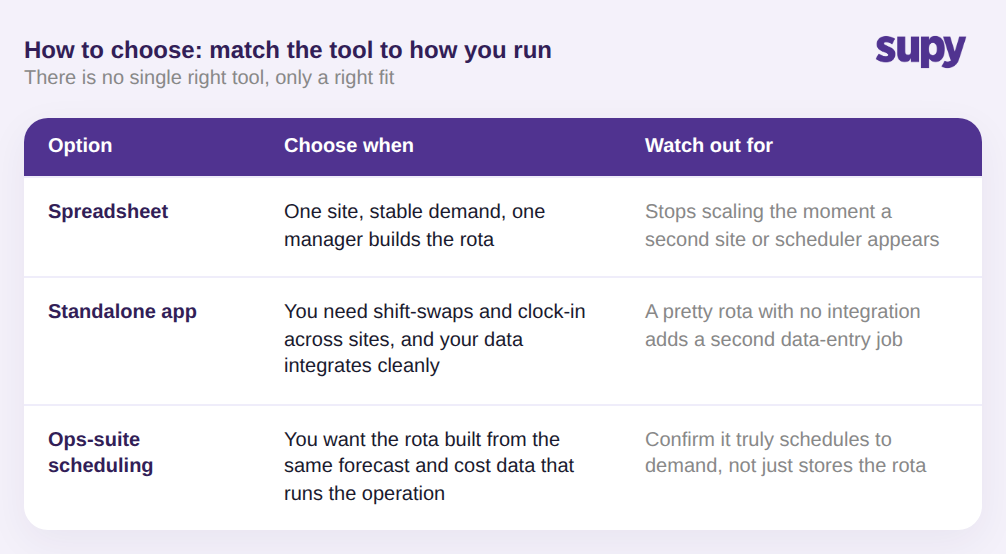
There is no single right tool, only a right fit for how your group runs. Use this rule.
- Stay on a spreadsheet only when you run a single site with stable demand and one manager who builds the rota. The moment a second location or a second scheduler appears, the spreadsheet stops scaling.
- Choose a standalone scheduling app when you mainly need shift-swaps, availability, and mobile clock-in across sites, and your demand and cost data already live in systems the app integrates with cleanly.
- Choose scheduling built into, or connected to, a broader operations suite when you want the rota built from the same demand forecast and cost data that runs the rest of the operation, so labour-to-sales and food cost are visible in the same place.
Whatever you shortlist, judge each option on two criteria in the demo: does it schedule to a real forward forecast rather than to last week, and does it show labour-to-sales on target across every site. A tool that clears both bars will lower your second-largest cost. One that clears neither is a calendar with a login.
Supy is not a staff scheduling tool and does not build rotas. What it does own is the two data signals good scheduling depends on: a real AI sales forecast for the demand side, and live food and recipe costing for the other half of prime cost, across every site in the group. And because Supy integrates with many of the scheduling and workforce-management tools you already use, those signals feed the scheduler you have rather than adding another system to manage. If your scheduling decision keeps stalling on bad demand numbers or a food-cost figure nobody trusts, that is the gap Supy closes.