.jpeg)


Dienstplan-Software für Restaurants: Was Gruppen mit mehreren Standorten wissen müssen
Was Dienstplan-Software für Restaurants wirklich leisten muss
Dienstplan-Software für Restaurants erstellt und verwaltet Mitarbeiterpläne über einen oder mehrere Standorte hinweg: Sie weist Schichten den richtigen Personen mit den richtigen Qualifikationen zu, verfolgt Verfügbarkeit und Abwesenheiten, veröffentlicht den Plan für das Personal und erfasst die Stunden für die Lohnabrechnung. Für eine Gruppe mit mehreren Standorten ist die eigentliche Aufgabe enger gefasst und anspruchsvoller: die Personalkosten an jedem Standort im Zielbereich zu halten und gleichzeitig jede Schicht zu besetzen.
Diese Sichtweise ist wichtig, weil Personalkosten üblicherweise die zweithöchste Position in der Restaurantkalkulation darstellen – häufig 25 bis 35 Prozent des Umsatzes – und zusammen mit dem Wareneinsatz die Primärkosten bilden, die die meisten Betreiber auf 55 bis 65 Prozent anstreben. Ein Planungstool, das Ihnen nur hilft, Schichten zu besetzen, ohne diese Schichten mit den erwarteten Umsätzen zu verknüpfen, überlässt die teure Hälfte der Gleichung dem Bauchgefühl. Das Feature, das in der Demo glänzt – Schichttausch, mobiles Einstempeln, ein übersichtlicher Kalender – ist selbstverständlich. Das Feature, das Ihre Kalkulation verändert, klickt in der Demo niemand an: wie der Dienstplan überhaupt erstellt wird.

Der Unterschied zwischen Prognose-basierter und letzte-Woche-basierter Planung
Die meisten Planungstools erlauben es einem Manager, den letzten Dienstplan zu kopieren und anzupassen. Das geht schnell – und ist genau der Grund, warum die Personalkosten-zu-Umsatz-Quote aus dem Zielbereich driftet. Letzte Woche ist nicht nächste Woche: Ein Feiertag, eine Hitzewelle, ein nahegelegenes Event oder ein ruhiger Dienstag verändern die Gästezahlen, und ein kopierter Dienstplan bucht dieselben Stunden gegen andere Umsätze. Prognose-basierte Planung beginnt mit der erwarteten Nachfrage nach Tag und Tagesabschnitt, überträgt das in die benötigte Personalstärke je Station und erstellt erst dann den Dienstplan.
Der Haken: Ein Planungstool ist nur so gut wie die Nachfragezahl, die es bekommt – und die meisten eigenständigen Planungstools liefern sie nicht. Hier hilft eine breitere Betriebsplattform, auch wenn sie den Dienstplan nicht selbst erstellt. Supy plant keine Mitarbeiter, aber seine Umsatzprognose-KI sagt Umsätze auf Tages- und Menüebene voraus und lässt Manager jeden Wert im Dashboard überschreiben – das Nachfragesignal, auf das Ihre Planungsentscheidung beruht, ist eine echte 14-Tage-Prognose statt einer kopierten Geschichte. Wenn Sie die Prognoseseite vertiefen möchten, erklärt unser Leitfaden zur Umsatzprognose im Restaurant, wie Bedarfsprognosen tatsächlich funktionieren. Der praktische Test für jedes Planungstool: Kann es eine vorwärtsgerichtete Nachfrageprognose einlesen, oder bietet es Ihnen nur die letzte Woche zum Kopieren?

Warum die Personalkosten-zu-Umsatz-Quote der Maßstab für ein Tool ist
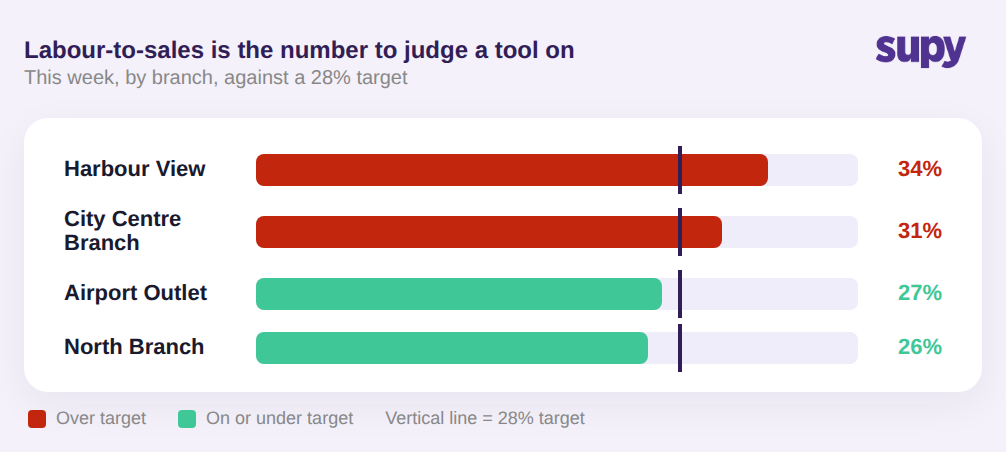
Beurteilen Sie Planungssoftware daran, ob sie Personalkosten im Verhältnis zum Umsatz – nach Standort und Tagesabschnitt – ausweist, nicht daran, wie viele Schichttausch-Funktionen sie auflistet. Die Personalkosten-zu-Umsatz-Quote ist die einzige Zahl, die einem Betreiber mit mehreren Einheiten sagt, ob ein Dienstplan funktioniert – und Betreiber fordern sie konsequent als Ansicht, die man auf einen Blick sieht, statt sie nachträglich in einer Tabelle zusammenzusetzen.
Auf Gruppenebene ist der Wert der Vergleich. Wenn jeder Standort Personalkosten-zu-Umsatz am gleichen Zielwert meldet, kann ein Bezirksleiter auf einem Bildschirm sehen, dass ein Standort zu hoch läuft und ein anderer Spielraum hat – und das Gespräch von Anekdoten auf Zahlen lenken. Ein Tool, das jedem Standort seinen eigenen Dienstplan zeigt, der Zentrale aber keine einheitliche standortübergreifende Ansicht bietet, erschafft genau das Tabellenkalkulationsproblem neu, das die Software lösen sollte. Verlangen Sie vor der Unterschrift die standortübergreifende Personalkosten-zu-Umsatz-Auswertung zu sehen – nicht den Planungskalender – denn diese Auswertung ist das, womit Sie täglich arbeiten werden.
Wo ein Planungstool aufhört und was zur manuellen Abgleichung bleibt
Selbst ein gutes Planungstool deckt nur die Personalkostenhälfte der Primärkosten ab – und auch nur die Teile der Personalkosten, die als geplante Stunden erscheinen. Mitarbeiterverpflegungskosten liegen beispielsweise komplett außerhalb des Dienstplans, und Gruppen mit mehreren Standorten müssen diese separat von Gästeumsätzen erfassen und zuordnen – etwas, das keine Planungs-App übernimmt. Die andere Hälfte der Primärkosten, der Wareneinsatz, lebt in Ihrem Lager- und Kalkulationssystem. Deshalb sind Primärkosten erst sichtbar, wenn Planungs- und Kalkulationsdaten zusammentreffen. Unser Leitfaden zur Primärkosten-Formel zeigt, wie die beiden Hälften sich zusammenfügen.
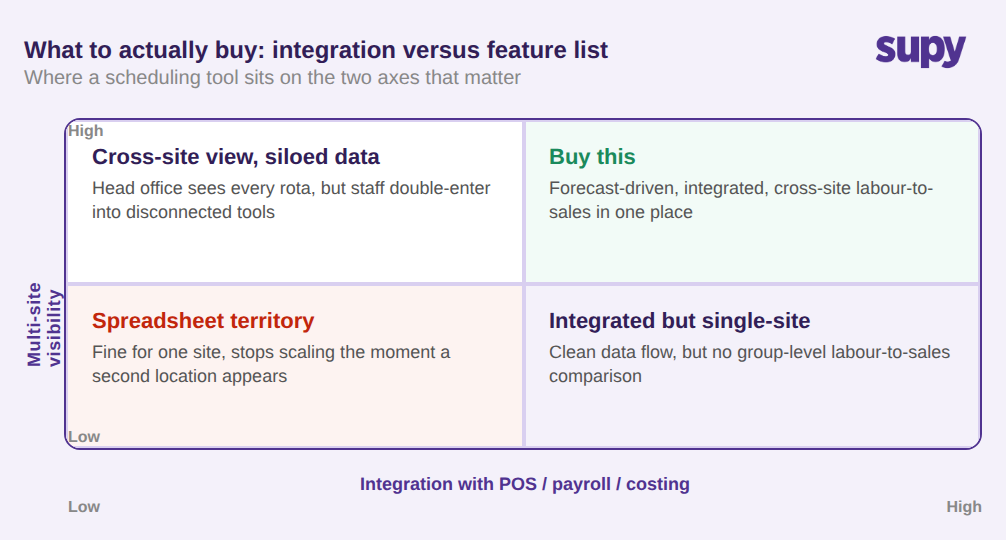
Das größere Risiko ist die Integration. Betreiber, die ein System einführen, das nicht mit ihrem Kassensystem, der Lohnabrechnung und den Kalkulationstools kommuniziert, stellen manchmal fest, dass der Verwaltungsaufwand steigt, weil Daten doppelt erfasst werden. Das ist die Entscheidung, auf die es bei Skalierung wirklich ankommt: Gewichten Sie ein Planungstool danach, wie sauber es mit Ihren bestehenden Systemen integriert – nicht danach, wie lang seine Funktionsliste ist. Eine eigenständige App mit einem schönen Dienstplan und ohne Integration kann unbemerkt einen zweiten Dateneingabejob über jeden Standort hinweg erzeugen. Hier passt Supy, ohne Ihren Planer zu ersetzen: Es integriert sich mit vielen der Planungs- und Personalmanagement-Tools, die Gruppen mit mehreren Standorten bereits nutzen – zusammen mit Ihrem Kassensystem und Buchhaltungssystem –, sodass Prognose und Live-Kostendaten in die von Ihnen gewählte Planungssoftware einfließen, anstatt ein paralleles System zu erzwingen.
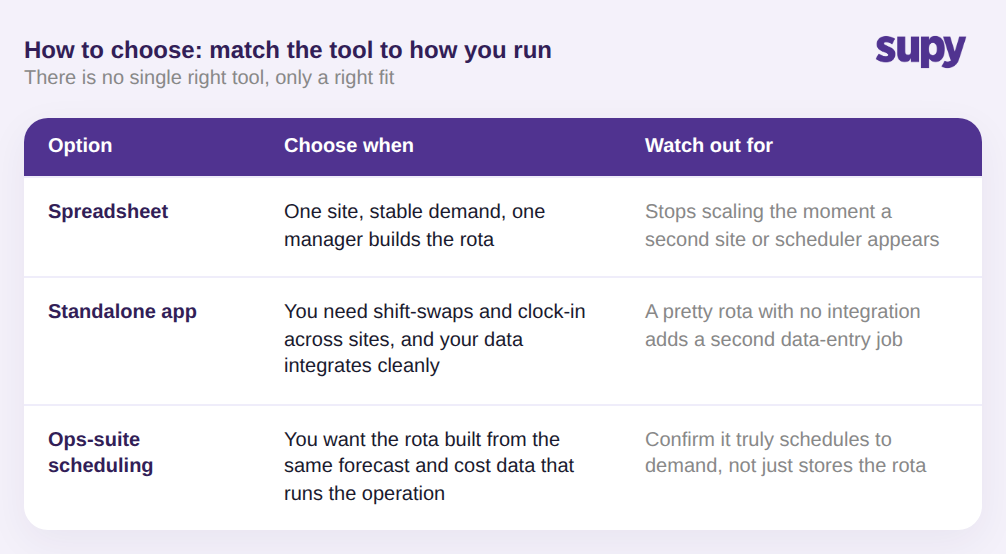
Wie man wählt: Eine einfache Regel
Es gibt kein einzig richtiges Tool – nur das, das zur Arbeitsweise Ihrer Gruppe passt. Nutzen Sie diese Regel.
- Bleiben Sie bei einer Tabellenkalkulation nur, wenn Sie einen einzigen Standort mit stabiler Nachfrage und einem Manager betreiben, der den Dienstplan erstellt. Sobald ein zweiter Standort oder ein zweiter Planer dazukommt, skaliert die Tabelle nicht mehr.
- Wählen Sie eine eigenständige Planungs-App, wenn Sie hauptsächlich Schichttausch, Verfügbarkeit und mobiles Einstempeln über Standorte hinweg benötigen und Ihre Nachfrage- und Kostendaten bereits in Systemen leben, mit denen die App sauber integriert.
- Wählen Sie Planung, die in eine breitere Betriebsplattform eingebettet oder damit verbunden ist, wenn Sie den Dienstplan aus denselben Prognose- und Kostendaten erstellen möchten, die den Rest des Betriebs steuern – so dass Personalkosten-zu-Umsatz und Wareneinsatz an derselben Stelle sichtbar sind.
Bevor Sie eine Lösung in die engere Wahl ziehen, beurteilen Sie jede Option in der Demo nach zwei Kriterien: Plant sie auf Basis einer echten Vorwärtsprognose, oder kopiert sie die letzte Woche? Und zeigt sie die Personalkosten-zu-Umsatz-Quote an jedem Standort? Ein Tool, das beide Hürden nimmt, senkt Ihren zweithöchsten Kostenfaktor. Eines, das keine von beiden nimmt, ist ein Kalender mit Login.
Supy ist kein Dienstplan-Tool und erstellt keine Rotas. Was Supy besitzt, sind die zwei Datensignale, auf die gute Planung angewiesen ist: eine echte Umsatzprognose-KI für die Nachfrageseite und live Lebensmittel- und Rezeptkosten für die andere Hälfte der Primärkosten – für jeden Standort der Gruppe. Und weil Supy mit vielen der Planungs- und Personalmanagement-Tools integriert, die Sie bereits nutzen, fließen diese Signale in Ihren bestehenden Planer statt ein weiteres System zu schaffen. Wenn Ihre Planungsentscheidung immer wieder an schlechten Nachfragezahlen oder einer Wareneinsatz-Quote scheitert, der niemand vertraut, ist das die Lücke, die Supy schließt.