.jpg)


Restaurant Procurement API Integration: Why Ordering Data Breaks Between Your Kitchen and Your ERP
What a Procurement API Actually Moves Into Your ERP
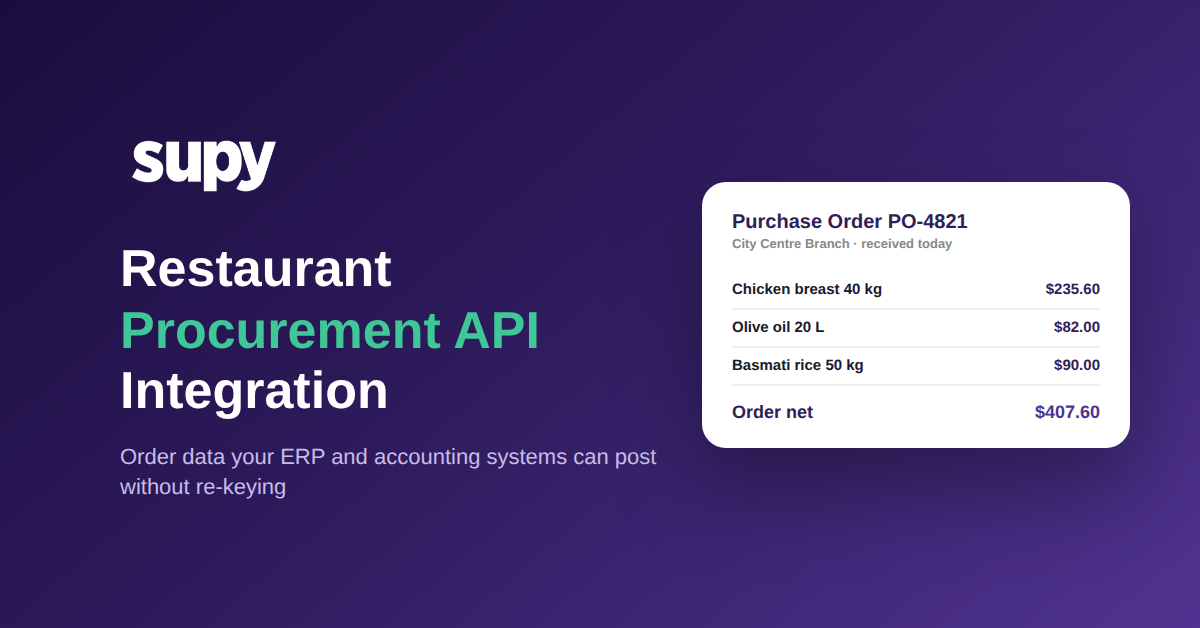
A restaurant procurement API integration is a direct connection that lets your ERP, accounting, and BI systems read order data from your procurement platform, and in a mature setup raise orders back into it, without anyone exporting a spreadsheet. Instead of a nightly file, each purchase order arrives as structured data: what was ordered, confirmed, received, returned, and what remains, with prices, tax, and a full status history.
That last part is what separates a real integration from a flat export. Supy's Open API returns each order line with its ordered, confirmed, received, returned, and remaining quantities, its unit price, tax, and net total, the supplier item code, and a complete record of who changed the order's status and when, all in a single call. Your ERP receives audit-ready data without any custom transformation step in the middle, which is exactly what a documented API across procurement, inventory, recipes, and COGS is meant to deliver.

Where Manual Integration Setup Stalls Go-Live
Most integration projects do not fail at the API. They stall in the setup before it: supplier mapping, cleaning up a legacy tenant, and reconciling general-ledger preferences that do not match between the two systems. A finance manager at one multi-site group described this work adding weeks to go-live every time, and flagged it as the single highest-priority blocker to getting live at all.
The reason is that most connectors ask you to map everything by hand and offer no stable identifier to hang the mapping on. When a supplier name is spelled two ways across sites, or a nominal code lives only in the accounting system, the integration cannot resolve it, so a human does. A procurement API that exposes stable supplier item codes and a consistent account structure removes most of that manual mapping, which is the part that actually eats the calendar. It is the same reason the wider question of how integrations fit your stack is worth answering before you sign.

Why Yesterday's Data Cannot Drive Tonight's Order
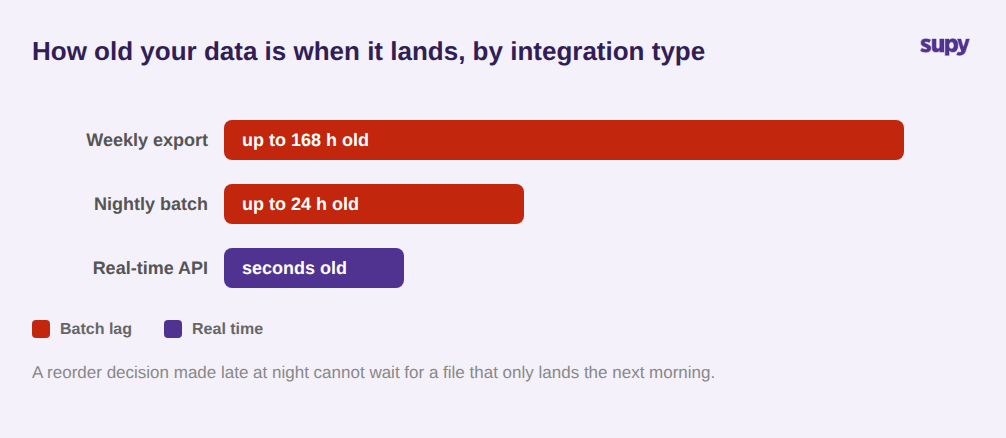
An operations director at a multi-location group put it plainly: a 24-hour data lag from their integrations made the reports useless for real-time or late-night ordering decisions. By the time last night's receiving showed up in the ERP, the reorder call had already been made blind.
Batch integrations create this gap by design. A nightly file means the freshest number your ERP or BI tool can show is up to a day old, and a weekly export can be a week behind. For a group deciding par levels and reorders across sites, stale data is not a minor inconvenience; it is the difference between ordering to actual consumption and ordering to a guess. An API that serves data in real time, or on a schedule you control, closes that window, which is why a restaurant inventory API integration is judged as much on freshness as on coverage.
The Reconciliation Tax: When Finance Re-Keys Every Figure
When order data does not arrive ready to post, someone posts it by hand. The most common culprit is tax. If the integration passes a raw price and leaves the tax calculation to whoever is reconciling, every line becomes a small manual decision, and small manual decisions across a 14-site group add up to hours a week and a trail of avoidable errors.
A procurement API earns its place here by doing the arithmetic before the data leaves. Supy's API calculates each line's tax through a defined fallback, the product tax rate first, then an item-level tax code, then the receiving default, and rounds it to two decimal places, so the figure your accounting system receives is consistent and ready to post. Pair that with per-line received and returned quantities and your ERP can reconcile an order against what actually arrived, not just against what was ordered.

From Read-Only Reports to Orders Your Systems Can Raise
Most integrations are a one-way mirror: data flows out to a dashboard, and nothing flows back. That is fine for reporting and useless for automation. The moment you want a demand-planning tool or an ERP to actually place an order, a read-only feed stops you cold.
A two-way procurement API lets an external system create supplier purchase orders and central-kitchen orders on behalf of any branch, which is what makes fully automated procurement possible: a forecast fires, the order is raised through the API, and the receiving flows straight back for reconciliation. Access stays governed by scope. Every call is tied to your account, and you can issue branch-scoped keys that only ever see the sites they are entitled to, so connecting a new BI or ERP system to your procurement platform does not mean exposing every location's data.

What to Check Before You Trust an Integration
Before you sign off on any procurement integration, run it against four questions drawn from where these projects actually break. First, how much manual mapping does go-live require, and is there a stable supplier and item identifier to map against? Second, how fresh is the data: real time, or a batch that is already hours old when it lands? Third, does each line arrive with tax already calculated and received-versus-ordered quantities separated, or will finance re-key it? Fourth, can an external system raise an order through the integration, or is it read-only? If you cannot get a clear answer to all four in a demo, the integration tax has not gone away; it has just moved onto your team's calendar. Supy's Open API and its 75+ integrations across POS, accounting, and ERP are built to answer all four, and you can see them against your own order data.