.jpeg)


Restaurant Beschaffung API Integration: Bestelldaten und ERP
Was eine Beschaffungs-API tatsächlich in Ihr ERP überträgt
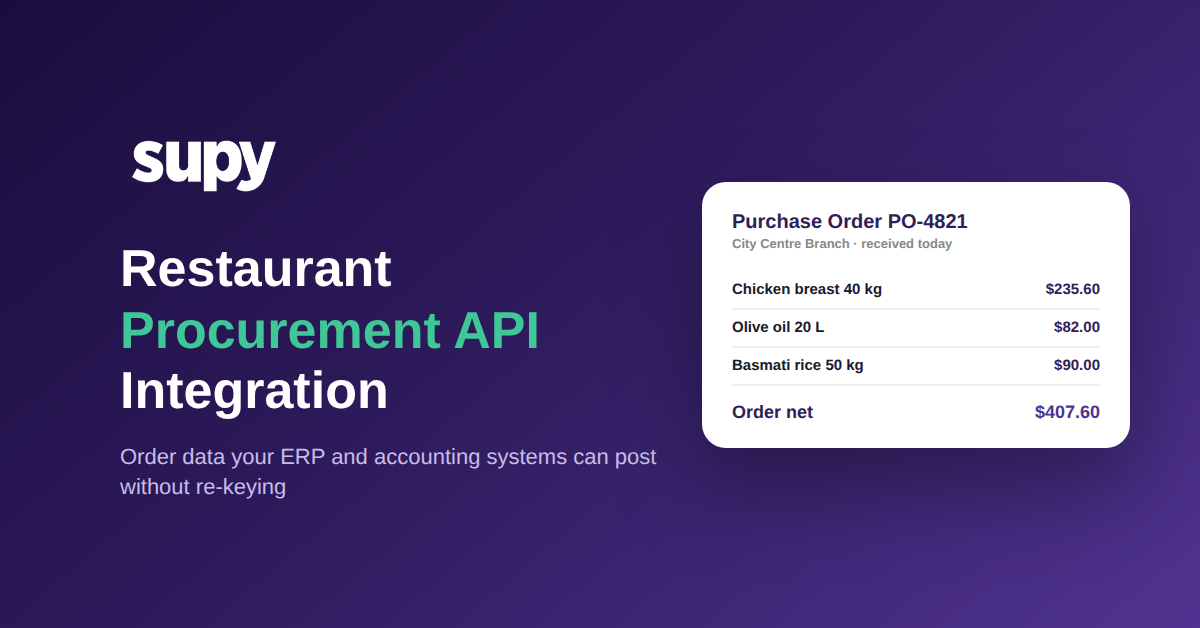
Eine Restaurant-Beschaffungs-API-Integration ist eine direkte Verbindung, die es Ihrem ERP, Ihrer Buchhaltung und Ihren BI-Systemen ermöglicht, Bestelldaten aus Ihrer Beschaffungsplattform zu lesen - und in einer ausgereiften Konfiguration Bestellungen dorthin zurückzusenden, ohne dass jemand eine Tabellenkalkulation exportieren muss. Statt einer nächtlichen Datei kommt jede Bestellung als strukturierte Daten an: was bestellt, bestätigt, empfangen, zurückgeschickt wurde und was noch aussteht, mit Preisen, Steuer und einer vollständigen Statushistorie.
Gerade dieser letzte Punkt unterscheidet eine echte Integration von einem einfachen Export. Supys Offene API liefert jede Bestellposition mit den bestellten, bestätigten, empfangenen, zurückgesendeten und verbleibenden Mengen, dem Stückpreis, der Steuer und dem Nettobetrag, dem Lieferanten-Artikelcode sowie einem vollständigen Protokoll, wer den Bestellstatus wann geändert hat - alles in einem einzigen Aufruf. Ihr ERP erhält prüfungsbereite Daten ohne benutzerdefinierten Transformationsschritt dazwischen - was genau das ist, was eine dokumentierte API für Beschaffung, Warenwirtschaft, Rezepte und COGS liefern soll.

Wo manuelle Integrationseinrichtung die Inbetriebnahme verzögert
Die meisten Integrationsprojekte scheitern nicht an der API. Sie verzögern sich bei der vorgelagerten Einrichtung: der Lieferantenzuordnung, der Bereinigung eines Legacy-Mandanten und dem Abgleichen von Hauptbucheinstellungen, die zwischen den beiden Systemen nicht übereinstimmen. Ein Finanzleiter einer Multi-Standort-Gruppe beschrieb, dass diese Arbeit jedes Mal Wochen zur Inbetriebnahme hinzufügt, und bezeichnete sie als den einzigen wichtigsten Blocker für den Live-Gang.
Der Grund liegt darin, dass die meisten Konnektoren eine vollständig manuelle Zuordnung erfordern und keinen stabilen Bezeichner anbieten, auf den die Zuordnung aufgebaut werden kann. Wenn ein Lieferantenname an verschiedenen Standorten unterschiedlich geschrieben wird oder ein Sachkonto nur im Buchhaltungssystem existiert, kann die Integration das nicht auflösen - also erledigt es ein Mensch. Eine Beschaffungs-API, die stabile Lieferanten-Artikelcodes und eine konsistente Kontenstruktur bereitstellt, eliminiert den Großteil dieser manuellen Zuordnung - und genau das ist der Teil, der tatsächlich den Kalender auffrisst. Aus demselben Grund lohnt es sich, die umfassendere Frage, wie Integrationen in Ihren Stack passen, zu beantworten, bevor Sie unterschreiben.

Warum gestrige Daten die heutige Bestellung nicht steuern können
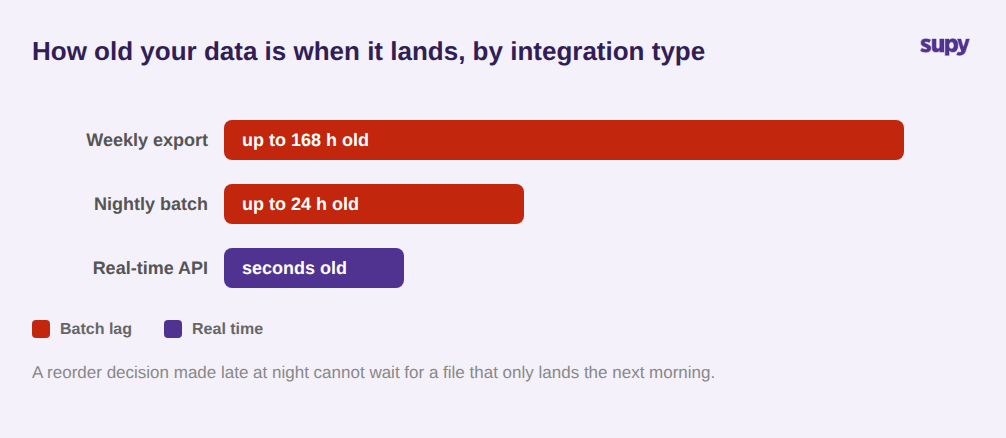
Ein Betriebsleiter einer Multi-Standort-Gruppe brachte es auf den Punkt: Eine 24-Stunden-Datenverzögerung aus ihren Integrationen machte die Berichte für Echtzeit- oder spätabendliche Bestellentscheidungen nutzlos. Als die gestrigen Wareneingänge im ERP erschienen, war die Nachbestellungsentscheidung bereits blind getroffen worden.
Batch-Integrationen erzeugen diese Lücke konzeptionell. Eine nächtliche Datei bedeutet, dass die aktuellste Zahl, die Ihr ERP oder Ihr BI-Tool anzeigen kann, bis zu einem Tag alt ist - und ein wöchentlicher Export kann eine Woche zurückliegen. Für eine Gruppe, die Mindestbestände und Nachbestellungen über mehrere Standorte hinweg festlegt, sind veraltete Daten keine geringfügige Unannehmlichkeit; es ist der Unterschied zwischen einer Bestellung nach tatsächlichem Verbrauch und einer Bestellung nach Schätzung. Eine API, die Daten in Echtzeit oder nach einem von Ihnen kontrollierten Zeitplan bereitstellt, schließt dieses Fenster - weshalb eine Restaurant-Warenwirtschafts-API-Integration genauso nach Aktualität wie nach Abdeckung beurteilt wird.
Die Abstimmungslast: Wenn die Buchhaltung jede Zahl manuell eingibt
Wenn Bestelldaten nicht buchungsbereit ankommen, bucht jemand sie manuell. Der häufigste Verursacher ist die Steuer. Wenn die Integration einen Rohpreis übergibt und die Steuerberechnung denjenigen überlässt, die abgleichen, wird jede Position zu einer kleinen manuellen Entscheidung - und kleine manuelle Entscheidungen über eine Gruppe mit 14 Standorten summieren sich zu Stunden pro Woche und einer Spur vermeidbarer Fehler.
Eine Beschaffungs-API rechtfertigt ihre Rolle hier, indem sie die Berechnung erledigt, bevor die Daten die Plattform verlassen. Supys API berechnet die Steuer jeder Position über einen definierten Fallback - zuerst den Produktsteuersatz, dann einen positionsbasierten Steuercode, dann den Standardwert beim Wareneingang - und rundet auf zwei Dezimalstellen, sodass die Zahl, die Ihr Buchhaltungssystem erhält, konsistent und buchungsbereit ist. Kombiniert mit empfangenen und zurückgesendeten Mengen pro Position kann Ihr ERP eine Bestellung gegen das tatsächlich Eingegangene abgleichen, nicht nur gegen das Bestellte.

Von schreibgeschützten Berichten zu Bestellungen, die Ihre Systeme aufgeben können
Die meisten Integrationen sind ein Einwegspiegel: Daten fließen zu einem Dashboard hinaus, und nichts fließt zurück. Das ist ausreichend für das Berichtswesen und nutzlos für die Automatisierung. In dem Moment, in dem ein Bedarfsplanungs-Tool oder ein ERP tatsächlich eine Bestellung aufgeben soll, blockiert ein schreibgeschützter Datenstrom alles.
Eine bidirektionale Beschaffungs-API ermöglicht es einem externen System, Lieferantenbestellungen und Zentralküchenbestellungen im Namen jeder Filiale zu erstellen - das ist es, was vollautomatisierte Beschaffung möglich macht: Eine Prognose wird ausgelöst, die Bestellung wird über die API aufgegeben, und der Wareneingang fließt direkt für den Abgleich zurück. Der Zugriff bleibt durch Berechtigungen geregelt. Jeder Aufruf ist mit Ihrem Konto verknüpft, und Sie können filialbasierte Schlüssel ausstellen, die nur die Standorte sehen, für die sie berechtigt sind - sodass die Verbindung eines neuen BI- oder ERP-Systems mit Ihrer Beschaffungsplattform nicht bedeutet, die Daten aller Standorte offenzulegen.

Was Sie prüfen sollten, bevor Sie einer Integration vertrauen
Bevor Sie eine Beschaffungsintegration freigeben, prüfen Sie sie anhand von vier Fragen, die sich daraus ableiten, wo diese Projekte tatsächlich scheitern. Erstens: Wie viel manuelle Zuordnung erfordert die Inbetriebnahme, und gibt es einen stabilen Lieferanten- und Artikelbezeichner für die Zuordnung? Zweitens: Wie aktuell sind die Daten - Echtzeit oder ein Batch, der bereits Stunden alt ist, wenn er ankommt? Drittens: Kommt jede Position mit bereits berechneter Steuer und getrennten Wareneingangs- und Bestellmengen an, oder muss die Buchhaltung sie manuell eingeben? Viertens: Kann ein externes System über die Integration eine Bestellung aufgeben, oder ist sie schreibgeschützt? Wenn Sie in einer Demo keine klare Antwort auf alle vier Fragen erhalten, ist die Integrationssteuer nicht verschwunden; sie hat sich nur in den Kalender Ihres Teams verlagert. Supys Offene API und ihre 75+ Integrationen für POS, Buchhaltung und ERP sind darauf ausgelegt, alle vier zu beantworten, und Sie können sie gegen Ihre eigenen Bestelldaten testen.