.jpg)


Restaurant Inventory Audit Trail: How Multi-Site Operators Close the Accountability Gaps Behind Phantom Variance
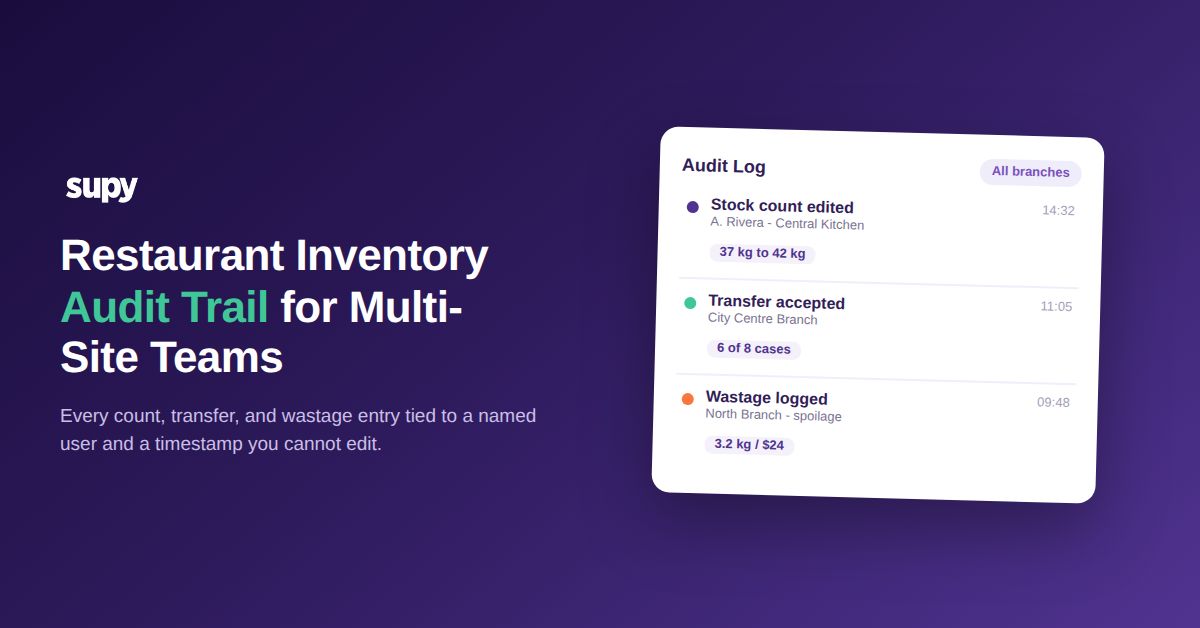
When every stock count, transfer, wastage entry, and production run carries the name of the person who made it and a timestamp you cannot edit, a whole category of month-end mystery disappears. A restaurant inventory audit trail turns "the numbers do not match and nobody knows why" into "this line changed, this person changed it, here is the before and the after." For a single site that is a convenience. Across a group with a central kitchen feeding several branches, it is the difference between variance you can act on and variance you can only argue about.
Most operators already know their inventory is drifting. What they cannot do is trace the drift back to a specific action or a specific person, because the record of who did what lives in people's memories and a chain of edited spreadsheets. By the time the numbers are reconciled at close, the events that caused the gap are days old and the people involved have moved on to the next service. This article walks through what a real audit trail records, where multi-site accountability tends to break, and how each break maps to a concrete control you can turn on.
What a Restaurant Inventory Audit Trail Actually Records
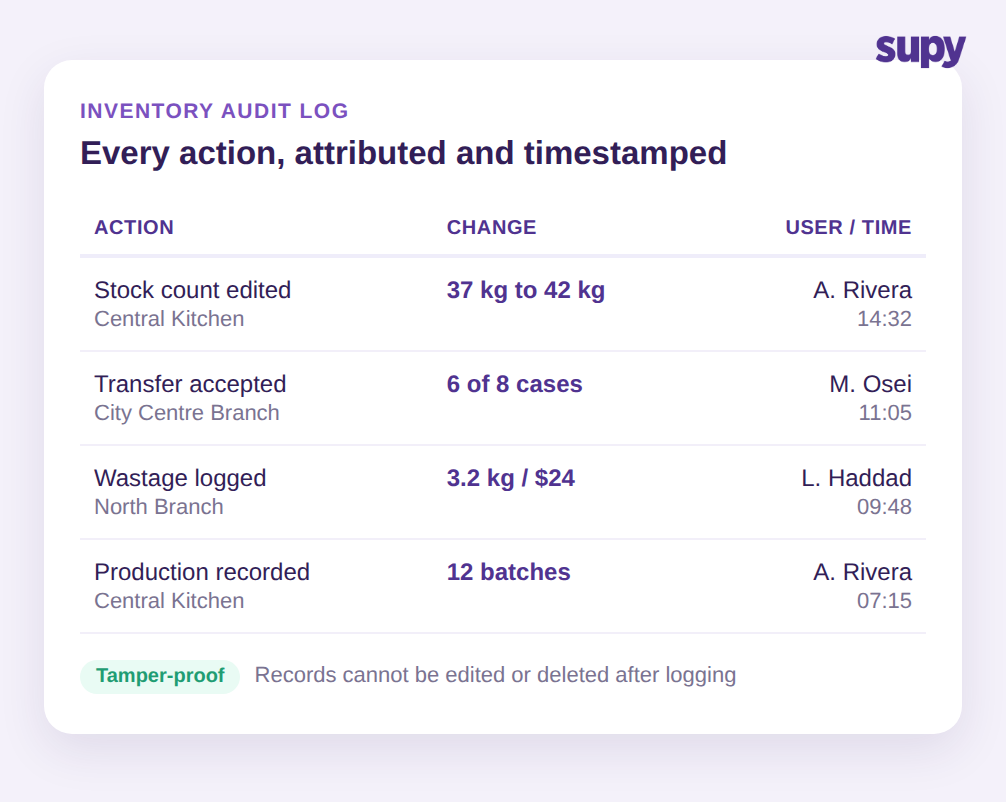
An inventory audit trail is not a periodic stocktake. It is a continuous log of every change to your inventory data, captured as it happens. In Supy, that log spans five areas of the operation: items, wastage, production, transfers, and stock counts. Each entry ties to a named user and a timestamp, records the before and after values where a change applies, and is tamper-proof, meaning users cannot quietly edit or delete their own history after the fact.
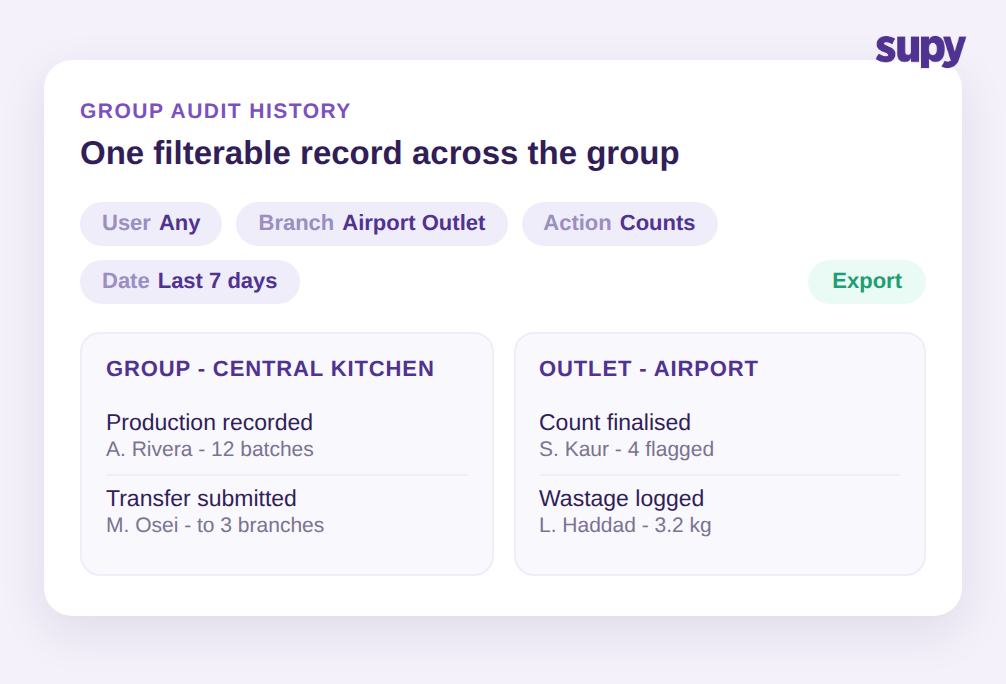
That last property is what makes the record worth anything. A log people can rewrite is not evidence, it is a suggestion. Because the trail is fixed once written, a finance lead reviewing a suspicious month can filter the history by user, by branch, by action type, and by date, then export the result for a supplier dispute, a loss-prevention review, or an internal conversation with a branch manager. The question stops being "do you remember adjusting this count" and becomes "the system shows this count was edited from one value to another at this time by this person, walk me through it."
Grouping helps here too. The log presents related changes made in a single edit together, attributed to the action and the user who triggered it, rather than as a flat list of isolated field updates. Reviewing the history of one count or one order shows you a coherent story of what changed and who changed it, not a stream of noise you have to reassemble by hand.
The reason this matters more as you grow is simple. At one site the general manager can hold the whole operation in their head. At six sites plus a central kitchen, no one can. The audit trail is the shared memory the group does not otherwise have, and it is the only version of events that every branch, the central kitchen, and head office all agree on.
Where Phantom Variance Hides Between Your Branches and the Central Kitchen
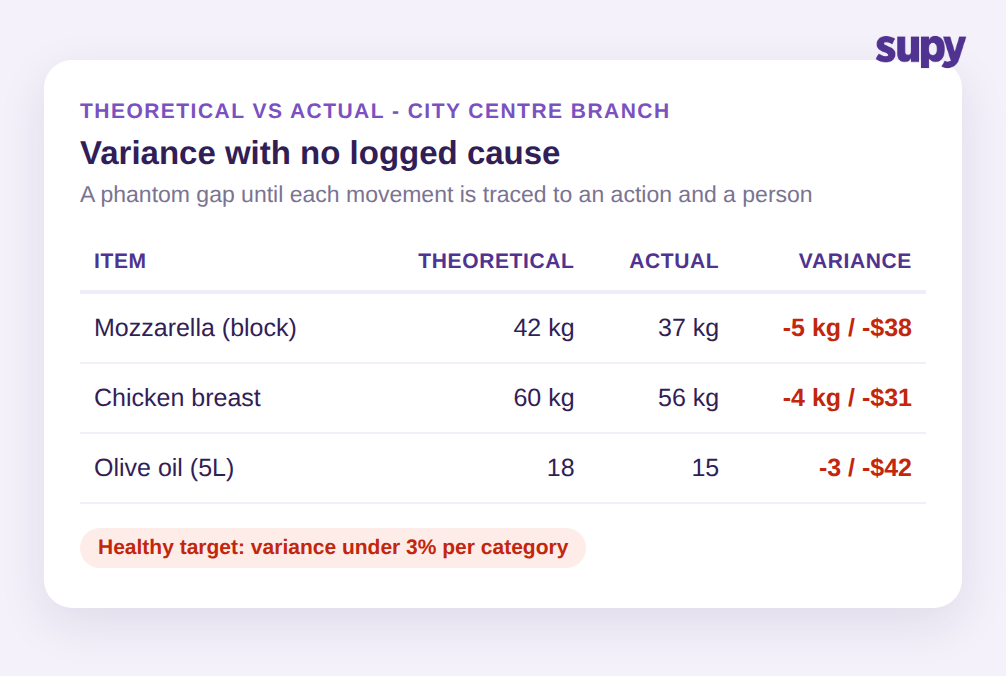
Phantom variance is the gap between what your system says you should have used and what you actually have on the shelf, with no visible cause. In a multi-site group the single biggest source is stock moving between locations without a recorded transfer. A branch runs short, borrows a case of an ingredient from a neighbouring site or the central kitchen, and the physical goods move while the record does not. Both sites now carry a variance that traces to nothing, because the event that caused it was never logged.
A finance manager at one multi-site group described exactly this: large inventory variances driven by stock crossing between cost centres without a formal transfer in the system, producing swings that no one could explain at close. When you cannot see the cause, you cannot fix it, and the same gap reopens every period.
A healthy target for most ingredient categories is variance under 3%. Anything above that is a signal worth investigating rather than absorbing. The value of the audit trail here is that it converts an unexplained aggregate number into a list of specific events. Instead of a branch showing a 7% swing on proteins with no explanation, you see the individual transfers, counts, and wastage entries that built up to it, each with a name attached. For a deeper walk-through of how to read those gap numbers, see our guide to restaurant inventory variance analysis.
Making Inter-Branch Transfers Traceable on Both Sides
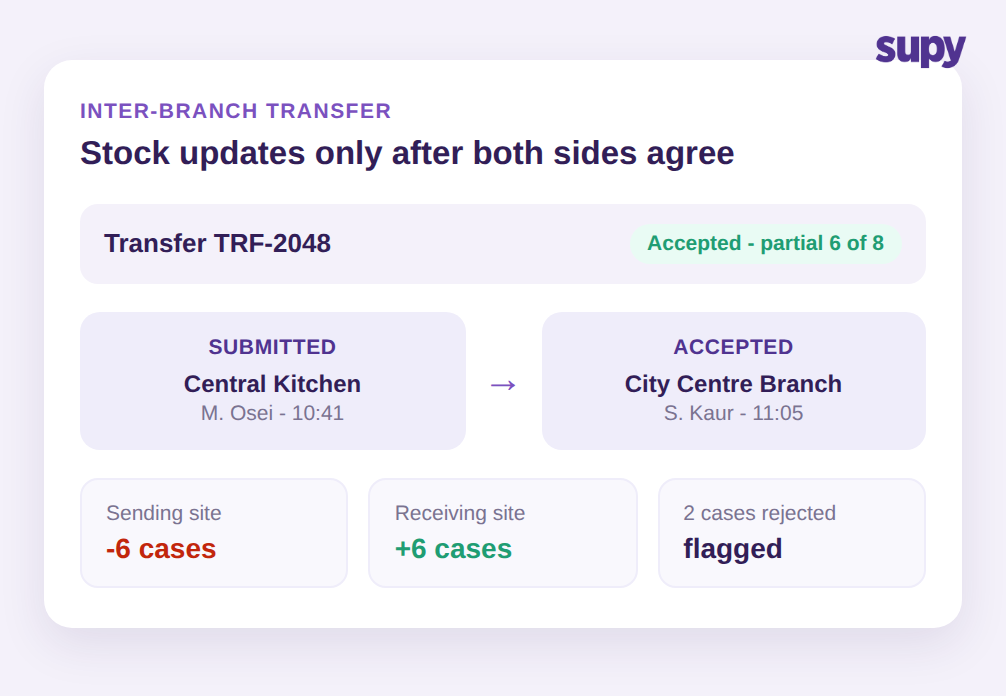
Transfers are where good intentions meet weak process. An operations director at one hospitality group found the standard submit-and-accept transfer flow non-intuitive, and the result was incomplete transfers that left stock discrepancies on both ends. A transfer that one side submits but the other never accepts is worse than no transfer at all, because now the data is confidently wrong in two places.
The control that closes this is a two-sided record. In Supy, an inter-branch transfer is a request that the receiving location must accept before any stock updates, with partial accept and reject supported for the real-world case where six of eight cases arrive intact. Once accepted, the system adjusts stock automatically at both ends and the movement flows straight into variance, usage, and live stock figures, carrying its own audit trail. Nothing moves in the data until both sides agree it moved in reality.
That agreement is the accountability. When a transfer is still pending, it is visible as pending rather than silently missing, so a manager chasing a variance can see the incomplete handoff instead of guessing at it. If your group runs a hub-and-spoke model, our piece on central kitchen stock transfer tracking goes deeper on the specific patterns that break at the central kitchen boundary.
Attributing Stock-Count Discrepancies to the Person Who Counted
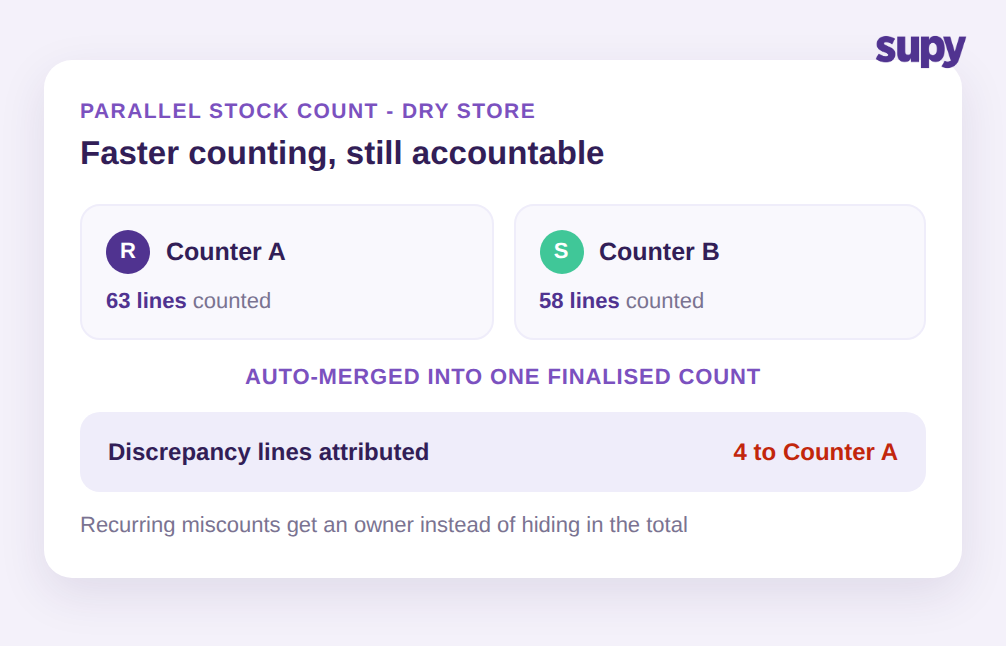
Counting is the other place accuracy quietly leaks. When several staff count the same storeroom to save time, a single merged number hides who counted what, so a recurring error has no owner and keeps recurring. The count is faster but no more accountable than one person doing it alone.
Supy handles parallel counting differently. Multiple counters can work at the same time, each person's entries are tracked separately, and the system merges them into one finalised count while attributing any discrepancy to the individual counter. If one team member consistently miscounts a high-value category, that pattern is now visible and coachable rather than buried in an aggregate. The count still gets done faster, with an operator-stated reduction of over 50% in counting time, but speed no longer costs you traceability.
This is the same principle as the transfer control, applied to a different action. The point is not to police staff. It is to give recurring accuracy problems an owner so they can actually be solved, instead of resetting every count cycle.
One Accountable View for Group and Franchise Operators
The final gap is organisational. Group and franchise operators run two overlapping worlds: the group-level activity of a central kitchen, and the outlet-level purchasing of each branch. When those share one undifferentiated history, reviewing anything means wading through noise.
Supy gives franchise and group operators a dedicated section to manage central-kitchen incoming orders, order creation, and full audit logs, keeping group procurement separate from outlet purchasing without switching tools. Combined with the ability to filter the audit history by user, branch, action, and date, a group finance lead can answer a question at the level it was asked. "What happened to production output at the central kitchen last week" and "who adjusted counts at the airport outlet" are now two clean queries against the same trustworthy record, not one messy scroll. If central production is core to your model, our overview of central kitchen management software covers the wider workflow this sits inside.
Wastage fits the same frame. Logged waste carries its item, quantity, reason, and the branch and period it belongs to, so cost impact is comparable across sites rather than trapped in each location's own habits. Every one of these actions writes to the same audit trail, which is what lets the group treat accountability as one system rather than a per-site favour.
How to Tell Whether Your Audit Trail Has These Gaps
You do not need a project to find out where you stand. Run three quick checks against your current setup this week.
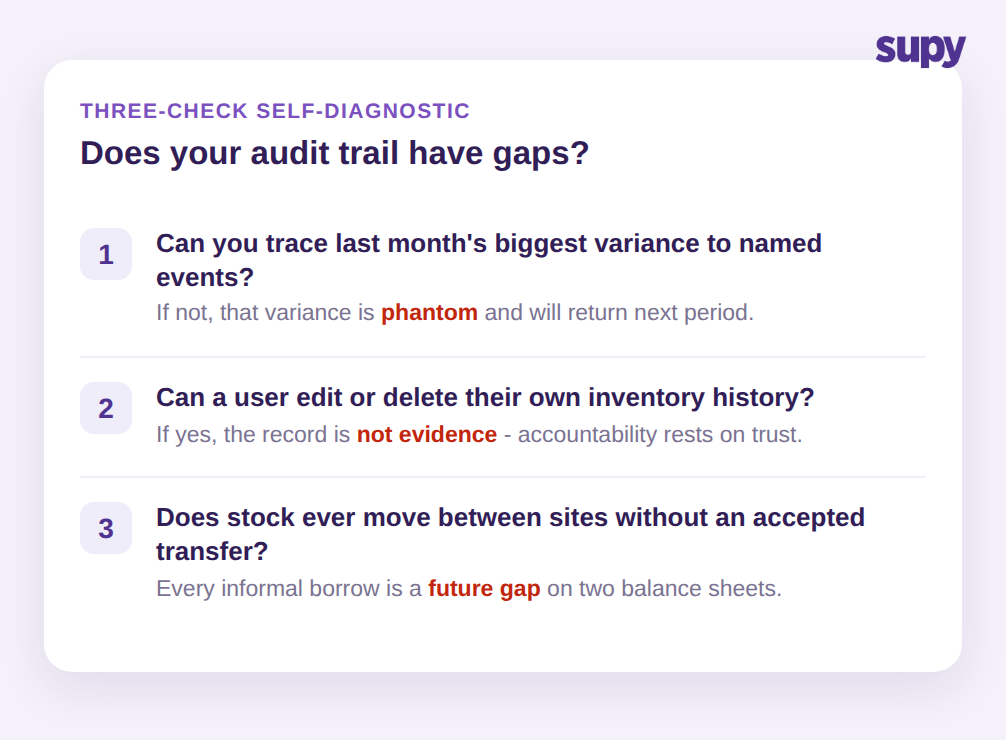
First, pick last month's largest branch variance and try to trace it to named events. If you can name the transfers, counts, and wastage entries and the people behind them within a few minutes, your trail is working. If you cannot, that variance is phantom by definition and it will return.
Second, ask whether a user can edit or delete their own inventory history. If the answer is yes, you have a record that cannot serve as evidence, and any accountability conversation rests on trust rather than fact.
Third, check whether stock ever moves between your sites without a transfer that the receiving location accepted. Every informal borrow is a future unexplained gap on two balance sheets.
If any of those three checks fails, the fix is not more spreadsheets or more frequent counts. It is a system where every inventory action is attributed, tamper-proof, and filterable across the whole group, so the next time the numbers do not match you can see exactly why. That is what turns variance from an argument into a to-do list, and it is the foundation multi-site groups need before any other inventory control pays off.