.jpg)


POS Inventory vs Dedicated Inventory Software: Where the Built-In Module Breaks for Multi-Site Restaurants
What a POS Inventory Module Tracks, and Where It Stops
The POS inventory vs dedicated inventory software decision starts with being honest about what the built-in module actually does, because for most multi-site groups the question is not whether to run inventory software at all but whether the POS module is genuinely enough. A POS inventory module is built around the sale. When a dish rings through, the system depletes the ingredients mapped to that menu item. For a single site with a short menu, that sale-level depletion is often enough to keep a rough count and trigger a reorder. The trouble starts when an operator assumes the same module carries the weight of multi-site cost control, because depletion-from-sales answers only one question: roughly how much should have left the shelf.
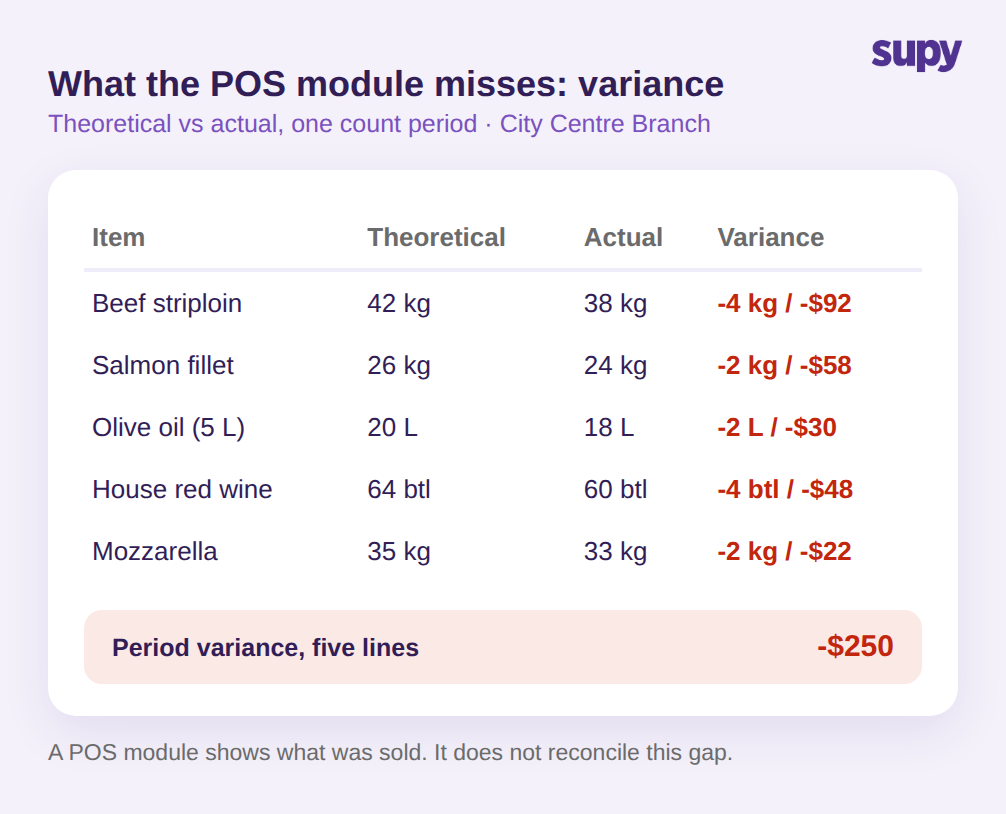
It does not answer the question that actually protects margin: how much actually left, and where did the gap go. That gap is variance, and it is where food cost leaks. A dedicated inventory system sets a theoretical figure from recipes and sales, then reconciles it against a physical count to expose the difference per item, per location. A typical variance read for one site might look like this: beef striploin down 4 kg against theoretical (-$92), salmon down 2 kg (-$58), olive oil down 2 L (-$30), house red wine short 4 bottles (-$48), mozzarella down 2 kg (-$22) - around $250 walking out the door in a single count period, on five lines alone.
The other thing a POS module rarely does is report on stock movement itself. A dedicated system like Supy generates a set of inventory movement reports - stock movement between counts, all movements, variance, item activity, and stock value - tied to the business date. That is five distinct views of where inventory went, against the POS module's single view of what was sold. For a group trying to find which location and which item is bleeding cost, that reporting depth is the difference between a hunch and an answer.
There is also a structural reason the POS module struggles here. It sets the theoretical figure from the menu items it sold and the recipes mapped to them, but it has no native place to record the events that happen away from the till - the prep batch that yielded less than expected, the spoilage logged at close, the items moved to another branch. Wastage, in particular, is where a real share of food cost hides, and a dedicated system lets a team log it by item, quantity, and reason in seconds, then deducts it from stock and rolls the cost impact up by branch and period. Without that, the variance a POS module shows is incomplete by design, and an operator is left attributing every gap to theft or counting error when the real cause is unrecorded usage. The question to ask of any POS module is plain: can it show you variance by item and by location, or only what was sold?
The 24-Hour Data Lag Behind POS-Bundled Reports
There is a quieter limitation that operators only notice once they try to act on a number at the wrong time of day. POS-bundled inventory reporting often runs on an overnight batch sync, so the stock figures a manager pulls can sit roughly 24 hours behind reality. For a back-of-house team making a late-night call on whether to fire a prep run or hold an order, a number from yesterday is not a decision aid - it is a guess with a timestamp.
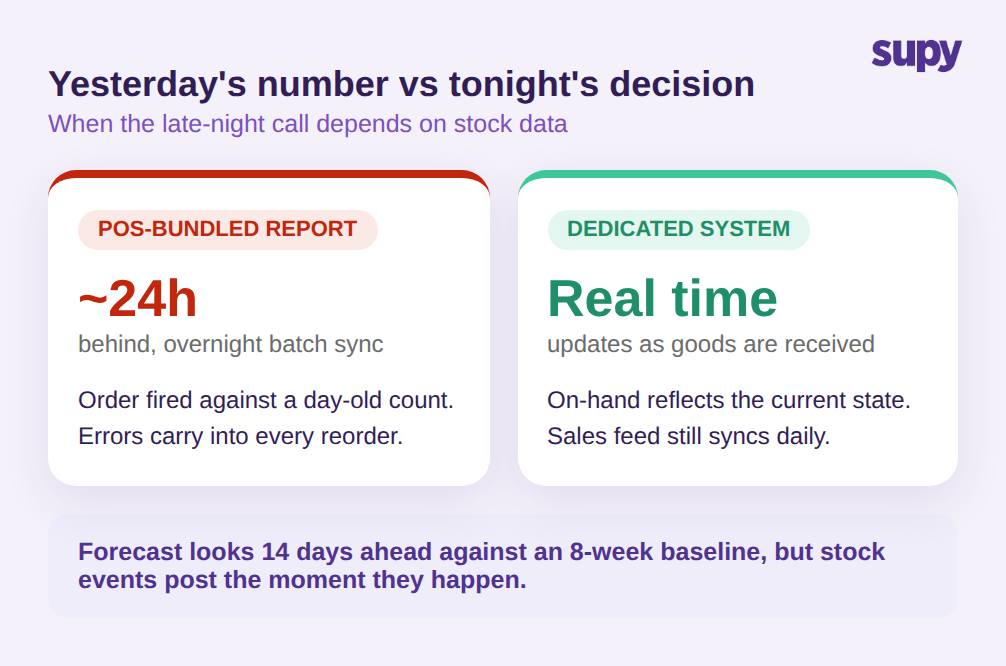
A dedicated system removes the lag for the events that move stock. Supy's live stock visibility updates from goods receipts and recipe usage as they happen, with no manual sync, so on-hand by location, category, and storage unit reflects the current state rather than last night's. The sales side still benefits from a daily POS feed - the AI sales forecasting model, for instance, predicts daily sales by branch for 14 days against an 8-week historical baseline - but the stock-affecting events that decide tonight's order post in real time. Real-time stock is not a luxury feature; it is the floor for a multi-site group whose busiest decisions happen after the reports have gone stale.
The lag also compounds when ordering depends on it. If the figure a manager orders against is a day old, every reorder inherits that error, and across several locations the small daily gaps add up into either dead stock or stockouts. A dedicated system closes the loop by building suggested orders from current stock and the forecast rather than from a stale snapshot, and it keeps the manager in control: predictive ordering shows current and projected-on-delivery stock for each line and never submits an order automatically, so a person reviews every quantity before it goes to the supplier. The point is not that the POS feed is wrong; it is that a day-old read is the wrong input for a same-day decision.
Where Site-by-Site Ordering Breaks Across Locations
Single-site ordering inside a POS module works because there is one stockroom and one person watching it. Add locations and the model quietly breaks. Each site orders on its own, against its own POS, from its own read of demand, and the group loses the one lever that multi-site scale is supposed to grant: buying as one operation instead of five.
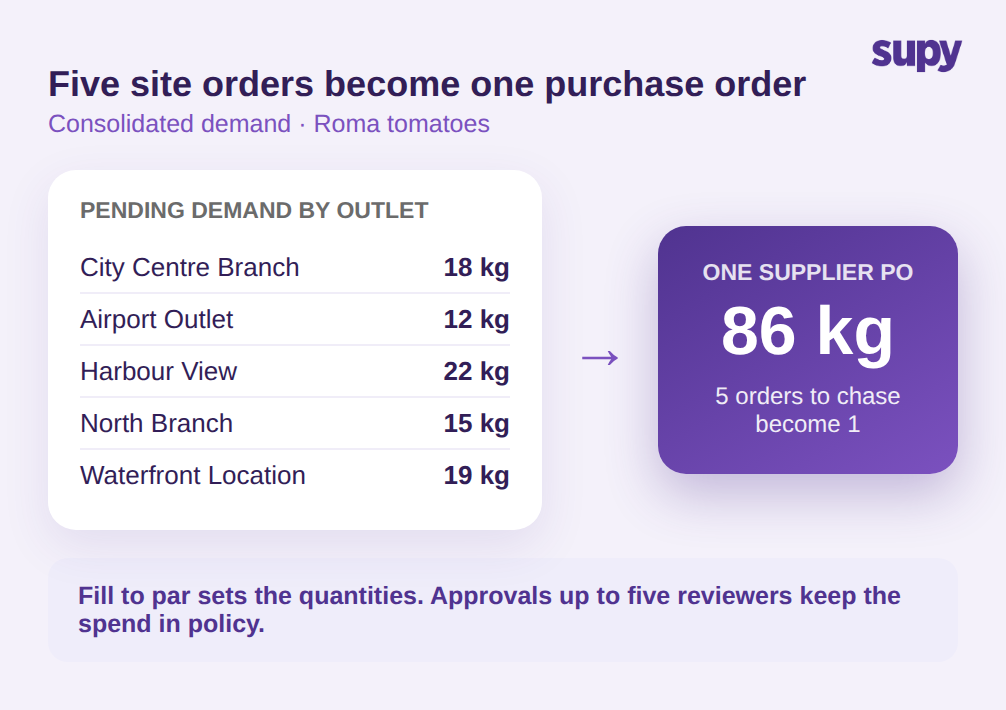
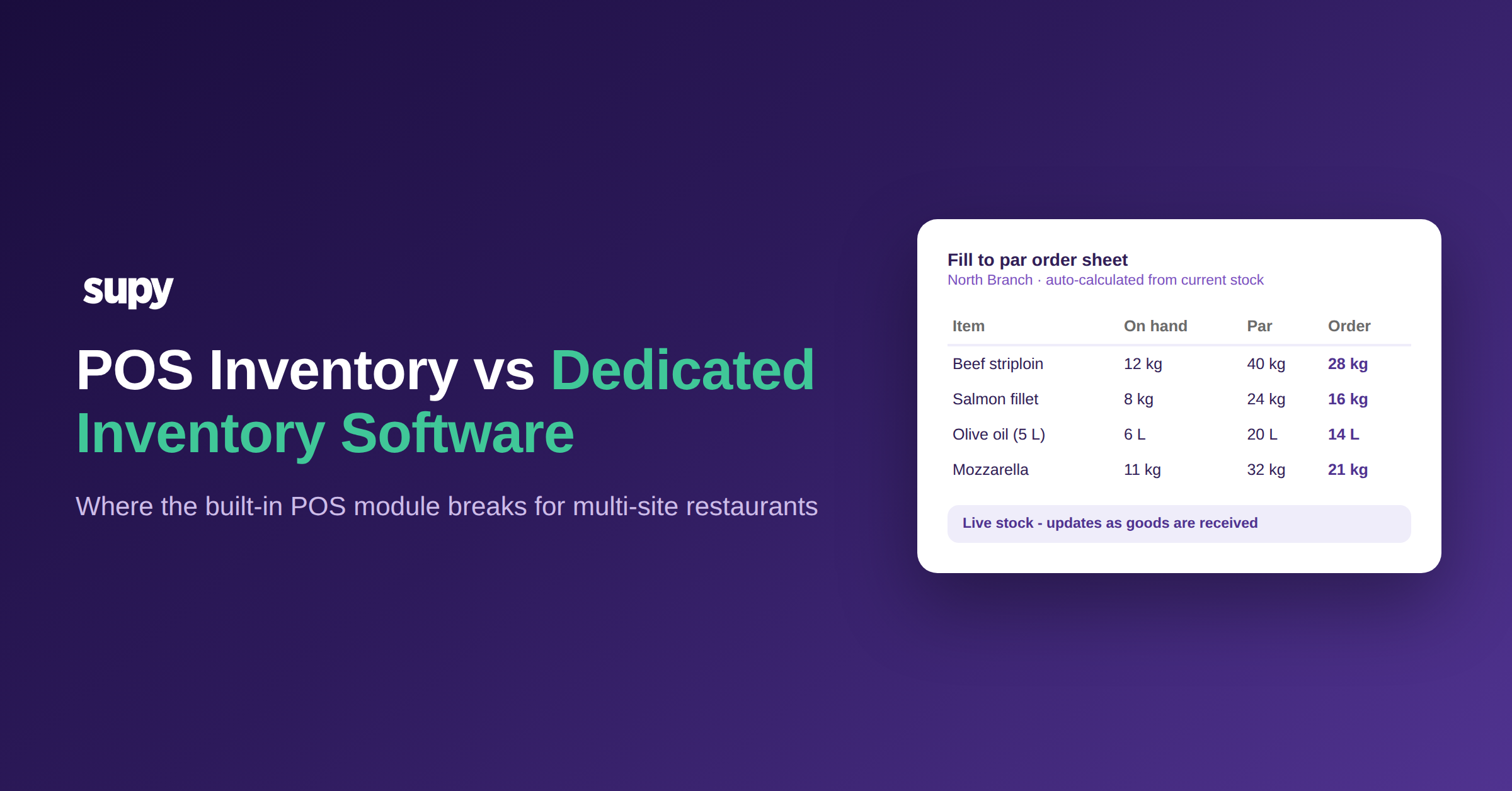
This is the clearest break-point in the comparison. A dedicated system aggregates pending demand from every outlet into a single procurement view and converts it to supplier purchase orders in bulk. Picture five sites each needing Roma tomatoes - City Centre Branch 18 kg, Airport Outlet 12 kg, Harbour View 22 kg, North Branch 15 kg, Waterfront Location 19 kg. Site-by-site, that is five separate purchase orders to chase and reconcile. Consolidated, it is one purchase order for 86 kg, with the supplier seeing the group's real volume. On top of that, fill-to-par logic auto-calculates order quantities from current stock against a par level set for every item at every location, so ordering becomes a review-and-approve step rather than a from-scratch guess at each site. Spending guardrails and sequential approvals - up to five approvers triggered by branch and order value - keep that consolidated buying inside policy. None of this exists in a POS inventory module, because the POS was never designed to see across locations. Before you open another site, ask a blunt question: can your current tool place one order for the whole group, or only five separate ones?
The Audit Trail a POS Module Does Not Keep
The last capability gap is the one operators feel only after something goes wrong and they try to reconstruct it. A POS module knows what was sold. It generally does not keep a defensible record of every other event that changed stock: the goods receipt, the production run, the wastage entry, the inter-branch transfer, the recount. When a number looks wrong across five locations, "what was sold" is not enough to find the cause.
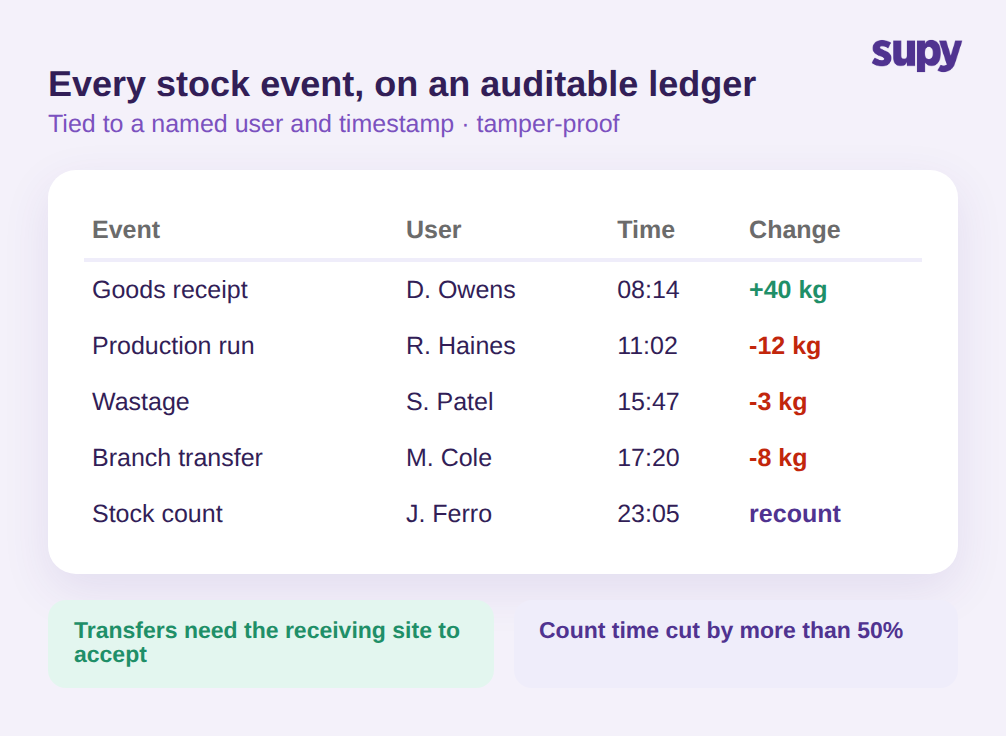
A dedicated system records each stock-affecting event to an auditable ledger, with full movement history per item per location. Supy's audit logs capture every action across modules, tied to a named user and a timestamp, and they are tamper-proof - users cannot edit or delete them. Inter-branch transfers require the receiving site to accept before stock updates on either end, so a transfer cannot quietly vanish between locations. And because stock counting runs on reusable templates in shelf order with parallel counting, the count that feeds the ledger is faster too - operators report cutting count time by more than 50%. For a group where accountability has to survive staff turnover and a finance review, an auditable ledger is not a nice-to-have on top of inventory; it is the inventory record. The test for your own setup is direct: could you reconstruct last week's stock movements, by user and timestamp, if finance asked for them tomorrow?
When the POS Module Is Enough, and When to Switch
The decision is not "dedicated software always wins." It is a question of where the operation sits. Use the POS inventory module when you run one or two sites, the menu is short, depletion-from-sales is close enough to control food cost, and no one is trying to reconcile variance or buy across locations. At that scale, a second system is overhead you do not need.
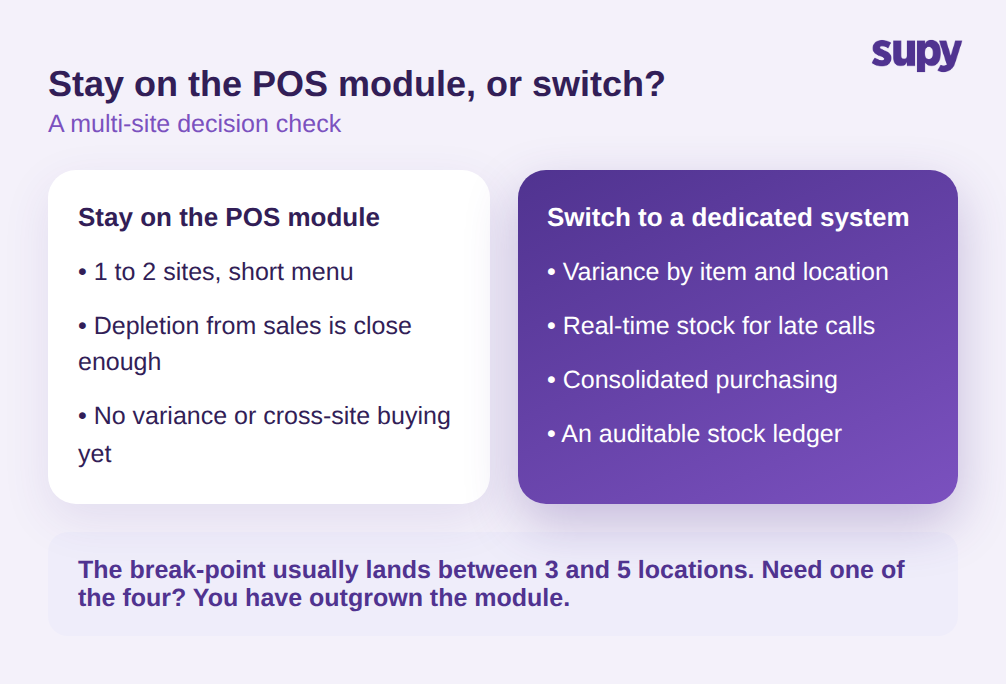
Move to a dedicated system when the operation crosses the points this comparison maps - typically somewhere between three and five locations, or earlier if cost control is already slipping. The signal is concrete: you need variance by item and location, real-time stock for late-night calls, consolidated purchasing across outlets, or an auditable ledger that finance will trust. Those are the four capabilities a POS module structurally cannot provide, and any one of them being a real need is the trigger to switch.
Two objections decide the timing, not the direction. The first is switching cost. A group with money already sunk into a POS-plus-inventory tool needs an ROI case, not a feature list - and the honest answer is that the POS stays. A dedicated system runs alongside it; Supy carries 75+ integrations, including POS connections, so the till keeps doing what it does well while inventory and procurement move to the system built for them. The second objection is adoption: a dedicated system only earns its keep if non-technical floor staff actually use it, which is why order and count templates that prefill the routine work matter as much as any headline capability. Run this self-check before you decide: of variance reporting, real-time stock, consolidated ordering, and an auditable trail, how many do you need today? If the answer is "none," the POS module is enough. If it is "one or more," you have already outgrown it.