.jpg)


Recipe Costing Software: A Practical Guide for Restaurant Operators

Recipe costing software calculates the exact cost of producing each dish on your menu by tracking ingredient prices, portion sizes, and yield losses in real time. It replaces the spreadsheet-based approach that most restaurant operators start with - and eventually outgrow - by connecting your recipes directly to live supplier pricing and inventory data. This guide covers what recipe costing software does, how it differs from manual methods, the features that matter most for multi-location operators, and how to evaluate whether a standalone tool or an integrated platform is the right fit for your operation. If you are already familiar with recipe management software and want to understand the costing side in depth, this is where to start.
What Recipe Costing Software Actually Does
At its core, recipe costing software takes your recipes - the ingredients, quantities, and preparation steps - and attaches a cost to every component. When an ingredient price changes because a supplier adjusts their rate or you switch vendors, the software recalculates every recipe that uses that ingredient automatically. The result is a live, accurate picture of what each dish costs to produce at any given moment.
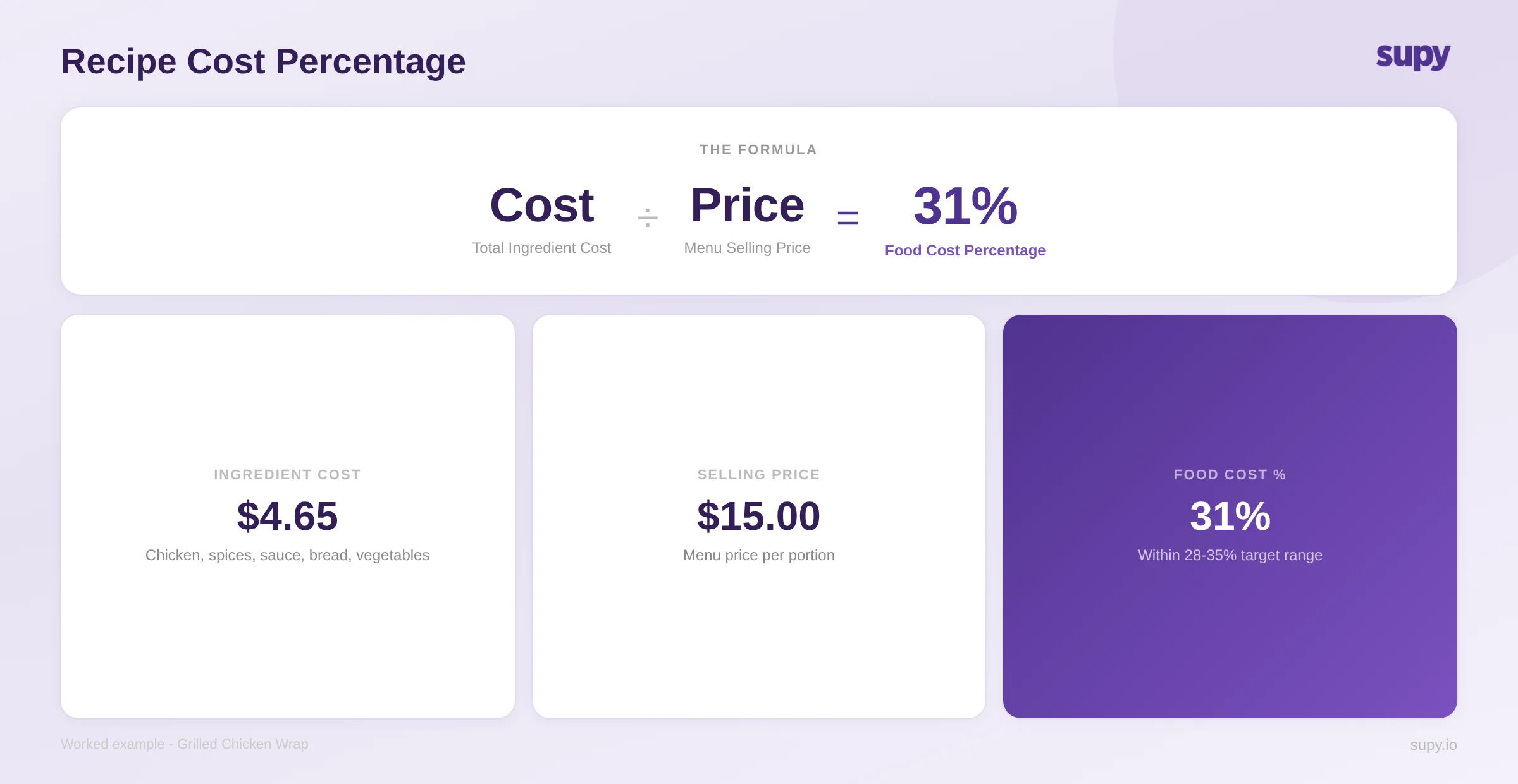
This matters because food cost percentage - the ratio of ingredient spend to revenue - is one of the most closely watched metrics in the restaurant business. Most operators target a food cost in the range of 28-35%, depending on their format. Hitting that target requires knowing, not estimating, what each dish costs. A recipe that was profitable at last month's ingredient prices may no longer be viable if a key ingredient has increased by 15%.
The core functions of recipe costing software include ingredient cost tracking (automatically pulling current prices from purchase orders or supplier catalogues), sub-recipe management (costing a sauce or dough that appears across multiple menu items), yield adjustment (accounting for trim, evaporation, and preparation losses), cost scenario modelling (simulating what happens to your margins under different pricing conditions - changing a selling price, switching a supplier, or absorbing an ingredient price rise before it hits your menu), and target cost alerts (automatic notifications when a recipe drifts above its set cost threshold).
For operators managing food costs across multiple locations, the ability to see recipe costs per site - reflecting different supplier contracts and local pricing - is where dedicated software starts to significantly outperform spreadsheets.
Why Spreadsheets Stop Working
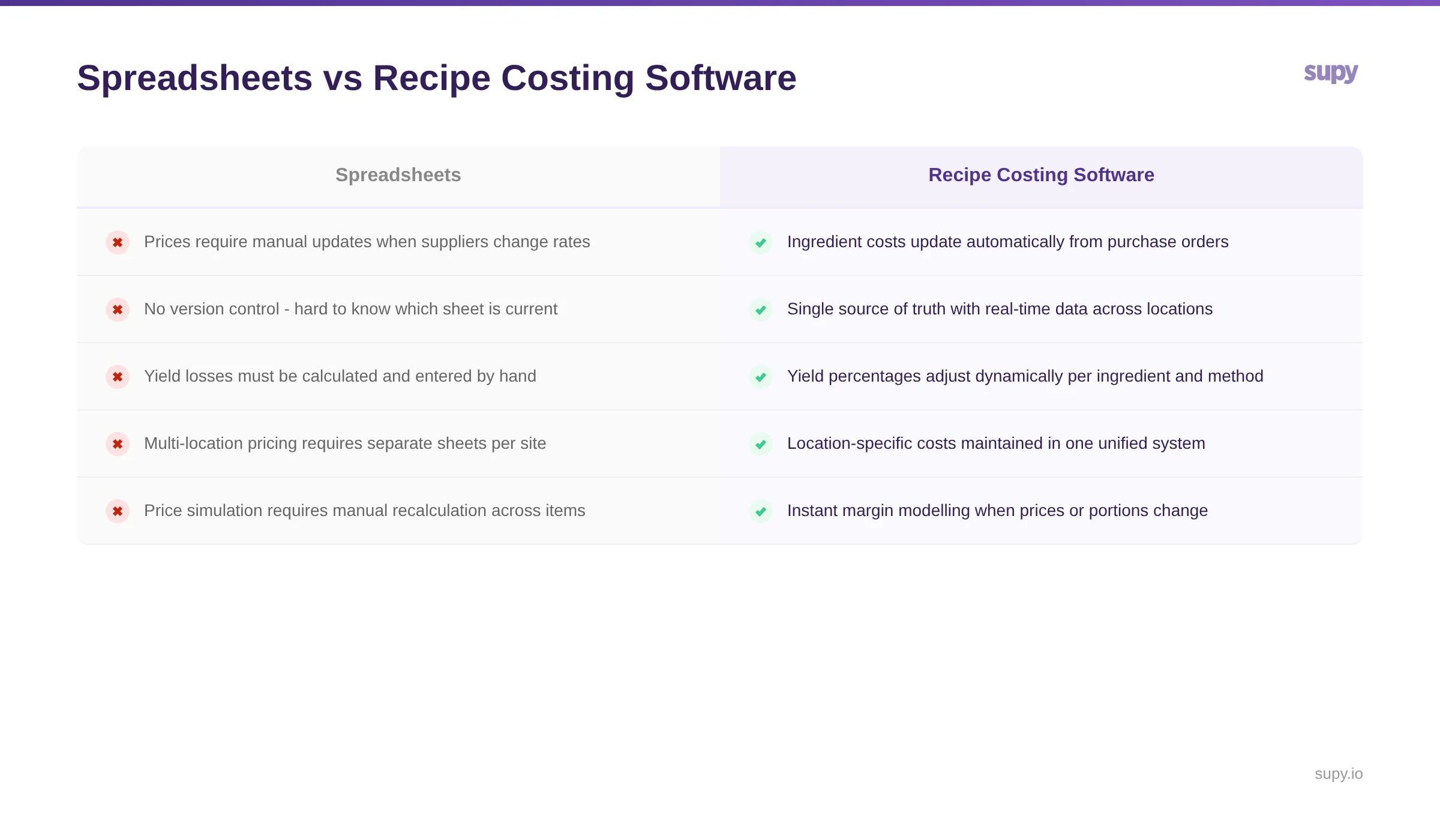
Most restaurant operators begin costing their recipes in spreadsheets. For a single location with a small menu, this can work adequately - you build a sheet, enter ingredient prices, link them to recipe quantities, and get a cost per dish. The problem is that spreadsheets are static. They reflect the prices you entered at the time you built the sheet, not the prices you are actually paying today.
The moment a supplier changes a rate, your spreadsheet is out of date. If you have 80 recipes and a supplier adjusts pricing on 12 ingredients, updating every affected recipe manually is tedious and error-prone. Multiply that across five or ten locations - each potentially buying from different suppliers at different rates - and the spreadsheet approach becomes a liability rather than a tool.
There are several specific failure points. Spreadsheets have no version control, so it is difficult to know whether you are looking at the latest version or one from three weeks ago. They cannot account for yield losses dynamically - if your prep team reports that a new batch of chicken has a higher trim percentage, your spreadsheet does not adjust. They cannot model scenarios quickly - asking "what happens to my margin if I increase the selling price by 10%" requires manual recalculation across every affected item.
Operators who have lived through this transition often describe the shift in stark terms. The experience of tracking costs manually - entering data into Excel document by document - is one that many finance leaders recognise as unsustainable once a group reaches three or more locations. The desire to get food costs under control, particularly when actual costs are running significantly above target, is frequently the trigger for evaluating dedicated software.
Key Features to Evaluate
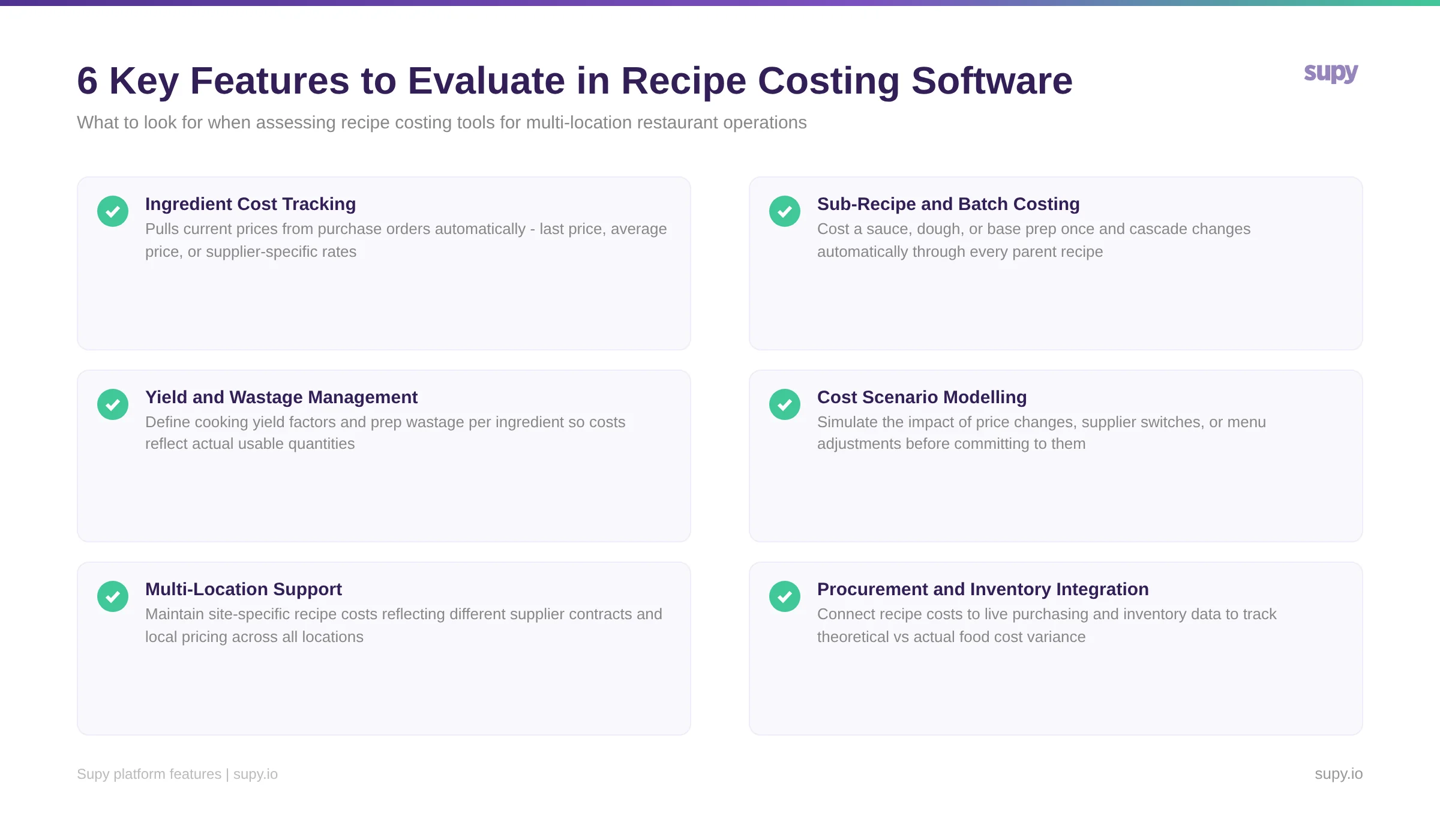
Not all recipe costing tools are built the same way. Some are standalone applications designed primarily for chefs building and scaling recipes. Others are modules within broader restaurant management platforms that connect costing to procurement, inventory, and reporting. The features that matter most depend on the scale and complexity of your operation.
Ingredient Cost Tracking
The most fundamental feature. The software should pull current ingredient costs automatically - ideally from your actual purchase orders rather than a generic price database. This ensures your recipe costs reflect what you are genuinely paying, not a market average.
Sub-Recipe and Batch Costing
Any operation with a central kitchen or shared base preparations (sauces, doughs, marinades, stocks) needs the ability to cost a sub-recipe once and have it flow into every parent recipe that uses it. Changing the cost of your house-made tomato sauce should instantly update the cost of every pizza, pasta, and appetiser that includes it.
Yield Management
Raw ingredient weight rarely equals usable ingredient weight. A kilogram of whole fish does not yield a kilogram of fillets. Effective recipe costing software lets you define yield percentages per ingredient and per preparation method, so your cost calculations reflect reality rather than raw purchase weight.
Cost Scenario Modelling and Menu Engineering
Beyond calculating what a dish costs, the software should help you model what to do about it. Cost scenario modelling lets you test the financial impact of changes before committing to them - simulating what happens if a key ingredient rises by 15%, if you switch to an alternative supplier, or if you adjust the selling price by $5. Menu engineering layers sales data on top of cost data, categorising dishes by profitability and popularity so you can identify items that are selling well but losing money. This is where recipe costing transitions from a back-office accounting exercise into a strategic pricing tool.
Cost Threshold Alerts
Rather than manually checking recipe costs after every supplier price change, purpose-built platforms let you set a target cost for each recipe and trigger an automatic alert when that threshold is breached. For a finance leader managing dozens of recipes across multiple locations, this monitoring layer is what catches margin erosion before it compounds.
Bulk Ingredient Management
When you need to swap an ingredient across your recipe library - substituting one protein for another, or updating a prep recipe that feeds dozens of parent recipes - the software should handle this in a single operation rather than requiring manual edits to every affected recipe. The same applies to backdating recipe changes, which ensures historical cost reports remain accurate even after a recipe is modified.
Multi-Location Support
For operators running multiple sites, the software must handle location-specific pricing. A restaurant in Dubai and a restaurant in Riyadh may source the same ingredient from different suppliers at different rates. Your recipe costing tool should reflect this without requiring you to maintain separate recipe databases for each location.
Integration with Procurement and Inventory
This is the critical differentiator that separates purpose-built restaurant platforms from standalone costing tools. When your recipe costing software connects to your procurement system, ingredient prices update automatically every time a purchase order is processed. When it connects to your inventory system, you can compare theoretical consumption (what should have been used based on sales and recipes) against actual consumption (what was actually taken from stock). That variance - the gap between theoretical and actual - is where waste, theft, and portioning errors hide.
Operators consistently highlight this integration as the capability they value most. The ability to see a live view of cost of goods, connected to actual purchasing and usage data, transforms recipe costing from a planning exercise into a real-time control system. Without it, you are costing recipes in isolation - accurate in theory, but disconnected from what is actually happening in your kitchens.
How to Choose: Standalone Tool vs Integrated Platform
The market for recipe costing software broadly splits into two categories: standalone costing tools and integrated back-of-house platforms.
Standalone tools tend to focus on recipe development, scaling, and nutritional analysis. They are often designed for chefs and culinary teams who need to build, test, and document recipes. Their strength is in the recipe-building workflow - intuitive interfaces, ingredient databases, photo documentation, and scaling calculators. Their limitation is that they typically do not connect to your procurement or inventory systems. Costs are entered manually or pulled from generic databases, which means the data ages quickly.
Integrated platforms treat recipe costing as one module within a broader operational system that includes procurement, inventory management, supplier management, and business intelligence. The advantage is that recipe costs are always current because they draw from live purchasing data. The trade-off is that these platforms are designed for operational scale - they are built for groups managing multiple locations and higher transaction volumes, and they may be more than a single-location café needs.
For multi-unit operators - particularly those managing five or more locations - the integrated approach is almost always the better long-term investment. The operational cost of maintaining accurate recipe costs manually across multiple sites, with different suppliers and different pricing, is significant. An integrated platform eliminates that manual layer entirely.
For strategies on reducing food costs once your recipes are accurately costed, see our guide to reducing restaurant food costs.
Making Recipe Costing Work in Practice
Implementing recipe costing software is not just a technology decision - it requires operational discipline to deliver results. A few practical considerations:
Start with your highest-volume recipes. You do not need to cost every recipe on day one. Begin with the 20-30 dishes that account for the majority of your sales. These are where accurate costing has the greatest immediate impact on your margins.
Define yield percentages accurately. The most common source of error in recipe costing is incorrect yield data. If your system assumes 90% yield on a product that actually yields 75%, every recipe using that ingredient will understate its true cost. Invest time in measuring actual yields during the setup phase.
Update supplier pricing regularly. If your software does not pull prices automatically from purchase orders, establish a weekly cadence for updating ingredient costs. Stale pricing data defeats the purpose of recipe costing entirely.
Use variance analysis as your feedback loop. Once your recipes are costed and your inventory system is tracking actual usage, the gap between theoretical and actual consumption becomes your most valuable metric. A consistent variance above 2-3% on a high-volume ingredient signals a problem worth investigating - whether that is portioning drift, waste, or unrecorded stock movement.
For operators evaluating broader restaurant inventory management software, recipe costing should be a core evaluation criterion. A platform that handles procurement, inventory, and recipe costing in a single system eliminates the data silos that cause most food cost blind spots.
How Supy Handles Recipe Costing
Supy treats recipe costing as an integrated part of the back-of-house operations platform rather than a standalone module. The key capabilities that distinguish it from generic costing tools:
Live, multi-mode cost tracking. When a purchase order is processed, ingredient costs update across every recipe that uses those ingredients - automatically and per location. You can configure cost calculations to use last purchase price, average price, or supplier-specific pricing, depending on which method best reflects how your operation buys.
Cost scenario modelling. Before accepting a supplier price increase or making a menu change, operators can run cost simulations to test the impact across affected recipes. This turns what-if questions - "what happens to my chicken dishes if poultry costs rise 10%?" - into a structured analysis rather than a manual calculation exercise.
Target cost alerts. Set a cost threshold for each recipe and Supy automatically flags when a recipe exceeds it. For finance leaders managing large menus across multiple sites, this alerting layer is what prevents margin drift from going unnoticed between reporting periods.
Sub-recipe cascade and bulk ingredient swaps. Changes to a prep recipe - a base sauce, a marinade, a dough - flow automatically into every parent recipe that uses it. When you need to swap an ingredient across your entire recipe library, Supy handles the update in bulk, without manual editing of individual recipes.
Batch production tracking. For central kitchen operations, Supy tracks quantities produced for batch and prep recipes with automatic stock deduction, connecting production runs to your inventory in real time.
Theoretical vs actual variance analysis. Recipe costing connects directly to procurement and inventory data, enabling comparison of theoretical food cost (what recipes say should have been consumed based on sales) against actual food cost (what inventory tracking shows was used). That gap - the variance - is where waste, portioning errors, and unrecorded stock movement are identified.
For kitchen teams: a digital cookbook. Chefs and kitchen staff access current recipes, prep steps, and portioning guides directly from a desktop or mobile device, ensuring the recipes being executed in the kitchen match the recipes being costed in the system.
For multi-location groups, Supy maintains location-specific recipe costs while providing consolidated reporting across the entire portfolio - a unified operational view that connects purchasing decisions, recipe costs, and actual consumption data in one place.
About Supy
Supy is a back-of-house operations platform built for multi-location restaurant groups. It connects procurement, inventory management, recipe costing, and business intelligence into a single system - enabling operators to make data-driven decisions about food cost, purchasing, and stock control across every location they manage.