.jpg)


Ordering Variable-Price Items From Suppliers: How Multi-Site Groups Keep Every Order Costed When Prices Move Weekly
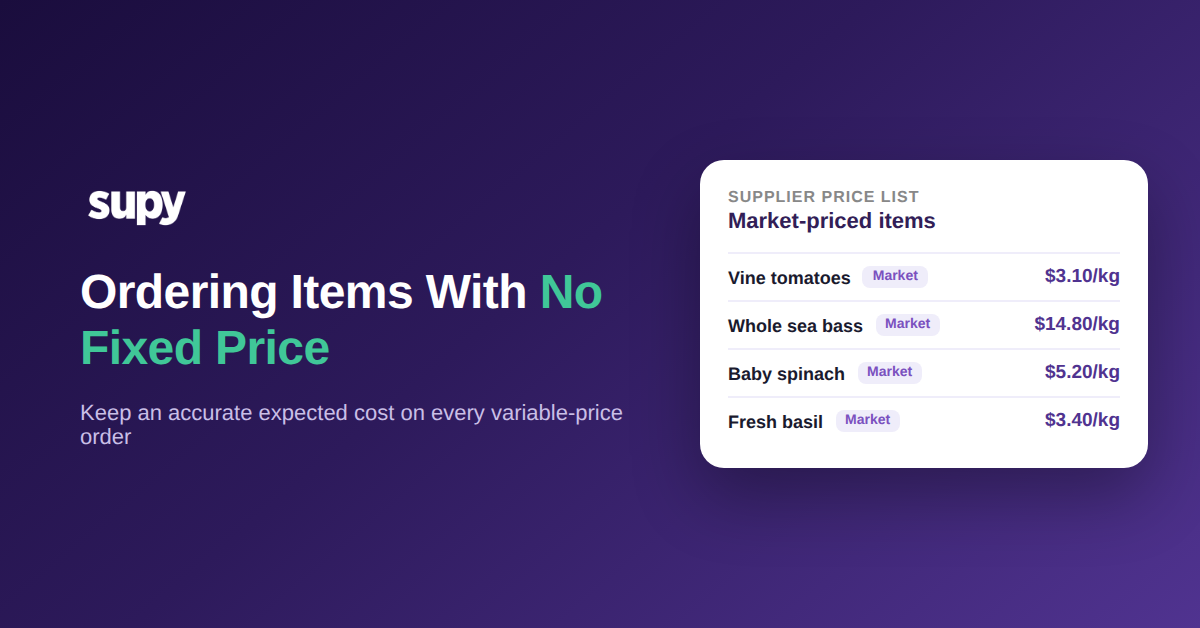
Why a Fixed Price Per Item Cannot Cost Fresh or Market-Bought Supply
Ordering variable-price items from suppliers means buying stock whose cost changes from one order to the next: fresh produce, seafood, and anything bought at a market or on a floating contract. A single fixed price per item cannot represent this, because the number is already wrong the moment the market moves. The aim is not a frozen price; it is a documented expected cost on every order line.

Picture Vine tomatoes moving from $2.40 to $3.10 per kg within a few weeks, a 29% swing. A fixed catalogue price set at the start of that run is either stale or quietly ignored by whoever places the order, and the cost that lands in your recipes and reports no longer matches what you actually paid. Multiply that across 12 outlets each buying around 180 variable-price lines, and "the price is roughly right" becomes a food-cost number nobody trusts.
The good news is that you can order these items and still carry an accurate expected cost into every count, recipe, and variance report. It takes three things: the right price type on each item, a way to maintain those prices in bulk instead of one at a time, and a receiving step that reconciles the real price the day it arrives. The rest of this guide walks through each one.
Choose the Right Price Type for Each Variable-Price Item
The first move is to stop treating "price" as a single fixed field. In Supy, an item does not have to carry one hard-coded number. You set how its cost is determined, so there is a documented expected price on the purchase order before the delivery ever arrives.
Three ways to price an item that is not truly fixed
| Price type | Best for | Expected price is set from |
|---|---|---|
| Fixed price | Contracted items where the rate genuinely holds | The agreed rate, held until you change it |
| Cost plus markup | Central-kitchen and internal supply between sites | A base cost plus a defined margin |
| Carried forward | Market and floating items with no set rate | The last cost, corrected at receiving |
There are three practical ways to price a line that is not truly fixed. A fixed price suits stable, contracted items where the rate genuinely holds. A cost-plus-markup price suits items you buy through a central kitchen or internal supplier, where the cost is a base figure plus a defined margin, so the receiving branch always sees a consistent, explainable rate. And for genuinely floating items, you carry forward the last agreed cost as the expected price, then correct it at receiving (covered below) so the number tracks reality instead of a guess. Supy's central kitchen billing already runs on this logic, supporting cost, markup, and fixed pricing on the same catalogue.
Set the price type once, per item, and every order for that line starts from a sensible expected cost. That is the number your team approves against, and the number Supy checks the invoice back against when the goods turn up. For the mechanics of keeping those supplier rates current, see Supy's supplier management tooling.
Stop Rewriting Prices Item by Item Across Every Site
The reason ordering variable-price items from suppliers feels painful is rarely the ordering itself. It is the maintenance. When each price has to be edited one item at a time, a monthly refresh across hundreds of lines and every site turns into half a day of data entry that is out of date before it finishes.
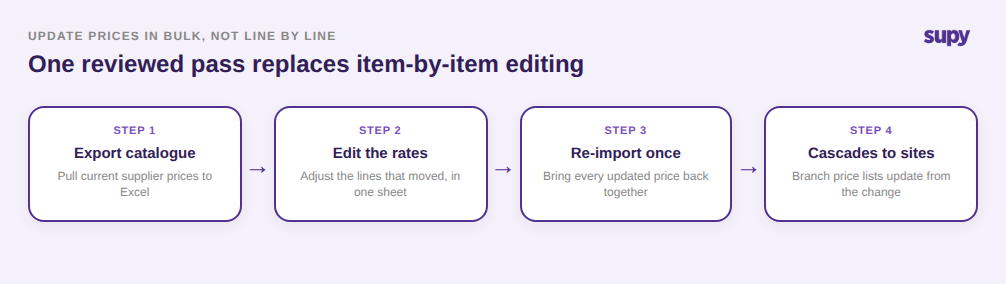
This is where managing fluctuating supplier prices at scale actually gets solved. Rather than touching lines individually, you update supplier pricing in bulk: export the catalogue to Excel, edit the rates, and re-import in one pass. You can hide prices on the purchase orders themselves where a branch does not need to see cost, and you can hold different terms, minimum orders, and delivery schedules per supplier and per branch so a central update does not flatten local differences. For groups that run a central kitchen, an updated price list cascades to the branches that order from it, so one change reaches every site that depends on it.
The point is not the spreadsheet; it is that price changes stop being a per-item chore and become a single reviewed action. That is the difference between a price list that is maintained and one that quietly rots. Supy's restaurant procurement platform is built around this bulk-first approach, and our deeper write-up on supplier price management covers how prices drift up when nobody owns that refresh.
When the Price Only Lands at the Door: Receive First, Cost After
Some supply never has a price list at all. A branch buys Vine tomatoes, leaf herbs, and fish daily from a market on handwritten dockets, and the real cost is only known when the goods and the paperwork arrive together. For these items, the workflow inverts: you receive first, then attach the true cost.

Supy lets a branch record a goods-received note without a matching purchase order, so a market buy with no formal PO is still captured in the system with its actual price and quantity. When a supplier does invoice, AI invoice receiving reads the document, extracts the line items, prices, and totals across inconsistent formats, and matches them to the order. Where the invoice price differs from the expected price, or the delivered quantity differs from the order, Supy flags the discrepancy before anyone accepts it. Say a line expected at $2.60 per kg arrives at $2.95, a 13% gap: with a receiving variance threshold set at 5%, that line is held for review instead of silently updating your costs.
From that flag, the receiver can accept the new price, edit the quantity, or raise a credit note for an over-charge, all from the same screen, with an audit trail. The expected cost is corrected by the real one at the exact moment you have both the goods and the document in hand. Left unchecked, small unflagged gaps across 180 variable lines and 12 outlets can quietly add up to roughly $1,180 a month. For more on catching those gaps automatically, see how invoice scanning works across locations.
Before You Approve the Next Variable-Price Order
Here is a quick self-check you can run against your own operation this week. If any answer is "no", that is where your variable-price money is leaking, and the fix is one of the three steps above.

Ask: does every variable-price item carry a defined price type and a documented expected cost, rather than a stale fixed number? Can your team update those prices in bulk, or is someone still editing them one line at a time? And when a market delivery arrives above its expected cost, does the system flag the gap before it hits your food-cost report, or does the difference only surface at month end? If your expected prices are set deliberately, maintained in bulk, and reconciled at receiving, ordering variable-price items from suppliers stops being a source of surprise and becomes just another controlled, costed order.