.jpg)


Excel Formulas for Food Cost Calculations: How Supy Simplifies the Process
.jpg)
Let’s be honest. Running a restaurant is about turning a profit while doing what you love most. It’s easy to get pulled into the day to day of service, brand, and guest experience, but accurate food cost calculations are still the bedrock of a healthy operation.
To price confidently and protect margins, owners and managers need to know the true cost of every dish on the menu. The problem is not the math. The problem is keeping the numbers accurate when supplier pricing changes, yields vary, and teams are busy. That’s where traditional tools like Excel start to show their limits.
Many restaurateurs still rely on Excel formulas to manage food costing, but manual spreadsheets are easy to break. One missed update, a small formula error, or an outdated supplier price can quietly distort your costs. And because Excel is static, it often reflects what was true last week, not what is true today.
That’s where Supy comes in. By automating food costing and connecting it to invoice-verified prices, inventory movement, and operational variance, Supy reduces manual work and makes food cost control easier to maintain as you grow.
In this blog, we’ll dive into all the ways Supy simplifies the food costing process. Read on to learn more!
1. The Basics of Food Costing and Why It Matters
Food costing is the process of calculating how much it costs to produce each menu item, based on the ingredients, quantities, yields, and purchase prices involved. That number directly influences pricing, margin targets, and long-term profitability.
At a high level, most operators track food cost as a percentage:
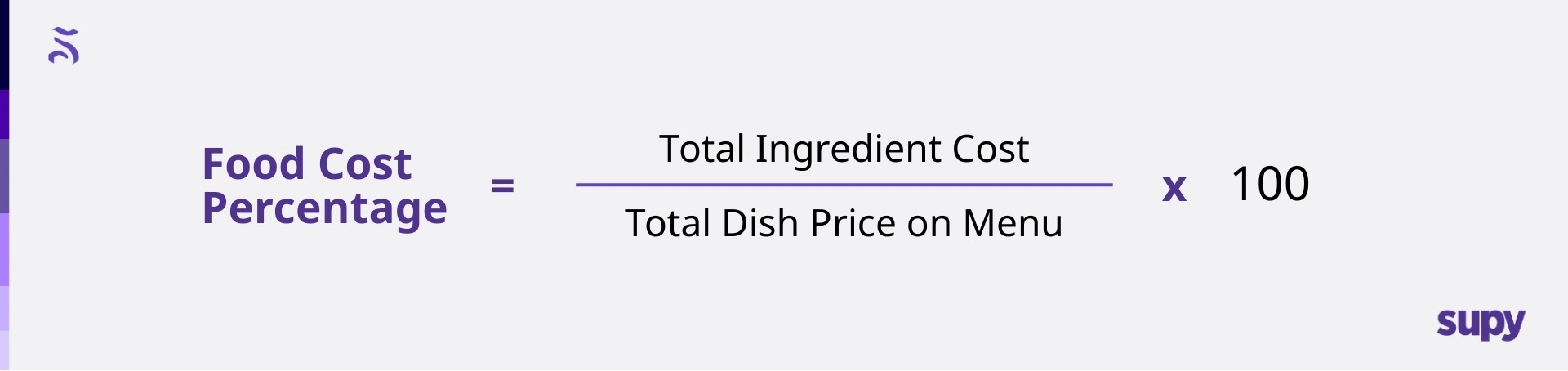
If a dish costs $5 to produce and sells for $15, the food cost percentage is ($5 ÷ $15) * 100% = 33.33%
This simple ratio helps operators understand whether menu pricing aligns with cost realities and margin goals. Across many concepts, food cost often lands somewhere in the high-20s to mid-30s, depending on cuisine, service model, and strategy. The exact number matters less than consistency and visibility.
Where things get difficult is not the formula itself, but keeping it accurate as costs change week to week. Click here to learn more about how to calculate food cost percentage for your restaurant, and try out our free food cost calculator here!
2. How Manual Food Cost Calculations Work in Excel
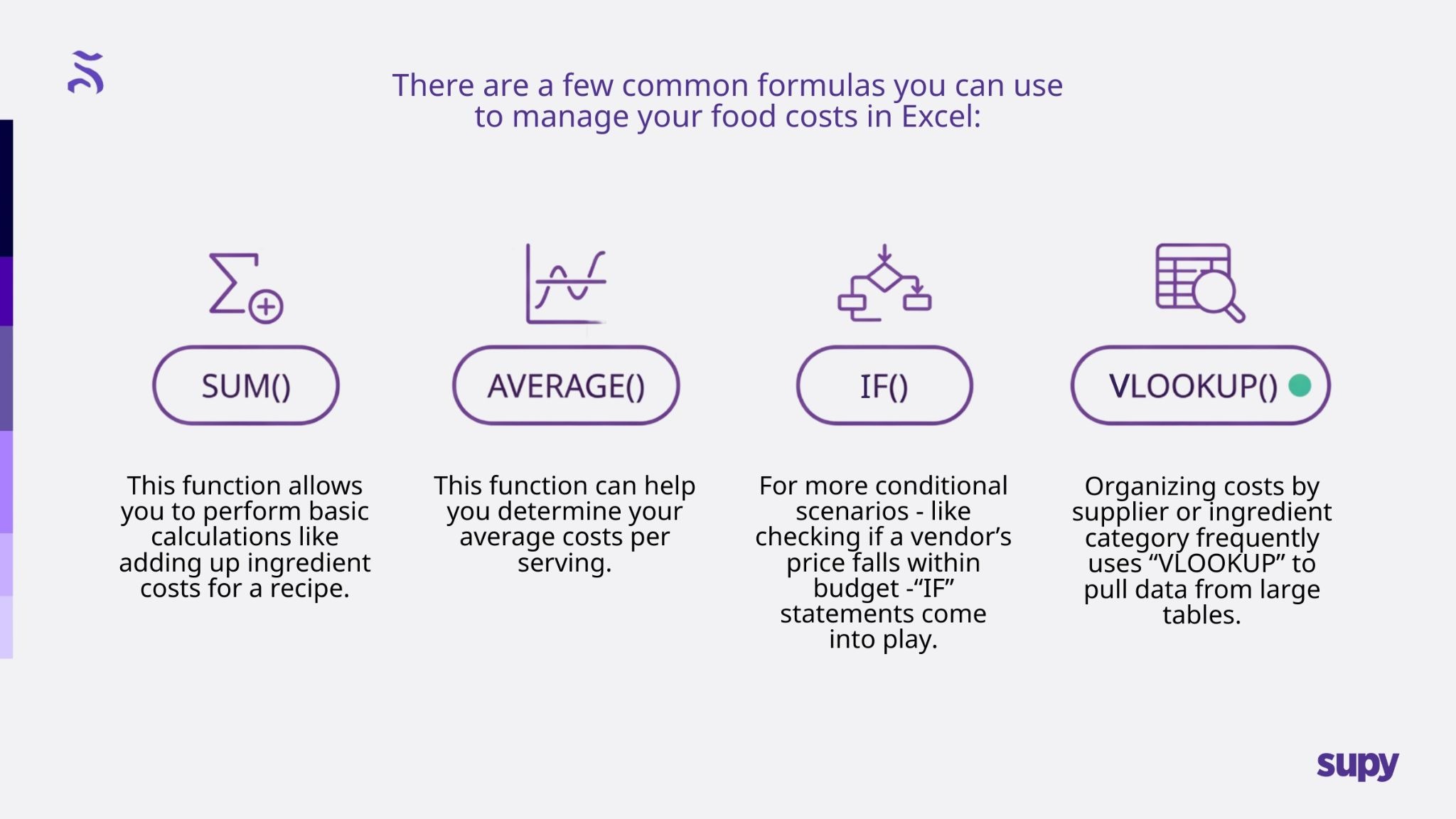
However, things tend to get tricky when you try to do advanced calculations like recipe costing and wastage percentages. For instance, a recipe costing calculation requires you to consolidate your ingredient quantities, unit costs, and yield factors into a single cost per recipe - a process that can involve combining multiple formulas and creating reference tables.
Similarly, calculating your wastage percentages can add another layer of complexity, as it requires deducting spoilage or unused portions from the total cost and recalculating the net expense per serving. This labor-intensive process highlights the inefficiency of relying solely on manual food cost excel formulas.
3. The Drawbacks of Using Excel for Food Cost Calculations
While Microsoft Excel has long been a staple in restaurant food cost calculations, it presents several significant drawbacks that can hinder operational efficiency and accuracy. Here’s a breakdown of the limitations of using an Excel spreadsheet.
1. Error-Prone Processes: Manually entering data into an Excel spreadsheet leaves plenty of room for human error - whether that’s a simple typo, miscalculated formula, or an oversight in data updates. These errors can easily snowball under the radar, leading to inaccurate food cost estimates and ultimately causing a negative impact on your bottom line. For restaurant operators managing tight profit margins, even small inaccuracies can prove to be very expensive indeed.
2. Static Nature: Another disadvantage of Excel is that it operates in a static environment. This makes it ill-suited to tracking fluctuating ingredient prices in real time. In the restaurant industry, ingredient costs will often change due to market dynamics, seasonality, or supply chain disruptions. Without real-time updates to your data, you risk basing your menu prices on outdated sources of data, which could result in losses or overpriced dishes that deter your customers.
3. Time Investment: The food costing process in Excel is a labor-intensive one, requiring significant time for data entry, formula management, and manual recalculations. For busy restaurant teams, it’s much more preferable to use this time on developing your customer service or business strategies, not spreadsheet maintenance!
4. Scalability Issues: Managing food costs for a single location is challenging enough in Excel, but for multi-location restaurant chains, the complexity of managing this data grows exponentially. The process of coordinating your spreadsheets across multiple locations can introduce inconsistency, making the data consolidation process incredibly cumbersome.
4. How Supy Automates and Simplifies the Food Costing Process
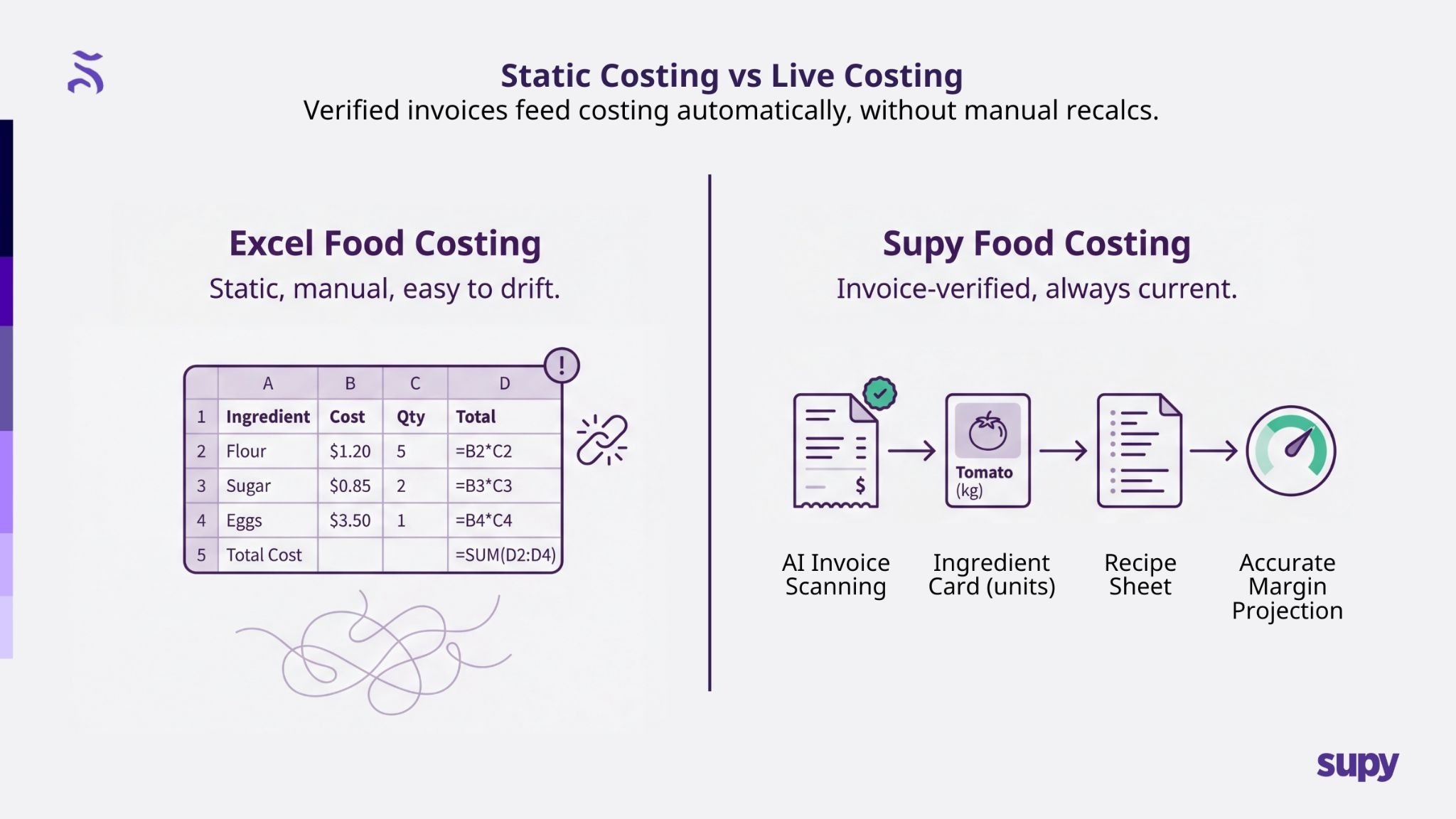
Supy’s free Food Cost Calculator is designed to allow restaurant managers to list the ingredients of each menu item, as well as its specific potential price and quantity in order to come up with an ideal food cost of this dish. You’ll be able to see each item’s breakdown to understand what items may be costing you the most so that you can either replace them or mark them up accordingly.
Once you download our app, you can access all of these features and automate your food cost calculations by seamlessly integrating with your inventory and supplier systems. Instead of manually inputting ingredient prices into Excel, Supy’s platform dynamically pulls real-time data from suppliers, ensuring your cost calculations are always accurate.
5. Supy’s Other Optimization Features
Supy’s innovative platform offers advanced tools to revolutionize food cost management, making it a superior alternative to traditional Excel-based calculations. Here’s how else Supy can help you transform your business:
1. Supplier Integration for Real-Time Pricing: Supy integrates right into your supplier databases, automating the process of tracking and updating ingredient prices. In doing so, Supy can help you update your prices in real-time and coordinate with your suppliers to streamline your supply chain.
2. Data-Driven Insights for Informed Decisions: Supy’s powerful reporting and analytics tools provide detailed insights into food costs, margins, and supplier performance. These actionable insights enable operators to identify cost-saving opportunities, optimize menu pricing, and improve supplier negotiations. Our interactive and mobile-friendly restaurant dashboards are a great tool for restaurant owners and managers trying to cover all of their back-of-house operations.
3. Real-Time Wastage Tracking: Never forget to log a wastage event again; with Supy’s mobile app, you can keep your inventory accurate by registering events as soon as they happen! Operators can identify sources of wastage, adjust portion sizes, and manage inventory better to reduce unnecessary losses. Log your wastage events by recipe and let Supy automatically deplete that item accordingly.
4. Scalable Solutions for Multi-Location Operations: Supy is designed to help you grow your business. With all your relevant data backed up on the cloud, restaurant owners and managers can centralise their food cost management across multiple locations.
6. The Advantages of Using Supy Over Excel
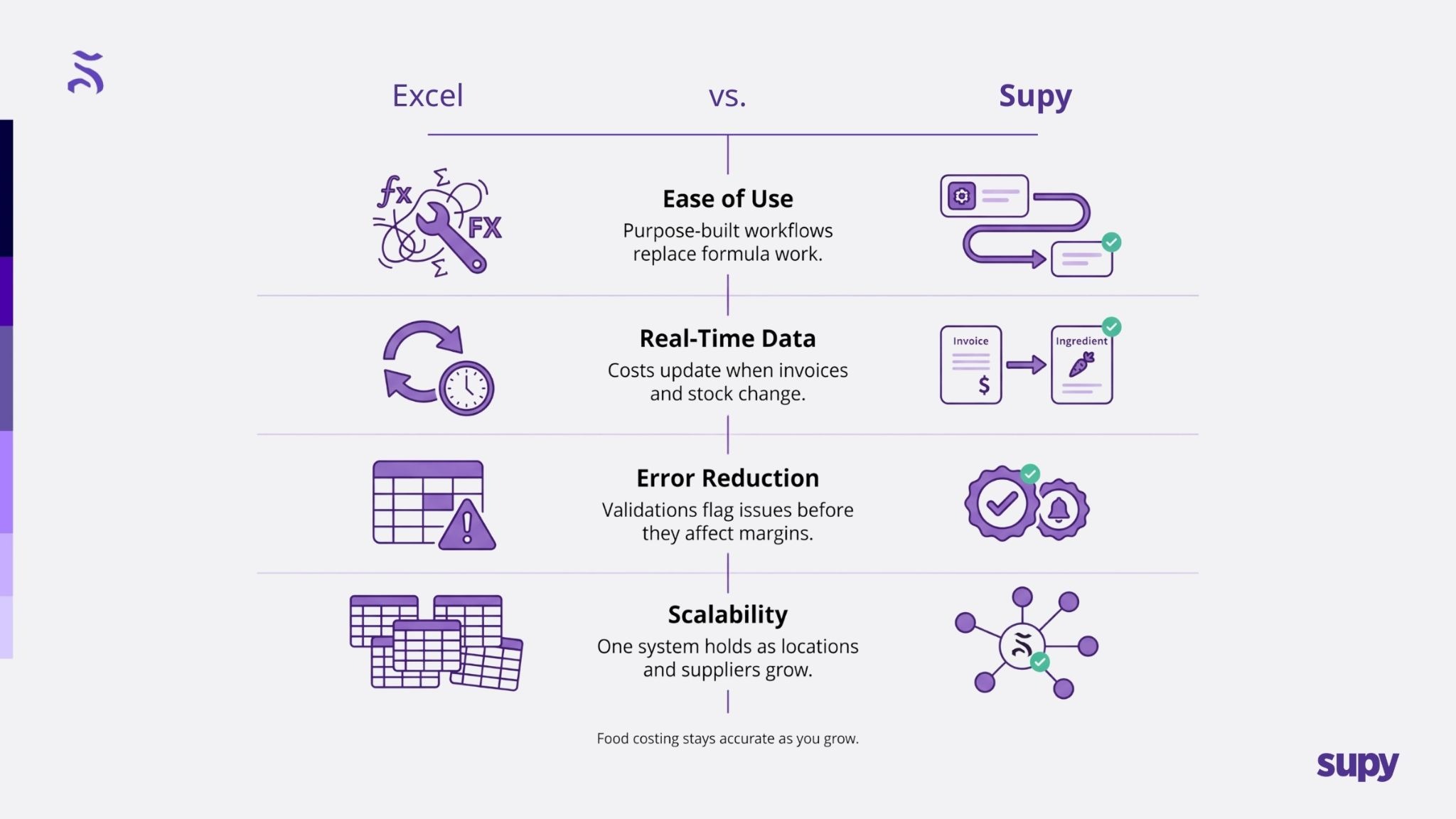
As we have seen, managing your food costs is crucial to your restaurant’s profitability. Here’s how Supy outshines Excel in four key areas:
1. Ease of Use: While Excel requires its users to have a solid understanding of formulas, functions, and formatting, Supy comes with a user-friendly interface designed specifically for restaurant operations. With intuitive dashboards and pre-configured modules, even non-technical users can learn how to navigate Supy effortlessly. This reduces the time owners and managers have to spend on training their staff and troubleshooting new processes.
2. Real-Time Data: Whereas Excel requires its users to manually enter and update their data, Supy’s platform integrates directly into your supplier and inventory systems, offering real-time updates on prices, inventory levels, and food costs. This automation ensures decision-makers always work with accurate, up-to-date information.
3. Error Reduction: The chance of making human errors in Excel calculations can lead to some very costly mistakes! Supy eliminates this risk with built-in validations and automated calculations. From detecting discrepancies to ensuring data consistency, our platform works to minimize your potential for making serious mistakes that impact your bottom line.
4. Scalability: Many restaurants that have tried to expand have complained of how Excel struggles with large datasets and complex operations. That’s why Supy’s platform was designed to handle the scale of data that comes with multi-location restaurant operations. Supy takes care of complex supplier relationships and dynamic pricing structures with an easy click of a button, making it an easily scalable solution for growing businesses.
7. A Successful Example of Supy’s Automation
A strong example of automation done right is Pitfire Pizza, a growing restaurant group that needed tighter food cost control as operations scaled. Their challenge wasn’t recipes or execution. It was visibility. Waste was being logged inconsistently, supplier costs were changing, and by the time issues surfaced, margin had already leaked.
After implementing Supy, Pitfire Pizza centralised recipe costing, automated invoice capture, and connected wastage logging directly to inventory and cost reporting. This allowed the team to spot abnormal waste patterns early, understand where losses were occurring, and act before they compounded.
As a result, Pitfire Pizza identified and prevented over $55,000 in wastage, directly contributing to lower food cost and more stable margins across locations. Just as importantly, the team reduced manual checks and reconciliation work, giving operators confidence that the numbers reflected reality, not last month’s spreadsheet.
Automation didn’t change how Pitfire cooked. It changed how clearly they could see cost drivers and respond in time.
8. Automation Is the New Future of Food Costing
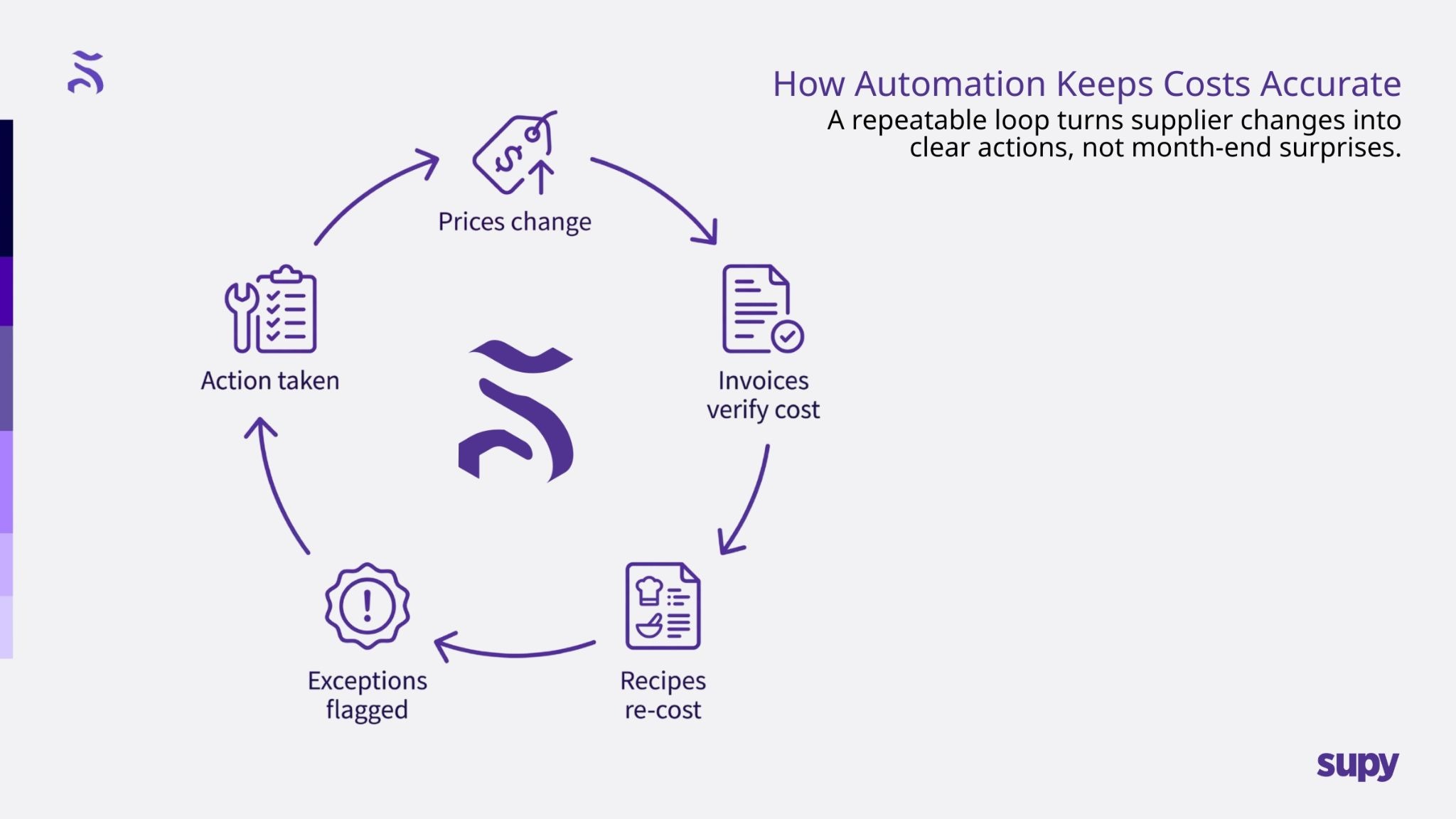
As we have seen throughout this article, when operations become more complex, it’s a wise idea for businesses to turn to technology to streamline their processes. Many manual methods, such as using Excel spreadsheets for food costing, are tedious and prone to error. A simple mistake during the data entry process can lead to significant discrepancies in your business. By automating your calculations, you can ensure they are accurate and in real-time. With platforms like Supy, you can even go a step further by integrating with a large variety of suppliers and inventory systems. This allows restaurant managers to automatically update their prices and track their costs across multiple branches with a single click of a button.
Beyond efficiency and accuracy, the process of automation also provides your business with a significant competitive advantage. Restaurants that leverage tools like ours can allocate their resources more strategically and respond faster to new market trends. Such kinds of capabilities can prove vital in an industry where margins can often be razor-thin.
There’s no doubt about it – switching to Supy means embracing the future of food costing.
9. Conclusion
In the end, learning how to effectively manage your food costs can be one of the most challenging aspects of running a restaurant, and for many operators, their reliance on manual Excel spreadsheets can be a significant pain point. These formulas often require constant adjustments, are prone to errors, and demand time-consuming updates. It can be overwhelming to constantly track your ingredient costs, adjust for fluctuations, and ensure everything is running smoothly and profitably when you’re running everything by hand!
With Supy, restaurant owners and managers can automate these food costing processes. Our platform is designed to simplify and accelerate the entire calculation process, offering real-time data and insights that help restaurant managers make more informed decisions.
If you're tired of spending valuable time and resources on cumbersome spreadsheets and wish to optimize your food costing process, it’s time to explore Supy. Sign up for our newsletter or book a free demo today to discover firsthand how our platform can transform the way you manage your food costs!
Let Supy take the reins so you can focus on growing your business with confidence.
To learn more about retail execution software, click here.