Inventory

Restaurant Stock Count Templates: Split Cross-Venue Items by Section
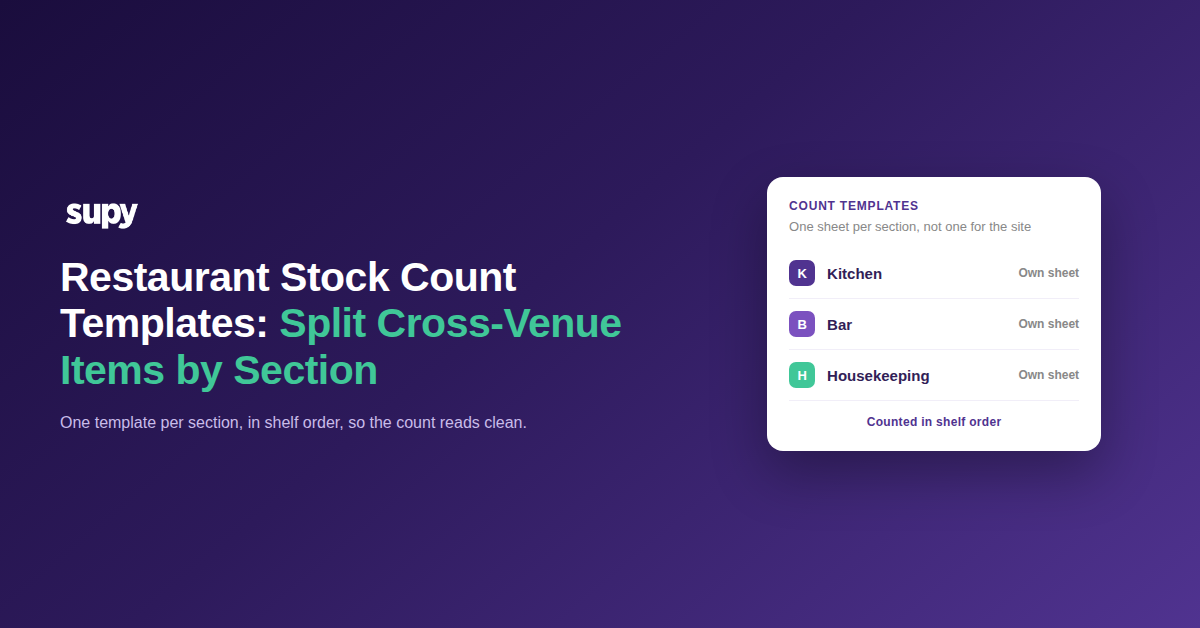
Restaurant stock count templates split by section

Why One Stock Count Template Breaks Across Venues

A stock count template is the ordered list a counter works through, shelf by shelf. When a single template covers a whole site, it pulls food, bar and housekeeping items onto one sheet. The count takes longer, items get skipped, and the variance it produces is hard to trust. Splitting the template by section fixes all three at once.

The specific failure is cross-venue items. A template built around the kitchen buries the bar and housekeeping stock at the bottom, or leaves it off the sheet entirely. So a whole section goes uncounted, or gets set to zero by mistake. If your counts keep drifting from the system, a mixed template is a common place it starts. The rest of this guide helps you find which version of that problem you have, then gives the exact fix for it.
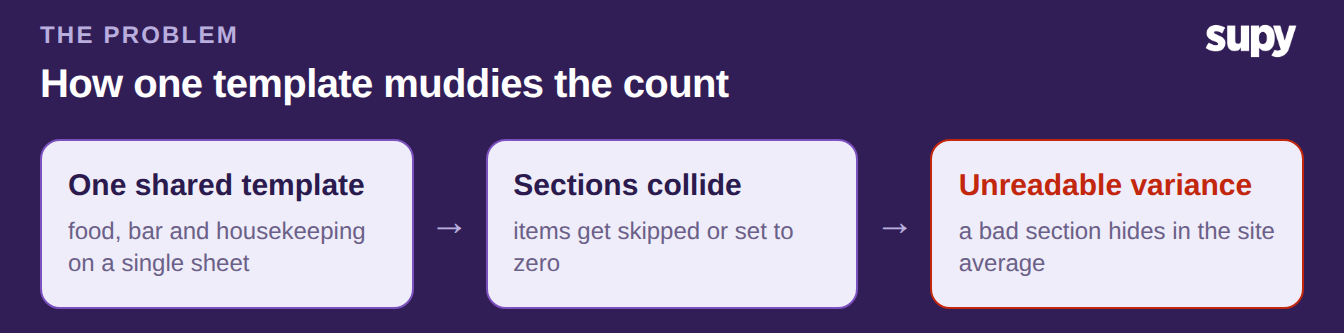
A three-step diagram showing how one shared count template leads sections to collide and produces unreadable variance

Which Cross-Venue Problem Are You Solving?

Start with one question about the item that is causing trouble: is it on the count sheet at all? Your answer points to the fix.

If the item is not on the sheet, it either arrived mid-cycle or belongs to a section the template ignores. A template only shows the items it was built with, so anything new is invisible to the counter. Add that item to the right section's template, so it is counted next cycle rather than remembered by hand.

If the item is on the sheet but sitting under the wrong section, it belongs to another venue. A keg listed among kitchen dry goods, or a cleaning supply mixed into food, is a cross-venue item on the wrong template. Move it onto that venue's own template, and count that venue as its own run. Both branches lead to the same place: one template per section, not one for the whole site.
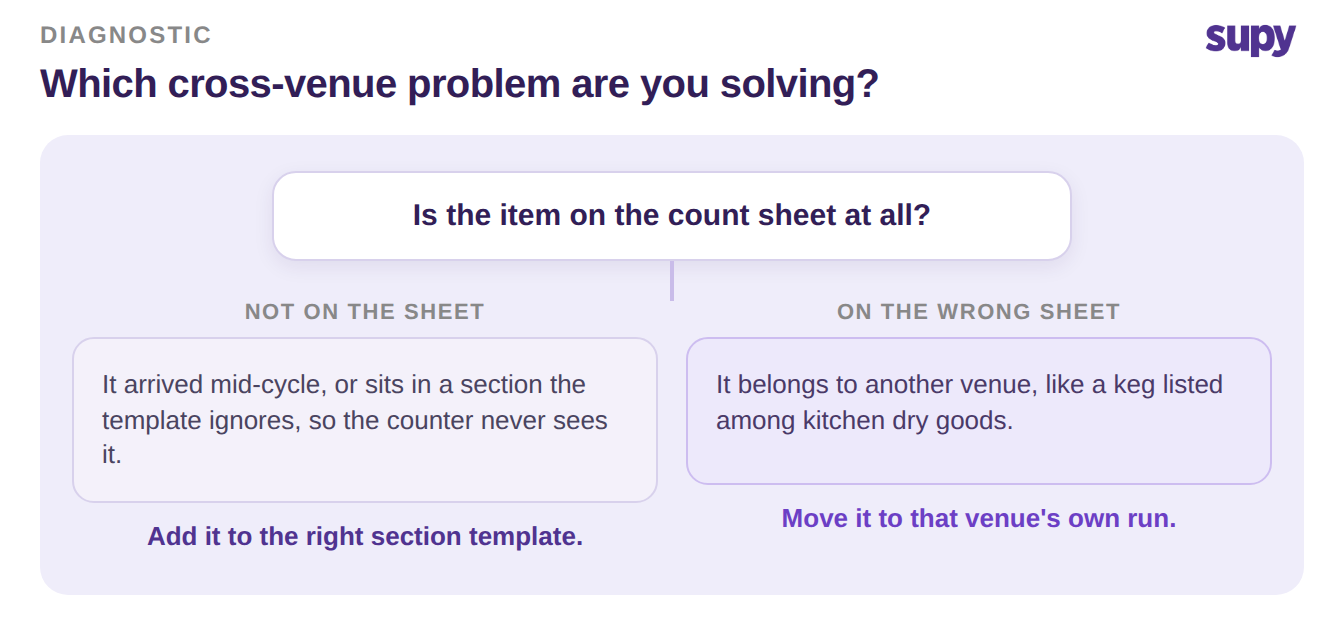
A decision tree asking whether the item is on the count sheet, with a fix for each branch

Build Section Templates and Read Variance by Section

Once you know the branch you are in, the build is the same. Create a separate count template for each section, in shelf order, so a counter walks the room in the order the stock sits. Supy's stock counting stores reusable custom count templates in shelf order. A single scheduled count can then be split into sub-counts per section, so the kitchen, the bar and housekeeping each get their own sheet inside one run.

Splitting the count is what makes the numbers usable. When every section is counted on its own template, the system produces a variance report that flags each item against its last count, section by section. A bar running high variance no longer hides inside a site-wide average. In one split count, the housekeeping section showed the widest gap, the bar sat in the middle, and the kitchen held tight. That is exactly the read you cannot get from one blended sheet.
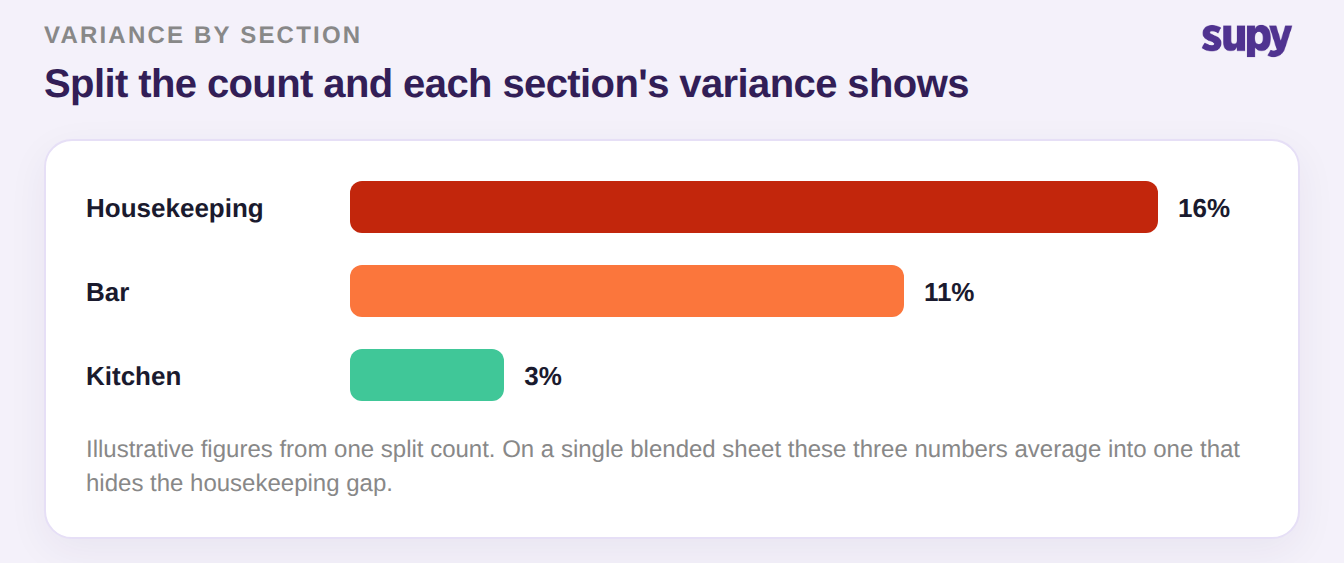
A bar chart of variance by section showing housekeeping highest, then the bar, then the kitchen

So name the branch you are in and take the one action for it. If items are missing from the sheet, add them to the right section template today. If items are on the wrong sheet, move them and give that venue its own run. Either way, the next count returns variance you can act on instead of a number you have to explain away.

Book a Demo with Supy to run section-level stock counts

Ready to optimize your restaurant operations?

Blog

Our operational insights

No items found.

Your questions 
answered

Everything you need to know about Supy — from setup to integrations, pricing, and daily use. If it’s not covered here, just ask.

What is a restaurant stock count template?
+

A restaurant stock count template is the ordered list a counter works through when they take stock, ideally in shelf order so they walk the room the way the items sit. A good template covers one section, like the kitchen, the bar or housekeeping, rather than the whole site. It fixes what gets counted and in what sequence, which keeps counts fast and consistent between people. The weakness of a single site-wide template is that it mixes sections, so items get skipped and the resulting variance is hard to read. Splitting the template by section is what keeps each count clean.

Why do cross-venue items break a stock count?
+

Cross-venue items break a count because a template built around one section rarely handles the others well. A sheet designed for the kitchen buries the bar and housekeeping stock at the bottom, or leaves it off entirely, so a whole section goes uncounted or gets set to zero by mistake. The count also takes longer as people hunt for items that are out of order. Worst of all, the variance blends every section into one number, so a bar running high shrinkage hides inside a healthy-looking site average. Counting each venue on its own template removes all three problems at once.

How do I stop bar and housekeeping items skewing the food count?
+

How you stop it is by giving each venue its own count template instead of sharing one. Build a separate sheet for the kitchen, the bar and housekeeping, each in shelf order, so a counter walks that section in sequence. Move any item that is on the wrong sheet onto the template for the venue it belongs to. Then count each venue as its own run. Once the sections are separate, the food count reflects only food, and the bar and housekeeping numbers stand on their own. That is what stops one venue's stock quietly skewing another's count.

Should each venue have its own stock count template?
+

Yes, each venue should have its own stock count template once a site runs more than one. A shared template forces food, bar and housekeeping onto a single sheet, which slows the count and muddies the variance. Separate templates let each section be counted in its own shelf order, by whoever owns that area, without wading through items that are not theirs. Supy stores reusable custom count templates in shelf order, and a scheduled count can be split into sub-counts per section, so the split does not mean running several disconnected counts. It is one run, organised by venue.

How does splitting a stock count by section improve variance reporting?
+

Splitting a count by section improves variance because the numbers stop blending together. When every section is counted on its own template, the system produces a variance report that flags each item against its last count, section by section. A bar running high shrinkage is then visible on its own line instead of being averaged away across the whole site. That lets a manager act on the section that is actually drifting, rather than chasing a vague site-wide figure. In short, per-section counts give per-section variance, which is the level at which someone can actually fix the problem.

What happens when an item is missing from the stock count template?
+

When an item is missing from the template, the counter never sees it, because a template only shows the items it was built with. Anything that arrived mid-cycle, or belongs to a section the template ignores, is invisible on the sheet. So it gets skipped, or its stock silently stays wrong until someone notices. The fix is to add that item to the right section's template as soon as it appears, so it is counted every cycle from then on rather than remembered by hand. Keeping templates current is what stops new stock falling through the gap.

Can one scheduled stock count cover multiple sections?
+

Yes, one scheduled count can cover multiple sections without merging them onto a single sheet. In Supy, setting up a stock count schedule lets you define which locations are included and how many sub-counts exist per run. That means the kitchen, the bar and housekeeping each get their own sheet inside one scheduled count, and the runs process in parallel so a group-wide count does not collide. You get the convenience of one scheduled event with the accuracy of section-level templates. The result is a single count that still returns clean, separate variance for each section.

Ready to transform your operations?

Join 3500+ restaurant operators cutting costs, streamlining operations and making smarter decisions with Supy.