Inventory

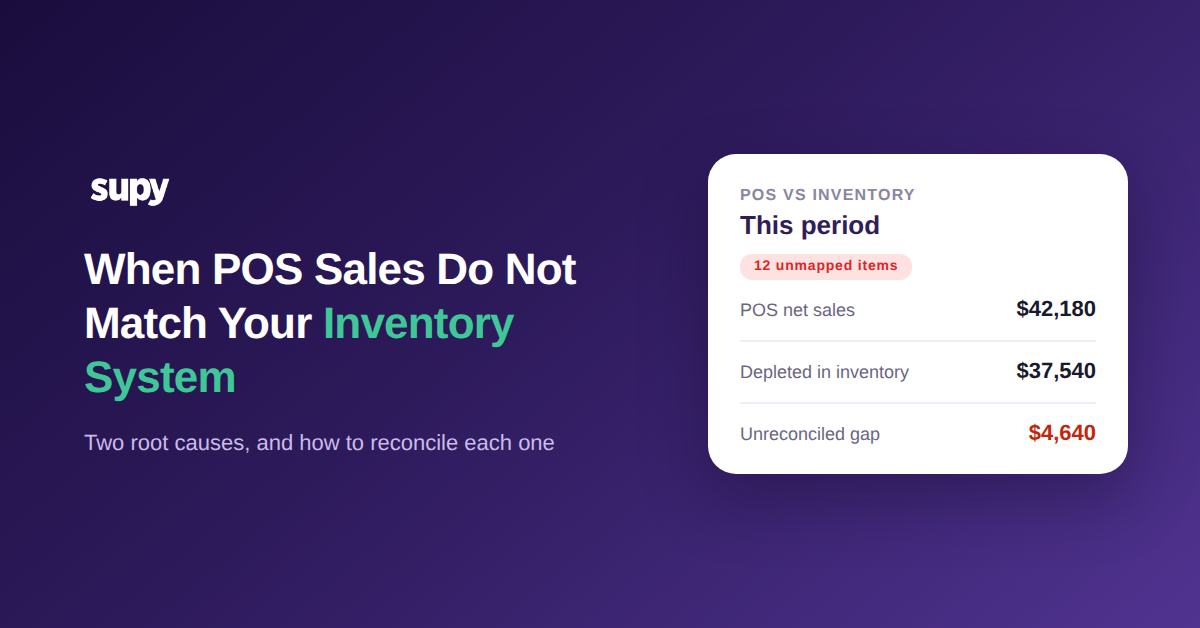
POS Sales That Do Not Match Your Inventory System: The Two Root Causes and How to Reconcile Them
First, Pin Down Which of the Two POS-to-Inventory Mismatches You Have

When your point-of-sale system and your inventory platform disagree on what you sold - when your POS sales are not matching inventory - the cause is almost never random. In nearly every case it is one of two things: sales started flowing before your recipes were mapped, or a later change on the POS quietly broke a mapping that used to work. Name which one you have before you fix anything.

That single question - did the mismatch exist from day one, or did it appear after go-live - splits almost every case cleanly, because the two causes need opposite fixes. A day-one gap means the links were never finished. A drift that shows up months later means something on the POS moved and the inventory side never heard about it. Left unnamed, a revenue mismatch can sit unresolved for four months and turn a dashboard operators paid for into one they stop opening. So start with the decision below, then jump to the matching section.
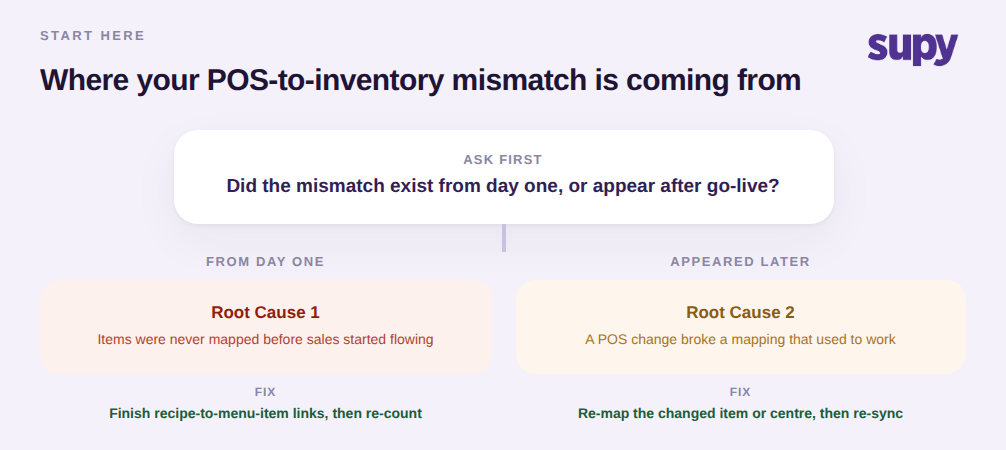
Decision tree for diagnosing a POS-to-inventory mismatch: from day one versus appeared after go-live

When Sales Start Flowing Before Your Items Are Mapped

This is the most common reconciliation failure at onboarding. The sales feed gets switched on to hit a go-live date, but the recipe and menu-item mapping is not finished yet. Every ticket for an unmapped item still lands in the system as revenue, but because that menu item is not linked to a recipe, no ingredients are depleted for it. Sales look roughly right while stock quietly stops moving, so theoretical usage and actual usage drift apart and your cost numbers follow them down.

The fix is to finish the links, not to re-import the data. Every menu item your POS can sell has to point at the recipe it consumes, so that one sale deducts the correct ingredients, modifiers included. Supy's recipe and menu-item linking is what closes this gap: link each sold item to its recipe once, and depletion starts flowing the moment a ticket arrives. Do this for the full menu before you trust a single variance report, and re-count once so the system has an accurate opening baseline to measure against.

How an unmapped menu item records a sale but never depletes stock, causing theoretical versus actual drift

When a POS Change Never Reaches Inventory

The second cause looks different because everything used to reconcile. Then someone on the POS side renames a revenue centre, adds a new PLU for a seasonal item, or splits one menu item into two. None of those edits are wrong, but the inventory side still expects the old names, so the changed items now land unmapped and the numbers separate again. Nobody broke anything on purpose; the two systems simply fell out of sync.

Reconciling this one means re-mapping what moved, then confirming it. The Integrations screen shows your incoming sales imports, so you can filter for the items that came in without a mapping and fix exactly those instead of rebuilding everything. For providers that use revenue centres, you can map several centres within one branch to a single inventory location, which is what catches a renamed or newly-added centre. After you re-map, trigger a manual re-sync and check the import history to confirm the previously-unmapped tickets now land correctly.
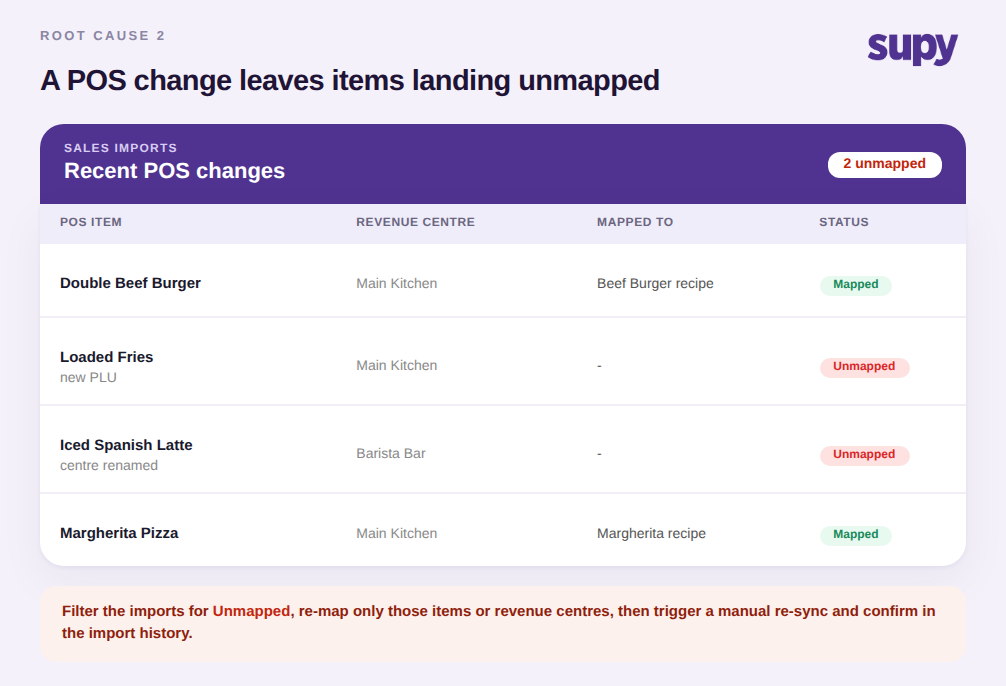
Sales imports table showing two menu items landing unmapped after a POS change, with mapped and unmapped status

The Check Everyone Skips: Does Your Integration Actually Flow Both Ways?

Before you blame any mapping, confirm sales are even arriving. Some connections that get called a POS integration only export data out of the POS; they never write sales back into inventory. If that is what you have, every ticket has to be uploaded by hand and the automated feed you expected does not exist, so no amount of re-mapping will ever reconcile it. This is the trap operators discover only after go-live, when they realise the promised live feed was one-directional all along.

Confirm the direction first: over a normal week, does the sales import count roughly match the tickets your POS rang up? If it reads zero while the POS shows a thousand-plus tickets, you have a one-way feed, not a mapping problem. The fix is a genuine two-way connection - Supy connects to 75+ integrations across the major POS platforms - and where a regional POS has no native connector at all, the honest interim answer is a scheduled managed import, not a promise of instant live sync. If you want the wider context, these mismatches are one slice of the broader POS data-quality gaps that quietly distort inventory. Rule the direction out before you spend an afternoon re-checking mappings that were fine all along.

Stat callout showing zero POS sales reached inventory out of 1,240 tickets, indicating a one-way integration

Reconcile in This Order

Work the three checks from the outside in, and stop at the first one that fails. First, confirm the feed is two-way - if sales never import, fix the connection before anything else. Second, if the mismatch was there from day one, finish the recipe-to-menu-item links across the full menu and re-count for a clean baseline. Third, if it used to reconcile and drifted later, find the recent POS change, re-map the item or revenue centre it touched, and re-sync. Name the branch you are in, make the one move that fits it, and confirm against the import history before you trust the dashboard again.
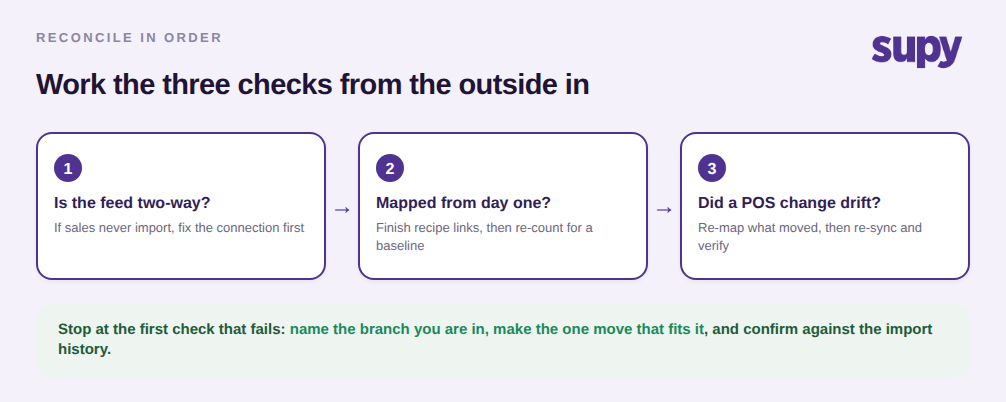
Three-step reconcile-in-order flow: check the feed is two-way, check day-one mapping, check for POS drift
Book a Demo with Supy - make POS sales and inventory reconcile

Ready to optimize your restaurant operations?

Blog

Our operational insights

No items found.

Your questions 
answered

Everything you need to know about Supy — from setup to integrations, pricing, and daily use. If it’s not covered here, just ask.

Why do my POS sales not match my inventory system?
+

Because one of two things is wrong. Either the sales feed was switched on before every menu item was linked to a recipe, so unmapped items record revenue but never deplete stock; or a later change on the POS - a renamed revenue centre, a new PLU, a split menu item - broke a mapping that used to work. A third, upstream possibility is that the connection only exports data out of the POS and never imports sales back, in which case nothing reconciles until the feed is made two-way. Identify which of the three you have before changing any settings, because each needs a different fix.

What is the difference between the two POS reconciliation root causes?
+

The difference is timing. A day-one mismatch means the recipe and menu-item mapping was never finished before sales started flowing, so items have been unmapped from the start. A drift means everything reconciled correctly for a while, then a change made on the POS side - renaming a cost or revenue centre, adding an item - was not mirrored on the inventory side, so previously-working items suddenly land unmapped. The quick test is to ask whether the numbers ever reconciled: if they never did, it is a mapping gap; if they did and stopped, it is configuration drift.

How do I reconcile POS sales with my inventory system after a mismatch?
+

Work from the outside in. First confirm the integration is two-way and sales are actually importing; a one-way feed reconciles nothing. Next, if the gap has existed from the start, link every sellable menu item to its recipe and re-count to set a clean baseline. If instead the numbers drifted after a change, open the sales imports screen, filter for tickets that arrived without a mapping, re-map the affected items or revenue centres, then trigger a manual re-sync. Verify against the import history that the previously-unmapped tickets now land correctly before trusting the dashboard.

Does an unmapped menu item really affect my food cost and variance?
+

Yes, and more than most operators expect. When a menu item is not linked to a recipe, selling it records revenue but deducts no ingredients, so your theoretical usage understates what actually left the shelf. That gap shows up as inflated variance and a food-cost percentage that does not match reality, even though nothing was stolen or wasted. Because the effect compounds with every ticket, a handful of unmapped high-volume items can distort a whole branch's numbers within a single period. Mapping those items closes the gap at the source rather than papering over it with manual adjustments.

How can I tell if my POS integration is one-way or two-way?
+

Compare volumes over a normal trading week. Count the tickets your POS rang up, then check how many sales transactions actually imported into your inventory system over the same window. If the import count is roughly in line with POS tickets, the feed is two-way and any mismatch is a mapping problem. If the import count is zero or a tiny fraction of the tickets, the connection is exporting out of the POS but not writing sales back in - a one-way feed. A one-way integration cannot be reconciled by adjusting mappings; it needs a genuine two-way connection or a managed import routine.

What should I do if my POS has no native inventory integration?
+

Do not force a live sync that the platform cannot actually deliver. For a POS without a native two-way connector - common with regional or niche systems - the honest interim answer is a scheduled managed import that brings sales in on a regular cadence, rather than a promise of instant real-time sync. Confirm what direction any available connection flows before you rely on it, and treat a one-way export as a manual-upload workflow until a real integration exists. Naming the limitation up front prevents the post-go-live surprise of discovering that the integration never imported a single sale.

How often should I check POS-to-inventory mappings?
+

Check them whenever the POS changes and on a light routine the rest of the time. Any time someone adds a menu item, introduces a PLU, or renames a revenue centre, re-check that the change was mirrored on the inventory side the same day, because that is exactly what causes drift. Beyond event-driven checks, a quick weekly look at the sales imports screen for anything that landed unmapped will catch the rest before it distorts a full period's variance. The goal is to make mapping a small, regular habit rather than a painful reconciliation project every quarter.

Ready to transform your operations?

Join 3500+ restaurant operators cutting costs, streamlining operations and making smarter decisions with Supy.