.jpg)


Restaurant Recipe Management Software: How to Choose the Right System

Most multi-location operators evaluating recipe management software believe they have a recipe problem. They do not. They have a data problem dressed up as a recipe problem. The teams who consistently land sub-30% food cost across every site treat the recipe library not as a digital binder, but as the connective tissue between purchasing, inventory and theoretical cost. This guide walks through what restaurant recipe management software actually needs to do for a multi-site group, the mistake that makes most evaluations fail, and the specific features to test for in a demo before signing anything.
What restaurant recipe management software actually does
Restaurant recipe management software is the system of record for how every dish on the menu is built, costed, scaled, and updated across one site or many. At its narrowest, it stores ingredients, quantities, allergens and a unit cost per portion. At its strongest, it links every recipe to live ingredient pricing, par levels, supplier prices and POS sales so that a single change - a new supplier, an adjusted portion, a new menu item - propagates through procurement and inventory automatically.
The category covers six core jobs:
- A central library of recipes shared across locations, with version control
- Yield and scaling logic so the same recipe works at a 40-cover bistro and a 400-cover banquet
- Allergen and nutritional data stored once, used everywhere
- Cost simulation - what does this dish cost today, at this site, with this supplier price
- Modifier and variant handling - sizes, prep methods, optional ingredients
- Permission control over which recipes are visible at which sites
A good recipe management platform handles all six. A weak one handles two or three and forces operators to plug the gaps with spreadsheets.
Recipe management vs recipe costing software: the distinction that matters
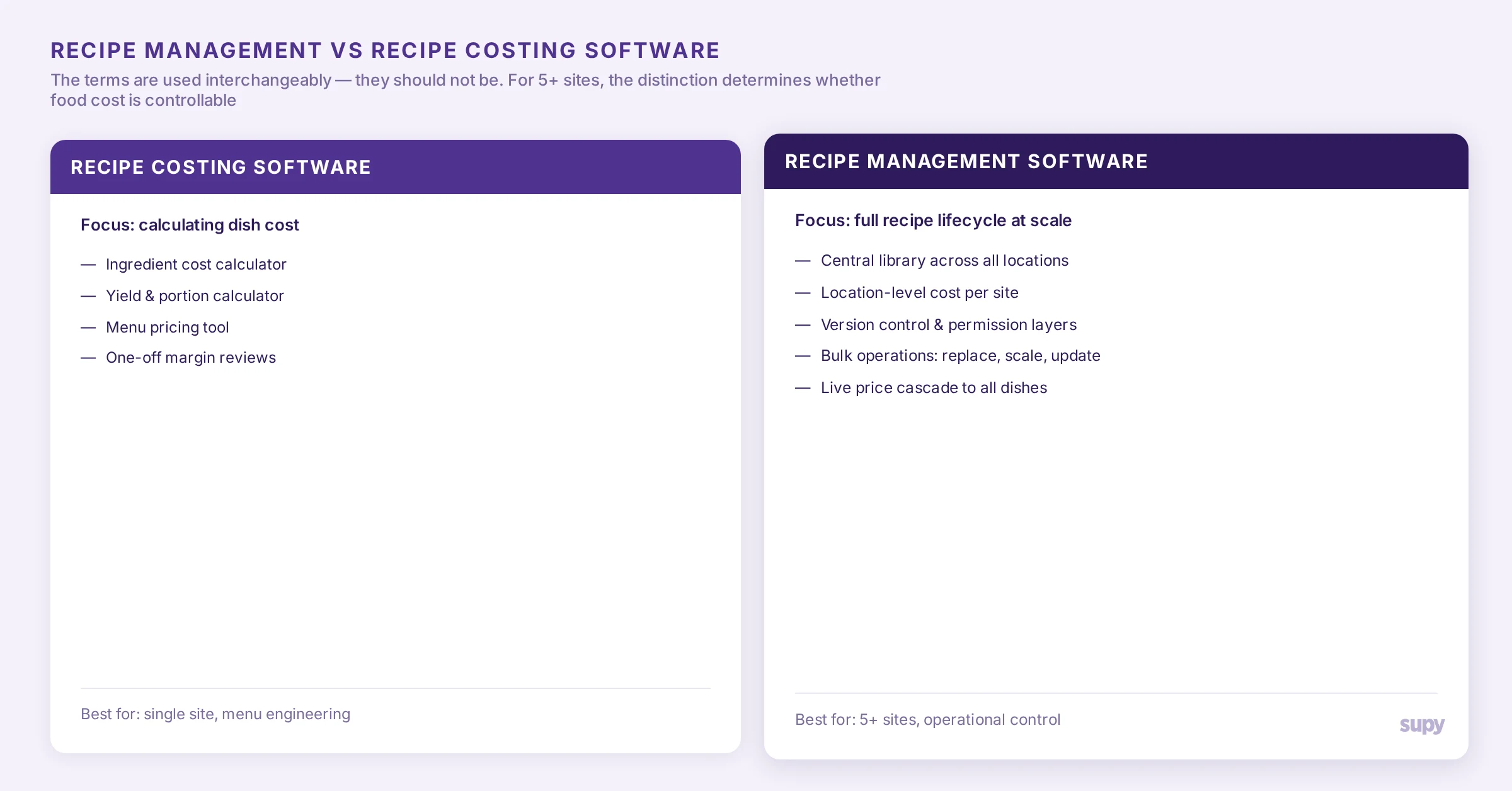
The terms are often used interchangeably. They should not be.
Recipe costing software focuses on calculating the cost of a dish - ingredients, yield, sometimes labour. It is essentially a calculator with a recipe layer on top. Useful for menu engineering exercises, pricing decisions, and one-off margin reviews.
Recipe management software governs the full life of a recipe across an operation: how it is created, scaled, distributed to sites, updated when a supplier price changes, locked when production standards need to be enforced, and connected to actual ingredient consumption. Costing is one output. The deeper job is consistency at scale.
For a single-site operator, the two often look the same. For a 5-site group and above, the distinction is what determines whether food cost is controllable or whether it drifts. If you are evaluating only on costing accuracy, you are evaluating the wrong layer. For a deeper view of the costing side, the recipe costing software guide covers that buyer journey separately.
What to look for in a restaurant recipe management system
Most buyer guides at this stage list features. That is not the test. The test is whether the system holds up at scale, when 40 sites are running the same menu with different suppliers, different stock counts, and different POS configurations.
Six capabilities matter more than the rest.
1. Multi-location recipe libraries with location-level cost. This is the feature operators discover too late. A recipe is not a thing with one cost - it is a thing with one specification and many costs, one per location, recalculated daily from the latest ingredient prices at each site. A recent support escalation surfaced exactly this: the same recipe costed out at $6.64 in one branch and $1.58 in another, because an initial stock count at the second branch was submitted without an ingredient value. Standalone recipe tools that store a single global price per recipe miss this completely. By the time a finance team notices the gap, the variance has been distorting the food cost reports for weeks.
2. Modifier and variant handling at scale. A multi-site beverage group looked at recently has drinks with over 90 modifier permutations - size, milk type, syrup, temperature, sweetness. Each combination has to live somewhere as a costed recipe, because each one consumes a different ingredient profile. The same applies to size variants: a 16oz milk-based drink and a 24oz version of the same drink share the menu item but consume meaningfully different amounts of milk. Recipe systems that treat modifiers as metadata tags rather than separate recipe instances quietly understate ingredient consumption and corrupt variance reporting.
3. Yield and scaling logic. Every ingredient should have a yield factor and the platform should automatically adjust raw quantities when scaling a recipe up or down. A 78% yield on chicken means a 90g portion needs 115g raw - a single number nobody wants to recalculate manually for 60 recipes when the supplier changes.
4. Bulk operations. Real recipe library maintenance is bulk work, not single-recipe edits. The most common operational asks from multi-site groups on the platform are: bulk replace an ingredient across hundreds of recipes when switching suppliers, batch update yield or portion sizes when a standard changes, and bulk price corrections when a stock count was entered incorrectly. Recipe tools that only support single-recipe edits force back-of-house teams into hours of manual rework every time the supply chain shifts.
5. Permission and visibility control by location. A central kitchen produces semi-finished recipes that are then shipped as items to branches. The branches do not need to see every CK recipe - only the ones tied to items they actually receive. A recent product call surfaced this exact need from a multi-site operator: the branch view should be filtered by what is in active production at that location, not the global catalogue. Without it, branch managers wade through hundreds of recipes that are not theirs to manage.
6. Integration with inventory and procurement. This is the feature that is the easiest to fudge in a demo and the most expensive to misjudge. A recipe is data. So is a purchase order. So is a stock count. If those three live in three systems, every recipe change creates manual reconciliation work. If they live in one system, a recipe edit propagates into purchasing par levels, theoretical cost reports, and variance analysis automatically.

In Supy, recipes are stored once and costed per location, automatically, against the latest ingredient cost at each branch - so the cost a finance team sees for a recipe at site A is calculated from the ingredient prices that branch is actually paying, not a global average. When a supplier price changes, every affected recipe's cost updates at every site without a single manual recalculation.
Standalone recipe software vs integrated platforms: which is right for your group?
This is the decision most evaluations get wrong.
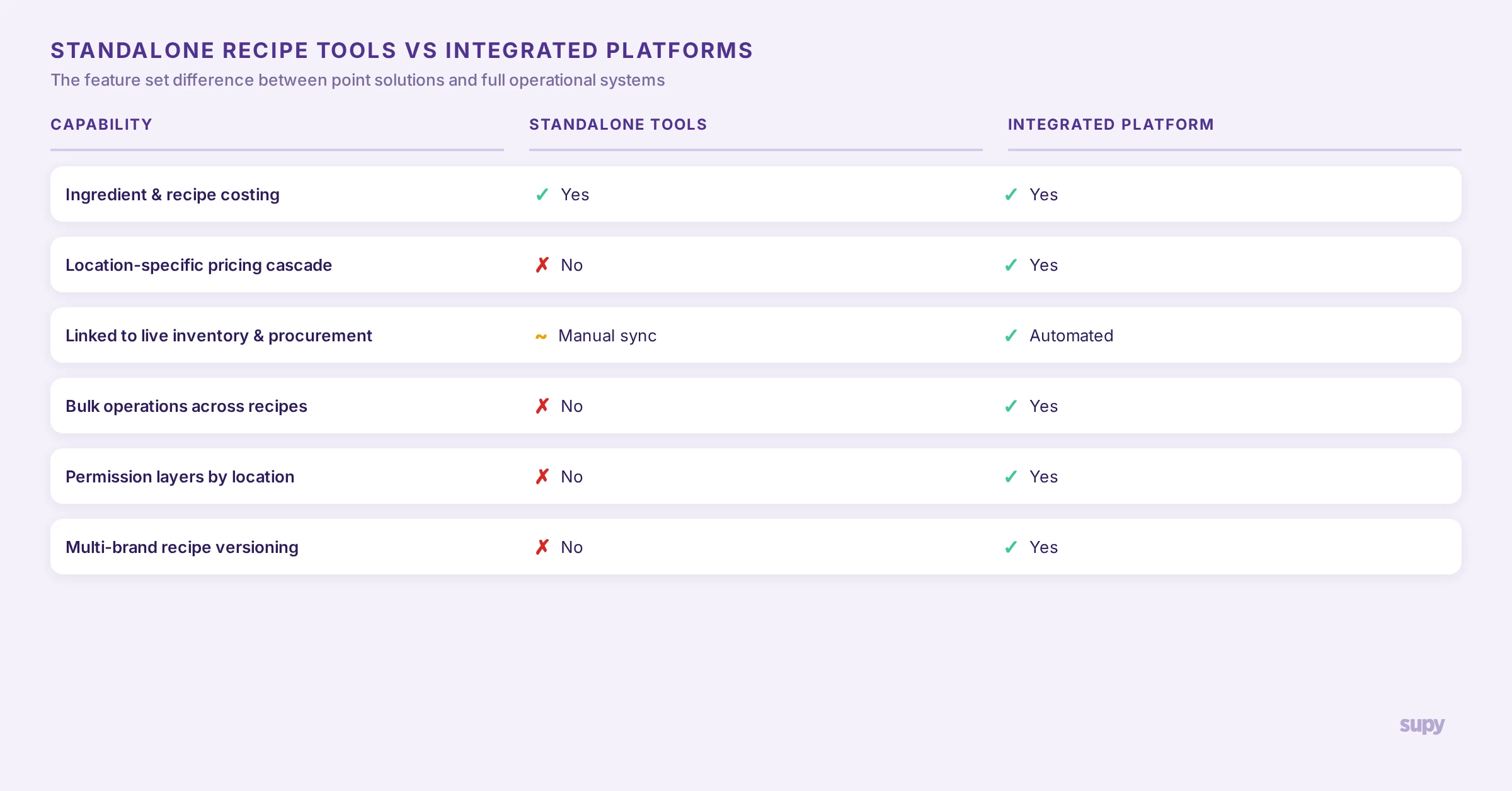
Standalone recipe management tools are purpose-built for the recipe layer. They are usually well-designed, intuitive for kitchen teams, and deep in features that matter to chefs - allergen libraries, nutritional analysis, beautiful recipe cards, photography, instruction sequencing. For a culinary team building and refining menus, they are a strong choice.
The problem they create is what happens after the recipe is built.
The recipe library lives in one system. Supplier prices live in the procurement tool or a spreadsheet. Stock counts live in the inventory tool or in a third spreadsheet. Theoretical food cost - the metric the entire exercise exists to control - then lives nowhere coherent. When the variance report shows a 4% gap between theoretical and actual cost, finance cannot tell whether it is a recipe drift, a portioning issue, a supplier price hike, or a count error - because the data needed to answer that question is split across three or four systems that do not talk to each other.
Integrated platforms - back-of-house operations systems that include recipe management as one module alongside procurement, inventory and BI - solve this by holding all four data layers in one place. The trade-off is that the recipe layer in an integrated platform may be slightly less specialised than a best-in-class standalone tool. The benefit is that food cost variance becomes a question you can answer in one report rather than a forensic exercise that takes a week.
For a single-site or two-site operator, a standalone tool is often fine. For five sites and above, the integration cost of a standalone tool starts to outweigh the depth advantage.
For broader context on the integrated platform model, the restaurant inventory management complete guide covers how recipes, stock and procurement connect inside a single back-of-house operations platform. The best restaurant inventory management software guide walks through how to evaluate platforms in this category specifically.
How recipe management connects to food cost control
The reason recipe management belongs in any food cost conversation is straightforward: theoretical food cost is built from recipe cost multiplied by sales mix. If the recipe layer is wrong, every downstream cost report is wrong by the same amount.
The compounding effect is brutal at scale. A 2% portion variance on a single dish at a single site is recoverable. The same 2% variance on a popular dish across 10 locations, undetected for two months, eats into margin in a way that is hard to claw back.
One operator on the platform recently described the goal as getting cost of goods down to 30%, naming portion control as the lever. Recipe standardisation is the upstream condition for portion control. If the recipe library does not enforce a single specification across sites, portioning is whatever the line cook remembers from training. If the library does enforce it - and the cost is calculated against real, location-specific ingredient prices - food cost stops being a finance reporting exercise and starts being an operational one.
This is also where the link to procurement matters. If a recipe requires 90g of cheese per portion and the platform knows the latest cost of cheese at every site, the next purchase order can be sized against forecast covers and recipe consumption. The recipe drives the order; the order drives the count; the count feeds back into the cost. That loop is the real product. Any tool that breaks the loop - by holding recipes outside the system that does ordering and counting - asks the operator to maintain the loop manually.

In Supy, when a recipe is updated - a new portion size, a new ingredient, a corrected yield - the platform flags every par level, purchase order template, and theoretical cost report that depends on it. The recipe edit propagates rather than sitting in isolation.
Questions to ask before you buy
A short evaluation checklist for a demo. Use it as a script.
- Is recipe cost calculated per location, against the latest ingredient cost at that location, or is there one global cost per recipe? If the latter, walk away.
- How does the system handle a drink with 50+ modifier combinations? Show me the data model.
- If I bulk-replace one ingredient across 200 recipes, what is the click count?
- If a branch should not see a semi-finished recipe prepared at the central kitchen, can I hide it for that branch only?
- When a recipe is updated, which downstream things update automatically - par levels, purchase orders, theoretical cost reports? Which require a manual sync?
- Show me the variance report. If a recipe cost looks wrong, can I drill from the variance back to the specific ingredient at the specific location that caused it?
If the answers involve "you'd need to do that in another system" or "we plan to support that," the platform is solving half the problem. The other half will land back on the operator's plate as manual work.
A short note on Supy
Supy is the back-of-house operations platform built for multi-location restaurant groups. Recipe management is one module in a system that also covers procurement, inventory and business intelligence - all running on a single data layer. Recipes are stored once and costed per location, every change propagates into purchasing and theoretical cost reports automatically, and the whole loop closes back into variance reporting that finance teams can act on. To see how recipe management connects to live procurement and inventory in practice, book a demo.


