.jpg)


Central Kitchen Management: Why Standard Inventory Software Cannot Handle Dual Recipe Costing or Branch Ordering
When a restaurant group adds a central kitchen to its operations, the inventory system that worked for individual branches stops being adequate. Standard tools track a simple flow: goods arrive from a supplier, go into one location's stock, and get consumed during service. A central kitchen introduces a second layer that most inventory software cannot model: raw materials arrive and are converted into semi-finished components at the CK, and those components are then transferred to branches as the starting input for each branch's production.
The failure points are consistent. Recipe costs at branch level fall out of sync with actual CK production costs because the two systems do not share data. Branch-to-CK ordering runs on shared spreadsheets or manual calls because there is no internal ordering module. End-of-period variance reports show a group total but cannot attribute the discrepancy to a specific outlet. Finance teams close monthly food cost periods by manually reconciling inventory output against ERP records - a process measured in days rather than hours.
This article covers each of these failure points and what a central kitchen management setup needs to handle them. For background on how inventory software works for standard multi-site operations, see our guide to restaurant inventory software.
Standard Inventory Software Assumes a Single Stock Flow - Central Kitchens Need Two
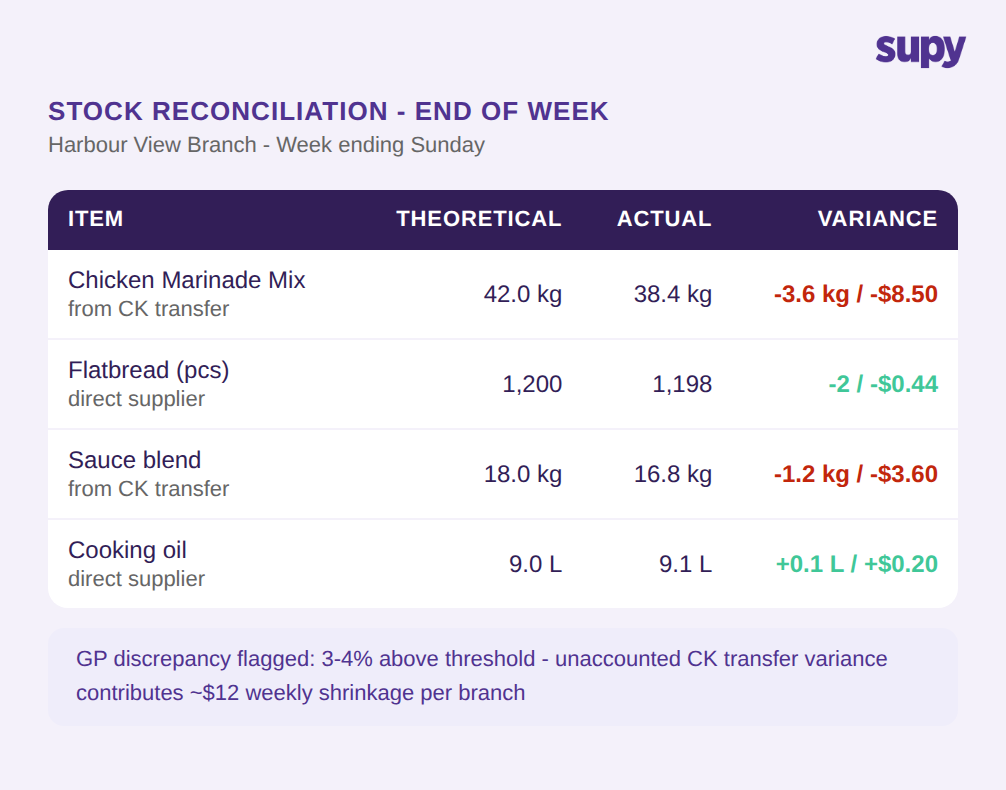
Most inventory software models a single, linear stock flow: a supplier delivers goods, those goods are received into storage, and sales drive depletion. The system tracks one cost per item from receipt to consumption. A central kitchen breaks this model at the start.
Raw materials arrive at the CK from external suppliers. The CK converts them into semi-finished components - marinated proteins, portioned doughs, prepared sauces - and dispatches those components to branches. Branches receive the semi-finished goods and use them in their assembly-level production. The cost of a dish at branch level is a function of CK production costs plus branch-level inputs, not of what the branch paid for a direct delivery.
Standard inventory software handles either the CK's raw-material flow or the branch's semi-finished goods flow, but not both as a connected system. When a group tries to use the same tool for the entire chain, they either track the CK as a location with no visibility into what branches are consuming, or track branches as independent locations with no visibility into where their inputs originated. Neither approach produces accurate food cost data across the group.
How Dual Recipe Costing Works When CK Bulk Recipes Link to Branch Assembly Recipes
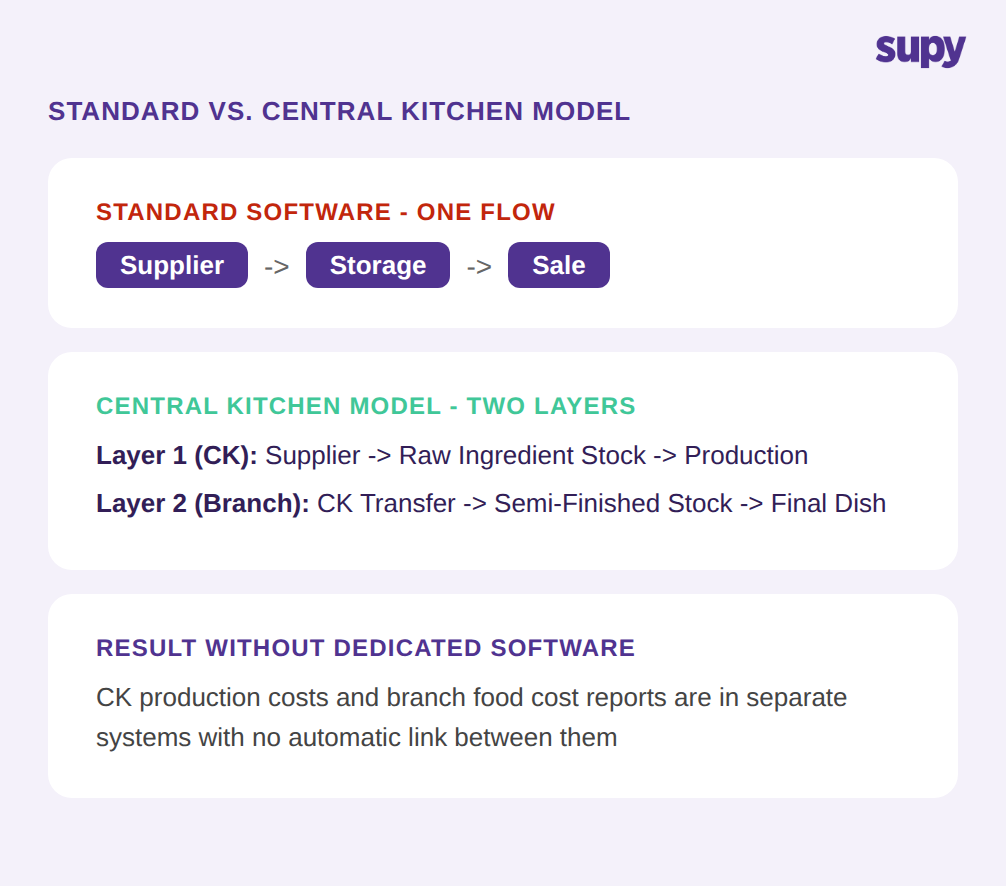
Dual recipe costing refers to the two-tier structure that a central kitchen model requires. At the CK level, bulk recipes define how raw ingredients combine to produce a batch of semi-finished output - a bulk batch of marinade mix from chicken, spices, and oil, with a calculated cost per unit of output. At the branch level, assembly recipes define how semi-finished inputs from the CK combine with any additional direct-purchase items to produce a final portion - a wrap made from a portioned amount of marinade mix, a flatbread, and garnish.
The critical requirement is that these two tiers are linked, not parallel. When the cost of chicken breast changes at the CK, the bulk recipe cost updates. That updated cost per unit of marinade mix then propagates automatically to every branch assembly recipe that uses marinade mix as a component. The branch food cost report reflects the current production cost without any manual intervention.
Without this link, recipe maintenance is duplicated. Groups with 12 branches using a common semi-finished component face the same update propagating through 12 separate branch-level recipe records every time a CK input price changes. In practice, this rarely happens on time - recipe costs at branch level lag behind actual CK production costs by weeks or months, making GP reports unreliable as a management tool.
Why Branch-to-CK Ordering Requires a Consolidated Demand Queue
A central kitchen cannot produce against estimates indefinitely. To plan production accurately, the CK team needs to know in advance what each branch will require for the following day or period. In the absence of a system, this information travels by phone, email, or shared spreadsheet - branch managers submit their requirements, someone at the CK consolidates all orders manually, and production is planned from the resulting list.
This manual workflow has a practical ceiling. Beyond a handful of locations, order consolidation becomes a full-time administrative task. Orders arrive at different times, get updated after submission, and need to be separated by product and production station before the CK team can build an accurate plan. Errors in the consolidation step lead to either over-production (wasted batch cost and storage space) or under-production (branch stockouts and emergency same-day orders).
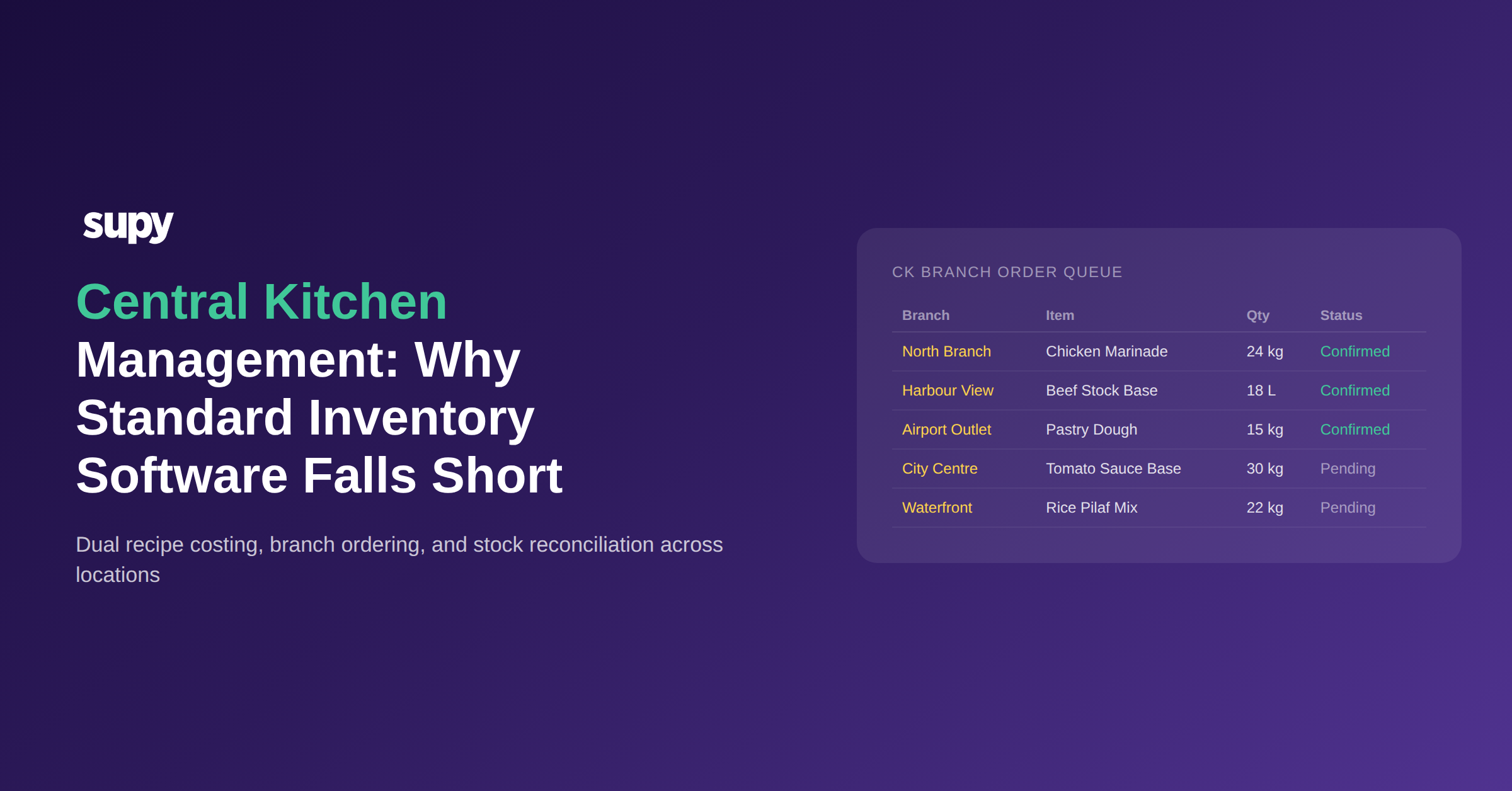
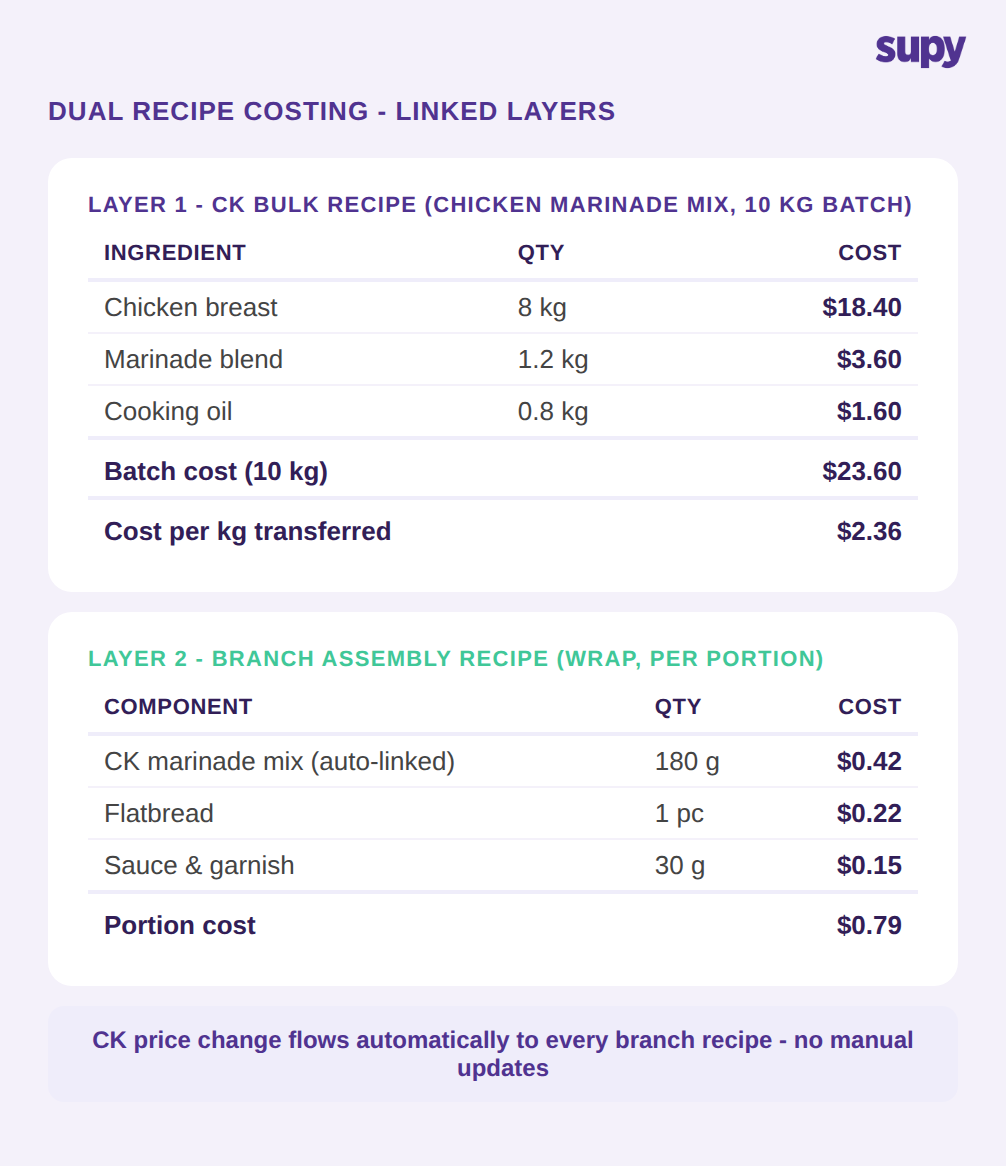
In a system designed for the central kitchen model, branches order from the CK catalogue directly. An order placed before the cutoff time enters a consolidated demand queue automatically - the CK sees the full picture of what all branches need without any manual aggregation. When the CK fulfills an order, the transfer is recorded as a stock movement: CK inventory decreases, branch inventory increases, and the accounting entries happen without manual journal entry. Configurable approval levels let groups match their procurement governance requirements without adding administrative overhead.
How Disconnected Systems Create Stock Reconciliation Gaps Across Outlets
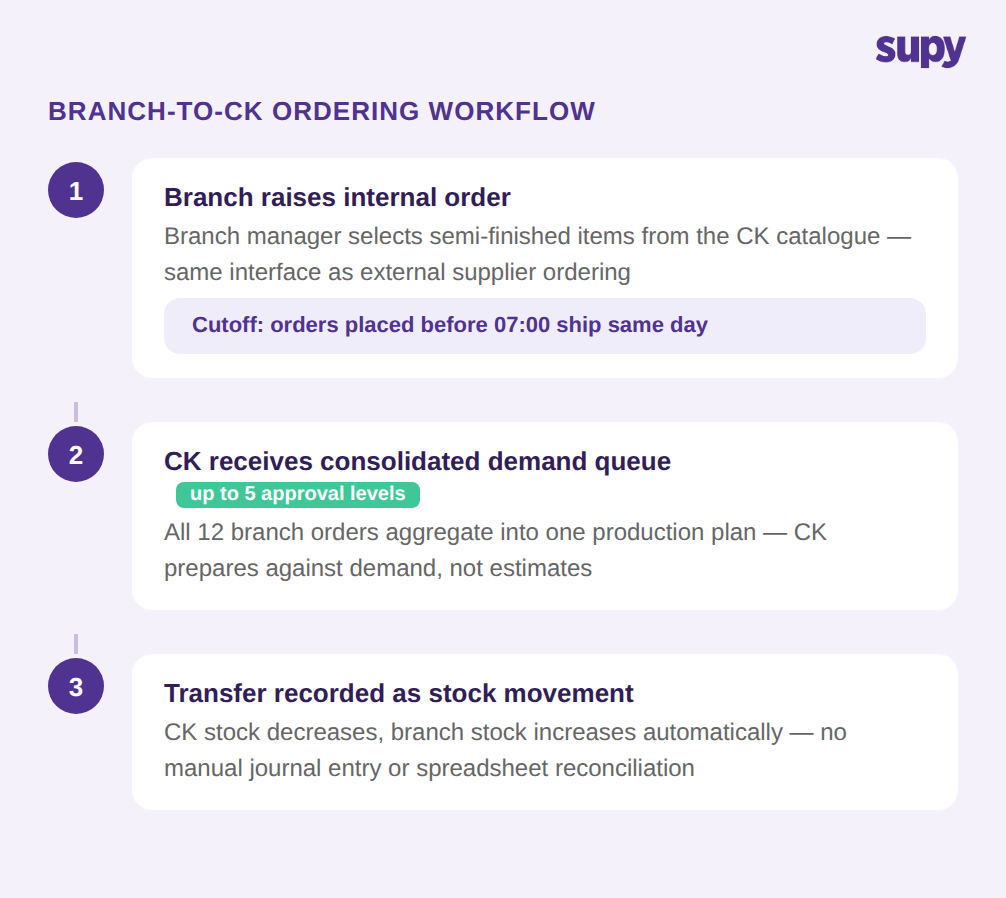
Stock variance in a central kitchen model originates at two distinct points. The first is production variance at the CK: raw material yield loss during preparation means the theoretical output from a bulk recipe often does not match what is actually dispatched. The second is consumption variance at each branch: portion control variation and service-level wastage create a gap between how much semi-finished stock should have been consumed based on sales and how much actually remains.
When the CK and branches operate on separate inventory systems - or on separate location accounts within the same system without linked transfers - these two variance sources are invisible to each other. A 3-4% GP deviation at group level may be visible in the finance report, but identifying whether it originates from CK production yield or from a specific branch's service operations requires manual comparison of reports from two different systems.
A unified system records every CK-to-branch transfer as a stock movement that attributes financial ownership to the receiving branch from the moment of dispatch. End-of-period variance reports show theoretical versus actual per outlet, and CK production variance is reported separately from branch consumption variance. This separation makes it possible to identify the source of a GP deviation without manual cross-system reconciliation.
Why ERP and POS Integration Is Non-Negotiable at Central Kitchen Scale
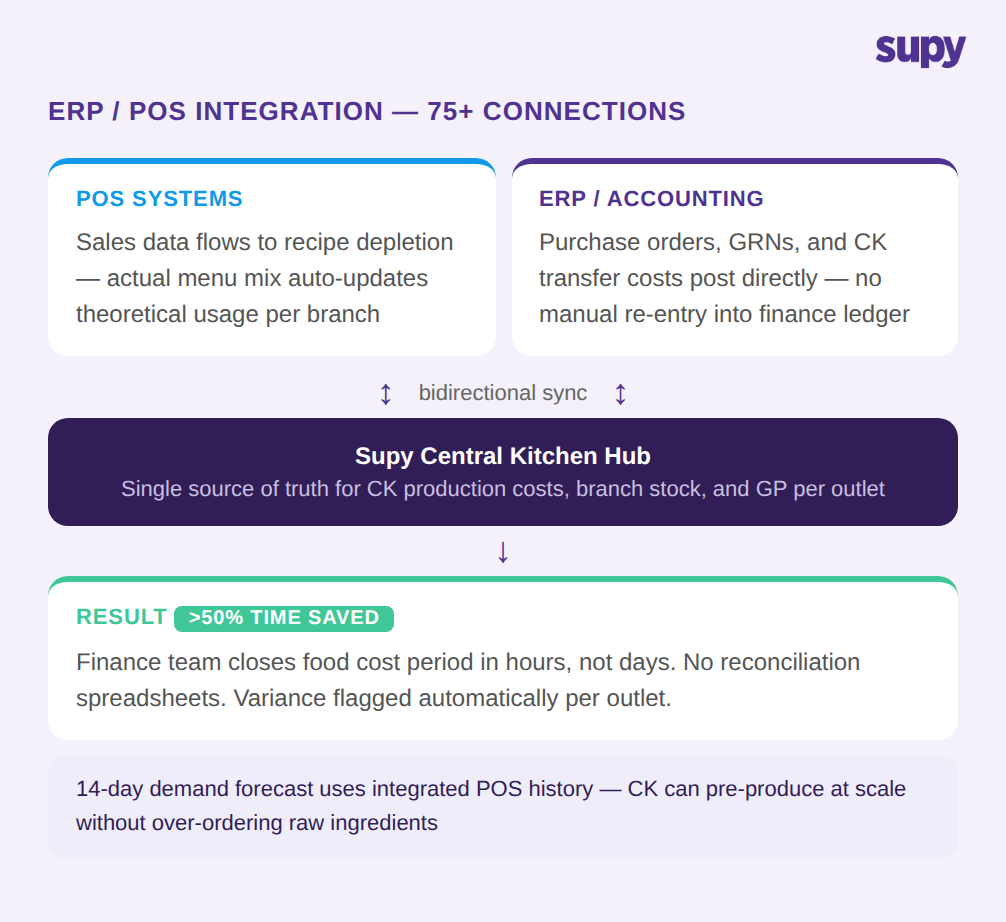
A central kitchen operation at enterprise scale sits at the intersection of two external data systems: the POS network and the ERP or accounting platform. Without direct integration into both, inventory management becomes a data re-entry exercise. Sales figures are manually transferred into the inventory system to drive theoretical recipe depletion. Stock transfer costs are manually posted into accounting to update the cost of goods sold. Both of these manual steps introduce latency and errors.
POS integration matters especially for groups that operate different branch formats, each with its own POS system. Each POS generates a different data format; the inventory layer needs to reconcile all of these feeds into a single demand signal. When this works correctly, theoretical recipe depletion at each branch updates automatically from actual sales mix - no-one manually enters how many portions were sold in each location. A 14-day demand forecast built on this integrated POS data allows the CK to plan raw material procurement in advance rather than reacting to daily branch order volumes.
ERP integration matters because every CK-to-branch stock transfer has a production cost that needs to post to the branch's cost of goods sold account in the accounting system. Without automated posting, the finance team closes monthly food cost periods by reconciling inventory records against accounting journals - a process that introduces errors at every handoff point and typically takes days rather than hours to complete.
What to Configure in Your Inventory System Before Your Central Kitchen Goes Live
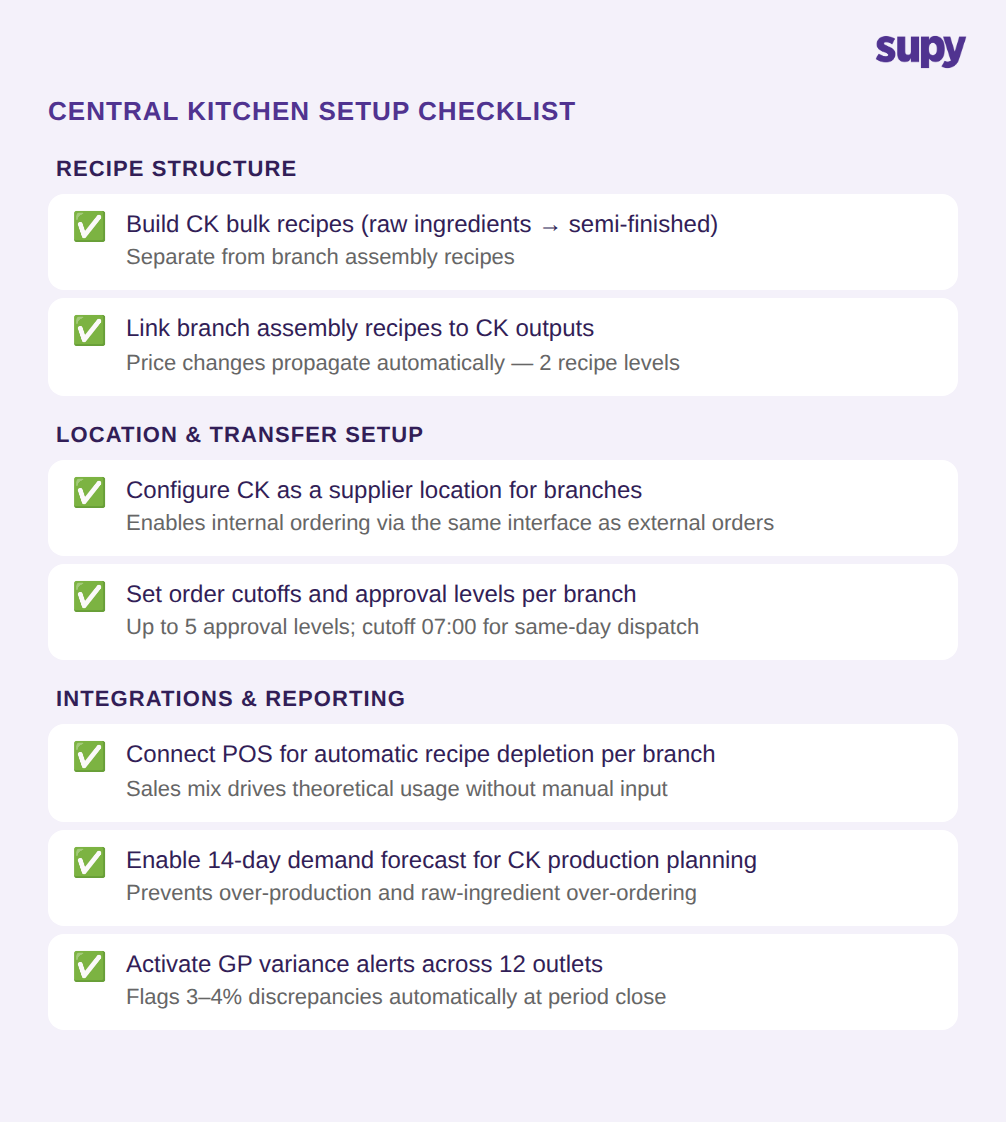
Getting a central kitchen inventory setup right from day one avoids the configuration debt that makes it hard to produce accurate food cost reports later. There are three areas that need to be in place before the first batch is produced.
The first is recipe architecture. CK bulk recipes need to be built from raw ingredients through to semi-finished output, with costs calculated per unit of output. Branch assembly recipes need to be linked to CK bulk recipe outputs so that the two-tier costing chain is established before any production happens. Without this foundation in place at go-live, branches calculate assembly costs against manual transfer prices rather than live CK production costs.
The second is location and ordering configuration. The CK needs to be set up as a supplier location that branch managers can order from using the same interface they use for external suppliers. Order cutoffs and approval levels need to be configured before branches start placing orders. Getting this right at setup means the consolidated demand queue is the single source of truth for production planning from the first dispatch.
The third is integration activation. POS connections should be live before go-live so that sales data drives automatic recipe depletion from the start. Waiting to connect the ERP until after go-live means the finance team will have a backlog of manual reconciliations to work through when they eventually enable the integration. Activating GP variance alerts across all outlets at the same time means the operations team gets automated flagging from day one rather than discovering discrepancies at period close.
Central kitchen management is not a variation on standard inventory management. It is a structurally different operational model that requires two-tier recipe costing, dedicated inter-location ordering, per-outlet variance attribution, and bidirectional integration with both POS and ERP systems. Standard tools can handle pieces of this in isolation, but the failure points appear when the pieces need to connect - CK production costs that need to flow to branch recipe costing, branch orders that need to consolidate into a CK production plan, stock transfers that need to post to the right branch's cost of goods sold account.
Groups scaling through this model should expect to need purpose-built software before reaching a large number of outlets. The configuration work required at setup is front-loaded, but it eliminates the ongoing manual reconciliation and data re-entry that otherwise occupies finance and operations teams throughout each reporting period.