.jpg)


Accounting Software for Restaurants: How to Choose and What It Should Connect To

Most restaurant operators eventually settle on the same accounting software - QuickBooks, Xero, or a restaurant-specific variant. Very few of them get genuinely useful data out of it. Accounting software records what you spent. Without real operational data feeding it, it cannot tell you why food cost rose, which location is underperforming, or whether your margins have eroded because a protein price crept up 2% over three months. This guide covers what accounting software for restaurants actually needs to connect to - and what the integration should do in practice.
What Accounting Software for Restaurants Does (and What It Does Not)
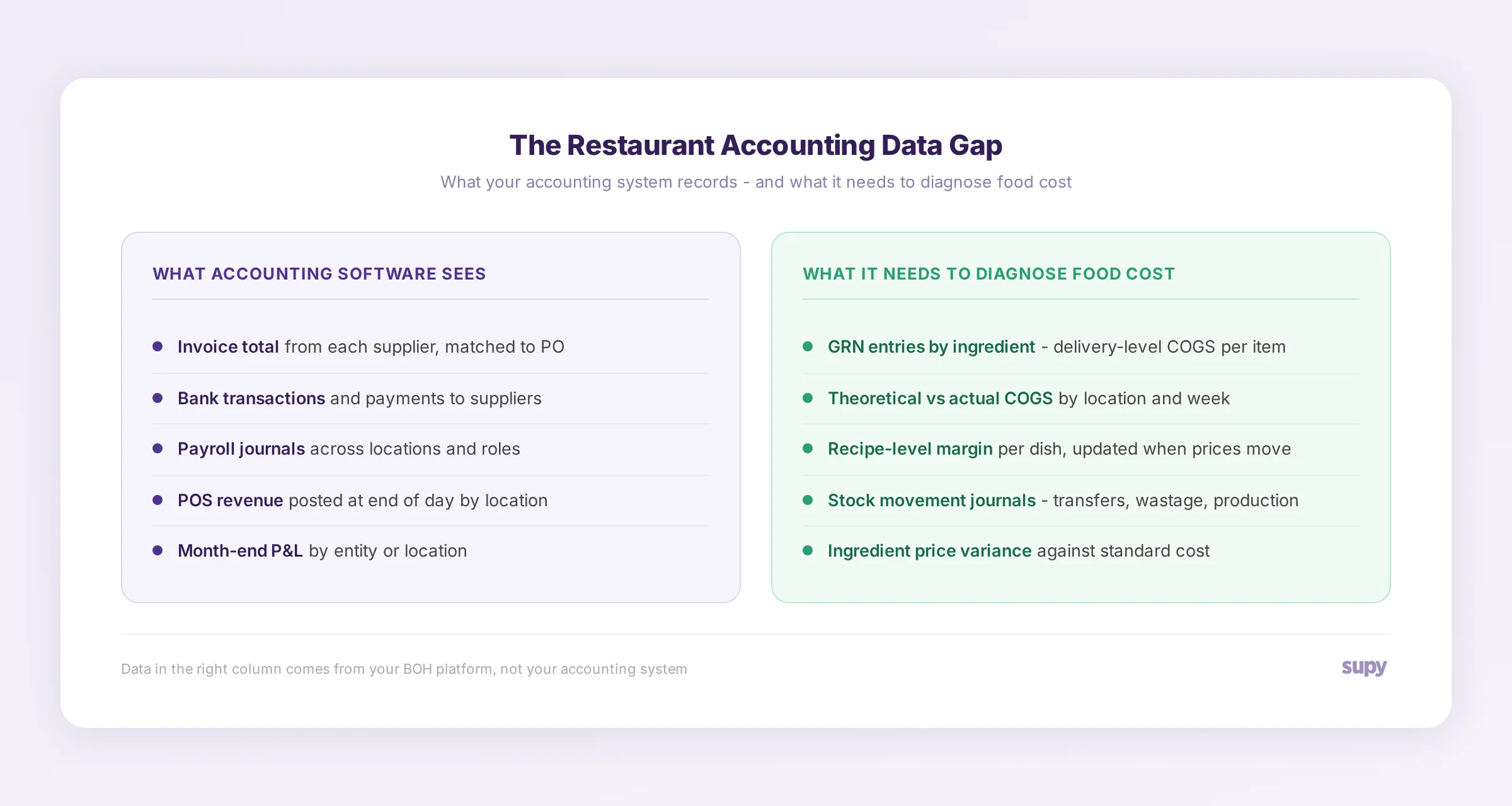
Accounting software handles the financial record of your business. It records:
For a single-site restaurant with straightforward purchasing, this covers most of what finance needs. But it does not tell you what happened operationally. An invoice from a supplier is one accounting entry. The COGS impact of that delivery across eight locations, mapped to 40 recipes, using three different yield factors - that data does not come from the invoice.
One of the most common patterns that surfaces when operators finally connect their BOH platform to their accounting system is a quiet margin erosion that nobody had spotted. A Supy team member described it this way: "One of your ingredients has just gone up from your suppliers in the last few months by like 2%, because it's such gradual inclines that they don't always realise, and then they'll go, why aren't we making as much profit?" The accounting system recorded every invoice. It captured the higher total. What it could not do is map that price movement to specific recipes and show which dishes were now running above standard cost.
That is the gap accounting software alone cannot close.
How Restaurant Accounting Differs from Standard Business Accounting
Restaurants present several genuine accounting complexities that general platforms handle imperfectly:
High transaction volume. A 10-site group receiving daily deliveries from 15 suppliers generates thousands of purchase entries per month. AP automation becomes essential rather than optional.
Multiple revenue streams. Dine-in, takeaway, delivery, catering, and central kitchen B2B sales all require separate revenue tracking - with different gross margin profiles and different VAT treatment.
Perishable inventory. Unlike manufacturing businesses, restaurant inventory has no carry-forward value after closing. Every unsold item is a cost, not an asset. Stock counting frequency must match this reality.
Multi-location chart of accounts. A 20-site group needs P&L visibility by location, by cluster, and consolidated - without requiring manual aggregation from the finance team. Chart of accounts design becomes a strategic accounting decision.
Tips and gratuities. Treatment varies by jurisdiction. Some must be included in payroll, others flow through separately. Accounting software must handle both cleanly.
These are real complexities that proper restaurant accounting handles well. But they are still financial complexities. They are not operational complexities. A head of operations at a multi-site hospitality group described it plainly on a sales call: "The biggest thing that we need to work on is always making sure our theoretical margin is right, because that's something I find we struggle with." Their accounting system gave them P&L actuals every month. It could not give them what margin should have been.
That is a BOH data problem, not an accounting software problem.
The Three Categories of Accounting Software for Restaurant Groups
Rather than naming specific platforms, it is more useful to understand the three categories and what each is suited to:
General accounting platforms adapted for restaurants. The broadest category. These cover the core accounting functions well and have wide accountant familiarity, which matters at year-end and for audit. Integration ecosystems are large - most POS systems and BOH platforms offer native connections. The trade-off is that restaurant-specific reporting (multi-location P&L, COGS by category) requires more setup than a purpose-built platform.
Restaurant-specific accounting platforms. Built for hospitality from the ground up. Native support for multi-location P&L, restaurant-specific GL structures, and tighter integration with common BOH workflows. The accountant ecosystem is smaller, which can cause friction at year-end or when engaging an external advisory firm.
Enterprise ERP accounting modules. For groups operating across multiple legal entities, currencies, and jurisdictions. The highest complexity to implement, the highest fidelity on financial consolidation and multi-entity reporting. Integration with BOH platforms varies significantly - enterprise ERPs often require custom middleware or an integration partner.
For most multi-site restaurant groups (3-50 locations), the choice sits between the first two categories. The deciding factors are typically accountant compatibility, BOH integration depth, and multi-location P&L capability.
Why Accounting Software Alone Is Not Enough for Multi-Site Operators
The finance team at a multi-site restaurant group needs two types of visibility: what happened (financial actuals) and why it happened (operational context). Accounting software provides the first. It cannot provide the second.
In Supy, recipe costing connects directly to purchasing. When an ingredient price moves, the platform can immediately calculate which recipes are affected and by how much - surfacing the theoretical vs actual cost gap that accounting software records as a journal entry at month end, not as a line-by-line variance at the moment of delivery.
The distinction becomes most visible at the Central Kitchen level. A multi-site bakery group encountered a specific limitation: inventory movements - stock transfers between the CK and retail locations, production events, inter-entity stock movements - were all captured operationally. But they did not automatically post through to their accounting system (Xero). The finance team was running manual reconciliations to reflect the correct financial position. As one CS escalation put it: the result was a "disconnect between inventory movements and financials" that was "not scalable as CK B2B volume grows."
The accounting system was not faulty. It was receiving incomplete input.
The same pattern appears with revenue visibility. A central kitchen operator's feedback was direct: they had no mechanism in their accounting setup to see "revenue vs COGS / theoretical vs actual cost" at the production-run level. Their P&L showed the headline numbers. It could not explain the variance.
Operators who have built accounting in-house - using custom daily cash-up modules baked into their BOH system - consistently encounter the same ceiling. A multi-site hospitality group actively switching away from such a setup described the core problem: the custom accounting module could not match the reporting standards of a dedicated accounting platform. They were replacing it with a proper integration between their BOH platform and Xero. The lesson the market is drawing is consistent: operators do not want accounting inside their BOH system. They want their BOH system to feed clean data into a proper accounting system.
What Your Accounting Software Should Connect To
Four connections determine how much value a restaurant group gets from its accounting system:
POS system - for revenue by location, cover count, revenue category, and critically, the distinction between comped and voided orders. Comped orders (food prepared and served without charge) must be included in COGS calculations - ingredients were consumed, even if no revenue was recorded. Voided orders (cancelled before preparation) should be excluded from COGS. Accounting software that receives only net revenue from the POS is missing the operational nuance that explains cost variances.
Back-of-house platform - this is the highest-value connection and the most commonly incomplete one. The BOH platform holds: goods received note (GRN) entries by delivery and ingredient, recipe cost per dish, theoretical vs actual COGS, wastage postings, stock movement journals across locations, and production cost entries for central kitchen runs. None of this flows from the accounting system on its own.
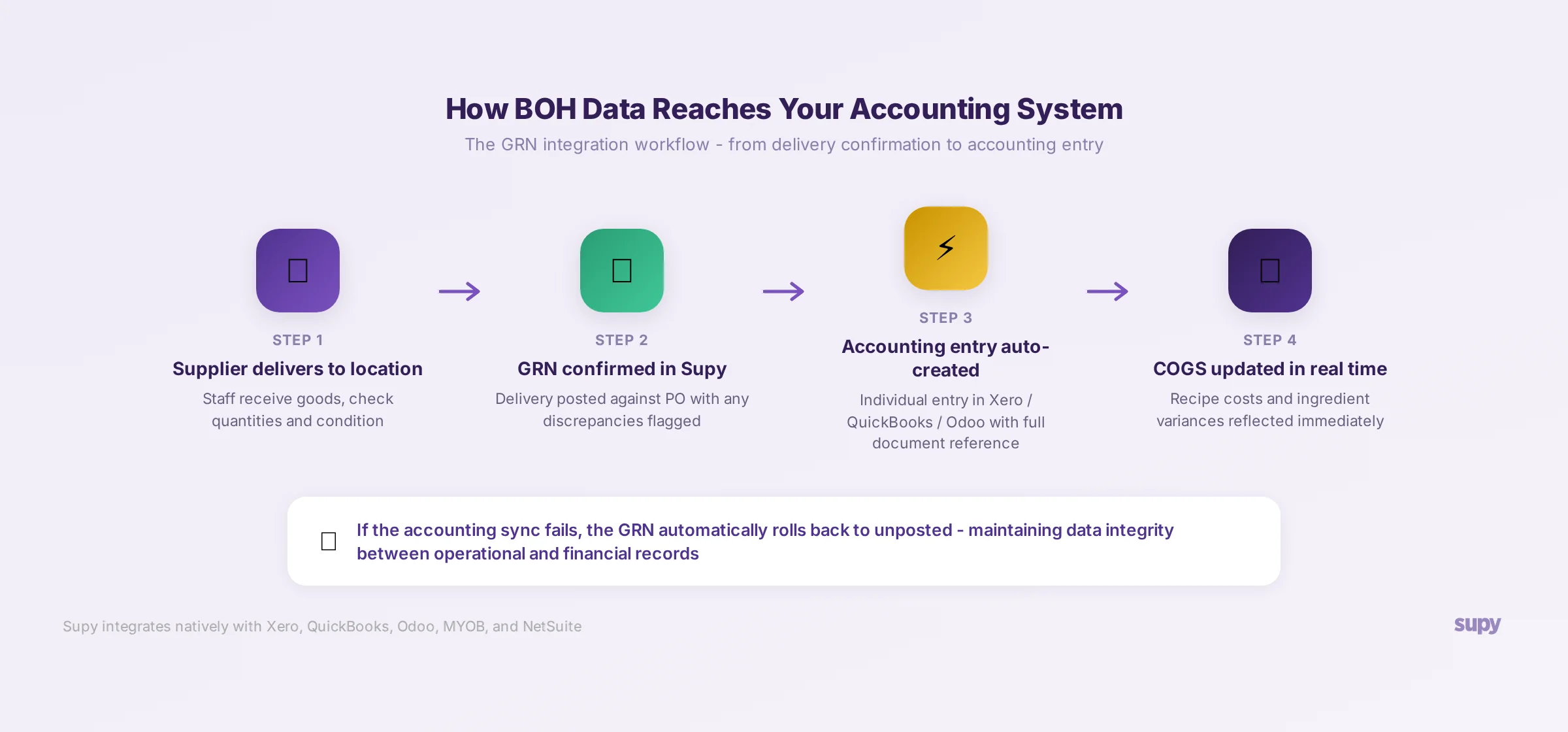
In Supy, when a delivery is confirmed, the corresponding accounting entry is automatically created in the connected platform (Xero, QuickBooks, Odoo, MYOB, or NetSuite) with full document reference data. If the sync fails, the GRN automatically rolls back to unposted status - preserving data integrity between operational and financial records.
Payroll system - for labour cost by location and role. Labour is typically the second-largest cost line in restaurant operations. Consolidated labour visibility requires a payroll feed, not a manual entry.
Banking - for cash flow visibility and automated bank reconciliation. Most accounting platforms handle this natively.
How the Integration Works in Practice
The most useful way to understand what a BOH-to-accounting integration should do is to trace a single delivery:
1. A supplier delivers to a restaurant location
2. The receiving team confirms the delivery in the BOH platform (quantities, condition, any discrepancies)
3. The GRN is posted - generating an accounting entry in Xero/QuickBooks with the supplier name, invoice reference, cost centre, and line-item values
4. If the delivery included returns, a credit note is automatically raised and posted
5. The ingredient costs update recipe-level COGS in real time, flagging any variance against standard cost
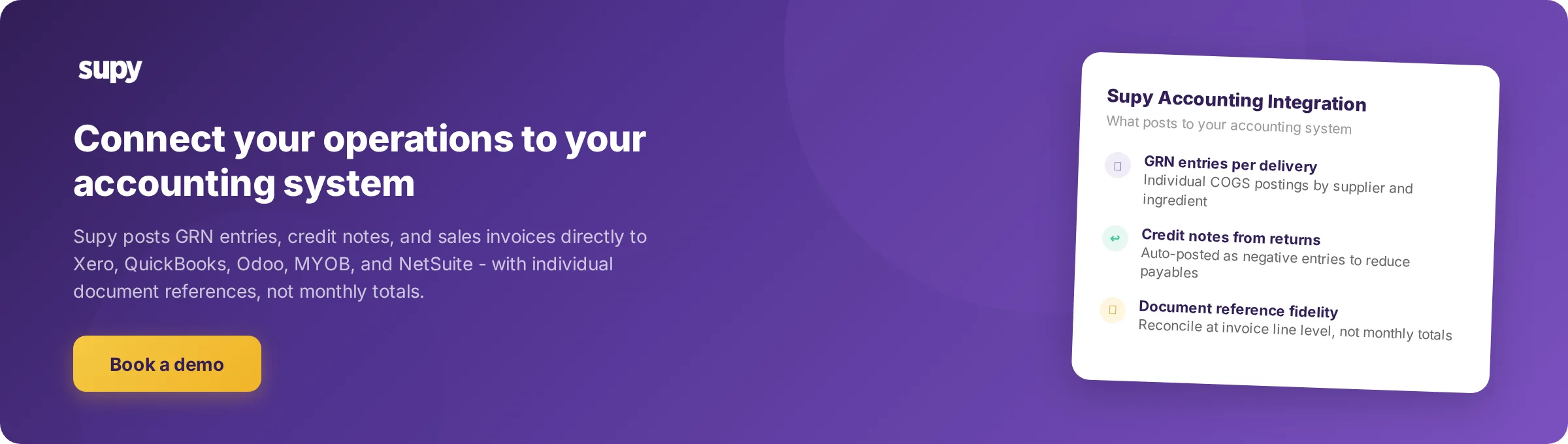
This is what Supy's integration does. Individual entries post per delivery - not a bulk monthly export. Finance teams can reconcile at invoice line level, not just by month-end totals.
A specific capability released in April 2026 illustrates the level of precision required for enterprise-grade accounting integration: External Document Number Sync for Sales Invoices. When enabled, sales invoices post to the accounting system using the external supplier document number rather than the internal Supy order number. For finance teams reconciling purchase data against supplier statements, the document reference must match exactly. A mismatch at reference level forces manual correction at month end. This is the kind of accounting fidelity that separates a genuine integration from a CSV export.
Evaluation Criteria for Restaurant Groups
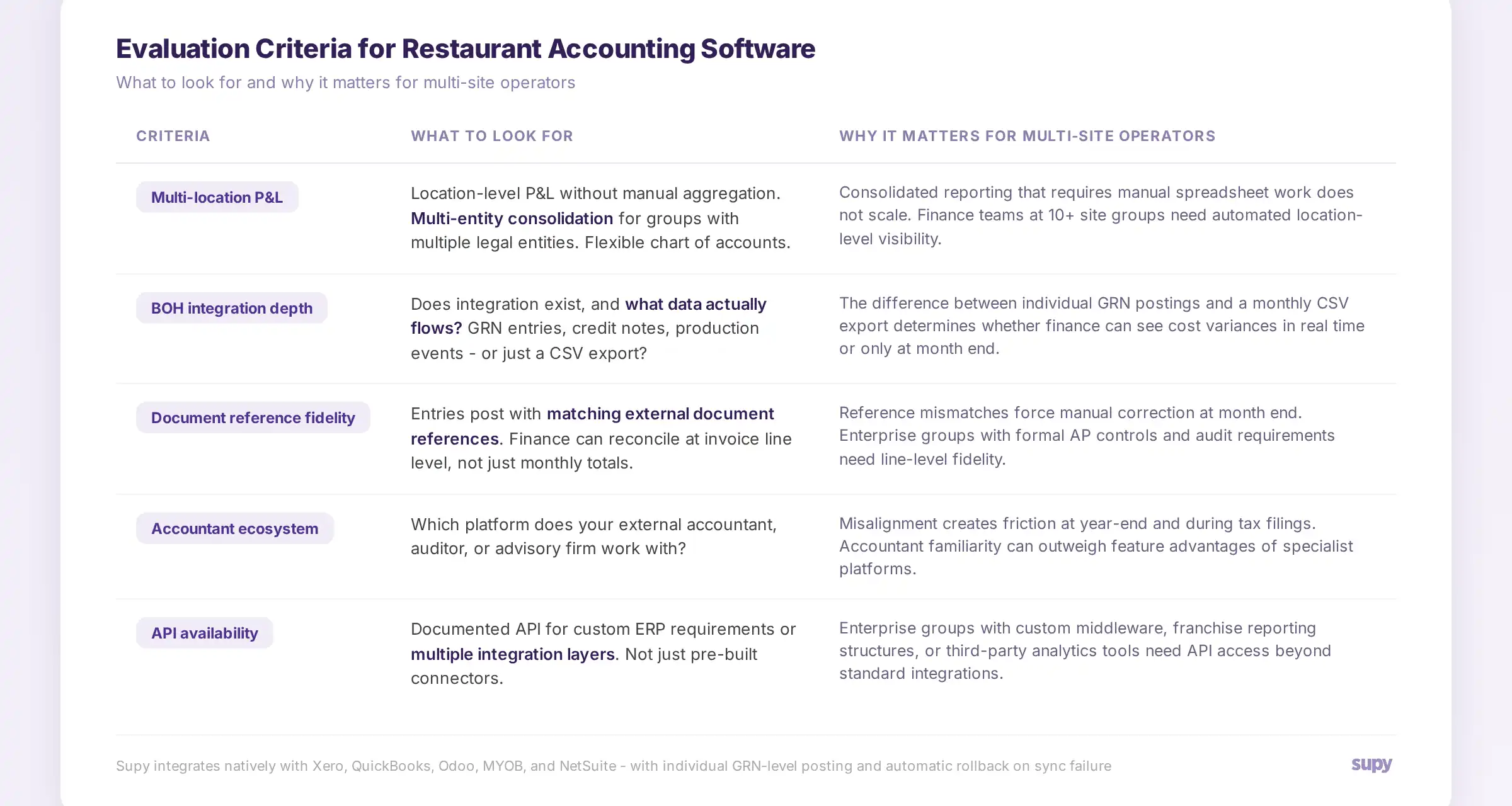
When selecting accounting software, multi-site restaurant groups should evaluate on these criteria:
Multi-location P&L. Can the platform generate location-level P&L without manual aggregation? Can it consolidate across legal entities? What is the chart of accounts flexibility for multi-site structures?
BOH integration depth. Does an integration exist, and if so, what data actually flows? There is a significant difference between a platform that "integrates with restaurant software" via a CSV export and one that receives individual GRN entries, credit notes, and production events as discrete accounting postings.
Document reference fidelity. Does the integration post with matching external document references? Can finance teams reconcile at invoice line level? This matters most at audit time and for enterprise groups with formal AP controls.
Accountant ecosystem compatibility. Which accounting platform does your external accountant, auditor, or advisory firm work with? Misalignment creates friction at year-end and during tax filings.
API availability. Enterprise groups with custom ERP requirements or multiple integration layers need a platform with a documented API - not just pre-built integrations.
Implementation support. Chart of accounts setup for a multi-site restaurant group is a specialist task. Does the platform provide implementation support or a certified partner network with restaurant sector experience?
How Supy Connects Your Operations to Your Accounting System
When a multi-site operator connects Supy to their accounting system, the finance team stops reconciling by month-end invoice totals and starts seeing COGS by ingredient, by location, by week - with every variance flagged the moment a GRN posts. The accounting system does not change. The data feeding it does.
Supy integrates natively with Xero, QuickBooks, Odoo, MYOB, and NetSuite. The integration is transactional: individual GRNs, credit notes, and sales invoices post as discrete accounting entries with matching document references. If a sync fails, the GRN rolls back automatically - so the financial record never gets ahead of the operational record.
For central kitchen operators with B2B customers, Supy handles sales invoices with external document number sync - allowing finance teams to reconcile CK revenue against customer statements without manual reference matching.
Supy does not attempt to be your accounting system. It feeds your accounting system with the operational data it cannot generate on its own.
About Supy
Supy is a back-of-house operations platform built for multi-site restaurant groups. It covers procurement, inventory management, recipe costing, and business intelligence - connecting operational data to the accounting and ERP systems that finance teams already use. For restaurant groups managing 3 to 300 locations, Supy closes the gap between what your accounting system records and what your operations actually cost. See how restaurant inventory management connects to financial reporting with live operational data rather than month-end estimates.