.jpg)


Supplier Management Software for Hospitality Groups
Why Generic Supplier Management Software Fails a Restaurant Group
A staff member needs a bigger order than their approval limit allows. So they raise a purchase order for a value just under the threshold, get it cleared in minutes, then phone the supplier to add the rest. Nobody approved the real order, and the extra cost only surfaces weeks later, when the invoice is processed and the numbers no longer match.
More oversight will not fix that, because it is not a discipline problem. It is what supplier management software for hospitality groups exists to close: control that sits where the ordering happens. In a restaurant group, kitchen managers, head chefs and site buyers raise the orders, take the deliveries and flag the discrepancies, so the software has to govern who can order what, from which supplier, and up to what value, at the branch rather than in a central buying office.
Generic supplier relationship management and spend-management platforms assume the opposite: procurement centralised with a dedicated team, controls at the top. That one wrong assumption is why they leak in a restaurant group. The gap is easiest to see side by side:
| What generic supplier software assumes | How a restaurant group actually buys |
|---|---|
| A central team places the orders | Kitchen managers, chefs and site buyers place them at each branch |
| Approvals sit at the top of the organisation | Approvals have to fire at the branch, by order value |
| Suppliers live on one shared master list | Suppliers are scoped to the branches allowed to use them |
| Price is a procurement number | Price is a recipe cost, so a change moves every dish that uses the item |
The rest of this guide walks the specific controls that difference demands, and the questions to ask a vendor about each one. Before you shortlist anything, ask: does this tool assume a central buying desk, or does it govern ordering at the branch where it happens?
Where Supplier Price Rises Hide: Month-End Versus the Goods-Received Line
The most expensive gap in most restaurant groups is the lag between a supplier raising a price and anyone noticing. One small multi-site group tracked price changes by photographing invoices into a messaging app and having an external accountant reconcile them in a spreadsheet at month-end. Unauthorised increases went undetected for weeks, and by the time anyone saw the pattern the margin was already gone.
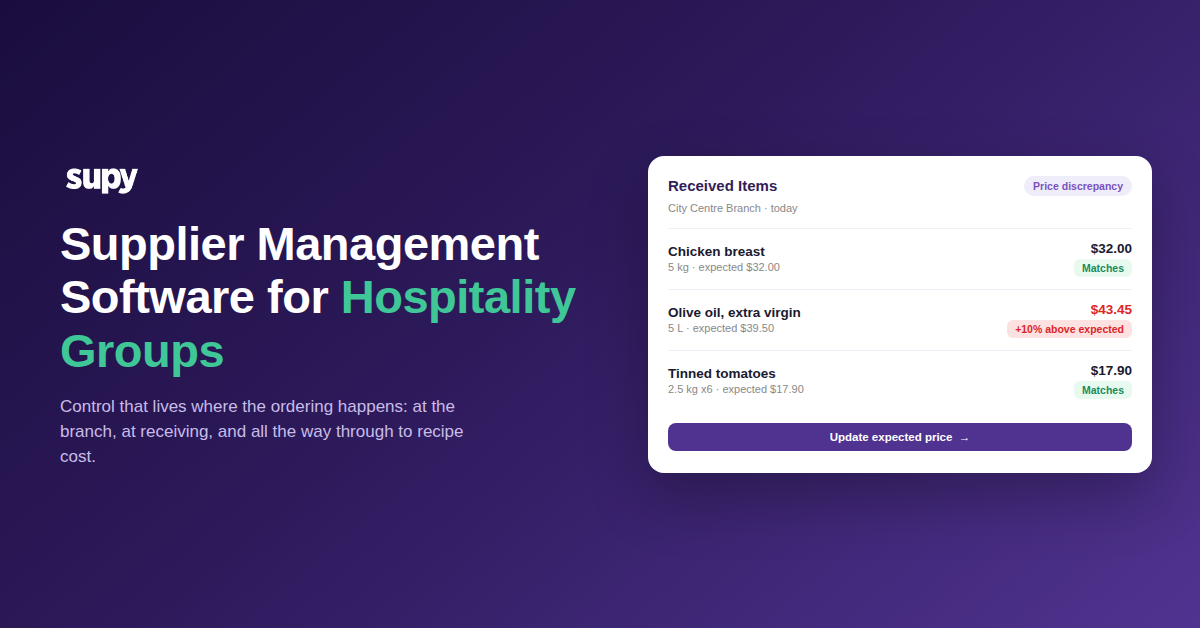
The fix is to move the check from month-end to the moment of receiving. When the system holds an expected price for every item, a delivery line that comes in above it can be flagged the instant goods are received, before the invoice posts to accounts. In practice that means an expected price of $39.50 on a 5 litre olive oil, a delivered price of $43.45, and a flag on that exact line the same day rather than a variance buried in a month-end report nobody reads in time.
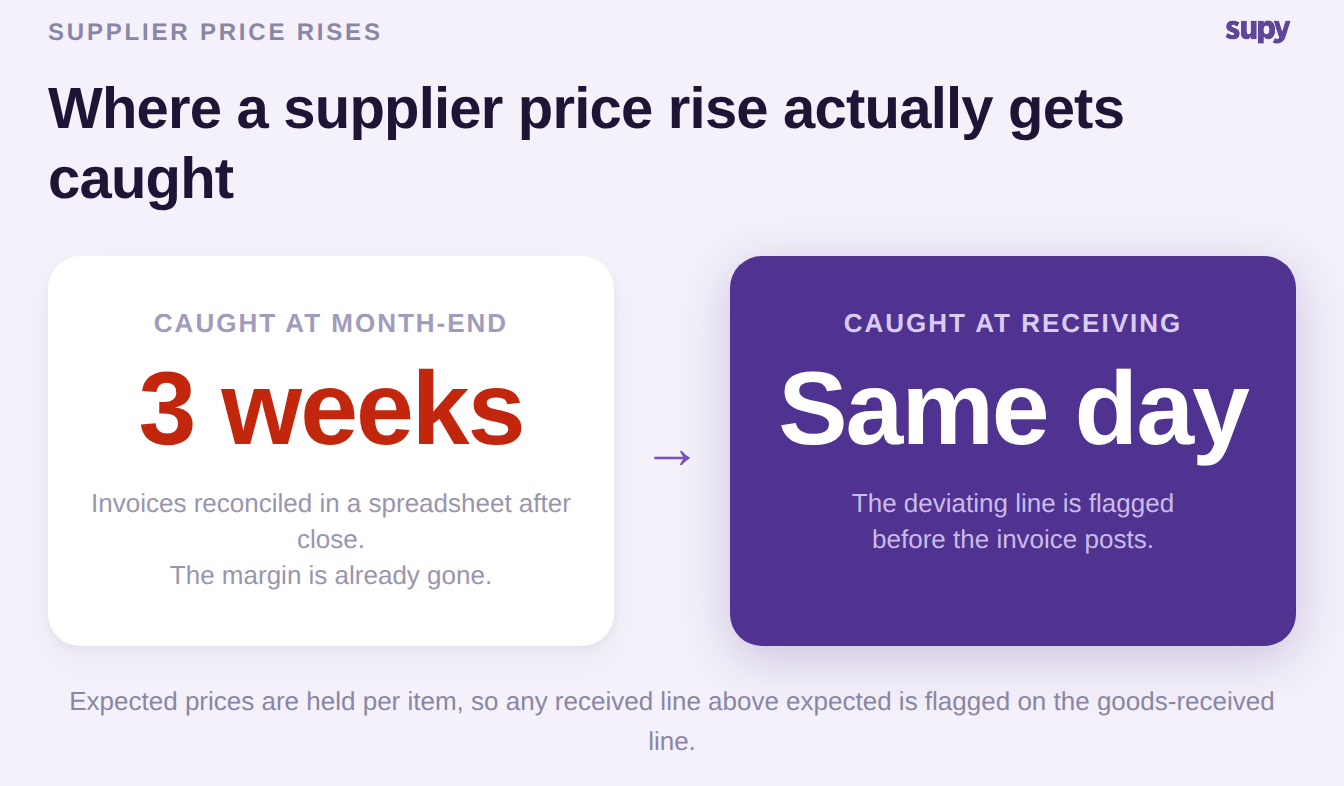
Supy's Received Items page is built around this: every received line lands as a row, the view defaults to the price-discrepancy filter, and each flagged line carries a status such as Needs review or Price updated with a one-click action to update the expected price or generate a supplier-contact email. A sharper version of the same request came from another group who did not want a report to remember to open at all, but a per-invoice flag that finds them. Ask a vendor: does price checking happen at receiving, per line, or only in a report you have to go and read?
Why Automated Invoice Matching Creates Work Instead of Removing It
Automated invoice matching is supposed to remove manual effort. A whole class of restaurant deliveries makes it add effort instead, and it comes down to units of measure. The purchase order is raised in cartons; the supplier invoices in eaches or packs. A matcher that does not reconcile the two reads 12 units delivered where 1 carton (12 eaches) actually arrived, then creates new order lines instead of matching the existing ones. Items show as partially received, and someone rewrites every quantity by hand.
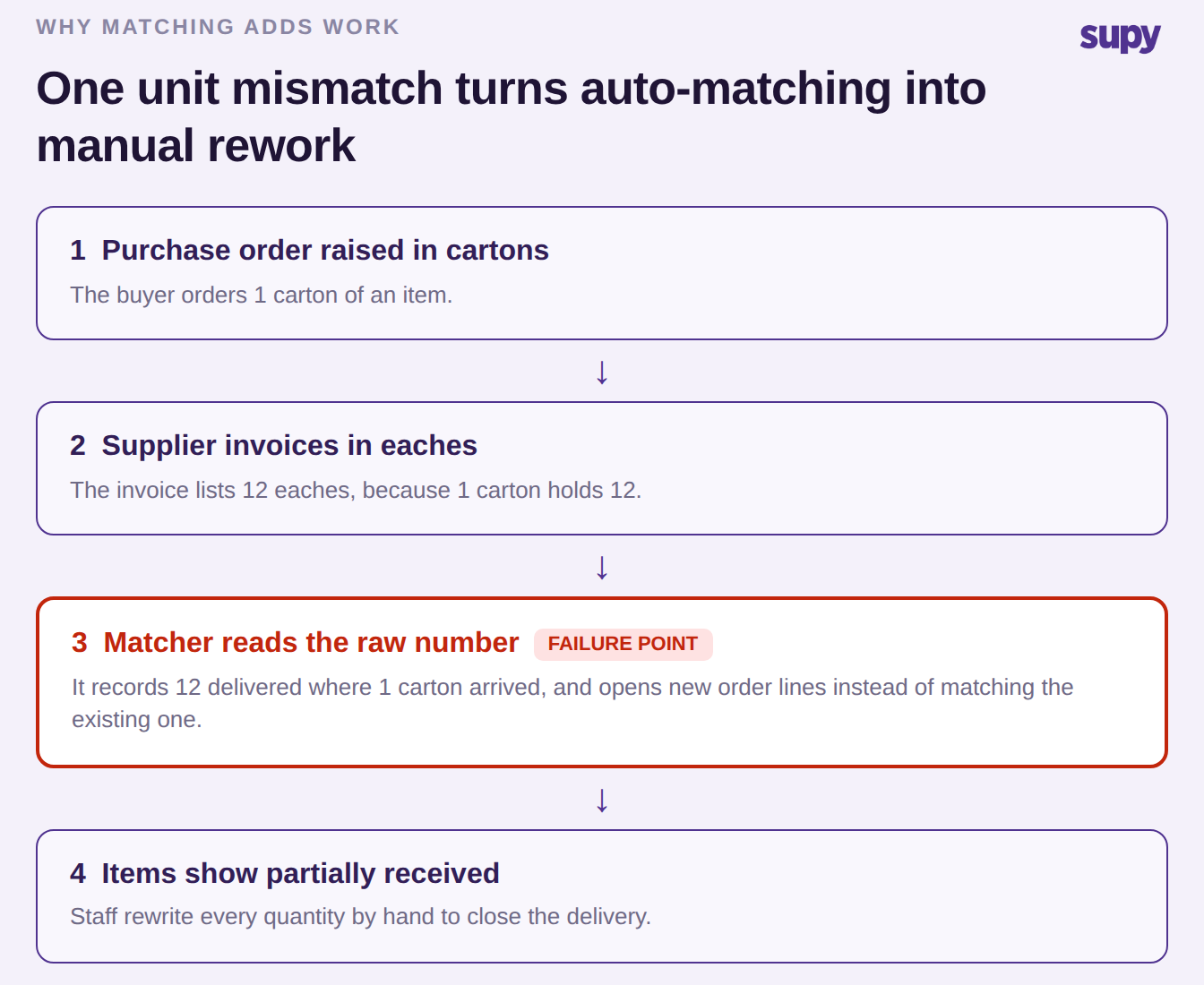
The requirement here is precise: the system has to understand that one carton equals 12 eaches for that item and match on the converted quantity, not the raw number on the invoice. It also has to handle a real delivery pattern where one purchase order arrives across several deliveries. Supy supports multiple goods-received notes against a single purchase order for exactly that split-delivery case, and its invoice receiving auto-matches line items and flags price and quantity conflicts for exception approval before anything updates stock or accounts.
When the unit conversion is wrong, matching is worse than useless, because now you are correcting the software as well as checking the delivery. Ask a vendor to show a match where the purchase order unit and the invoice unit differ, and watch whether the quantities reconcile on their own.
Who Can Raise a Purchase Order, and to Which Supplier
Return to the threshold-gaming order from the opening. The reason it works is almost never that approvals do not exist. It is that the approval rule is a policy people are asked to follow, rather than a control the system enforces at the point of ordering. Two gates decide whether that order is possible at all, and both are configuration.
The first gate is the supplier list. If every supplier is active at every branch, any branch can raise an order directly to any supplier, and the approved-supplier list is guidance rather than a rule. One group's IT lead, ahead of granting branch staff access, asked to restrict every supplier except two to a single main warehouse branch precisely so branches could not order around the approved channel. That is supplier activation scoped to the buying location, and it is the control that closes the side-door call to the supplier.
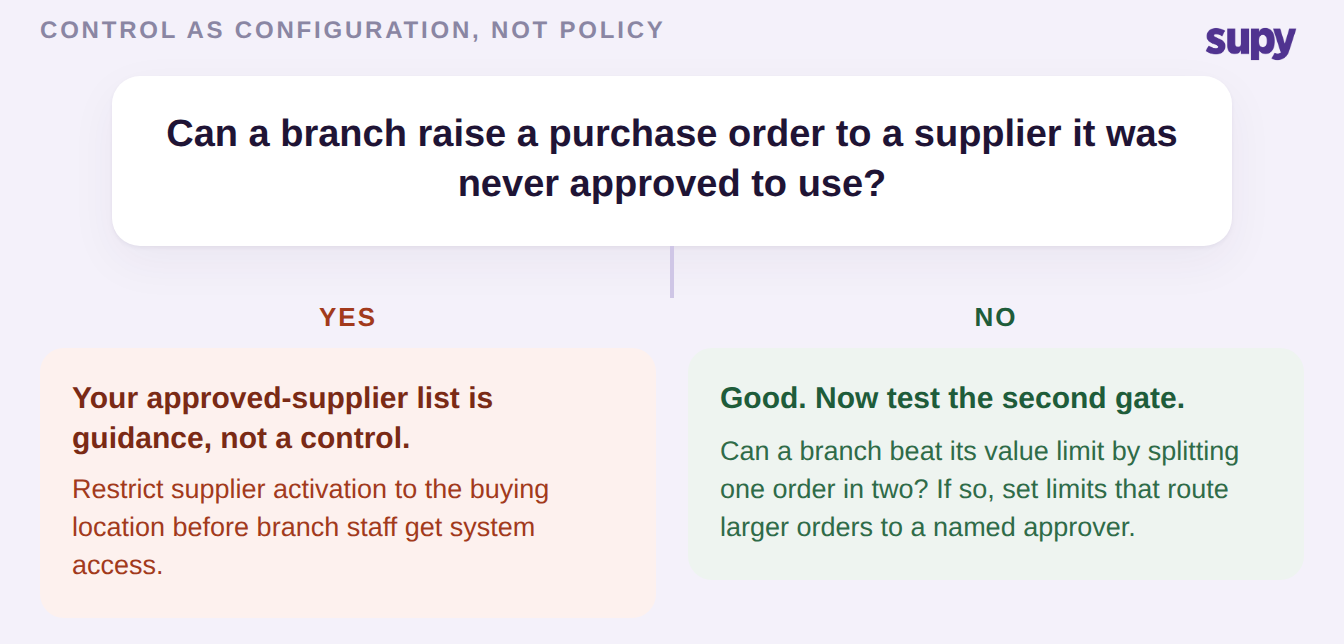
The second gate is value and role. Supy enforces sequential approvals, up to 5 approvers, triggered by branch and order value, with purchase-order value limits that can be set by supplier, branch, category, user or par level, drawn from a set of 200+ customisable permissions. That is the difference between a purchaser who can raise a requisition that routes to a named approver above a set value, and a policy in a document. For a deeper walk-through of routing approvals across sites, see Supy's guide to restaurant spending controls and procurement approval. Ask a vendor the plain version of both gates: can a branch raise an order to a supplier it was never approved to use, and can it exceed its value limit by splitting the order?
One Ingredient, Every Supplier's Price, and What a Rise Costs Your Recipes
Underneath all of the above sits the item master, and it is where restaurant supplier management quietly diverges from every generic tool. Because Supy links each supplier's own SKU and pack size to a single base ingredient, a buyer sees what every supplier charges for the same thing in one view, without keeping a separate catalogue per supplier. Preferred-supplier-per-item ordering then defaults each item to the right vendor, and if a preferred link is removed another available supplier is promoted so an item is never left without a default for the next order.
The per-ingredient price view below is what that looks like in practice: one ingredient, each supplier's pack and price, and the preferred choice highlighted.
| Ingredient (pack) | Northgate Supply | Harbour Provisions | Preferred |
|---|---|---|---|
| Olive oil, extra virgin (5 L) | $41.80 | $39.50 | Harbour Provisions |
| Chicken breast (5 kg) | $32.00 | $33.20 | Northgate Supply |
| Tinned tomatoes (2.5 kg x6) | $18.40 | $17.90 | Harbour Provisions |
| Bread flour (16 kg) | $14.20 | $14.90 | Northgate Supply |
The reason this matters beyond convenience is the part no generic supplier relationship management tool addresses, because no other industry needs it. A restaurant's supplier prices are recipe costs. When a supplier price rises 8% on one ingredient, and that ingredient sits in 14 recipes, the real question is not what the item now costs but what every dish that uses it now costs. A group operating across three countries was offered an item-level price-change report and rejected it for exactly this reason: an item price change does not show the cascade into recipe cost. Because Supy holds recipes against those same base ingredients, a price move can be traced through to the affected recipes, and its spreadsheet reporting exports recipe costing at group or site level. If you want to sanity-check where an ingredient move lands before you commit, Supy's food cost calculator is a quick way to see the effect on a plate. Ask a vendor: when a supplier raises a price, can you see which recipes just got more expensive, or only which item did?
How Deep Your Supplier Integration Actually Goes
The last thing to weigh is how the software actually connects to each supplier, because the label integration hides a wide range. At the shallow end, a supplier gives you access to their own ordering portal, which means you leave your system to place the order and get nothing back into it. Email purchase orders are easy to send and most suppliers accept them, but they carry no live price or stock feed in return. A file feed over SFTP or a full electronic data interchange link carries a catalogue, but a catalogue file cannot carry live stock or a live price. A punch-out or a direct integration is the deep end, where price and availability come back into your system as you order.
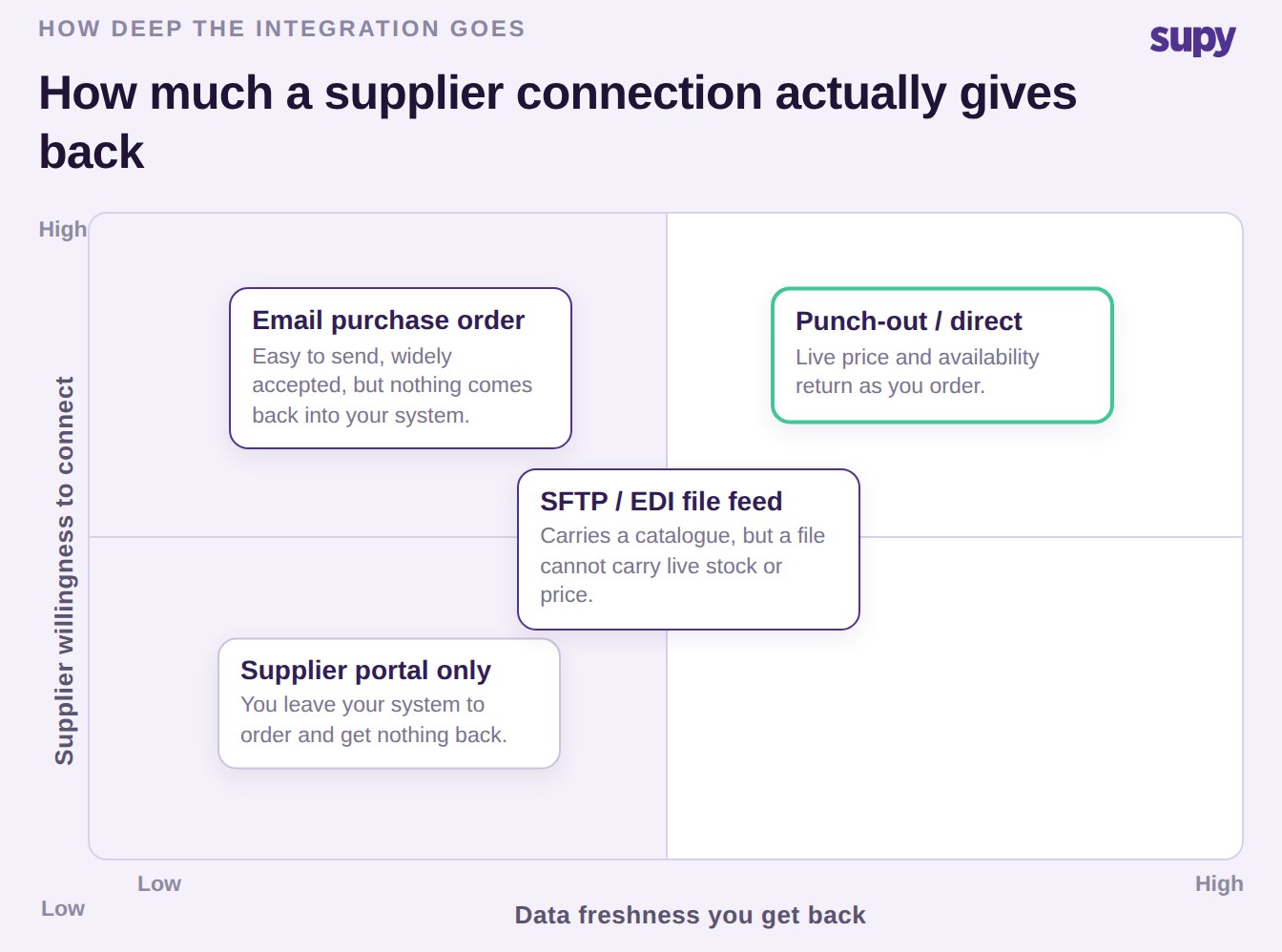
The honest way to read a supplier is on two axes: how much data freshness you get back, and how willing that supplier is to connect at all. Most of a group's suppliers will sit in the middle, and the point of mapping them is to know which relationships are worth pushing deeper and which are fine on email. Supy sends orders by email, WhatsApp or direct integration and connects across 75+ integrations, so the channel can match what each supplier will actually support rather than forcing one method on all of them. For the wider platform view of this, see Supy's supplier management features. Ask a vendor: for a supplier on a plain email relationship, what data comes back into the system, and what stays manual?
Where to Start With Supplier Management Software
You do not need to evaluate all of this at once. Walk your own operation against three checks, in order, and stop at the first one that fails, because that is the control currently living on paper rather than in the software. The check you land on tells you which fix returns the most margin fastest.
| Check | What it means if the answer is wrong | First move |
|---|---|---|
| Can any branch order from a supplier it was never approved to use? | Your approved-supplier list is a policy, not a control | Scope supplier activation to the buying location |
| Are expected prices held per item and checked at receiving? | Price rises keep surfacing at month-end, after the margin is gone | Load expected prices and flag deviations on the goods-received line |
| Does a price change show the affected recipes, not just the item? | You are costing plates on stale numbers | Link each supplier SKU to a base ingredient so cost cascades to recipes |
The check you land on is almost always a rule you have written down but never made the system enforce. Turning that one rule into a setting is the whole difference between supplier management software that fits a restaurant group and a central-procurement tool wearing a hospitality label.