Food cost

Recipe Costing for Menu Modifiers: One Setup, Every Variation
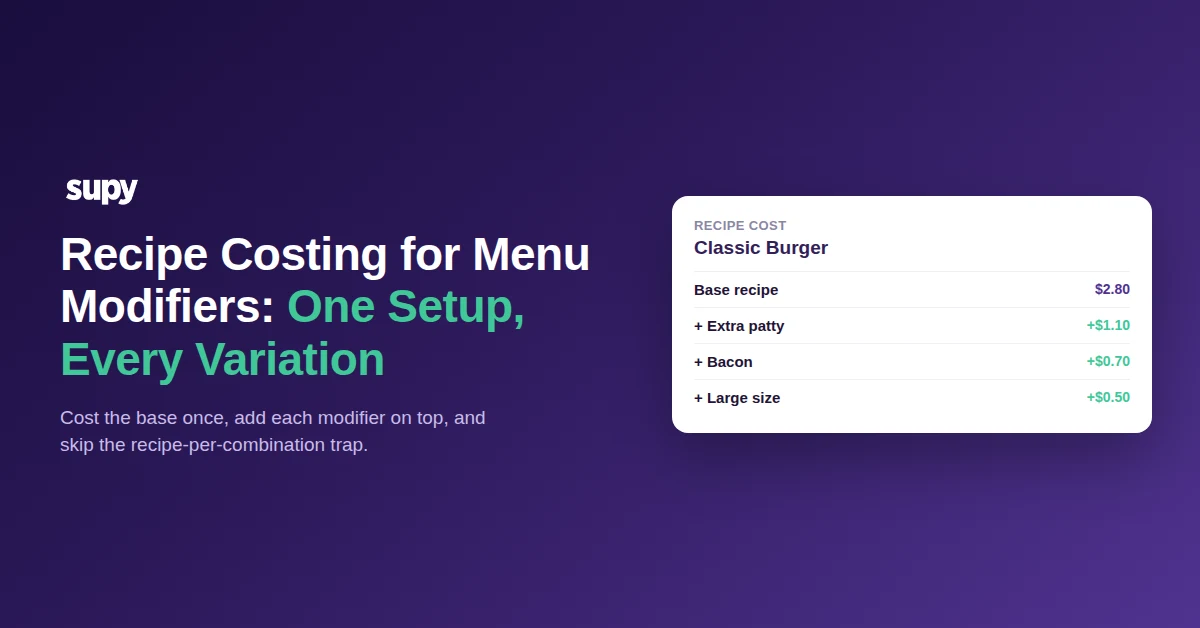
Classic Burger recipe cost with modifier add-ons

Cost the Base Recipe Once, Before Any Modifiers

Recipe costing for menu modifiers and variations starts with one base recipe, costed once. A Classic Burger has a fixed set of core ingredients, and their combined cost is the foundation every variation builds on. Get that base right, per branch, and you never recost it from scratch again. Each size, sauce or spice level then becomes a small change on top, not a whole new recipe.

Here is what a base cost looks like before any modifier is added. Every figure comes from the ingredients, their portions and the prep wastage on the dish.

Base ingredientQuantityCost
Beef patty150 g$1.35
Brioche bun1$0.45
Cheese slice1$0.35
Salad and house sauce1 portion$0.40
Prep and wastage-$0.25
Base recipe cost-$2.80

Build Shared Parts as Prep Recipes You Reuse

Many variations share the same components. The house sauce goes on three burgers. The spiced mayo appears across the wrap menu. Cost each shared part once as a prep recipe, then reuse it wherever it appears. A prep recipe is a small recipe in its own right, with its own ingredients and yield, that other recipes pull in as a single line.

This is what keeps the setup from ballooning. When the sauce recipe changes, every dish that uses it recosts on its own. You update one prep recipe, not thirty finished dishes. Semi-finished items such as a marinated patty or a batch dough work the same way, so the building blocks stay small and shared.
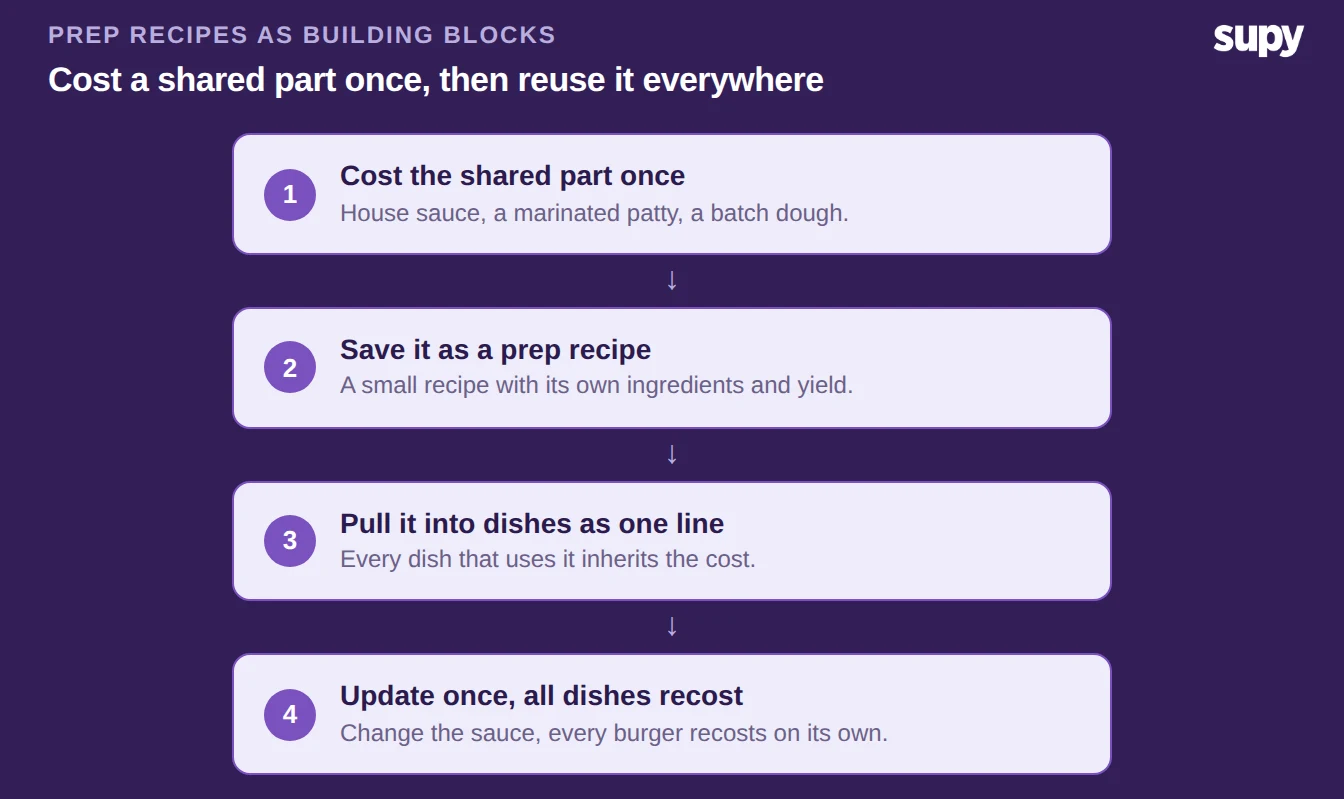
Four steps to build a prep recipe once and reuse it across dishes

Cost Each Modifier as a Small Add-On, Not a New Recipe

This is where variations usually go wrong. Three sizes, four sauces and three spice levels give 36 possible combinations. Build a full recipe for each and you have 36 recipes to maintain. Change one ingredient price and you edit all of them.

Do it the other way. Keep the base, and cost each modifier as its own small add-on: extra patty adds $1.10, bacon adds $0.70, the large size adds $0.50. One base plus a handful of add-ons, nine building blocks in total, covers all 36 combinations. Each add-on carries only its own cost, and the combination cost is just the base plus whatever the customer chose.
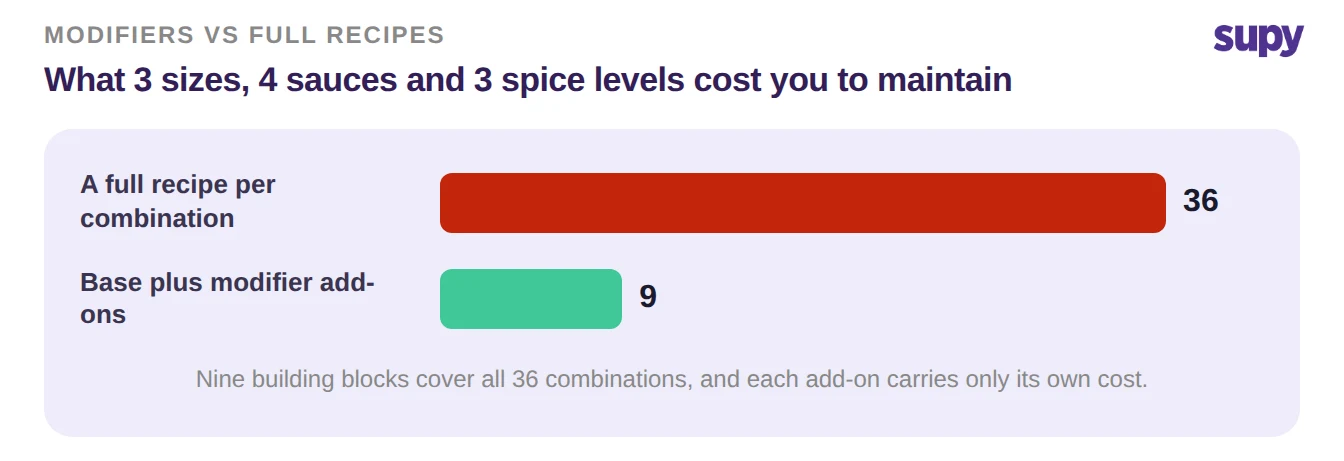
Bar chart comparing 36 recipes per combination with 9 building blocks using modifier add-ons

Map Recipes to POS Modifiers So Sales Deplete the Right Stock

Costing is only half the value. The other half is stock. Link each recipe and its add-ons to the matching POS menu item and modifiers, so a sale reaches the right ingredients. When someone orders a burger with bacon, the sale depletes the base ingredients plus one rasher, not a generic burger.

Get this mapping right once and two things follow. Your theoretical food cost reflects what was actually sold, down to the modifier. And your stock counts line up with the menu, because every variation deducts exactly what it uses. When a POS cannot pass clean modifier data, that is the thing to fix first, because everything downstream depends on it.
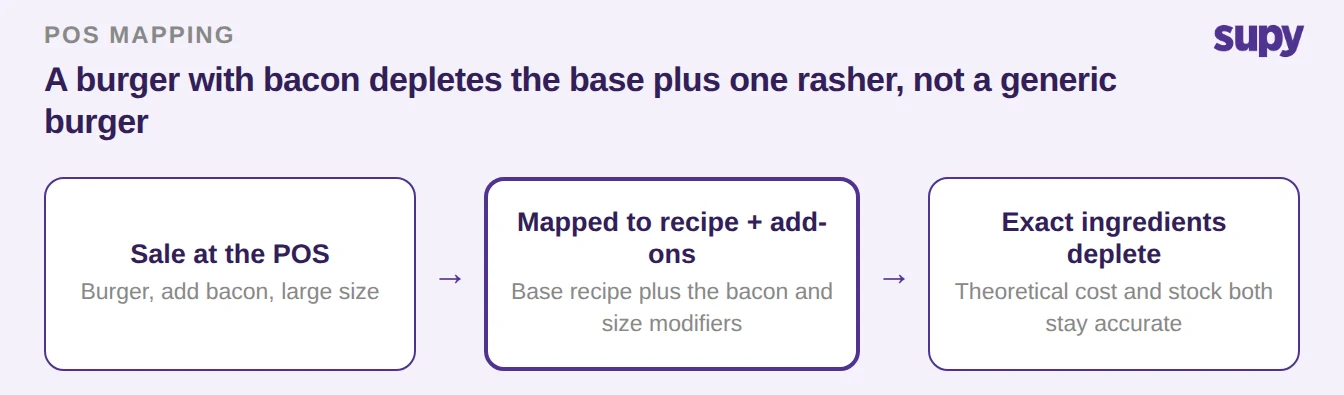
Flow of a point-of-sale burger with bacon mapping to the base recipe plus add-ons and depleting exact ingredients

Keep Every Variation's Cost Current Across Branches

A cost set once goes stale the moment a supplier price moves. Track each ingredient by its running average cost and its last purchase price, per branch, and every recipe and add-on that uses it recosts on its own. The way you handle live purchase price versus a fixed cost decides how quickly that happens.

Set a target food cost for each recipe, per branch, because the same burger can carry a different price and target at the airport than in town. Recipe and prep-recipe costing then flags any variation whose actual cost climbs above the target you set. You see the drift on the dish that caused it, while you can still act on it, not at month end.
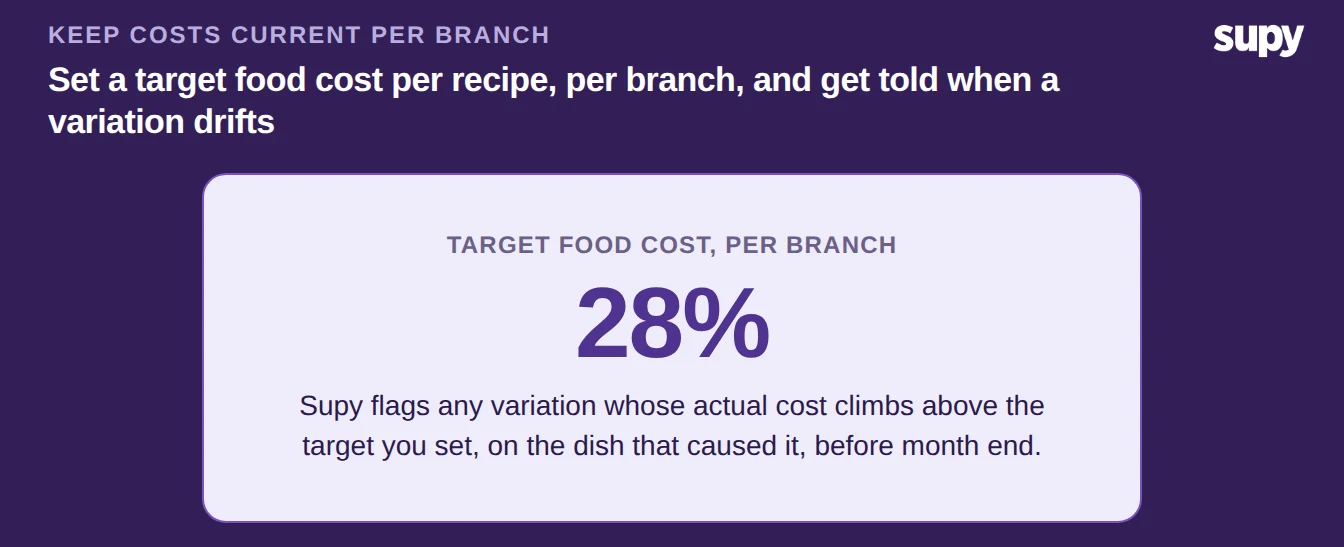
Set a 28 percent target food cost per branch and get flagged when a variation drifts above it

Start With One Base and Add As You Go

Pick your highest-volume dish first. Cost its base once, per branch, and get that number right. Turn every shared component into a prep recipe. Then add each size, sauce and spice level as its own small modifier, mapped to the POS. Watch the target food cost you set, say 28%: when a variation climbs above it, the ingredient price moved, not your recipe. One base and a short list of add-ons will always beat a recipe for every combination.


Book a Demo with Supy - recipe costing for menu modifiers and variations

Ready to optimize your restaurant operations?

Blog

Our operational insights

Supy recipe management and live costing dashboard
Recipe & Menu Costing

Best Recipe Management Software for Restaurant Groups

Food cost
Inventory

Restaurant Combo Meal Recipe Costing: Cost Every Combo and Modifier

Food cost
Menu engineering

Restaurant POS Modifier Mapping: One Recipe, All Locations

Your questions 
answered

Everything you need to know about Supy — from setup to integrations, pricing, and daily use. If it’s not covered here, just ask.

How do you cost menu items with modifiers and variations?
+

Cost the base recipe once, then add each modifier as its own small cost on top. A burger has a fixed base of patty, bun, cheese and sauce, costed as one recipe. Extra patty, bacon or a larger size each carry only their own added cost. The combination the customer orders is simply the base plus whichever modifiers they chose. This keeps you from building a full recipe for every possible variation, which multiplies fast: three sizes, four sauces and three spice levels already make 36 combinations, but only nine building blocks to maintain.

What is a prep recipe and why does it help with modifier costing?
+

A prep recipe is a small recipe in its own right, with its own ingredients and yield, that finished dishes pull in as a single line. A house sauce, a marinated patty or a batch dough are all prep recipes. Because several dishes share the same component, you cost it once and reuse it everywhere it appears. When the sauce ingredients change price, every dish that uses it recosts on its own, so you update one prep recipe instead of dozens of finished dishes. This is what keeps a modifier-heavy menu manageable.

Why not build a separate recipe for every menu variation?
+

Because the number of variations multiplies far faster than you can maintain. Three sizes, four sauces and three spice levels already give 36 combinations, and each new option multiplies the rest. Build a full recipe for every one and a single ingredient price change means editing all of them. Operators who try this often give up and drop parts of the costing to keep it manageable, which loses accuracy. Keeping one base and costing each modifier as an add-on covers every combination from a short list of building blocks instead.

How do modifier costs stay accurate when ingredient prices change?
+

Track each ingredient by its running average cost and its last purchase price, per branch, so a price change flows through automatically. Every recipe, prep recipe and modifier add-on that uses that ingredient recosts on its own the moment the price moves. You do not re-enter anything by hand. Because costs are held per branch, the same modifier can cost slightly more at one site than another and both stay correct. Set a target food cost per recipe and the system flags any variation whose actual cost climbs above it, so you catch drift on the dish that caused it.

How does mapping recipes to POS modifiers keep stock accurate?
+

When each recipe and its add-ons are linked to the matching POS menu item and modifiers, a sale depletes the exact ingredients used. Order a burger with bacon and the sale removes the base ingredients plus one rasher, not a generic burger. Two things follow. Your theoretical food cost reflects what was actually sold, down to the modifier, and your stock counts line up with the menu because every variation deducts what it uses. If a POS cannot pass clean modifier data, fix that first, because both costing and stock accuracy depend on it.

Can recipe costs differ by branch for the same menu item?
+

Yes. Each recipe can be assigned to specific branches with independent selling prices, target food cost percentages and tax rates. Ingredient costs are also held per branch, based on what that location actually pays its suppliers. So the same burger can cost more to make at one site than another, and carry a different menu price, while both stay accurate. This matters for multi-site groups where supplier prices and menus vary by location. You manage one recipe library, but the numbers reflect each branch's real costs rather than a single blended figure.

What target food cost should each recipe have?
+

There is no single right number. You set a target per recipe, per branch, based on the margin you want on that dish. A premium item and a high-volume staple can carry different targets, so a blanket figure across the menu rarely fits. What matters is that you set a target and track against it. Supy alerts you when a variation's actual cost climbs above its target, so you act on the specific dish while you still can, rather than finding out at month end. Review the targets whenever supplier prices move materially.

Ready to transform your operations?

Join 3500+ restaurant operators cutting costs, streamlining operations and making smarter decisions with Supy.