.jpg)


Cloud-Based Restaurant Inventory Management Software: What to Look For

What Cloud-Based Restaurant Inventory Management Software Actually Is
Cloud-based restaurant inventory management software is hosted on remote servers (the vendor's infrastructure) and accessed via web browser or mobile app. Your data lives in centralised cloud storage rather than on a local server at each location or in spreadsheets.
But here's the operational difference: with cloud platforms, every location updates the same inventory record in real time. When kitchen staff at site A records a supplier delivery, site B sees updated stock levels instantly. When the head of operations at headquarters needs a multi-location stock view, they open a single dashboard - not a collection of separate logins.
The real value isn't "it's online." The real value is synchronisation. Real-time visibility. Mobile-first access. And complete removal of IT maintenance overhead.
Why Multi-Location Restaurant Groups Choose Cloud Architecture
Most restaurants running multiple sites operate with significant data friction. Location managers log into separate systems (or worse, separate spreadsheets). Stock counts happen at different times. Supplier receives are recorded locally and manually consolidated into a central record - sometimes weeks later. Real-time inventory visibility is a report request that arrives after decisions are already made.
Cloud platforms eliminate that friction.
Real-Time Multi-Site Synchronisation
When one location updates inventory - receiving stock, moving items between locations, adjusting for waste - every other location sees that change instantly. No manual consolidation. No daily batch processes. No data conflicts because multiple locations updated different copies of the same spreadsheet simultaneously.
For groups managing transfer logistics between sites, this is transformative. A head of operations at a multi-location hospitality group described centralised visibility as "one of the most compelling aspects of moving to a cloud platform." They can see stock across all locations, understand where surplus exists, and authorise transfers - all from a single view.
Mobile-First Operations
Kitchen staff, receiving teams, and inventory managers work in the stock room and on the line - not at desks. Cloud platforms designed for mobile access let them record counts, confirm deliveries, and check availability without returning to an office to log into a local system.
Automatic Updates and Zero IT Overhead
Cloud vendors handle all infrastructure maintenance, security patches, and software updates automatically. Your IT team doesn't manage server hardware, apply updates, or troubleshoot local installation issues. Your restaurant group can focus on operations, not technology infrastructure.
Automatic Data Backup and Compliance
Multi-location data is stored with automatic redundancy. No reliance on a single on-premise server. If your headquarters loses network connectivity, cloud systems are still accessible from any location with internet. GDPR, SOC 2, and other compliance audits are handled by the vendor's infrastructure team, not yours.
The 6 Features That Separate Good Cloud Inventory Software from Adequate Ones
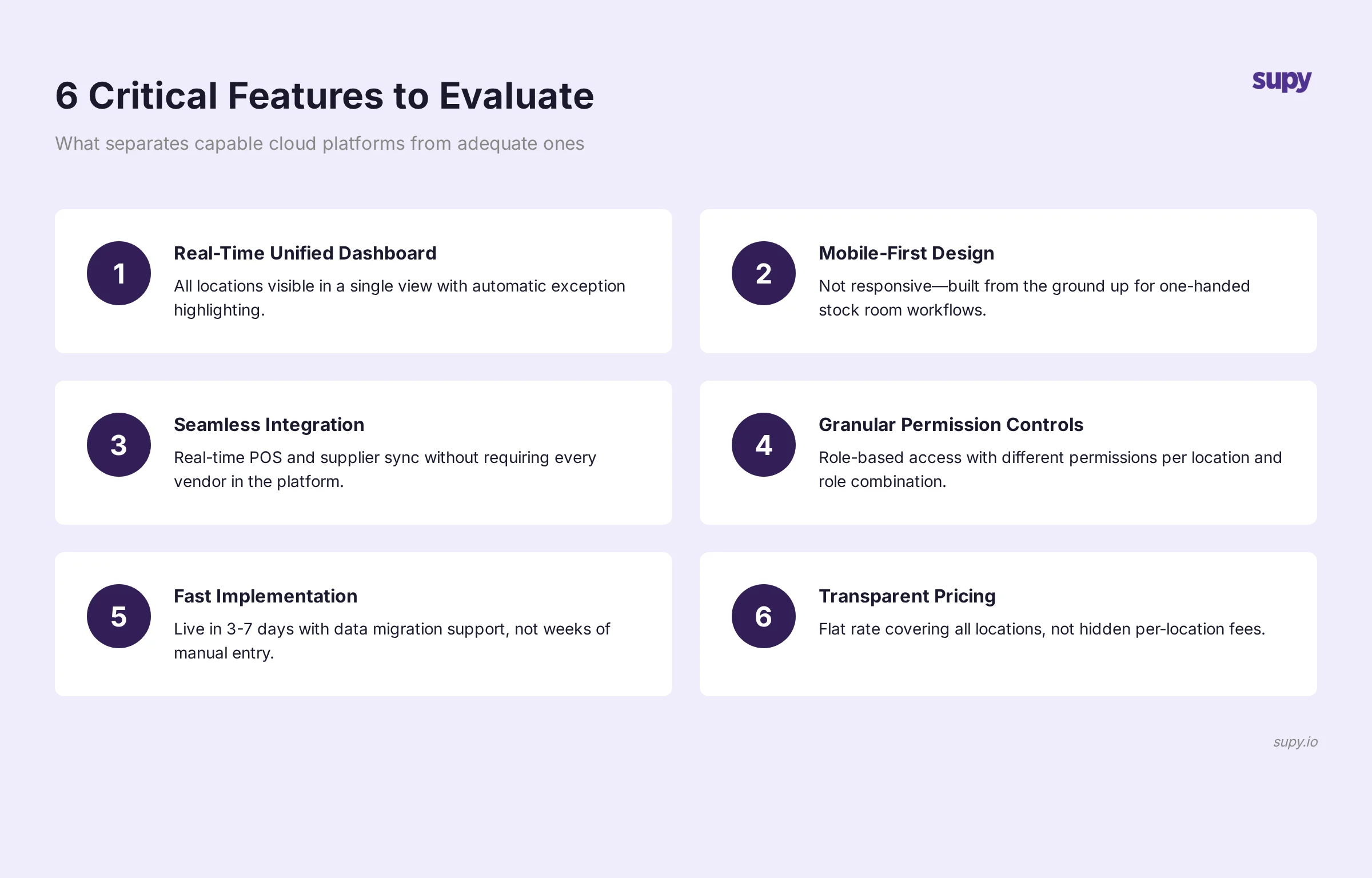
When evaluating cloud platforms, feature lists look similar. The difference reveals itself in implementation. Here's what to examine closely:
1. Real-Time Unified Dashboard Across All Locations
An adequate cloud platform shows you inventory per location if you log in separately to each one. A good one shows you all locations in a single dashboard.
Better: You can drill down from a company-wide view ("Which locations are low on olive oil?") to a specific location's par levels, recent usage, and supplier history - without changing views.
If you'd rather not work par out by hand, the free par level calculator does it for every item on your sheet from your usage, delivery days and supplier lead times.
Best: The system highlights anomalies across locations automatically. A location receiving 40% more of a given item than usual, or stock moving between locations in unusual patterns - these surface as exceptions so you can investigate.
2. Mobile-First Design, Not Mobile-Responsive
Many platforms build a desktop interface and make it "mobile responsive." Their mobile version is a shrunken desktop.
Cloud inventory software built mobile-first from the ground up has workflows optimised for the stock room and the line. One-handed inventory recording. Voice input for counts. Quick-lookup tools for the exact location of high-velocity items. Camera-based barcode scanning.
Test this during the demo: Open the mobile interface on an actual phone, not just a browser resize preview. Try a realistic workflow - recording a delivery or confirming stock count - using only one hand. If it feels clunky, the platform wasn't designed for how your team actually works.
3. Seamless POS and Supplier System Integration
Every cloud inventory platform claims API integration with major POS systems (Toast, Square, Lightspeed) and supplier ordering systems.
The difference: some require manual configuration per location. Some sync supplier costs automatically; others require manual cost entry. Some pull POS data hourly; others pull daily. Some require your supplier to be registered in their system; others work with any supplier.
Better platforms pull POS transaction data in real time, automatically cost updates from your suppliers' systems, and let you order from any supplier - integrated or not.
Ask: "How many of our suppliers need to be set up in your system for ordering integration to work?" If the answer is "all of them," that's a manual, fragile integration. If the answer is "zero - you can order from anyone," that's robust integration.
4. Role-Based Access Controls That Actually Scale
An adequate platform lets you set permissions: owner, manager, staff. A good one lets you define custom roles with granular permissions.
Better: You can set different permissions per role per location. A regional manager at the north location sees all locations' data but can only edit the north location's stock counts. A head of purchasing sees cost data across all locations but not waste tracking. A kitchen manager sees only their location's stock levels, not financial data.
Test this: Can you create a "kitchen staff" role that allows stock counts but blocks access to cost data, and apply it to specific locations only? If the platform requires a global role applied to everyone, you can't enforce the permission structure your operation needs.
5. Implementation Speed and Data Migration Support
An adequate cloud platform takes weeks to implement. A good one takes days.
Better: The vendor provides data migration support. You provide a spreadsheet or export from your old system; they map the data, handle the import, and verify accuracy.
Best: They provide live support during your first week - a dedicated person on calls helping your team get comfortable with the platform, troubleshooting early issues, and ensuring your data is clean.
Ask: "How long from contract signature to first location live?" and "What data migration support do you provide?" Some platforms require you to manually re-enter all supplier details and par levels into their system. Others import directly from your legacy platform and verify the import.
6. Transparent Pricing Without Hidden Per-Location Fees
An adequate platform charges per location. A good one charges a flat rate that covers all locations.
The difference matters. If you have seven locations and the platform charges per location, adding an eighth location increases your cost and forces a contract amendment. If you're evaluating an expansion and need to model costs for 12 locations, you need a per-location price commitment.
Better: Flat pricing that grows only with actual usage (transaction volume, data storage) rather than with the number of locations.
Ask for the complete cost breakdown in writing: software licence, per-location fees if any, set-up fees, data migration fees, training fees, and any usage-based fees. Confirm whether multi-location pricing includes unlimited locations or caps at a specific number.
Cloud vs On-Premise vs Spreadsheets: An Honest Comparison
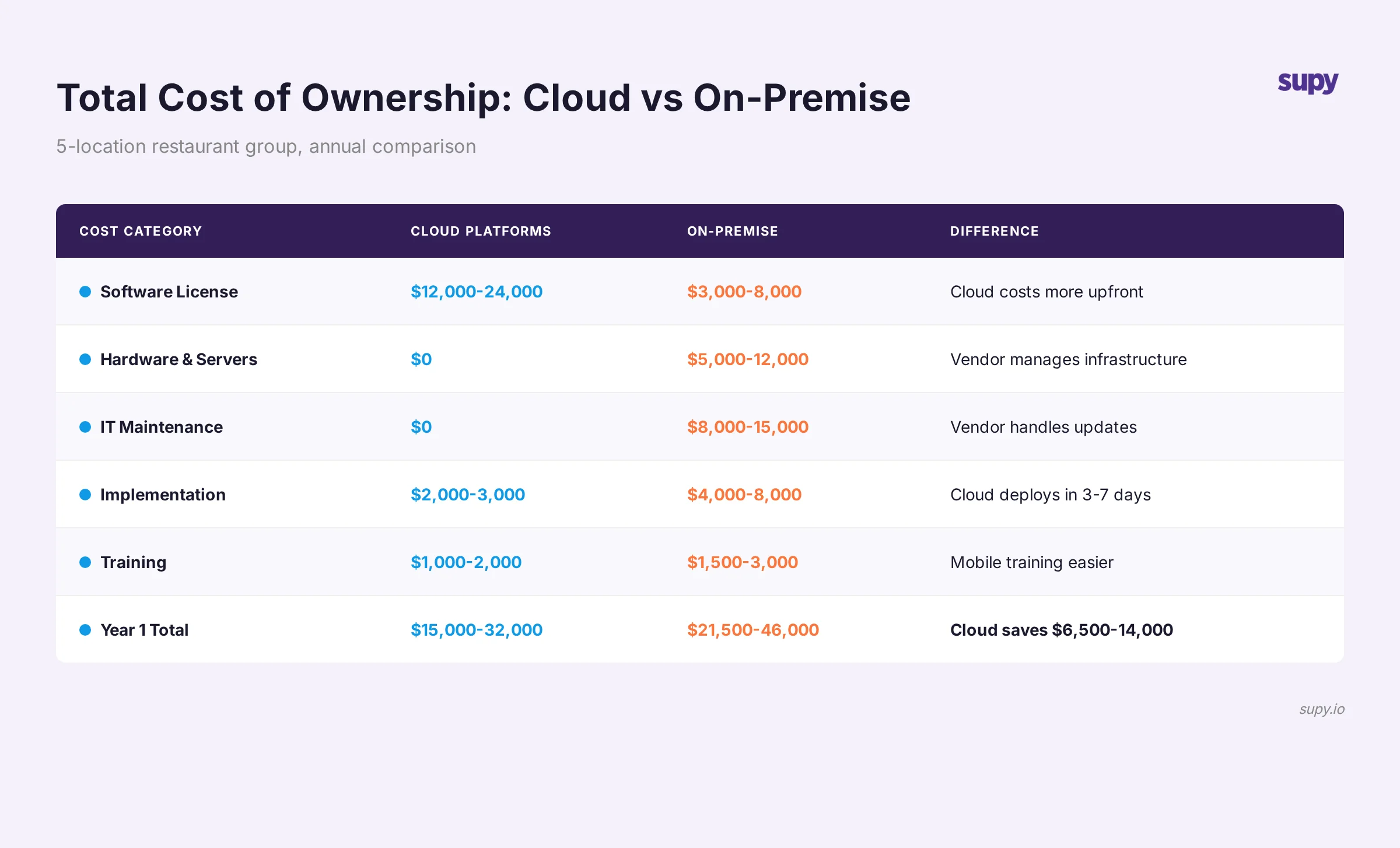
Let's ground this in an actual example. You're operating five restaurant locations, managing inventory across roughly 2,000 line items per location (proteins, produce, dry goods, paper, oils, etc.).
Spreadsheets:
- Cost: Minimal (your IT time)
- Stock visibility: Manual, delayed (counts happen weekly or monthly)
- Mobile access: None (staff would need to carry a laptop)
- Multi-location sync: Manual consolidation (hours of work weekly)
- Compliance and backup: Your responsibility
- Time to new location: 1-2 weeks (set up the new sheet, populate par levels manually, train staff)
On-Premise Software:
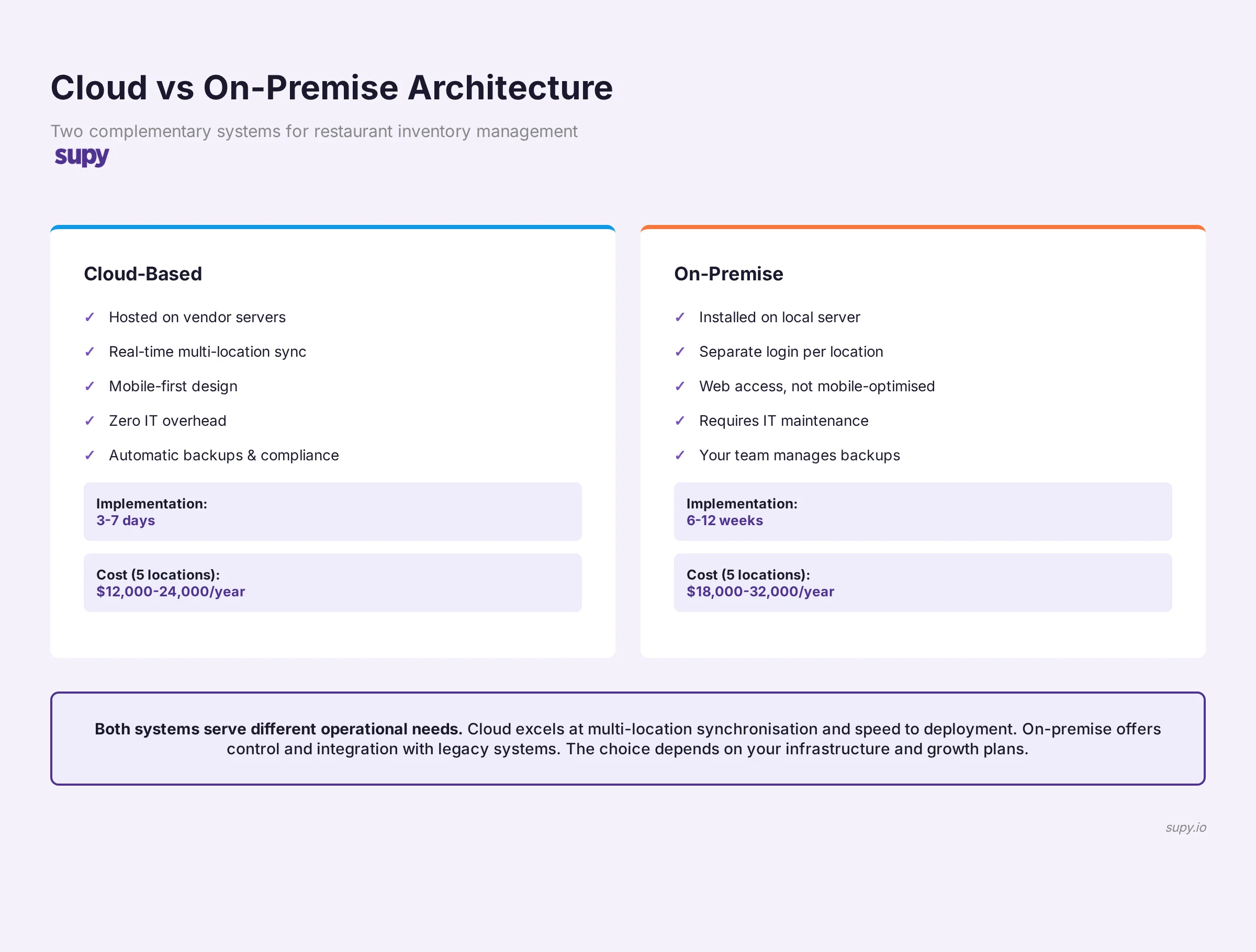
- Cost: Software licence (typically 3,000-8,000 per year) + server hardware (5,000-12,000 upfront) + IT maintenance (40-60 hours per year)
- Stock visibility: Real time per location, but separate login per location
- Mobile access: Limited (typically web-only, not optimised for mobile)
- Multi-location sync: Manual consolidation of reports
- Compliance and backup: Your IT team's responsibility
- Time to new location: 6-12 weeks (hardware procurement, software installation and configuration, data migration, staff training, IT support for local connectivity)
Cloud (Example: Supy):
- Cost: Software licence (typically 200-400 per location per month, all-inclusive)
- Stock visibility: Real time across all locations in a single dashboard
- Mobile access: Full mobile-optimised app with offline capacity
- Multi-location sync: Automatic and instant
- Compliance and backup: Vendor's responsibility (SOC 2, automatic redundancy)
- Time to new location: 3-7 days (create location in the system, import supplier list and par levels, staff training)
For a five-location group, cloud typically costs 12,000-24,000 per year - roughly equivalent to on-premise software + one full-time IT person dedicated to the system. But you get real-time multi-site visibility, mobile access everywhere, automatic compliance, and the ability to add new locations in days rather than months.
What to Ask During a Software Demo (The Questions That Expose Shallow Platforms)
Feature lists lie. Implementation details tell the truth. When you demo a platform, ask these questions and watch how the vendor responds.
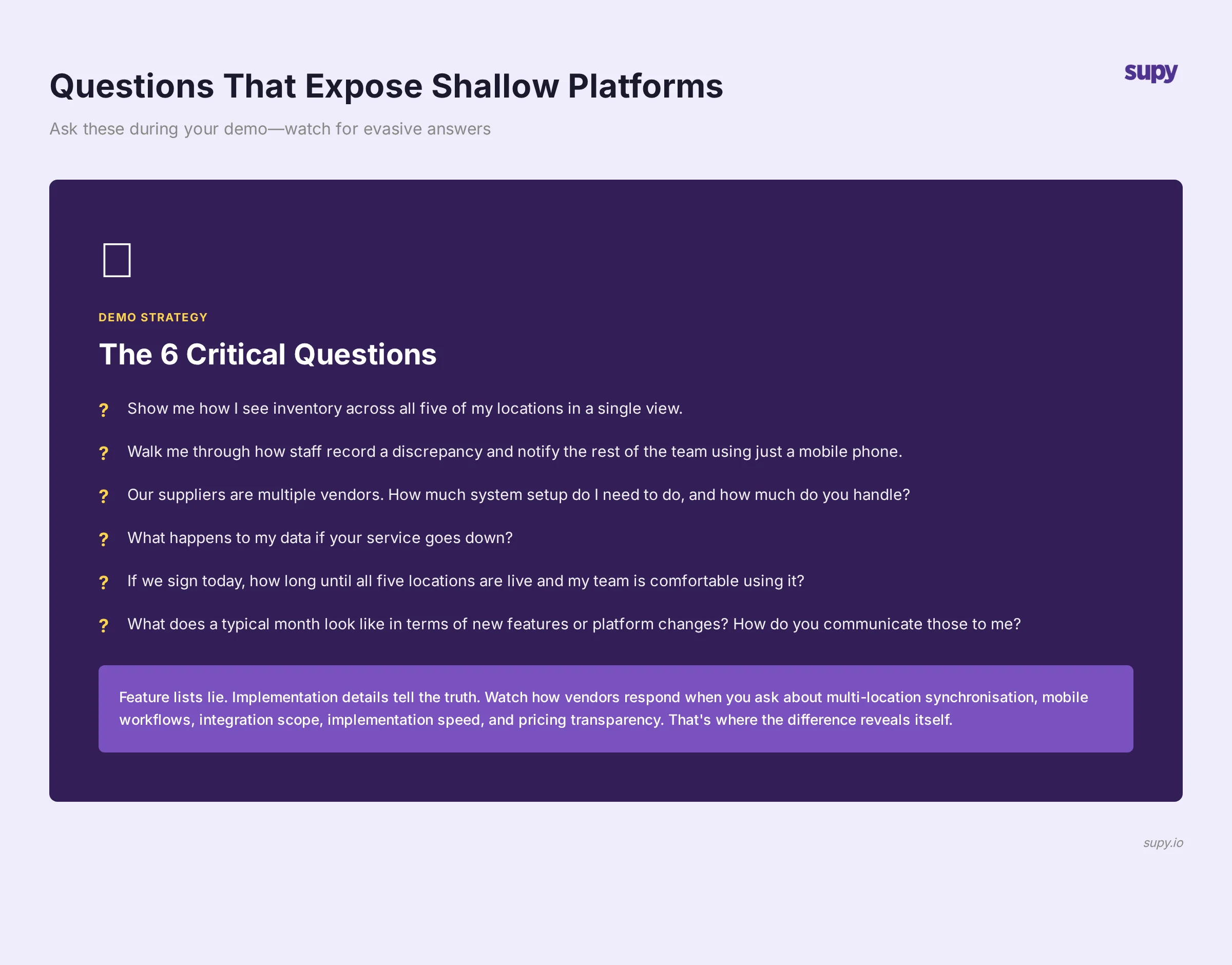
Question 1: "Show me how I see inventory across all five of my locations in a single view."
Watch what happens. Do they:
- Open five separate location dashboards? (Adequate)
- Show a company dashboard with all locations, organised by location, with aggregate totals? (Good)
- Show exceptions and anomalies highlighted automatically? (Better)
Question 2: "I'm at location A with my phone. A staff member finds a box of chicken that doesn't match our supplier invoice. Walk me through how they record the discrepancy and notify the rest of the team."
This tests mobile workflow design and team communication. A good answer: "They open the app on their phone, find the item, swipe to record a discrepancy, add a photo of the packaging, and the head of operations gets a notification immediately." A weak answer: "They'd need to email or call someone at the office."
Question 3: "Our suppliers are BlueCart, Toast POS, and a local cash-and-carry. How much of their system setup do I need to do, and how much do you handle?"
This tests integration capability. Best answer: "We connect to BlueCart and Toast directly. For your cash-and-carry, you log your purchases manually - we don't require their system integration." Weak answer: "All three suppliers need to be registered in our system before ordering integration works."
Question 4: "What happens to my data if your service goes down?"
This tests reliability. Good answer: "Our infrastructure is geographically redundant. You can continue working from any other connected device. Historical data is always accessible." Weak answer: "We guarantee 99.5% uptime." (Uptime guarantees don't help you during that 0.5%.)
Question 5: "If we sign a contract today, how long until all five locations are live and my team is comfortable using it?"
This tests implementation speed and support. Good answer: "Three to five days from contract. We'll handle data migration, and we'll provide a dedicated support person for your first week." Weak answer: "Four to six weeks, depending on your IT team's availability."
Question 6: "What does a typical month look like in terms of new features or platform changes? How do you communicate those to me?"
This tests whether the platform is static or evolving. Better platforms iterate monthly with new features, API capabilities, and efficiency improvements. They communicate changes clearly and give customers the choice to adopt or stay on the current version. Weaker platforms change infrequently and deploy updates without warning.
How Supy's Cloud Architecture Works
Supy's platform is built cloud-native from the ground up. That means every feature is designed for multi-location restaurant operations.
Real-time inventory synchronisation across locations means all your sites pull from the same stock database. When one location records a supplier delivery or inter-location transfer, every other location sees the change instantly. No manual consolidation. No data conflicts.
Mobile-first design means your kitchen staff, receiving teams, and inventory managers record stock counts on their phones without needing a desk or a second login. The app works offline - if your stock room loses connectivity, staff keep working, and the app syncs automatically when connectivity returns.
API integrations with 70+ suppliers, POS systems, and accounting platforms mean Supy pulls real-time cost updates, POS transaction data, and supplier inventory directly. Your cost of goods is automatically calculated without manual spreadsheet work.
Role-based access controls mean your kitchen manager sees only stock levels for their location. Your regional manager sees all locations but can only edit their region. Your head of purchasing sees financial data across all locations. Your operators see only what they need to do their jobs.
Multi-location features include inter-location transfer workflows, shared supplier ledgers, consolidated purchasing reports, and the ability to set par levels per location or per location-and-dish (if you run identical menus across sites, or if different locations run different menus).
Implementation takes 3-7 days. You provide your supplier list and par levels. Supy handles the data import, trains your team, and you're live.
Conclusion
The decision to move from spreadsheets or on-premise systems to cloud inventory management isn't just about technology. It's about operational visibility. It's about your head of operations seeing real-time stock across all locations instead of yesterday's data. It's about kitchen staff recording counts on their phones instead than returning to an office. It's about adding a new location in days instead of months.
The platforms that deliver this are built cloud-native from the ground up - not retrofitted from legacy on-premise systems. They prioritise real-time synchronisation, mobile-first design, seamless integrations, and transparent pricing.
When you demo platforms, watch for the features and implementation details that matter to your operation. Ask the hard questions. Watch how vendors respond when you ask about multi-location synchronisation, mobile workflows, integration scope, permission controls, implementation speed, and pricing transparency. That's where the difference reveals itself.
If you're ready to evaluate cloud inventory platforms for your restaurant group, book a demo with Supy. We'll walk you through how cloud-native architecture works across multiple locations, answer your evaluation questions, and help you model costs for your specific operation.