.jpg)


Automated Par-Level Reordering for Multi-Site Restaurants: Trigger Replenishment Before Items Run Out
What Automated Par-Level Reordering Actually Does Across Sites
Most multi-site groups already know what a par level is. The harder problem is what happens next. Even with par levels written down, reordering still depends on someone opening each order sheet and eyeballing every item against its par, site by site, before every delivery. High-velocity items run out mid-service while slower movers get over-ordered and tie up cash. Automated par-level reordering means the system, not a person, is the one comparing current stock against target stock and surfacing what needs to be ordered.
You set a par level (the amount you want on hand) and a min level (the floor you never want to drop below) for each item at each location. From there, the reorder trigger is continuous: as stock moves, the picture of what is at par, near par, or below par stays current without anyone rebuilding a spreadsheet.
The reason this matters more at multi-site scale is simple. A single-site manager can carry the par picture in their head. A group running ten or twenty branches cannot. Par levels differ by site because footfall, menu mix, and storage differ by site. Manual reordering at that scale means every branch repeats the same eyeball-and-guess routine, and head office has no consistent view of where a stockout is about to happen. Automating the trigger gives every site the same discipline and gives the group one place to see it.
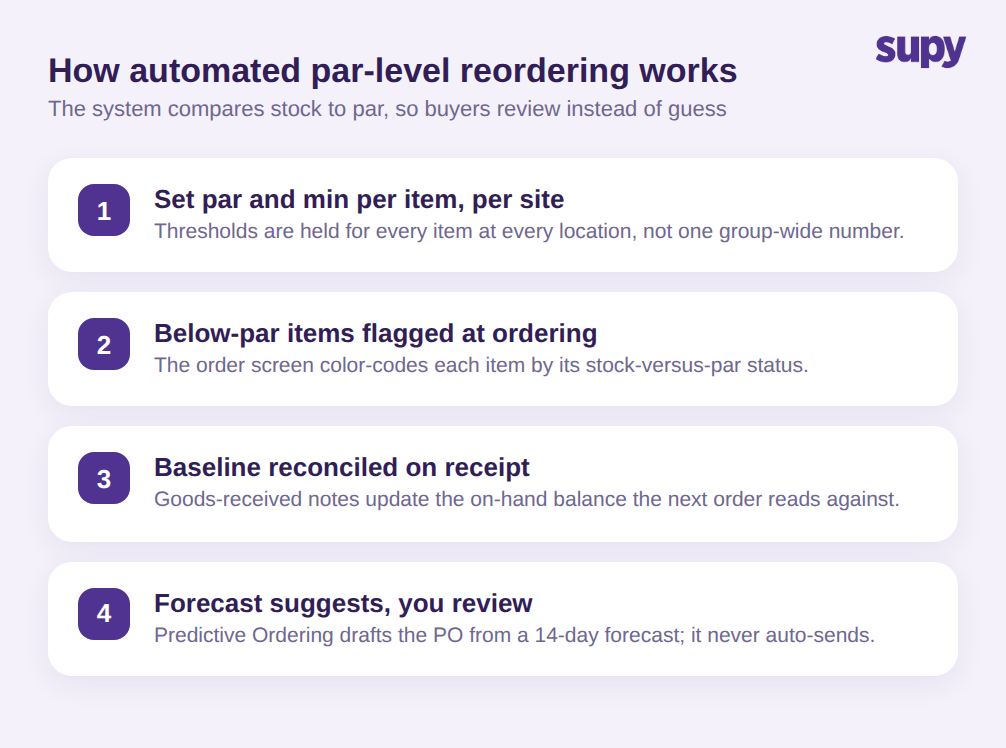
In practice, four capabilities do the work: thresholds set per item per site, below-par flagging at the point of ordering, a reorder baseline kept accurate by goods-received reconciliation, and forecast-driven suggested orders that a buyer reviews before sending. The sections below walk through each one, and where each sits on the Supy platform today.
Set Par and Min Thresholds Per Item, Per Site
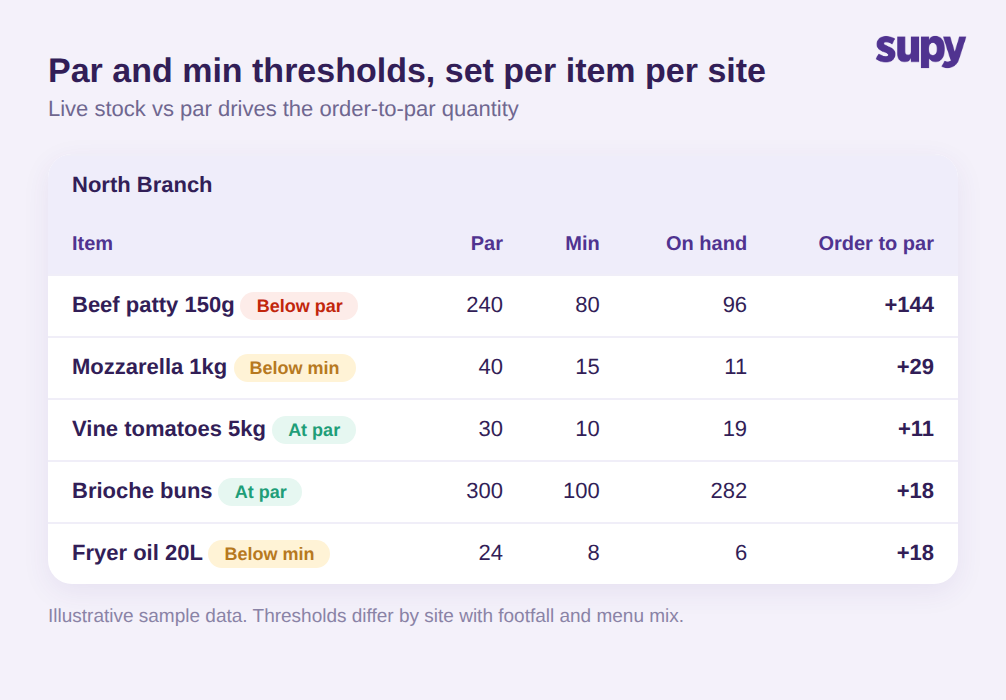
Everything downstream depends on getting the thresholds right, and getting them right per location. Supy holds a par level and a min level for every item at every site, so the trigger for reordering is specific rather than a single group-wide number that fits no branch well. Live Stock Visibility tracks real-time stock on hand by location, category, and storage unit, and flags items that fall below min or climb above par against those per-site thresholds.
That per-site precision is exactly what operators ask for. Teams running several branches have told us that par and min are currently set by hand, item by item, location by location, which is labour-intensive to set up and even harder to keep current as menus and volumes shift. The direction of travel here is toward thresholds that adjust to consumption patterns rather than sitting static, so the reorder trigger stays honest as demand changes.
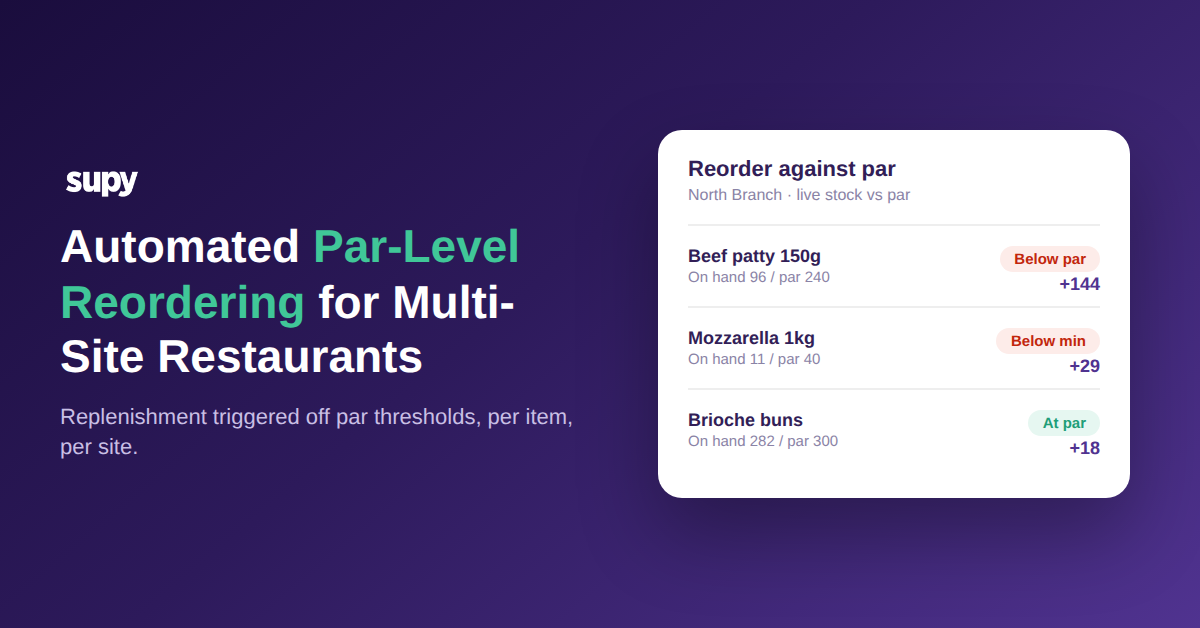
For a sense of scale, a single burger-focused branch might hold a par of 240 and a min of 80 on a 150g beef patty, a par of 300 on brioche buns, and a par of 40 with a min of 15 on 1kg mozzarella. Multiply that across every item and every site and the value of the system holding the thresholds, rather than a manager holding them in memory, becomes obvious.
See Below-Par Items at the Point of Ordering
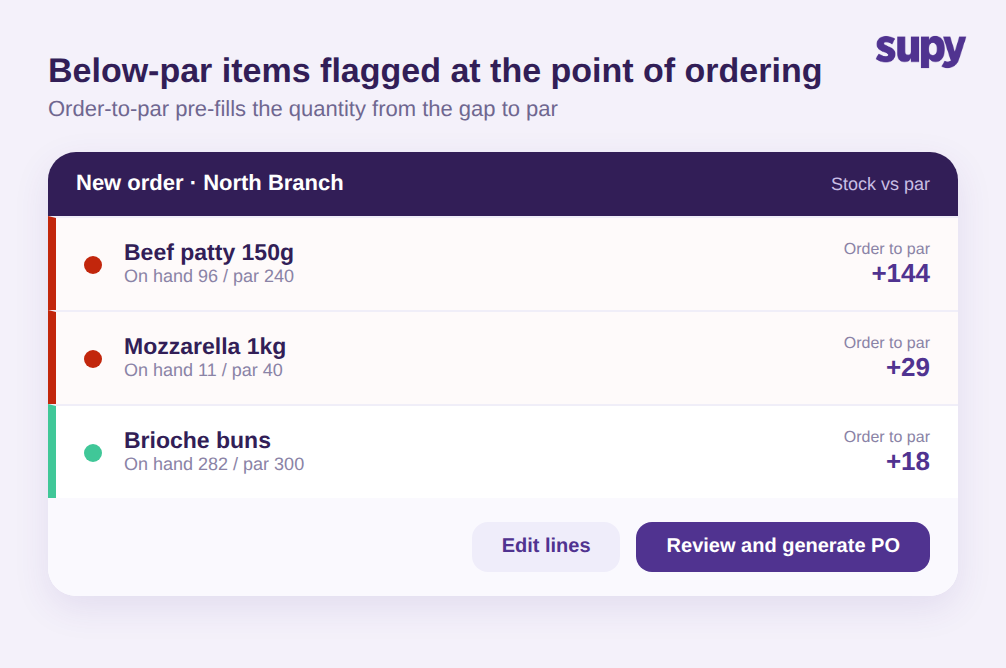
The most immediate change operators feel is at the ordering screen itself. Rather than opening a blank order and trying to remember what is low, buyers see each item color-coded by its stock-versus-par status: items at or above par read one way, items below par read another. What needs reordering is visible at a glance, without leaving the order-entry screen and without cross-checking a separate stock report.
From there, the order does not have to be typed by hand. Supy's order-to-par logic and Fill to PAR feature fill the order quantity from the gap between current stock and the par level, so a beef patty sitting at 96 against a par of 240 proposes an order of 144 rather than leaving the buyer to do the subtraction. The buyer still reviews and edits every line before a purchase order is generated, and can then send it by email, WhatsApp, or a direct supplier integration. The point is that the starting position is a pre-filled, par-aware order rather than a blank page.
This is what operators are really searching for when they look for automatic reorder point alerts for restaurant inventory: not another report, but the reorder decision surfaced inside the workflow they already use. For a group, it also means every branch orders against the same logic, so a new outlet manager is not guessing at quantities on their first week.
Keep the Reorder Baseline Accurate with Goods-Received Reconciliation
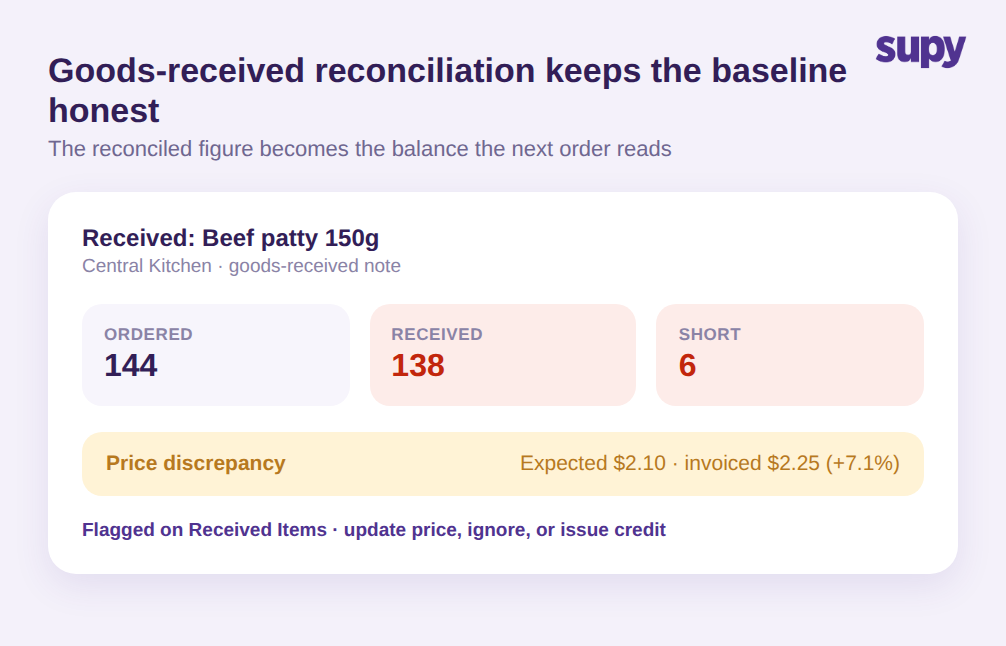
Automated reordering is only as good as the stock number it reads. If the on-hand figure is wrong, every order-to-par suggestion built on it is wrong too, and the group ends up automating a mistake at scale. This is where the goods-received step matters. When a delivery arrives, the goods-received note reconciles what was ordered against what actually turned up, and that reconciled figure becomes the updated stock balance the next order reads against. Operators have asked for exactly this: items depleted to a par level on receipt, with the receipt itself becoming the current balance, so buyers are never reordering against a stale number.
Supy keeps that baseline current in two ways. Live Stock Visibility auto-updates stock from goods-received notes and recipe usage, so there is no manual sync between receiving and the reorder picture. And the Received Items Page lays out every received item across goods-received notes as a row, defaulting to a price-discrepancy filter, so a line where 144 patties were ordered but 138 arrived, or where an expected price of 2.10 was invoiced at 2.25, is caught rather than quietly flowing into the next order. Multi-Location GRN Assignment lets one goods-received note be assigned across several locations, which keeps the baseline accurate for groups that receive centrally and distribute out.
Accurate receiving is not a glamorous part of reordering, but it is the part that decides whether the automation you build on top of it can be trusted.
Let the Forecast Suggest the Order, Then Review Every Line
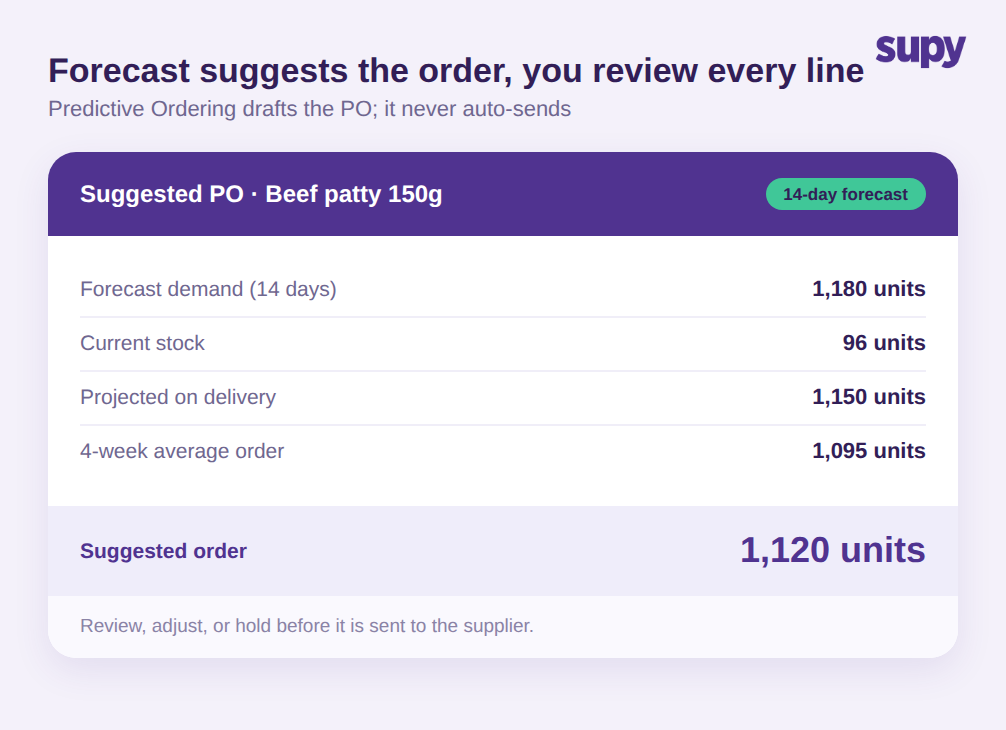
Par-based reordering answers "what am I short against my target right now." A forecast answers "what am I about to need." Supy's AI Predictive Ordering builds ready-to-submit purchase orders from the AI sales forecast, run through your recipes, minus current stock. It shows current stock, projected-on-delivery stock, the last order quantity, and a 4-week average on each line, so the buyer can see why a number is what it is. AI Sales Forecasting predicts daily sales by branch for 14 days, down to the menu item, against an 8-week historical baseline, with per-branch models.
The guardrail here is deliberate: Predictive Ordering never auto-sends. Every line is reviewed before anything goes to a supplier. For a beef patty forecast to sell around 1,180 units over the next two weeks against 96 in stock, the system might suggest an order of 1,120 units and show the projected on-hand position once it lands. The buyer confirms, adjusts, or holds. Automation proposes; the operator decides. That balance is what makes it safe to run across many sites at once.
For recurring, predictable lines, Order and Requisition Templates and Standing Orders take the repetitive ordering off the buyer's plate entirely, running scheduled orders built on pre-set item lists. Between par-based triggers for the day-to-day, templates for the routine, and forecast-driven suggestions for the planned, the manual eyeball step shrinks to review rather than reconstruction.
What This Changes, and Where to Start
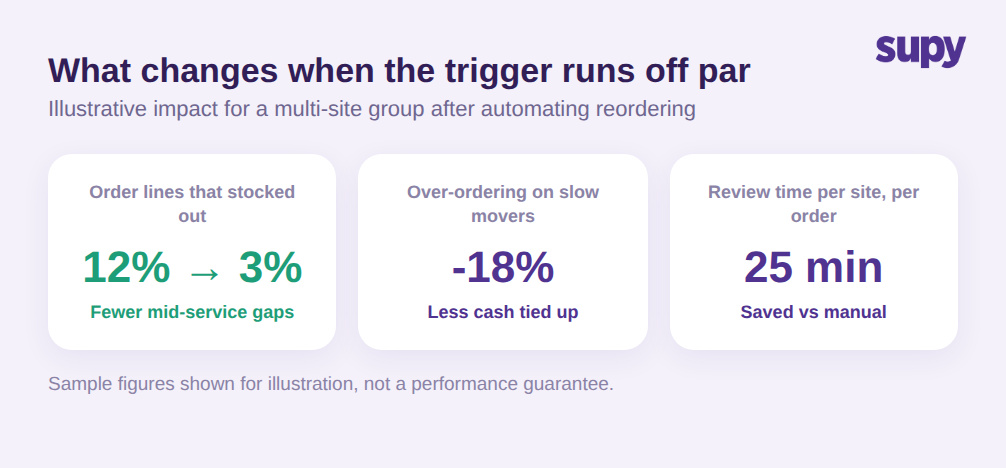
Here is the quick check. If your branches still reorder by opening each order sheet and comparing items to par by hand, you are carrying three avoidable costs: stockouts on fast movers, over-ordering on slow ones, and the time managers spend rebuilding the same picture before every delivery. The first move is not a big migration. It is getting par and min thresholds set correctly per item per site, because every downstream trigger, flag, and forecast reads from those numbers. Get the thresholds right, turn on below-par flagging at the point of ordering, and let goods-received reconciliation keep the baseline honest.
One note on honesty about what is live. The capabilities described here, per-site par and min thresholds, below-par flagging at the point of ordering, order-to-par and Fill to PAR quantities, goods-received reconciliation, and forecast-driven suggested orders, are all live on Supy today. Proactive in-app and email notifications that ping a group the moment an item crosses below its threshold, before anyone opens an order at all, are in active development rather than live. When they land, the trigger moves from "visible when you look" to "pushed to you before you look." For a fuller grounding in the thresholds everything here depends on, see our guide to par-level inventory management.
If you want to see automated par-level reordering running against your own items and sites, the fastest way is to walk through it on your own data. Book a demo and we will show you the reorder trigger end to end.