.jpeg)


Kostenlose Vorlage
Der Betrieb eines erfolgreichen Restaurants setzt eine effiziente Verwaltung Ihrer Bestände voraus. Doch die Warenwirtschaft Ihres Restaurants kann schnell überwältigend werden — sie ist alles andere als eine leichte Aufgabe.
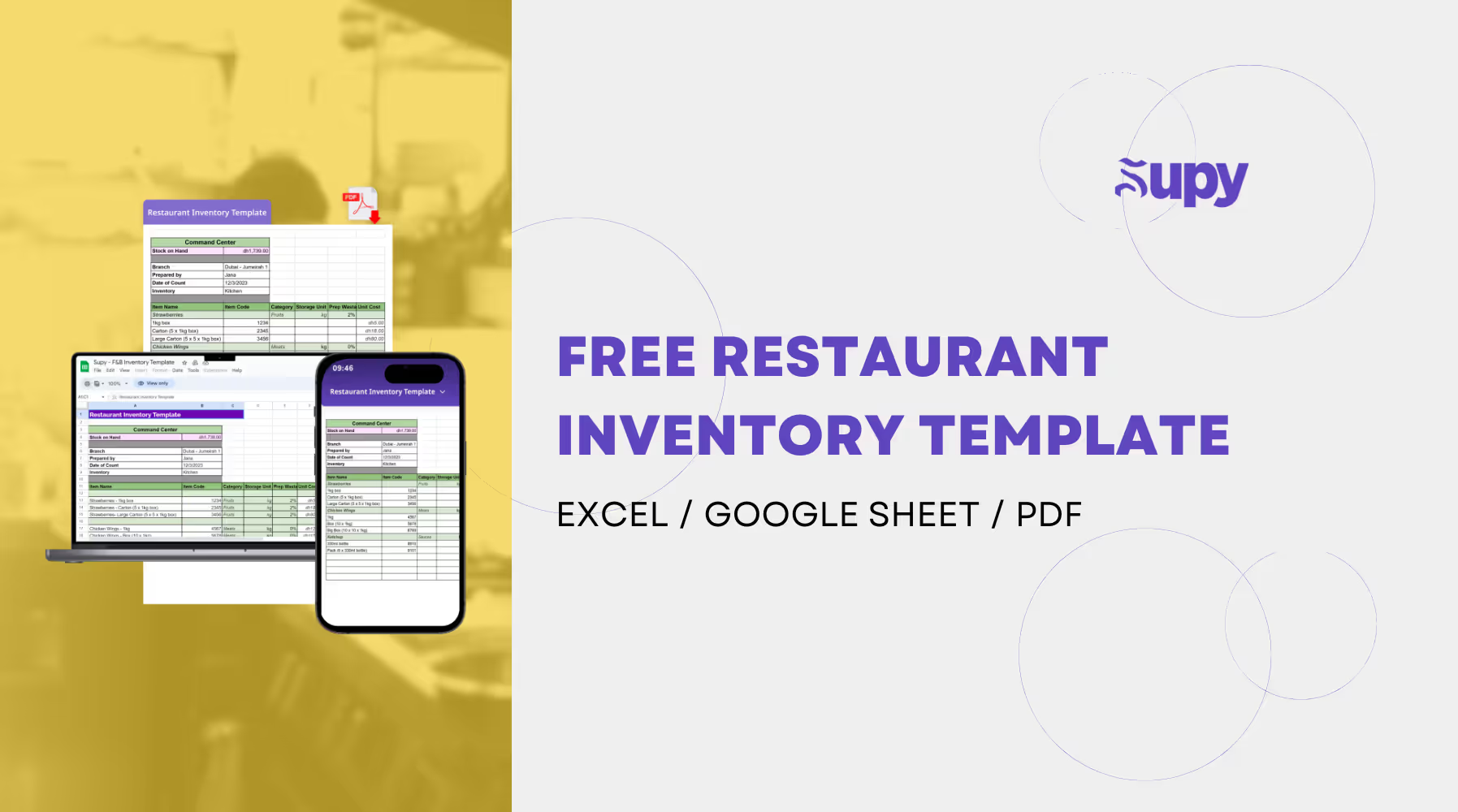
Unsere kostenlose Vorlage für die Warenwirtschaft von Restaurants, verfügbar für Excel & Google Sheets, ist ein hervorragender Ausgangspunkt, um Ihre Bestände zu erfassen und zu überwachen.
Dieser Artikel beschreibt außerdem Best Practices, die Sie anwenden können, um die Warenwirtschaft Ihres Restaurants zur zweiten Natur für Sie und Ihr Restaurantpersonal zu machen.
Vorlage für die Warenwirtschaft von Restaurants : Was Sie damit tun können
Unsere kostenlose Vorlage ist eine direkte Umsetzung der Best Practices, die wir in unsere Warenwirtschaftssoftware für Restaurants eingebettet haben. Natürlich ist das Schöne an Software, dass viele der unten beschriebenen Aufgaben für Sie automatisiert werden! Der Einstieg mit einer einfachen Tabelle ist jedoch mehr als ausreichend, um loszulegen.
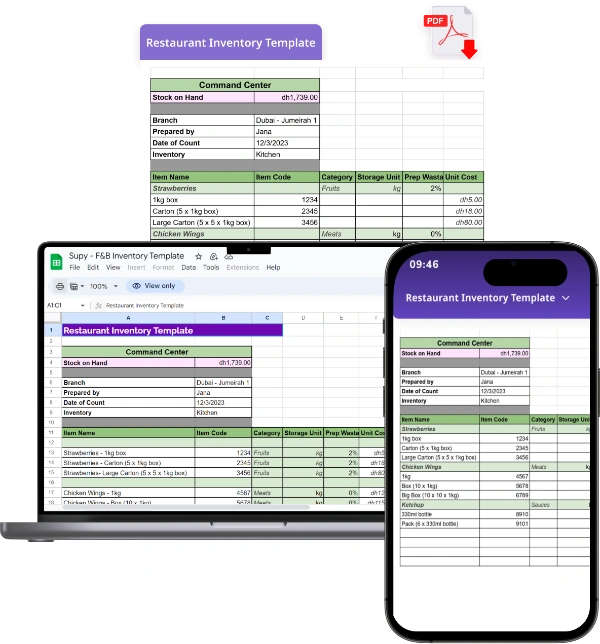
Mit dieser Vorlage können Sie Ihre Artikel auflisten, deren Menge, Preis und Lieferanten angeben sowie Sollbestände festlegen und überwachen (die optimale Lagerbestandsmenge, die Sie von jedem Zutaten benötigen, um einen reibungslosen Betrieb zu gewährleisten).
Sie können auch die verschiedenen Verpackungen angeben, in denen jeder Artikel geliefert wird, sowie die Kategorie jedes Artikels, die Basismaßeinheit des Artikels und seine Kosten. Sie können den Bestand, den Lagerwert und die zu bestellende Menge einsehen.
Unsere Vorlage für die Warenwirtschaft von Restaurants stellt Ihnen auch alle Formeln bereit, die Sie benötigen, um Ihren Bestand schnell und präzise zu zählen. Mit anderen Worten: Supy übernimmt die Einheitenumrechnungen für Sie. Sie können unsere Tabelle auch nutzen, um den Bestand im Team zu zählen, indem Sie verschiedene Artikelkategorien verschiedenen Teammitgliedern zuweisen. Supy kümmert sich dann darum, die gezählten Artikel für Sie zusammenzuführen. Sie können die Reibung weiter verringern, indem Sie diese Tabelle auf einem mobilen Gerät öffnen, um Stift-und-Papier-Zählungen zu vermeiden, die häufig zu menschlichen Fehlern führen.
Empfohlene Lektüre : Warenwirtschaft im Restaurant : Die 8 Tipps, die Sie kennen müssen
11 Tipps für eine leistungsstarke und profitable Warenwirtschaft im Restaurant
Ihren Restaurantbestand aktuell, zuverlässig und präzise zu halten ist keine leichte Aufgabe : Sie erfordert Disziplin, strenge Prozesse, engagiertes Personal und im Idealfall geeignete Kostenlose Tools (d. h. reibungslose Software).
Im Folgenden finden Sie zahlreiche Best Practices, die Sie ergänzend zu unserer kostenlosen Vorlage für die Warenwirtschaft von Restaurants anwenden können, um auf dem richtigen Weg zu sein :
- Bestandsereignisse in Echtzeit erfassen
- Papier hinter sich lassen : Auf digitale Lösungen setzen
- Artikel & Rezepte präzise konfigurieren
- Soll- & Mindestbestände festlegen
- Den Restaurantbestand kategorisieren
- Kosten- & Erloszentren einrichten
- Klare Benutzerrollen & -berechtigungen vergeben
- Regelmäßige Bestandszählungen & Stichproben durchführen
- Beschaffungsprozesse optimieren
- Zeit für Reporting & Analyse einplanen
- Mitarbeiter zur Verantwortung ziehen
1. Bestandsereignisse in Echtzeit erfassen
Nichts geht in Ihren Restaurantbestand hinein oder heraus, wenn Sie es nicht erfassen ! Ja, Präzision beginnt damit, Ihre Rechnungen, Abfälle und Abgänge jedes Mal genau zu erfassen, wenn Sie Artikel erhalten, Zutaten verschwenden oder Artikel verkaufen.
Viele Restaurants haben nach wie vor Schwierigkeiten, mit dem Tempo mitzuhalten — insbesondere aufgrund der Reibung, die bei der manuellen und/oder papierbasierten Erfassung von Bestandsereignissen entsteht, was die Nachverfolgung nahezu aller Bestandsereignisse zu einer zeitaufwändigen und ermüdenden Aufgabe macht. In Fällen, in denen bereits ein Warenwirtschaftssystem installiert wurde, kann mangelnde Sorgfalt bei der Erfassung von Bestandsereignissen auf die schlechte Benutzerfreundlichkeit des Systems zurückzuführen sein. Eine schwierige Benutzererfahrung veranlasst Teams dazu, die Erfassung der Rechnung zu verzögern (bester Fall) oder sie gar nicht zu erfassen (schlimmster Fall).
Bedenken Sie auch den Einsatz mobilfreundlicher Lösungen. Die Echtzeit-Erfassung von Ereignissen wird noch einfacher, wenn Sie ein mobiles Gerät verwenden. Die Notwendigkeit, die Erfassung zu verzögern, weil Sie vor einem Computer sein müssen, fördert den Mangel an Sorgfalt und erhöht menschliche Fehler.
2. Papier hinter sich lassen : Auf digitale Lösungen setzen
Bestandszählungen auf Papier durchzuführen ist ein umständlicher und fehleranfälliger Prozess, den Unternehmen unbedingt vermeiden sollten. Die manuelle Natur papierbasierter Bestandszählungen führt zu Ineffizienz und Verzögerungen. Das physische Erfassen und Addieren jedes Artikels ist zeitaufwändig, beeinträchtigt die Produktivität und verschwendet wertvolle Ressourcen. Darüber hinaus fehlt papierbasierter Bestandszählung die Echtzeit-Transparenz und -Nachverfolgung, was es schwierig macht, Abweichungen zu erkennen oder Bestandsniveaus präzise zu überwachen. Deshalb sollten Sie digitale Lösungen (einschließlich Excel und Google Spreadsheets) gegenüber physischem Papier bevorzugen.
In der heutigen technologisch fortgeschrittenen Welt (und dem scharfen Wettbewerb, der keinen Raum für Fehler lässt) bieten digitale Warenwirtschaftssysteme überlegene Präzision, Geschwindigkeit und Effizienz, optimieren Abläufe und ermöglichen es Unternehmen, datengestützte Entscheidungen zu treffen.
3. Artikel & Rezepte präzise konfigurieren
Die genaue Einrichtung der Grundlage Ihres Bestands (Ihre Artikel, Rezepte, Lieferanten...) erhöht Ihre Chancen, dessen Präzision zu erhalten.
Konfigurieren Sie Ihre Artikel, indem Sie deren Maßeinheiten, den Lagerort sowie Soll- und Mindestbestände pro Inventar (Küche, Bar, Ausstattung...) festlegen. Geben Sie die verschiedenen Verpackungen an, in denen sie geliefert werden, und welcher Lieferant sie liefert, sowie die Kosten jedes Artikels pro Lieferant und Verpackung. Dies ermöglicht Ihnen schnellere und präzisere Zählungen.
Konfigurieren Sie Ihre Rezepte, indem Sie die Zutaten klar in verständlichen Maßeinheiten angeben. So stellen Sie sicher, dass Ihre Rezepte präzise reproduzierbar sind und Ihr Bestand exakt reduziert wird, wann immer ein Verkauf oder Verlust auftritt.
4. Soll- & Mindestbestände festlegen
Das Festlegen von Soll- und Mindestbeständen in Ihrer Warenwirtschaft ist entscheidend, um einen reibungslosen Restaurantbetrieb zu gewährleisten. Sollbestände helfen Ihnen, die richtige Balance zu finden: genügend Bestand, um die Kundennachfrage zu erfüllen, ohne übermäßige Überbestände. Mindestbestände wiederum dienen als Sicherheitsnetz und stellen sicher, dass Sie nie kritische Zutaten oder Materialien ausgehen. Diese Niveaus geben die Mindestmenge eines Artikels an, die jederzeit in Ihrem Bestand vorhanden sein sollte.
Das strategische Festlegen von Soll- und Mindestbeständen ermöglicht es Ihnen, die Warenwirtschaft zu optimieren, Verschwendung zu reduzieren und Kosten zu kontrollieren. Sie können vermeiden, übermäßiges Kapital in überschussige Bestände zu binden, während Sie das Risiko von Bestandsengpässen minimieren, die sich auf die Kundenzufriedenheit auswirken können.
5. Den Restaurantbestand kategorisieren
Die Organisation Ihres Bestands in Kategorien wie Lebensmittel, Getränke, Verderb- und Verbrauchsmaterial bietet zahlreiche Vorteile. Erstens vereinfacht es die Nachverfolgung von Artikeln, sodass Sie bestimmte Produkte schnell finden und präzise Bestandsaufzeichnungen führen können. Durch die Kategorisierung nach Art können Sie schnellumschlagende Produkte leicht identifizieren, die Nachfrage vorausplanen und sicherstellen, dass beliebte Artikel stets ausreichend vorrätig sind. Ebenso hilft die Kategorisierung dabei, langsam verkaufte Produkte zu identifizieren, sodass Sie geeignete Maßnahmen ergreifen können, wie Aktionen anzubieten oder Bestellmengen anzupassen. Zusätzlich verbessert die Organisation des Bestands in Kategorien Ihre Fähigkeit, Nachschub zu planen, sodass wesentliche Artikel rechtzeitig aufgefüllt werden und das Risiko von Überbeständen minimiert wird. Dieser systematische Ansatz optimiert Abläufe, verbessert die Warenwirtschaft und führt letztendlich zu höherer Effizienz und Kundenzufriedenheit.
6. Kosten- & Erloszentren einrichten
Die Trennung Ihrer Bestände innerhalb eines einzelnen Standorts — beispielsweise ein Bar-Inventar und ein Küchen-Inventar — ist für eine effektive Warenwirtschaft wichtig. Hier ist, warum es wichtig ist :
Kostenverfolgung: Durch die Einrichtung separater Bestände (oder Kostenzentren) können Sie Ausgaben für bestimmte Bereiche Ihres Restaurants präzise nachverfolgen. Ob Küche, Bar, Speisesaal oder andere Abteilungen — separate Kostenzentren ermöglichen es Ihnen, die mit jedem Bereich verbundenen Kosten und die Rentabilität zu überwachen und zu analysieren. Dieser Einblick ermöglicht es Ihnen, fundierte Entscheidungen zu treffen und Verbesserungspotenziale zu identifizieren.
Bestands- und Abweichungskontrolle: Die Führung separater Bestände für jeden Bereich ermöglicht eine bessere Kontrolle und Nachverfolgung der Bestandsniveaus. Sie können bestimmten Mitarbeitern die Aufsicht über jeden Bestand zuweisen und so eine ordnungsgemäße Verwaltung, rechtzeitige Auffüllung und Reduzierung des Engpassrisikos sicherstellen. Dieses Kontrollniveau hilft, sowohl Überberäte als auch Unterverfügbarkeit zu vermeiden, was zu reibungsloseren Abläufen und einem besseren Kundenservice führt.
Sie können gerne Kopien unserer kostenlosen Vorlage erstellen und jeder Ihrer Bestandslisten eine Kopie zuweisen.
7. Klare Benutzerrollen & -berechtigungen vergeben
Der Hauptgrund für Verschwendung ist Überbeschaffung, die häufig auf mangelnde Benutzerkontrolle und einen auf Intuition statt auf Daten basierenden Einkaufsentscheidungsprozess zurückzuführen ist. Vergeben Sie klare Benutzerrollen an jeden in Ihrem Team. Vergeben Sie frühzeitig Rechte wie "Bestellung entwerfen" und "Bestellung senden" und entscheiden Sie, wem das Recht zurübertragen werden soll, die Bestellung aufzugeben — vom Sous-Chef über den Küchenchef bis hin zum Beschaffungsmanager oder Kostencontroller.
8. Regelmäßige Bestandszählungen & Stichproben durchführen
Abweichungen werden berechnet, indem Ihr theoretischer Bestandswert mit Ihrem tatsächlichen Bestandswert verglichen wird. Ist der tatsächliche Wert höher, haben Sie möglicherweise Artikel nicht korrekt erfasst und sollten prüfen, ob Ihre Mitarbeiter die Rechnungen richtig erfassen. Ist der tatsächliche Wert niedriger, liegt eine ernsthafte Abweichung vor, die Sie untersuchen müssen — von Diebstahl bis hin zu nicht erfasstem Abfall. Und der beste Weg, eine Abweichung festzustellen und Maßnahmen zu ergreifen, ist, Ihren Bestand so regelmäßig wie möglich zu zählen.
9. Beschaffungsprozesse optimieren
Etablieren Sie Beziehungen zu zuverlässigen Lieferanten, um rechtzeitige und konstante Lieferungen zu gewährleisten. Überprüfen und bewerten Sie Ihre Lieferanten regelmäßig hinsichtlich Qualität, Zuverlässigkeit und Kosteneffektivität. Darüber hinaus stellt die regelmäßige und präzise Erfassung Ihrer Rechnungen saubere, genaue Lieferantenleistungsdaten sicher, anhand derer Sie sehen können, mit welchem Lieferanten es sich am besten zusammenarbeiten lässt. Ein weiterer Grund, Ihre Rechnungen im Blick zu behalten! Messen Sie Einsparungen pro Lieferant, gekaufte Mengen pro Lieferant und verhandeln Sie bessere Konditionen.
10. Zeit für Reporting & Analyse einplanen
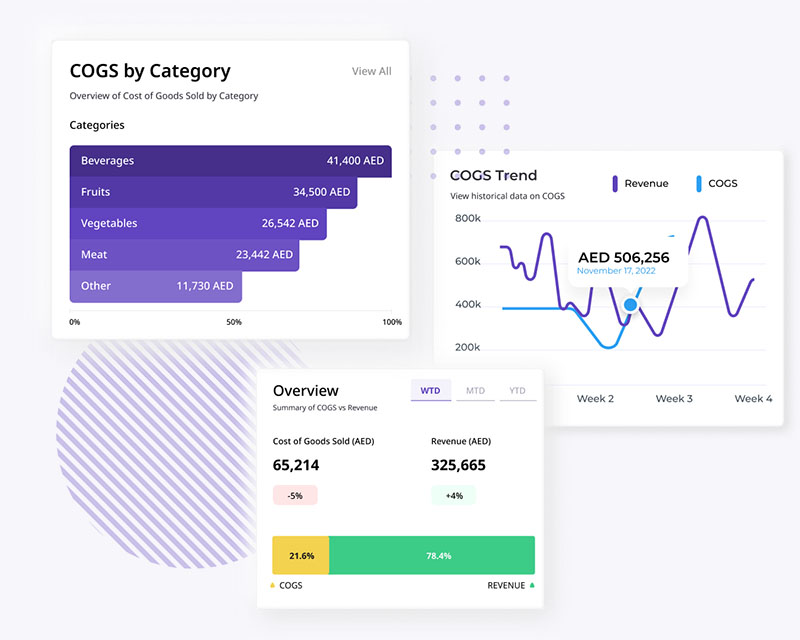
Regelmäßiges Reporting gibt Ihnen Einblicke in die Leistung Ihrer Warenwirtschaft und ermöglicht datengestützte Entscheidungen. Durch die Analyse von Berichten können Sie Trends, Muster und Verbesserungsbereiche identifizieren. Berichte können wertvolle Informationen zu Lagerumschlag, Bestandsniveaus und Verkaufstrends liefern. Die Einplanung dedizierter Zeit für Reporting gewährleistet, dass Sie den Status Ihrer Warenwirtschaft umfassend verstehen und Bestellungen optimieren, Kosten senken und die Gesamteffizienz verbessern können.
Die Einplanung von Zeit für Untersuchungen ist entscheidend, wenn Abweichungen oder Probleme in Ihrer Warenwirtschaft auftreten. Ob Schwund, Bestandsabweichungen oder unerwartete Veränderungen bei Bestandsniveaus — die Untersuchung der Grundursachen ist unabdingbar. Durch gründliche Untersuchungen können Sie potenzielle Fehler, Ungenauigkeiten oder sogar Diebstahl erkennen. Dies ermöglicht es Ihnen, Korrekturmaßnahmen zu ergreifen, präventive Maßnahmen umzusetzen und die Integrität Ihres Warenwirtschaftssystems aufrechtzuerhalten.
11. Mitarbeiter zur Verantwortung ziehen
Das Zur-Verantwortung-Ziehen von Mitarbeitern gewährleistet Präzision, Compliance und kontinuierliche Verbesserung. Durch klare Erwartungen, Leistungsüberwachung und Feedback fördern Sie ein Gefühl der Verantwortung und des Eigentums. Verantwortungsbewusste Mitarbeiter halten sich eher an etablierte Verfahren,
erfassen Bestandsdaten präzise und melden Probleme umgehend. Diese Verantwortlichkeit fördert zuverlässige Bestandsinformationen, minimiert Fehler und verbessert die Gesamteffizienz des Betriebs.
Fazit
Ihren Lebensmittelbestand präzise, zuverlässig und aktuell zu halten ist keine leichte Aufgabe. Es gibt jedoch einige Techniken, die Sie üben können, um diese entscheidende Aufgabe im Griff zu behalten.
- Ereignisse in Echtzeit erfassen, um Verzögerungen und Vergessen zu vermeiden. Mobilfreundliche Lösungen nutzen.
- Auf digitale Lösungen setzen und Papierkram hinter sich lassen. Papierkram erhöht das Risiko menschlicher Fehler und reduziert die Produktivität erheblich.
- Von Anfang an einen hohen Präzisionsstandard für Ihren Bestand setzen, indem Sie Ihre Artikel und Rezepte präzise konfigurieren.
- Das Festlegen von Soll- und Mindestbeständen in der Warenwirtschaft ist für einen reibungslos funktionierenden Restaurantbetrieb unabdingbar. Sollbestände schaffen eine Balance zwischen Kundennachfrage und Überbeständen, während Mindestbestände sicherstellen, dass kritische Materialien stets verfügbar sind. Durch das strategische Festlegen dieser Niveaus optimieren Restaurants die Warenwirtschaft, reduzieren Verschwendung und kontrollieren Kosten.
- Ihren Bestand kategorisieren, um die Leistung auf Kategorienebene besser zu überwachen und eine präzisere Kontrolle über Ihren Bestand zu erhalten.
- Bestände für Bar und Küche innerhalb eines einzelnen Standorts zu trennen verbessert Organisation, Effizienz und Kontrolle.
- Klare Benutzerberechtigungen in Ihrem Team vergeben, um größere Kontrolle und Verantwortlichkeit zu etablieren.
- Regelmäßige Bestandszählungen durchführen, um den Inhalt Ihres Bestands so regelmäßig wie möglich zu aktualisieren und Abweichungen zu identifizieren und zu beheben, bevor sie sich wiederholen.
- Ihre Beschaffungsprozesse optimieren, um rechtzeitige und konstante Lieferungen zu gewährleisten.
- Zeit für Reporting und Analyse einplanen, da dies Einblicke in die Leistung Ihrer Warenwirtschaft bietet und Zeit freisetzt, um datengestützte Entscheidungen zu treffen.
- Das Zur-Verantwortung-Ziehen von Mitarbeitern fördert Verantwortungsbewusstsein, Präzision und Compliance und führt zu zuverlässigen Bestandsinformationen und verbesserter Betriebseffizienz.
Weitere Ressourcen
- Die Funktionen, auf die Sie 2024 bei einer Warenwirtschaftssoftware für Restaurants achten sollten
- So verwalten Sie Ihre Stammartikeliste in einer Warenwirtschaftssoftware für Restaurants
- Was ist die Wareneinsatzabweichung & wie können Sie sie kontrollieren
- So berechnen Sie Lebensmittelkostenprozentsätze
- 10 Tipps zur Reduzierung von Lebensmittelverschwendung im Restaurant