.jpeg)


Die richtige Warenwirtschaft für Restaurants wählen: Funktionen im Überblick

Mittlerweile ist uns allen bewusst, dass nicht jede Warenwirtschaftssoftware für Restaurants gleich ist. Die Wahl des richtigen Systems bedeutet nämlich mehr als nur eine digitale Inventur – es geht darum, reale Herausforderungen im Restaurantbetrieb zu lösen. Verlieren Sie durch Verschwendung und Überbestellungen Geld? Kämpfen Sie mit Fehlbeständen, die den Service stören? Verbringen Sie zu viel Zeit mit manuellen Bestandsprüfungen? Die richtige Software sollte Ihnen helfen, diese Probleme zu beseitigen und die Warenwirtschaft reibungslos und mühelos zu gestalten.
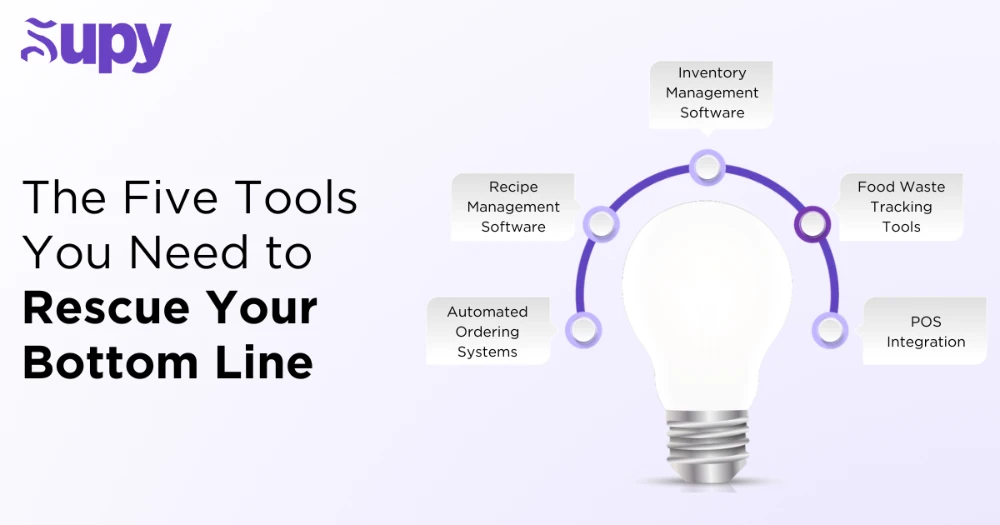
Doch bei so vielen Optionen auf dem Markt – wie wissen Sie, welche die richtige für Sie ist? Obwohl nicht jede beworbene Funktion unverzichtbar ist, gibt es bestimmte Merkmale, deren Fehlen sofortige Ausschlusskriterien darstellen. Wenn Ihr System beispielsweise keine Automatisierung, keine Echtzeit-Bestandsverfolgung und keine Kassensystemintegration bietet, könnte es am Ende mehr Arbeit verursachen als es Ihnen abnimmt.
- Funktion Nr. 1: Echtzeit-Bestandsverfolgung
- Funktion Nr. 2: Automatisierte Inventur & Warnungen
- Funktion Nr. 3: Rezept- & Menümanagement-Integration
- Funktion Nr. 4: Lieferantenverwaltung & Beschaffung
- Funktion Nr. 5: Controlling und automatisiertes Reporting
- Funktion Nr. 6: Multi-Standort- oder Cloud-Zugang
- Funktion Nr. 7: Nahtlose Integration mit Kassensystem und Buchhaltung
- Weitere Überlegungen
- Fazit
- Über Supy
In diesem Leitfaden erläutern wir die wichtigsten Funktionen, auf die Sie bei der Warenwirtschaftssoftware für Restaurants achten sollten. Am Ende dieses Blogs wissen Sie genau, welche Funktionen und Vorteile Sie priorisieren müssen, um das Restaurantmanagement effizient, rentabel und stressfrei zu gestalten.
Bereit, Ihre Suche zu vereinfachen? Lassen Sie uns in die Top 7 der Funktionen für Warenwirtschaftssoftware eintauchen, die wirklich einen Unterschied machen!
1. Funktion Nr. 1: Echtzeit-Bestandsverfolgung
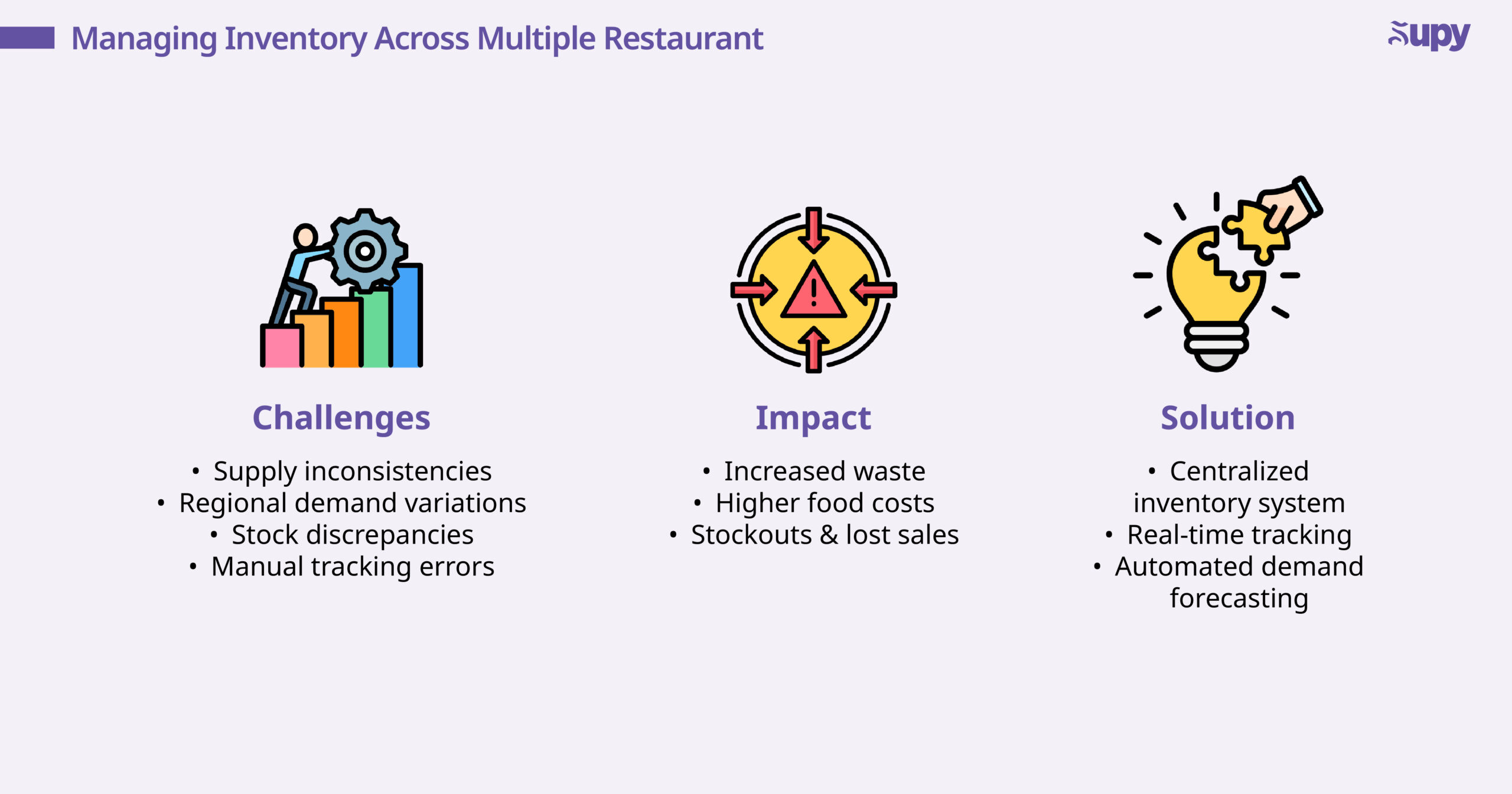
Eine der wichtigsten Funktionen jeder Warenwirtschaftssoftware für Restaurants ist die Echtzeit-Bestandsverfolgung. Im modernen Restaurantbetrieb ist das Führen eines Restaurants ohne diese Funktion wie Autofahren ohne Tankuhr – man weiß nie, wann man leer läuft! Ohne Echtzeit-Bestandsverfolgung sind Sie gezwungen, sich auf manuelle Aktualisierungen und veraltete Berichte zu verlassen – was zu Rätselraten, Bestandsdifferenzen und kostspieligen Überraschungen mitten im Service führt.
Mit Echtzeit-Tracking werden Ihre Lagerbestände automatisch aktualisiert, sobald alte Zutaten verbraucht und neue Bestellungen eingegangen sind. Das bedeutet kein hastiges Suchen mehr, wenn ein Schlüsselartikel während der Stoßzeiten unerwartet ausgeht. Mit dieser Funktion stehen Ihnen jederzeit genaue, aktuelle Bestandsdaten zur Verfügung.
Doch wie können wir die Echtzeit-Verfolgung noch leistungsfähiger machen?
Die Antwort liegt in der mobilen Inventur. Durch die Aktualisierung von Lagerbeständen auf einem Tablet oder einer mobilen App kann Ihr Personal nun spontane Zählungen durchführen, Barcodes scannen und Lagerbestände sofort anpassen – ohne den Service zu unterbrechen!
Das Fazit
Jedes System, das keine Echtzeit-Verfolgung bietet, setzt Sie dem Risiko aus, mit verzögerten Berichten, manuellen Fehlern und unerwarteten Engpässen allein umgehen zu müssen. Mit der richtigen Software können Sie Ihren Bestand genau halten, Lebensmittelverschwendung reduzieren und Last-Minute-Bestellungschaos verhindern!
2. Funktion Nr. 2: Automatisierte Inventur & Warnungen
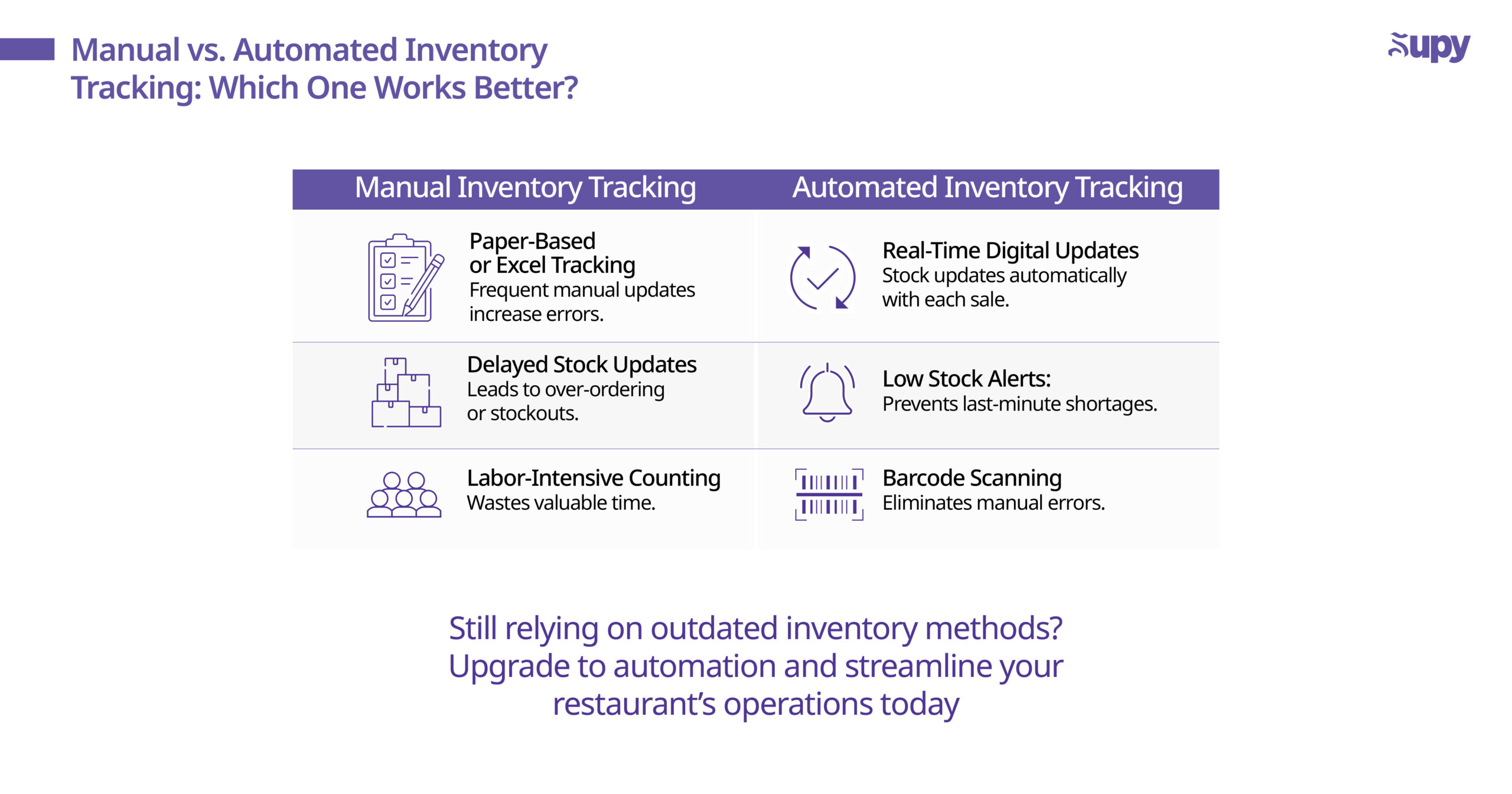
Die manuelle Bestandsverfolgung ist eine zeitaufwändige Aufgabe, die anfällig für menschliche Fehler ist. Jede gute Warenwirtschaftssoftware für Restaurants sollte Ihnen diese Last abnehmen, indem sie die Inventur automatisiert und Echtzeit-Warnungen bei niedrigen Lagerbeständen ausgibt.
Mindestbestand-Warnungen einrichten
Eine der wertvollsten Funktionen der automatisierten Inventur und der Warnungen ist die Möglichkeit, Mindestbestände festzulegen, d. h. das System benachrichtigt Sie automatisch, wenn ein Artikel unter einen vordefinierten Schwellenwert fällt. Kein hastiges Nachbestellen mehr, wenn Sie merken, dass eine wichtige Zutat aufgebraucht ist – Mindestbestand-Warnungen geben Ihnen genug Zeit zum Auffüllen, bevor Sie leer laufen.
Barcode-Scanning & RFID-Integration
Eine weitere Funktion, auf die Sie achten sollten, ist das Barcode-Scanning oder RFID-Tracking, um Ihre Inventur zu vereinfachen. Anstatt darauf angewiesen zu sein, dass das Personal Artikel manuell zählt, können sie Produkte ein- und ausscannen und Ihre Bestandsaufzeichnungen sofort aktualisieren. Einige Plattformen integrieren sich sogar mit Ihrem Kassensystem und passen die Lagerbestände automatisch auf Basis der Verkaufsdaten an.
Das Fazit
Wenn Ihr Warenwirtschaftssystem die Lagerbestände nicht in Echtzeit verfolgt oder Sie nicht benachrichtigt, wann Sie nachbestellen sollen, riskieren Sie Umsatzausfälle und Störungen im Küchenablauf. Automatisierung spart Arbeitszeit, verhindert Fehlbestände und gewährleistet einen reibungslosen Küchenbetrieb.
3. Funktion Nr. 3: Rezept- & Menümanagement-Integration
Als Nächstes: Ihre Warenwirtschaftssoftware sollte mehr leisten als nur den Bestand zu verfolgen – sie sollte direkt mit Ihren Rezepten und der Menükalkulation verbunden sein. Warum? Weil der Bestand mit dem zusammenhängt, was Sie verkaufen, nicht nur mit dem, was Sie einkaufen.
Ein gutes System sollte es Ihnen ermöglichen, Rezepte mit genauen Zutatenmengen einzugeben, sodass das System beim Verkauf von Menüartikeln (bei POS-Integration) automatisch die richtige Menge an Zutaten vom Bestand abzieht. Dies verhindert ungenaue Bestandszählungen und macht die Nachbestellung präziser.
Ebenso sollte ein gutes Warenwirtschaftssystem die Verfolgung der Menürentabilität ermöglichen. Das bedeutet, dass Ihre Software die Kosten pro Gericht berechnet, sodass Sie sehen können, ob Ihre Menüpreise tatsächlich mit Ihren Ausgaben übereinstimmen. Wenn sich die Zutatenpreise ändern, sollte das System die Rezeptkosten in Echtzeit aktualisieren, sodass Sie Preise anpassen oder Portionen optimieren können, bevor Gewinne sinken.
Das Fazit
Ihre Warenwirtschaftssoftware für Speisen und Getränke sollte mit Rezepten und Menükosten verknüpft sein und Lagerbestände sowie Preise automatisch aktualisieren. Dies verhindert Fehler, verbessert die Rentabilität und hilft Ihnen, datengestützte Entscheidungen zu treffen.
4. Funktion Nr. 4: Lieferantenverwaltung & Beschaffung
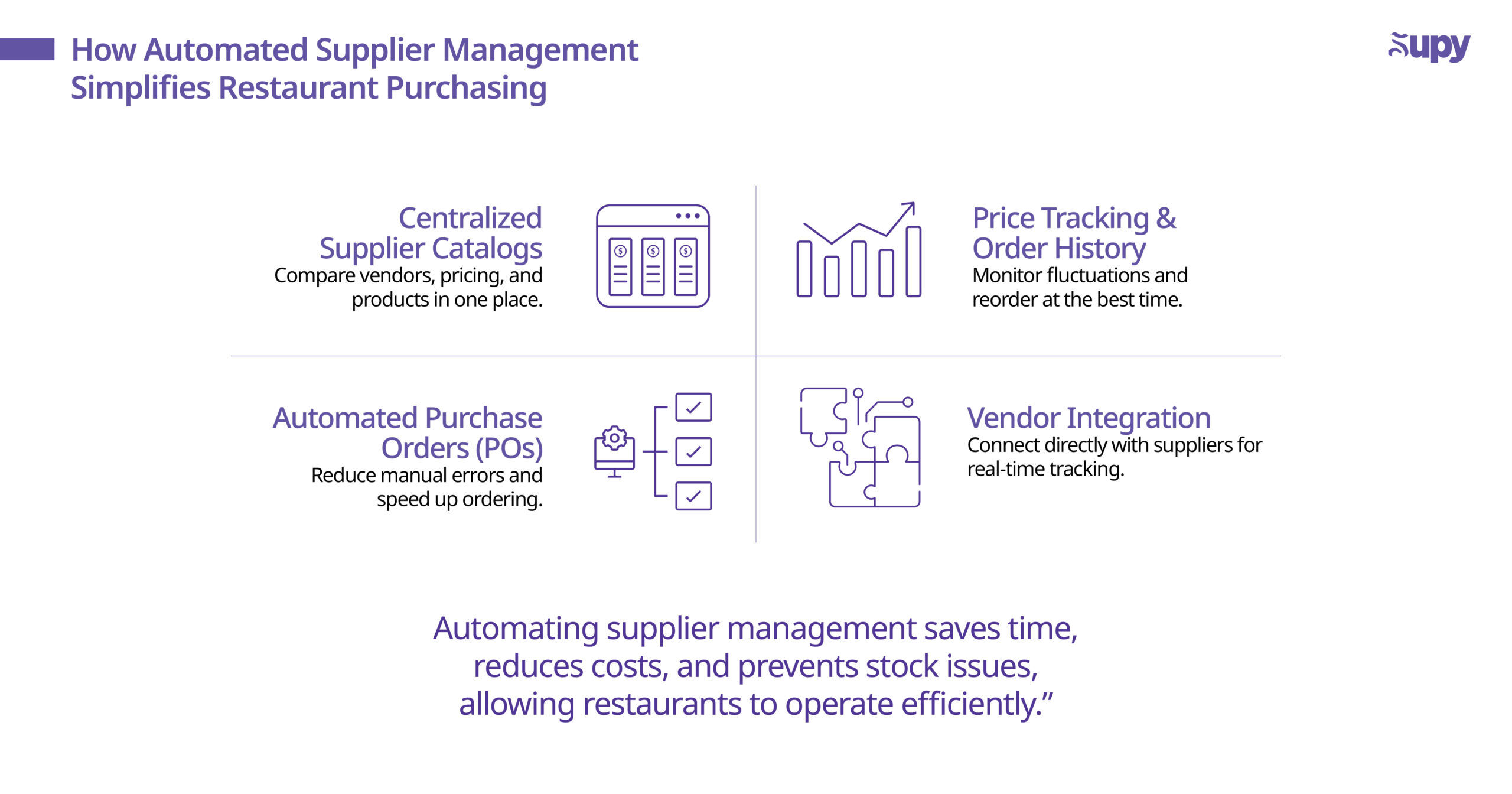
Eine weitere Funktion guter Warenwirtschaftssysteme für Restaurants ist die optimierte Lieferantenverwaltung und Beschaffung für eine nahtlose Beschaffung. Die manuelle Verwaltung von Lieferantenbeziehungen kann zu versäumten Bestellungen, inkonsistenten Preisen und Ineffizienzen beim Nachbestellen führen. Ohne Funktionen zur Lieferantenverwaltung verbringen Sie wahrscheinlich zu viel Zeit damit, Rechnungen nachzujagen, Preise zu vergleichen oder Bestellfehler zu beheben.
Wichtige Funktionen
- Zentrale Lieferantenkataloge – Diese speichern alle Lieferantendetails, Preise und Produktlisten an einem Ort und erleichtern so den Vergleich von Optionen.
- Automatisierte Bestellungen (POs) – Diese ermöglichen es Ihnen, Bestellungen direkt an Ihre Lieferanten zu generieren und zu senden, wodurch Fehler minimiert und Zeit gespart wird.
- Preisverfolgung & Bestellhistorie – Diese überwachen Preisschwankungen und vergangene Bestellhistorien, um Ihnen zu helfen, bessere Deals auszuhandeln und im richtigen Moment in größeren Mengen zu bestellen.
- Lieferantenintegrationen – Einige Systeme bieten Funktionen, die Ihnen eine direkte Verbindung mit den Plattformen Ihrer Lieferanten ermöglichen. Diese Integrationen gewährleisten reibungslosere Transaktionen und Echtzeit-Updates zu Ihrem Bestellstatus.
Das Fazit
Ohne Lieferantenverwaltungs-Tools bleibt Ihr Beschaffungsprozess ineffizient. Ein Warenwirtschaftssystem, das Einkäufe automatisiert, kann Zeit sparen, Kosten senken und Bestandsprobleme verhindern – sodass Sie sich auf den Betrieb eines rentablen Restaurants konzentrieren können.
5. Funktion Nr. 5: Controlling und automatisiertes Reporting
Es ist wichtig zu bedenken, dass jede Warenwirtschaftssoftware für Restaurants, die ihren Namen verdient, nicht nur Ihre Lagerbestände verfolgt – sie sollte Ihnen auch helfen, datengestützte Entscheidungen für Ihr Unternehmen zu treffen! Mit integrierten Controlling-Funktionen und Reporting-Funktionen kann Ihr Softwaresystem versteckte Ineffizienzen in Ihren Prozessen aufdecken.
Achten Sie auf Systeme, die wichtige Berichte generieren wie:
- Wareneinsatz-Berichte: Schlüsseln Sie die Zutatenkosten pro Gericht auf, um die Rentabilität zu erhalten.
- Verbrauchsberichte: Verfolgen Sie den tatsächlichen vs. theoretischen Zutatenverbrauch.
- Abweichungsanalyse: Erkennen Sie Diskrepanzen zwischen erwarteten und tatsächlichen Bestandsniveaus.
- Verschwendungsberichte: Identifizieren Sie übermäßige Verschwendung und passen Sie Bestellmuster an.
Aber ein gutes System gibt Ihnen nicht nur Zahlen – es sollte diese Daten auch in klaren, visuellen Dashboards präsentieren. Durch die Eingabe wichtiger KPIs wie teuerste Zutaten, langsam drehende Bestände und Lebensmittelverschwendungstrends können Restaurantinhaber und -manager schnell Problembereiche erkennen (wie ein teures Gericht, das die Margen belastet, oder einen plötzlichen Anstieg der Zutatenverschwendung).
Bonus: Bedarfsprognose-Berichte können zukünftige Bestandsbedarfe auf Basis von Trends vorhersagen und so Fehlbestände und Überbestellungen verhindern.
Das Fazit
Ohne leistungsstarke Reporting-Funktionen operieren Sie blind. Die richtige automatisierte Warenwirtschaftssoftware sollte die Zahlen für Sie verarbeiten und Ihnen sofortige, datengestützte Erkenntnisse liefern, um Ihren Bestand zu optimieren und Gewinne zu maximieren – alles mit nur wenigen Klicks.
6. Funktion Nr. 6: Multi-Standort- oder Cloud-Zugang
Wenn Sie mehrere Restaurantstandorte betreiben – oder eine Expansion planen – ist eine cloudbasierte Multi-Standort-Unterstützung in Ihrer Warenwirtschaftssoftware unerlässlich. Ohne sie ist die Verwaltung von Bestandsvariationen über mehrere Filialen hinweg ein logistischer Albtraum.
Mit einem cloudbasierten System können Sie alles zentralisieren und Folgendes über mehrere Filialen hinweg tun:
- Lagerbestände überwachen,
- Inventar zwischen Standorten transferieren und
- ein einheitliches Reporting gewährleisten.
Anstatt separate Tabellen zu verwalten oder sich darauf verlassen zu müssen, dass Manager den Bestand manuell verfolgen, gibt Ihnen der Cloud-Zugangszugang diese Funktion eine Echtzeit-Gesamtübersicht über Ihren gesamten Betrieb.
Selbst wenn Sie ein einzelnes Restaurant betreiben, kann eine Investition in den Cloud-Zugang sinnvoll sein. Denn er bietet zwei Dinge: Komfort und Kontrolle. Mit dieser Funktion können Sie Lagerbestände von Ihrem Smartphone aus prüfen, Bestellentscheidungen per Fernzugriff treffen und sicherstellen, dass Ihre Bestandsdaten immer aktuell sind – ob in der Küche, zu Hause oder unterwegs!
Über den Komfort hinaus können cloudbasierte Systeme auch die Sicherheit verbessern, indem sie Ihre Abhängigkeit von lokalen Dateien auf dem Laptop eines Managers eliminieren. Da alle Ihre Daten automatisch gesichert werden, sind eine höhere Datenintegrität und eine schnellere Notfallwiederherstellung gewährleistet.
Das Fazit
Wenn Sie Pläne haben, Ihr Restaurant zu expandieren (oder einfach mehr Kontrolle über Ihren Bestand wünschen), ist der Cloud-Zugang ein hervorragender Weg, um Ihre Daten jederzeit und überall im Blick zu behalten.
7. Funktion Nr. 7: Nahtlose Integration mit Kassensystem und Buchhaltung
Schließlich sollte Ihre Warenwirtschaftssoftware nicht isoliert arbeiten – sie muss mit Ihren anderen Systemen kommunizieren, um einen reibungslosen Betrieb zu gewährleisten. Die wichtigste Integration? Ihr Kassensystem (POS). Ohne diese Verbindung erfordert jeder Verkauf manuelle Bestandsanpassungen, was das Fehlerrisiko und veraltete Bestandsdaten erhöht. Mit einem vollständig integrierten System wird Ihr Bestand automatisch bei jedem Warenverkauf aktualisiert – was eine Echtzeit-Verfolgung gewährleistet, die das Risiko von Fehlbeständen oder Überbestellungen minimiert.
Über die Kassensystemintegration hinaus benötigen Sie auch eine Buchhaltungsintegration oder ein ERP-System. Dies ermöglicht die automatische Synchronisierung von Rechnungen, Lieferantenkosten und Lebensmittelausgaben und bietet Ihnen eine klare, aktuelle Übersicht über Ihren Wareneinsatz auf einem einzigen Dashboard. Einige Warenwirtschaftssysteme können sogar mit Beschaffungsplattformen und Lieferdiensten verbunden werden, um das Bestellmanagement zu optimieren und Diskrepanzen zwischen Lagerbeständen und eingehenden Lieferungen zu verhindern.
Der Vorteil all dessen: Es eliminiert doppelte Dateneingaben, minimiert menschliche Fehler und hält Ihre Finanzen, Ihren Bestand und Ihre Verkaufssysteme perfekt aufeinander abgestimmt – und spart Zeit sowie verbessert die Genauigkeit. Wenn Ihre gewählte Warenwirtschaftssoftware nicht mit diesen wichtigen Systemen integriert werden kann, werden Sie sich möglicherweise ständig mit der Fehlerkorrektur oder der manuellen Dateneingabe beschäftigen müssen – was Zeit und Geld verschwendet, die besser in die Verbesserung des Betriebs investiert werden sollten.
Das Fazit
Wählen Sie eine Warenwirtschaftssoftware für Restaurants, die sich nahtlos mit Ihrem Kassensystem und Ihrer Buchhaltung integriert, um die Verfolgung zu automatisieren, Fehler zu reduzieren, manuelle Eingaben zu eliminieren und alle Ihre Systeme perfekt aufeinander abzustimmen.
8. Weitere Überlegungen
Obwohl jede der oben genannten Funktionen unverzichtbar ist, gibt es einige andere wichtige Faktoren, die bei der Wahl einer Warenwirtschaftssoftware für Restaurants zu berücksichtigen sind.
Benutzerfreundlichkeit
Ein leistungsstarkes System ist nur so gut wie seine Benutzerfreundlichkeit. Wenn die Software zu komplex ist, werden Ihre Mitarbeiter möglicherweise Schwierigkeiten haben, sie zu übernehmen, was zu Fehlern oder Workarounds führt, die den Zweck vereiteln. Eine übersichtliche, intuitive Benutzeroberfläche – insbesondere mit einer gut gestalteten mobilen App – ist ein hervorragender Weg, um einen reibungslosen Tagesbetrieb zu gewährleisten.
Support und Schulung
Weiterhin ist Ihr Bestand betriebskritisch, daher ist es bei Problemen wichtig, schnell zuverlässigen Support zu erhalten. Suchen Sie nach Lieferanten, die umfassendes Onboarding, Schulungsressourcen und einen reaktionsschnellen Kundendienst bieten, um größere Störungen zu verhindern.
Kosten vs. ROI
Schließlich variieren die Preismodelle zwar (Abonnement vs. Einmalkauf), aber die eigentliche Frage, die Sie vor dem Kauf stellen sollten, lautet: "Welche Art von ROI kann ich von diesem System erwarten?". Denken Sie daran: Jedes System, das Tausende durch Verschwendung und Fehlbestände verhindert, kann sich viele Male selbst amortisieren.
9. Fazit
Letztendlich ist die Wahl der richtigen Warenwirtschaftssoftware für Restaurants eine Entscheidung, die sich auf Ihre Margen, Bestandskosten und die langfristige operative Effizienz auswirkt. Indem Sie sich auf die in diesem Leitfaden beschriebenen Schlüsselfunktionen konzentrieren, sollten Sie in der Lage sein, die beste Lösung für Ihr Restaurant selbstbewusst zu identifizieren. Geben Sie sich nicht mit einem System zufrieden, dem diese unverzichtbaren Tools fehlen! Da dies bedeuten könnte, später wieder wechseln zu müssen, was zu Zeitverlust, zusätzlichen Kosten und unnötigem Frust führt.
Um eine fundierte Entscheidung zu treffen, empfehlen wir, eine Funktions-Checkliste zu erstellen, mit der Sie Anbieter direkt vergleichen können. Fragen Sie sich: Integriert es sich mit meinem Kassensystem? Bietet es Echtzeit-Verfolgung? Was ist mit der Automatisierung von Bestellungen und der Vermeidung von Verschwendung? Wenn Sie feststellen, dass Ihr System bei einem dieser Punkte versagt, ist es möglicherweise nicht die beste Wahl für Sie.
Bei Supy haben wir unsere Lösungen mit all diesen unverzichtbaren Funktionen im Blick (und mehr!) entwickelt, damit Sie eine einfache, nahtlose und effiziente Warenwirtschaft genießen können. Neugierig, wie Supy Ihren Bestandsprozess vereinfachen kann? Erkunden Sie unsere Funktionen hier oder fordern Sie noch heute eine Demo an! Sie können sich auch für unseren Newsletter anmelden, um über die neuesten Branchentrends informiert zu bleiben!
10. Über Supy
Supy ist die führende Warenwirtschaftssoftware für Restaurants, zugeschnitten auf Restaurants mit mehreren Filialen und Franchise-Unternehmen. Mit Funktionen wie Echtzeit-Bestandsverfolgung, intelligenten Beschaffungssystemen und erweitertem Controlling hilft Supy Restaurants, ihre vielfältigen Anforderungen effektiv zu verwalten und bietet die Tools, die Restaurants benötigen, um in einer dynamischen Branche zu gedeihen.
Für die neuesten Experteneinblicke laden Sie Supys E-Book herunter: Der ultimative Leitfaden zur Reduzierung des Wareneinsatzes in Multi-Standort- & Enterprise-Restaurants.
Bereit, mehr zu erfahren? Vereinbaren Sie eine Demo mit Supy und machen Sie den ersten Schritt in eine optimierte, rentable Zukunft.