.jpeg)


Lieferantendiskrepanzen in der Gastronomie korrekt erfassen: Gutschriften, Lageranpassungen, Retouren und negative WEPs
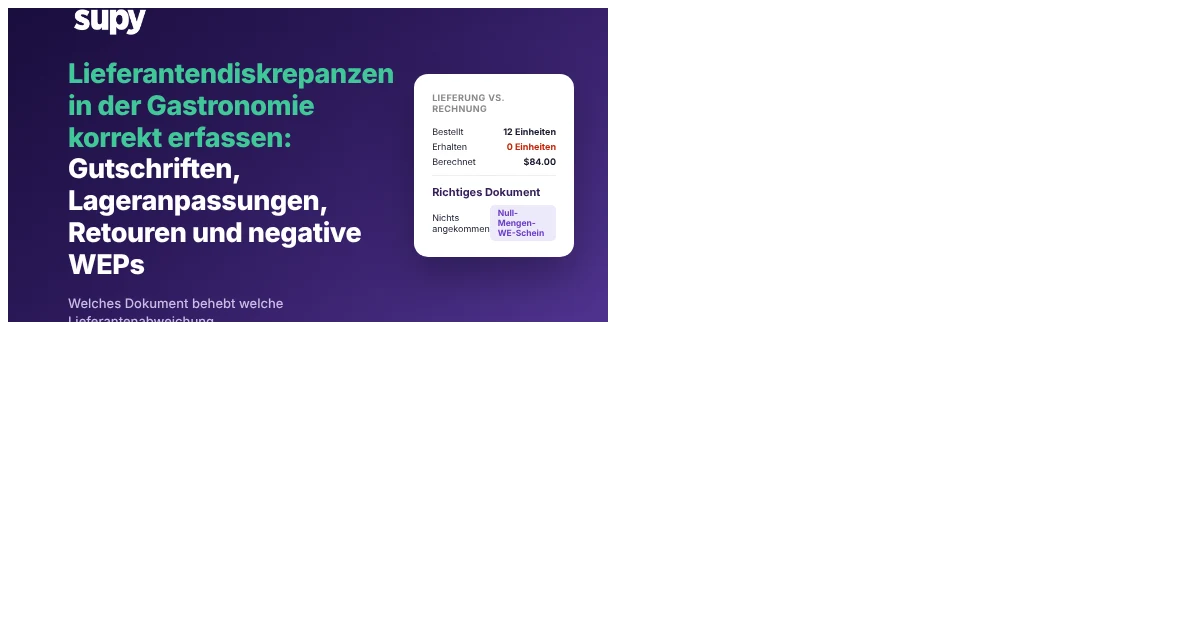
Jede Lieferantendiskrepanz hat ein korrektes Dokument dahinter, egal ob es sich um eine Unterlieferung, eine Überberechnung, eine Retoure oder eine Rückerstattung auf eine Kaution handelt. Wählen Sie das falsche und Sie ruinieren still Ihren Lagerbestand, Ihre Monatsabschlussabstimmung oder beides. Dieser Leitfaden bietet einen klaren Entscheidungsrahmen für Gastronomie-Finanzteams und Back-of-House-Teams: Für jedes Szenario, das Sie wirklich erleben, wissen Sie, welches Dokument Sie erstellen müssen, warum es das richtige ist und was eine falsche Wahl kostet. Lesen Sie ihn einmal und Sie können aufhören, zwischen einer Gutschrift, einer WEP-Korrektur, einer Lieferantenretoure und einer eigenständigen Anpassung zu raten.
Drei Dokumente, eine Frage: Welches behebt Ihre Diskrepanz wirklich?
Drei Dokumente können eine Lieferantendiskrepanz korrigieren, und jedes hat eine eigene Funktion. Ein Wareneingangsprotokoll (WEP) mit Nullmenge oder bearbeitetem WEP behebt, was Sie bei der Lieferung feststellen. Eine Gutschrift behandelt eine Überberechnung oder eine Retoure, sobald die Rechnung bestätigt ist. Eine eigenständige Gutschrift erfasst eine rein finanzielle Gutschrift ohne zugehörige Lieferung. Sie wählen anhand dessen, was schiefgelaufen ist und wann.
Teams wählen das falsche Dokument, weil alle drei zum selben Ergebnis führen – einem kleineren geschuldeten Betrag an den Lieferanten –, sodass jedes davon funktioniert zu haben scheint. Der Unterschied zeigt sich später: ob Ihr Lagerbestand stimmt und ob die Gutschrift je Ihr Buchhaltungssystem erreicht. Wählen Sie das falsche Dokument und Sie korrigieren entweder die Rechnung, während Sie still den Lagerbestand falsch erfassen, oder Sie klären die Bücher auf dem Papier, während Ihre Buchhaltung die Gutschrift nie registriert.
Dieser Leitfaden behandelt die häufigsten Szenarien und benennt das korrekte Dokument für jedes. Für den Begleitblick darauf, warum diese Gutschriften operativ durch die Maschen fallen, lesen Sie unsere Analyse wo Lieferantengutschriften in Multi-Standort-Gruppen verloren gehen.

Wenn Waren nicht ankamen: Menge auf null setzen – keine Gutschrift erstellen
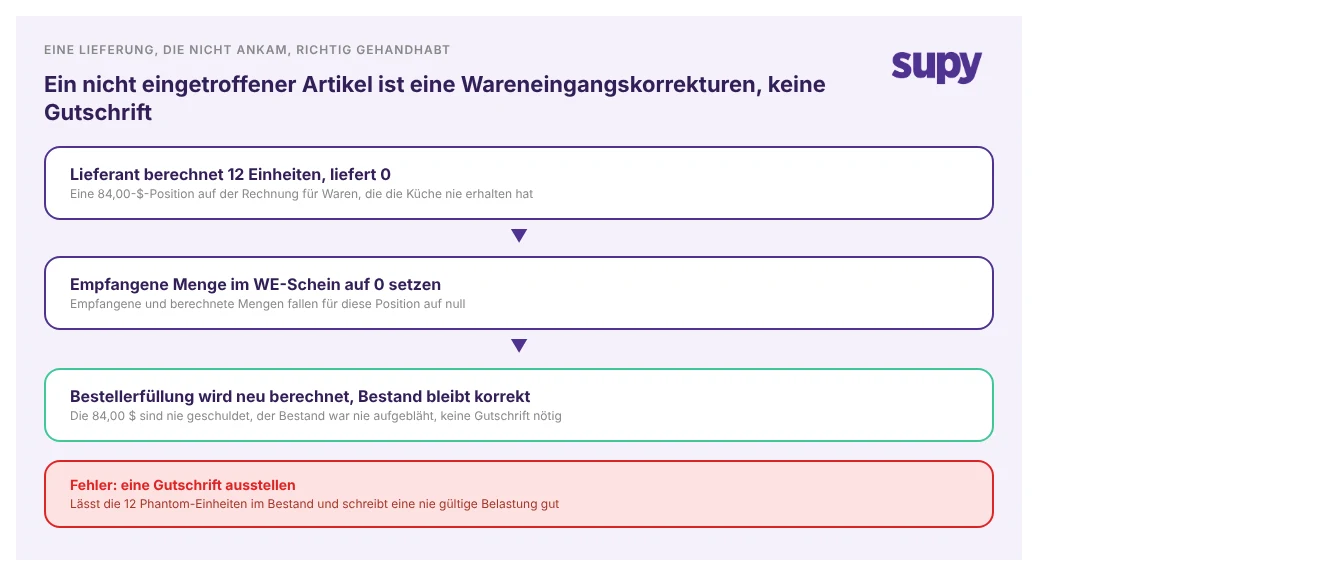
Der häufigste Fehler ist das Erstellen einer Gutschrift für Waren, die nie ankamen. Ein Lieferant stellt einen Karton mit 12 Einheiten à 7,00 $ in Rechnung, der Karton kommt nie an, und die Back-of-House-Abteilung erstellt eine Gutschrift über 84,00 $. Das fühlt sich richtig an – und ist doch das falsche Dokument.
Eine Nichtlieferung ist ein Wareneingangs-, kein Gutschriftsproblem. Die Lösung ist, die empfangene Menge im WEP für diese Position auf null zu setzen, was sowohl die empfangene als auch die berechnete Menge für den Artikel senkt. Die Erfüllung der Bestellung wird dann automatisch aus dem WEP neu berechnet, sodass die 84,00 $ nie als geschuldet erfasst werden und die 12 Einheiten nie in den Lagerbestand eingehen. Erstellen Sie stattdessen eine Gutschrift, erhalten Sie das Gegenteil: Die 12 Phantomeinheiten sitzen im Lager und blähen Ihren Bestand auf, und Sie haben eine Belastung gutgeschrieben, die von Anfang an nie gültig war.
Bei Überberechnungen oder zurückgesandten Waren: Gutschrift erstellen, kein negatives WEP
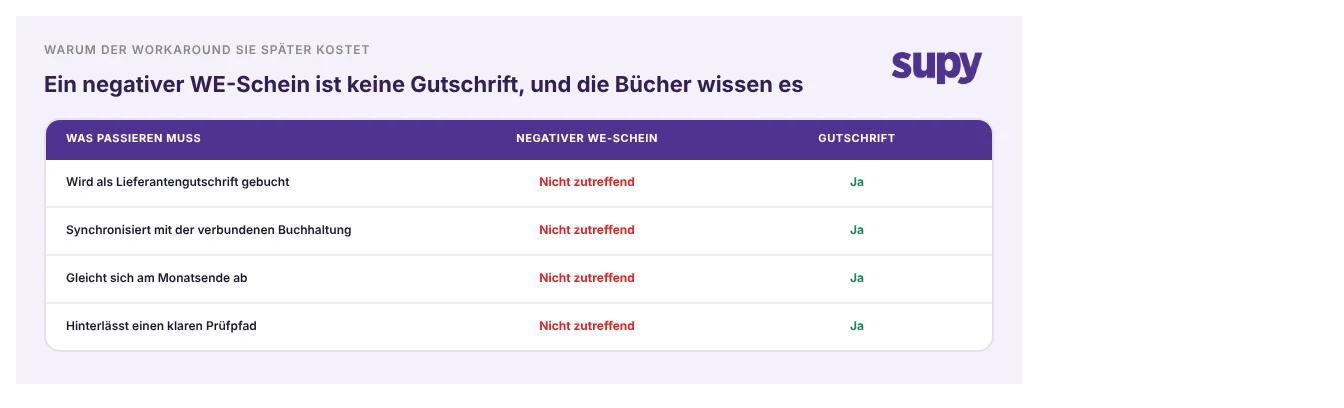
Sobald eine Rechnung bestätigt ist, ändert sich das Bild. Wenn ein Lieferant Sie um 45,00 $ für Waren überberechnet hat, die Sie tatsächlich erhalten haben, oder wenn Sie Lagerbestand zurückschicken, der wirklich geliefert wurde, ist das korrekte Dokument eine Gutschrift. Hier richtet eine verbreitete Umgehungslösung echten Schaden an: die Gutschrift als negatives WEP einzugeben.
Ein negatives WEP passt Ihren Lagerbestand und den Rechnungswert im Beschaffungssystem an, aber es ist keine Gutschrift, und Ihr Buchhaltungssystem behandelt es als nichts. Es wird nie als Kreditorengutschrift gebucht, synchronisiert sich nie mit Ihrer verbundenen Buchhaltung und hinterlässt keinen sauberen Prüfpfad, sodass die Zahlen beim Monatsabschluss nicht mehr übereinstimmen. Eine ordnungsgemäße Gutschrift tut all das. In Supy generiert die Erfassung einer Lieferantenretoure automatisch eine Gutschrift und überträgt sie als Kreditorengutschrift an Ihre verbundene Buchhaltung, sodass Sie dieselbe Anpassung nicht manuell in Ihr Hauptbuch eintippen müssen. Gutschriften für Über- oder Falschberechnungen laufen durch denselben KI-Rechnungen und Gutschriften-Prozess.
Bei rein finanziellen Gutschriften: Eigenständige Gutschrift verwenden, keine Retoure
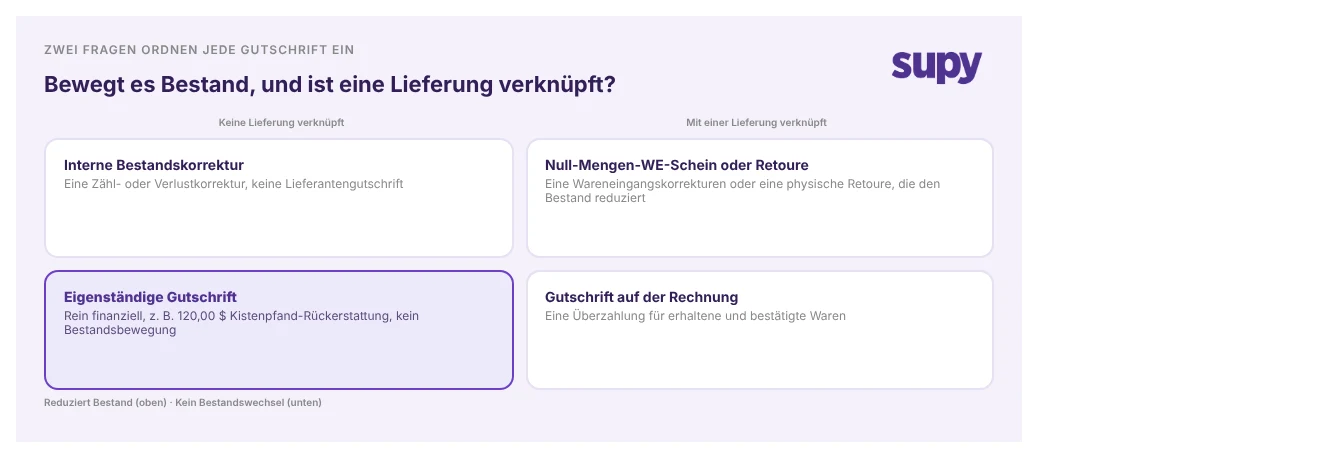
Manche Gutschriften haben nichts mit Lagerbestand zu tun. Eine Rückerstattung auf eine Pfandkaution von 120,00 $, eine Rechnungskorrektur, ein ausgehandelter Rabatt: Das Geld bewegt sich, aber keine Waren. Diese als Retoure zu behandeln ist der Fehler hier, denn eine Retoure reduziert Lagerbestand, den Sie nie tatsächlich zurückgeschickt haben, und wirft Ihren Bestand genau um den Wert des angeblich zurückgesandten Artikels aus dem Gleichgewicht.
Dafür ist eine eigenständige Gutschrift gedacht. Sie erfasst eine Lieferantengutschrift ohne zugehörige Lieferung, bucht gegen Ihr Konto und fließt in die Buchhaltung, ohne eine einzige Lagerzahl zu berühren. Der Test ist einfach: Fragen Sie, ob Waren physisch bewegt wurden. Wenn nichts Ihre Regale verlassen hat, ist es eine eigenständige Gutschrift, keine Retoure.
Im richtigen Moment handeln: Warum der Zeitpunkt das Dokument bestimmt
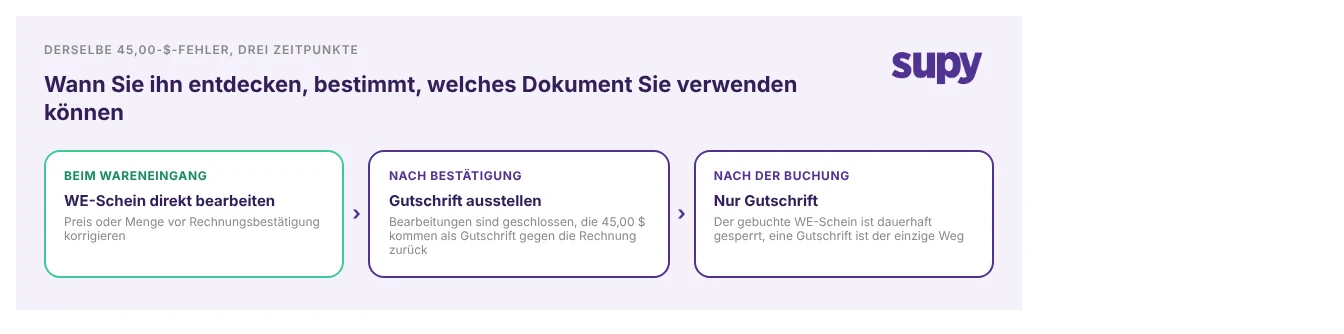
Welches Dokument überhaupt verfügbar ist, hängt oft davon ab, wann Sie das Problem bemerken. Derselbe Preisfehler von 45,00 $ hat drei verschiedene Korrekturen, je nachdem, in welchem Stadium er erkannt wird.
Erkannt beim Wareneingang, bevor der Lieferschein zu einer Rechnung bestätigt wird, bearbeiten Sie den Preis oder die Menge direkt im WEP und machen weiter. Sobald die Rechnung bestätigt ist, sind diese Bearbeitungen geschlossen, sodass die Korrektur als Gutschrift gegen die Rechnung zurückkommen muss. Und sobald ein WEP im Hauptbuch gebucht ist, ist es dauerhaft gesperrt – by design –, um die Integrität Ihrer Lager- und Kostenaufzeichnungen zu schützen, was eine Gutschrift als einzigen Weg übriglässt. Je früher Sie eine Diskrepanz erkennen, desto günstiger und einfacher ist das benötigte Dokument.
Die Regel in einem Satz: Wählen Sie das Dokument anhand dessen, was tatsächlich schiefgelaufen ist, nicht anhand des Betrags, den Sie zurückwollen. Stellen Sie zwei Fragen der Reihe nach. Erstens: Wurden Waren physisch bewegt oder nicht geliefert? Wenn eine Lieferung zu kurz war oder nie ankam und Sie es beim Wareneingang feststellen, korrigieren Sie das WEP; wenn Waren zurückkamen oder Sie nach Bestätigung der Rechnung überberechnet wurden, erstellen Sie eine Gutschrift. Zweitens: Ist überhaupt eine Lieferung dabei? Wenn nicht und die Gutschrift ist rein finanziell, verwenden Sie eine eigenständige Gutschrift.
Führen Sie eine schnelle Prüfung Ihres eigenen Betriebs durch: Rufen Sie die Lieferantengutschriften des letzten Monats ab und zählen Sie, wie viele als negative WEPs eingegeben oder per E-Mail statt über das System verfolgt wurden. Jede davon ist eine Gutschrift, die Ihre Buchhaltung wahrscheinlich nie abstimmte, und wenn es wirklich eine Nichtlieferung war, sitzt noch eine Phantomeinheit in Ihrem Lager. Das Dokument zu korrigieren ist der schnellste Weg, um Ihren Lagerbestand und Ihr Hauptbuch wieder in Einklang zu bringen.
Das ist die Logik, auf der Supy aufgebaut ist: Gutschriften und Retouren werden im System statt per E-Mail abgewickelt, Retouren buchen ihre eigenen Kreditorengutschriften in Ihre Buchhaltung, und Nichtlieferungen werden im WEP korrigiert, damit Ihr Lager keine Waren enthält, die Sie nicht erhalten haben.