.jpeg)


QSR-Automatisierung: Was Multi-Standort-Schnellrestaurantgruppen tatsächlich automatisieren
Wo Multi-Standort-Schnellrestaurantgruppen tatsächlich Zeit verlieren
Fragen Sie einen Multi-Standort-Schnellrestaurantbetreiber, wohin die Stunden seiner Manager tatsächlich gehen, und die ehrliche Antwort ist selten der Gastraum – es ist die Verwaltung. QSR-Automatisierung ist die Lösung: die repetitiven Back-Office-Aufgaben einer Schnellrestaurantgruppe – wie wiederkehrende Bestellungen aufgeben, Bestände zählen, Umsatzdaten synchronisieren und Rechnungen abgleichen – an Software übergeben, die diese planmäßig ausführt, damit Manager diese Stunden für Service und Kostenkontrolle zurückgewinnen. Die Gruppen, die davon am meisten profitieren, automatisieren zuerst die vorhersehbare Arbeit und behalten das menschliche Urteilsvermögen dort, wo Geld auf dem Spiel steht.
Gehen Sie durch das Back-Office einer 12-Standort-Gruppe und dasselbe Muster wiederholt sich an jedem Standort. Ein Manager erstellt jede Woche ungefähr dieselbe Lieferantenbestellung neu und sendet sie per WhatsApp oder E-Mail. Jemand zählt den Bestand von Hand und gibt die Zahlen in ein zweites System ein. Umsatzsummen werden aus dem Kassensystem in eine Tabelle kopiert, damit der Wareneinsatzbericht erstellt werden kann. Rechnungen stapeln sich und werden Zeile für Zeile mit Bestellungen abgeglichen. Nichts davon ist schwierig. Alles ist konstant, und über eine Woche summiert sich das auf etwa 18 Stunden, die ein Manager stattdessen im Gastraum verbringen könnte.
Das ist die Arbeit, die Schnellrestaurantgruppen zuerst anvisieren, weil sie hochfrequent und regelbasiert ist. Es ist auch der Grund, warum die unsichtbarste Form der QSR-Automatisierung am wichtigsten ist: Umsatz- und Menüdaten automatisch über alle Filialen hinweg synchron zu halten. Sobald die Zahlen hinter Bestellungen, Zählung und Prognose zuverlässig sind, ohne dass jemand sie neu eingibt, kann jeder Automatisierung, die auf diesen Daten aufbaut, vertraut werden. Bringen Sie die Dateninfrastruktur in Ordnung, und der Rest der Liste wird möglich; überspringen Sie sie, und jede nachgelagerte Automatisierung erbt die Fehler von gestern. Die Ausgangsfrage ist einfach: Welche dieser Aufgaben beansprucht den größten Teil der Woche Ihrer Manager?

Wiederkehrende Lieferantenbestellungen, die sich selbst aufgeben
Die erste Aufgabe, die die meisten Gruppen aufhören, manuell zu erledigen, ist die wiederkehrende Bestellung. Ein Beschaffungsleiter einer Gastgewerbegruppe mit 6 Standorten beschrieb die Verwaltung von Dauerbestellungen über alle Standorte hinweg vollständig per WhatsApp und Telefonaten – schnell für die Person, die es tut, aber ohne Prüfpfad und ohne Möglichkeit, später nachzuweisen, wer was bestellt hat. Für einen einzelnen Standort ist das ein Ärgernis. Über ein Dutzend Filialen hinweg ist es eine Compliance-Lücke.
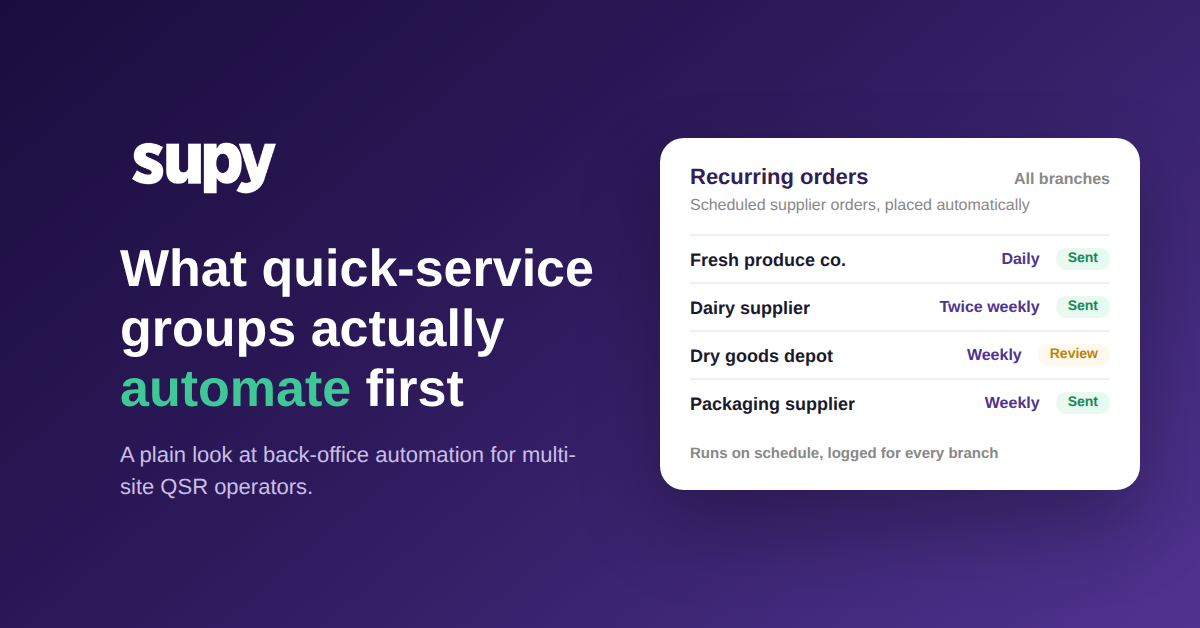
Automatisierung wiederkehrender Bestellungen löst dies mit einem einfachen Muster. Eine Bestellvorlage erfasst einmalig den Lieferanten, die Artikel und die üblichen Mengen, sodass niemand sie in jedem Zyklus aus dem Gedächtnis neu erstellt. Ein Zeitplan generiert diese Bestellung dann automatisch – täglich, wöchentlich oder an festgelegten Tagen – und protokolliert jede Version mit einem Zeitstempel. Der Betreiber entscheidet, wie autonom es läuft: Einige lassen die Bestellung direkt an den Lieferanten übermitteln, andere behalten eine Abschlussprüfung vor dem Senden. In jedem Fall gibt es eine Aufzeichnung. Wenn Sie die Mechanik dazu vertiefen möchten, lesen Sie unseren Leitfaden zu Daueraufträgen und wiederkehrenden Lieferantenbestellungen.
Es geht nicht nur um Geschwindigkeit. Es geht darum, dass eine geplante, protokollierte Bestellung die zwei Dinge beseitigt, die manuelle Bestellung einer Multi-Standort-Gruppe nicht geben kann: Konsistenz über alle Standorte hinweg und einen Prüfpfad, dem ein Prüfer oder Finanzverantwortlicher folgen kann. Der Test für jede Dauerbestellung: Wenn die Buchhaltung morgen die vollständige Historie anfordern würde, könnten Sie sie auf Knopfdruck liefern?

Nachfrage prognostizieren ohne eine Tabelle, die nur eine Person versteht
Fragen Sie eine wachsende Schnellrestaurantgruppe, wo ihre Prognose liegt, und die Antwort ist oft eine Tabelle, die eine Person pflegt und die sonst niemand wirklich versteht. Der F&B-Direktor einer Schnellrestaurantgruppe mit 4 Standorten bezeichnete die Ablösung genau dieses Modells als seine oberste Priorität: die manuelle Version produzierte konstante Überbestellungen und überhöhte Wareneinsatzkosten und skalierte nicht über eine Handvoll Artikel hinaus.
Die Automatisierung der Nachfrageprognose mit KI liest echte Umsatzhistorie und produziert einen 14-Tage-Bestellausblick bis auf das Menüelement, den ein Manager vor jeder Bestellung für ein bekanntes Ereignis anpassen kann. Der ehrliche Vorbehalt ist die Voraussetzung: Eine Prognose ist nur so gut wie die ihr zugrundeliegenden Daten. Die meisten Tools benötigen etwa sechs Monate saubere, ununterbrochene Umsatzhistorie und jedes Menüelement, das einem Rezept zugeordnet ist, bevor das Ergebnis handlungsfähig ist. Gruppen, die diese Hürde nehmen, sehen die Auszahlung – ein anonymisierter Multi-Standort-Betreiber erreichte unter 10 % Abweichung zwischen Prognose und Ist-Wert, sobald die Prognose richtig eingerichtet war. Für einen tieferen Einblick lesen Sie unseren Artikel zur Umsatzprognose im Restaurantbereich.
Prognose ist also kein Schalter, den Sie am ersten Tag umlegen. Es ist eine Fähigkeit, die Sie erwerben, sobald Ihre Umsatzdaten sauber und vollständig sind, und sie lohnt das Warten mit Bestellungen, die der Nachfrage entsprechen statt Schätzungen. Bevor Sie sich auf eine Prognose verlassen, fragen Sie sich: Haben wir sechs saubere Umsatzmonate dahinter, und ist jedes Menüelement einem Rezept zugeordnet?

Wo die Grenze ziehen: das Wiederholbare automatisieren, den Menschen beim Geld behalten
Nicht alles sollte selbstständig laufen, und reife Gruppen sind bewusst dabei, wo sie aufhören. Rechnungserfassung ist das deutlichste Beispiel. Software kann eine Lieferantenrechnung lesen, Positionen extrahieren und sie einer Bestellung zuordnen, aber das hängt vollständig davon ab, dass die Daten des Lieferanten sauber sind. Wenn Rechnungen ohne Bestellnummern oder Kostenstellen ankommen oder mit kleinen Tippfehlern in Artikelnamen, landet ein großer Teil in einer manuellen Prüfwarteschlange statt automatisch übereinzustimmen. Die Automatisierung ist real; sie kann einfach keine Informationen erfinden, die der Lieferant nie gesendet hat.
Dieselbe Logik gilt für Bestellungen. Die besseren Prognose- und prädiktiven Bestellungstools füllen bewusst vorgeschlagene Mengen vor, anstatt selbst Bestellungen aufzugeben, weil eine falsche automatische Bestellung echtes Geld kostet und eine Lieferantenbeziehung belastet. Das Designmuster, das für Multi-Standort-Gruppen funktioniert, ist Empfehlen-und-Prüfen: die Software erledigt die Vorbereitung und die Berechnung, und ein Mensch trifft die endgültige Entscheidung für alles, was Geld, Ausnahmen oder einen Lieferanten betrifft, der Sie schon einmal enttäuscht hat.
So betrachtet ist die Frage nie „Wie viel können wir automatisieren?" Sie lautet: „Was ist wiederholbar genug, um einem Zeitplan anvertraut zu werden, und was braucht noch ein paar Augen?" Die Gruppen, die echten Wert aus der QSR-Automatisierung ziehen, beantworten diese Frage Aufgabe für Aufgabe, nicht alles auf einmal.
Sie brauchen kein Transformationsprojekt, um anzufangen. Wie entscheiden Sie also, wo die Grenze liegt? Beurteilen Sie jede Back-Office-Aufgabe anhand dieser Fragen:
- Wie wiederholbar ist diese Aufgabe? Wöchentliche Dauerbestellungen sind hochgradig wiederholbar; einmalige Lieferantenstreitigkeiten nicht. Vollautomatisierung nur für die wiederholbare Arbeit.
- Was kostet es, wenn es schiefgeht? Eine falsch eingegebene Dauerbestellung für einen einzelnen Standort ist kostengünstig und umkehrbar; ein systemweiter Nachfrageprognosefehler nicht. Höhere Kosten = menschlichen Prüfschritt beibehalten.
- Wie gut sind die eingespeisten Daten? Eine sechsmonatige, saubere Kassenumsatzhistorie mit jedem Menüelement, das einem Rezept zugeordnet ist, nährt gute Prognosen. Dünne Daten oder nicht zugeordnete Artikel bedeuten geringe Zuverlässigkeit; menschliche Überschreibungsmöglichkeit erforderlich.
- Ist der Fehler sichtbar? Eine verpasste Dauerbestellung erscheint am nächsten Tag in einer Mindestbestandswarnung; ein stiller Rechnungsabgleichfehler in einem Stapel taucht möglicherweise erst nach Wochen auf. Gute Sichtbarkeit = sicherer zu automatisieren.
- Wird Geld oder ein Lieferantenversprechen eingegangen? Eine Nachfrageprognoseempfehlung (noch vor dem Senden menschlich geprüft) ist risikoarm; eine automatisch übermittelte Bestellung an einen Lieferanten ist eine rechtliche Verpflichtung. Verpflichtungen bleiben kontrolliert.
- Läuft diese Aufgabe jedes Mal gleich, oder braucht jeder Fall sein eigenes Urteilsvermögen?
- Was kostet es, wenn es schiefgeht: ein paar Minuten zur Korrektur, oder echtes Geld und eine belastete Lieferantenbeziehung?
- Ist ein Streit, eine Ausnahme oder ein neuer Lieferant beteiligt, der noch eine Person zum Hinschauen braucht?
Automatisieren Sie die vorhersehbare Arbeit, behalten Sie das Urteilsvermögen beim Geld, und lassen Sie die Dateninfrastruktur den Rest tragen.

Supy bringt wiederkehrende Bestellungen, KI-gestützte Nachfrageprognose und Rechnungserfassung auf einer Plattform für Multi-Standort-F&B-Gruppen zusammen, mit den Prüfsteuerungen, die einen Menschen bei den wichtigen Entscheidungen halten. Sehen Sie, wie es zu Ihrer Gruppe passt, in unserer Restaurant-Beschaffungssoftware, oder Demo buchen – klicken Sie unten.



