.jpeg)


الأتمتة في مطاعم الوجبات السريعة: ما تُؤتمته فعلياً مجموعات الوجبات السريعة متعددة المواقع
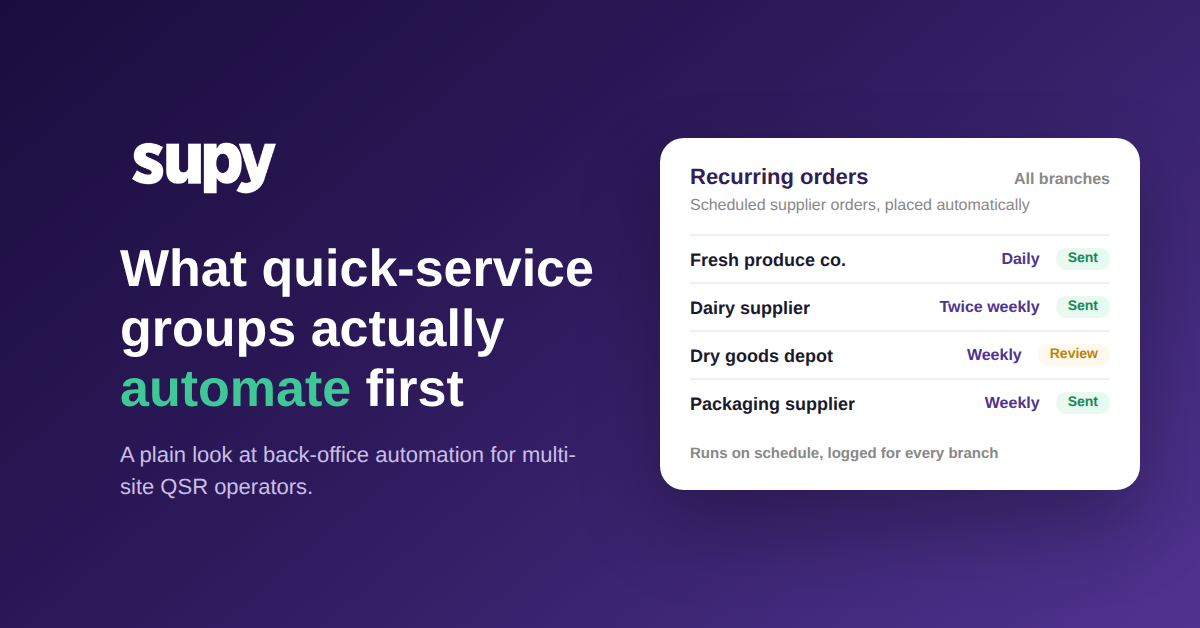
أين تخسر مجموعات الوجبات السريعة متعددة المواقع الوقت فعلياً
اسأل مشغّل مطاعم وجبات سريعة متعدد المواقع أين تذهب ساعات مديريه فعلاً، والجواب الصادق نادراً ما يكون القاعة — بل الإدارة. أتمتة المطاعم السريعة هي الحل: تسليم المهام المكتبية المتكررة لمجموعة الوجبات السريعة — كإرسال الطلبات المتكررة، وعدّ المخزون، ومزامنة بيانات المبيعات، ومطابقة الفواتير — إلى برنامج يُنفّذها وفق جدول زمني، حتى يستعيد المديرون تلك الساعات للخدمة والتحكم في التكاليف. المجموعات التي تستفيد أكثر تُؤتمت العمل المتوقع أولاً وتحتفظ بالحكم البشري حيث تكون الأموال على المحك.
تجوّل في مكتب مجموعة مؤلفة من 12 موقعاً وستجد النمط ذاته يتكرر في كل فرع. يُعيد المدير بناء طلب المورد نفسه تقريباً كل أسبوع ويرسله عبر واتساب أو البريد الإلكتروني. يعدّ شخص ما المخزون يدوياً ويُدخل الأرقام في نظام ثانٍ. تُنسخ إجماليات المبيعات من نظام نقطة البيع إلى جدول بيانات حتى تتمكن من تشغيل تقرير تكلفة الغذاء. تتراكم الفواتير وتُطابق مع الطلبات سطراً بسطر. لا شيء من ذلك صعب. كل ذلك مستمر، وعلى مدار أسبوع يرتفع إلى نحو 18 ساعة يمكن للمدير قضاؤها في القاعة عوضاً عن ذلك.
هذا هو العمل الذي تستهدفه مجموعات الوجبات السريعة أولاً، لأنه عالي التكرار وقائم على قواعد. هذا أيضاً هو سبب أهمية الشكل الأقل وضوحاً من أتمتة المطاعم السريعة: الحفاظ على مزامنة بيانات المبيعات والقوائم تلقائياً عبر جميع الفروع. بمجرد أن تصبح الأرقام التي تقف وراء الطلبات والعدّ والتنبؤ موثوقة دون أن يُعيد أحد كتابتها، يمكن الوثوق بكل أتمتة مبنية فوق تلك البيانات أيضاً. أصلح البنية التحتية للبيانات وسيصبح الباقي ممكناً؛ تجاهلها وسترث كل أتمتة لاحقة أخطاء الأمس. السؤال الذي يجب البدء به بسيط: أيٌّ من هذه المهام يستنزف معظم أسبوع مديريك؟

طلبات المشتريات المتكررة التي تُرسل نفسها تلقائياً
أول مهمة تكف معظم المجموعات عن تنفيذها يدوياً هي الطلب المتكرر. وصف مدير المشتريات في مجموعة ضيافة مكونة من 6 مواقع كيف كان يُدير طلبات أسبوعية دائمة عبر جميع المواقع بالكامل عبر واتساب والمكالمات الهاتفية — سريعة لمن يقوم بها، لكن بدون مسار تدقيق وبدون طريقة لإثبات من طلب ماذا لاحقاً. لموقع واحد هذا إزعاج. عبر عشرات الفروع يصبح ثغرة في الامتثال.
تُصلح أتمتة الطلبات المتكررة هذا بنمط بسيط. يلتقط قالب الطلب المورّد والعناصر والكميات المعتادة مرة واحدة، حتى لا يُعيد أحد بناءه من الذاكرة في كل دورة. ثم يُولّد جدول زمني هذا الطلب تلقائياً — يومياً أو أسبوعياً أو في أيام محددة — ويُسجّل كل نسخة بطابع زمني. يختار المشغّل مستوى الاستقلالية: بعضهم يسمح للطلب بالإرسال مباشرة إلى المورد، والبعض الآخر يُبقي مراجعة نهائية قبل الإرسال. في كلتا الحالتين يوجد سجل. إذا أردت التعمق في آليات ذلك، راجع دليلنا حول الطلبات الدائمة وطلبات المشتريات المتكررة من الموردين.
الأمر لا يتعلق بالسرعة وحدها. بل يتعلق بأن الطلب المُجدول والمُسجّل يُزيل الشيئين اللذين لا تستطيع المشتريات اليدوية منحهما لمجموعة متعددة المواقع: الاتساق عبر المواقع ومساراً يمكن للمراجع أو مسؤول المالية اتباعه. الاختبار لأي طلب متكرر: إذا طلبت المالية السجل الكامل غداً، هل تستطيع تقديمه بنقرة واحدة؟

التنبؤ بالطلب بدون جدول بيانات لا يفهمه إلا شخص واحد
اسأل مجموعة وجبات سريعة متنامية أين يكمن نظام التنبؤ لديها، وستكون الإجابة في الغالب جدول بيانات تُديره شخص واحد لا يفهمه أحد سواه حقاً. وصف مدير F&B لمجموعة وجبات سريعة من 4 مواقع الاستغناء عن هذا النموذج بالضبط باعتباره أولويته القصوى: كانت النسخة اليدوية تُنتج طلبات زائدة مستمرة وتكلفة غذاء مرتفعة، ولم تكن قابلة للتوسع إلى أكثر من بضعة عناصر.
أتمتة التنبؤ بالطلب تقرأ تاريخ المبيعات الفعلي وتُنتج توقعات طلب لمدة 14 يوماً حتى مستوى عنصر القائمة، يمكن للمدير تعديلها لحدث معروف قبل أي طلب. المأخذ الصادق هو المتطلب المسبق: التنبؤ لا يكون أفضل من البيانات التي تقف وراءه. تحتاج معظم الأدوات إلى نحو ستة أشهر من تاريخ المبيعات النظيف غير المنقطع، مع ربط كل عنصر في القائمة بوصفة، قبل أن يكون الناتج جديراً بالتطبيق. المجموعات التي تتجاوز هذا الحاجز ترى العائد — وصل مشغّل متعدد المواقع مجهول الهوية إلى أقل من 10% من التباين بين التنبؤ والواقع بمجرد إعداد التنبؤ بشكل صحيح. للاطلاع على شرح أعمق، راجع مقالنا في المدونة حول التنبؤ بمبيعات المطاعم.
إذن التنبؤ ليس مفتاحاً تُشغّله في اليوم الأول. إنه قدرة تكتسبها بمجرد أن تصبح بيانات مبيعاتك نظيفة ومكتملة، وتُكافئ الانتظار بطلبات تتوافق مع الطلب عوضاً عن التخمين. قبل الاعتماد على التنبؤ، اسأل: هل لدينا ستة أشهر نظيفة من المبيعات وراءه، وهل كل عنصر قائمة مرتبط بوصفة؟

أين ترسم الحدود: أتمتة المتكرر، والإبقاء على الإنسان في مسائل المال
ليس كل شيء ينبغي أن يعمل تلقائياً، والمجموعات الناضجة واعية بمكان التوقف. أتمتة استخراج الفواتير هي المثال الأوضح. يمكن للبرنامج قراءة فاتورة المورد واستخراج البنود ومطابقتها مع طلب الشراء، لكنه يعتمد كلياً على نظافة بيانات المورد نفسها. عندما تصل الفواتير بدون أرقام طلبات أو مراكز تكلفة، أو مع أخطاء إملائية صغيرة في أسماء العناصر، تهبط نسبة كبيرة في قائمة انتظار المراجعة اليدوية بدلاً من المطابقة التلقائية. الأتمتة حقيقية؛ هي فقط لا تستطيع اختراع معلومات لم يُرسلها المورد قط.
تنطبق المنطق ذاته على الطلبات. أفضل أدوات التنبؤ والطلب التنبّؤي تملأ الكميات المقترحة عن قصد بدلاً من إرسال طلبات الشراء بنفسها، لأن طلباً آلياً خاطئاً يكلّف أموالاً حقيقية ويُجهد علاقة الموردين. نمط التصميم الذي يصلح للمجموعات متعددة المواقع هو التوصية والمراجعة: دع البرنامج يقوم بالتحضير والحساب، وأبقِ الإنسان على القرار النهائي لكل ما يتعلق بالمال أو الاستثناءات أو مورّد خذل في السابق.
بهذه القراءة، السؤال ليس أبداً "كم يمكننا أتمتة؟" بل هو "ما الذي يمكن الوثوق به لجدول زمني، وما الذي يحتاج عيناً بشرية؟" المجموعات التي تُحقق قيمة حقيقية من أتمتة المطاعم السريعة تُجيب عن ذلك مهمة بمهمة، لا دفعة واحدة.
لا تحتاج لمشروع تحوّل لتبدأ. إذن كيف تُقرر أين تقع الحدود؟ قيّم كل مهمة في المكتب الخلفي وفق هذه الأسئلة:
- ما مدى قابلية هذه المهمة للتكرار؟ الطلبات الأسبوعية الدائمة قابلة للتكرار بدرجة عالية؛ النزاعات الفردية مع الموردين ليست كذلك. أتمتة كاملة فقط للعمل المتكرر.
- ما التكلفة إذا حدث خطأ؟ طلب دائم خاطئ لموقع واحد تكلفته منخفضة وقابلة للتراجع؛ خطأ في توقع الطلب على مستوى النظام بأكمله ليس كذلك. تكلفة أعلى = احتفظ بخطوة مراجعة بشرية.
- ما جودة البيانات التي تُغذّيه؟ تاريخ مبيعات نظيف لستة أشهر مع ربط كل عنصر قائمة بوصفة يُغذّي توقعات جيدة. بيانات شحيحة أو عناصر غير مرتبطة تعني ثقة منخفضة؛ تتطلب قدرة تجاوز بشرية.
- هل الإخفاق مرئي؟ تفويت طلب متكرر يظهر في تنبيه مستوى المخزون الأساسي في اليوم التالي؛ خطأ صامت في مطابقة الفواتير في دفعة قد لا يظهر لأسابيع. رؤية جيدة = أكثر أماناً للأتمتة.
- هل يُلزم المال أو وعداً مع مورد؟ توصية تنبؤ الطلب (لا تزال تخضع لمراجعة بشرية قبل الإرسال) منخفضة المخاطر؛ طلب شراء تلقائي لمورد هو التزام قانوني. الالتزامات تبقى محكومة.
- هل هذه المهمة تسير بنفس الطريقة في كل مرة، أم يحتاج كل حالة حكماً خاصاً بها؟
- ما تكلفتها حين تسوء: بضع دقائق للتصحيح، أم أموال حقيقية وعلاقة متوترة مع مورد؟
- هل يوجد نزاع أو استثناء أو مورد جديد يتطلب شخصاً للنظر فيه؟
أتمت العمل المتوقع، وأبقِ الحكم على الأموال، ودع البنية التحتية للبيانات تحمل الباقي.

Supy يجمع الطلبات المتكررة والتنبؤ بالطلب بالذكاء الاصطناعي وأتمتة الفواتير في منصة واحدة مصممة لمجموعات F&B متعددة المواقع، مع عناصر التحكم في المراجعة التي تُبقي الإنسان على القرارات المهمة. تعرّف على كيفية ملاءمتها لمجموعتك في برنامج المشتريات للمطاعم، أو احجز عرضاً توضيحياً أدناه.




