.jpeg)


بيانات المُوردون الرئيسية: مسؤولية من في مجموعة المطاعم؟
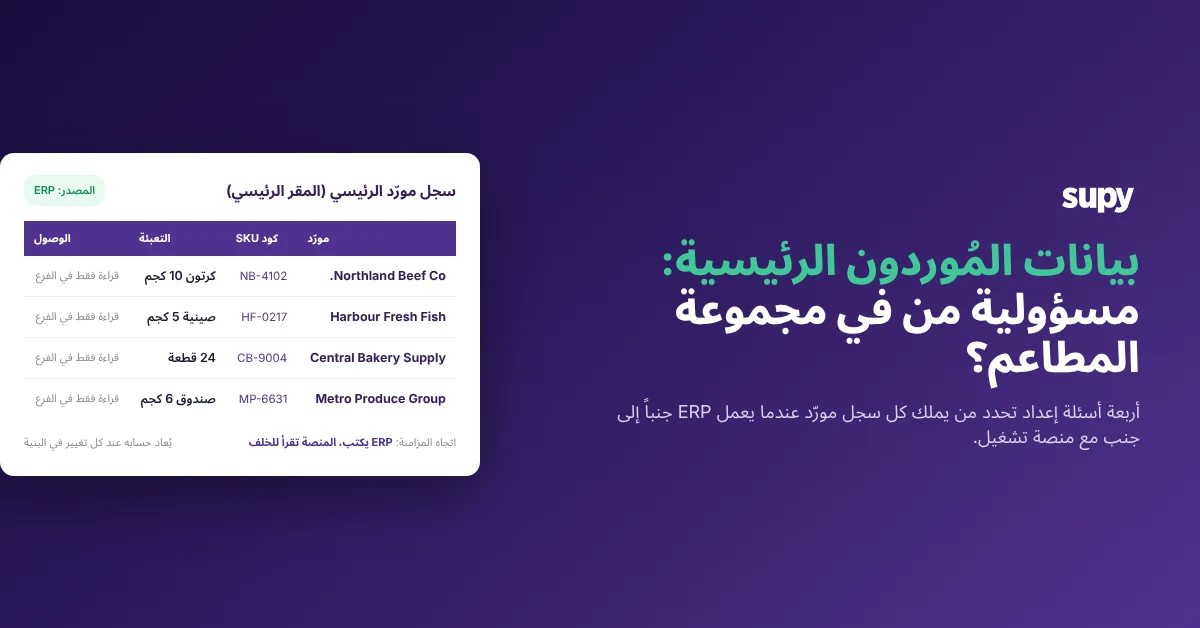
يُنشئ المُوردون في الأعلى داخل نظام ERP المجموعة، ثم يُعاد إدخالهم يدوياً في الفروع، وتُحرَّر بياناتهم محلياً عند كل تغيير في السعر أو حجم العبوة. الهدف المحوري من انتشار نظام ERP – سجل مورّد واحد موثوق – يختفي في ازدواجية الإدخال التي جاء ليزيلها. الحل ليس في شراء أداة مختلفة، بل في الإجابة على أربعة أسئلة إعداد قبل أن تبدأ المنصتان في التواصل.
حدّد مصدر السجل، ثم اقفل الجانب الآخر
مصدر السجل للمورّد هو النظام الوحيد الذي يُسمح فيه بإنشاء بيانات مورّدين جديدة وتعديلها؛ كل نظام آخر يستهلك هذا السجل للقراءة فقط. في مجموعة مطاعم تُشغّل نظام ERP ومنصة تشغيل معاً، يجب اتخاذ هذا القرار صراحةً، لأنه حين لا يُتخذ، يقبل كلا النظامين التعديلات، ويفقدان التزامنه معاً، وتتكرر دورة الإدخال المزدوج فرعاً تلو فرع.
ثلاثة إعدادات ممكنة. الاثنان الأولان فقط يعملان.
| الإعداد | إنشاء المُوردون الجدد في | تعديلات الأسعار والتغليف في | يمكن لمستخدمي الفروع التعديل |
|---|---|---|---|
| ERP كمصدر سجل | ERP | ERP | لا |
| المنصة كمصدر سجل | منصة التشغيل | منصة التشغيل | لا |
| لا قفل لأي منهما | كلاهما | كلاهما | نعم |
حين يحتفظ ERP ببيانات المورّد المالية (شروط الدفع، التسجيل الضريبي، البيانات المصرفية)، فإن ERP هو مصدر السجل ومنصة التشغيل هي المستهلك. حين تحتفظ منصة التشغيل بالبيانات الشرائية (وحدات SKU، أحجام العبوات، التسعير الوحدوي، تغطية الفروع)، يمكن للمنصة أن تكون مصدر السجل ويستهلك ERP بياناتها. الإعداد الثالث غير المقفل ليس وسطاً؛ إنه الحالة التي جاء سؤال الملكية ليزيلها.
طابق مخطط كتالوج الموردين مع ما يُرسله ERP
سجل المورّد الذي يصل من ERP كسطر واحد لا يمكن استخدامه في الفرع. يحتاج الفرع إلى الطلب بحجم تغليف محدد، والاستلام وفق وحدة قياس محددة، وإدراج رمز SKU محدد في الفاتورة. يجب أن يصل السجل في شكل يحمل كل هذه الحقول، وإلا أضافها الفرع يدوياً، وهذا هو الإدخال المزدوج في صورة أخرى.
| الحقل | ما يحمله | لماذا يحتاجه الفرع |
|---|---|---|
| رمز المنتج | المعرّف الأساسي للمكوّن في كتالوج المجموعة | يربط SKU المورّد بسطر تكلفة وصفة واحدة |
| وحدة القياس | وحدة العد على الرف (كغ، لتر، قطعة) | يجب تسجيل جرد المخزون والاستلام بهذه الوحدة |
| شكل التغليف | طريقة بيع المورّد للمنتج (صندوق، صينية، برميل) | تُصدر طلبات الشراء بالعبوات لا بالوحدات الخام |
| معامل التحويل | عدد وحدات العد في كل عبوة | يحوّل سعر العبوة إلى تكلفة الوحدة تلقائياً |
| علامة التوفر | ما إذا كان المورّد قادراً على تلبية SKU حالياً | يمنع تقديم طلب لن يُنفَّذ |
| رمز المورّد | رمز SKU الخاص بالمورّد للمنتج | يطابق سطر الفاتورة مع SKU المنصة عند الاستلام |
كل SKU لمورّد هو منتج مستقل في الفرع يحمل وحدته وتغليفه ومعامل تحويله وعلامة توفره ورمز مورّده الخاص، مرتبطاً بالمكوّن الأساسي المقابل في الكتالوج المركزي للمجموعة. هذا هو ما يجعل سجل المورّد من ERP قابلاً للتنفيذ في نقطة البيع بدلاً من أن يكون اسماً يجب على الفرع إعادة تفسيره في كل مرة يُصدر فيها أمر شراء.
اضبط القراءة فقط في الفروع عبر الأذونات المستندة إلى الأدوار
السبب وراء تعديل مستخدمي الفروع سجلات المُوردون محلياً نادراً ما يكون رغبةً في تغيير مصدر السجل. بل لأن المنصة منحتهم الزر. الحل ليس تدريب المستخدمين؛ إنه تعطيل الزر للأدوار التي لا تحتاجه، مع الحفاظ على الرؤية لكل من يحتاج إلى رؤية الأسعار وأحجام العبوات على الرف.
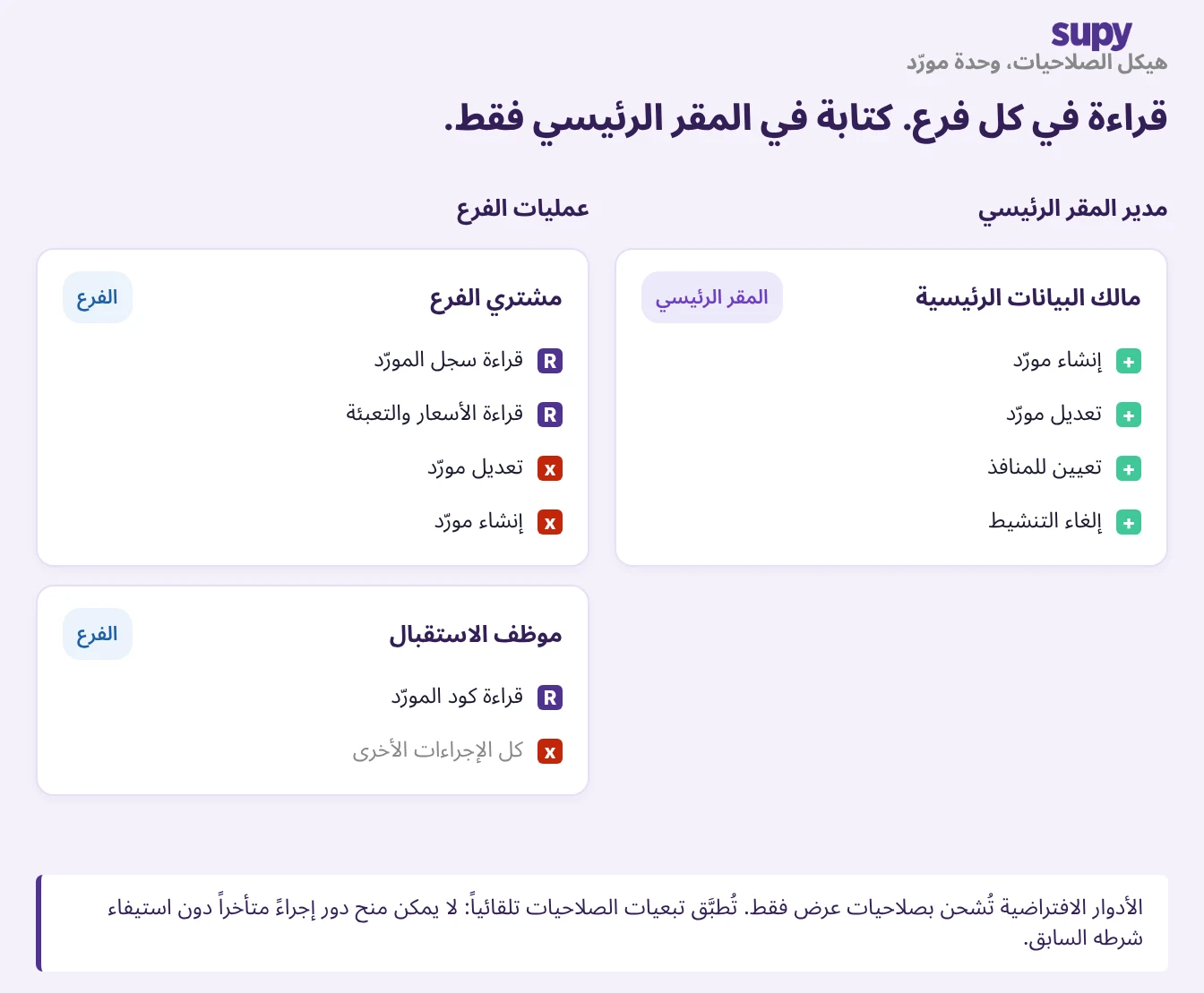
تعمل ضوابط الأذونات المستندة إلى الأدوار كشجرة أذونات دقيقة لكل وحدة. تُسلَّم الأدوار الافتراضية للقراءة فقط ولا يمكن تعديلها؛ يبني المسؤولون أدواراً مخصصة من الشجرة، ويُطبَّق تبعية الأذونات تلقائياً حتى لا تحصل أي دور على إجراء لاحق دون شرطه السابق. الإعداد الذي يُرسّخ الملكية هو دور فرع مخصص بصلاحية قراءة في وحدة المُوردون وكتابة لا مكان لها.
وجّه API: ERP يكتب داخلاً، المنصة تقرأ خارجاً
حين يكون ERP هو مصدر السجل، التكامل ليس أحادي الاتجاه. يجب إعداد قناتين منفصلتين في اتجاهين متعاكسين؛ الخلط بينهما هو سبب إعادة إدخال البيانات الرئيسية "المتكاملة" في الجانبين.
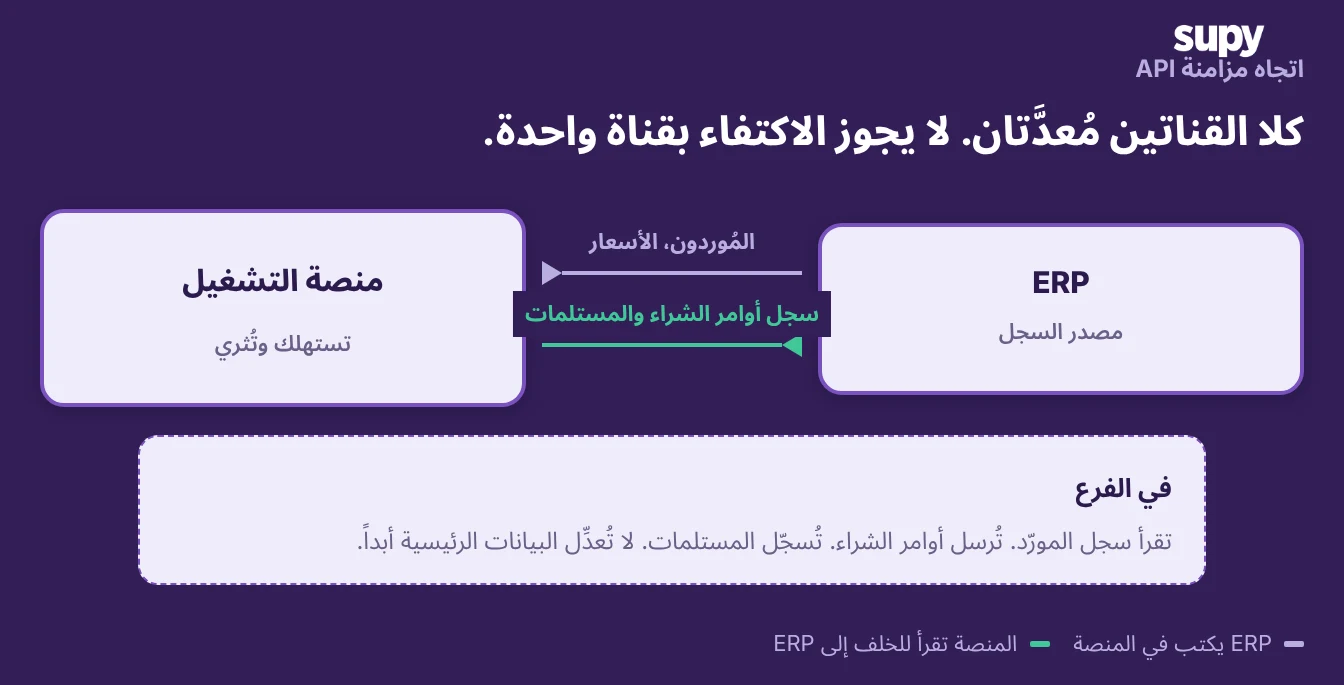
في الاتجاه الصاعد، تنتقل المُوردون الجدد والتعديلات من ERP إلى منصة التشغيل عبر نقاط نهاية المُوردون في المنصة، بحيث يظهر مورّد يُضاف في قسم المالية في كل فرع دون خطوة إدخال. في الاتجاه النازل، تُوفّر Open API لمنصة التشغيل بيانات طلبات الشراء التفصيلية (سجل دورة الحياة، الكميات المؤكدة والمستلمة، معلومات المورّد المثراة) حتى يتمكن ERP من رؤية ما جرى مقابل كل سجل مورّد أرسله. هذه القراءة النازلة تُغلق الحلقة؛ بدونها، لا يرى ERP ما إذا كانت سجلات المُوردون الخاصة به تُستخدم ولا يملك أساساً للتسوية بحسب المورّد.
إبقاء السجل سليماً عند تغير النطاق
يسهل الحفاظ على ملكية المُوردون حين يكون النطاق ثابتاً. تصبح هشّةً حين يفتح موقع أو يُغلَق أو يغيّر علامته التجارية أو يغيّر المطبخ المركزي الذي يستلم منه، لأن معظم الأنظمة تعامل "أي المُوردون نشطون أين" كقائمة تُدار يدوياً لكل موقع.
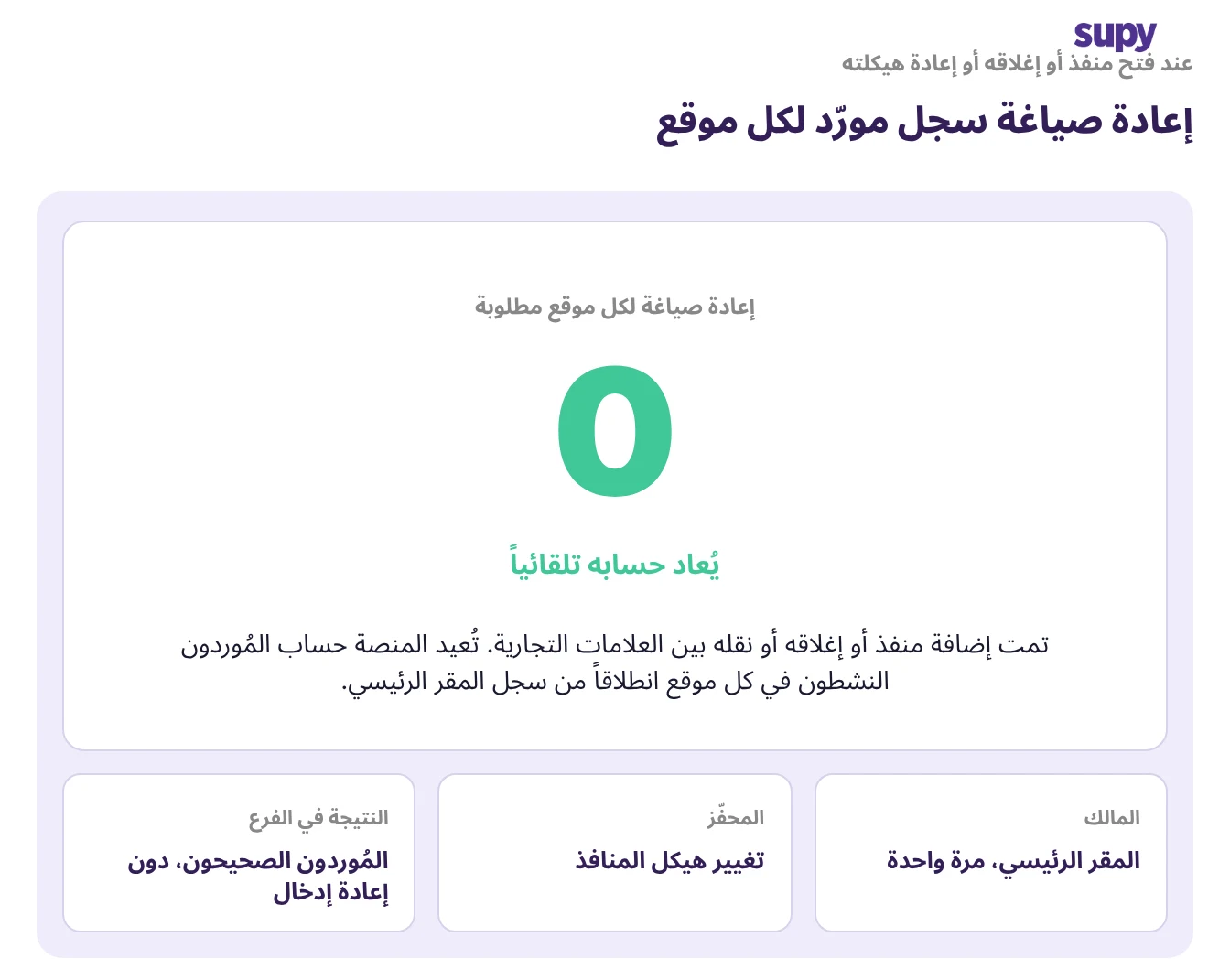
حين تتغير هيكلية نقاط البيع لكيان علامة تجارية في منصة التشغيل، تُعيد المنصة حساب أي المُوردون نشطون لكل مكوّن في كل موقع تلقائياً، بحيث لا يحتاج سجل المورّد إلى إعادة تحديد لكل موقع في كل مرة يتغير فيها نطاق المجموعة. قرار الملكية المتخذ مرةً واحدةً في الأعلى يعيش عبر إعادة التنظيم. إن كانت عمليتك تتطلب إعادة تعيين المُوردون عند كل تغيير في نطاق العمل، فهذه ليست مشكلة نطاق؛ إنها علامة على أن إعادة الحساب لا تزال تجري يدوياً في ERP ولم يوجد سجل مركزي واحد أساساً.
من أين تبدأ في إعدادك الخاص
أجب على هذه الأسئلة الأربعة قبل ربط ERP ومنصة التشغيل. إن كان أي جواب غامضاً أو "كلاهما"، فذلك هو المكان الذي ستعود منه الازدواجية.
أربعة أسئلة إعداد. أجب على كل واحد قبل بدء التكامل:
- أي نظام هو مصدر السجل؟ سمّه. في كل مكان آخر في المجموعة، سجل المورّد للقراءة فقط.
- هل يتناسب مخطط السجل؟ رمز المنتج، وحدة القياس، التغليف، معامل التحويل، علامة التوفر، رمز المورّد – ستة حقول على الأقل.
- هل مستخدمو الفروع محجوبون عن التعديل؟ الافتراضي للقراءة فقط. أدوار مخصصة من شجرة الأذونات. لا كتابة تحت مستوى المقر الرئيسي.
- هل اتجاه API مضبوط في الاتجاهين؟ ERP يكتب المُوردون. المنصة تقرأ بيانات طلبات الشراء. قناتان منفصلتان، كلتاهما مطلوبتان.
إن كان أي جواب غامضاً أو "كلاهما"، فذلك هو المكان الذي ستعود منه الازدواجية.
- أي نظام هو مصدر السجل؟ سمّه. في كل مكان آخر في المجموعة، سجل المورّد للقراءة فقط.
- هل يتناسب مخطط السجل؟ الجانب المستقبِل يحتاج وحدة القياس والتغليف ومعامل التحويل وعلامة التوفر ورمز المورّد حتى يكون السجل قابلاً للاستخدام على الرف – لا اسم المورّد وشروط الدفع فحسب.
- هل مستخدمو الفروع محجوبون عن التعديل؟ الأدوار الافتراضية للقراءة فقط، الأدوار المخصصة من شجرة الأذونات، لا حقوق تعديل على وحدة المُوردون دون مستوى المقر الرئيسي.
- هل اتجاه API مضبوط في الاتجاهين؟ ERP يكتب داخلاً، المنصة تقرأ خارجاً، عبر قناتين منفصلتين، كلتاهما مطلوبتان.
تُدير وحدة إدارة المُوردين في Supy كل SKU لمورّد كمنتج مستقل بوحدته وتغليفه ومعامل تحويله الخاص؛ وتُعيد Open API بيانات طلبات الشراء التفصيلية بحسب المورّد حتى يتمكن ERP من تسوية ما جرى مقابل كل سجل أُرسل. مع الأذونات المستندة إلى الأدوار التي تُسلَّم للقراءة فقط افتراضياً، يعيش قرار الملكية المتخذ مرةً واحدةً في المقر الرئيسي عبر كل تغيير في النطاق وكل نوبة في الفروع. إن كنت تعمل على هذا في عملية نشر جارية، يغطي دليلنا حول برامج المشتريات للمطاعم منظومة المشتريات الأوسع؛ ويمكن أن يساعد حاسبة العائد على الاستثمار المجانية في بناء حجة الأعمال لقفل بيانات المُوردون في المقر الرئيسي.