.jpeg)


Restaurantlagersystem vs. ERP: Wo die Rezeptkalkulation versagt

Was ein Restaurantlagersystem und ein ERP jeweils wirklich leisten
Ein Restaurantlagersystem verfolgt Bestand, Rezepte und den Wareneinsatz auf Tellerebene; ein allgemeines Unternehmens-ERP steuert das Finanzwesen und die Lieferkette des gesamten Unternehmens. Beide überschneiden sich bei Einkauf und Bestand, aber nur eines von beiden wurde für die Rezeptkalkulation entwickelt – und genau diese Lücke ist es, an der Mehrstandortgruppen scheitern.
Beide Systeme verwalten Artikel, Lieferanten und Preise, sodass ein ERP auf dem Papier auch die Lagerverwaltung abdecken sollte. Die Teams, die dies evaluieren, betreiben in der Regel bereits SAP, Microsoft Dynamics 365 oder ein ähnliches Back-Office-System. Die Frage lautet selten „Welches kaufen wir?", sondern „Brauchen wir wirklich eine separate Ebene, wenn das ERP bereits ein Lagermodul hat?" Die ehrliche Antwort hängt von einer einzigen Sache ab: wie viel Ihrer Betriebstätigkeit aus Rezeptkalkulation besteht und wie viele Standorte diese tragen.
Die nachstehende Tabelle zeigt, wo jedes System seine Stärken hat. Betrachten Sie sie als Aufgabenteilung und nicht als Kampf auf Leben und Tod, denn in den meisten Mehrstandortgruppen ergänzen sich die beiden Systeme am Ende, anstatt dass eines das andere ersetzt.
| Funktion | Restaurant-Lager- und Rezeptplattform | Allgemeines Unternehmens-ERP |
|---|---|---|
| Rezeptkalkulation (Stückliste) | Nativ, pro Teller kalkuliert | Fertigungs-Stückliste, nicht restaurantspezifisch |
| Kosten aktualisieren sich bei Preisänderungen | Automatisch beim Wareneingang | Manueller Export in eine Tabellenkalkulation |
| Verkäufe verbrauchen die richtigen Zutaten | Eingebaut über die Kassenschnittstelle | Selten, erfordert individuelle Anpassungen |
| Vorbereitung: Schwund und Ausbeute | Im Rezept modelliert | Nicht modelliert |
| Nicht-Lager-Verbindlichkeiten und Hauptbuch | Nicht ihre Aufgabe | Kernstärke |
| Geeignet für Mehrstandort-Restaurantgruppen | Speziell dafür entwickelt | Aufwändig für den Gastronomiebereich zu konfigurieren |
Warum ein Finanz-ERP kein Restaurant-Rezept kalkulieren kann
Unternehmens-ERPs wie SAP und Microsoft Dynamics wurden für die Fertigung und das Finanzwesen entwickelt, wo eine Stückliste feste Komponenten zu einem Fertigprodukt zusammensetzt. Ein Restaurant-Rezept ist ein anderes Tier: Portionen variieren, Zutaten werden ausgetauscht, die Vorbereitung verursacht Ausbeuteverluste, und dasselbe Gericht wird in zehn Küchen leicht unterschiedlich zubereitet. Die ERP-Stückliste wurde nie dafür ausgelegt – und so landet das Kalkulationsteam damit, Wareneingänge und Preisdaten in Excel zu exportieren und die Rezeptkosten manuell neu zu berechnen.
Das ist der Moment, in dem die Rezeptkalkulation zusammenbricht. Es ist nicht so, dass das ERP ein schlechtes System ist; die Kalkulation eines Gerichts liegt schlicht außerhalb dessen, wofür es entwickelt wurde. Wir hören dieselbe Geschichte von einer Mehrmarkengruppe, die auf Tabellenkalkulationen angewiesen ist, weil ihr ERP keine Rezeptkalkulation bietet, und von einer Zehn-Standort-Gruppe, die Wareneingangs- und Preisdaten jede Woche manuell aus demselben ERP zieht. Die Arbeit ist real, repetitiv und still fehleranfällig – genau die Art von Aufgabe, die eine Tabellenkalkulation bis zu einem gewissen Punkt bewältigt und dann plötzlich nicht mehr. Dieselbe Falle schnappt bei Teams zu, die versuchen, die Kalkulation über ein ERP-Lagermodul in einer Zentralküche abzuwickeln.
Eine dedizierte Plattform schließt diese Lücke, indem sie das Rezept so modelliert, wie die Küche tatsächlich arbeitet. Rezepte und Vorbereitungsrezepte erfassen fertige und halbfertige Artikel, sind mit dem Kassensystem verknüpft, sodass ein Verkauf die richtigen Zutaten einschließlich Modifikatoren verbraucht, und rechnen den Schwund bei der Vorbereitung hoch, damit die Kosten das widerspiegeln, was die Küche tatsächlich verbraucht. Da die Kosten automatisch für Zählungen, Schwund, Produktion und Transfers angewendet werden, basiert der theoretische Wareneinsatz immer auf dem aktuellen Rezeptkostenstand – ohne dass jemand eine Neuberechnung anstoßen muss.

Wo die Excel-Übergangslösung Ihre Kosten still verfälscht
Die Tabellenkalkulations-Brücke schlägt nicht laut aus. Sie schlägt eine ausgetauschte Position nach der anderen aus. Ein Lieferant liefert eine andere Marke, Qualitätsstufe oder Herkunft für dieselbe Zutat; der Wareneingang erfasst dies unter einem neuen oder nicht übereinstimmenden Code, und das Rezept in Excel verweist weiterhin auf den abgekündigten Artikel und seinen alten Preis. Das Gericht wird nun auf Basis eines Preises kalkuliert, den die Küche nicht mehr zahlt – und da jeder Standort dasselbe Rezept liest, verbreitet sich der Fehler überall auf einmal.
Multipliziert man das mit einer geschäftigen Woche, in der ein erheblicher Anteil der Positionen ausgetauscht wird, driftet der gemeldete Wareneinsatz von der Realität ab, ohne dass jemand die Formel anfasst. Eine Gruppe kann einen Wareneinsatz sehen, der gesund aussieht, während die tatsächliche Zahl mehrere Punkte höher liegt – und niemand erkennt es, bis der Monatsabschluss eine Abstimmung erzwingt.
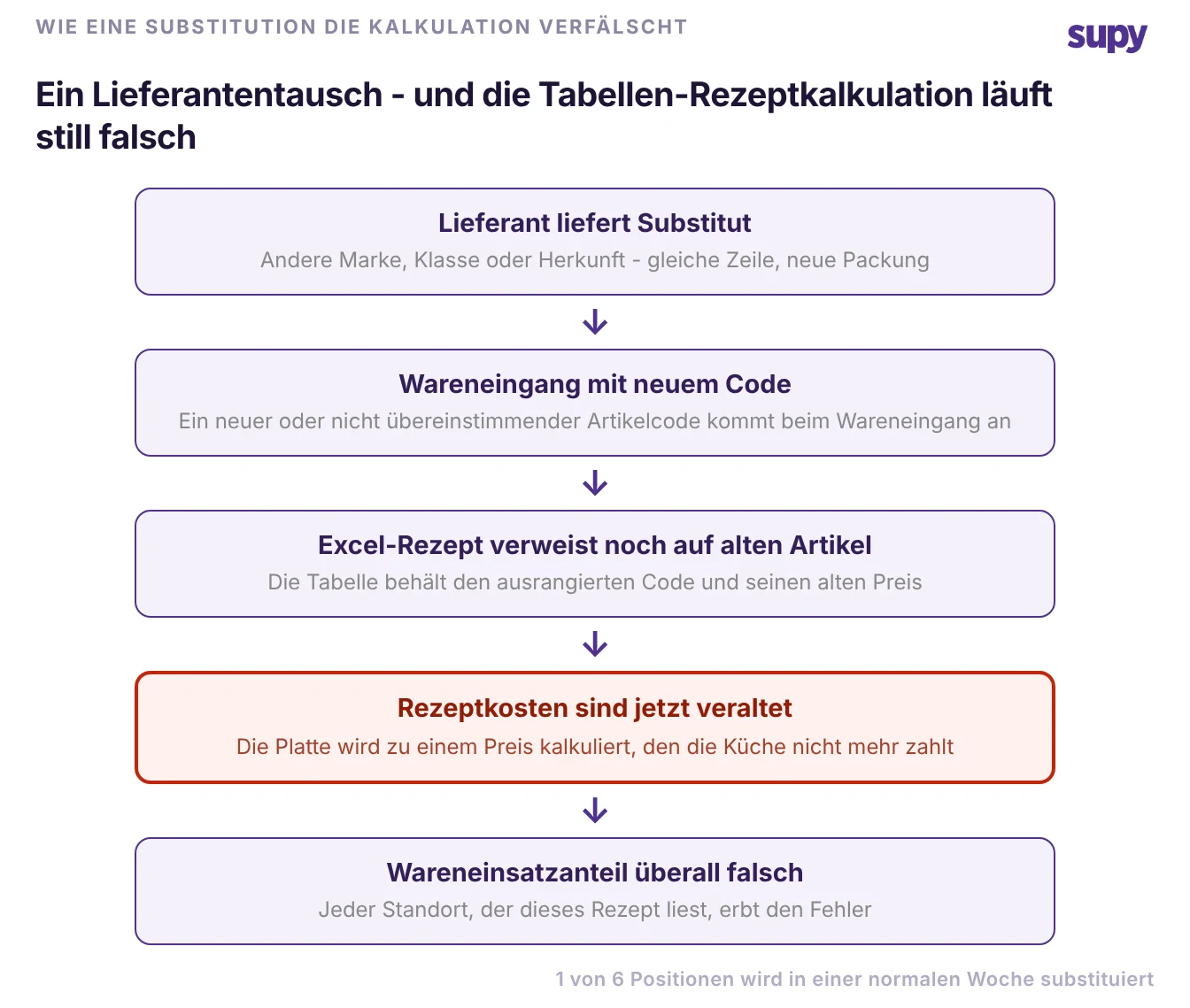
Eine Plattform, die Preise aus dem Wareneingang bezieht und das Rezept an den Live-Artikel knüpft, beseitigt die manuelle Dateneingabe, die dies ermöglicht. Es ist nicht so, dass die Menschen nachlässig sind; die Tabellenkalkulation hat schlicht keine Möglichkeit zu wissen, dass ein Artikel ausgetauscht wurde – sodass die Korrektur nie vorgenommen wird.
Obendrauf schichten oder komplett ersetzen?
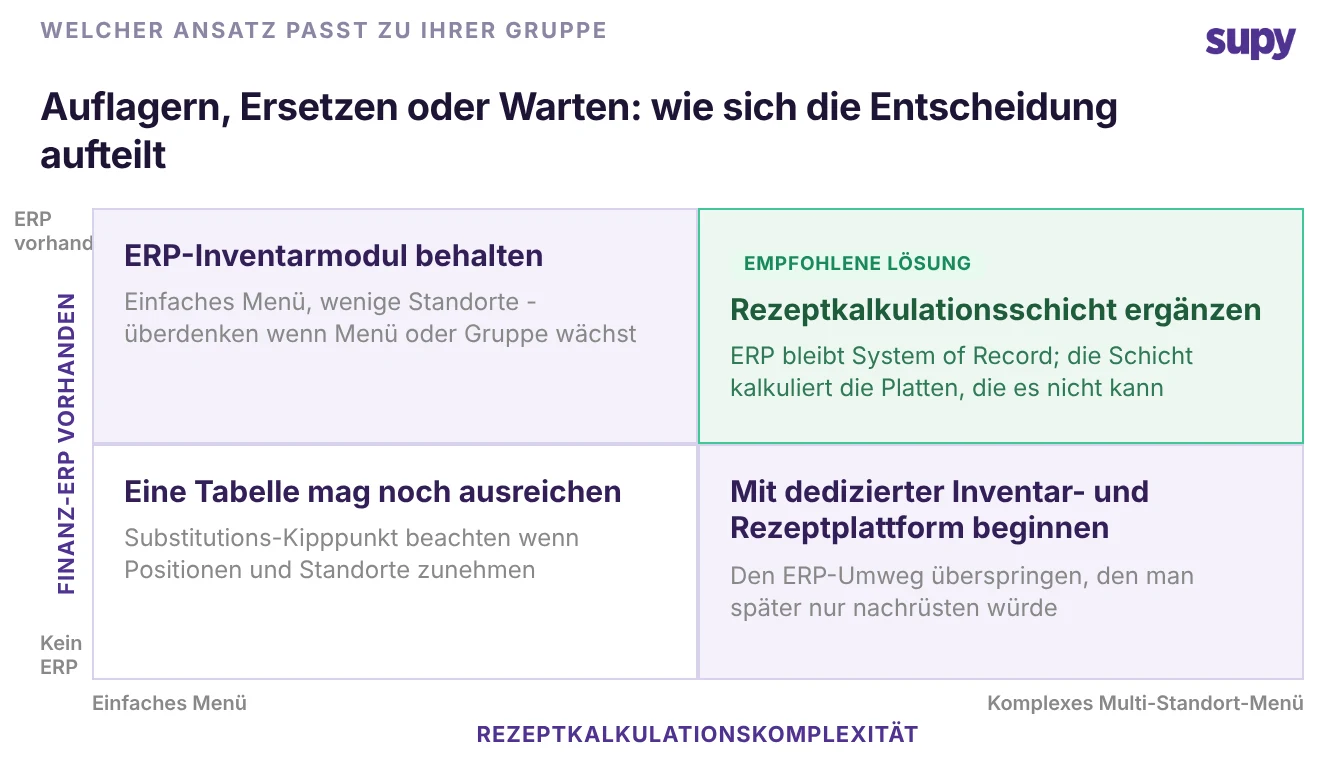
Die entscheidende Frage ist nicht „ERP oder dedizierte Plattform". Für die meisten Gruppen, die bereits ein Finanz-ERP betreiben, lautet sie: „Ersetzen wir das ERP, oder fügen wir eine Ebene hinzu, die den Teil übernimmt, den das ERP nicht kann?" Ein funktionierendes Finanzsystem zu ersetzen, um eine Rezeptkalkulation zu erhalten, lohnt sich fast nie – und den Restaurantbetrieb vollständig in einem allgemeinen ERP abzuwickeln bedeutet, für immer mit der Tabellenkalkulations-Übergangslösung zu leben.
Der Mittelweg ist der, den die meisten Mehrstandortgruppen einschlagen: das ERP als Aufzeichnungssystem für Finanzen und Verbindlichkeiten behalten und eine dedizierte Lager- und Rezeptplattform obendrauf für Bestand, Rezeptkalkulation und Wareneinsatz legen. Die beiden sind über eine Integration verbunden, sodass Wareneingangswerte und Dokumentenstatus zwischen ihnen fließen, anstatt erneut eingegeben zu werden. Supy zeigt den Live-Synchronisationsstatus von verbundenen Buchhaltungssystemen – darunter Xero, QuickBooks, NetSuite, MS Dynamics und weitere – direkt auf den Wareneingangs- und Lieferantendatensätzen an und ist Teil einer Bibliothek von 75+ Integrationen in den Bereichen Kasse, Buchhaltung und ERP. Das ERP erledigt weiterhin, was es gut kann; die Ebene kalkuliert die Gerichte, die es nie kalkulieren konnte.
Die Wahl zwischen beiden: Wann welcher Ansatz gewinnt
Bringen Sie es auf Ihre eigene Situation herunter. Wählen Sie das ERP-Lagermodul allein, wenn Ihre Speisekarte einfach ist, Sie wenige Standorte betreiben und die Rezeptkalkulation ein untergeordneter Teil des Betriebs ist. Wählen Sie eine dedizierte Lager- und Rezeptplattform zusätzlich zu Ihrem ERP, wenn Sie eine echte Speisekarte über mehrere Standorte hinweg führen, Ihr Kalkulationsteam Daten in Excel exportiert und der Wareneinsatz eine Kennzahl ist, die das Unternehmen aktiv verbessern möchte. Wenn Sie noch kein ERP haben und Rezepte komplex sind, beginnen Sie mit der dedizierten Plattform und überspringen Sie den Fertigungs-ERP-Umweg, den Sie später ohnehin nur als Aufsatz einbinden würden.
Ein schneller Selbsttest: Öffnen Sie das letzte Rezept, das Ihr Team kalkuliert hat, und finden Sie das Datum, an dem die Zutatenpreise darin zuletzt aktualisiert wurden. Wenn dieses Datum älter ist als Ihre letzte Lieferantenpreisänderung, driftet Ihr Wareneinsatz bereits – und keine ERP-Konfiguration behebt eine Kalkulationsmethode, die in einer Tabellenkalkulation lebt. Wenn Sie vor einer Systemänderung schnell prüfen möchten, wo Ihre Gerichte stehen, gibt Ihnen unser kostenloser Wareneinsatzrechner die Zahl in wenigen Minuten.
Supy ist die dedizierte Ebene genau dafür: restaurantspezifische Rezeptkalkulation, die sich aktualisiert, wenn Ihre Preise steigen, auf dem ERP aufsetzt, das Sie bereits betreiben, und dafür sorgt, dass jeder Standort dasselbe Gericht auf dieselbe Weise kalkuliert. Wenn das die Lücke ist, die Ihre Gruppe mit einer Tabellenkalkulation überbrückt hat, lohnt es sich zu sehen, wie es mit Ihren eigenen Rezepten funktioniert.