.jpeg)


Integration der Restaurantbuchhaltung: Wie Rechnungen und Wareneingangsnachweise mit den richtigen Sachkonten und Steuerschlüsseln gebucht werden
Was die Integration der Restaurantbuchhaltung wirklich in Ihre Bücher einbucht
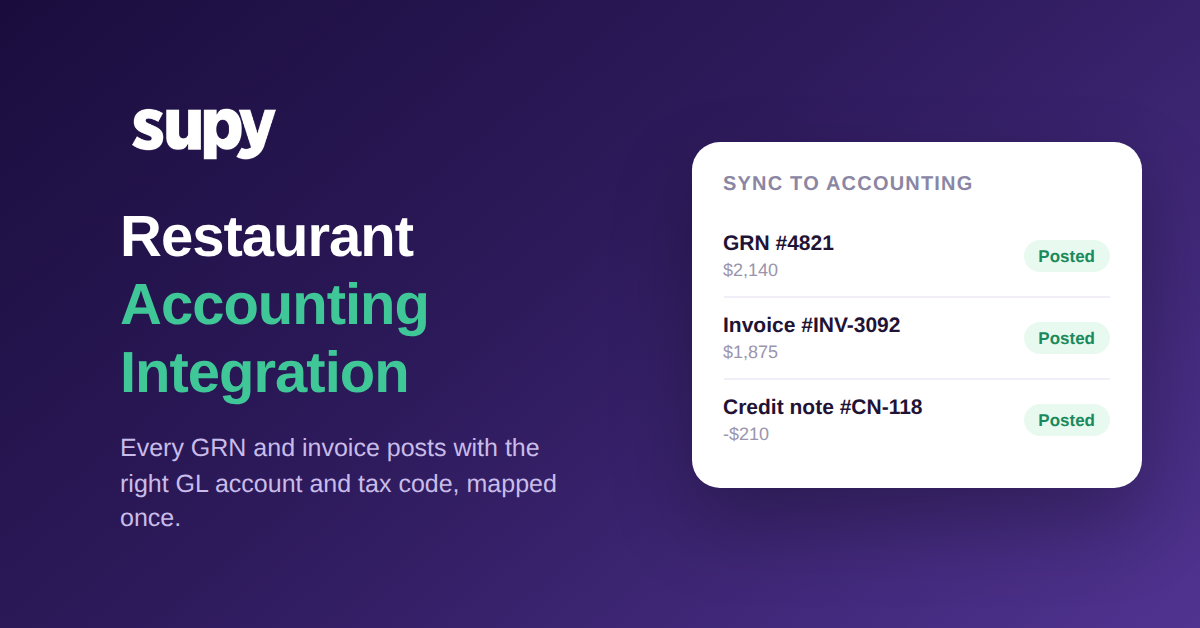
Verbinden Sie Ihr Lager- und Beschaffungssystem korrekt mit Ihrer Buchhaltungssoftware, und jeder Wareneingangsschein sowie jede Lieferantenrechnung wird automatisch als vollständig kodierter Journaleintrag in das Hauptbuch gebucht, ohne manuelles Abtippen am Periodenende. Das ist die Leistung der Restaurantbuchhaltungs-Integration: Sie ordnen jede Artikelkategorie, jeden Lieferanten und jeden Transaktionstyp bei der Einrichtung einmalig einem Sachkonto und einem Steuerschlüssel zu, und jedes nachfolgende Dokument erhält automatisch die richtige Klassifizierung.
Das ist der eigentliche Zweck der Verbindung beider Systeme, und es ist genau der Teil, den die meisten Vergleiche der „besten Buchhaltungssoftware“ übergehen. Die Wahl des Tools ist die einfache Entscheidung. Die Arbeit, die einem Finanzteam seinen Monatsabschluss tatsächlich einspart, liegt im Buchungsmechanismus: Wenn eine Filiale eine Lieferung erhält und der Wareneingangsschein bestätigt wird, oder wenn eine Lieferantenrechnung eingeht, sollte dieses Dokument bereits wissen, in welches Sachkonto es gehört und welcher Steuerschlüssel gilt, und es sollte ohne manuelle Reklassifizierung in die Buchführung eingehen.
Mit Supy, das mit Ihrem Buchhaltungssystem verbunden ist, fließen Erlös- und Kostendaten mit den richtigen Kontocodes in das Hauptbuch, und manuelles Abtippen am Periodenende entfällt. Die einmalige Einrichtung ordnet die Finanzobjekte, die ein Restaurant tatsächlich verwaltet – Sachkonten, Steuersätze, Umsatzarten und Maßeinheiten – ihren Entsprechungen im verbundenen System zu. Danach übernehmen der Wareneingangsschein und die Rechnung die Codierung für Sie.
Wie einmalige Kategorienzuordnung die manuelle Reklassifizierung beendet
Der Mechanismus dahinter ist eine gespeicherte Zuordnung. Statt dass eine Person Dokument für Dokument entscheidet, ob diese Fleischlieferung Warenkosten mit Normalsteuersatz sind und diese Reinigungsbestellung ein Gemeinkostenkonto, konfigurieren Sie diese Regeln einmalig. Jede Artikelkategorie, jeder Lieferant und jeder Transaktionstyp verweist auf das richtige Sachkonto, den richtigen Steuerschlüssel und die richtige Zahlungsmethode. Von da an übernimmt ein Wareneingangsschein oder eine Rechnung seine Klassifizierung aus der Zuordnung, sobald er erstellt wird.
Das ist der Unterschied zwischen einer Integration, die Zahlen verschiebt, und einer, die sie korrekt bucht. Ein reiner Datenfeed lässt immer noch jemanden entscheiden, wo jede Zahl hingehört. Eine gespeicherte Zuordnung beseitigt diese Entscheidung vollständig: Die Frischproduktzeile geht auf das Frischprodukt-Kostenkonto zum Nullsteuersatz, die Verpackungsbestellung geht auf das Verpackungs-Gemeinkostenkonto zum Normalsatz, und keines von beiden braucht einen Menschen, der es noch einmal sagt. Wenn ein neuer Lieferant oder eine neue Kategorie hinzukommt, ordnen Sie sie einmalig zu, und die Regel gilt für jedes zukünftige Dokument.
Da die Zuordnung auf Kategorie- und Lieferantenebene liegt und nicht auf einzelnen Positionszeilen, skaliert sie so, wie es eine wachsende Gruppe benötigt. Fügen Sie eine Filiale hinzu, und sie verwendet denselben Kontenplan und dieselbe Steuerlogik wie jede andere Niederlassung. Diese Konsistenz ist es, die einem Finanzteam mehrerer Standorte ermöglicht, darauf zu vertrauen, dass ein standortübergreifender Bericht Gleiches mit Gleichem vergleicht, anstatt handcodierten Schätzungen einer Filiale gegen die einer anderen. Wenn Sie noch überlegen, welches System Sie standardisieren sollen, bietet unser Leitfaden zur Auswahl von Buchhaltungssoftware für Restaurantgruppen diese Entscheidung; dieser Artikel befasst sich mit dem, was nach der Verbindung passiert.
Wie jede Artikelkategorie einem Sachkonto und einem Steuerschlüssel zugeordnet wird
| Artikelkategorie | Sachkonto | Steuerschlüssel |
|---|---|---|
| Fleisch und Geflügel | 5010 · Lebensmittel - Fleisch | Normalsatz |
| Frisches Gemüse und Obst | 5020 · Lebensmittel - Frischprodukte | Nullsatz |
| Reinigung und Chemikalien | 6300 · Reinigungsbedarf | Normalsatz |
| Verpackung | 6100 · Verpackung | Normalsatz |
Wie niedrige Rechnungserfassung den Wareneinsatz über Standorte hinweg unbemerkt aufteilt
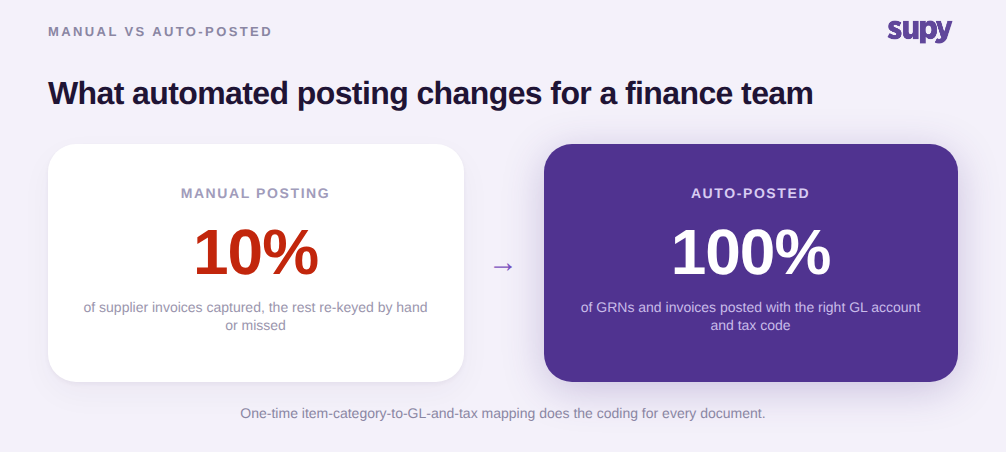
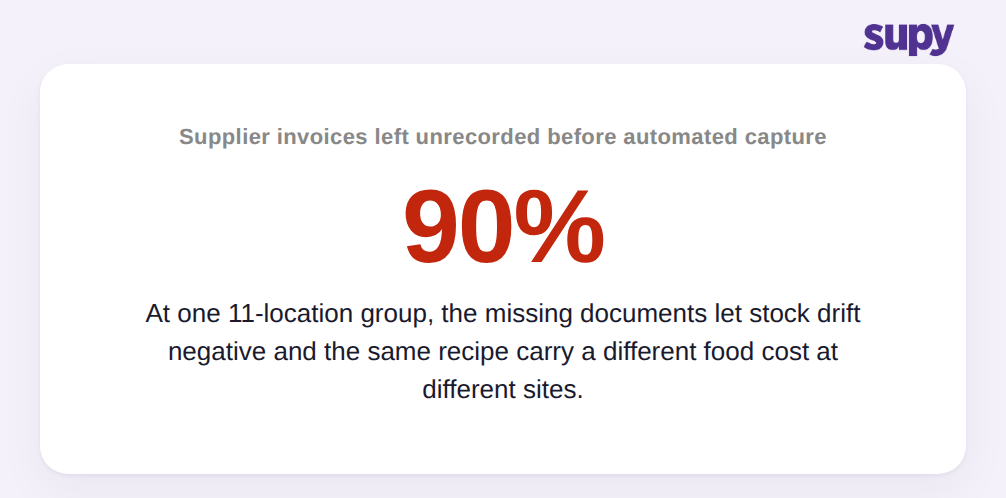
Die Kosten des Fehlens sind leicht zu unterschätzen, weil sie sich nicht als Fehler zeigen. Sie zeigen sich als Drift. Eine Gruppe mit 11 Standorten im Casual-Dining-Bereich hatte, bevor sie auf automatische Rechnungserfassung umstellte, nur etwa 10 % ihrer Lieferantenrechnungen tatsächlich in ihr System eingegeben. Die anderen 90 % blieben unerfasst. Der Lagerbestand driftete ins Negative, und dasselbe Rezept trug an verschiedenen Standorten unterschiedliche Wareneinsätze, weil jede Filiale, die eine Zutat nicht über das System eingekauft hatte, noch immer auf der Grundlage eines veralteten Preises kalkulierte.
Das ist der eigentliche Schaden einer manuellen, niedrig-erfassenden Buchhaltung: keine falsche Zahl, die man finden und korrigieren kann, sondern eine langsame Divergenz, die man nicht sehen kann. Wenn die meisten Dokumente nie gebucht werden, beschreiben das Hauptbuch und die Lagerdatei beide ein Restaurant, das nicht existiert. Die Wareneinsatz-Prozentzahlen sehen an einem Standort gut aus und an einem anderen falsch, aus Gründen, die kein Bericht erklären kann, weil die zugrundeliegenden Rechnungen nie erfasst wurden.
Betreiber spüren dies, bevor sie es benennen können. In mehreren Märkten ist die am häufigsten genannte unmittelbare Verwaltungsbelastung von Betreibern das manuelle Verarbeiten hoher täglicher Volumina von Lieferanten- und Steuerrechnungen. In einer Arbeitssitzung priorisierte ein Betreiber die automatische Rechnungserfassung gegenüber fortgeschritteneren Vorhersagefunktionen, genau weil die manuelle Rechnungsbearbeitung der tägliche Schmerz war. Das korrekte Erfassen und Buchen von Rechnungen ist keine Back-Office-Spielerei. Es ist das Fundament, von dem jede nachgelagerte Zahl abhängt. Die Erfassung beginnt in der Regel an der Eingangstür, mit einem gemeinsamen Lieferantenrechnungs-Posteingang, der Dokumente hereinzieht, bevor sie verloren gehen können.
In Ihr Buchhaltungssystem buchen, ohne es Dokument für Dokument zu tun
Bei Mehrfachstandort-Volumen ist die korrekte Codierung nur die Hälfte des Problems. Die andere Hälfte ist der Durchsatz. Ein Finanzteam, das einen Monat von Dokumenten einzeln bucht, wird immer in Rückstand geraten, egal wie gut die Zuordnung ist. Supy ermöglicht es Betreibern, mehrere Wareneingangsnachweise in einer einzigen Massenaktion zu buchen, die die verknüpften Rechnungen zusammenfasst, alle verknüpften Gutschriften abschließt, die PDFs generiert und jedes ausgewählte Dokument gleichzeitig mit dem verbundenen Buchhaltungssystem synchronisiert. Sie buchen nicht Dokument für Dokument auf die Konten; Sie leeren eine Warteschlange in einem Schritt.
Das zweite, was ein Finanzteam braucht, ist der Beweis, dass es funktioniert hat. Supy zeigt den Live-Synchronisierungsstatus von verbundenen Buchhaltungssystemen direkt auf den Wareneingangsschein-, Lieferantenrücksendungs-, Gutschrift- und Bestelldatensätzen an, sodass ein Betreiber auf einen Blick sehen kann, ob jedes Dokument auf die Konten gebucht wurde. Das beantwortet die Frage, die jedes Finanzteam tatsächlich stellt, nämlich nicht „kann das integrieren“, sondern „hat diese spezifische Rechnung gebucht, ja oder nein.“ Die anerkannten Systeme, mit denen dies verbunden werden kann, umfassen QuickBooks, Xero, Zoho Books, MYOB, Oracle NetSuite, Odoo, MS Dynamics und Wafeq, Teil von Supys 75+ Buchhaltungs-, POS- und ERP-Integrationen. Wenn Sie die Rohdaten auch in einem Warehouse oder einem ERP neben dem Buchhaltungsposten benötigen, behandelt der Beschaffungs-API- und ERP-Pfad diesen Weg.
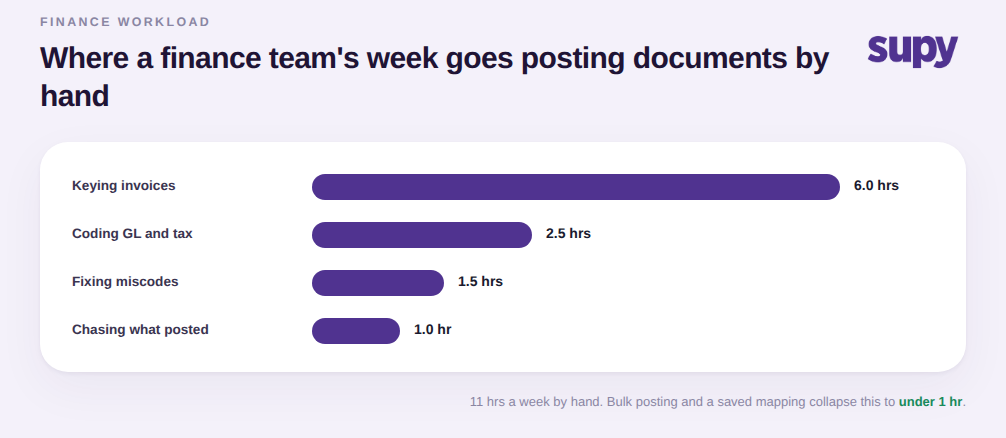
Wenn Sie dieses Ergebnis möchten, beginnen Sie nicht mit dem Integrations-Wechsel. Beginnen Sie mit der Zuordnung. Bevor Sie irgendetwas verbinden, listen Sie Ihre Artikelkategorien und das Sachkonto sowie den Steuerschlüssel auf, auf das jede gebucht werden soll, und notieren Sie, welche Lieferanten oder Transaktionstypen Ausnahmen von diesen Standards sind. Diese Liste ist die Einrichtung. Eine Integration, die ohne sie verbunden wird, schiebt Zahlen in ein nicht klassifiziertes Sammelbuchungskonto und gibt Ihrem Team dieselbe Reklassifizierungsarbeit an einem neuen Ort.
Wenn Sie ein System evaluieren, bitten Sie darum, drei Dinge live zu sehen: einen Wareneingangsschein, der aufgrund einer gespeicherten Zuordnung auf das richtige Sachkonto und den richtigen Steuerschlüssel gebucht wird, eine Massenbuchung, die mehrere Dokumente auf einmal abräumt, und den Synchronisierungsstatus-Indikator, der bestätigt, dass ein bestimmtes Dokument in den Konten gelandet ist. Wenn ein Anbieter alle drei auf echten Datensätzen statt auf einer Folie zeigen kann, ist das Monatsend-Abtippen, das die Finanzen fürchtet, wirklich verschwunden, nicht nur verschoben.