.jpg)


Professional Recipe Software: What to Look for Beyond a Spreadsheet

Why a Spreadsheet Stops Working Once Recipes Have Real Money On Them
Professional recipe software is a system that costs, standardises and maintains a restaurant's recipes automatically, rather than storing them as static numbers in a spreadsheet. The difference that matters is upkeep: it keeps every recipe's cost current as supplier prices move, handles sub-recipes and yields, and serves the finance team and the line cook at once. A spreadsheet does none of that on its own.
For a single site with a stable menu, a spreadsheet can look like enough. It stops working the moment recipes carry real money. Prices change weekly, so a costed sheet is out of date the day after someone builds it. Sub-recipes mean a sauce feeds twenty dishes, and a price change in one ingredient should ripple to all twenty, which a flat sheet cannot do without manual rework. And the numbers only stay right for as long as one person keeps updating them by hand, which never lasts.
The result is a recipe book that everyone trusts and nobody has actually recosted in months. What clean recipe data depends on before any of this is a disciplined item master, and that is worth getting right early because recipe costing is only ever as accurate as the item data underneath it. Professional recipe software is what maintains that accuracy for you. The sections below are what to look for when you evaluate one.
Does the Cost Update When Your Supplier Prices Move?
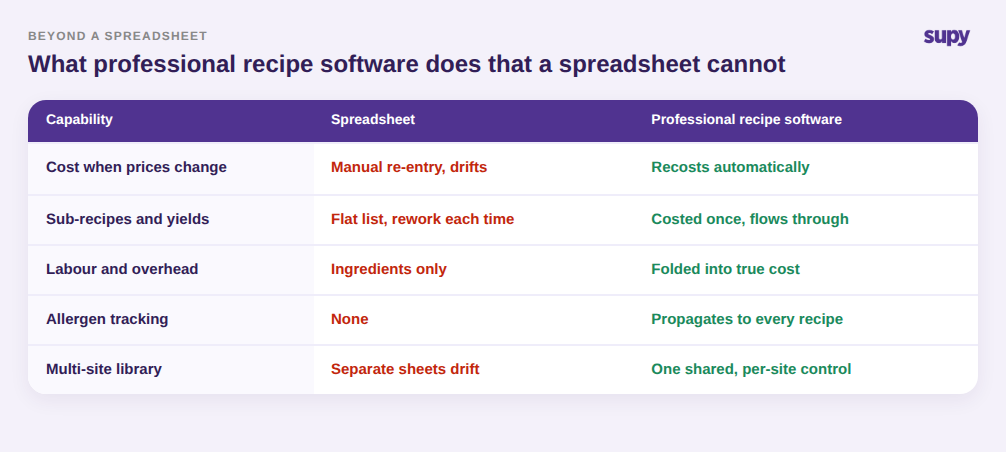
This is the single most important question, and the one buyers most often forget to ask. A recipe cost is only useful if it reflects what ingredients cost today, not what they cost when someone last typed them in. Supplier prices drift constantly, and every drift quietly changes the true cost of every dish that uses that ingredient.
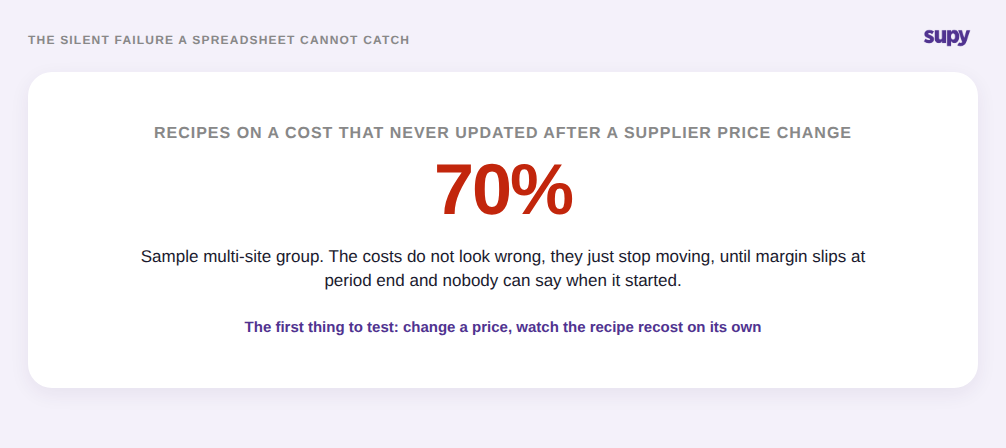
The failure mode is silent. Costs do not look wrong; they just stop moving. On a sample multi-site operation, as many as 70% of recipes can be sitting on costs that never updated after a price change, and nobody notices until margin slips at period end. A spreadsheet has no mechanism to catch this, and neither do some tools that claim to.
So test it directly in a demo. Change a supplier price on one ingredient and watch whether every recipe using it recosts automatically, or whether someone still has to trigger it by hand. Ask how the tool ingests price changes in the first place, because a cost that depends on manual re-entry will drift exactly like the spreadsheet you are trying to replace. If you already track what your suppliers charge you over time, professional recipe software should turn that price movement into a live recipe cost without a human in the loop.
What Actually Goes Into the Costed Number
Two recipes can show the same cost and mean completely different things, depending on what the tool counts and how it averages. Beyond just being current, a costed number is only trustworthy if you know what sits behind it.
Start with the averaging method. When an ingredient arrives at different prices from different suppliers, or the same supplier at different times, the tool has to decide which price to use. A naive average that throws every purchase into one number inflates cost when a backup supplier or a one-off high-price delivery is pulled in. A rolling weighted average, based on what you actually paid over a recent window, keeps the figure stable and defensible, which matters the day an auditor asks you to prove it. Ask which method a tool uses; if it cannot tell you, that is an answer in itself.
Then ask what the number includes. A dish that looks like it costs a sample $4.20 in ingredients can really cost $6.10 once prep labour and kitchen overhead are counted. Ingredient-only costing, which is all most spreadsheets ever manage, understates true cost by a margin wide enough to turn a dish you think is profitable into one that is not. Professional recipe software should let you fold labour and overhead into the costed number, so the figure you price and menu-engineer against is the real one.

Can It Handle Sub-Recipes, Yields and Allergens, Not Just a Flat List?
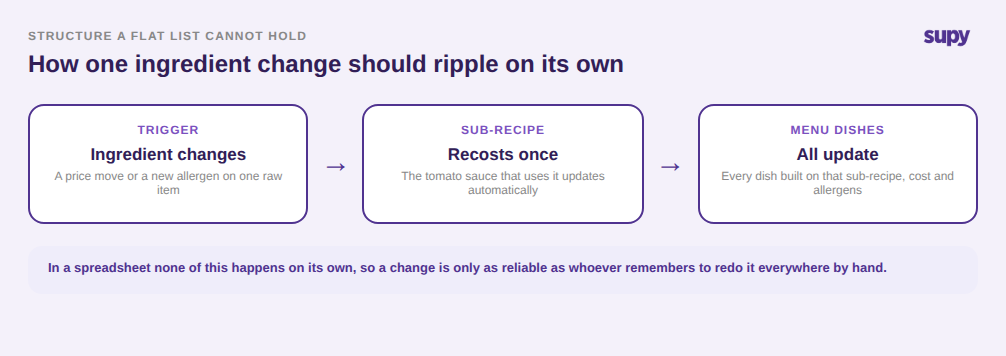
A spreadsheet treats every recipe as a flat list of ingredients. Real kitchens do not work that way. A stock reduces into a sauce, the sauce goes into six dishes, and a batch of dough yields forty portions at a cost per portion that has to be worked out, not guessed. Professional recipe software has to model this structure, because the structure is where cost and consistency actually live.
Look for three things a flat list cannot do. Sub-recipes, so a component is costed once and reused everywhere, and a change flows through automatically. Yields, so batch production translates into an accurate cost per portion rather than a rough divide. And allergen handling that tracks allergens at the ingredient level and propagates them to every recipe that uses that ingredient, so when an ingredient's profile changes, every affected dish updates at once rather than waiting for someone to remember.
That last point is not only a costing feature; it is a safety one. A recipe tool that cannot tell you, reliably, which live dishes contain a given allergen is not doing a job a professional kitchen needs done. Test it by changing one ingredient and checking what moves downstream on its own.
What Changes the Day You Run More Than One Site
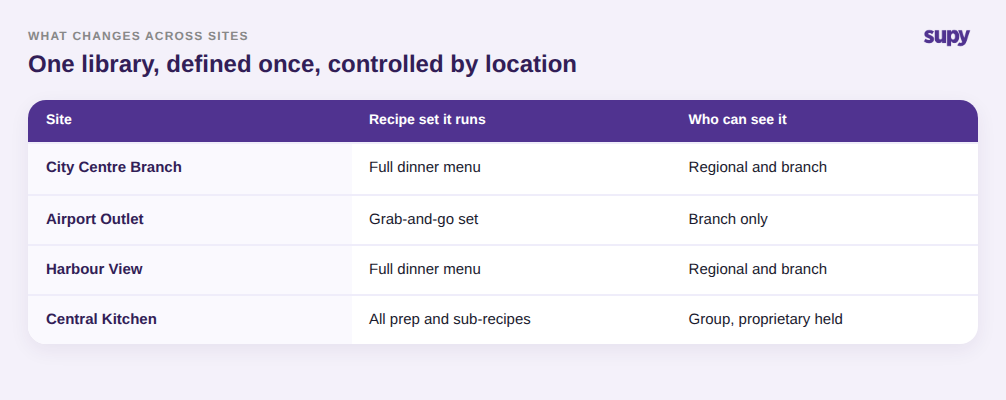
Everything above gets harder across locations, and this is where a spreadsheet finally gives up. Multiple sites mean one recipe library that has to stay consistent, costs that differ by location because prices do, and control over who sees and edits what.
Look for a shared library where a recipe is defined once and rolled out to the sites that run it, rather than a separate sheet drifting on every branch's laptop. Look for per-location cost, because the same recipe genuinely costs different amounts in different places and a single blended number hides that. And look for visibility control: recipes should be assignable to specific outlets, so a regional manager sees only the recipes their sites run, and proprietary formulas stay with the branches that need them rather than being visible group-wide.
None of this is a nice-to-have at scale. It is the difference between a recipe system that holds a growing group together and a pile of spreadsheets that quietly disagree with each other.
When you sit down for a demo, take four questions with you and make the vendor show you, not tell you: change a supplier price and watch the recipe recost; ask which averaging method sits behind the cost; record a dish with labour and overhead and see the true number; and change one ingredient's allergens and confirm every affected recipe updates. A tool that handles those four cleanly is doing the job a spreadsheet cannot. One that stumbles on them will cost you the same blind spots you have now, just with a login screen in front of them.
Recipe costing is the part of the operation Supy is built for, alongside inventory and procurement, keeping every recipe's cost current as prices move across every site. If your recipes still live in a spreadsheet that nobody has recosted in months, that is the gap to close first, and the fastest way to judge any tool is to put your own recipes and prices in front of it.