.jpeg)


Professionelle Rezept-Software für Restaurants: der Guide

Warum eine Tabellenkalkulation scheitert, sobald sich Rezeptkosten ändern
Professionelle Rezept-Software ist ein System, das die Rezepte eines Restaurants automatisch kalkuliert, standardisiert und pflegt, anstatt sie als statische Zahlen in einer Tabellenkalkulation zu speichern. Der entscheidende Unterschied liegt in der Pflege: Die Software hält die Kosten jedes Rezepts aktuell, wenn sich Lieferantenpreise ändern, verarbeitet Unterrezepte und Ausbeuten und dient gleichzeitig dem Finanzteam und dem Küchenpersonal. Eine Tabellenkalkulation kann das alleine nicht leisten.
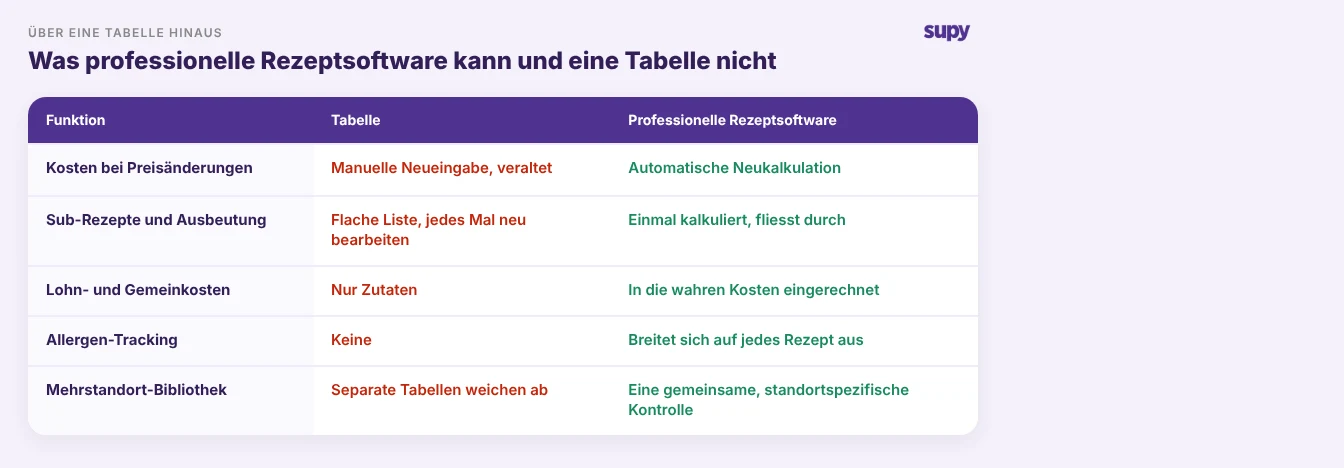
Für einen einzelnen Standort mit stabilem Menü kann eine Tabellenkalkulation ausreichen. Sie versagt in dem Moment, in dem Rezepte echtes Geld kosten. Preise ändern sich wöchentlich, sodass eine kalkulierte Tabelle bereits am Tag nach ihrer Erstellung veraltet ist. Unterrezepte bedeuten, dass eine Soße in zwanzig Gerichte eingeht, und eine Preisänderung bei einer Zutat sollte sich auf alle zwanzig auswirken – was eine flache Tabelle ohne manuellen Aufwand nicht leisten kann. Die Zahlen bleiben nur so lange korrekt, wie eine Person sie manuell aktualisiert – was auf Dauer nicht funktioniert.
Das Ergebnis ist ein Rezeptbuch, dem alle vertrauen, aber das seit Monaten niemand tatsächlich neu kalkuliert hat. Was saubere Rezeptdaten grundlegend voraussetzt, ist ein disziplinierter Artikelstamm, und es lohnt sich, diesen früh richtig anzulegen, denn Rezeptkalkulation ist immer nur so genau wie die zugrundeliegenden Artikeldaten. Professionelle Rezept-Software sorgt dafür, dass diese Genauigkeit erhalten bleibt. Die folgenden Abschnitte zeigen, worauf Sie bei der Auswahl achten sollten.
Aktualisieren sich die Kosten, wenn sich Ihre Lieferantenpreise ändern?
Das ist die wichtigste Frage überhaupt, und die, die Käufer am häufigsten vergessen zu stellen. Ein Rezeptpreis ist nur dann nützlich, wenn er widerspiegelt, was Zutaten heute kosten, nicht was sie kosteten, als jemand sie zuletzt eingetragen hat. Lieferantenpreise verschieben sich ständig, und jede Verschiebung verändert still die wahren Kosten jedes Gerichts, das diese Zutat verwendet.
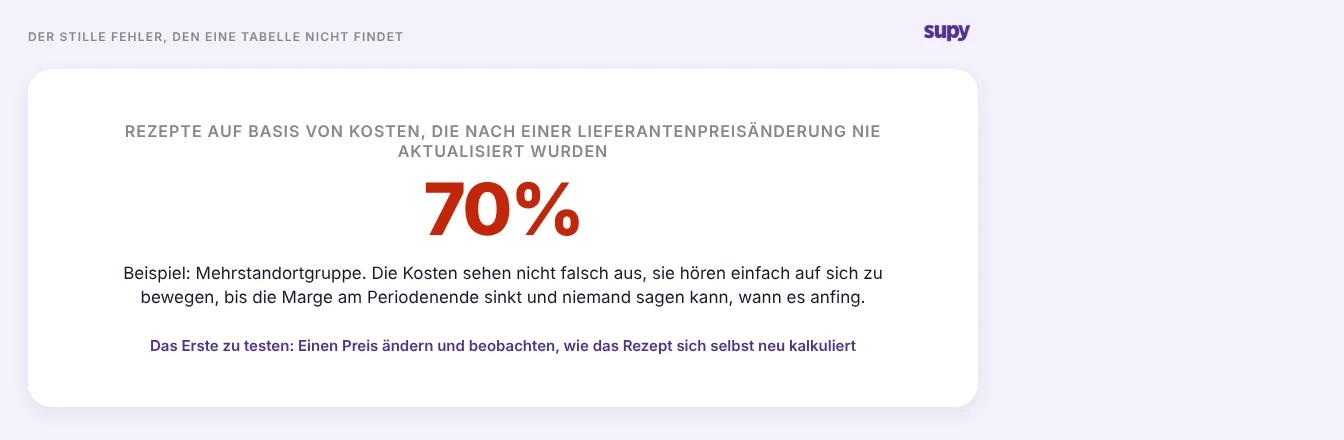
Das Fehlermuster ist still. Die Kosten sehen nicht falsch aus; sie hören einfach auf, sich zu bewegen. Bei einem Beispiel-Mehrstandort-Betrieb können bis zu 70 % der Rezepte auf Kosten sitzen, die nach einer Preisänderung nie aktualisiert wurden, und niemand bemerkt es, bis die Marge am Periodenende sinkt. Eine Tabellenkalkulation hat keinen Mechanismus, das aufzufangen, und einige Tools, die es behaupten, auch nicht.
Testen Sie es daher direkt in einer Demo. Ändern Sie den Lieferantenpreis für eine Zutat und beobachten Sie, ob jedes Rezept, das sie verwendet, automatisch neu kalkuliert wird, oder ob jemand das noch manuell auslösen muss. Fragen Sie, wie das Tool Preisänderungen überhaupt erfasst, denn eine Kalkulation, die auf manuelle Neueingabe angewiesen ist, wird genauso abweichen wie die Tabellenkalkulation, die Sie ersetzen wollen. Wenn Sie bereits verfolgen, was Ihre Lieferanten Ihnen im Laufe der Zeit berechnen, sollte professionelle Rezept-Software diese Preisbewegung ohne menschliches Eingreifen in eine aktuelle Rezeptkalkulation umwandeln.
Was tatsächlich hinter der kalkulierten Zahl steckt
Zwei Rezepte können dieselben Kosten ausweisen und doch völlig unterschiedliche Dinge bedeuten, je nachdem, was das Tool zählt und wie es den Durchschnitt bildet. Eine kalkulierte Zahl ist nur dann zuverlässig, wenn Sie wissen, was dahintersteckt – unabhängig davon, ob sie aktuell ist.
Beginnen Sie mit der Berechnungsmethode. Wenn eine Zutat zu unterschiedlichen Preisen von verschiedenen Lieferanten eintrifft oder vom selben Lieferanten zu unterschiedlichen Zeiten, muss das Tool entscheiden, welchen Preis es verwendet. Ein naiver Durchschnitt, der jeden Einkauf in eine einzige Zahl wirft, bläht die Kosten auf, wenn ein Ersatzlieferant oder eine einmalige teure Lieferung einbezogen wird. Ein rollierender gewichteter Durchschnitt, basierend auf dem, was Sie tatsächlich in einem aktuellen Zeitraum bezahlt haben, hält die Zahl stabil und nachvollziehbar – was dann zählt, wenn ein Prüfer Sie auffordert, es nachzuweisen. Fragen Sie, welche Methode ein Tool verwendet; wenn es Ihnen das nicht erklären kann, ist das selbst eine Antwort.
Fragen Sie dann, was die Zahl beinhaltet. Ein Gericht, das in Zutaten scheinbar 4,20 $ kostet, kann tatsächlich 6,10 $ kosten, sobald Vorbereitungsarbeit und Küchengemeinkosten eingerechnet werden. Die reine Zutaten-Kalkulation, die das Maximum ist, was die meisten Tabellenkalkulationen leisten, unterschätzt die wahren Kosten um eine Marge, die groß genug ist, um ein Gericht, das Sie für profitabel halten, tatsächlich unrentabel zu machen. Professionelle Rezept-Software sollte es Ihnen ermöglichen, Arbeitsaufwand und Gemeinkosten in die kalkulierte Zahl einfließen zu lassen, damit die Zahl, gegen die Sie kalkulieren und nach der Sie den Speiseplan optimieren, die echte ist.

Kann die Software Unterrezepte, Ausbeuten und Allergene verwalten – nicht nur eine einfache Liste?
Eine Tabellenkalkulation behandelt jedes Rezept als einfache Zutatenliste. Echte Küchen arbeiten nicht so. Eine Brühe wird zu einer Soße reduziert, die Soße geht in sechs Gerichte ein, und ein Teig-Batch ergibt vierzig Portionen zu einem Stückpreis, der berechnet werden muss, nicht geschätzt. Professionelle Rezept-Software muss diese Struktur abbilden, denn die Struktur ist der Ort, an dem Kosten und Konsistenz tatsächlich entstehen.
Achten Sie auf drei Dinge, die eine einfache Liste nicht kann. Unterrezepte, sodass eine Komponente einmal kalkuliert und überall wiederverwendet wird und eine Änderung automatisch durchfließt. Ausbeuten, sodass die Batchproduktion in einen genauen Stückpreis übersetzt wird, anstatt grob aufgeteilt zu werden. Und Allergen-Management, das Allergene auf Zutatenebene verfolgt und auf jedes Rezept überträgt, das diese Zutat verwendet – sodass, wenn sich das Profil einer Zutat ändert, jedes betroffene Gericht auf einmal aktualisiert wird, anstatt zu warten, bis es jemand in Erinnerung ruft.
Dieser letzte Punkt ist nicht nur ein Kalkulationsmerkmal; er ist ein Sicherheitsmerkmal. Ein Rezept-Tool, das Ihnen nicht zuverlässig mitteilen kann, welche aktuellen Gerichte ein bestimmtes Allergen enthalten, erfüllt eine Aufgabe nicht, die eine professionelle Küche erfordert. Testen Sie es, indem Sie eine Zutat ändern und beobachten, was sich automatisch nachgelagert bewegt.

Was sich ändert, wenn Sie mehr als einen Standort betreiben
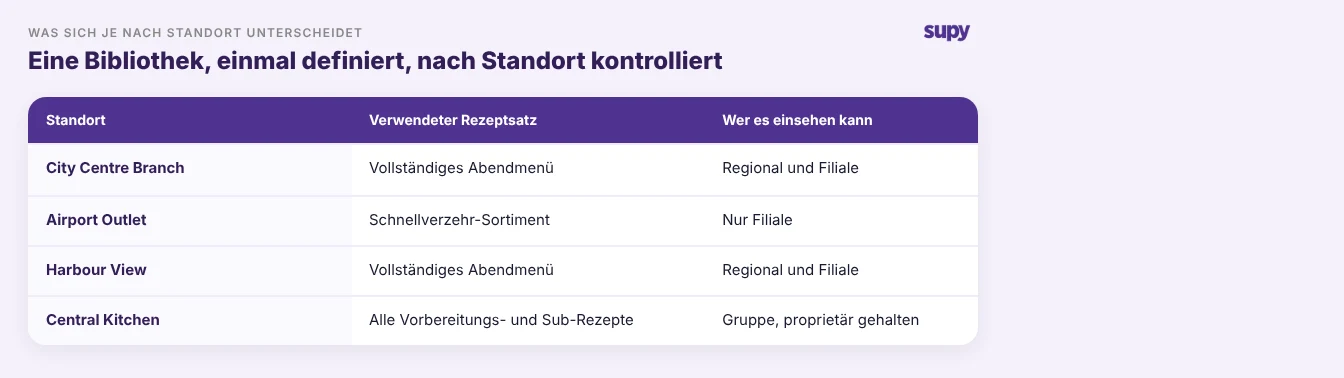
Alles oben Genannte wird standortübergreifend schwieriger, und hier kapituliert eine Tabellenkalkulation schließlich. Mehrere Standorte bedeuten eine Rezeptbibliothek, die konsistent bleiben muss, Kosten, die je nach Standort variieren, weil die Preise es tun, und Kontrolle darüber, wer was sieht und bearbeitet.
Suchen Sie nach einer gemeinsamen Bibliothek, in der ein Rezept einmal definiert und auf die Standorte ausgerollt wird, die es führen, anstatt eines separaten Tabellenblatts, das auf dem Laptop jeder Filiale vor sich hin driftet. Suchen Sie nach standortbezogenen Kosten, denn dasselbe Rezept kostet an verschiedenen Orten tatsächlich unterschiedliche Beträge, und eine einzige gemischte Zahl verschleiert das. Und suchen Sie nach Sichtbarkeitskontrolle: Rezepte sollten bestimmten Filialen zuweisbar sein, damit ein Regionalmanager nur die Rezepte sieht, die seine Standorte führen, und proprietäre Formeln bei den Filialen verbleiben, die sie benötigen, anstatt gruppenübergreifend sichtbar zu sein.
Nichts davon ist in großem Maßstab ein Nice-to-have. Es ist der Unterschied zwischen einem Rezeptsystem, das eine wachsende Unternehmensgruppe zusammenhält, und einem Stapel Tabellenkalkulationen, die still miteinander in Widerspruch stehen.
Wenn Sie sich für eine Demo hinsetzen, nehmen Sie vier Fragen mit und lassen Sie sich vom Anbieter zeigen, nicht nur erzählen: Ändern Sie einen Lieferantenpreis und beobachten Sie die Rezeptneuberechnung; fragen Sie, welche Berechnungsmethode hinter dem Preis steckt; erfassen Sie ein Gericht mit Arbeitsaufwand und Gemeinkosten und sehen Sie die wahre Zahl; und ändern Sie die Allergene einer Zutat und bestätigen Sie, dass jedes betroffene Rezept sich aktualisiert. Ein Tool, das diese vier Punkte sauber abdeckt, leistet die Arbeit, die eine Tabellenkalkulation nicht kann. Eines, das an ihnen scheitert, wird Ihnen dieselben blinden Flecken bescheren, die Sie jetzt haben – nur mit einem Login-Bildschirm davor.
Rezeptkalkulation ist der Teil des Betriebs, für den Supy gebaut ist, zusammen mit Inventur und Beschaffung, wobei die Kosten jedes Rezepts aktuell bleiben, wenn sich die Preise an jedem Standort ändern. Wenn Ihre Rezepte noch in einer Tabellenkalkulation leben, die seit Monaten niemand neu kalkuliert hat, ist das die Lücke, die zuerst zu schließen ist, und der schnellste Weg, jedes Tool zu beurteilen, ist, Ihre eigenen Rezepte und Preise einzugeben.